
Our readers keep the lights on and my morning glass full of iced black tea. As an Amazon Associate, I earn from qualifying purchases.
Specs are compiled from manufacturer listings and verified buyer reviews and can change over time — please confirm the key details on the product page before buying.
Recording a tennis match is a battle against two things: keeping the players in frame and keeping the camera steady. Manual panning with a phone gets tiring, and a fixed wide shot makes the ball look like a speck. The best solutions today either track the action automatically or let you zoom in optically without losing quality, so you can actually review a serve or a rally instead of watching a blur.
I’m Min — the founder and writer behind Gadgets Feed. This guide is built by comparing the manufacturers’ published specifications and the patterns across verified customer reviews, so you get each pick’s real strengths and trade-offs instead of marketing spin.
From pro camcorders with 15x optical zoom to AI trackers that follow the ball, here’s the top camera to record tennis matches — and the exact feature that makes each one worth your money.
Our Picks at a Glance

How To Choose The Best Camera To Record Tennis Matches
Recording a tennis match means capturing fast action across a large court, so your main trade-offs are zoom power, tracking smarts, and how much manual work you want during play. Your choice hinges on which of those trade-offs matters most.
Tracking: The AI vs. The Tripod
The biggest decision is if you want the camera to follow the players automatically. AI-powered systems (software that recognizes the court and keeps the action centered digitally) are ideal for coaching sessions or when you are the one playing. Traditional camcorders need a tripod and manual panning, but they give you full control over the shot.
Zoom: Getting Close Without the Blur
Optical zoom uses the lens glass to magnify the image, so quality stays sharp. Digital zoom simply crops the image, which makes it look pixelated. For tennis, you want enough optical zoom to fill the frame with a player at the baseline—that is where the real detail lives.
Stabilization: Keeping It Smooth
Even on a tripod, wind and vibration can cause shake. In-body image stabilization (IBIS) or electronic stabilization (EIS) smooths out these jitters. This matters most if you plan to shoot handheld from the stands or use a lightweight tripod.
Quick Comparison
| Model | Best For | Video Resolution | Zoom | Tracking Type | Amazon |
|---|---|---|---|---|---|
| Canon EOS R7★ Best Overall | Pro sports shooters | 4K | Lens-dependent | Manual / AF tracking | Amazon |
| FJFJOPK 5K CamcorderBudget Champion | Budget vlogging | 5K | 8x Optical | Zone autofocus | Amazon |
| BallerCamAuto-Track Pick | Hands-free team sports | iPhone-based | 180° lens | AI auto-track | Amazon |
| Xtra Atto | Wearable POV clips | 4K/60fps | None (fixed) | None (wearable) | Amazon |
| XbotGo Chameleon | Versatile team sports | 4K/60fps | 120° wide lens | AI auto-track | Amazon |
| AVKANS GO | Live streaming matches | 4K | 9x (3x optical) | Manual | Amazon |
| Sony HDRCX405 | Budget classic camcorder | 1080p HD | 30x Optical | Face Detection | Amazon |
| Veo Cam 3 | Team analysis (subscription) | 1080HD | None (wide) | AI auto-track | Amazon |
| Canon XA70 Pro | Professional broadcast | 4K UHD | 15x Optical | Dual-Pixel CMOS AF | Amazon |
In‑Depth Reviews
1. Canon EOS R7 Mirrorless Camera
Our pick — over 4.5★ from 400+ verified ratings; the strongest balance of quality and price.
The hybrid that nails a serve at 15 frames per second without breaking a sweat.
If you want a body that doubles as a serious stills camera and a 4K video machine, the R7 is the top pick. Its 32.5-megapixel APS-C CMOS sensor gives you extra telephoto reach, so a lens on the sideline reaches further down the court. The 5-Axis In-body Image Stabilization (IBIS) — a system that shifts the sensor to counter camera shake — keeps footage smooth even when you are shooting handheld in low light.
Autofocus is where this camera earns its keep for tennis. Dual Pixel CMOS AF technology covers about 100% of the frame with up to 651 AF zones, which means it can lock onto a moving player and keep them sharp across the whole court. Pair that with a 15 fps mechanical shutter and a 30 fps electronic shutter, and you can capture the exact moment of impact on a big serve.
The crowd has spoken loudly here: quality and image quality are the two most-praised aspects, and buyers report it is a “fantastic body for the price” with great buffer, RAW quality, and dual UHS-II slots for fast writes. It is also compact and lightweight with a firm grip, so it travels well. The honest catch is that body-only means you need to invest in lenses, and third-party glass can have focus quirks.
Courtside Credentials
- 4K video with professional-grade Movie Servo AF tracking
- High-speed 15 fps mechanical / 30 fps electronic shutter
- 5-Axis IBIS keeps telephoto shots steady
What to Budget For
- Body only — you’ll need to buy an RF lens separately
- Non-Canon lenses may have autofocus compatibility issues
Reach for this if: you want a do-everything hybrid that shoots pro-level 4K tennis footage and stunning stills in one body.
Look elsewhere if: you want a ready-to-shoot all-in-one without buying lenses, or you need built-in live streaming.
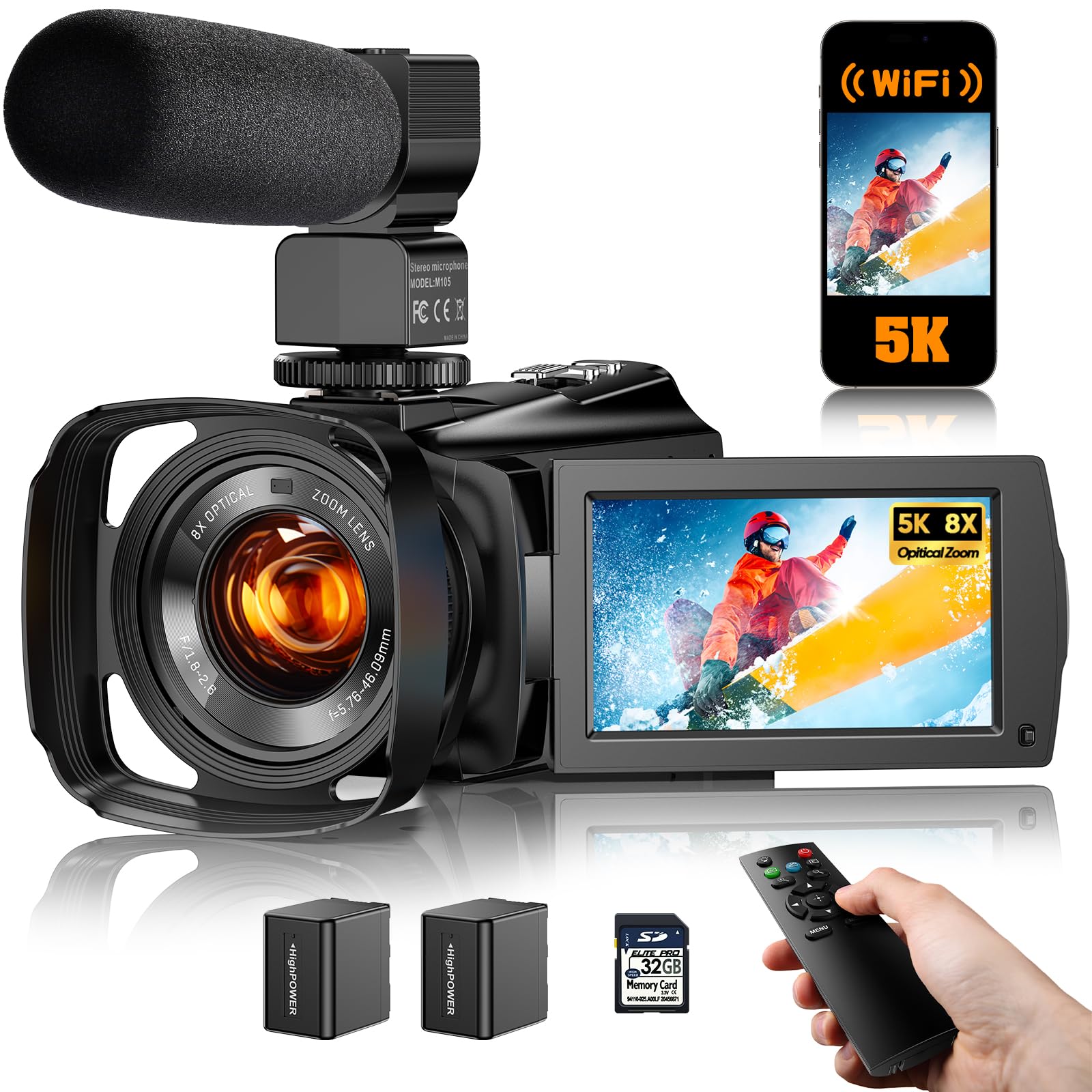
2. FJFJOPK 5K Video Camera Camcorder
A pocket-friendly 5K camcorder that brings an 8x optical zoom to the baseline for less.
For a budget-friendly entry into match recording, this camcorder packs a surprising amount of hardware. It shoots UHD 5K video and 64MP photos, and the 8x optical zoom lets you pull in a player at the far end of the court without the clarity loss that digital zoom brings. The 3.6-inch IPS touchscreen rotates 270° for framing from any angle, and the 6-axis EIS (electronic stabilization using a gyroscope and accelerometer) cuts down shake.
It is an all-in-one kit: you get a microphone, remote control, two rechargeable batteries, a 32GB SD card, and a camera bag. The built-in Wi-Fi works with the “Viipulse” app to transfer files straight to your phone for posting. Full-color night vision even lets you shoot in near-darkness, which could matter for evening matches under poor lights.
Owners mention it is “exactly how it’s described” and a great buy for the price, and children love using it. The honest trade-off is audio: owners note the sound is only okay, and using a lapel mic forces you to record in 1080p or the sound won’t sync. Quality is the most-mentioned aspect, but feedback is mixed, so treat it as a capable beginner tool, not a pro rig.
The Value Read: you get a full accessory bundle and real optical zoom for a fraction of the cost of a pro camcorder — but you’ll want an external mic for clean match audio.
Who it beats: any phone camera for reach and battery endurance across a long match.
Who it doesn’t: anyone who needs reliable audio or who wants a simple point-and-shoot without quirks.
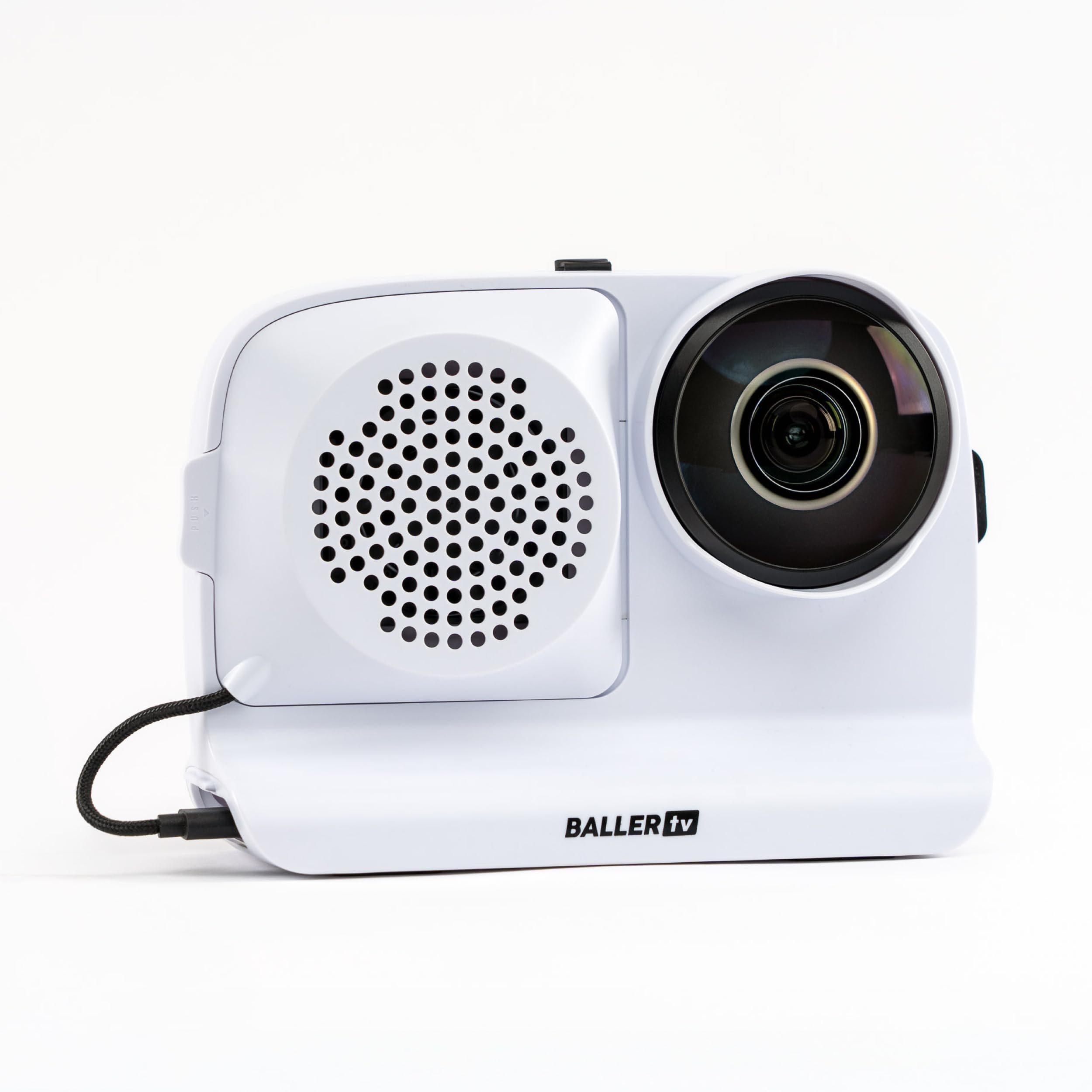
3. BallerCam Sports Filming System
An AI ball-tracking system that turns your iPhone into a hands-free courtside camera.
This is the pick for parents and coaches who want to capture a match without babysitting a camera. BallerCam clips onto your iPhone on a tripod, and the AI recognizes the court and follows the ball automatically, keeping play centered digitally. It is built specifically for basketball, soccer, and volleyball, and customers note it also tracks tennis well — you just set it up and let it run.
The 180° ultra-wide lens sees the entire court, so the system never misses action due to panning errors. Live streaming is simple: start a stream in the app, send the link, and grandparents can watch from home. It includes 20 hours of cloud storage with no subscription required, plus a swappable battery rated at 10,000 milliamp-hours.
The thing everyone raves about is picture quality, with owners saying it is better than the Veo system. Setup is a breeze and Live streaming lets remote family watch matches in real time.. The honest caveat: AI tracking is the most-discussed aspect, and it is mixed — AI tracking is about 95% accurate, so a weird bounce can occasionally lose the ball.. You’ll also need a spare phone to run the camera while you use your main one.
Set-and-Forget Strengths
- No subscription required for 20 hours of cloud storage
- Swappable 10,000mAh battery covers multiple matches
- Simple live streaming with a shareable watch link
Know Before You Clip
- AI tracking is strong but not perfect at every single bounce
- Requires a dedicated iPhone to operate
Reach for this if: you want to record whole matches hands-free and share them live with family.
Think twice if: you need a dedicated standalone camera without relying on your phone’s storage.
4. Xtra Atto Wearable 4K Action Camera
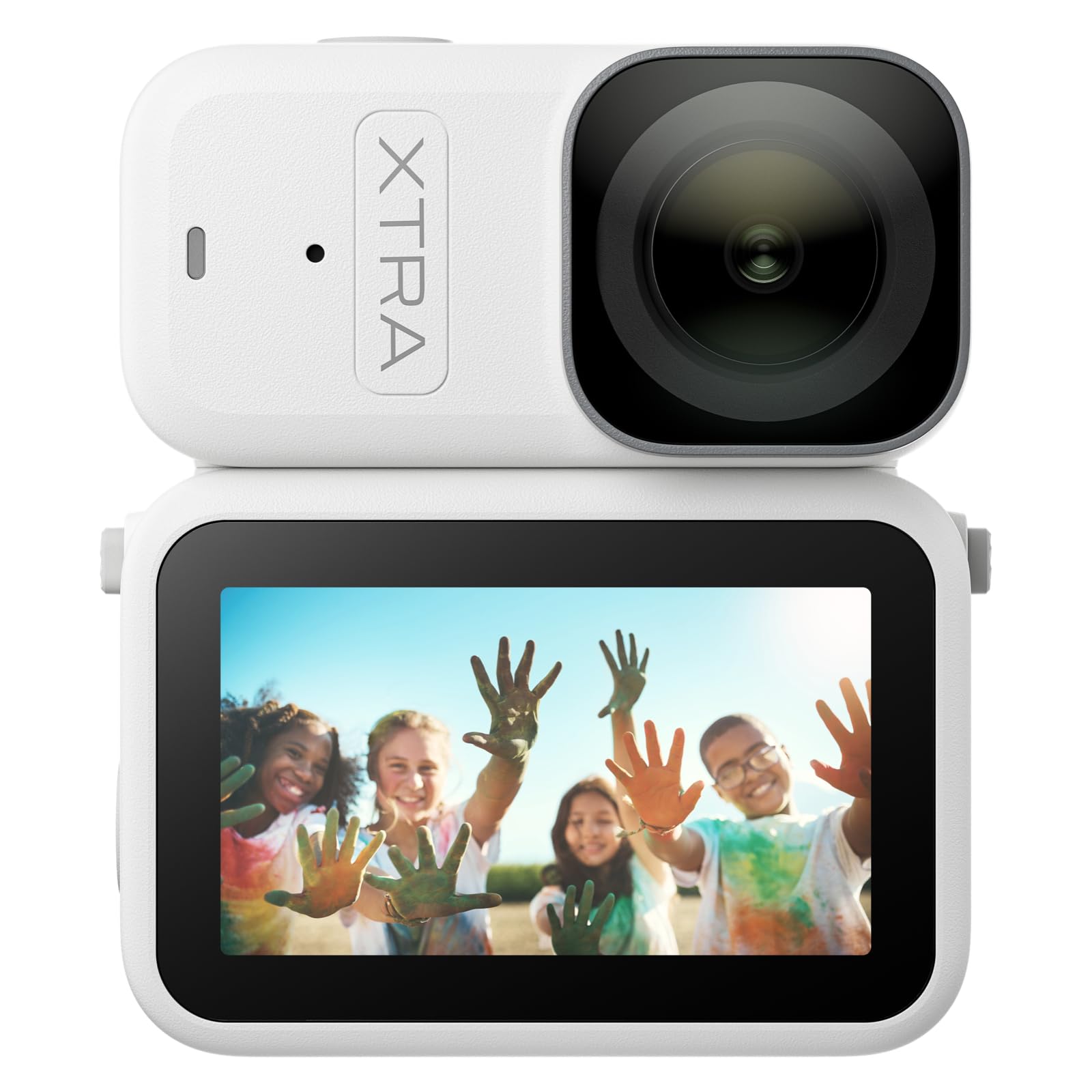
A 54-gram body cam that clips to a hat for a courtside view no tripod can match.
This is a different angle on match recording: instead of a static camera, the Xtra Atto mounts to a cap or headband for a first-person perspective. Weighing just 54g, it is barely noticeable, and the 1/1.3″ sensor captures 4K/60fps video with built-in stabilization. It is built for hands-free POV shots, so a coach or a player can record their own view of a point.
Battery life is a standout: with the Vision Dock, total runtime extends to 220 minutes, which covers a long match or training session without hitting pause. The 128GB built-in memory is generous, and transfers hit 600MB/s via the dock — that moves about 1GB of heavy 4K footage in around 3 seconds. The magnetic body snaps onto metal surfaces like fences or gym equipment for creative angles.
Owners call it a surprisingly amazing device with clear, smooth, and detailed footage, and the 5-minute pre-recording feature is a quiet hero. It is a great value for the price. Battery life is the most mixed aspect, though: long recordings drain it, and the built-in mic picks up wind noise. This is a specialist tool for POV highlights, not a full-match recorder.
The Fit: ideal for a player or coach who wants personal, rich POV clips (point-of-view footage from the camera’s perspective) of their own game — not for capturing the whole court from a tripod.
Best for: players and coaches who want a wearable perspective to review footwork and technique.
skip it if: you need a camera that captures the entire court in one wide shot.
5. XbotGo Chameleon AI Sports Camera
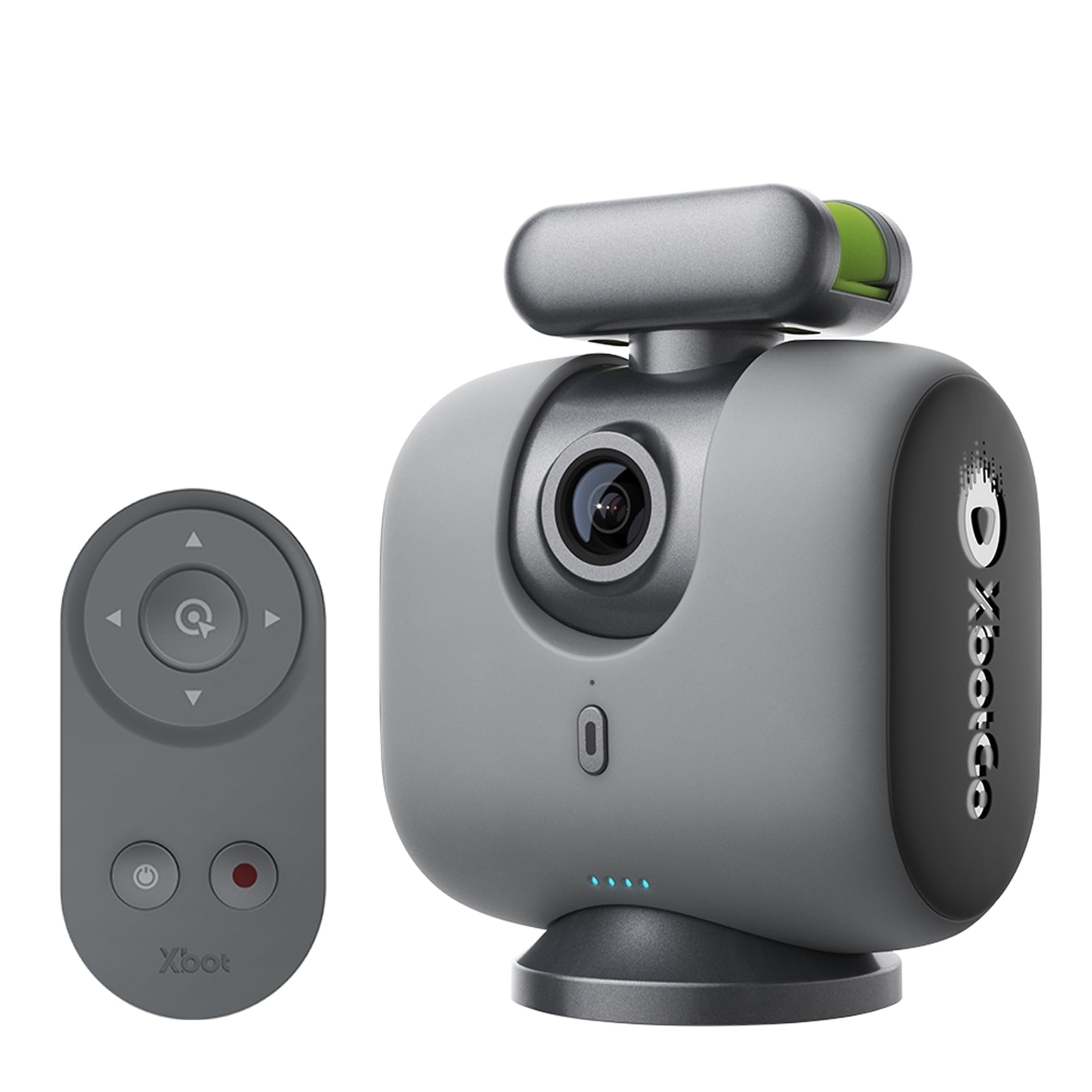
A gimbal-driven camera that swivels 360° to follow the flow of play across the court.
Unlike fixed-lens trackers, the Chameleon physically rotates on a gimbal to keep players centered. Its xbotVision AI 2.0 algorithm tracks over 20 sports, and the 120° ultra-wide-angle AI lens plus 360° panoramic tracking means it can follow a player sprinting from baseline to net. It records crisp 4K/60fps video with strong stabilization built in.
Sports tracking is the headline feature: the AI follows the flow of play, not just a single player, which is excellent for tennis where the action switches sides constantly. Live streaming is built into the app, and there’s no subscription required. The 8-hour battery life easily covers a full day of matches or training. A Bluetooth remote and Apple Watch integration let you adjust the angle from your wrist.
Buyers are split on the AI tracking performance — the most-discussed aspect. Some report it tracks smoothly and keeps players centered, while others say it can lose tracking mid-game. Panning can occasionally feel jerky in chaotic, fast-moving sports like hockey. Everyone agrees on ease of use and crisp 4K video at 60fps (frames per second, meaning smooth motion), with strong live streaming capabilities. One owner notes the app now demands full photo library access to record, which is a privacy consideration.
What It Does Well
- 8-hour battery covers a full day of matches
- No subscription for AI tracking and streaming
- Bluetooth remote and Apple Watch control
The Mixed Bag
- AI tracking is excellent for some, but can lose the ball mid-game
- App requires full photo library access to start recording
Reach for this if: you want a physical gimbal that follows play in multiple sports without a subscription.
Look elsewhere if: you need rock-solid tracking reliability above all else, or you object to the app’s permissions.
6. AVKANS GO 4K Live Streaming Camera
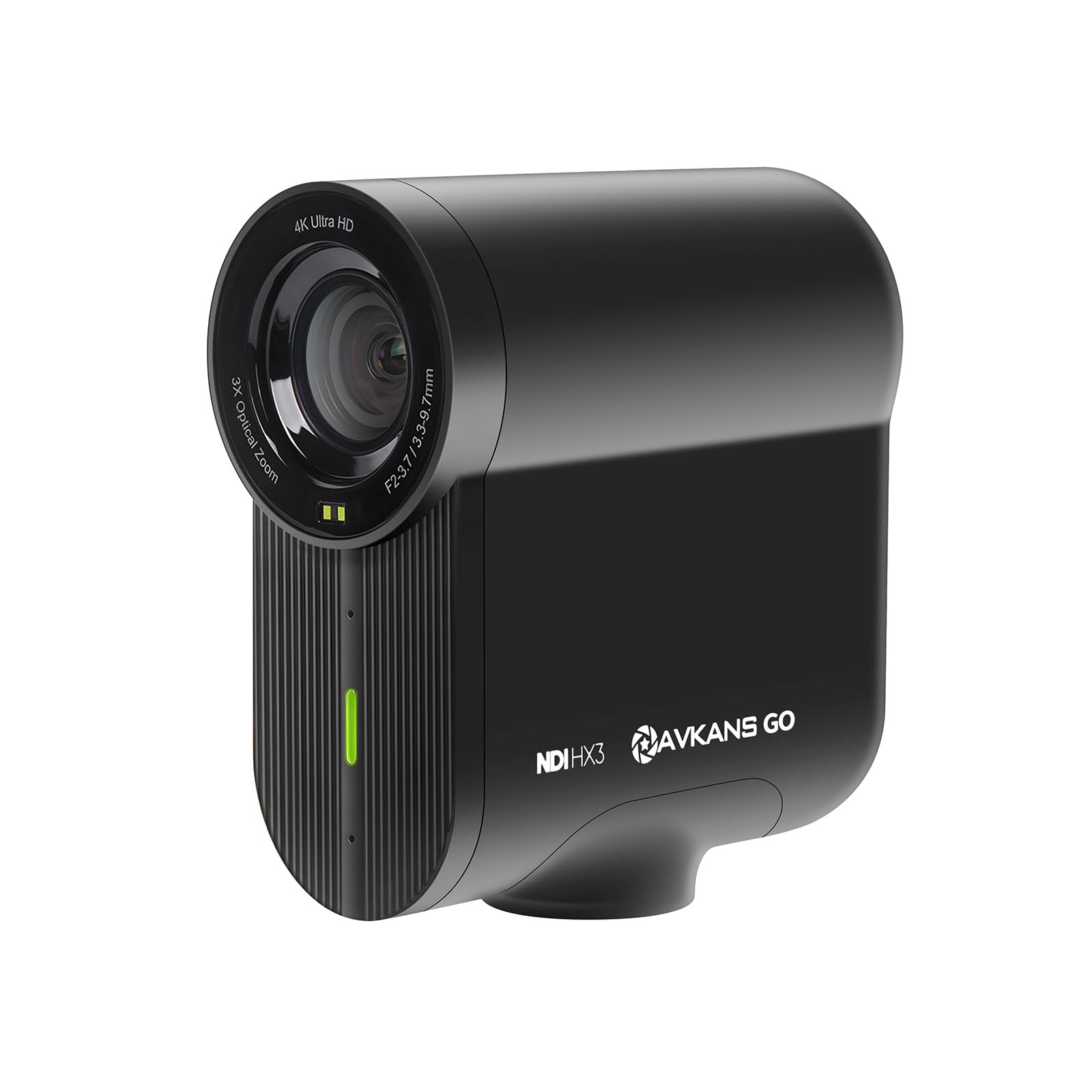
A 4K streaming workhorse that records to SD while broadcasting live to any platform.
If your goal is to live-stream matches for remote viewers, the AVKANS GO is built exactly for that. It records a clean 4K feed to a micro SD card while simultaneously streaming live — no extra capture cards needed. The 9X zoom (with 3x optical) and 90-degree wide-angle lens let you frame the court, and reviewers point out it can zoom past net poles while keeping the bases in view.
Connectivity is this camera’s superpower. It supports HDMI, USB, RTMP, and NDI protocols, meaning it plugs into nearly any streaming setup — YouTube, Facebook, GameChanger, and SidelineHD all work. The AVKANS Live app adds overlays, scoreboards, and picture-in-picture. The 6-hour battery life handles full matches without overheating.
Owners praise the sharp image quality and wide field of view, with ease of use and versatility also standing out. The 9X zoom and reliable autofocus make it a favorite among baseball families, and support is exceptional — one buyer says the team resolved Wi-Fi issues via beta firmware. The recurring gripe is wireless connectivity, which has been mixed; a few owners could not maintain a stable connection. If you are tech-savvy, this is a powerful streaming tool, but it demands patience with app updates.
The Verdict: an affordable, versatile live-streaming camera that shines for sports broadcasters who want multi-protocol flexibility — if you’re willing to tweak firmware settings.
Best for: parents and clubs that want to live-stream matches to remote fans with broadcast-grade flexibility.
Not for: anyone who wants a plug-and-play experience with zero setup or app troubleshooting.
7. Sony HDRCX405 Handycam

A classic palm-cam with 30x optical zoom that brings far-baseline action up close.
This is the old-school camcorder that still wins on pure reach. The 30x optical zoom is the standout spec — it crushes the digital zooms found on phones, letting you fill the frame with a single player from across the court. The 26.8mm wide-angle ZEISS lens captures the whole court when you need it, and Optical SteadyShot with Active mode smooths out handheld shake.
It records Full HD 1080p at 60p in multiple formats, and it automatically creates a highlight video in MP4 from your clips. The built-in USB cable flips out for easy file transfer and charging. Face Detection with voice enhancement and noise reduction helps keep the focus on the action, and the 2.7-inch LCD gives you a clear view. Weighing very little, it’s easy to hold for long matches.
Shoppers say it as a durable workhorse, reliable for 6+ years with excellent lens quality and zoom. It is a perfect little camera that is very light. The trade-offs are real: it lacks an external microphone input, the controls are tiny (tough for large hands), and the battery lasts about 155 minutes per charge. Low-light performance has mixed feedback, so it’s happiest in daylight or good stadium lighting.
Reach & Reliability
- 30x optical zoom gets you close without quality loss
- Built-in USB cable for quick transfers and charging
- Proven durable build that lasts years
Classic Camcorder Limits
- No external microphone input for better audio
- Small physical controls and a 155-minute battery
Reach for this if: you want a simple, lightweight camcorder with massive optical reach for daytime matches.
Look elsewhere if: you need 4K resolution, pro audio, or long single-charge recordings.
8. Veo Cam 3 1080p Sports Camera
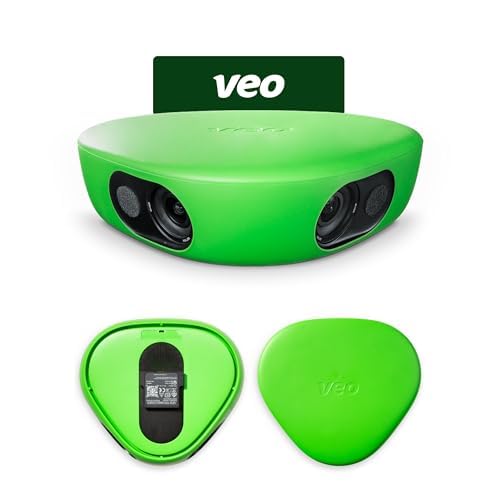
A weather-proof auto-tracking camera built for serious team game analysis.
The Veo Cam 3 is a specialist tool for teams and coaches who want automated capture and rich analysis. Its AI-powered auto-tracking follows the action without manual intervention, so you can set it up on a tripod and focus entirely on the game. It records in 1080HD resolution, which favors consistent, reliable footage over ultra-sharp 4K.
Durability is a major selling point: it operates in climates from -10°C to 45°C (14°F to 113°F) and is weather-proof in rain and snow, so a drizzle won’t ruin a match recording. It’s lightweight and travel-friendly, designed to capture football, basketball, rugby, volleyball, and more. The included carrying case and mount make it easy to transport.
Owners who use it for soccer say it’s “easy to setup and record a game” and call it the “best investment ever” for getting footage of games and training. The major structural caveat is the subscription: Veo requires a paid plan, and one buyer notes the included credit cannot be used on the family plan, pushing you to the more expensive team tier. Some units have arrived without the camera mount, which is a known shipping frustration. Treat this as a team purchase with a clear budget for the service.
The Service Model: the hardware is solid and weather-proof, but the mandatory subscription makes this a commitment — plan for the ongoing cost, not just the camera.
Best for: clubs and coaches who want automated, weather-proof capture with an ongoing analysis service.
Not for: casual players who want a one-time purchase with no recurring subscription fees.
9. Canon XA70 Pro Camcorder

The broadcast-grade camcorder with a 1-inch sensor and XLR audio for serious productions.
When a tennis match needs to look like a TV broadcast, this is the camera. The 1-inch CMOS sensor and DIGIC DV6 processor deliver stunning 4K UHD video, and the integrated 15x optical zoom lens reaches across the court with clarity. It records in XF-AVC or MP4 at up to 4K UHD 160Mbps at 30P/24P, or Full HD 45Mbps at 60P — flexible enough for any deliverable.
Audio is where this camcorder separates itself from the pack. The detachable handle includes 2 XLR terminals with 4-channel linear PCM, giving you pro-level sound recording to pair with the visuals — essential for coaching commentary or broadcast. The dual SD card slots enable relay and simultaneous recording, so you never miss a moment. Infrared and optical image stabilization keeps telephoto shots steady.
The 3.5-inch touchscreen LCD and tilable OLED EVF give you precise framing control. Owners who use manual settings love it, calling it a “great pro video” camera, and one hockey coach replaced an overheating mirrorless camera with this for reliable 4K recording in cold rinks. The honest catch: it demands manual skill. As one buyer puts it, if you’re not going to use manual settings, a cheaper auto camera is a better fit. A few owners also found the built-in monitor resolution lacking for critical focus checks.
Production Power
- 2 XLR inputs for professional broadcast audio
- Dual SD slots for relay and simultaneous recording
- 4K UHD 160Mbps recording in XF-AVC or MP4
Pro Demands
- Rewards manual skill; auto features are not the focus
- Monitor resolution is weak for precise focus checks
Reach for this if: you’re a professional or serious creator who wants broadcast-quality 4K with XLR audio.
Think twice if: you want a point-and-shoot experience — this rewards those who understand manual settings.
Understanding the Specs
Optical Zoom vs. Digital Zoom
Optical zoom magnifies the image using the lens glass, so detail stays crisp at full extension. Digital zoom crops into the sensor, which makes footage look soft and pixelated. For tennis, a 30x optical zoom like the Sony’s lets you fill the frame with a player at the baseline, while a phone’s digital zoom just enlarges a blur.
AI Auto-Tracking
AI tracking systems recognize the court and follow the ball or players automatically, keeping the action centered without a camera operator. Some, like the XbotGo, physically rotate on a gimbal for 360° coverage, while others like the BallerCam use a 180° wide lens and crop digitally. Tracking is powerful, but accuracy can vary in fast, chaotic play.
FAQ
Will a smartphone-based tracking system work for tennis?
What optical zoom do I need to cover a tennis court?
How important is image stabilization for match recording?
Is 4K video necessary to record tennis?
Can I live-stream a match directly from the camera?
How long does the battery last for a full match?
Do I need an external microphone for good match audio?
What is the difference between a camcorder and a mirrorless camera for sports?
Final Thoughts: The Verdict
The standout camera to record tennis matches is the canon eos r7 because its 4K video, fast 15 fps shooting, and near-full-frame autofocus make it a genuine all-rounder for sports. If you want hands-free convenience, the BallerCam follows the ball automatically using your iPhone. And for broadcast-grade audio and zoom, the Canon XA70 Pro is the one to reach for — just be ready to use manual settings.
How We Picked
We do not accept paid placement. Every pick is matched to a real buyer and a real use-case; we do not hands-on test units.
Sources & Methodology
Specifications: manufacturer listings and product documentation. Review insights: verified customer reviews, as of August 2026. Pricing: not shown on this page (it changes often); check the current price via the retailer link.
As an Amazon Associate, Gadgets Feed earns from qualifying purchases. This does not affect which products we feature.