
Your laptop’s built-in camera delivers muddy video, inconsistent color, and a microphone that makes you sound distant. Upgrading to a dedicated camera webcam transforms your video calls, live streams, and recordings with sharper detail, accurate skin tones, and reliable audio capture.
I’m Min — the co-founder and writer behind Gadgets Feed. I analyze sensor sizes, field-of-view angles, autofocus systems, and noise-rejection algorithms to separate the real performers from the spec-sheet bloat, giving you a clear path to the right camera webcam for your specific setup.
Whether you need smooth 60 fps for streaming or crisp 4K for professional meetings, this guide evaluates the top options to help you choose the best camera webcam for your workflow and budget.
How To Choose The Best Camera Webcam
Selecting the right camera webcam means understanding where your video will be seen and under what lighting conditions. A cam that looks stunning in a perfectly lit studio can fall apart in a dim home office, while a budget pick might surprise you with solid color accuracy. Focus on specs that directly impact your specific use case.
Resolution and Frame Rate Priorities
4K resolution delivers more detail for product demos, teaching, or professional recordings, but it demands good lighting and a capable computer. 1080p at 60 fps provides smoother motion, which is ideal for fast-paced gaming streams or presenters who move around. Most users benefit more from solid 1080p performance than a mediocre 4K implementation.
Autofocus and Tracking Capabilities
Fixed-focus webcams are fine if you sit still, but any movement — leaning in, standing up, or shifting side to side — results in a blurry mess. PDAF (phase-detection autofocus) locks on faster than contrast-based systems. For dynamic presenters or streamers, a PTZ camera with AI tracking keeps the subject centered without manual intervention.
Microphone Array and Noise Rejection
Your audience will tolerate slightly soft video, but bad audio drives them away. A dual or triple microphone array with beamforming technology isolates your voice from room echo and background hums like fans or keyboards. If you record in a noisy environment, prioritize cameras with dedicated noise-canceling modes over basic single-mic designs.
Quick Comparison
On smaller screens, swipe sideways to see the full table.
| Model | Category | Best For | Key Spec | Amazon |
|---|---|---|---|---|
| Insta360 Link 2 Pro | Premium PTZ | Streamers & Pros | 1/1.3″ sensor, AI Tracking, 4K HDR | Amazon |
| EMEET PIXY | AI PTZ | Content Creators | Dual-camera AI, 0.2s focus, 310° pan | Amazon |
| Logitech StreamCam | 1080p 60fps | Gaming Streams | 1080p 60fps, USB-C, auto-framing | Amazon |
| EMEET C60E | Dual-Camera 4K | Hybrid Streaming | Wide + telephoto, 11x zoom, remote | Amazon |
| Owl Labs Meeting Owl 3 | 360° Conference | Conference Rooms | 360° 1080p, 18ft mic pickup | Amazon |
| NexiGo N660P Pro | 4K Distortion-Free | General Use & Gaming | 4K, 3DNR, 1080p 60fps, dual mics | Amazon |
| j5create JVCU100 | Value 1080p | Budget Home Office | 1080p 30fps, 360° rotation, low-light | Amazon |
In‑Depth Reviews
1. Insta360 Link 2 Pro – 4K PTZ Webcam

The Insta360 Link 2 Pro sets a new benchmark for PTZ webcams with its large 1/1.3-inch sensor, delivering exceptional low-light clarity and a natural bokeh effect that mimics a DSLR. Its physical pan, tilt, and zoom mechanism, combined with AI tracking, keeps you perfectly framed whether you’re pacing during a presentation or shifting positions during a stream.
The dual-mic beamforming array isolates your voice from background noise, while HDR support prevents blown-out highlights in mixed lighting. The included Link Controller software unlocks gesture control, DeskView mode, and whiteboard mode, making it a versatile tool for both creators and remote professionals.
Elgato Stream Deck integration allows instant mode switching and preset recall, speeding up multi-camera workflows. The short included USB-C cable is the only notable limitation, but the image quality and tracking reliability make this a top-tier investment for anyone serious about video quality.
Why it’s great
- Large sensor delivers superb low-light performance with natural bokeh
- AI tracking with physical PTZ keeps you centered without software crop
- Direcional dual-mic array isolates voice from room noise
Good to know
- Included USB-C cable is relatively short for some setups
- Not compatible with ARM-based Windows systems
2. EMEET PIXY Dual-Camera AI PTZ

The EMEET PIXY redefines mid-range webcams by pairing a 4K main imaging camera with a dedicated AI auxiliary cam that tracks your face for instant 0.2-second autofocus. Its 1/2.55-inch Sony sensor produces clean video across varied lighting, while the PTZ system offers 310 degrees of pan and 180 degrees of tilt for complete room coverage.
The three-microphone array switches between Live Mode, Noise Canceling Mode, and Original Sound Mode, adapting to streaming, recording, or casual calls. Gesture control — activated by holding an open palm — starts and stops tracking without touching any software, which is incredibly useful for solo content creators.
Whiteboard mode and preset positioning through the EMEET Studio app add professional polish, though some users report the AI tracking can lag if you move too quickly. For its price point, the PIXY delivers an impressive feature set that rivals cameras costing twice as much.
Why it’s great
- Blazing-fast 0.2s PDAF and AI autofocus keeps moving subjects sharp
- Triple-mic array with three distinct audio modes for any environment
- Gesture control and 310° PTZ tracking for hands-free operation
Good to know
- AI tracking can struggle with rapid or sudden movements
- Setup instructions and app links could be clearer
3. Logitech StreamCam (Renewed)

The Logitech StreamCam remains a gold standard for 1080p streaming at 60 frames per second, delivering smooth, fluid motion that 30 fps cams simply cannot match. Its USB-C connection ensures stable bandwidth for uncompressed video, while auto-framing and intelligent exposure adjust to changing light conditions without manual intervention.
Logitech Capture software unlocks advanced composition tools like digital pan, tilt, and zoom, plus customizable presets for different streaming scenarios. The built-in microphone performs surprisingly well for a single-mic design, though external audio is recommended for professional-grade sound.
The renewed version offers significant savings, but the included mount can feel less secure on thicker monitors. The StreamCam excels in its core mission: delivering reliable, high-frame-rate video for gaming streams and live content without the complexity of PTZ systems.
Why it’s great
- Smooth 1080p 60fps capture ideal for gaming and motion-heavy streams
- USB-C connection ensures high bandwidth and stable video transmission
- Logitech Capture software adds flexible digital framing options
Good to know
- Monitor clip can be prone to slipping on certain displays
- Built-in mic is decent but dedicated audio is still preferred
4. EMEET C60E Dual-Camera 4K Webcam

The EMEET C60E is the world’s first dual-camera streaming webcam, sharing a single 1/2.8-inch CMOS 4K sensor between a wide-angle and a telephoto lens. You can switch between a full panoramic room view and a tight close-up of your face or a product, with 11x hybrid zoom that transitions smoothly at 3x, 5x, 7x, and 11x levels.
PDAF autofocus keeps the frame sharp during zooms, and the included remote control lets you adjust zoom, resolution, and color temperature without breaking your stream flow. The RGB lighting on the front adds a modern aesthetic while indicating active status, and the two omnidirectional mics capture clear audio within a 9.8-foot radius.
Compatibility with OBS, Twitch, and YouTube is plug-and-play, and the 1/4-inch tripod mount offers flexible positioning. The internal mic is sufficient for meetings but lacks the noise rejection of dedicated arrays, making an external mic a worthwhile companion for serious streaming.
Why it’s great
- Unique dual-camera system with wide and telephoto views in one device
- 11x hybrid zoom with PDAF keeps close-ups crisp and clear
- Physical remote control provides real-time adjustments without software
Good to know
- Zoom functionality is limited in 4K mode
- Internal mics are adequate but not ideal for critical audio work
5. Owl Labs Meeting Owl 3

The Meeting Owl 3 is purpose-built for conference rooms, capturing 360-degree video in 1080p HD while its Owl Intelligence System uses visual and audio cues to focus on whoever is speaking. Remote participants see a panoramic view of the room with the active speaker highlighted, creating a natural hybrid meeting experience.
Audio pickup extends to 18 feet, meaning even soft-spoken participants at the far end of a table are heard clearly. Setup takes roughly six minutes from unboxing to first meeting, and IT administrators can manage fleets of devices through the Nest management tool with bulk registration and default settings.
Pairing two Meeting Owls or adding an Expansion Mic extends coverage for larger spaces. The 1080p resolution feels dated for its premium price point in an era where 4K is common, but the seamless speaker-tracking and room coverage remain unmatched for collaborative environments.
Why it’s great
- 360-degree video with intelligent speaker tracking for natural meetings
- 18-foot microphone pickup ensures everyone in the room is heard
- Plug-and-play setup gets you running in minutes without drivers
Good to know
- 1080p resolution is behind the curve at this price tier
- Best suited for dedicated conference rooms over personal use
6. NexiGo N660P Pro 4K Webcam
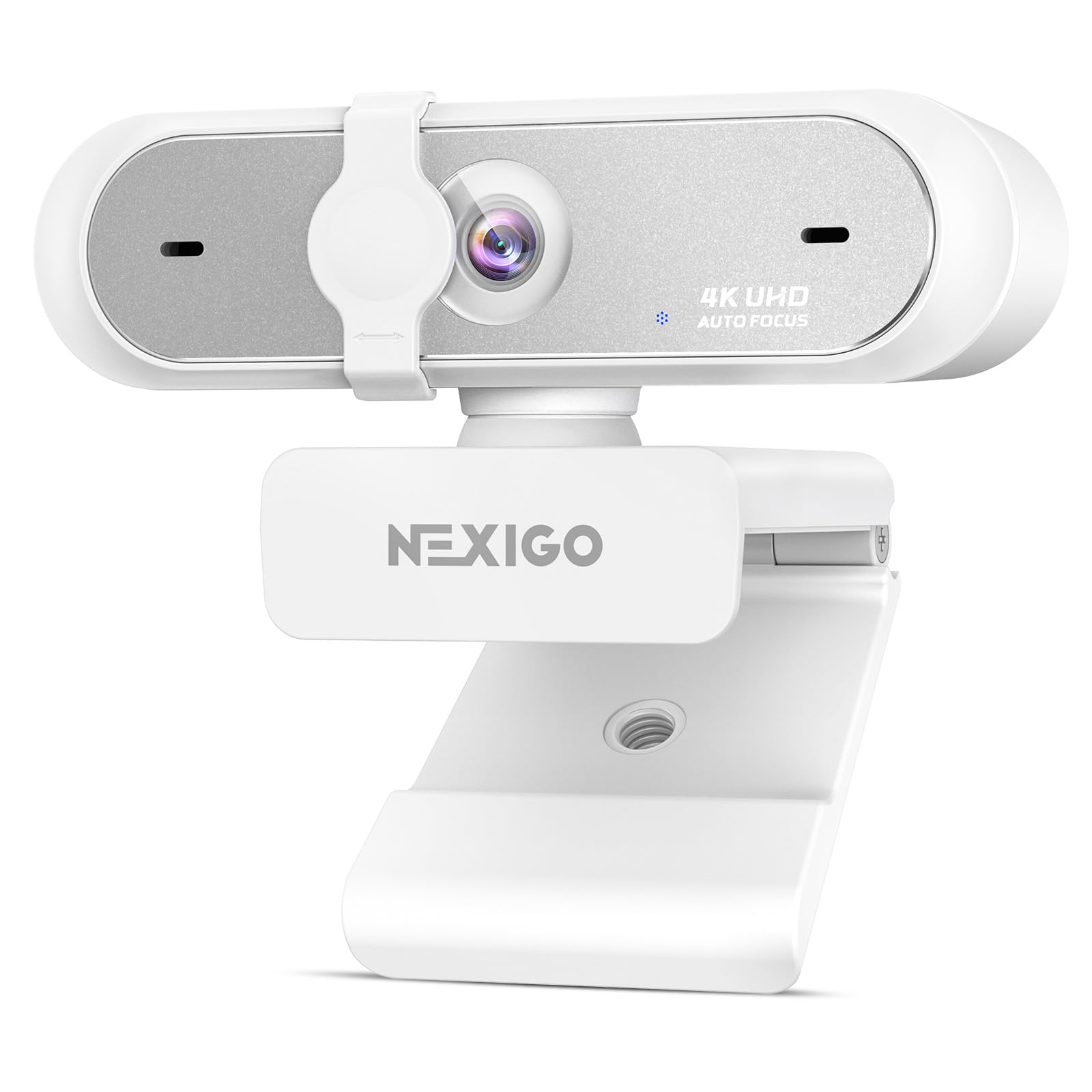
The NexiGo N660P Pro delivers genuine 4K resolution through a distortion-free lens that eliminates the fisheye warp common in budget wide-angle cams. Combined with 3DNR (3D Noise Reduction), the camera actively removes visual grain in real-time, producing a clean image even in moderately lit rooms.
Dual noise-canceling microphones isolate your voice from keyboard clicks, fans, and other background distractions, while the advanced autofocus system keeps you sharp whether you’re leaning in for a closer look or rocking back in your chair. The NexiGo software unlocks a 4x digital zoom for flexible framing.
The sliding privacy cover provides physical lens blocking when not in use, and the 360-degree swivel mount with a 1/4-inch tripod thread offers versatile positioning. The autofocus can struggle to reacquire focus after dramatic movements, and the built-in microphones are better suited for conferencing than critical audio work.
Why it’s great
- Distortion-free lens preserves natural proportions without fisheye effect
- 3DNR technology delivers clean 4K footage in low to moderate light
- Dual noise-canceling mics reduce ambient background sounds effectively
Good to know
- Autofocus can lose target quickly and requires manual refocus
- Microphone quality is decent for casual use but not studio-grade
7. j5create USB Streaming Webcam JVCU100

The j5create JVCU100 proves you don’t need to spend heavily to upgrade from a laptop camera. Its 1080p sensor with an F/2.4 aperture lens works well in typical office lighting, and the built-in low-light enhancement helps maintain visibility when your room isn’t perfectly lit.
Plug-and-play compatibility spans Windows, macOS, and Chrome OS, making it a drop-in solution for remote workers who just want reliable video for Zoom and Teams calls. The 360-degree rotation allows flexible angle adjustments, and the wide-angle lens captures a broader view than most built-in cams.
Customer reports indicate solid performance for the first two years, with some audio degradation appearing after extended daily use at the three-year mark. The microphone is not compatible with Discord on Chromebook, and the 30 fps frame rate means motion can appear slightly choppy compared to 60 fps alternatives.
Why it’s great
- Affordable entry point for basic 1080p video conferencing upgrades
- F/2.4 aperture and low-light enhancement help in dim conditions
- Plug-and-play works effortlessly across Windows, macOS, and Linux
Good to know
- Limited to 30 fps, which can look less smooth during motion
- Microphone longevity may degrade after extended daily use over years
FAQ
Do I need 4K resolution for a camera webcam?
What does PTZ mean in a webcam context?
Final Thoughts: The Verdict
For most users, the best camera webcam winner is the Insta360 Link 2 Pro because its large sensor, reliable AI tracking, and professional bokeh effect deliver the highest image quality in a plug-and-play package. If you want smooth 60 fps streaming without breaking the bank, grab the Logitech StreamCam. And for AI-powered PTZ tracking with gesture control at a mid-range price, nothing beats the EMEET PIXY.