
Our readers keep the lights on and my morning glass full of iced black tea. As an Amazon Associate, I earn from qualifying purchases.
Specs are compiled from manufacturer listings and verified buyer reviews and can change over time — please confirm the key details on the product page before buying.
You want to play your console or camera on your PC monitor and record it without freezing, stuttering, or lag. A capture card—a small box or internal card that sits between your device and your PC—makes that happen. This guide covers seven top options, focusing on what really matters: resolution, frame rate, and how much delay you feel.
I’m Min — the founder and writer behind Gadgets Feed. This guide is built by comparing the manufacturers’ published specifications and the patterns across verified customer reviews, so you get each pick’s real strengths and trade-offs instead of marketing spin.
You want to stream or record without your game feeling off, and the right capture card for pc delivers that by handling high refresh rates and low latency so your setup works as one smooth unit.
Our Picks at a Glance


How To Choose The Best Capture Card For PC
First, decide what you are capturing: a console, a DSLR camera, or a second PC. That choice tells you if you need an external USB card you can move between setups or an internal card that stays inside your desktop tower.
Passthrough vs. capture resolution
Passthrough is the signal that goes from your console to your monitor — it is what you actually see and play on. Capture is the recording. A card can pass through 4K at 144Hz but only record 1080p at 60fps, and that split is normal and fine for most streamers. The key is knowing which number you care about: smooth play (passthrough) or crisp video (capture).
Latency and your hardware
Latency is the delay between an action on screen and the same action showing up in your stream preview. Near-zero latency cards show almost no lag, but your PC still has to encode the video, so an older CPU or GPU will bottleneck even the best card. Check the minimum system requirements before buying — a card can’t fix a weak computer.
Quick Comparison
| Model | Best For | Max Capture | Max Passthrough | Interface | Amazon |
|---|---|---|---|---|---|
| Blackmagic DeckLink Duo 2★ Best Overall | Multi-camera production | 1080p60 (4 channels) | 1080p60 (4 channels) | PCIe x4 | Amazon |
| Elgato 4K XMost Versatile | Competitive PC streamers | 1080p240 | 4K144 VRR | USB-C 3.2 Gen 2 | Amazon |
| NearStream CCD10 | Budget first-time streamers | 1080p60 | 4K60 / 1440p120 / 1080p240 | USB-C 3.0 | Amazon |
| Elgato 4K S | High-refresh console play | 4K60 | 1440p120 / 1080p240 | USB-C 3.0 | Amazon |
| AVerMedia Live Gamer Ultra 2.1 | Ultra-high-refresh recording | 4K144 (Windows) | 4K144 HDR/VRR | USB-C 10Gbps | Amazon |
| AVerMedia Live Gamer Ultra GC553 | 4K HDR passthrough | 4K30 / 1080p120 | 4K60 HDR | USB-C 3.1 | Amazon |
| ASUS TUF CU4K30 | Durable plug-and-play | 4K30 | 4K60 HDR | USB-C 3.2 | Amazon |
In-Depth Reviews
1. Blackmagic Design DeckLink Duo 2
Our pick — over 4.5★ from 250+ verified ratings; the strongest balance of quality and price.
The internal workhorse for multi-camera setups that never drops a single stream.
If you are running a church service, a live event, or any production where one computer needs to capture four cameras at once, this is the card built for exactly that. It grabs four independent 3G-SDI connections simultaneously, each at up to 1080p60, so you can record a stage, a podium, and two crowd angles without adding more hardware. It is an internal PCIe card, which means it lives inside your desktop — you will need a PCI Express 4-lane Gen 2 slot, compatible with 4, 8, and 16-lane slots.
Buyers praise this card for rock-solid stability, reporting stable 4x 1080p60 capture (four 1080p feeds at 60 frames per second) with easy setup. It works directly with OBS, Wirecast, and vMix. One owner uses it to replace a TripleHead2Go for ProPresenter 7, driving three stage screens plus a confidence monitor with no driver boot issues. The honest caveat: this is not an enthusiast gaming card—it is a production tool. Channel mapping can take trial and error on first setup, especially with a reference input for genlock sync (a signal that keeps multiple cameras in sync) in multi-camera rigs.
The Duo 2 is a physical 6 x 6 x 6 inch card, so it is a full internal component, not a portable dongle. It is the right pick when your PC is the hub of a live event, not when you want a quick USB grab-and-go solution.
Production-Grade Strengths
- Captures four video streams at once, each up to 1080p60
- Reference input locks timing across multiple cameras
- Plays nicely with OBS, Wirecast, and vMix
Consider Before Buying
- Needs an open PCIe slot inside your desktop
- Channel mapping can be fiddly on first setup
The verdict: If you produce live events with multiple cameras, this card is the most reliable hub you can install — it is built for broadcasting, not weekend gaming.
Who should pass: Anyone who wants a portable card for a single console or DSLR, since the SDI-only inputs and internal install demand a serious rig.
2. Elgato 4K X
The crowd-favorite HDMI 2.1 card that keeps your game buttery at 4K144.
The 4K X eliminates screen tearing via VRR passthrough, making it the upgrade pick for serious streamers. The 4K X passes through Variable Refresh Rate (VRR), which means your monitor and console stay in perfect sync so you get flawlessly smooth gameplay with no visual stutter. It captures up to 1080p at 240fps, and its HDMI 2.1 in-and-out lets you document high frame rates that older cards simply cannot touch.
It’s plug-and-play: owners set up a Switch 2 in under 10 minutes, streaming crisp video and audio to Discord, with support for PS5 Pro, Series X, and Switch 2. The one honest limitation is that it is expensive, and Mac compatibility draws mixed feedback while audio quality occasionally needs a tweak in your software. For most buyers, the 4K X beats any need for a pricier internal setup — it handles 4K at 144Hz with HDR10 flawlessly, as the review pages sum it up: absolutely worth it.
It works with OBS, Streamlabs, Twitch Studio, Restream, Zoom, and Teams, so it fits your existing workflow with no new software to learn. Its compact 0.67 x 4.41 x 2.83-inch body tucks neatly behind a monitor or under a desk.
Why It Leads
- VRR passthrough kills screen tearing for competitive play
- Captures 1080p up to 240fps for ultra-smooth recordings
- Works with OBS, Streamlabs, Zoom, and Discord from the start
What To Know
- Sits at the premium end of the price spectrum
- Mac compatibility and audio get mixed feedback
Reach for this if: you stream from a PS5, Xbox, or Switch 2 and want zero tearing plus 4K144 passthrough — this is the most complete external card you can buy.
Look elsewhere if: you need a budget option or a card that records 4K internally, since this captures up to 1080p240 and the price reflects its premium status.
3. Elgato 4K S
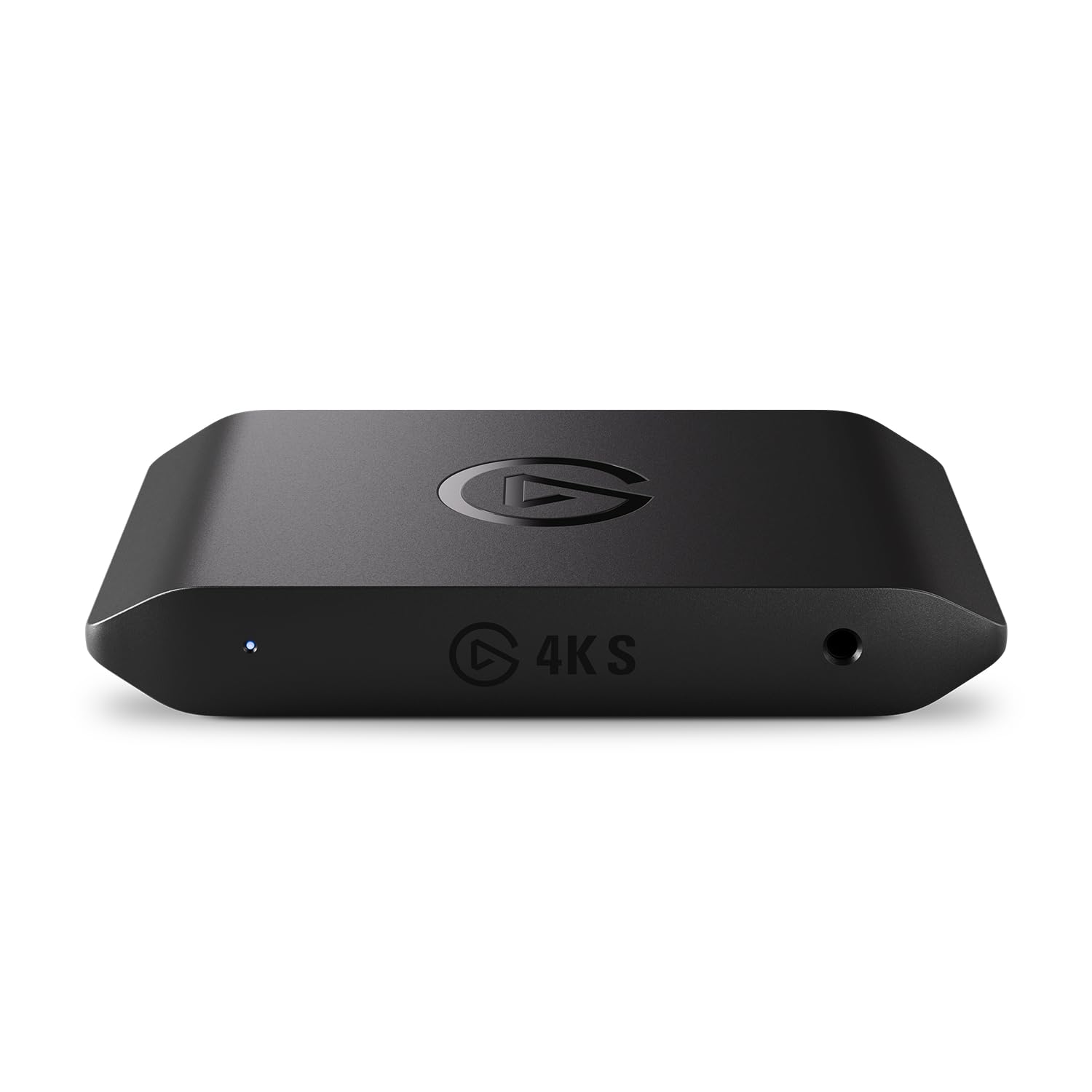
This mid-range card captures 4K60 (4K resolution at 60 frames per second) without the high price of the 4K X model.
What makes the 4K S special is the balance it strikes: it records in true 4K60 with crisp detail and vivid colors, while passing through 1440p120 or 1080p240 for high-refresh play on your monitor. That means you can record a cinematic 4K video while still playing a competitive game at 120 or 240 frames per second, all through a single USB-C connection. It also supports HDR10 with tone mapping on Windows, so bright and dark scenes look right in your recording.
Owners love it for the Switch 2 specifically — the review pages describe it as an absolute must for capturing Switch 2 footage for YouTube with no hassles, working perfectly with both Switch 1 and Switch 2. The one consistent caveat is that preview playback can show slight input lag for ultra-competitive titles like COD or Valorant, though it is perfectly fine for story games. The consensus is that the pricier 4K X is unnecessary for most users; this card delivers the same real-world experience for less.
It also includes a 3.5mm analog audio input so you can capture in-game chat or commentary alongside your video, making it a complete package for streamers who want to talk over their gameplay without a separate mixer. Its slim 0.67 x 4.41 x 2.83-inch profile keeps any setup tidy.
Everyday Strengths
- True 4K60 recording with HDR10 support
- 1440p120 and 1080p240 passthrough keeps play smooth
- 3.5mm analog input captures commentary easily
Small Compromises
- Slight preview lag for high-speed competitive shooters
- Connectivity and 720p performance draw mixed notes
Best for: most gamers who want 4K recordings without paying for the flagship — this is the value pick that covers 90% of use cases.
Skip if: you’re a tournament-level player who absolutely cannot tolerate any preview delay, in which case the 4K X sits closer to your needs.
4. AVerMedia Live Gamer Ultra 2.1

The only external card here that records a true 4K144, designed for serious Windows setups.
If recording quality is your obsession, this AVerMedia card is the one that goes beyond the rest. It records up to 4K144 with MJPEG encoding on supported Windows PCs running AVerMedia Streaming Center, which is a step above the 4K60 ceiling most external cards hit. For Mac users, it still captures up to 4K60 with HDR available on Windows, so the full performance open up on a PC. Its HDMI 2.1 passthrough plays up to 4K144 HDR/VRR, 1440p240, or 1080p360 on compatible displays — the highest refresh rates in this lineup.
You get enough bandwidth for console and PC capture through the USB-C 10Gbps connection (USB 3.2 Gen 2), hooking into PS5, Xbox Series X/S, and Nintendo Switch 2 gear. A long-time content creator reports steady 5-hour Twitch streams with no dropped frames and recordings up to 144fps in OBS. The trade-offs are real: the card runs hot and could use better cooling. Audio sync—not video quality—is where owners hit trouble, with one describing an impossible audio delay appearing after about 20 minutes of streaming. It also asks for a capable PC; an RTX 3060 can hit encoder overload at 1440p120 while streaming.
It includes dual 3.5mm four-pole ports so you can capture both headset and gamepad audio, plus 5.1-channel audio support in compatible Windows workflows. The RGB lighting is controllable through Windows Dynamic Lighting, a nice touch if you care about desk aesthetics.
Performance Highlights
- Records a genuine 4K144 on Windows — the fastest here
- Party chat plus 5.1 audio capture
- Stable long streams with no dropped frames
Watch Outs
- Runs hot enough that owners flag cooling
- Audio sync issues are the recurring complaint
Pick this if: you want the highest possible recording resolution and refresh rate on a Windows PC, and you have a strong CPU and GPU to feed it.
Think twice if: you’re on a modest laptop or you need dependable audio sync from the start — that is where this card stumbles.
5. ASUS TUF Gaming CU4K30

The tank-built external card that plugs into any PC with zero drivers and zero fuss.
Some streamers want a card that simply works the moment it arrives, and the ASUS TUF CU4K30 is built for that. Its Plug & Play UVC design means you connect it to any PC with a USB 3.2 Type-C port and start streaming immediately — no drivers, no utilities, no bloatware. It passes through video up to 4K HDR at 60Hz while capturing up to 4K at 30Hz, so your live visuals stay buttery while you record a quality stream. The frame rates break down as 4K up to 30 fps, 2K up to 60 fps, and Full HD up to 120 fps.
The durable alloy shell and 2-minute setup earn consistent praise, with one owner calling it the best upgrade to their streaming setup. It is certified for OBS Studio, so it plays perfectly with the most popular streaming software. The honest caveats: some units require plug-and-unplug cycles to reconnect, and a few owners find the audio too low until they set the default device in their software. There is also a brief audio delay at the start that clears up once you adjust OBS settings.
It connects controllers and headsets so you can share team comms with your audience—a thoughtful touch for squad games. At 423 g, it’s heavier and more substantial than most external cards, matching its rugged build.
Built To Last
- Alloy shell survives years of desk life
- True plug-and-play on any USB-C PC
- OBS certified with zero bloatware
The Friction
- Some units cut out and need a replug
- Default audio levels can run too low
Choose it when: you want a near-indestructible, driver-free card for a PC you swap often, and you are fine with a quick OBS audio tweak on day one.
Not for: anyone demanding flawless reconnect behavior or who wants Mac support, since the setup assumes a Windows PC with USB-C.
6. NearStream CCD10

The entry-level USB stick that proves you can start streaming without emptying your wallet.
If you are just getting into streaming or recording gameplay, the NearStream CCD10 is the budget-friendly door in. It captures video up to 1080p at 60fps through USB-C 3.0, and it passes through 4K60, 1440p120, or 1080p240 so your monitor still shows a smooth high-refresh image while you record. It is genuinely plug-and-play across Windows, macOS, and Linux — owners specifically confirm it works great on Linux, which is rare praise for a budget card.
Compatibility is the biggest strength in the reviews, with ease of use close behind. It works with PS5, PS4, Xbox, Switch, DSLR cameras, and computers. The package includes the card, an HDMI cable, a USB cable, a user manual, and a quick start guide. The honest catch: video quality gets mixed feedback—some owners find the recorded output lands closer to 720p despite the 1080p setting, and one buyer reports a failed unit that ran around 20FPS instead of the advertised 60FPS. For story-driven games and casual streaming, it is easy to recommend, but competitive players chasing every frame may want to step up.
It has dual 3.5mm audio ports — a 3-pole TRS mic input for an external mic and a 4-pole TRRS headset jack — so you can wire in your commentary easily. The 76 g body slips into a bag pocket, making it a fine travel companion for capturing on the road.
Starter Appeal
- True cross-platform support including Linux
- High-refresh passthrough at a low entry point
- Two 3.5mm audio ports for mic and headset
Reality Check
- Recorded quality can fall short of the 1080p claim
- An occasional unit underperforms on frame rate
Start here if: you are new to streaming, play mostly story games, and want a low-risk way to learn OBS without spending much.
Step up if: you play fast competitive shooters, because the frame-rate and quality inconsistency will frustrate you within a week.
7. AVerMedia Live Gamer Ultra GC553

The veteran USB card that passes 4K HDR through with virtually no lag you can feel.
Before HDMI 2.1 cards arrived, this was the go-to for console streamers, and it still holds its own thanks to one trick: 4Kp60 HDR passthrough. It sends your console’s 4K HDR signal straight to your monitor with ultra-low latency, so you play the exact uncompressed image while the card records at up to 4Kp30, 1440p60, or 1080p120. That split — full-fat HDR on screen, solid 1080p120 recording — is exactly what most Switch 2 and PS5 streamers need.
Buyers report it works like a champ and never gets hot, delivering quality with zero G-SYNC or FreeSync support as the main trade-off. It is plug-and-play with OBS and shines in dual-PC streaming setups. The bigger friction is compatibility: owners mention it does not officially work with Mac, and it needs a powerful PC—an Intel Core i5-4440 3.10 GHz or above, an NVIDIA GTX 660, and 4GB of RAM on desktop, with a Core i7-4810MQ and GTX 870M minimum on laptops. Some owners hit audio and video desync when switching consoles, and the USB-C port can feel loose over time. It bundles CyberLink PowerDirector 15, an HDMI 2.0 cable, and a USB Type-C to Type-A cable in the box.
At a compact 4.43 x 2.6 x 1.02 inches and 4.16 ounces, it is genuinely portable and powered by the USB connection alone. For Switch 2 owners, it passes 4K HDR and 5.1 Linear surround uncompromised, which is a major win over older single-input cards.
What Endures
- Passes through 4K60 HDR with near-zero latency
- Runs cool and reliable even on long sessions
- Small enough to toss in a laptop bag
Where It Ages
- No official Mac support
- Needs a beefy PC for full performance
Grab it for: a PS5 or Switch 2 setup where you want to see true 4K HDR while you play and record a clean 1080p stream on a strong desktop.
Look past it if: you are on a Mac or a modest laptop, since this card expects real desktop muscle and official Windows support.
Understanding the Specs
Passthrough vs. Capture
Passthrough is what you see on your monitor when you play; capture is the video file you save. A card can pass through 4K at 144Hz while capturing only 1080p, and that is fine for streamers who play on a high-refresh monitor but publish 1080p video. Know which number you actually need.
Latency and USB Standards
Latency is how delayed your preview feels versus your real gameplay. USB 3.0, USB 3.1, and USB 3.2 Gen 2 all carry enough bandwidth for modern capture, but the standard affects the top resolution and frame rate the card can handle. Faster USB means room for 4K recording and 240fps capture, while older ports cap you at lower quality.
FAQ
Will a capture card add input lag to my gameplay?
USB capture card or internal PCIe card, which is better for me?
Why does my capture show 1080p even when the card claims 4K60 capture?
Do I need an HDMI 2.1 card for streaming?
Can a capture card record from a DSLR or mirrorless camera?
What PC specs do I need for 4K capture?
Why is my audio out of sync with my video?
Does a capture card work with a second PC for streaming?
What is VRR passthrough and why does it matter?
Final Thoughts: The Verdict
For most streamers, the capture card for pc winner is the Elgato 4K X because it delivers the complete package — 4K144 passthrough, VRR support, and rock-solid reliability across every console. The Elgato 4K S is the smart pick if you want 4K60 recording at a friendlier price, while the NearStream CCD10 gets beginners streaming on a tight budget. If you run multi-camera events, the Blackmagic DeckLink Duo 2 is the professional-grade internal hub that outpaces every external card in this list for that specific job.
How We Picked
We do not accept paid placement. Every pick is matched to a real buyer and a real use-case; we do not hands-on test units.
Sources & Methodology
Specifications: manufacturer listings and product documentation. Review insights: verified customer reviews, as of September 2026. Pricing: not shown on this page (it changes often); check the current price via the retailer link.
As an Amazon Associate, Gadgets Feed earns from qualifying purchases. This does not affect which products we feature.