
Our readers keep the lights on and my morning glass full of iced black tea. As an Amazon Associate, I earn from qualifying purchases.
Specs are compiled from manufacturer listings and verified buyer reviews and can change over time — please confirm the key details on the product page before buying.
Struggling with a card reader that drops the connection just as a customer is ready to pay is the fastest way to lose a sale. The real challenge is matching the right device—a phone-connected reader, standalone terminal, or countertop machine—to your specific business setting.
I’m Min — the founder and writer behind Gadgets Feed. This guide is built by comparing the manufacturers’ published specifications and the patterns across verified customer reviews, so you get each pick’s real strengths and trade-offs instead of marketing spin.
You need a dependable way to accept cards anywhere, and this breakdown of the best card reader for small business cuts through the connectivity and fee confusion to find your reliable match.
Our Picks at a Glance


How To Choose The Best Card Reader For Small Business
Your total cost includes hardware, processing fees, approval timelines, and how well the device fits your checkout flow. Here are the three decisions that will shape your daily reality.
Match the Reader Type to Your Setting
Decide if you need a mobile companion that pairs with your phone via Bluetooth, a standalone device with its own screen and SIM card, or a countertop terminal that stays plugged in. A vendor at a craft fair needs portability, while a boutique shop might prefer a permanent countertop machine.
Check the Merchant Account String
Before you buy, check which processing account the reader needs. Some work with their own free app, but others force you to sign up for a specific processor—or block third-party merchant accounts completely. Pick the wrong one, and you could end up with a costly paperweight.
Don’t Underrate Connectivity and Battery
A reader that drops Bluetooth or WiFi connections is useless, no matter how smooth its interface. Look at whether the device has a built-in battery for cordless use or needs an outlet, and check if it offers cellular backup data so you aren’t stuck when the store WiFi blinks out.
Quick Comparison
| Model | Best For | Connectivity | Power Source | Core Feature | Amazon |
|---|---|---|---|---|---|
| Square Reader (2nd Gen)★ Best Overall | Mobile & Market Sellers | Bluetooth | Battery (included) | Offline payments for 24 hours | Amazon |
| Square TerminalTop Performer | All-in-One Counter | WiFi | Battery | Receipt printer & chip in 2 sec | Amazon |
| Symcode MJ-Q80 | Cash Register Integration | USB | Wired | Reads magnetic, chip & NFC | Amazon |
| SumUp Solo | Standalone Mobile Use | WiFi + SIM | Battery + Charging Station | Touchscreen & built-in SIM | Amazon |
| Verifone VX520 | Countertop Retail | Dual Comm (Dial/ETH) | Plug-in | Established countertop design | Amazon |
| Clover Compact | Clover Ecosystem Users | Cloud/WiFi | Plug-in | Syncs with Clover Dashboard | Amazon |
| Clover Go | iOS/Android Mobile | Bluetooth | Battery | Compact contactless reader | Amazon |
In‑Depth Reviews
1. Square Reader for contactless and chip (2nd Generation)
Our pick — 4.5★ from 4,500+ verified ratings; the strongest balance of quality and price.
The featherweight that keeps your market stall selling while the WiFi drops.
If you sell at craft fairs, farmers markets, or flea markets, this is the reader that keeps pace. It pairs to your phone over Bluetooth and accepts contactless payments, chip cards, Apple Pay, and Google Pay from anywhere. But the standout trick is offline payments—you can keep taking payments for up to 24 hours even when the internet vanishes, which is a lifesaver at a busy vendor fair where connectivity is spotty.
Setup is genuinely quick, and the whole unit weighs just 5.92 ounces, so it slips into a pocket or bag without a second thought. Buyers report the Bluetooth range is long and the device stays paired all day, making checkout fast and “straight to the point.” The business case is clean, too: no long-term contracts, no monthly fees, and one low rate for every tap or dip.
Owners consistently report faster checkout times and doubled sales after switching to this reader. It also includes 24/7 fraud prevention and payment-dispute management at no extra cost. This package delivers a professional payment experience for a minimal upfront investment.
Where It Shines
- Offline mode keeps sales flowing for up to 24 hours without internet
- Featherlight build (5.92 oz) is truly portable for markets
- No contracts, no monthly fees, and free fraud prevention
What to Watch
- Connectivity issues are the most-discussed gripe—you need a signal to process
- Battery life is split among owners: some get many hours, others see it die within 2 days
Reach for this if: you’re a mobile seller who needs a reliable, contract-free way to take card and phone payments on the go.
Plan for: the occasional Bluetooth pairing hiccup, and keep your phone charged—battery endurance is the biggest variable in real-world use.
2. Square Terminal – Credit Card Machine to Accept All Payments | Mobile POS
An all-in-one countertop hub that prints, chips, and settles sales in two seconds.
When you want one device that does everything, the Square Terminal is it. You can ring up sales, accept payments, and print receipts all from a single machine, whether it’s sitting at the counter or carried anywhere in your store. It weighs 14.7 ounces, so it’s heavier than a dongle, but it packs a full touchscreen and a built-in receipt printer that owners say works flawlessly.
Speed is the headline: it processes chip cards in just two seconds, and it accepts all major credit and debit cards. The built-in battery is designed to last all day, so you can unplug it and keep selling. It connects via WiFi, with an ethernet option through a hub for a more stable wired link when your store’s internet is fussy.
What wins people over is the ease of use—owners mention setup takes under five minutes and the money lands in your account as soon as the next business day. There’s no learning curve because it mirrors the Square app and dashboard. It’s a slightly higher investment for a card reader, but it doubles as your full point-of-sale system, making it a professional centerpiece for a growing shop.
Built Like a Hub
- Chip payments process in just two seconds
- Built-in receipt printer means no extra hardware
- All-day cordless battery for counter or mobile use
Consider These
- WiFi can be finicky—some owners see it drop offline
- Durability is the recurring worry, with a few units failing within 30 days
Best when: your business wants one polished device that handles sales, receipts, and reporting without juggling multiple gadgets.
Know this: treat the screen gently and keep it on a stable WiFi network—those are the two areas owners hit most.
3. SumUp Solo Credit Card Payment Card Reader with Charging Station

A full touchscreen terminal that carries its own SIM so you can sell anywhere.
This is the reader for businesses that want zero dependence on a phone. The SumUp Solo is a standalone device with a full touch-screen interface, a strong WiFi connection, and a free SIM card with mobile data built in—so you can process payments anywhere, even far from your store’s router. The included charging station keeps the battery topped up between shifts.
It’s a truly portable unit, and buyers who’ve used it find it fast, responsive, and reliable, with easy phone and app integration. The touchscreen makes navigating sales simple, and the sleek design is easy to carry. For those who’ve upgraded from older models, it’s a definite step up in speed and consistency.
But this is where approval matters most. The device is useless until you’re pre-approved by SumUp, and onboarding can take up to 14 days with extensive business documentation required. It’s a powerful tool once approved, but onboarding can take up to 14 days—plan your setup weeks ahead.
Freedom built-in: the SIM card and charging station combination means no phone pairing and no dead-battery panic in the middle of a sale.
Fair fit note: the approval gate is the real hurdle here—some owners hit “Transaction Failed” errors until the lengthy onboarding clears.
Pick this if: you want a self-contained terminal you can carry anywhere without relying on a phone or WiFi network.
Prepare for: a potentially 14-day onboarding window—don’t order this the day before your big market event.
4. Verifone VX520 Dual Comm Credit Card Machine

A sturdy countertop workhorse with smart card reading and an ergonomic build.
For a permanent spot on your checkout counter, the Verifone VX520 pairs an ergonomic design and a small footprint with a unique cable management system to keep your desk tidy. It combines dial and ethernet connectivity—the “Dual Comm” in the name—so it can stay wired to your landline or network. This is a machine built to sit still and process all day, not bounce around in a bag.
Owners find it reliable and easy to use, noting it works with COX Communication Internet service and links easily to a US bank. Setup takes roughly 10 minutes with no training required. The smart card reader handles EMV chip transactions, making it compliant with modern card standards for a physical storefront.
The notable caveat is that it’s a non-contactless model, so customers can’t tap-to-pay. And like many countertop terminals, the machine can arrive locked to a specific processor—one owner reported a second unit arriving locked with no easy fix. It’s a solid, budget-friendly choice, but confirm your processor compatibility before you commit.
Solid and simple: the 2.5-pound design is meant to stay put, and buyers repeatedly praise the easy install and reliable operation.
Double-check: this is not a contactless reader, and a unit can arrive locked to a processor—verify your merchant account can program it.
Best for: a fixed retail counter where you want a straightforward, durable chip reader that doesn’t rely on a phone.
Look elsewhere if: your customers expect to tap contactless cards or mobile wallets at the register.
5. Clover Compact Payment Terminal – Requires New Merchant Processing Account

The plug-in terminal that syncs your whole Clover dashboard into one view.
If you’re already living inside the Clover ecosystem, the Clover Compact is a natural fit. It syncs with the Clover Mini and Clover Station through the Clover Dashboard and cloud-based network, letting you manage transactions, track sales, and access business data across both devices. It’s a plug-in unit, not battery-powered, so it’s designed to stay on the counter.
Owners who use it in this ecosystem find it easy to set up, with clients loving that they can swipe, tap, or insert their card. It connects easily to WiFi, runs at good speed, and is cost-effective for what it delivers. For those already on Clover’s processing, it’s a clean addition.
Here’s the hard rule: this unit requires a new merchant processing account through Powering POS, and it cannot be used with a different processor. If you’re operating through a third-party merchant company, this is not the device for you. It’s locked to Powering POS processing, but smooth if you’re already committed to the Clover ecosystem.
Synced selling: the cloud dashboard sync means sales data flows across your Clover devices without manual entry.
Read the lock: it’s tied to Powering POS processing—third-party merchant accounts are a dead end here.
Choose this if: you’re building out a Clover-based setup and want a countertop terminal that talks to your other Clover hardware.
skip it if: you’re not ready to move your processing to the required Powering POS account.
6. Clover Go Contactless Reader – EMV/Chip Ready
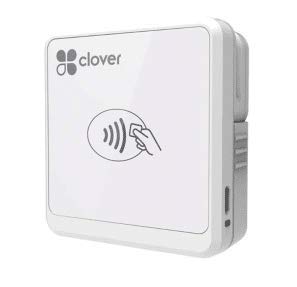
A pocket-sized contactless reader that works with iOS and Android phones.
For a portable companion that doesn’t anchor you to a counter, the Clover Go is the lightweight answer. It’s EMV/chip ready and contactless, and it works with both iOS and Android devices. At just 4.8 ounces, it’s genuinely pocket-friendly for businesses that vend offsite—museums, festivals, and mobile services all fit this bill.
Owners find it very easy to connect over Bluetooth and use, with a museum even using it for offsite vending to scan barcodes and enter cash, credit, or check payments that go straight to the Clover system. It’s a device you can take everywhere and use instantly.
Keep in mind this version is noted as end-of-life, so orders may be fulfilled with the most current version of Clover Go. The reliability record is mixed—while many find it works flawlessly, some report Bluetooth dropping after a few months, and a few had trouble even powering on. It pairs best with the Clover app you already have.
Truly portable: at 4.8 ounces, it disappears into a pocket, making offsite vending a breeze.
Fair warning: Bluetooth longevity is the split point—some units lose the connection after about 6 months of heavy use.
Grab this if: you’re already in the Clover app ecosystem and need a light, mobile reader for events and field sales.
Think twice if: you want a permanent, wired terminal—this is a companion device, not a countertop hub.
7. Symcode Multi-Function Magnetic Card Reader (MJ-Q80)
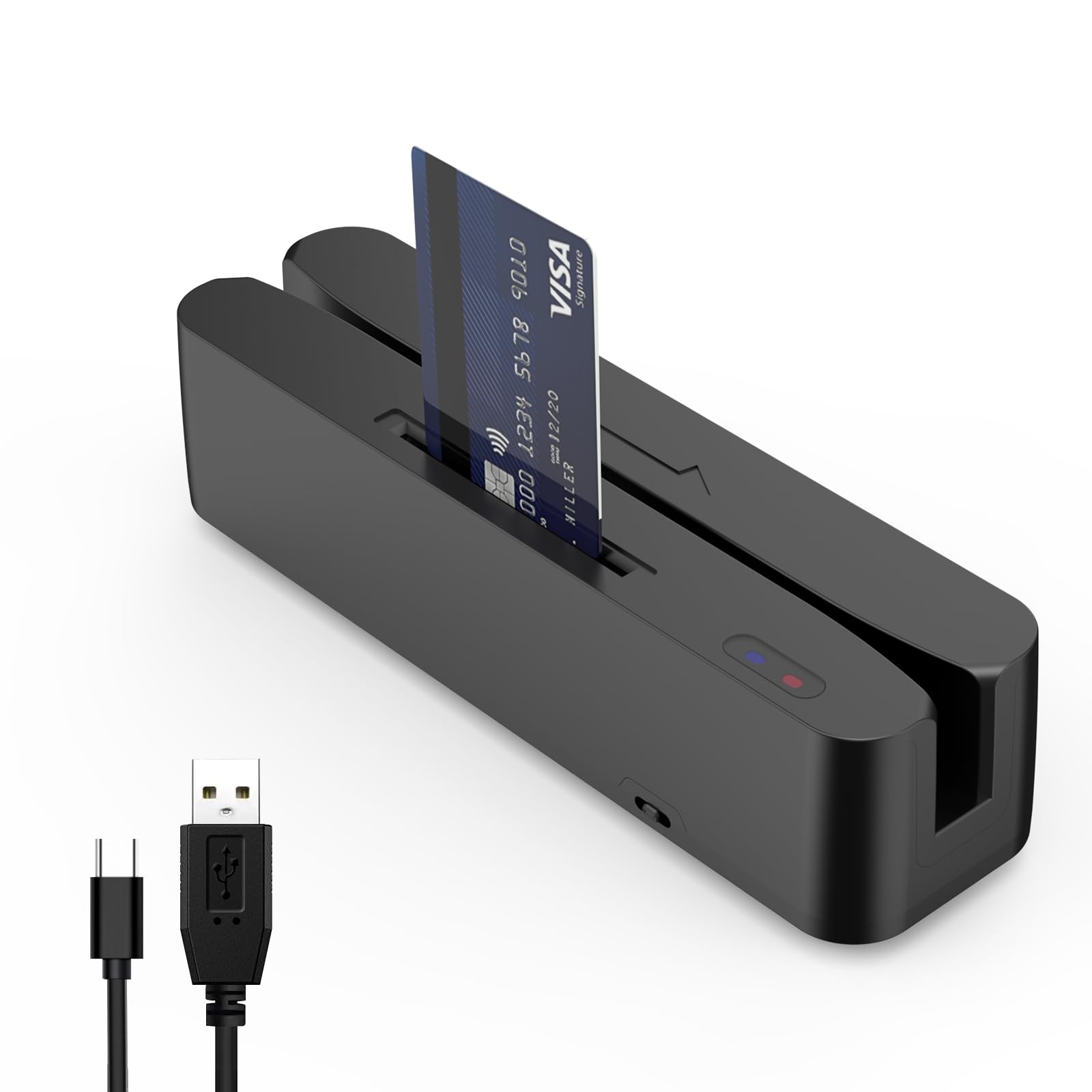
A plug-in USB reader that snaps into your cash register for instant card reading.
If you run a traditional shop with a cash register, this USB reader might be the missing link. The Symcode MJ-Q80 plugs straight into your system via USB and reads magnetic stripe cards across all 3 tracks, plus SLE4442 chip cards and even NFC payments—all without any setup beyond plugging it in. The indicator lights make it easy to tell when it’s active.
Owners with a cash register find it works smoothly, noting it reads magnetic stripe, chip, and NFC payments right from the start. It’s small and sleek, so it fits on the counter without clutter, and it’s held up well with daily use. For membership systems or check-in checkout systems, it’s a versatile little workhorse.
This is a budget-tier utility, but its reviews are polarized. Some owners had units fail to read credit cards properly, only picking up track 2 (the card number), and a few found the English support lacking. It’s a great fit for a register-based setup, but if you need a full, standalone payment terminal, this isn’t it.
Register Ready
- Plug-and-play USB—no pairing or setup needed
- Reads magnetic, chip, and NFC in one device
- Compact 0.21 kg build fits any counter
Know the Limits
- Some units only read track 2 data, failing to capture full card info
- English support can be hard to reach for troubleshooting
Best when: you need a wired, low-cost way to read cards directly through your existing register or membership system.
Reconsider if: you want a standalone payment terminal—this is a peripheral, not a full POS device.
Understanding the Specs
Connectivity: Bluetooth vs. WiFi vs. Cellular
Bluetooth readers pair to your phone and are great for markets, but they depend on your phone’s signal to process. WiFi terminals connect to your store network, offering speed but risking dropouts. Cellular devices (like the SumUp Solo) carry their own SIM, so they work anywhere—at the cost of needing approval and a data plan.
Battery vs. Plug-In Power
A built-in battery means you can take the reader anywhere, but endurance varies wildly—some last all day, others die in two. Plug-in terminals (like the Verifone and Clover Compact) never lose power but are permanently anchored to your counter. Decide whether portability matters before you buy.
FAQ
Will a card reader work with my existing bank or merchant account?
Can I take card payments without an internet connection?
What is the difference between a mobile reader and a countertop terminal?
How long does it take to get approved to start processing payments?
What does EMV and chip-ready mean for my business?
Do I need a receipt printer, or can I email receipts?
How do I know which card type a reader accepts?
Will my reader stay connected to Bluetooth and WiFi all day?
Can I use one card reader for multiple locations or vendors?
What should I do if my card reader stops working or arrives defective?
Final Thoughts: The Verdict
For most mobile sellers, the strongest all-around card reader for small business is the Square Reader (2nd Gen) because it pairs easy setup with a 24-hour offline mode and no monthly fees—a combination that protects your sales even when internet fails. If you want a full countertop hub that prints receipts and processes chip cards in two seconds, the Square Terminal is the professional centerpiece for a growing shop. And for a standalone terminal that works anywhere without a phone, the SumUp Solo offers that freedom, as long as you clear its approval process first.
How We Picked
We do not accept paid placement. Every pick is matched to a real buyer and a real use-case; we do not hands-on test units.
Sources & Methodology
Specifications: manufacturer listings and product documentation. Review insights: verified customer reviews, as of August 2026. Pricing: not shown on this page (it changes often); check the current price via the retailer link.
As an Amazon Associate, Gadgets Feed earns from qualifying purchases. This does not affect which products we feature.