
Our readers keep the lights on and my morning glass full of iced black tea. As an Amazon Associate, I earn from qualifying purchases.
Specs are compiled from manufacturer listings and verified buyer reviews and can change over time — please confirm the key details on the product page before buying.
You see a cheap printer and think “bargain,” but the ink costs can drain your wallet faster than the machine itself. That is the real trick with a cartridge printer: the upfront price is low, but running it can sting. So the smart question is which printer delivers sharp text and vivid photos without burning cash on refills. This guide focuses on running costs, print speeds, and real-world reliability so you know what matters once the box is open.
I’m Min — the founder and writer behind Gadgets Feed. This guide is built by comparing the manufacturers’ published specifications and the patterns across verified customer reviews, so you get each pick’s real strengths and trade-offs instead of marketing spin.
After weeks of research, these are the picks that deliver the best balance of quality, speed, and long-term value in a cartridge printer without locking you into a budget-breaking subscription.
Our Picks at a Glance


How To Choose The Best Cartridge Printer
You balance the upfront cost against the ongoing expense of ink. A cheap machine with expensive cartridges will cost you more over a year than a pricier model with efficient cartridges. Understanding a few key specs makes the difference between a smart buy and a costly mistake.
Print Speed and Your Workflow
Print speed is measured in pages per minute (ppm) for black-and-white and color text. A home-office model that prints 20 ppm black will finish a ten-page report in thirty seconds; a portable unit that prints 9 ppm takes over a minute for the same job. If you print in bursts, faster speed saves real time. If you print a few pages a week, it hardly matters.
Duplex Printing and the Paper Tray
Automatic duplex (two-sided) printing cuts your paper bill in half and makes multi-page documents feel professional. It saves you the hassle of manually flipping pages. The paper tray capacity also matters: a 150-sheet tray runs out fast if you print frequently, while a 225-sheet tray means fewer refills during a busy workday.
Connectivity and Mobile Printing
Dual-band Wi-Fi (2.4GHz or 5GHz) gives you a stable connection from anywhere in the house. A dedicated app like Canon PRINT, Brother Mobile Connect, or the HP App lets you print, scan, and copy from your phone without touching the printer. If you have an Apple device, AirPrint support is nearly essential. For those who want to avoid using a router entirely, Wi-Fi Direct lets you connect and print directly from your device.
Quick Comparison
| Model | Best For | B&W Speed | Color Speed | Duplex | Amazon |
|---|---|---|---|---|---|
| Canon PIXMA TR160★ Best Overall | Travel & portability | 9 ppm | 5.5 ppm | Simplex | Amazon |
| HP OfficeJet Pro 8125Also Great | Home office speed | 20 ppm | 10 ppm | Automatic | Amazon |
| HP OfficeJet Pro 8139 | Home office with fax | 20 ppm | 10 ppm | Automatic | Amazon |
| Canon PIXMA TR7120 | Value all-in-one | 14 ppm | 9 ppm | Automatic | Amazon |
| Brother Work Smart 1410 | Versatile home office | 16 ppm | 9 ppm | Automatic | Amazon |
| Brother INKvestment 1365 | High-page-yield value | 16 ppm | 9 ppm | Automatic | Amazon |
| HP Envy Photo 7975 | Photo printing at home | 15 ppm | 10 ppm | Automatic | Amazon |
In‑Depth Reviews
1. Canon PIXMA TR160 Wireless Portable Compact Printer
Our pick — over 4★ from 650+ verified ratings; the strongest balance of quality and price.
A printer you can actually throw in a backpack—just 4.5 pounds and 2.6 inches thin.
The Canon PIXMA TR160 is a print-only machine built for one job: delivering crisp black text and vibrant color wherever you are. It weighs just 4.5 pounds and measures 2.6 inches thick, fitting into a bag alongside a laptop. The 5-Color Hybrid Ink System produces rich borderless photos up to 8.5” x 11”. The 1.44-inch monochrome OLED display shows ink levels and printer status without needing a phone.
Wireless Direct Mode lets you print even when there is no router—perfect for hotel rooms. The Canon PRINT app, AirPrint, and Mopria cover mobile connections. Speed is modest (9 ppm black, 5.5 ppm color), but that is the trade-off for portability. Owners say it is an “excellent purchase for home/travel.” Note that the battery is sold separately, so you will want to add one for true on-the-go printing. The 50-sheet tray is small but realistic for a portable unit.
What it does best
- Ultra-portable at 4.5 lbs and 2.6” thin—slips into any bag
- 5-Color Hybrid Ink System delivers vibrant borderless photos
- Wireless Direct Mode prints without a router
What to know
- Print-only—no scanner or copier built in
- Battery is sold separately, adding to the total cost
- Slow print speed (9 ppm black) compared to full-size models
Snag this if: You travel frequently and need a printer small enough for a backpack—the portability is class-leading.
Avoid if: You need scanning, copying, or faxing; this is strictly a print device.
2. HP OfficeJet Pro 8125 Wireless All-in-One
The fastest black-and-white speed in the roundup, paired with a massive paper tray.
If your home office prints a steady stream of reports, invoices, and presentations, the HP OfficeJet Pro 8125 is built to keep pace. It prints black text at 20 pages per minute and color at 10 pages per minute. The 225-sheet input tray swallows a full ream of paper, so you are not constantly refilling mid-task.
The 2.7-inch touchscreen feels like a smartphone interface, making navigation fast and intuitive. Setup scores high with owners, and the included three-month Instant Ink trial delivers cartridges automatically before you run dry (a subscription kicks in after the trial unless you cancel). The printer also uses HP Wolf Essential Security to protect your network. A minor trade-off: the printer requires cartridges with original HP chips, blocking third-party ink.
Why it wins
- Fastest B&W print speed (20 ppm) and color (10 ppm) in this lineup
- 225-sheet paper tray handles a full ream without refilling
- Auto duplex and ADF make multi-page jobs easy
The catch
- Firmware blocks non-HP cartridges, raising long-term ink cost
- Some owners find connectivity finicky on first setup—phone app install is smoother than PC
Best suited for: Home offices that need speed, volume, and pro-grade features—the paper tray and duplexing alone justify the mid-range investment.
Think twice if: You want the freedom to use generic ink cartridges; HP’s chip lockout makes that impossible here.
3. HP OfficeJet Pro 8139 Wireless All-in-One
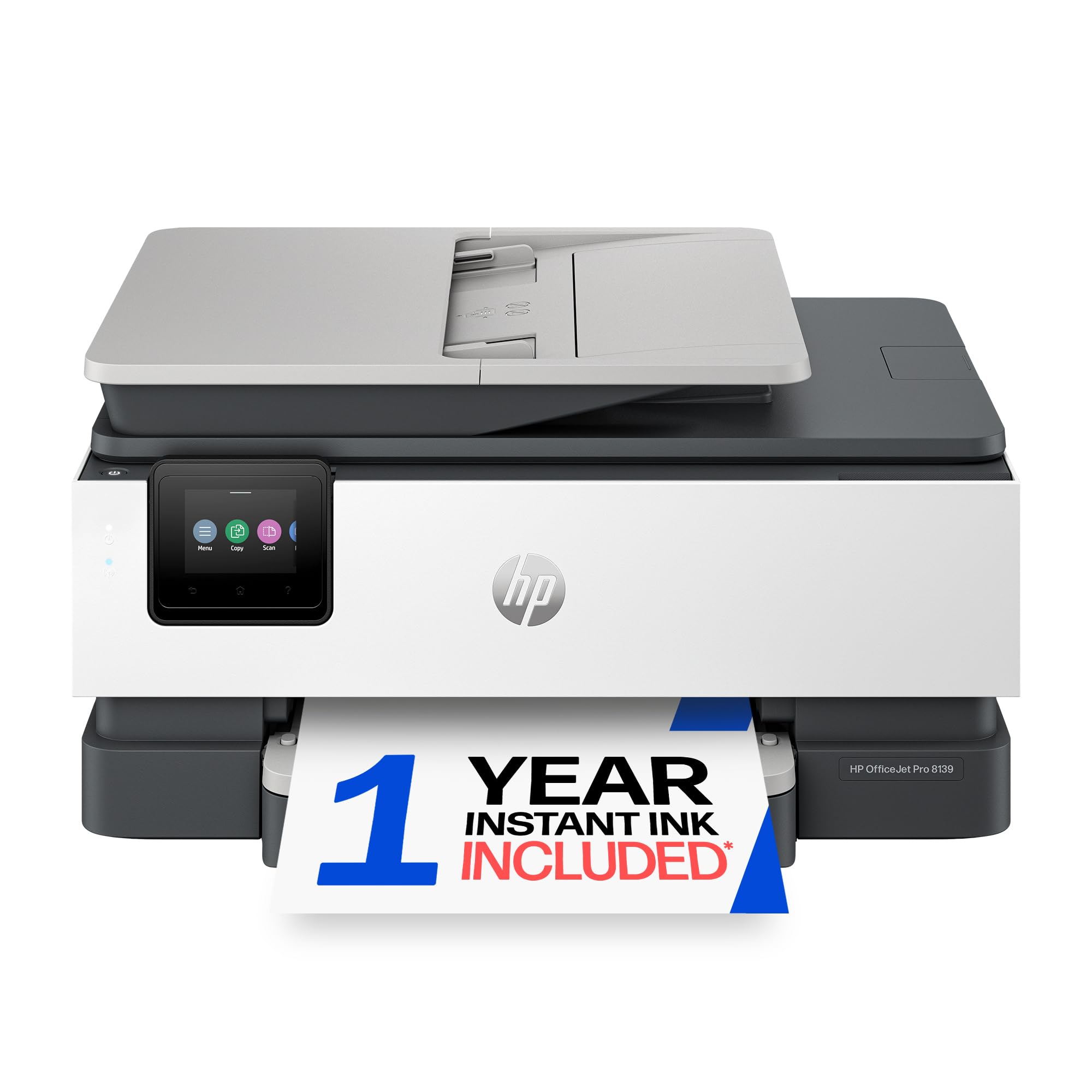
Same speed as the 8125, plus fax and a full year of Instant Ink on trial.
The HP OfficeJet Pro 8139 is essentially the 8125 with fax capability and a much longer Instant Ink trial. If your home office still sends the occasional fax, this is the one. It matches the same class-leading print speeds—20 ppm black, 10 ppm color—and packs the same 225-sheet tray, auto-duplex, and auto document feeder.
The big draw is the one-year Instant Ink trial, which saves a significant amount on ink costs over twelve months. The 2.7-inch color touchscreen is the same phone-like interface. Owners praise the setup and print quality, calling the image results “amazing.” A handful of buyers report that the printer did not connect smoothly with Bluetooth on the first attempt, though a simple power cycle usually resolves it. Like the 8125, it blocks third-party cartridges.
Why it stands out
- Includes fax for homes or offices that still need it
- One-year Instant Ink trial before any subscription kicks in
- Same blistering speed and 225-sheet capacity as the 8125
The catch
- Bluetooth setup can be finicky for a second computer; unplugging the printer for a few minutes usually solves it
- No third-party ink allowed after the trial ends
Grab this if: You need faxing and want the longest possible ink-trial period (a full year) before paying for cartridges.
Look elsewhere if: You don’t need fax and want to save a little upfront—the 8125 is identical without it.
4. Canon PIXMA TR7120 Wireless Color Inkjet Printer

A budget-friendly all-in-one that does not skimp on print quality or duplex.
The Canon PIXMA TR7120 proves you don’t have to spend a lot to get automatic duplex printing and an auto document feeder. It prints black at 14 ppm and color at 9 ppm, a solid middle-ground speed for home or light office use. The 1.42-inch monochrome OLED display keeps things simple—check ink levels and printer status at a glance.
Dual-band Wi-Fi (2.4GHz and 5GHz) provides a stable connection, and the printer supports Apple AirPrint and Mopria for easy mobile jobs. Buyers consistently praise the sharp print quality and fast copy speeds. One owner called it a “nice little printer” that set up quickly to Wi-Fi. The small paper tray is the main compromise. The machine also uses traditional individual cartridges (cyan, magenta, yellow, black), which keeps replacement costs predictable.
Standout move: Automatic duplex and an ADF at this price point—two features you normally pay more for elsewhere.
Trade-off: The paper tray runs out fast if you print more than a dozen pages at once.
Reach for this if: You want a capable all-in-one without a big upfront spend—the print quality alone earns its keep.
skip it if: You regularly print stacks of 50+ pages; the small tray will annoy you.
5. Brother Work Smart 1410 Wireless Color Inkjet All-in-One

Brother’s reliability in a compact body with cloud-app integration and a bright touchscreen.
The Brother Work Smart 1410 prints black at 16 ppm and color at 9 ppm, putting it ahead of the Canon TR7120 on speed. It is also notably compact—at 13.5 inches deep it slides into tight desk spaces without crowding. The 2.7-inch color touchscreen gives you direct access to cloud apps like Google Drive, Dropbox, and OneDrive for printing and scanning.
Print quality is excellent, and owners say the setup is straightforward. A major bonus: the printer accepts generic third-party ink cartridges, which dramatically lowers long-term running costs. The automatic duplex and 20-sheet ADF keep multi-page tasks moving. A small number of owners note that Brother’s starter cartridges run out quickly, but this is true of nearly every new printer. A first-page-out time of 6.2 seconds black means the first print is almost instant.
Smart move: Accepts generic ink—a rare feature that saves you a small fortune over the printer’s life.
Trade-off: The paper tray is 150 sheets, fine for light use but smaller than the HP competitors.
Best for: Budget-conscious home offices that want Brother’s rock-solid reliability and the freedom to buy cheap ink from any brand.
Not for: Anyone who prints 200+ pages daily—the tray runs dry fast.
6. Brother INKvestment 1365 Wireless Color Inkjet All-in-One

Comes with a high-yield starter cartridge that prints 1,200 black pages from the start.
The Brother INKvestment 1365 stands apart because it includes a 1,200-page black cartridge and 500-page color cartridges in the box. That is months of printing for a typical home before you need to buy ink. It prints at 16 ppm black and 9 ppm color, and includes automatic duplex plus a 20-page ADF.
The 1.8-inch color display gives you cloud access to Google Drive, Dropbox, and OneDrive. The front-loading cartridges are easy to swap, and the printer has a compact footprint that fits tight shelves. Print quality on documents is excellent, with some owners comparing it to laser output. The main downside reported is high ink consumption—some owners feel it uses ink faster than expected once the starter cartridges run out. The compact size draws plenty of praise from owners.
Biggest perk: The included starter cartridges give you 1,200 black pages and 500 color pages—you may not buy ink for months.
Heads up: A few owners mention the printer uses ink faster once you switch to replacement cartridges.
Perfect for: Budget buyers who want the lowest possible upfront cost and months of printing before the first ink refill.
Think twice if: You do a lot of high-volume color printing—ink consumption after the starter cartridges can add up.
7. HP Envy Photo 7975 Wireless Color Inkjet Photo Printer

Premium photo printing with a separate photo tray and AI that removes wasted margins.
The HP Envy Photo 7975 is the pick for families who want true-to-screen borderless photo prints alongside daily document duties. It prints black at 15 ppm and color at 10 ppm, and a dedicated photo tray handles 5×7 and 4×6 sheets separately from the main paper tray—no swapping media. The auto document feeder and automatic duplex round out the office features.
HP’s AI-powered formatting automatically removes unwanted content from web pages and emails before printing, saving paper and ink. Owners praise the print quality for photos, noting “the quality of images is amazing.” The 2.7-inch color touchscreen is intuitive. Ink drying is not a problem even after periods of disuse—occasional head cleaning restores full quality. A few owners experienced paper jams after a few weeks, and the printer is on the larger side at 18.11 inches wide. It uses HP 64 cartridges, which are common and widely available.
Why it shines
- Dedicated photo tray means no switching paper between a document and a 4×6 print
- AI removes wasted margins from web pages automatically
- High-quality borderless photo output with rich color
Considerations
- Occasional paper jams reported, especially after a few weeks of light use
- Large footprint (18.11” wide) needs dedicated desk space
Reach for this if: Photo quality is a priority and you want a printer that handles both everyday documents and gorgeous borderless 4×6 prints without hassle.
Look elsewhere if: You need a compact machine—this one demands a solid chunk of desk real estate.
Understanding the Specs
Pages Per Minute (ppm)
This number tells you how fast the printer churns out pages. A machine rated 20 ppm black finishes a ten-page report in 30 seconds; one rated 9 ppm takes over a minute. Faster speeds matter if you print in bursts; for occasional use, the difference is small.
Duplex & ADF
Automatic duplex (two-sided printing) cuts your paper consumption in half and makes multi-page documents look professional. The Automatic Document Feeder (ADF) lets you stack up to 20 sheets for unattended scanning or copying—a huge time-saver if you handle receipts, contracts, or multi-page forms.
FAQ
How do I know which cartridge my printer uses?
Are generic or third-party ink cartridges safe to use?
What does “starter cartridge” mean and how many pages does it print?
How do I know if a printer supports AirPrint or Android printing?
Is a higher page-per-minute (ppm) rating always better?
What is the difference between a 2.4GHz and 5GHz printer connection?
How long do ink cartridges last before they dry out?
Does automatic duplex printing slow down the print speed?
Final Thoughts: The Verdict
For most people, the cartridge printer winner is the HP OfficeJet Pro 8125 because it balances blistering speed (20 ppm black), a massive 225-sheet paper tray, and pro-grade features like duplex and ADF at a price that does not sting. If you want the freedom to use cheap generic ink and a compact footprint, the Brother Work Smart 1410 is the smart move. And for travelers who refuse to be without a printer, the Canon PIXMA TR160 packs full-size prints into a bag-friendly frame at just 4.5 pounds.
How We Picked
We do not accept paid placement. Every pick is matched to a real buyer and a real use-case; we do not hands-on test units.
Sources & Methodology
Specifications: manufacturer listings and product documentation. Review insights: verified customer reviews, as of July 2026. Pricing: not shown on this page (it changes often); check the current price via the retailer link.
As an Amazon Associate, Gadgets Feed earns from qualifying purchases. This does not affect which products we feature.