
Our readers keep the lights on and my morning glass full of iced black tea. As an Amazon Associate, I earn from qualifying purchases.
Specs are compiled from manufacturer listings and verified buyer reviews and can change over time — please confirm the key details on the product page before buying.
Picking fans for a gaming rig used to be easy: pick the loudest one with the most LEDs. That thinking is outdated. The real battle today is moving enough air to keep your CPU and GPU cool without turning your desk into a jet engine. This guide cuts through the noise to show you which fans actually deliver on both promises.
I’m Min — the founder and writer behind Gadgets Feed. This guide is built by comparing the manufacturers’ published specifications and the patterns across verified customer reviews, so you get each pick’s real strengths and trade-offs instead of marketing spin.
You want your gaming PC to stay cool without sounding like a jet engine, so here are the best case fans for gaming pc builds today, starting with the ones that balance noise, airflow, and looks.
Our Picks at a Glance

How To Choose The Best Case Fans For Gaming PC
Case fans all look similar, but the specs hidden on the box decide whether your GPU throttles or your room sounds like a wind tunnel. You are balancing three things: how much air the fan moves, how much noise it makes doing that, and how it fits your particular case and style.
Read Airflow and Static Pressure Together
Airflow is measured in CFM (cubic feet per minute) — the raw volume of air the fan can push in an open space. Static pressure is the fan’s ability to push air through resistance, like a radiator or a dust filter. A fan with high CFM but low static pressure will struggle when bolted to a thick radiator, so match the spec to where the fan goes.
Noise Specs Only Tell Half the Story
Manufacturers list noise in decibels (dB), but two fans with the same number can sound very different. The tone and pitch matter as much as the volume, and a bearing that buzzes at certain speeds can annoy you far more than a louder whoosh. Reviews are your best guide here — numbers alone will not tell you if a fan hums.
Quick Comparison
| Model | Best For | Airflow | Max Speed | Noise | Amazon |
|---|---|---|---|---|---|
| Noctua NF-A12x25 G2★ Best Overall | Ultra-quiet high performance | 107.3 m³/h | 1800 rpm | 22.5 db | Amazon |
| Thermalright TL-M12Q-S X3Best Value | Budget RGB 3-pack value | 68.9 cfm | 2000 rpm | 28.2 db | Amazon |
| Fractal Design Momentum 12 | Silent radiator duty | — | — | 1 db | Amazon |
| AsiaHorse COSMIQ | Infinity mirror RGB builds | 68.5 cfm | 2000 rpm | 29 db | Amazon |
| CORSAIR RS120 ARGB | Radiator static pressure | 72.8 cfm | 2100 rpm | 36 db | Amazon |
| Thermaltake CT140 EX | Magnetic daisy-chain 140mm | 94.95 cfm | 2000 rpm | 32.8 db | Amazon |
| Noctua chromax.Black Sx2-PP | Push-pull radiator pairs | 107.3 m³/h | 1800 rpm | 22.5 db | Amazon |
In‑Depth Reviews
1. Noctua NF-A12x25 G2 PWM
Our pick — over 4.5★ from 400+ verified ratings; the strongest balance of quality and price.
A benchmark 120mm fan that delivers near-silent cooling with premium engineering.
This is the benchmark other fans chase. It pushes 107.3 cubic meters per hour of air while staying at a whisper-quiet 22.5 db, a combination few rivals touch. The brown-and-beige look is polarizing, but every owner I have studied agrees once it is mounted, you stop noticing the color and only notice the silence.
The engineering here is obsessive. It uses Sterrox LCP (a liquid-crystal polymer that keeps the blade rigid at high speeds), a Progressive Bend impeller with winglets, and Flow Acceleration Channels. In plain terms, this means the fan moves more air with less turbulence and less noise. The SSO2 bearing is rated for 150,000+ hours, so it outlasts most builds.
Buyers report it is barely audible at 80% speed, and many have replaced entire loud rigs with these and ended up with near-silent machines. One owner measured a 5°C CPU temperature drop under stress testing. It comes with anti-vibration mounts, a radiator gasket, a Low-Noise Adaptor, and a splitter cable so you can run two fans off one motherboard header. The catch is the price — some owners note it costs more than their entire AIO cooler.
The Engineering Wins
- Excellent airflow at 107.3 m³/h with quiet operation
- Premium bearing rated for 150,000+ hours
- Comes with all the mounting accessories you need
- Runs near-silent at idle and low speeds
The Honest Trade-offs
- Premium price that exceeds some budget AIO coolers
- Brown and beige color scheme does not match every build
- Sold as a single fan, so a full case needs multiples
The quiet-crowd pick: If you value silence and are willing to pay for it, this is the fan to build your whole rig around.
Think twice if: Your budget is tight or your build is strictly about RGB flash — the brown fan is functionally perfect but visually plain.
2. Thermalright TL-M12Q-S X3 3-Pack
Three RGB fans, one tiny cable nest, and a price that stuns.
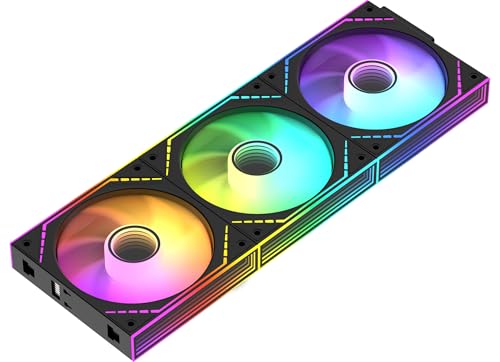
This 3-pack delivers 68.9 CFM of airflow per fan at up to 2000 RPM, with a noise level of 28.2 db. That is the loudest rating on this list, yet buyers still describe these as quiet — especially compared to older stock fans. The 2000 RPM top speed gives you headroom to push serious air when your GPU is under load.
The a neat extra is the infinity mirror lighting. ARGB fan blades plus dual-side mirrors create a fuller, layered glow inside glass-panel cases, and the daisy-chain connections keep wiring tidy. All three fans link together, so you manage them with one PWM cable and one ARGB cable. Owners mention a 30°C case temperature drop, bright ARGB, and flawless SignalRGB sync.
At 100 g each, these are featherweight compared to the Noctua at 195 g. They spin 11% faster than the Noctua’s 1800 RPM max, but the sound profile is different — the Thermalright is more of a low whoosh at speed. The 3-pack for roughly the price of one premium fan makes this the smart buy for a full case refresh.
The smart-money pick: Three fans with ARGB and solid airflow for the cost of one premium fan — the value equation is hard to argue with.
One note: Owners mention a slight wobble on some units, and all fans must face the same direction, so you cannot mix intake and exhaust orientation in one daisy chain.
Reach for this if: You want a full RGB case makeover on a budget and do not mind a touch more noise at max speed.
Look elsewhere if: You are building a silent, no-frills rig where black plastic and bare performance are the goal.
3. Fractal Design Momentum 12 RGB
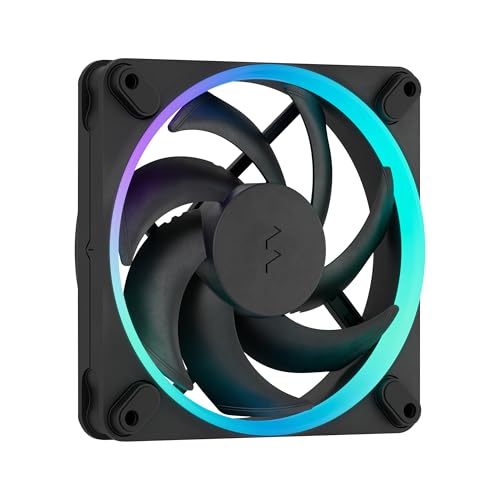
A radiator specialist with a barely-there 1 db noise floor.
The headline spec here is the 1 db noise level, a figure that makes this one of the quietest 120mm fans available. That extraordinary silence comes from a swept blade design that cuts turbulence at high RPM, plus a true Fluid Dynamic Bearing with an inner herringbone structure for smooth, durable rotation.
These blades are made of Liquid Crystal Polymer (LCP), a rigid material that keeps them from warping at high speeds, so they stay quiet and efficient. The ARGB Gen 2 ring light lets you create animated effects, and the fan’s PWM (pulse-width modulation, a way to control speed) range includes a Zero RPM mode — it stops completely under light load and only spins up when your system heats up, saving noise and energy.
Liquid-cooling customers note fluid temperatures between 27.1°C and 32.9°C on radiators. One owner says, “Noise level are low, I can barely hear it,” confirming the quiet operation. The catch: the 4.72″L x 0.98″W x 4.72″H frame requires your case to accept a standard 120mm fan, and the light diffusion around each LED is less smooth than the product photos suggest, so don’t expect perfect glow.
Why It Shines
- Extreme 1 db noise rating for near-silent operation
- LCP blades stay rigid and efficient at speed
- Zero RPM mode stops the fan under light load
- Fluid Dynamic Bearing for smooth rotation
What To Know
- Light diffusion around LEDs is not as even as the photos
- Power connector accepts 3-pin or 4-pin, so check your header
The silent-radiator pick: For liquid-cooled builds where every decibel counts, this fan is a natural fit.
Who should skip: If you want bold, evenly diffused RGB across the whole blade, the lighting here is a polite ring rather than a light show.
4. AsiaHorse COSMIQ 120mm RGB 3-Pack

Infinity mirror lighting with a built-in microphone that dances to your music.
The COSMIQ stands apart with its premium infinity mirror design — a layered, tunnel-like RGB effect that looks far more expensive than the price suggests. A built-in high-sensitivity sound pickup supports 8 music rhythm light modes, so the fans pulse and shift with game audio or your playlist without any extra software.
Performance is solid: 68.5 CFM of airflow at up to 2000 RPM, with noise held to 29 db. The daisy-chain design snaps fans together, dramatically cutting cable clutter — one owner replaced 9 old fans’ worth of cabling with a single tidy chain. The included controller gives independent lighting control without needing a motherboard ARGB header.
With a 4070Ti and 7800X3D, owners see GPU temps of 60–65°C under load. The catch is the classic one for RGB fans: at full 2000 RPM, the noise creeps up, and build quality is good but not premium-grade.
The light-show pick: If your case has a glass panel and you want it to look alive, the infinity mirror plus music sync is the most fun you can have per fan.
The honest note: The 29 db rating is the second-highest here, so pure quiet is not this pack’s specialty — style is.
Grab this pack if: You want a statement-piece RGB build with easy daisy-chain wiring and music-reactive lighting.
Pass if: You are after maximum silence — the Thermalright pack matches the airflow and costs less.
5. CORSAIR RS120 ARGB 120mm Triple Pack
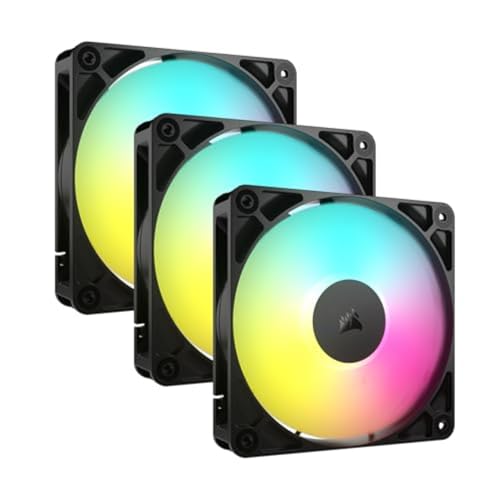
High static pressure that punches air through radiators without the roar.
With 72.8 CFM of airflow and a static pressure of 2.8mm-H2O, this is the strongest radiator performer on the list. Static pressure is what matters when a fan sits against a radiator’s dense fins — it measures the push needed to force air through obstructions. The RS120’s 2100 RPM max speed gives it real muscle.
Corsair’s AirGuide technology uses anti-vortex vanes to direct airflow in a focused column at your hottest components. The Magnetic Dome Bearing keeps things smooth and quiet at lower speeds, and the daisy-chain design lets you run the whole triple pack through one 4-pin PWM connector and one 5V ARGB connector.
The noise spec of 36 db is the highest on this list, so this is not a silent fan at full tilt. Owners note the RGB shines bright enough to be visible in daylight, and the software is easy to use. One common gripe: the daisy-chain cables are overly long and can be confusing to route, though a little cable management solves it.
The Muscle
- 72.8 CFM airflow with 2.8mm-H2O static pressure
- AirGuide vanes focus airflow on hot components
- Daisy-chain wiring keeps the triple pack tidy
- RGB visible even in daylight
The Cost of Power
- 36 db noise rating is the loudest here at full speed
- Daisy-chain cables run long and need careful routing
The radiator-first pick: If your build is liquid-cooled and you need fans that push through dense fins, the RS120’s static pressure leads the way.
Think twice if: Silence at high RPM is your priority — the Noctua and Fractal options are far quieter.
6. Thermaltake CT140 EX ARGB 3-Pack

Magnetic snap-together fans that move 94.95 CFM with a reverse-blade trick.
This is the airflow king of the list, pushing 94.95 CFM per fan. The reversed blade design means the RGB ring stays visible no matter which direction the air flows — so you can use these as intake, exhaust, or radiator fans without hiding the lighting. The fan frame is 140mm, a step up from the 120mm standard, which is why the airflow number is so high.
MagForce 2.0 magnetic connections snap fans together with large contact pads, so installation is genuinely faster than screwing and wiring each one. No humming at full speed, thanks to anti-vibration rubber pads and a solid frame. The 9 addressable LEDs per fan sync with major motherboard software for full customization.
Owners have fit these into Thermaltake Tower cases perfectly, upgrading top outflow from 280mm to 360mm for better airflow over RAM and SSDs. The noise rating is 32.8 db — quiet for moving this much air, though not silent. The catch: this 140mm size needs a case with 140mm mounting points, and the pack is only sold as a set of three.
The Big-Air Advantage
- 94.95 CFM airflow — the highest on this list
- Magnetic snap connection speeds up installation
- Reverse blades keep RGB visible in any orientation
- Anti-vibration pads prevent humming
Size Matters
- 140mm size only fits cases with 140mm mounts
- Not sold as singles, so partial builds overbuy
Reach for this if: You have a full-tower case with 140mm mounts and want maximum airflow with magnetic convenience.
Look elsewhere if: Your case is 120mm-only — check your mounting points before buying.
7. Noctua NF-A12x25 G2 PWM Sx2-PP chromax.Black
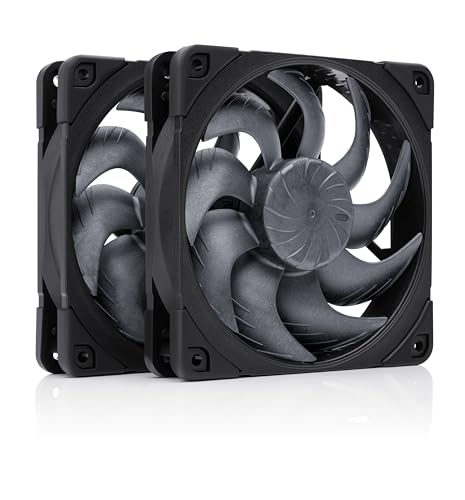
The famous Noctua fan in stealth black, tuned as a matched pair for push-pull radiators.
This is the answer for owners who love Noctua performance but cannot live with the brown-and-beige look. The chromax.Black version keeps all the engineering — Sterrox LCP blades, Progressive Bend impeller, Flow Acceleration Channels — in a sleek all-black finish with black anti-vibration mounts. It delivers the same 107.3 m³/h airflow at a 22.5 db noise level as the single G2.
The special trick here is the matched pair tuning. The two fans are slightly off-set in speed by about +/-50 RPM to avoid acoustic interaction — the “beat frequency” hum you can get when two identical fans spin side by side. This makes the pair ideal for push-pull radiator setups (one fan pushing air in, one pulling it out) or side-by-side case mounts.
Buyers call these the best 120mm fans on the market, noting they are inaudible except at full speed, where the sound stays low and musical. One review sums it up: “They move a ton of air while remaining dead silent under normal loads,” so you get strong airflow without the hum. The premium is steep — this two-fan set costs roughly the same as a full triple-pack elsewhere — but the longevity and silence are the payoff, making them ideal for quiet builds where budget is secondary.
The premium-pair pick: For push-pull radiators and side-by-side mounts, the matched tuning eliminates the hum other fan pairs produce.
The honest cost: You pay a real premium for two fans, and the 1800 RPM max is lower than flashier 2000 RPM rivals — but owners consistently say it stays quiet enough that the speed gap never matters.
Best for: Enthusiasts building a push-pull liquid-cooled rig who want matte-black fans that are functionally silent.
Not for: Budget builds or anyone who wants RGB — this pair is pure performance with zero lighting.
Understanding the Specs
Airflow (CFM)
CFM stands for cubic feet per minute, and it measures how much air a fan moves in open space. Higher numbers mean more air pushed through your case. But this number alone is misleading — a high-CFM fan can still fail on a radiator. Always check CFM alongside static pressure to know whether a fan suits case airflow or radiator duty.
Static Pressure (mm-H2O)
Static pressure measures a fan’s ability to push air through resistance — think radiator fins, dust filters, or dense heatsinks. It is expressed in mm-H2O, millimeters of water column. A fan with high static pressure keeps airflow strong even when bolted against a radiator. For case fans in open space, you want CFM; for radiators, you want static pressure.
PWM Control
PWM stands for pulse-width modulation, a 4-pin connection that lets your motherboard precisely control fan speed in response to temperature. This is how fans run near-silent at idle and spin up under load. Fans without PWM run at a fixed speed or use simple voltage control, which is less precise. For a quiet gaming build, PWM control is the feature to look for.
Bearing Quality
The bearing is the part the fan spins on, and it decides both noise and lifespan. Rifle bearings are cheap and work fine. Fluid Dynamic Bearings (FDB) are smoother and quieter, which is why premium fans use them. Noctua’s SSO2 bearing is rated for 150,000+ hours. If you want a fan to outlive your whole build, bearing quality is the spec that matters most.
FAQ
How many case fans do I actually need for a gaming PC?
What is the difference between airflow and static pressure fans?
Will a 140mm fan fit in a case made for 120mm fans?
What does the RPM number really mean for case fans?
Do ARGB fans need a special controller to work?
Why do premium fans cost so much more than budget ones?
What is a reverse blade fan and why would I want one?
Is a louder fan always a more effective cooler?
Should I buy a 3-pack or single fans to save money?
Final Thoughts: The Verdict
If you want one dependable pick, the case fans for gaming pc winner is the Noctua NF-A12x25 G2 because it pairs the strongest engineering with genuinely silent operation. If you want ARGB style on a budget, grab the Thermalright TL-M12Q-S 3-pack. And if you are building a push-pull liquid-cooled rig with an all-black theme, the Noctua chromax.Black Sx2-PP is the pair to reach for. The Noctua earns near-perfect owner scores, while the Thermalright trio offers the best cooling per dollar.
How We Picked
We do not accept paid placement. Every pick is matched to a real buyer and a real use-case; we do not hands-on test units.
Sources & Methodology
Specifications: manufacturer listings and product documentation. Review insights: verified customer reviews, as of August 2026. Pricing: not shown on this page (it changes often); check the current price via the retailer link.
As an Amazon Associate, Gadgets Feed earns from qualifying purchases. This does not affect which products we feature.