
Our readers keep the lights on and my morning glass full of iced black tea. As an Amazon Associate, I earn from qualifying purchases.
Specs are compiled from manufacturer listings and verified buyer reviews and can change over time — please confirm the key details on the product page before buying.
If your PC sounds like a hairdryer during a game, the fans are usually the culprit — not the graphics card. A good fan moves more air at a lower speed, so your components stay cool and your room stays quiet. This guide breaks down the picks worth your money by airflow, noise, and how easy they are to wire up.
I’m Min — the founder and writer behind Gadgets Feed. This guide is built by comparing the manufacturers’ published specifications and the patterns across verified customer reviews, so you get each pick’s real strengths and trade-offs instead of marketing spin.
Every pick below was chosen for measured airflow and low noise, not spec-sheet numbers that rattle your desk in real use. Whether you are building a fresh rig or quieting a loud one, these picks cover every budget and mount.
Our Picks at a Glance


How To Choose The Best Case Fans
The fan that fixes a hot, noisy build is rarely the one with the biggest number on the box. What matters is how much air it moves, how loud it gets doing it, and whether it fits where you need to mount it. Get those three right and the rest is cosmetic.
Airflow Versus Static Pressure
Airflow (measured in CFM, or cubic feet per minute) tells you how much air a fan pushes through open space. Static pressure is the force it uses to push air through something in the way — a radiator, a dust filter, or a dense mesh front panel. A fan with big airflow but weak pressure stalls out against resistance. If your case has a mesh front or you are cooling a radiator, pressure matters as much as airflow.
PWM Control And Noise
PWM (pulse-width modulation) is just the four-pin plug that lets your motherboard set the fan speed automatically. Your PC spins the fans up when the CPU heats up and slows them down when it is idle. Noise level, measured in decibels (dB), is the number to compare here — a fan rated near 19 dB will be nearly silent in a quiet room, while one up near the mid-30s is audible across the room. Plug a fan into a three-pin header and it just runs flat-out, which is what makes cheap builds noisy.
Bearing Type And Wiring
The bearing is the small mechanism the fan spins on, and it decides how long the fan lasts and how much it vibrates. Fluid dynamic bearings and magnetic dome bearings run smoother and quieter than the simple sleeve bearings in bargain fans. Daisy-chaining means you link several fans through one connector instead of running a separate cable for each — the single biggest quality-of-life feature if you are filling a case with three or more fans.
Quick Comparison
| Model | Best For | Airflow (CFM) | Max Speed (RPM) | Noise (dB) | Amazon |
|---|---|---|---|---|---|
| be quiet! Silent Wings 4 120mm PWM★ Best Overall | Quiet-focused builds | 48.7 cfm | 1600 rpm | 18.9 db | Amazon |
| NZXT F120Q 120mm Quiet AirflowTop Performer | Intake and exhaust airflow | — | 1700 rpm | 25.1 db | Amazon |
| Thermalright TL-C12C-S 5-Pack | Filling a whole case on a budget | 66.17 cfm | 1550 rpm | 25.6 db | Amazon |
| Thermalright TL-M12Q X3 3-Pack | RGB builds with strong airflow | 68.9 cfm | 2000 rpm | 28.2 db | Amazon |
| ARCTIC P14 Pro PST 5-Pack | Radiators and restricted airflow | — | 1800 rpm | — | Amazon |
| UTLGAMENG 7-Pack ARGB Fans | Reverse-blade glass-panel builds | — | 1550 rpm | — | Amazon |
| CORSAIR RS120 ARGB Triple Pack | Radiator cooling with ARGB syncing | 72.8 cfm | 2100 rpm | 36 db | Amazon |
In‑Depth Reviews
1. be quiet! Silent Wings 4 120mm PWM 1600 RPM
Our pick — over 4.5★ from 650+ verified ratings; the strongest balance of quality and price.
The quietest fan on this list, built for people who want to forget their PC is on.
The 18.9 db noise rating is the number that separates this fan from everything else here, and it is the only pick in this list that dips below 25 db. For a bedroom or studio build, that gap is the difference between a quiet machine and a machine you notice. The 1600 rpm top speed keeps a ceiling on how hard it can ever spin, which is exactly why it stays tame.
A 6-pole motor and fluid-dynamic bearing (a self-lubricating bearing that cuts vibration and friction) mean the thing does not develop the low hum that budget fans do after a year. Funnel-shaped air outlets and tight blade-to-frame clearances build the static pressure needed to push through a filter or mesh front. What owners settle on is the silence — check whether the PC is even switched on levels of quiet, the kind you only catch during a heavy photo export.
For a single replacement or a two-or-three fan quiet build, this is the one to reach for. The airflow here is 48.7 cfm versus the 66.17 cfm from the Thermalright 5-pack above — noticeably less, but for a quiet room you are trading raw push for silence, and that trade is the whole point. Mounting hardware gives you both anti-vibration push pins and a screw option, so you can pick whichever fits your case.
Where it quietly shines
- 18.9 db — the lowest noise number in this entire list
- Funnel-shaped outlets and tight tip clearance build real static pressure
- 6-pole motor and fluid-dynamic bearing reduce vibration and long-term hum
- Anti-vibration push pins plus a screw-mount option cover either install
Worth knowing first
- 48.7 cfm airflow is modest — this favors quiet over raw push
- One fan per box, so a full case fill adds up
- Only one available here
Settle on this if: your build has to disappear into a quiet room and you want the calmest fan spec on the page.
Hold off if: you are filling a whole case with mesh panels and want maximum airflow per purchase — a five-fan bundle buys more air for less.
2. NZXT F120Q 120mm Quiet Airflow PC Case Fan – Black
A nine-blade airflow specialist tuned for intake and exhaust, not radiator duty.
If your build needs a fan pulling cool air through an open front or pushing heat out the top, the F120Q is aimed straight at you. It runs up to 1700 rpm — a touch quicker than the Thermalright 5-pack’s 1550 rpm — and the fluid dynamic bearing inside carries a rated 60,000-hour lifespan, so this is a fan you install once. Nine sickle-style blades and a chamfered frame (the angled edge that focuses the air) push a concentrated stream deep into the case instead of scattering it.
The honest limit is written right into how it is built. This is an airflow fan, not a pressure fan, and one buyer’s summary of it says it plainly: use the static-pressure version instead “if you want to use them with a radiator or in a restricted environment.” Against a dense radiator or a thick dust filter, the F120Q loses its advantage. In an open intake or exhaust mount, it does exactly what it was designed to do — quietly move a lot of air.
Quick tip if you are mounting this in a case like an NZXT H5: buyers report it works cleanly as a bottom intake. The one snag worth flagging up front is the mounting screws — a few people find them frustrating to work with, though the fan itself is well regarded. That is a five-minute annoyance, not a dealbreaker.
The real strength: that 60,000-hour bearing rating means this is a set-and-leave-it part — you are not revisiting it every couple of years.
Where it gives ground: the moment your fan faces real resistance, a pressure-focused pick beats it. Know which job the fan is doing before you commit.
Reach for this if: you want dependable, quiet airflow through open intake and exhaust mounts and appreciate a long-rated bearing.
Look elsewhere if: you are cooling a radiator or pushing through a heavily filtered front — the pressure-focused options here suit that job better.
3. Thermalright 5 Pack TL-C12C-S 120mm ARGB Case Fans

Five ARGB fans that fill a complete case for less than some brands charge for two.
You get five fans in this box — five times the count of the be quiet! and NZXT picks here — which is the whole reason it tops the value stack. Each one pushes 66.17 cfm of airflow with 1.53 mm H2O of pressure, so these work as intake, exhaust, or on a CPU cooler. Compared to the be quiet! Silent Wings 4’s 48.7 cfm, that is meaningfully more air per fan, and the 25.6 db noise rating keeps them civil in the process.
The build keeps the price honest without feeling cheap. An S-FDB bearing (a sealed fluid bearing that reduces blade wobble) keeps things smooth and cuts the vibration that causes drone. The translucent ARGB blades diffuse the lighting softly so it glows rather than spotlights, and up to 17 lighting modes sync through your motherboard. Daisy-chaining the PWM and ARGB cables means no separate hub is needed — a real convenience when you are wiring five fans.
This is also the rare budget set that holds up on a radiator: one buyer runs a single fan on a 120mm radiator and keeps a 7800X3D chip under 75 degrees in games. As they put it, the fans are “quieter than my older fans, dirt cheap, and look amazing.” If you are starting a build and want fans, cooling, and lighting in one purchase, this is the value pick.
What you are actually getting
- Five 120mm fans in one box — enough to fill a whole case
- 66.17 cfm airflow and 1.53 mm H2O pressure per fan
- 17 ARGB lighting modes with no hub needed thanks to daisy-chaining
- S-FDB bearing smooths operation and reduces blade wobble
The fine print
- 25.6 db is louder than the 18.9 db silent pick on this list
- 1550 rpm ceiling is fine for most builds but not a pressure monster
- No controller in the box — you need an ARGB header or a separate controller
Choose this if: you are filling a case from scratch and want airflow, quiet operation, and lighting bundled together for the least spend.
Skip if: your build lives in a hushed room and every decibel counts — pay up for the 18.9 db pick instead.
4. Thermalright TL-M12Q X3 120mm ARGB Case Fans, 2000RPM, 68.9CFM, 3-Pack

The most airflow in a three-pack, dressed up with dual-side infinity-mirror lighting.
Pick this if your case has a glass side panel and you actually want people to see inside it. The dual-side infinity mirror gives each fan a fuller, deeper look from both faces — useful when a fan sits on a visible side or bottom position where a plain frame would look flat. It is the flashier sibling of the TL-C12C-S above, and it swings for a different buyer.
Under the lighting, this is a serious performer. It spins to 2000 rpm and pushes 68.9 cfm at 2.21 mm H2O — the highest airflow of any three-pack here, and tops in this list on raw push. The daisy-chain connection links the fans for tidier wiring, and the 4-pin PWM plus 3-pin 5V ARGB plugs work with compatible motherboard headers and lighting software. The trade-off is noise: at 28.2 db it is louder than the TL-C12C-S’s 25.6 db, and owners say you can hear it even at low speed, so it is a fan for airflow-forward builds rather than silent ones.
Installation is where it pays attention to detail — a few owners mention the cable-connection instructions could be clearer for first-time builders, and the 2+1 split setup wants a second dongle beyond the one included. Once the wiring is sorted, it earns its keep as front intake. If you are building around a recent CPU and RGB matters as much as cooling, this is the standout here.
Where it stands out: 68.9 cfm at 2000 rpm is the strongest airflow of the three-fan packs on this page, and the dual-side mirror makes it look the part.
Plan around this: the 28.2 db rating and the extra cable dongle — factor both in before you commit to a purely silent build.
Buy this when: you are chasing maximum airflow and want lighting that reads well through glass.
Think twice if: quiet is your priority — step down to a lower-speed, lower-db fan instead.
5. ARCTIC P14 Pro PST 5-Pack 140mm PWM Fans
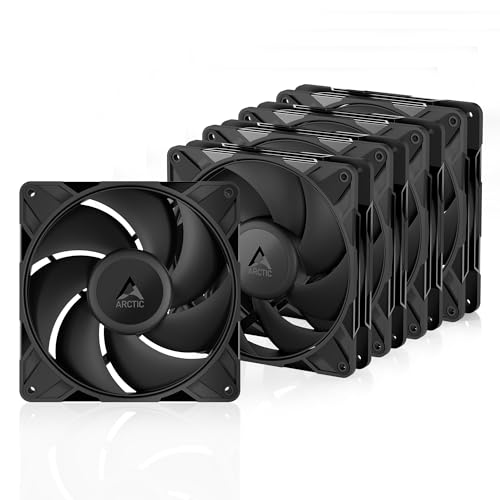
Five larger 140mm fans built to shove air through radiators and dense mesh.
This is the pick for anyone cooling a radiator or fighting a thick, tight mesh front panel. These are 140mm fans — bigger blades that move more air at lower speed — and they are rated for a very high static pressure, which means the airflow keeps its punch even when a radiator or a perforated panel is in the way. If the F120Q above is the open-airflow specialist, this is the pressure specialist.
The speed is adjustable up to 2500 rpm through the 4-pin PWM connection, and below 5% PWM the fan stops completely — a handy way to go fully silent when your system is idle. A fluid dynamic bearing reduces operating noise and, with minimal gaps and automatic balancing, the whole assembly cuts vibration. The blades were redesigned around performance and low noise, which pays off most at low speeds.
The clear fit-note is sound: high airflow and high speed mean the noise climbs when you push them hard, and at full tilt they are audible. Owners run them quiet at idle and quiet in the middle of the range, but past that point it is a fan that lets you know it is working. That is the nature of a pressure fan, not a defect. If you have the room for 140mm mounts and want fans that push through anything, this is the set.
Why it suits radiator builds
- High static pressure pushes air through radiators and dense mesh panels
- 2500 rpm ceiling with adjustment via 4-pin PWM, plus a full stop below 5% PWM
- 5-pack with a Y-cable splitter and fluid dynamic bearing
- Redesigned blades balance performance and low noise at low speeds
Before you buy
- Gets loud at high speed — not a whisper build at full tilt
- Short cables and a Y-splitter some buyers would rather avoid
- Mounting holes noted as small; the supplied screws strip easily
Go for this if: you are running a radiator or a heavily filtered case and need pressure over quiet.
Pass if: your build lives on a whisper-silent desk and rarely sees high speeds — a lower-speed design serves you better.
6. UTLGAMENG 7 Pack 120mm ARGB PC Fans (4 Forward + 3 Reverse)

Seven fans, and three of them are reverse-blade — built to show their face, not their back.
The reverse-blade idea is what sets this kit apart. Standard fans face one way, so a fan mounted on the bottom or the front of a glass case shows you its ugly back. Reverse-blade fans spin the other way so the frame’s face stays visible, and this pack hands you three of them alongside four forward-blade fans — a combination most kits do not offer. If you care how the inside of a glass-panel build looks, that is the reason to pick these.
Each fan runs 1550 rpm and gives off a 19 db noise rating — the second-quietest spec in this entire list, behind only the be quiet! 18.9 db pick, and surprisingly quiet for a budget set. Twenty-eight ARGB LEDs per fan light them up, and the count was increased by 25% over the previous version for both brightness and lifespan. They pair with a 4-pin PWM header, run on 12 volts DC, and daisy-chain for tidy wiring. The infinity-mirror lighting mirrors what the pricier Thermalright fans do, at a friendlier outlay.
Owners run these four as exhaust and three as intake and report bright, even lighting that works with any RGB hub or motherboard ARGB port. The catch is cable volume — with seven fans in one kit you will be managing a lot of wire, and the buyer guidance is to use a hub and avoid chaining more than three together. Budget time for cable routing and this kit delivers seven fans of cooling and light.
The clever bit: three reverse-blade fans mean you can mount intake and exhaust fans without ever showing a bare back frame through your glass panel.
The honest catch: seven fans generate seven fans’ worth of cabling — plan the routing before you start plugging things in.
This is for you if: you want a full case of quiet, bright, mirror-lit fans and a clean look from every angle.
Move on if: you are filling one or two mounts and would rather not juggle the extra wiring a seven-fan kit brings.
7. CORSAIR RS120 ARGB 120mm PWM Fans – Triple Pack
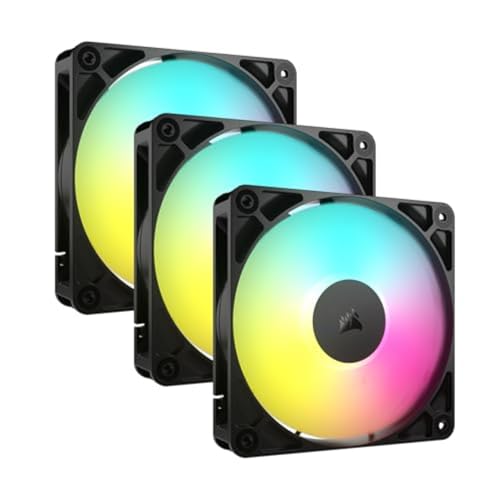
A three-pack with the highest airflow on this page and radiator-grade static pressure to match.
This is the fan for a build that pairs ARGB looks with real performance. It pushes 72.8 cfm — the most airflow of any pick here — and backs it with 2.8 mm H2O of static pressure, which is why it works as a radiator fan and a case fan alike. If you want one fan type to handle both intake and a liquid-cooling radiator, this covers it. Compared to the Thermalright TL-C12C-S’s 66.17 cfm, it moves more air and spins higher, up to 2100 rpm.
The clever part is Corsair’s AirGuide technology — anti-vortex vanes (small fins) that straighten the airflow and point it at the components that need it. Eight LEDs per fan light it up, and daisy-chaining lets you control multiple fans through a single 4-pin PWM connector and a single +5V ARGB connector, so your cable runs stay clean. A magnetic dome bearing keeps the spinning smooth over the long haul.
The fit-note here is noise. At 36 db this is the loudest spec on the list, and while the fans run quietly under light loads, they make themselves heard when pushed. If you are building a silent PC, this is not the set for that goal. If you are building a bright, high-airflow machine and value the tidy daisy-chain wiring, this is the premium pick. It also plays nicely with any RGB software rather than demanding a brand controller.
What the premium buys you
- 72.8 cfm — the highest airflow of any fan on this list
- 2.8 mm H2O static pressure makes it a genuine radiator fan
- Daisy-chain control through one PWM and one ARGB connector
- Works with any RGB software, no brand controller required
Where it costs you
- 36 db is the loudest rating here — audible when the fans spin up
- Daisy-chain setup can confuse first-time builders
- One available here
Choose this when: you want maximum airflow and radiator-ready pressure in one fan and can live with some noise under load.
Step away if: silence is the whole point of your build — the lower-db picks above fit that goal better.
Understanding the Specs
Airflow (CFM) and Static Pressure (mm H2O)
Airflow, measured in CFM (cubic feet per minute), is how much air a fan moves when nothing is in its way. Static pressure, measured in mm H2O, is how hard it pushes through resistance — a radiator, a filter, a mesh panel. A high-CFM fan is great for open intake and exhaust. A fan with both high CFM and high pressure, like the 72.8 cfm and 2.8 mm H2O Corsair, works for radiators too. Match the fan to the job: open mounts want airflow, restricted mounts want pressure.
Noise Level (dB) and PWM
Noise level in dB is the sound the fan makes, and it is the number to compare if quiet matters — a fan near 19 db is nearly silent, while one in the mid-30s is clearly audible. PWM (pulse-width modulation) is the four-pin control that lets your motherboard set the speed automatically, spinning fans up when the system heats up and down when it cools. A fan plugged into a three-pin header just runs at full speed, which is why a properly PWM-controlled fan can be quiet most of the time even if its top-end rating is higher.
FAQ
How many case fans do I actually need?
What size fan fits my case?
Is a higher RPM fan always better?
Do I need a controller for ARGB fans?
What is the difference between air pressure and airflow fans?
How long do case fans last?
What does daisy-chaining fans mean?
Are quiet fans worth choosing over high-airflow ones?
Final Thoughts: The Verdict
For most builders, the best case fans winner is the be quiet! Silent Wings 4 because its 18.9 db rating is the lowest here, making it the pick for anyone who wants a build they never hear. If you are filling a whole case and want airflow, cooling, and lighting bundled together, grab the Thermalright TL-C12C-S 5-Pack. And for a radiator build that needs real static pressure, the ARCTIC P14 Pro 5-Pack is the one to reach for. One nudge before you close the tab: the CORSAIR RS120 has racked up more owner ratings than any other pick here at well over 2,500, which tells you it is the safest mainstream bet if you want confident airflow and radiator-ready pressure in one order.
How We Picked
We do not accept paid placement. Every pick is matched to a real buyer and a real use-case; we do not hands-on test units.
Sources & Methodology
Specifications: manufacturer listings and product documentation. Review insights: verified customer reviews, as of September 2026. Pricing: not shown on this page (it changes often); check the current price via the retailer link.
As an Amazon Associate, Gadgets Feed earns from qualifying purchases. This does not affect which products we feature.