
A slow, clunky checkout process is the fastest way to lose a customer waiting with a coffee and a pack of gum. Every second the register lags or the printer jams directly cuts into your daily sales, especially during a rush. The right unit for your store must handle high-volume, low-margin transactions without a hitch, integrating everything from barcode scanning to card payments into one fluid motion.
I’m Min — the co-founder and writer behind Gadgets Feed. My research for this guide focused on parsing hundreds of entry-level to professional-grade POS systems to identify the hardware that can actually survive a 14-hour convenience store shift and speed up your transaction times.
The goal is simple: find the best cash register for convenience store operations that balances high-speed processing with essential inventory tracking features.
How To Choose The Best Cash Register For Convenience Store
Selecting a cash register for a convenience store involves more than just comparing prices. You need a machine that can process a high volume of low-cost items quickly, integrate with payment processors, and keep your cash secure. Here are the key factors to focus on.
Transaction Speed vs. Feature Depth
Speed is king in a convenience store. Every second a shopper waits at the counter increases the chance they leave the items behind. Look for a system with a fast thermal printer (90mm/s or faster) and a responsive interface. Touchscreen systems offer quick navigation across departments and PLUs, while traditional ECRs with dedicated keys are physically tough against repeated daily presses.
Payment Integration and Connectivity
Convenience store transactions are increasingly cashless. Your register must either have a built-in card reader or be compatible with external payment terminals via USB or RS232. For an all-in-one experience, a system like the Square Terminal integrates card processing directly. For a modular setup, ensure your register has the necessary ports to connect a separate terminal, a barcode scanner, and a customer-facing display.
Durability and Security
Your counter is a high-traffic, high-spill zone. The unit needs a robust cash drawer with secure locking mechanisms and a metal or heavy-duty ABS body. Check for multiple cashier passwords to prevent unauthorized access to sales data and cash drops. A removable coin tray also helps organize the barrage of change you will handle daily.
Quick Comparison
On smaller screens, swipe sideways to see the full table.
| Model | Category | Best For | Key Spec | Amazon |
|---|---|---|---|---|
| Square Terminal | Mobile POS | All-in-one card payments | Built-in battery, chip/tap | Amazon |
| PYY Cash Register | ECR Bundle | Budget-friendly starter kit | 10,000 PLU capacity | Amazon |
| EOM-POS Bundle | Printer & Drawer | Square Stand/Register users | 80mm thermal printer | Amazon |
| Square Handheld | Mobile POS | Managing queues / line busting | Water & dust resistant | Amazon |
| Nadex CR360 | Traditional ECR | No monthly fees | 4,700 PLU lookups | Amazon |
| ZHONGJI SET01 | Touch POS | Full inventory & reporting | 15″ touch, 8GB RAM | Amazon |
| Clover Station Duo | Countertop POS | Dual-screen customer interaction | 14″ + 8″ dual displays | Amazon |
| ZHONGJI SET05 | Touch POS Bundle | All-in-one with scanner | i5 processor, 128GB SSD | Amazon |
| Petrosoft SmartPOS 129 | Full POS Station | High-volume stores | 15″ dual displays, 50+ processors | Amazon |
In‑Depth Reviews
1. Petrosoft SmartPOS 129

The SmartPOS 129 is the closest you get to an enterprise-grade POS without a multi-year contract. It comes with a 15-inch cashier touchscreen *and* a matching 15-inch customer-facing promo display, a cash drawer, a handheld 2D barcode scanner, and a thermal printer right in the box. The unit weighs nearly 58 pounds because it is built with industrial components, including an industrial motherboard.
Its biggest advantage for a convenience store is the ability to integrate with over 50 card processors and forecourt systems, meaning you can pick your own payment provider instead of being locked into one. The system runs a full POS software that includes inventory management, invoicing, and sales reporting, accessible through the touchscreen interface. It also offers a free initial setup call and a mobile app for on-the-fly price book updates.
The free mobile app helps manage basic tasks, but some users noted that the screen navigation has a short learning curve for beginners. Also, advanced reporting features for items like lottery tickets require their premium subscription tier, but the core POS functions for ringing up standard items work without any ongoing fee.
Why it’s great
- True out-of-box experience with all peripherals included
- Dual 15-inch displays speed up checkout and show promos
- Works offline when internet goes down during a shift
Good to know
- Requires a subscription for advanced item-level reporting
- Heavy, bulky footprint needs a dedicated counter space
2. Clover Station Duo

The Clover Station Duo is built specifically for speed. It features a 14-inch HD display for the cashier and an 8-inch touchscreen facing the customer, allowing them to confirm their order, add a tip, or pay without the cashier needing to spin the screen around. This dual-screen approach is excellent for reducing transaction times during a rush.
The system comes ready with an integrated receipt printer and a cash drawer right in the package. The software is intuitive, meaning staff training is minimal — a huge plus for a convenience store with high employee turnover. It is also expandable, allowing you to add handheld devices or extra printers and scanners as your business grows.
It requires a new merchant processing account through Powering POS, so you cannot use your existing processor. Some users reported frustration with the setup process and monthly fees. The unit itself is solid, but the total cost of ownership includes both hardware and ongoing processing rates.
Why it’s great
- Customer-facing screen speeds up payment and tip entry
- Intuitive software requires almost no staff training
- Expandable with additional peripherals and handhelds
Good to know
- Tied to a specific merchant processor (Powering POS)
- Monthly software and processing fees apply
3. ZHONGJI SET05

The SET05 takes the same base touchscreen system as the SET01 but adds an omnidirectional laser barcode scanner and a stainless steel cash drawer directly into the bundle. This is the most complete all-in-one package for a convenience store that needs to scan high volumes of packaged goods (chips, sodas, candy) at the counter.
It runs on an industrial motherboard with an Intel Core i5 processor, 8GB of RAM, and a 128GB SSD, providing snappy performance when loading the POS software and processing transactions. The 15-inch main touchscreen (1024×768) is responsive, and the 11.6-inch customer display shows the running total so customers can see their charges clearly.
The MSJ POS software included has a lifetime license and covers billing, orders, discounts, and promotions. The included laser scanner is a reliable workhorse for barcodes, though the software interface has a slight learning curve and some initial menu names were reported as non-English, requiring a bit of patience during setup.
Why it’s great
- Complete bundle with scanner, drawer, printer, and two screens
- Lifetime POS software license with no monthly fees
- Powerful i5 processor handles multi-tasking easily
Good to know
- Software setup can be non-intuitive, especially for first-timers
- Some interfaces have Chinese-language elements that need translation
4. ZHONGJI SET01

The SET01 is a desktop touchscreen POS system built around a 15-inch full flat touchscreen with a 1024×768 resolution. It comes with a built-in 58mm thermal printer, eliminating the need for a separate printer taking up counter space. The unit is powered by an industrial-grade i5 processor, 8GB of RAM, and a 128GB SSD, ensuring the system boots up fast and runs multiple reports smoothly.
The MSJ POS software provides a cash register function that includes billing, discount, and checkout workflows. It also supports customer management, basic data management, and order management, making it suitable for a convenience store that wants to track inventory without switching to a full ERP. The package includes a free keyboard, mouse, and 10 rolls of thermal paper.
Customer service is reported as excellent, with users praising the live support for helping install and configure the software remotely. However, the out-of-box experience lacks a printed manual, and some users had to figure out basic functions (like how to log in or program items) on their own. A few units arrived with defective scanners or display issues, so testing immediately upon arrival is recommended.
Why it’s great
- Built-in thermal printer saves counter space
- Lifetime POS software license, zero ongoing fees
- Responsive customer service for remote setup help
Good to know
- No detailed instruction manual included in the box
- Quality control varies — test all peripherals immediately
5. Nadex CR360
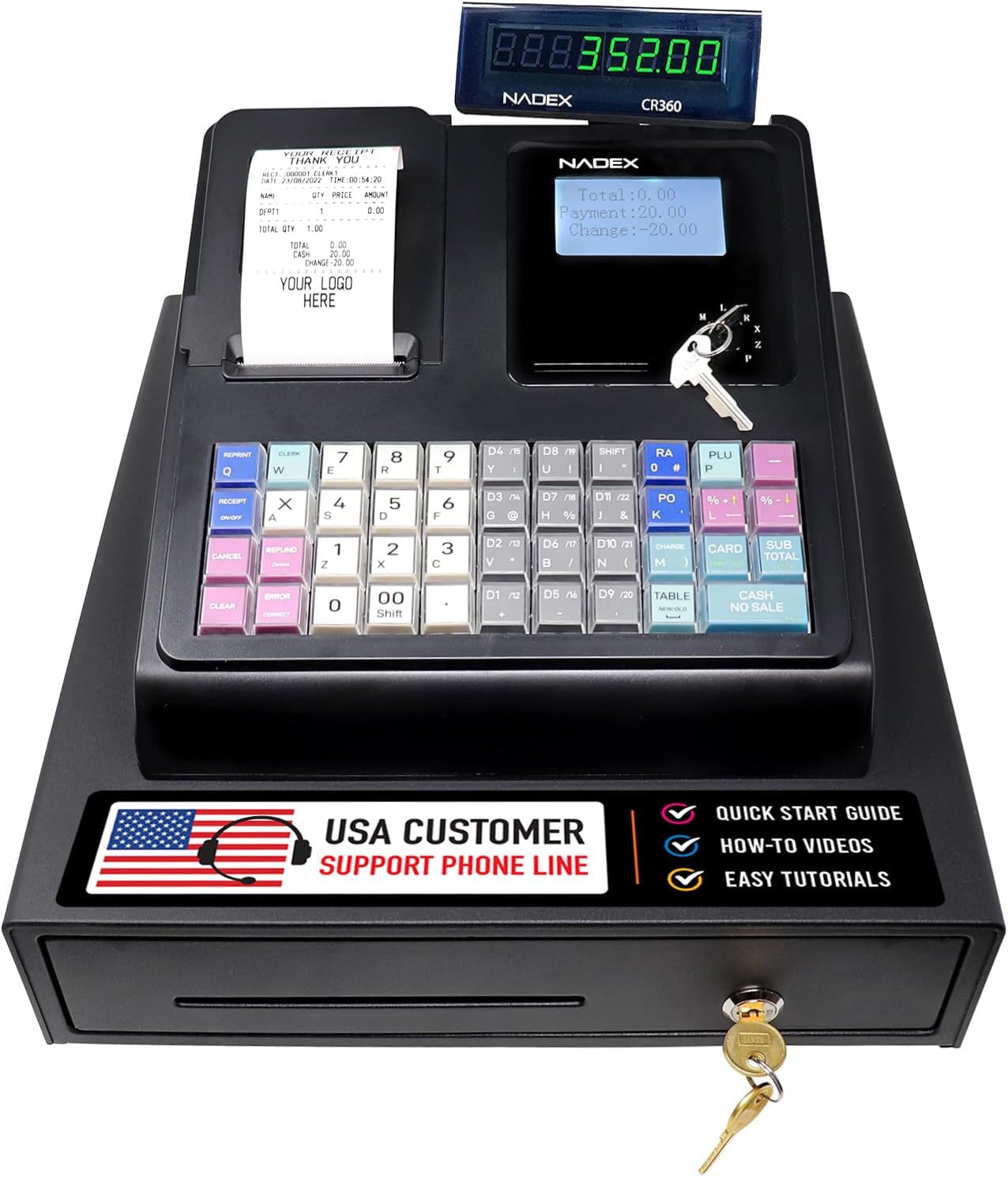
The Nadex CR360 is a traditional ECR (Electronic Cash Register) that does not require any monthly software fees or internet connectivity to function. It supports 4,700 PLU lookups, 50 departments, and 50 cashier codes, which is more than sufficient for a busy convenience store dealing with hundreds of unique SKUs. The integrated thermal printer uses standard 2-1/4 inch paper and prints quickly.
It features a 5-inch LCD operator display and an 8-digit customer display, along with a heavy-duty cash drawer that has 4 bill slots and 8 coin slots, plus a removable coin tray. The unit includes three dedicated command keys: one for cashier operations, one for manager functions, and one to lock/unlock the drawer. A serial port allows connection to an external barcode scanner or kitchen printer.
Setup requires some manual programming for PLUs and categories, but once configured, daily operation is extremely fast and simple. Users consistently praise Nadex customer service for replacing units under warranty without hassle. One buyer noted the register does not print a continuous journal tape, which may be a drawback if you need a paper audit trail.
Why it’s great
- Zero monthly fees or internet requirement
- Large PLU capacity (4,700 items) for your full inventory
- Excellent manufacturer support and warranty service
Good to know
- No continuous journal tape printing
- Initial programming takes time and patience
6. Square Handheld

The Square Handheld is a purpose-built mobile POS device that fits in your palm or pocket, weighing just 2.11 ounces. It is designed to bust lines — you can walk up to a customer waiting at the coffee station, scan their item, and process their card payment without them ever reaching the front counter. The device is rated to withstand water splashes and dust, which is vital for the counter environment.
It includes a built-in barcode scanner, a long-lasting battery that can handle an entire shift, and the ability to process payments offline (the transaction is stored and processed once Wi-Fi reconnects). It accepts all major credit and debit cards through tap, chip, or swipe. The slim design and comfortable grip make it easy to hand to a customer to complete their payment.
The device does not print physical receipts — it sends them via email or text. This is perfectly acceptable for a modern convenience store but may confuse older customers expecting a paper slip. The screen is bright and responsive, though the optional protective case can sometimes peel up a screen protector if not installed carefully.
Why it’s great
- Pocketable and portable — bust lines anywhere in the store
- Accepts payments offline and syncs later
- IP-rated water and dust resistance for counter spills
Good to know
- No receipt printer — only digital receipts
- Screen protector may peel with the official case
7. Square Terminal

The Square Terminal is a standalone, portable credit card machine that also functions as a basic register. It rings up sales, accepts all major payment types (chip, tap, swipe), and prints receipts from its built-in thermal printer — all in a device that weighs just 14.7 ounces. It is perfect for a convenience store counter where space is at a premium.
Processing chip cards takes about two seconds, and the built-in battery lasts an entire business day on a single charge, even with 20+ transactions daily. You can use it cordlessly anywhere in your store via Wi-Fi or a phone hotspot. The terminal syncs with your Square account, and your money is available as soon as the next business day.
It is designed for stores that already use Square for payment processing and want a simple, reliable device at the counter. The interface is clean and easy to navigate. The signature screen can sometimes be finicky with a stylus, and the device is not designed for high-volume manual PLU entry (no department keys), so it works best for businesses that do not need complex inventory management at the register.
Why it’s great
- Extremely compact, saves counter space
- Built-in receipt printer and all-day battery
- Payments processed in 2 seconds with next-day settlement
Good to know
- Not suited for high-volume manual item entry
- Requires Square processing account
8. EOM-POS Hardware Bundle

If you already own a Square Stand or Square Register, this hardware bundle from EOM-POS is the easiest way to add a professional cash drawer and thermal receipt printer. It includes an Epson USB thermal receipt printer (with autocut) and an EOM-100 cash drawer. The printer connects to the USB ports on the Square Stand with no installation required, and the cash drawer connects via a built-in RJ12 cable to automatically pop open when a sale is completed.
The thermal printer uses 80mm (3-1/8 inch) paper and does not require ink or toner, saving you on consumable costs. The printer can do automatic duplex printing. The cash drawer is sturdy, locking mechanism is reliable, and the included two-year full warranty with lifetime tech support provides peace of mind for a convenience store environment.
Setup is genuinely plug-and-play for Square users. However, some buyers reported that the printer was not immediately recognized by their Square setup if they used older hardware versions. It is also worth noting that this is purely a hardware bundle — there is no POS software included, so it is only useful if you already have a software ecosystem like Square or a PC-based POS system.
Why it’s great
- True plug-and-play with Square Stand/Register
- No ink or toner needed, low running costs
- Included two-year warranty and lifetime support
Good to know
- Requires a separate POS system (like Square)
- Compatibility issues reported with non-Square systems
9. PYY Cash Register
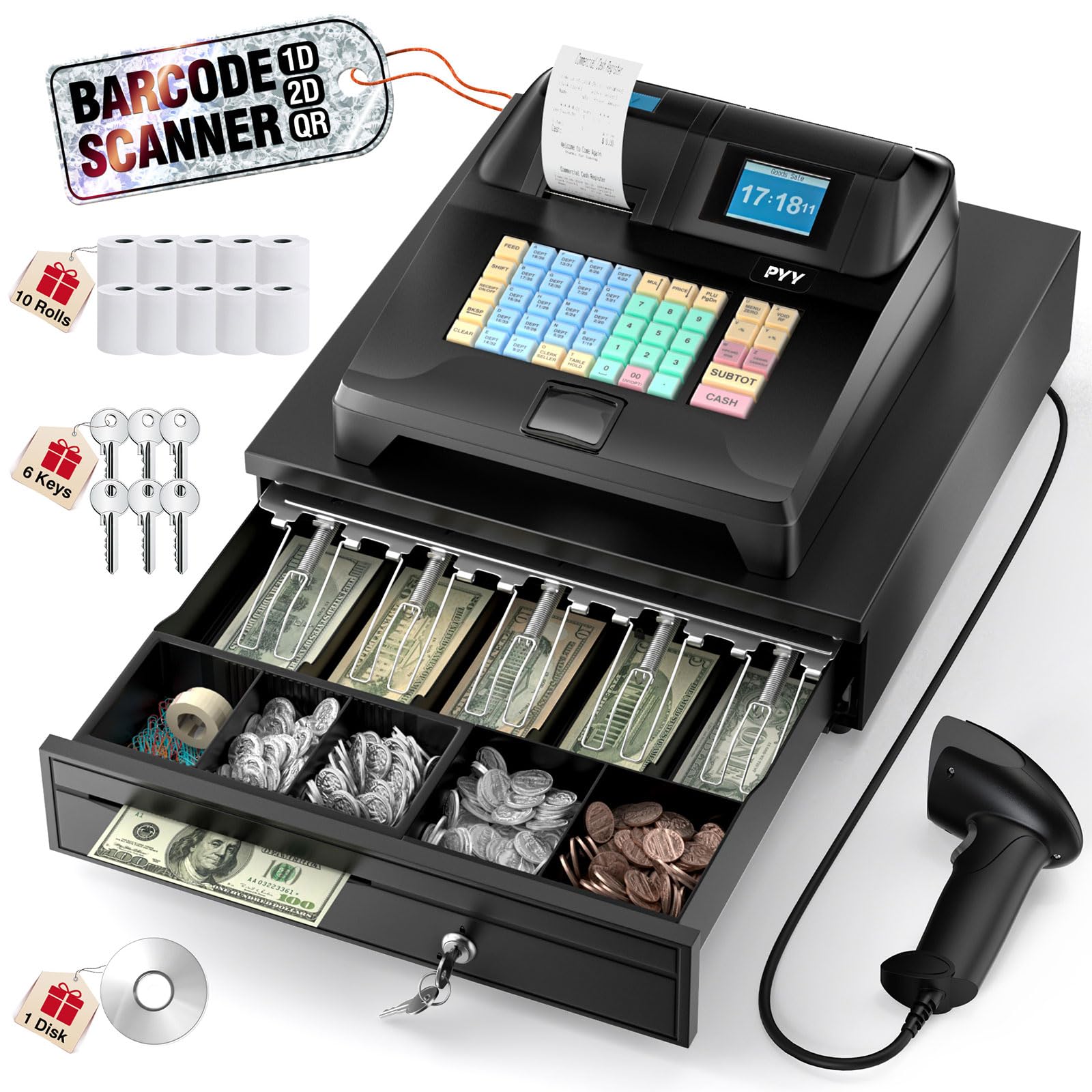
The PYY Cash Register is an entry-level ECR bundle that punches above its price point. It integrates a receipt printer, a 2.8-inch TFT LCD for the cashier, an 8-digit LED for the customer, a cash drawer, and a corded barcode scanner into one unit. The thermal printer reaches up to 90mm/s, which is genuinely fast for this class of register, keeping the checkout line moving.
It supports 200 departments, 10,000 PLU items, 1,000 membership profiles, and 9 tax rate settings — enough depth for a small to medium convenience store. The ABS casing is explicitly waterproof and oil-resistant, an overlooked but critical feature for a counter that sees coffee spills and cleaning liquid. The cash drawer has 5 bill slots and 5 coin slots, with 6 keys total for dual security.
Setup is straightforward but the date format is hard-coded to DD/MM/YY, which can confuse cashiers in the US where MM/DD/YY is standard. Additionally, you cannot customize the store name on the receipt, which may be a dealbreaker for branding. The hardware quality is solid for the money, though the software lacks advanced reporting found in more premium systems.
Why it’s great
- Fast 90mm/s thermal printer for a budget machine
- Waterproof and oil-resistant ABS casing
- Includes scanner, drawer, and paper rolls in the box
Good to know
- Date format locked to DD/MM/YY
- Cannot add store name to receipts
FAQ
Can I accept credit cards with a traditional ECR like the Nadex CR360?
What happens to my sales data if the power goes out mid-transaction?
Do I need an internet connection to use a cash register for my convenience store?
Final Thoughts: The Verdict
For most users, the best cash register for convenience store winner is the Clover Station Duo because it balances an intuitive dual-screen interface, built-in payment processing, and expandability. If you want the most complete all-in-one bundle with zero monthly fees, grab the ZHONGJI SET05. And for a simple, affordable setup without any software subscriptions, nothing beats the Nadex CR360.