
Our readers keep the lights on and my morning glass full of iced black tea. As an Amazon Associate, I earn from qualifying purchases.
Specs are compiled from manufacturer listings and verified buyer reviews and can change over time — please confirm the key details on the product page before buying.
A cat camera that stays fixed in one spot is little better than a security cam aimed at an empty couch. The real value comes when the camera moves with your cat, tracks their motion across a room, or lets you pan the view to find them fast. You stay connected, can talk to your cat, and won’t miss them napping under a chair or dashing across the living room.
I’m Min — the founder and writer behind Gadgets Feed. This guide is built by comparing the manufacturers’ published specifications and the patterns across verified customer reviews, so you get each pick’s real strengths and trade-offs instead of marketing spin.
The key is picking a cat camera that actually shows you the whole picture, not just a slice of floor. The six options below are the best on the market right now, chosen for their video quality, movement range, and real-world reliability.
Our Picks at a Glance


How To Choose The Best Cat Camera
Most cat cameras look similar on a shelf — a small white puck with a lens. The difference is in what happens after you plug it in. You need a camera that can find your cat, not one that forces you to rearrange furniture.
Field of View and Movement
A stationary camera shows one angle. A camera with pan and tilt lets you look around the room from your phone. The wider the field of view (the angle the lens sees), the less you need to move the camera. A vertical field of view of 114° like the Tapo C211 covers a room from floor to ceiling, while the Wyze Cam Pan v3 offers 180° tilt coverage. More movement means fewer blind spots.
Video Resolution and Night Vision
Resolution decides if you see a blur or a clear shape when your cat moves. 1080p (1920 x 1080 pixels) is the standard for most cat cameras and gives you a sharp daytime image. 2K (2560 x 1440 pixels) adds more detail, so you can read a tag or spot a specific behavior. Night vision matters if your cat is active at dawn or after lights out — some cameras use infrared (invisible light) for black-and-white night footage, while others like the Wyze Cam Pan v3 offer color night vision using a built-in spotlight.
Storage: Local vs. Cloud
Once you start recording, you need a place to store the video. Local storage uses a microSD card inside the camera — you own the footage and there is no monthly fee. Cloud storage saves video to the manufacturer’s servers, which costs a subscription but protects the video if the camera is stolen or damaged. Some cameras, like the eufy Indoor Cam E220, support both options, giving you flexibility.
Two-Way Audio and Smart Features
Being able to hear your cat and talk back is the difference between watching a silent video and actually interacting. Two-way audio lets you calm a nervous cat or call them for dinner. Motion tracking is another standout feature — the camera follows your cat automatically as it walks across the room, so you do not have to control it manually from the app.
Quick Comparison
| Model | Best For | Video Resolution | Pan & Tilt Range | Night Vision Type | Amazon |
|---|---|---|---|---|---|
| Tapo C211 (2-Pack)★ Best Overall | Budget-Friendly 2-Cam Setup | 2K (3MP) | 360° H / 114° V | Infrared (Black & White) | Amazon |
| eufy Indoor Cam E220Also Great | No Monthly Fees / HomeKit Support | 2K (1440p) | 360° H / Tilt | Infrared | Amazon |
| Wyze Cam Pan v3 | Outdoor & Color Night Vision | 1080p HD | 360° H / 180° V | Color Night Vision | Amazon |
| Petcube Cam 360 | Zero-Noise Pan & Tilt | 1080p HD | 360° H / 360° V | Infrared (Up to 30 ft) | Amazon |
| Arlo Essential Indoor (2025) | Smart Detection & Animal Alerts | 2K | 360° H / 180° V | Night Vision (Sharp in Low Light) | Amazon |
| Enabot EBO ROLA Mini | Multi-Room Roaming | 2K HD | Full Mobility (Driven) | Night Vision | Amazon |
In‑Depth Reviews
1. Tapo C211 (2-Pack)
Our pick — 4.5★ from 21,500+ verified ratings; the strongest balance of quality and price.
Two cameras for the price of one competitor — the Tapo C211 pack is the budget king with a 2K punch.
Each camera delivers 2K high definition video and covers 360° horizontally and 114° vertically with its pan and tilt mechanism — a field of view that shoppers say is more than enough to see an entire room. The vertical range is noticeably tighter than the 180° tilt on the Wyze Cam Pan v3 (a significant gap), but for a stationary ceiling or shelf mount, it captures the full floor-to-ceiling space. Motion, person, and baby crying detection all come free without a subscription, and you save footage locally on a microSD card up to 512GB.
Buyers are overwhelmingly positive, with a 4.5-star average across over 21,500 ratings. However, a few consistent patterns emerge: some buyers report the 2-minute live view pause is annoying, and sleep mode can cause delayed recording and missed footage. Weak WiFi can also cause sync issues, and capture quality drops in low light beyond 25 feet. That said, for a two-camera kit at an entry-level cost, the value proposition is hard to ignore — especially compared to the Arlo, where a single camera plus subscription costs significantly more.
The Value Case
- Two cameras in one box for whole-home coverage
- 2K video without any subscription for alerts
- Supports microSD cards up to 512GB for local storage
The Catch
- 2-minute live view pause disrupts continuous watching
- Low-light performance weakens past 25 feet
- Weak WiFi can cause sync issues
Best for: covering multiple rooms on a modest budget — two cameras for one low price is class-leading.
Not ideal if: you need a live, unbroken feed or your camera is placed far from a strong WiFi signal.
2. eufy Security Indoor Cam E220
The eufy E220 gives you 2K video and no subscription trap for persistent cat monitoring.
If you want sharp footage of your cat without paying a monthly fee, this is the camera to beat. The on-device AI determines whether a human or pet is present and only records when an event of interest occurs — so you get alerts about your cat, not every passing shadow. Its pan-and-tilt system delivers 360° coverage, letting you see the whole room clearly from corner to corner, and the camera automatically locks onto and tracks the moving object once motion is detected. Buyers report that one owner has had it running reliably since 2021, which speaks to its build quality.
Unlike the Wyze Cam Pan v3 which relies on a subscription for cloud recording, the eufy E220 works entirely without fees using onboard microSD recording (though it supports up to 128GB, not the 512GB of some competitors). It also supports Apple HomeKit, so you can view the feed alongside your other smart home devices — a feature the Arlo Essential Indoor lacks natively. Owners mention the video quality is excellent and the remote control is responsive, even on a low-bandwidth cellular hotspot. The one compromise: if you connect it to Apple Home, you lose pan and tilt control in that app and must use the eufy app instead.
What Stands Out
- 2K clarity lets you see small details like a cat’s collar tag
- No monthly subscription for core recording and alerts
- 360° pan and auto motion tracking keep your cat in frame
One Limitation
- Pan and tilt control disappears inside Apple Home app
- Max microSD support at 128GB is lower than some alternatives
Reach for this if: you want subscription-free 2K recording with automatic pet tracking that works when you are not touching your phone.
Look elsewhere if: you need pan/tilt control to work inside Apple HomeKit natively — you will need the separate eufy app for that.
3. Arlo Essential Indoor Pan Tilt Security Camera 2K (2025 Release)
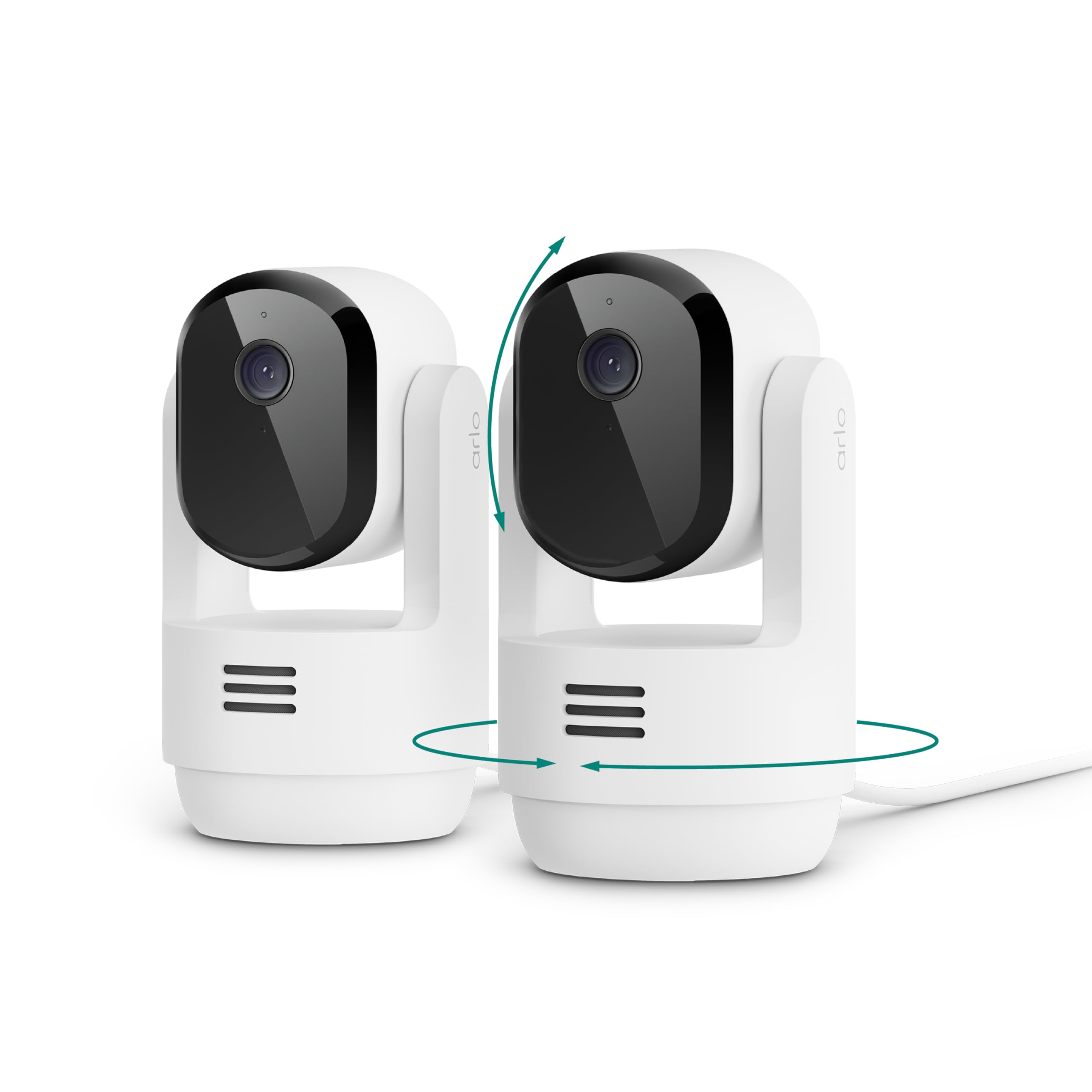
The Arlo Essential Indoor knows the difference between a cat on the couch and a person at the door.
The headline feature here is the ability to create custom alerts for specific animal behaviors — you can get a notification when your cat jumps on the kitchen table. That level of specificity comes from Arlo’s Smart Detection system (which requires a subscription after the included 1-month Secure Plan). The camera delivers clear 2K video with a 360° pan and 180° tilt range, and customers note the pan and tilt controls are responsive with auto motion tracking that works smoothly for slow-moving pets. Unlike the Tapo C211, which has a 2-minute pause on live view that some owners find annoying, the Arlo feed stays live continuously.
Night vision is a strong point here — reviewers point out it is sharp in low light, and the person/animal detection is accurate enough that you can trust the alerts. The camera plugs in so there is no battery to charge, and it works with Alexa and Google Home. The catch: after the free trial month, a subscription to Arlo Secure starts at /month (billed annually) to keep features like animal detection, activity zones, and 60-day video history. Buyers also note it lacks native Apple HomeKit support, though the Arlo app is well regarded.
The Big Advantage
- Custom alerts for specific pet behaviors (like a cat on a table)
- Sharp 2K video with strong low-light performance
- 360° pan and 180° tilt covers the entire room
The Trade-Off
- Best features require a subscription after the free month
- No native Apple HomeKit support
Grab it when: you want a camera that can tell the difference between animal and human motion and alert you to specific cat antics.
Think again if: you want zero monthly costs — the advanced detection lives behind a subscription paywall.
4. Petcube Cam 360

The Petcube Cam 360 moves so quietly your cat will forget it is watching.
Some cats get spooked by the whir of a motorized camera. This one solves that problem. The pan and tilt function is so smooth and makes basically zero noise, as one reviewer noted after two weeks of use — their sensitive puppy did not even notice it. You get a full-room 360° view with sharp 1080p HD video and night vision that works clearly up to 30 feet. The 8x digital zoom holds quality better than many budget cameras, so you can zoom in on a sleeping cat without the picture falling apart. Set up takes under 5 minutes according to multiple verified purchasers, which beats the more complex configuration of some competitors.
A standout feature is the true physical privacy mode — when you tap to block the lens, it is not just a software switch; the camera actually closes off the view so you know it is off. This camera also supports Petcube Care for cloud storage, but you can use the free version for basic alerts. Unlike the Wyze Cam Pan v3, which requires you to use a proprietary right-angle USB cable that can be hard to replace if damaged, the Petcube uses a standard setup. The metal enclosure also feels more premium than the plastic bodies of the Tapo and Wyze options.
Why It Works for Skittish Pets
- Silent pan and tilt motor does not startle sensitive cats
- Physical privacy mode blocks the lens completely
- Quick setup under 5 minutes gets you watching fast
A Minor Drawback
- 1080p resolution is standard — not 2K like the eufy or Arlo
Choose this for: skittish cats or noise-sensitive homes where a silent camera keeps the peace.
Skip it for: critical detail that only 2K resolution provides — the picture is good but not the sharpest in this list.
5. Wyze Cam Pan v3

The Wyze Cam Pan v3 brings color night vision and a 180° tilt that beats most indoor competitors.
Most cat cameras are strictly indoor devices. The Wyze Cam Pan v3 breaks that pattern with an IP65 rating (resistant to rain, heat, and cold, though you need an outdoor power adapter), so you can mount it under a covered porch or in a garage to watch a cat that goes outside. It offers 360° pan and 180° tilt coverage — that is 66° more vertical sweep than the Tapo C211’s 114°, a real advantage in a high-ceilinged room or when mounted high on a wall. The color night vision uses a built-in spotlight, so you see your cat in vivid colors even in pitch-darkness, unlike the infrared black-and-white of the Tapo and Petcube.
AI-powered motion tracking automatically follows your cat, person, or any moving object, and you get four custom waypoints so the camera sweeps through its programmed patrol route. Owners mention the daytime and color night vision are clear, though grain can appear in very low light. The MicroSD recording timestamps are not synchronized with real time, which requires manual search through footage — a quirk noted by some owners. The proprietary right-angle micro USB cable is also hard to replace if lost, and some users mention power cuts can factory reset the Pan.
Outdoor Flexibility
- IP65 rating stands up to weather for semi-outdoor cat watching
- Color night vision reveals detail in total darkness
- 180° tilt covers far more vertical space than most rivals
Two Annoyances
- Recording timestamps out of sync with real time, making search harder
- Proprietary cable is difficult to replace if lost
Get this when: your cat hangs out on a covered porch or in a room where you want color night vision.
Watch out for: the offset recording timestamps — you will need to manually scroll to find specific moments.
6. Enabot EBO ROLA Mini Pet Camera Robot

A rolling camera that finds your cat in any room — no fixed mounting needed.
Every other camera on this list stays in one place. The Enabot EBO ROLA Mini actually drives around your home, so you can steer it from room to room to find a hiding cat. It captures 2K HD video and includes night vision for dark rooms. A 5000mAh battery lasts up to two and a half days of intermittent checking — one buyer mentioned they got 2.5 days with occasional logins throughout the day. The camera comes with a 32GB microSD card included, so you do not need to buy extra storage. It supports both 5GHz and 2.4GHz WiFi; the manufacturer recommends 5GHz for setup.
Customers note this device is genuinely fun and very cool to use, especially for connecting with pets when you are far from home — one owner used it from the other side of the world with minimal delay. The trade-off is the lack of an auto-recharge dock. You charge it manually using the included magnetic USB-C cable, which some owners find finicky to align. One reviewer built a makeshift platform to get the camera to charge reliably. For the price, a dedicated charging dock would be expected. But if you want a camera that roams rather than sits still, nothing else here competes.
The Freedom Advantage
- Drives between rooms to find your cat wherever it hides
- 2K HD video with included 32GB microSD storage
- Long battery life lasting up to 2.5 days between charges
What Holds It Back
- Manual charging with a magnetic cable that is tricky to align
- No auto-return dock — you must remember to charge it
Perfect for: those who want a true mobile companion that can roam through multiple rooms without losing the video feed.
Consider an alternative if: you prefer a set-and-forget camera that charges itself — this one needs a mindful hand to top it up.
Understanding the Specs
Pan and Tilt Range
This spec tells you how much of the room the camera can see. Pan is side-to-side (horizontal coverage), and tilt is up-and-down (vertical coverage). A camera with 360° pan and 180° tilt, like the Wyze Cam Pan v3, can look in every direction including straight down if mounted on a ceiling. A camera with 360° pan but only 114° tilt, like the Tapo C211, has a narrower vertical slice and may miss a cat on the floor if mounted high. For cat watching, wider tilt is usually better because cats spend time at floor level.
Motion Tracking
Motion tracking means the camera follows a moving object automatically. When your cat walks across the room, the camera turns to keep it in frame — you do not need to touch the app. This is different from motion detection, which just sends you an alert. All the cameras here have some form of motion tracking, but the eufy E220 and Arlo Essential Indoor are particularly accurate at distinguishing between pet and human movement, reducing false alerts from shadows or light changes.
Local vs. Cloud Storage
Local storage on a microSD card keeps your footage secure on the device itself. No one else can access it, and there is no monthly bill. The downside: if the camera is destroyed or stolen, the footage goes with it. Cloud storage uploads video to the manufacturer’s servers, so it survives a lost camera, but it usually costs a subscription. The eufy E220 works well without any cloud subscription, while the Arlo Essential Indoor requires a paid plan to open up its best features. The Tapo C211 and Wyze Cam Pan v3 offer both options.
Two-Way Audio
Two-way audio lets you hear your cat and speak back through the camera’s built-in microphone and speaker. This feature is more useful for cat cameras than you might think — you can comfort a nervous cat, call them for dinner, or scold them for scratching the couch. The quality varies between models. The Petcube Cam 360 and Wyze Cam Pan v3 have clear audio, while some Tapo C211 reviewers point out a half-second delay that can be slightly disruptive during a real-time conversation.
FAQ
Will a cat camera work at night without turning on room lights?
Do I need a subscription for a cat camera to work?
Can I talk to my cat through a cat camera?
How do I set up a cat camera if I am not tech-savvy?
Can I use a cat camera to also watch a baby or elderly relative?
What happens if my Wi-Fi goes out while I am using a cat camera?
How much storage do I need for a cat camera?
Will my cat be scared of a roaming camera like the Enabot ROLA Mini?
Can I mount a cat camera on the wall or ceiling?
Is 1080p good enough for a cat camera, or do I need 2K?
Final Thoughts: The Verdict
If you want one dependable pick, the cat camera winner is the eufy Indoor Cam E220 because it delivers sharp 2K video with zero monthly fees and reliable auto motion tracking. If you want a two-camera setup for different rooms at a very low cost, grab the Tapo C211 (2-Pack). And for a camera that finds your cat in any room without a fixed mount, the Enabot EBO ROLA Mini is the one to pick.
How We Picked
We do not accept paid placement. Every pick is matched to a real buyer and a real use-case; we do not hands-on test units.
Sources & Methodology
Specifications: manufacturer listings and product documentation. Review insights: verified customer reviews, as of July 2026. Pricing: not shown on this page (it changes often); check the current price via the retailer link.
As an Amazon Associate, Gadgets Feed earns from qualifying purchases. This does not affect which products we feature.