
That stack of classic CDs and movie DVDs gathering dust doesn’t need to be obsolete. Modern laptops have nearly all ditched the internal disc slot, leaving entire music libraries, software installers, and photo backups trapped on silver discs with no way in or out. An external CD drive bridges that gap instantly, turning a slim USB peripheral into the key that unlocks decades of optical media — ripping tracks, watching DVDs, and burning backups without sacrificing your machine’s portability.
I’m Min — the co-founder and writer behind Gadgets Feed. I’ve spent countless hours analyzing technical specifications, reading real-world buyer feedback, and comparing build quality across dozens of external optical drives to separate the reliable performers from the finicky budget traps.
Whether you’re archiving a music CD collection, installing legacy software, or burning data discs for work, this guide walks through every spec that matters to find the right cd drive for your exact setup.
How To Choose The Best CD Drive
Every external CD drive looks similar at first glance — a slim black box with a USB cable. The real differences live in the connection standard, read/write speeds, extra port selection, and OS compatibility quirks that can make or break a purchase. Here’s what to check before adding one to your cart.
USB 3.0 vs USB 2.0 Connection
A USB 3.0 interface delivers data transfer rates up to 5 Gbps — roughly ten times faster than USB 2.0. This matters most when ripping large CD collections or burning multiple DVDs. Drives with USB 3.0 also remain backward compatible, so they work in older USB 2.0 ports at reduced speeds. Budget-friendly models often use USB 2.0, which is fine for occasional disc reading but noticeably slower for batch ripping or writing.
Read and Write Speed Ratings
Look for a drive that offers 24X maximum CD read/write speed and 8X maximum DVD read/write speed. These figures determine how quickly you can rip a music CD (about 3-4 minutes per disc) or burn a full DVD (around 8-10 minutes). Lower-rated drives stretch those times significantly. Drives lacking these specific speed ratings may still function but are typically older or lower-cost units with slower performance.
Built-In Card Readers and USB Hubs
Many modern external drives integrate SD and TF (microSD) card slots plus additional USB ports. This transforms the drive into a small hub, handy for reading camera memory cards or connecting a flash drive alongside the optical disc. The most useful configurations include a USB 3.0 port for fast external storage and separate SD/TF slots for photo transfers — just note that some drives restrict simultaneous SD and TF use.
OS Compatibility and Chipset Restrictions
Most drives advertise broad OS support — Windows 11 through XP, plus macOS and Linux. But Apple’s M1, M2, M3, and M4 chips have introduced incompatibilities with certain budget drives. If you own a recent MacBook Pro or MacBook Air with Apple Silicon, verify the drive explicitly states M-series support, or stick with a recognized brand like ASUS or HP that has stable driver certification.
Quick Comparison
On smaller screens, swipe sideways to see the full table.
| Model | Category | Best For | Key Spec | Amazon |
|---|---|---|---|---|
| ASUS SDRW-08D2S-U LITE | Premium Slim | Reliable burning & encryption | 8X DVD write / 24X CD write | Amazon |
| ORIGBELIE 6-in-1 | Premium Hub | Multi-port expansion + RGB | 5 Gbps USB 3.0 hub | Amazon |
| HP F2B56AA | Premium Brand | Name-brand reliability on PC/Mac | 24X CD-RW / 8X DVD+RW | Amazon |
| NOLYTH USB-C Hub | Mid-Range Hub | USB-C & dual USB-A + card slots | 24X CD read / 8X DVD read | Amazon |
| Rioddas USB 3.0 | Mid-Range Value | Budget-conscious plug-and-play | 5 Gbps USB 3.0 transfer | Amazon |
| GODBPNYMU 5-in-1 | Mid-Range Compact | Slim design with dual USB-A/C | 24X CD / 8X DVD speeds | Amazon |
| Aumdie 5-in-1 | Budget Entry | Lowest cost for occasional use | 5 Gbps USB 3.0 / 8 MB cache | Amazon |
In‑Depth Reviews
1. ASUS SDRW-08D2S-U LITE
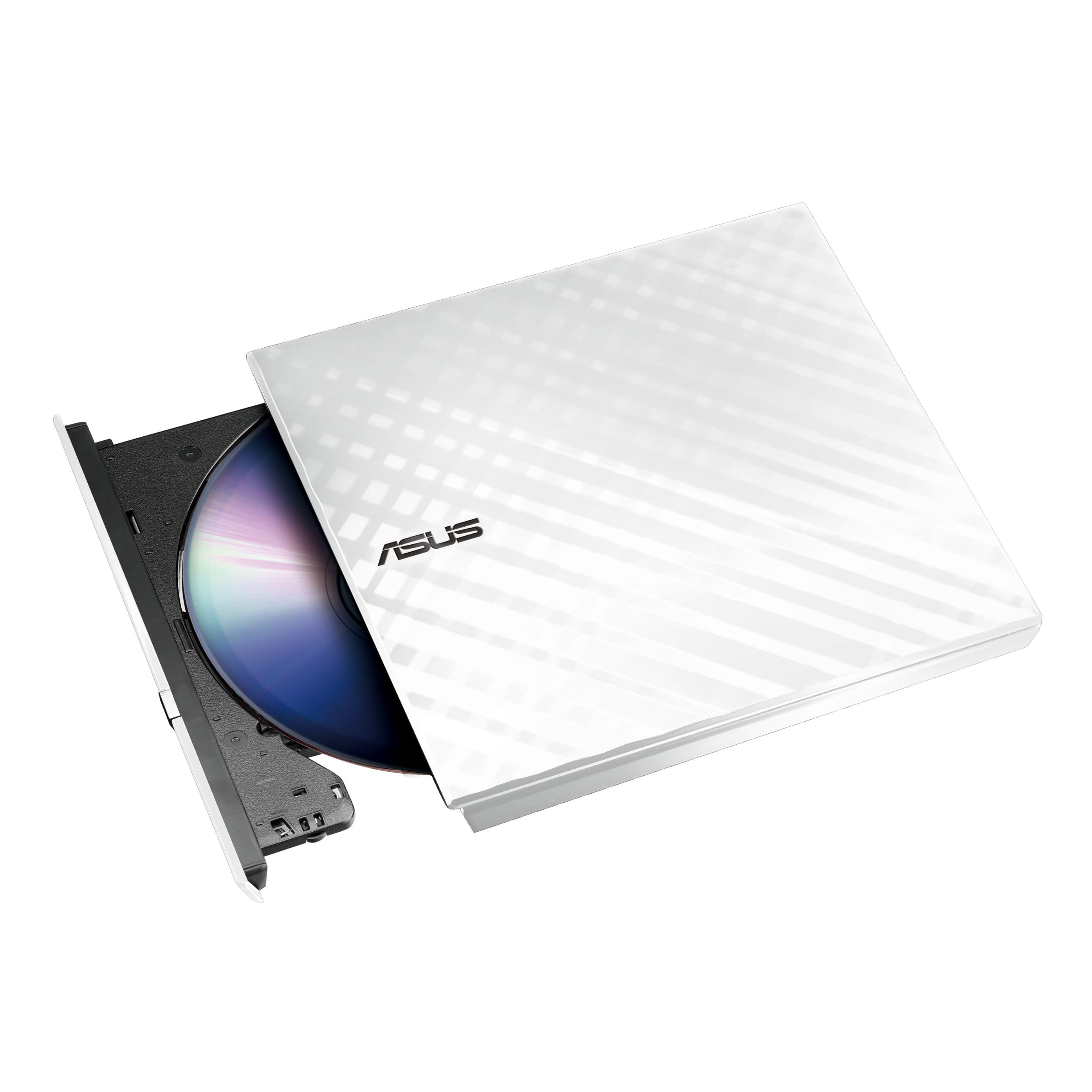
The ASUS SDRW-08D2S-U LITE earns the top spot because it pairs a proven brand reputation with features you won’t find in generic drives — specifically disc encryption and the drag-and-burn software that simplifies the burning process into three clicks. The diamond-cut white finish stands apart from the sea of black plastic models, and the 8X DVD write speed with 24X CD write speed covers any disc task you throw at it.
This drive includes ASUS’s proprietary Disc Encryption, which lets you password-protect and hide files on burned discs — a genuine advantage for anyone archiving sensitive data. The Drag and Burn utility works on both Windows and Mac, so you don’t need to hunt for third-party burning software. Customers consistently report plug-and-play detection on Mac mini, ASUS netbooks, and Windows 10/8 machines without driver hunting.
One slight trade-off: the build uses a plastic enclosure with a manual tray that must be pulled open by hand — no automatic slot-loading here. The included software is for burning only, so you’ll still need a separate media player like VLC for DVD movie playback on Windows. But for a premium slim drive at a mid-range price, the ASUS delivers the most polished, reliable user experience across the board.
Why it’s great
- Disc encryption with password protection built in
- Diamond-cut design stands out and complements laptops
- Drag-and-burn software works on Windows and Mac
Good to know
- Plastic build feels light; manual tray operation
- Burning software only — need VLC or similar for DVD playback
- USB 2.0 interface instead of faster USB 3.0
2. ORIGBELIE External CD DVD Drive with 4 USB Ports

The ORIGBELIE drive is the most feature-packed external optical drive on this list, functioning simultaneously as a CD/DVD burner, a 4-port USB 3.0 hub, and a dual-slot SD/TF card reader. The included USB A to DC power cable ensures stable performance even on older laptops with weaker USB power delivery, solving the most common complaint about external drives that stall during disc reading.
A 5 Gbps USB 3.0 backbone handles data transfers, and the built-in cable with both USB-A and USB-C connectors eliminates the need for separate adapters. The RGB LED gradient light adds a style element that gamers and desk enthusiasts will appreciate, though it’s entirely cosmetic. Customers report smooth playback on Windows 11 and successful data recovery from old DVD-R discs. The velvet storage bag and hard carrying case make this an ideal travel companion.
On the downside, the SD and TF card slots cannot operate simultaneously — a limitation shared with most competing multi-card drives. A small number of users reported difficulty reading discs with paper labels, and one file corruption incident required a driver reinstall. Still, for anyone who wants a single device that handles discs, flash drives, and memory cards, the ORIGBELIE represents the ultimate in versatility.
Why it’s great
- Four USB ports plus SD/TF card slots — replaces a separate hub
- USB-A and USB-C cables built-in; no adapter needed
- Includes carrying case and storage bag for portable use
Good to know
- SD and TF slots cannot be used at the same time
- Occasional read issues with labeled or paper discs
- RGB lighting is aesthetic only — no functional benefit
3. HP External Portable Slim Design CD/DVD RW Write/Read Drive

The HP F2B56AA is the name-brand choice for users who prioritize long-term reliability and corporate-grade compatibility above all else. HP’s slim external drive supports the widest range of disc formats on this list — including DVD-RAM, CPRM, and M-Disc (DVD+R SL) — making it the only option here that can write to archival-grade M-Discs rated to last centuries. That single feature alone justifies its premium position for serious data preservationists.
Write speeds are full spec: 24X CD-RW and 8X DVD+RW, with read speeds matching those numbers across the board. The drive is USB-powered (no separate AC adapter needed) and works across Windows 11 through XP plus Mac OS X. Real-world user experiences are overwhelmingly positive — one customer ripped an entire 400-500 CD collection to WAV files on a Mac without a single drive failure, and another praised how easily it integrated with a Windows 11 mini PC via a USB extender.
The trade-off is aesthetic and functional minimalism. This is a plain black plastic drive with no extra USB ports, no card reader, and no RGB lighting. The cable is not built-in, so you’ll need to carry it separately. But when your priority is a drive that just works reliably for years without surprises — especially for archival projects — HP’s reputation and M-Disc support make it the safe premium bet.
Why it’s great
- Industry-leading brand with long-term driver support
- Supports M-Disc for archival-grade data preservation
- Works across Windows 11 through XP and Mac OS X
Good to know
- No extra USB ports, card slots, or integrated cable
- Plain black plastic design — minimal aesthetic appeal
- USB 2.0 interface; no USB 3.0 speed advantage
4. NOLYTH External CD Drive USB 3.0 & USB-C
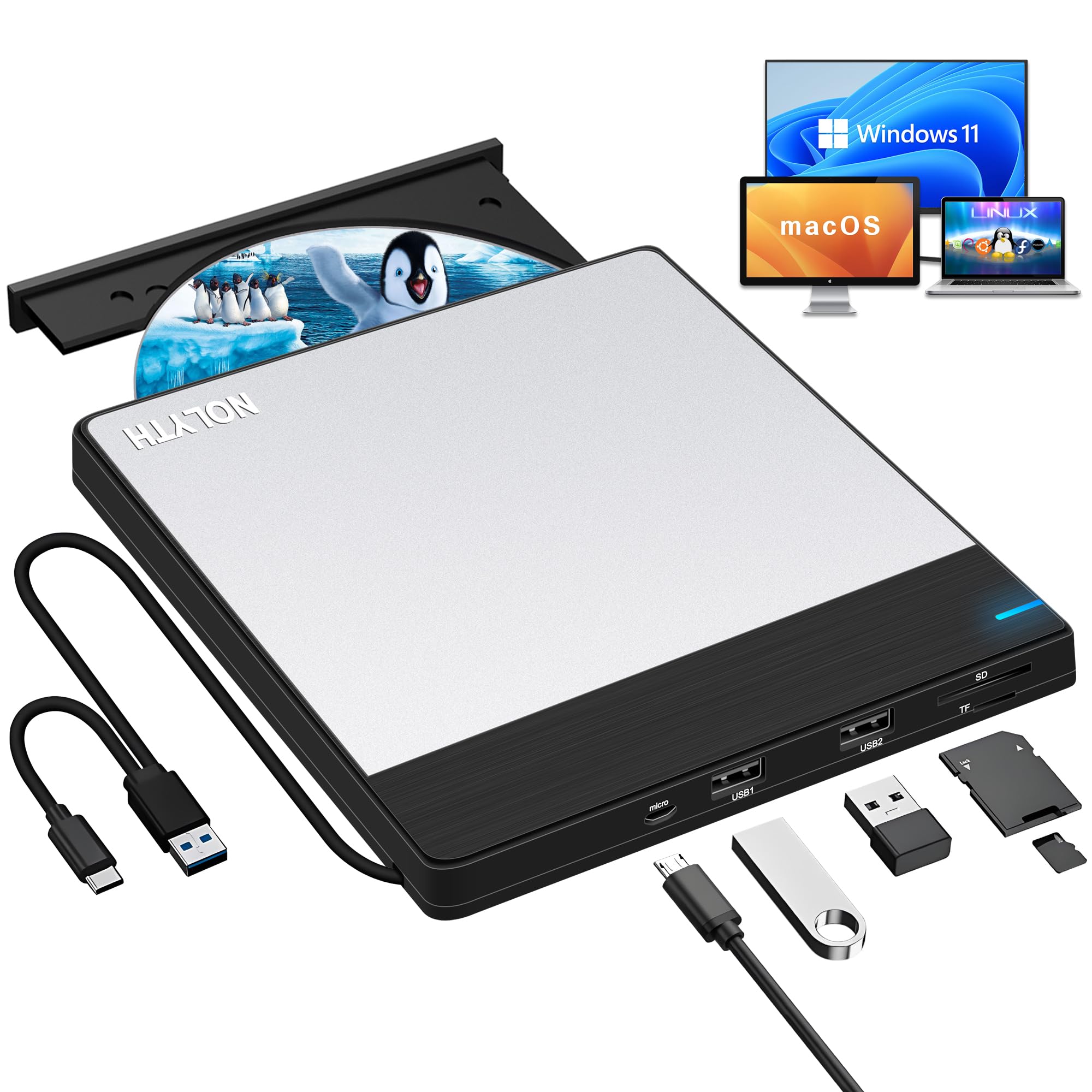
The NOLYTH drive addresses one of the most common modern laptop frustrations: the lack of a USB-C port on many external drives. This slim silver-and-black unit includes both a USB 3.0 Type-A connector and a separate USB-C connector, so it plugs directly into MacBook Air/Pro, Dell XPS, and other USB-C-only laptops without an adapter. It also adds two extra USB ports plus SD and TF card slots, making it a genuine 5-in-1 hub.
At just 0.66 pounds and 0.7 inches thick, it’s among the lightest drives here, and the brushed black case with a silver aluminum top plate feels more premium than its price suggests. Read/write speeds hit 24X CD and 8X DVD. The drive ships with a power cable for computers with weak USB ports — a thoughtful inclusion that prevents the “disc won’t spin” problem. Customer reviews consistently highlight plug-and-play success on Linux Mint, MacBook Air, and Windows 11 out of the box.
One notable caveat: the NOLYTH drive is not compatible with Chromebooks, tablets, iPads, game consoles, TVs, or projectors. It’s strictly a laptop/desktop device. Also, while the USB-C cable is built in (no separate dongle needed), some Mac users note that the drive icon doesn’t appear until a disc is inserted — that’s macOS behavior, not a defect. For the price, this drive delivers an exceptional combination of port selection and compact design.
Why it’s great
- Dual USB-A and USB-C connectors — no adapter needed for modern laptops
- Lightweight build at 0.66 lbs with metal top plate
- Includes power cable for computers with weak USB ports
Good to know
- Not compatible with Chromebook, tablets, or game consoles
- Mac users must insert a disc before the drive appears in Finder
- SD and TF slots cannot operate simultaneously
5. Rioddas External CD/DVD Drive USB 3.0

The Rioddas drive focuses on doing the basics well at a price that undercuts most competitors without feeling cheap. Its standout design feature is an embedded USB 3.0 cable that tucks into the drive’s bottom — you’ll never lose the cable or need to carry a separate one. The brushed texture shell adds grip and a modern look that hides fingerprints better than glossy plastic alternatives.
Performance is exactly what you’d expect from USB 3.0 at this tier: 5 Gbps data transfer, 24X CD read/write, and 8X DVD read/write. The physical eject button solves a frustration many cheap drives share — if your computer fails to recognize the drive, you can still safely remove the disc manually. Customers praise the drive for reading old CD-R demo discs on Windows 11 without drivers, and one reviewer burned Spotify playlist CDs in under two minutes.
The main downside is the manual tray (no auto-eject or slot-load), and the USB cable is short — about 12 inches — which limits positioning flexibility on a desk. Some users also noted the lack of a 10-second rewind button for quick audio CD navigation. For straightforward disc reading and burning on a tight budget, the Rioddas delivers reliable performance with smart design touches you won’t find on cheaper alternatives.
Why it’s great
- Embedded USB cable prevents loss and keeps organization simple
- Physical eject button works even when the OS doesn’t detect the drive
- Brushed texture resists scratches and fingerprints
Good to know
- Short built-in cable limits placement flexibility
- Manual tray must be pulled open by hand
- No quick-skip buttons for audio CD navigation
6. GODBPNYMU 5-in-1 External CD/DVD Drive
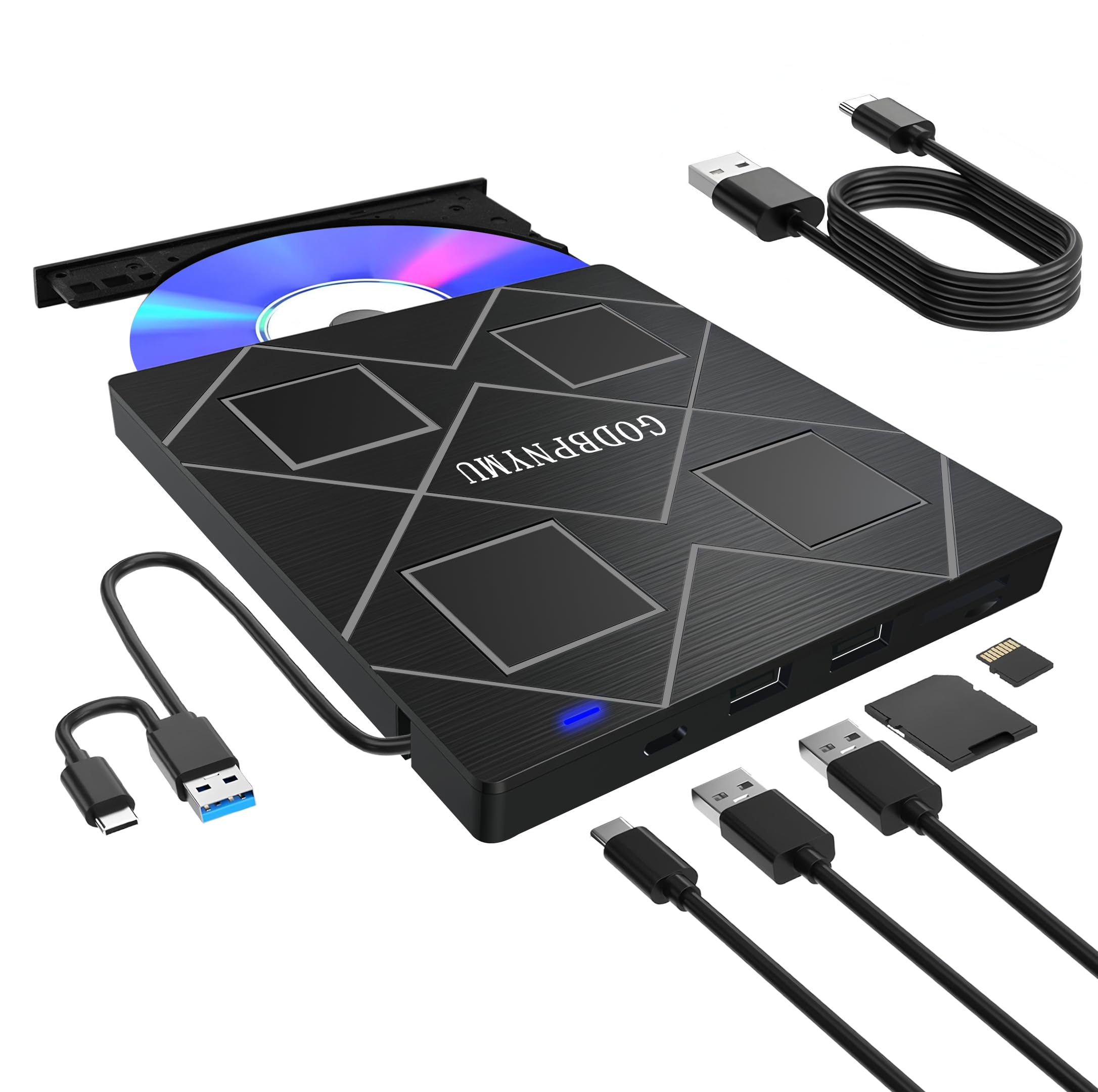
The GODBPNYMU drive prioritizes extreme portability. At just 0.59 inches tall and 5.87 inches wide, it sits nearly flush with a small laptop and slides into any backpack pocket without bulging. It packs a 5-in-1 feature set: CD/DVD burning, two USB 2.0 ports, an SD card slot, and a TF card slot — all in a body that weighs less than most phone chargers.
Both USB-A and USB-C 3.0 connectors are built into the chassis, so you can connect to older PCs or modern MacBooks without hunting for an adapter. The drive ships with a separate power cable for devices with insufficient USB power delivery, along with a generous 24-month warranty — double the standard one-year coverage most budget drives offer. Customer reviews highlight fast, quiet operation and easy plug-and-play detection on both Windows and Linux systems.
The trade-off for this slim profile is that the two USB ports are USB 2.0, not the faster 3.0 standard — fine for a mouse or keyboard, but slower for file transfers. The plastic enclosure is lightweight but doesn’t inspire the same confidence as the aluminum-backed NOLYTH drive. For travelers or students who need optical disc access without adding noticeable weight to their bag, the GODBPNYMU is a capable, well-warrantied choice.
Why it’s great
- Ultra-slim 0.59-inch profile — the thinnest drive reviewed
- 24-month warranty provides extended peace of mind
- Includes both USB-A and USB-C connectors built-in
Good to know
- Extra USB ports are USB 2.0, not USB 3.0 speed
- Plastic shell feels less durable than metal-finished alternatives
- Manual tray; no auto-loading mechanism
7. Aumdie 5-in-1 External CD/DVD Drive

The Aumdie drive is the entry-level contender that proves you don’t need to spend top dollar for solid disc functionality. It includes the same 5-in-1 layout as mid-range competitors — two USB ports (one 3.0, one 2.0), SD slot, and TF slot — plus an 8 MB cache memory that’s larger than most drives in this price bracket, helping reduce buffer underruns during burning sessions. The USB 3.0 interface delivers up to 5 Gbps transfer speeds for fast ripping.
Read/write speeds hit the standard 24X CD and 8X DVD marks. The drive features a slim, portable profile with a built-in cable and skip-proof rubber pads that keep it stable on a desk. Customers report successful plug-and-play on Linux workstations, MacBooks, and Windows 11/10 machines, with solid CD and DVD read performance. The 1-year warranty is standard, and the email-based support team responds within 24 hours for troubleshooting.
The Aumdie drive has two significant red flags. First, it explicitly states incompatibility with Apple M1, M2, M3, and M4 chips — Mac users with Apple Silicon must skip this model entirely. Second, build quality complaints appear in user feedback, with some units failing to be recognized after a few months of use. If you’re on an Intel-based PC and need a bare-bones optical drive for occasional tasks, the Aumdie works fine. For reliability or M-series Macs, spend a little more on the NOLYTH or Rioddas.
Why it’s great
- Largest cache memory (8 MB) in this price range for stable burning
- USB 3.0 interface with 5 Gbps transfer speeds
- Includes SD/TF slots and dual USB ports
Good to know
- Not compatible with Apple M1/M2/M3/M4 MacBooks at all
- Build quality is hit-or-miss; some units fail within months
- Flimsy plastic construction with no metal reinforcement
FAQ
Why isn’t my external CD drive showing up on my Mac?
Can I use an external CD drive with a Chromebook?
How do I play DVD movies on a Windows laptop using an external drive?
What does M-Disc support mean and do I need it?
Final Thoughts: The Verdict
For most users, the cd drive winner is the ASUS SDRW-08D2S-U LITE because it combines a trusted brand, disc encryption, and seamless Mac/Windows compatibility at a reasonable mid-range price. If you want a multi-functional hub that also handles memory cards and extra USB devices, grab the ORIGBELIE 6-in-1. And for archival projects where data longevity matters most, nothing beats the HP F2B56AA with its M-Disc support and proven long-term reliability.