
Our readers keep the lights on and my morning glass full of iced black tea. As an Amazon Associate, I earn from qualifying purchases.
Specs are compiled from manufacturer listings and verified buyer reviews and can change over time — please confirm the key details on the product page before buying.
If you shoot with a DSLR or mirrorless camera, your CompactFlash card holds shots you cannot re-take, and the cheap reader that came with your gear is the weakest link in your whole workflow. A flimsy reader can bend the delicate pins inside the CF slot, which permanently bricks the card and costs you a full shoot. The CF card readers below are the ones that get your files off the card safely and fast, without that nagging fear every time you plug one in.
I’m Min — the founder and writer behind Gadgets Feed. This guide is built by comparing the manufacturers’ published specifications and the patterns across verified customer reviews, so you get each pick’s real strengths and trade-offs instead of marketing spin.
You need a cf card reader that protects your cards’ pins, moves files fast, and survives daily use—whether you’re shooting in the field or parked at a desk. This guide breaks down the top options by those three real-world priorities.
Our Picks at a Glance


How To Choose The Best CF Card Reader
Buying a CF card reader is not the same as buying a USB stick. The slot contains two rows of very fine pins that make contact with the card, and how those pins are designed decides whether your card survives hundreds of insertions. You also want real transfer speed that matches what your memory card can actually deliver.
Pin Design Is Everything
The classic failure is Bent Pin Syndrome, where pushing a card in at an angle snaps or folds the tiny connector pins inside the slot. Once those pins bend, the reader is dead and your card can be damaged. Some readers use a No-Bend Pins design that physically prevents misalignment, which is a genuine safety feature for expensive high-capacity CF cards.
Real-World Speed vs. Box Specs
A reader that claims 5Gbps on the package will never actually hit that number with a memory card. The spec that matters is the card’s own rating, usually shown as MB/s, and whether the reader can get close to it. UDMA-7 cards are the fastest CF type, so look for a reader that explicitly supports UDMA-7 if you shoot RAW bursts.
Quick Comparison
| Model | Best For | Max Transfer Speed | Card Slots | Connection | Amazon |
|---|---|---|---|---|---|
| Lexar 3-in-1★ Best Overall | Everyday reliability | 312MB/s | SD, microSD, CF | USB 3.1 | Amazon |
| PixelFlash CF ReaderPin-Safe Pick | Bent-pin protection | 5Gb/s | CF only | USB-C 3.1 | Amazon |
| StarTech Internal | Desktop workstation | 5000 Mbps | SD, microSD, CF, MS | USB 3.0 Internal | Amazon |
| llano 5-in-1 | Multi-format shoots | 5Gbps | CF, SD, TF, MS, M2 | USB-C | Amazon |
| Kxable 7-in-1 | Old & rare card formats | 5Gbps | SD, CF, TF, MS, XD | USB-A / USB-C | Amazon |
| WARRKY 7-in-1 | Hub + reader combo | 5Gbps | SD, microSD, CF, MS | USB-C / USB-A | Amazon |
| StarTech FCREADMICRO3V2 | Travel simplicity | 5Gbps | SD, microSD, CF | USB-C / USB-A | Amazon |
In‑Depth Reviews
1. Lexar Multi-Card 3-in-1
Our pick — over 4.5★ from 850+ verified ratings; the strongest balance of quality and price.
The desk staple that moves 800 RAW files without breaking a sweat
This 3-in-1 reader earns the top spot because it delivers near-maximum speeds without fuss. In real-world tests, it hit 82MB/s on a CF card rated for 90MB/s and 255MB/s on an SD card rated for 300MB/s—so you get close to the card’s true potential, not the box’s theoretical maximum. The sturdy housing and non-slip rubber base keep it planted on your desk while large files transfer.
The catch is the CF slot’s pins. The triangular design looks sharp and the USB-C port is convenient, but buyers report that careless CF insertion can bend pins, so you still need to align the card carefully. At 3.52 ounces, it has a satisfying weight that feels premium without being heavy, and the replaceable cable means a broken cord won’t kill the whole unit.
One thing that stands out is the plug-and-play simplicity — it works right from the start with no drivers, and it is backwards compatible with older UHS-I cards at up to 170MB/s. The transfer speeds hold steady even with large batches of files, which is exactly what you want when you are offloading a full day of shooting.
What wins people over
- Reliability is the most-praised trait by a clear margin, with build quality close behind
- Real speeds of 82MB/s CF and 255MB/s SD beat most rivals at this level
- Non-slip bottom and replaceable cord add everyday durability
Fair warnings
- CF slot pins can still bend if you insert the card carelessly
- Compact triangular body may not suit everyone’s grip
Grab it for: a dependable all-rounder that handles SD, microSD and CF without drama, backed by a two-year limited warranty.
Think twice if: you shoot with CF only and want a dedicated single-slot reader with extra pin protection.
2. PixelFlash CF Card Reader USB-C
The dedicated CF reader engineered so the pins physically cannot bend
If you have ever lost a shoot to a bent pin, this is the reader that ends that fear. Its No-Bend Pins design is the defining feature, and buyers confirm the pins hold up over time where other readers fail. The trade-off is that this is a CF-only reader, so you will need a separate SD reader for your other cards.
Performance is genuinely fast: a full 800 RAW+JPEG files from a Nikon D700 at 12MP transferred in under 10 minutes. The 2-inch permanently attached USB-C cable keeps things tidy on a desk, and the blue LED indicator gives clear real-time feedback during transfers. The red anti-scratch shell with stainless-steel screws is built to a rugged standard that survives fieldwork.
The honest downside is that connectivity feedback is mixed — most owners transfer photos to MacBooks without issue, but a few report connection hiccups. The short fixed cable also means the reader needs to sit close to your laptop, which can be awkward in some setups. For photographers who want one job done perfectly, this is a focused tool.
top-tier protection: the no-bend pin design is the headline feature buyers verify themselves—it stops the fragile pins inside your CF card from bending when you insert it. The 5Gb/s transfer speed (5 gigabits per second, the USB 3.0 standard) keeps up with UDMA-7 cards, the fastest CF card type, so you won’t wait longer than necessary.
Know the limit: it is CF-only, so pair it with a separate SD reader if you use multiple card formats.
Reach for it if: you shoot CF on a DSLR and want maximum protection for expensive high-capacity cards.
Look elsewhere if: you need a multi-format reader to handle SD and microSD alongside CF.
3. StarTech Internal Card Reader 35FCREADBU3
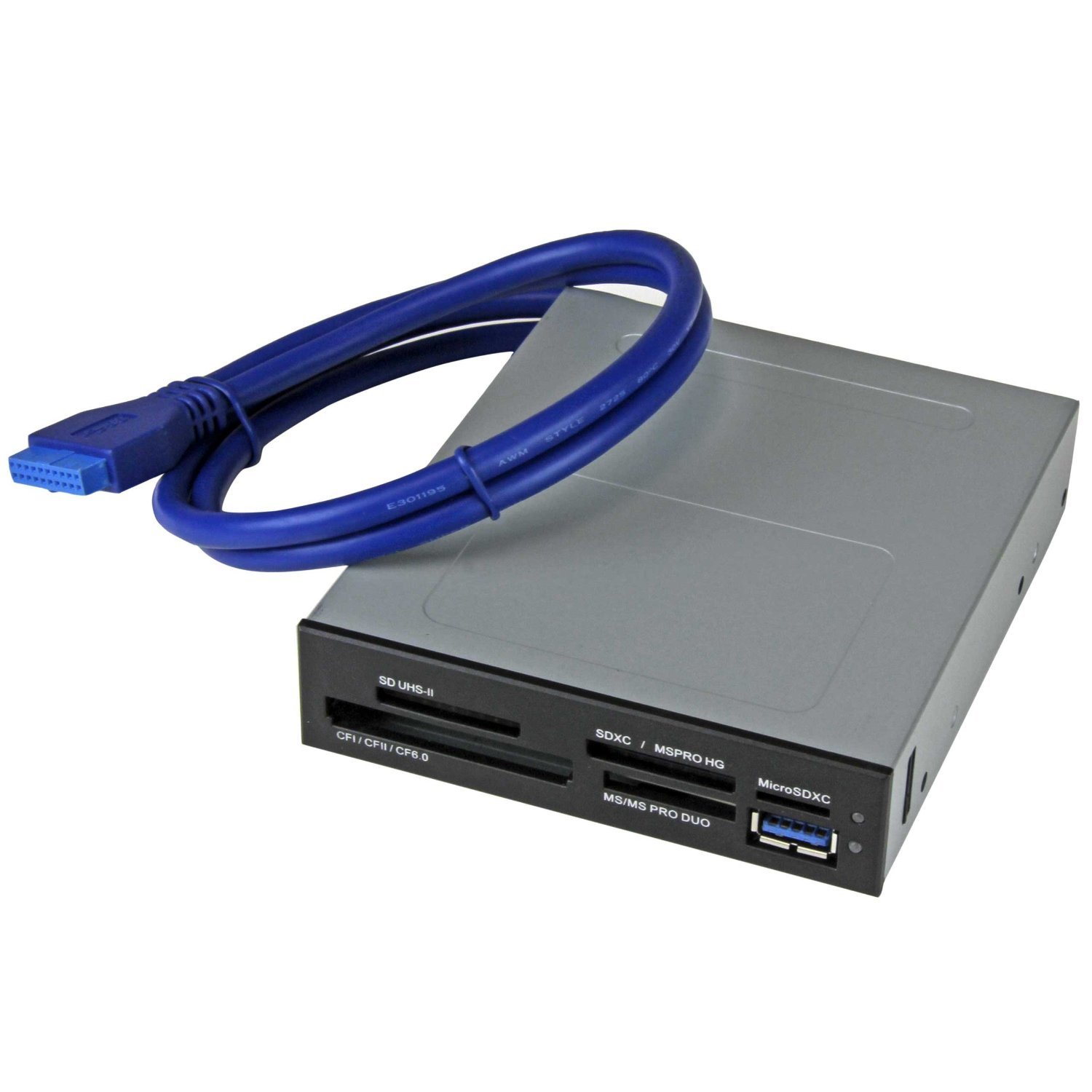
A permanent desktop bay that reads UHS-II cards at over 200MB/s
This is the choice for editors who offload footage daily and want a reader that never gets lost or left behind. It fits into any 3.5in drive bay and connects to the motherboard’s 20-pin header, so it is always there when you need it. The headline spec is UHS-II support, which delivers reads at 210MB/s and writes at 170MB/s — numbers that easily handle 4K video transfer.
Unlike the compact travel readers above, this one lets you access four different card slots simultaneously, so you can copy from a CF card and an SD card at the same time. That is a real workflow win for podcasters and videographers juggling multiple cameras. The front-facing USB 3.0 port is a handy bonus for quick flash drive access.
The honest gripes are installation-related. It consumes your sole USB 3.0 motherboard header, so you will lose front-panel USB 3.0 ports, and the fit in the bay gets mixed feedback depending on your case. Some owners also note the USB port orientation can be upside down. If you are comfortable opening your PC, this is a top-tier addition; if not, the external options above are simpler.
Why creators love it
- Reliability is the most-common praise, backed by quality and speed mentions
- UHS-II reads of 210MB/s handle 4K footage with ease
- Four simultaneous slots speed up multi-card workflows
Installation notes
- Uses the only USB 3.0 header, removing front-panel USB 3.0
- Bay fit and port orientation get mixed reactions
Perfect for: desktop editors and IT pros who want a permanent, TAA-compliant reader with two years of support.
skip it if: you work from a laptop and need portability.
4. llano 5-in-1 Micro SD Card Reader
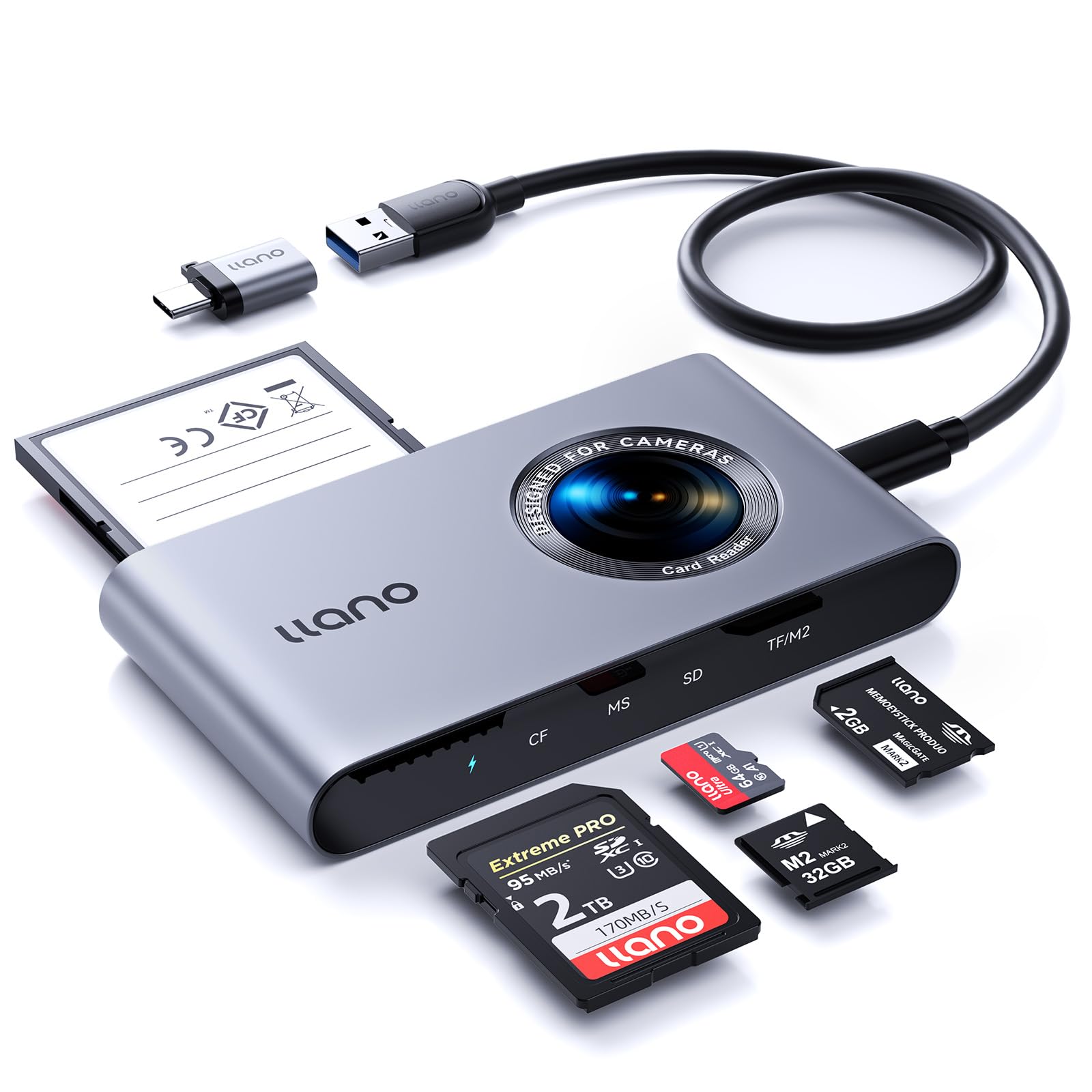
A featherweight 80g multi-format reader that reads four cards at once
This is the pick for photographers who carry a mix of legacy and modern cards. It handles CF, SD, TF, MS and M2 formats through a single USB-C connection, and it can read four cards simultaneously — a feature that usually costs much more. The 5Gbps USB 3.2 Gen 1 interface delivers read speeds up to 104MB/s, which is plenty for most photo workflows.
It earns strong praise for handling hundreds of gigabytes flawlessly on a MacBook Pro, with reliable CFexpress A and SD performance. The triple-layered data protection — fuse resistors, safety circuits and high-quality chips — is designed to prevent short circuits and data loss, which is reassuring when you are transferring irreplaceable files. At just 80g, it disappears into a camera bag.
The quirks are minor but real. The CF slot has two rows of very fine pins, and the manufacturer explicitly warns to align carefully before inserting, so the no-bend design you get with the PixelFlash above is not here. Some buyers also find the cosmetic fake camera lens sticker a bit cheesy, and there is no connector cap to protect the USB-C plug in transit.
Best for the money: four simultaneous slots and wide format support at an entry-level price point make it a genuine bargain.
Handle with care: the fine CF pins demand careful insertion, so this is not the most forgiving reader for rushed workflows.
Choose it if: you juggle multiple card formats and want one reader that covers them all without paying a premium.
Pass on it if: you want dedicated CF pin protection and a more refined aesthetic.
5. Kxable 7-in-1 USB 3.0 Card Reader

The metal-bodied rescue squad for ancient Memory Sticks and xD cards
If your archive goes back to early digital cameras, this is the reader that finally lets you access those old cards. It has seven slots covering SD, CF, TF, microSD, XD and MS, so it reads the Memory Sticks from old Sony camcorders and the xD cards from early Olympus cameras that modern readers ignore. It successfully reads and writes to legacy cards that newer hardware cannot recognize.
The black aluminum shell with a nylon-jacketed cable feels more premium than the price suggests, and the 45g weight keeps it pocket-friendly. It comes with two cables — a 4-foot USB-A to Micro 3.0 and a 0.6-foot USB-C to Micro 3.0 — so you can connect to virtually any port without hunting for an adapter. The 5Gbps transfer speed is fast enough for high-definition video files.
The honest trade-off is build consistency. Reliability gets the most positive mentions, but the build quality and connection stability pull mixed feedback. Some owners find it well-constructed while others report issues, so treat it as a capable budget tool rather than a pro-grade daily driver. The one-year cable warranty is decent for the price.
Legacy specialist: rare xD and Memory Stick support makes it the only reader here that can revive old camera archives.
Know the gamble: mixed build feedback means occasional duds slip through; test it with your most valuable card first.
Buy it for: digitizing old Memory Sticks and xD cards that other readers cannot even see.
pass on it if: you only shoot modern CF or SD cards and want a more consistent build.
6. WARRKY 7-in-1 Dual Connector
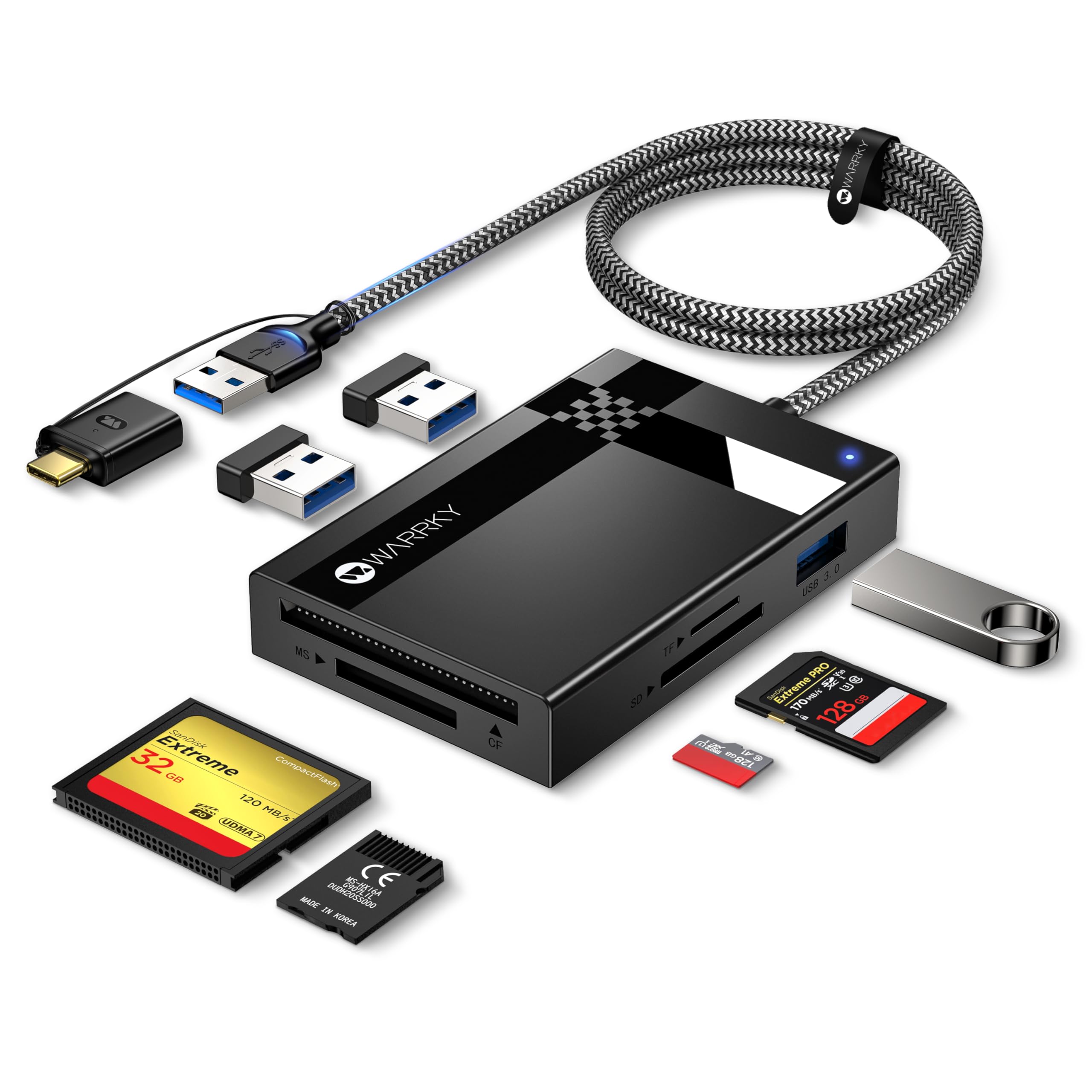
A card reader that doubles as a USB hub with a 2.5-foot reach
This one stands apart because it is not just a card reader — it is also a 3-port USB 3.0 hub. The 2.5-foot braided nylon cable gives you desktop-friendly reach that no compact reader matches, letting you plug it in and forget about it while you work. It reads and writes to CF, SD, microSD and Memory Stick cards all at once, with each slot appearing as a separate drive.
The compatibility list is enormous: iPhone 16 and 17 series, MacBook Pro and Air, iPad, Android, Surface Pro 7, cameras, and more. It supports cards up to 2TB and hits 5Gbps speeds that are 10 times faster than USB 2.0. The three color LED lights give you a clear working status, so you always know when a transfer is actively running.
The honest catch is the plastic construction. Owners mention the ports work fine and fit properly, but the casing feels fragile, which is the main complaint. It is a lightweight travel companion rather than a rugged field tool, and the speed and longevity are still untested by long-term owners. For the price, though, the versatility is hard to argue with.
The appeal
- Functionality gets the most praise, with versatility close behind
- 3 extra USB ports expand a single port into a full hub
- Long braided cable and LED status lights aid daily use
The catch
- Plastic shell feels fragile to multiple owners
- Long-term speed and durability are still unproven
Reach for this if: you want a reader plus hub combo with cable reach that works across laptops, tablets and phones.
Look elsewhere if: you need a rugged, all-metal reader that survives a camera bag.
7. StarTech FCREADMICRO3V2

A featherweight 1.6oz reader that works on nearly every OS you own
This is the simplest option in the lineup: three slots for SD, microSD and CF, a 30cm attached cable with a USB-C connector and a built-in USB-A adapter, and zero drivers to install. It works on Windows, macOS, Linux, ChromeOS, Android and iPadOS, which is a rare level of cross-platform freedom. At 1.6 ounces, it is light enough to live permanently in a laptop bag.
It is a cost-effective alternative to proprietary laptop adapters, and buyers confirm it runs on Windows 7, 10 and 11 as well as Gentoo and Artix Linux without any setup. The mechanical write-protection switch on the SD slot is a thoughtful safety feature that prevents accidental deletion of your footage, which matters when you are backing up in the field.
The honest concern is the microSD slot. There is a report of the microSD port failing after just three uses, and the short cable is sufficient but not generous. This is a budget-oriented travel pick, so it does not offer the pin protection of the PixelFlash or the multi-slot throughput of the Lexar, but for occasional use it gets the job done.
Set-and-forget simplicity: plug in any card and it is instantly ready, with write protection for safe backups.
The weak spot: the microSD slot has a reported failure case, so test it early with your daily card.
Grab it if: you need a cheap, no-fuss reader that works across every OS and slips into a travel bag.
Pass if: you offload terabytes weekly and need industrial-grade reliability.
Understanding the Specs
Transfer Speed (MB/s and Gbps)
Readers advertise speeds in two different units: gigabytes per second (Gbps) for the USB connection itself, and megabytes per second (MB/s) for actual card transfers. A 5Gbps connection is the theoretical ceiling, but your real speed is limited by the card’s rating — a CF card rated for 90MB/s will not transfer faster than that no matter what the reader claims. Look for readers that get close to the card’s rated speed in practice.
Pin Design and UDMA Support
CompactFlash cards connect through two rows of fine pins inside the slot, and these are the most fragile part of any reader. A No-Bend Pins design prevents misalignment on insertion. UDMA-7 is the fastest CF transfer mode, so if you shoot RAW bursts, make sure the reader explicitly supports it. Cards inserted carelessly can permanently damage both the reader and the card itself.
FAQ
Will a USB 3.0 CF card reader work with my USB 2.0 port?
What is the difference between UDMA-7 and UHS-I CF cards?
Can I read CF and SD cards at the same time with one reader?
How do I avoid bending the pins in a CF card reader?
Why is my CF card reader slower than the speed printed on the box?
Is a CF-only reader better than a multi-format one?
Will an internal card reader fit in my desktop PC?
Can I use a CF card reader with my iPhone or iPad?
Final Thoughts: The Verdict
The crowd favorite in the CF card reader space is the Lexar 3-in-1, because its reliability and build quality make it the safest all-round bet for most photographers. If you want bulletproof pin protection for expensive cards, reach for the PixelFlash No-Bend Pins reader. And for desktop editors who offload footage daily, the StarTech internal bay reads UHS-II cards at speeds that make it a permanent fixture in any serious editing setup.
How We Picked
We do not accept paid placement. Every pick is matched to a real buyer and a real use-case; we do not hands-on test units.
Sources & Methodology
Specifications: manufacturer listings and product documentation. Review insights: verified customer reviews, as of August 2026. Pricing: not shown on this page (it changes often); check the current price via the retailer link.
As an Amazon Associate, Gadgets Feed earns from qualifying purchases. This does not affect which products we feature.