
Our readers keep the lights on and my morning glass full of iced black tea. As an Amazon Associate, I earn from qualifying purchases.
Specs are compiled from manufacturer listings and verified buyer reviews and can change over time — please confirm the key details on the product page before buying.
Cheap audio interfaces promise to turn your laptop into a recording studio, but the real challenge is finding one that doesn’t add hiss, drop your guitar signal, or fight your computer’s operating system. This guide cuts through the spec-sheet noise to show you exactly which budget-friendly models deliver clean, reliable recordings for podcasts, voiceovers, and home demos, and which ones have quirks you should know about before you click buy.
I’m Min — the founder and writer behind Gadgets Feed. This guide is built by comparing the manufacturers’ published specifications and the patterns across verified customer reviews, so you get each pick’s real strengths and trade-offs instead of marketing spin.
The right entry-level unit balances preamp gain, sample rate, and connection stability—and here is exactly how to pick the best cheap audio interfaces for your microphone and budget.
Our Picks at a Glance


How To Choose The Best Cheap Audio Interfaces
A rock-bottom price means nothing if the preamp adds hiss or drops your signal, so prioritize clean gain over the lowest sticker price. Before you pick, focus on three things: how much gain the preamp delivers, whether it plays nice with your computer’s operating system, and what connections it offers for your specific microphone and instruments.
Look At The Gain First, Not Just The Price Tag
A dynamic microphone like the Shure SM7B or SM58 needs a lot of amplification to sound loud and clear. The spec to check is the preamp’s maximum gain, measured in dB. Budget units with around 55dB to 60dB of gain can drive most mics without extra gear, which saves you from buying a separate booster later.
Check Driver And OS Compatibility For Your Setup
Some interfaces are “class-compliant,” meaning your Mac, Windows PC, or even iPad recognizes them instantly with no extra software. Others need dedicated drivers that can be finicky with certain operating systems or recording software. If you use Linux, free software like Audacity, or a tablet, you must confirm the unit works with your exact setup before buying.
Balance Inputs And Outputs With Your Recording Goals
Count your inputs. If you only record one microphone at a time, a single-XLR unit is sufficient. If you want to record two mics for interviews or capture guitar and vocals simultaneously, you need a 2-in/2-out interface. For podcasters who want to add sound effects or music, look for extra features like loopback, sound pads, and Bluetooth connectivity.
Don’t Overlook The Importance Of Phantom Power
Condenser microphones require 48V phantom power to operate, and most audio interfaces include a switch to deliver it. If you plan to use a condenser mic for vocals or acoustic guitar, make sure the unit not only has this feature but also delivers clean power without adding noise to your recordings.
Quick Comparison
| Model | Best For | Sample Rate | Inputs | Gain | Amazon |
|---|---|---|---|---|---|
| Focusrite Scarlett Solo 3rd Gen★ Best Overall | Beginners & singer-songwriters | 24-bit/192kHz | 2 (1 XLR + 1 Instrument) | — | Amazon |
| Piyone Q2 (Alloy Red)Best Value | Plug-and-play minimalists | 24-bit/192kHz | 2 (2 Combo XLR/TRS) | — | Amazon |
| Mackie Onyx Producer 2-2Top Performer | MIDI-equipped studios | 24-bit/192kHz | 2 (2 Combo XLR/TRS) + MIDI | — | Amazon |
| M-Audio M-Track Duo HD | Mobile creators & podcasters | 24-bit/192kHz | 2 (2 Combo XLR/TRS) | 55dB | Amazon |
| MAONO AME2 | Live streamers & podcasters | — | 10 channels | 60dB | Amazon |
| MAONO P1 | Guitar & mobile recording | 24-bit/192kHz | 2 (2 Combo XLR/TRS) | 70dB | Amazon |
| Behringer U-Phoria UMC204HD | Musicians wanting MIDI & inserts | 24-bit/192kHz | 2 (2 Combo XLR/TRS) + MIDI | — | Amazon |
| Focusrite Vocaster Two | Two-host podcasts | — | 2 (2 XLR) + Bluetooth | 70dB | Amazon |
| Universal Audio Volt 1 | Mobile recordists & UA fans | 24-bit/192kHz | 2 (1 XLR + 1 Instrument) | — | Amazon |
In‑Depth Reviews
1. Focusrite Scarlett Solo 3rd Gen
Our pick — over 4.5★ from 29,000+ verified ratings; the strongest balance of quality and price.
The beginner-friendly benchmark that makes a Shure mic sound like a studio upgrade.
This is the unit you will see in every home studio starter video because it earns that reputation. The Scarlett Solo uses high-performance mic preamps to capture a brighter recording, and a switchable Air mode adds extra clarity to acoustic instruments at the touch of a button.
It records and mixes at up to 24-bit/192kHz, which means your recordings keep their full sonic detail when you edit them. Two low-noise balanced outputs give you clean playback on studio monitors, and the Gain Halos help you avoid clipping—the red rings light up to stop distortion before it ruins a take.
Beginners praise how straightforward it is. As buyers put it: “So easy to use for a beginner. Been using it the past two years and I love it. Super straightforward and works well with my Shure microphone.” The box includes Ableton Live Lite, Pro Tools Intro, Cubase LE, and the Hitmaker Expansion, so you have recording software and effects ready the day it arrives. The three-year warranty is a rare safety net at this level.
Why it wins: Sound quality is the thing everyone raves about, with over 265 owners singling out the clean capture for vocals and guitars. Ease of use runs a close second, with 175 buyers noting how fast they got recording.
The honest caveat: Its popularity also brings a mix of reliability reports—occasional units have connectivity quirks with certain computers, so check your OS compatibility first if you are on an uncommon setup.
Your first pick if: you want the safest, most proven entry into recording vocals and acoustic guitar with bundled software to start creating immediately.
Look elsewhere if: you need more than one mic input at a time, since this Solo model has a single XLR jack alongside its instrument input.
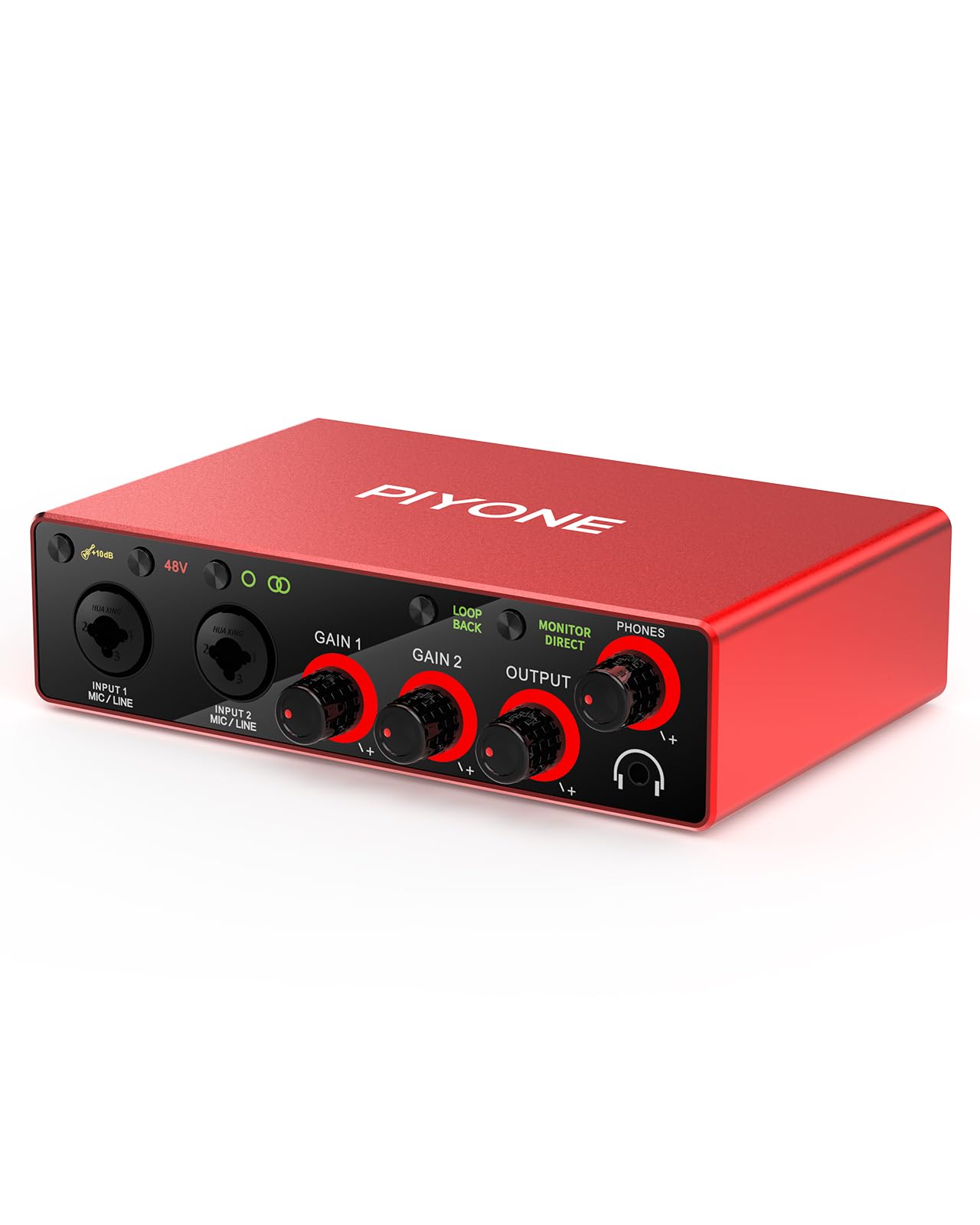
2. Piyone Q2 2X2 Interface (Alloy Red)
The no-driver workhorse that records clean audio on laptops, tablets, and even Linux.
The biggest friction with budget audio interfaces is usually the driver installation. This Piyone unit skips that entirely—it is class-compliant, so you plug the USB-C cable into your Mac or PC and start creating with no drivers required. That same USB-C port handles power, which means no bulky external power supply on your desk.
It matches the pro-standard 24-bit/192kHz resolution of pricier rivals, with two combo jacks that accept XLR mics or quarter-inch instruments. The built-in 48V phantom power feeds condenser microphones, and the Hi-Z input works as a guitar interface for your PC without extra gear.
You get a metal top and solid, smooth volume knobs, according to owners. Its versatility wins people over: the built-in Loopback function (a feature that routes your computer’s audio into your broadcast) is a gift for streamers, and the Direct Monitor feature gives you zero-latency tracking, so you hear yourself with no delay. The fixed LED light rings on each gain knob keep things visible in a dimly lit studio.
Standout feature: The noise-free recordings are a recurring compliment, and it works cleanly on Linux and Audacity setups where many interfaces fail.
Who should skip it: If you rely on software that requires a dedicated ASIO driver, note that this unit uses a generic headphone driver—one owner found it unrecognized by Amplitube and Reaper even though it “worked great otherwise.”
Reach for this if: you want a fuss-free, bus-powered interface for recording vocals, guitar, or a two-mic drum setup on any device without installing software.
The trade-off: its plug-and-play nature means it lacks depth in advanced driver-based software routing for pro DAW users.
3. Mackie Onyx Producer 2-2
The tank-built interface that adds MIDI ports and low latency to a 2×2 recording setup.
Mackie’s “built-like-a-tank” reputation is the first thing owners mention, and for good reason—this rugged unit survives day-to-day abuse that would crack flimsier plastic interfaces. It offers high-resolution 2-in/2-out recording at 24-bit/192kHz, and it is one of the few budget units that includes full MIDI I/O, so you can connect keyboards and hardware synths directly.
The two boutique-quality Onyx mic preamps deliver class-leading fidelity and dynamic range, with 48V phantom power for studio condenser mics. The XLR/TRS combo inputs accept mic, line, and Hi-Z instrument sources, and zero-latency direct monitoring lets you track while hearing yourself instantly. Bus-powered via USB 2.0, it needs no power adapter on the road.
Functionality is what owners praise most, with over thirty buyers highlighting how well it just works across Ubuntu Linux, Windows 10 64-bit, and even Windows 11. It is also silent when idle—no background hiss between takes. The 23 included plugins and instruments in The Musician Collection add immediate value for producers just starting out.
Why it stands out: The low latency and rock-solid build make it a favorite for travel, and several owners describe it as a direct upgrade from M-Audio interfaces they had used for over a decade.
Honest fit note: The headphone output runs quieter than some users expect, and its long-term Windows driver support draws mixed feedback now that the model is discontinued—check your OS version.
Pick this if: you need MIDI connectivity alongside clean preamps and want a rugged unit that handles Linux without a driver install.
skip it if: you crank headphones loudly—the volume ceiling is the most common owner complaint.
4. M-Audio M-Track Duo HD
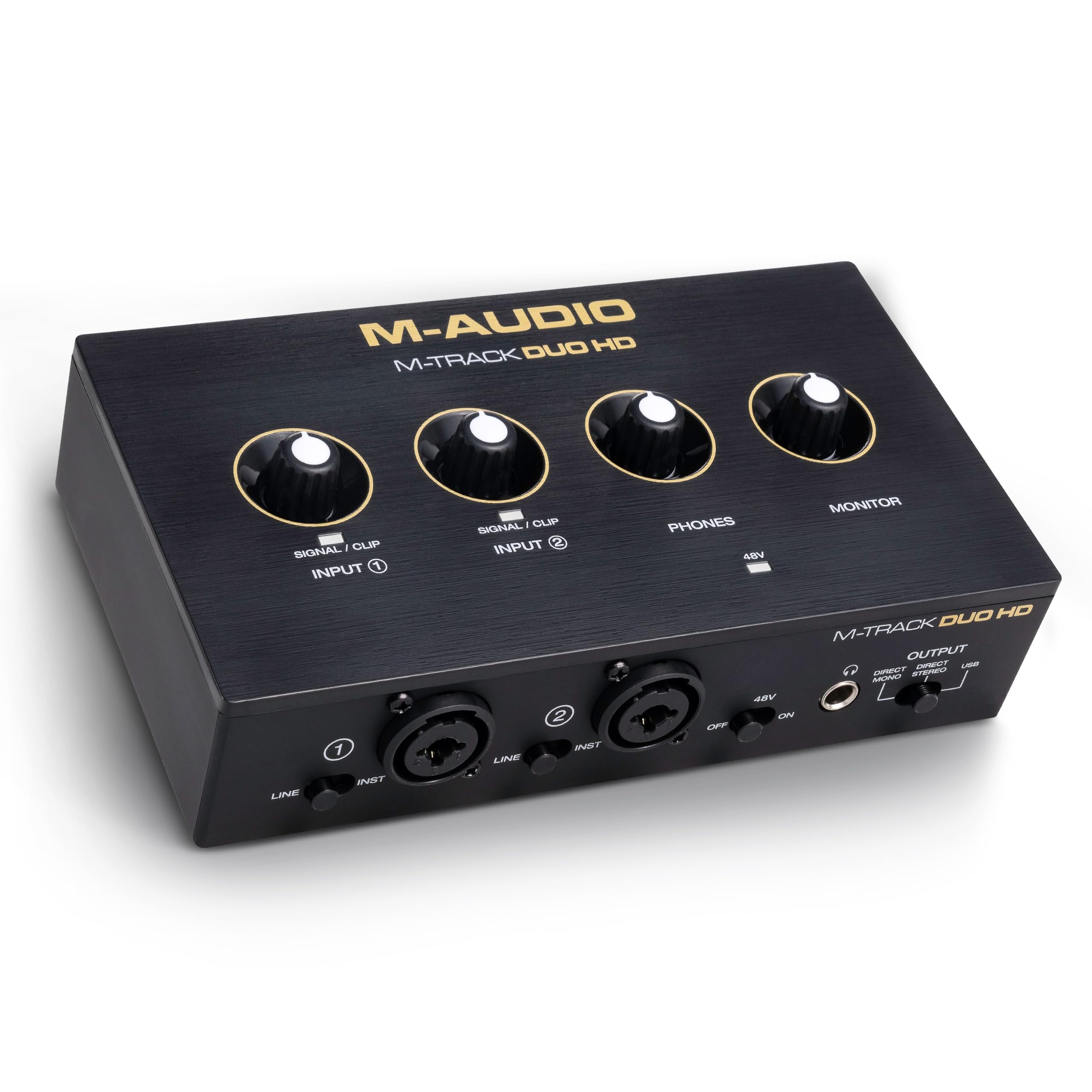
A pocket-sized 2-in/2-out that punches into podcast and mobile-recording territory with 55dB of gain.
If your recording life happens on a desk that changes between home studio and gig bag, this compact M-Audio unit is built for that shuffle. It delivers 2-in/2-out USB-C connectivity with 24-bit/192kHz resolution, and the Crystal preamps provide 55dB of detailed gain—enough to make most dynamic mics sound loud and clear without an extra booster.
It is equally at home with a Mac, PC, iOS, or Android device, so you can record into a DAW on your laptop or straight into a phone app. Two combo inputs accept mic, guitar, bass, or line-level sources, and the switchable +48V phantom power feeds condenser mics. The Direct/USB monitor switch lets you tailor exactly what you hear while tracking.
Owners call it “tough to top” for the price and build quality, describing the HD conversion (the analog-to-digital audio processing) as outstanding. They also point out it is genuinely lightweight, making it an easy grab for Zoom calls or instrument recordings on the move. The bundle includes Ableton Live Lite, MPC Beats, and two months of Splice to get you creating immediately.
What impresses: The value-for-money verdict is strong, with owners praising the high-resolution 24-bit/192 audio conversion as a feature that makes the unit worth every penny.
Heads-up: Compatibility gets mixed marks—most find it works flawlessly, but a few report it doesn’t play nice with their specific MacBook Pro models.
A great match for: podcasters and mobile creators who want a featherweight interface that records clean audio onto laptops and phones alike.
Think twice if: you are on an older MacBook Pro—there are isolated reports of connection issues on that hardware.
5. MAONO AME2 Podcast Studio Console

The 10-channel podcast console that packs sound pads, auto-tune, and Bluetooth into one desktop box.
This is not just an audio interface—it is a full podcast production desk in a single unit. The AME2 is a 10-channel mixer with 11 customizable sound pads: three pads record up to 60 seconds of audio each with one-key looping, while eight more hold 20 seconds of sound effects. You can upload your own audio via smartphone, PC, microphone, or Bluetooth.
Built-in preamps support phantom power for XLR mics, with 3-level mic gain adjustment offering ultra-low-noise gain up to 60dB. The 32-bit chipset and DENOISE function work together to deliver clearer sound, and six reverb modes, 12-step auto-tune, and three modifiable tones let you shape your voice live. The sidechain, music-only, and loopback switches make it a pro tool for streamers.
The recurring praise centers on quality and value for money. Owners use it for karaoke, load sound effects, and appreciate the sturdy build and clean signal. It is compatible with most analog microphones including the Shure SM7B and SM58, Rode Podmic, and Samson Q2U—though USB microphones are not supported, so check your mic type.
Why streamers love it: The 11 sound pads and Bluetooth connectivity let you drop in effects and phone calls without touching your computer or adding cables.
The honest caveat: Functionality and reliability draw mixed feedback—some buyers report it “barely works” or stopped after a few months, so factor in the fresher track record of other picks.
Ideal for: podcasters and live streamers who want a self-contained console with sound effects, voice processing, and phone-in capability.
Not for: anyone who wants a simple, no-frills interface—this is a feature-packed mixer with a learning curve and some noise reports.
6. MAONO P1
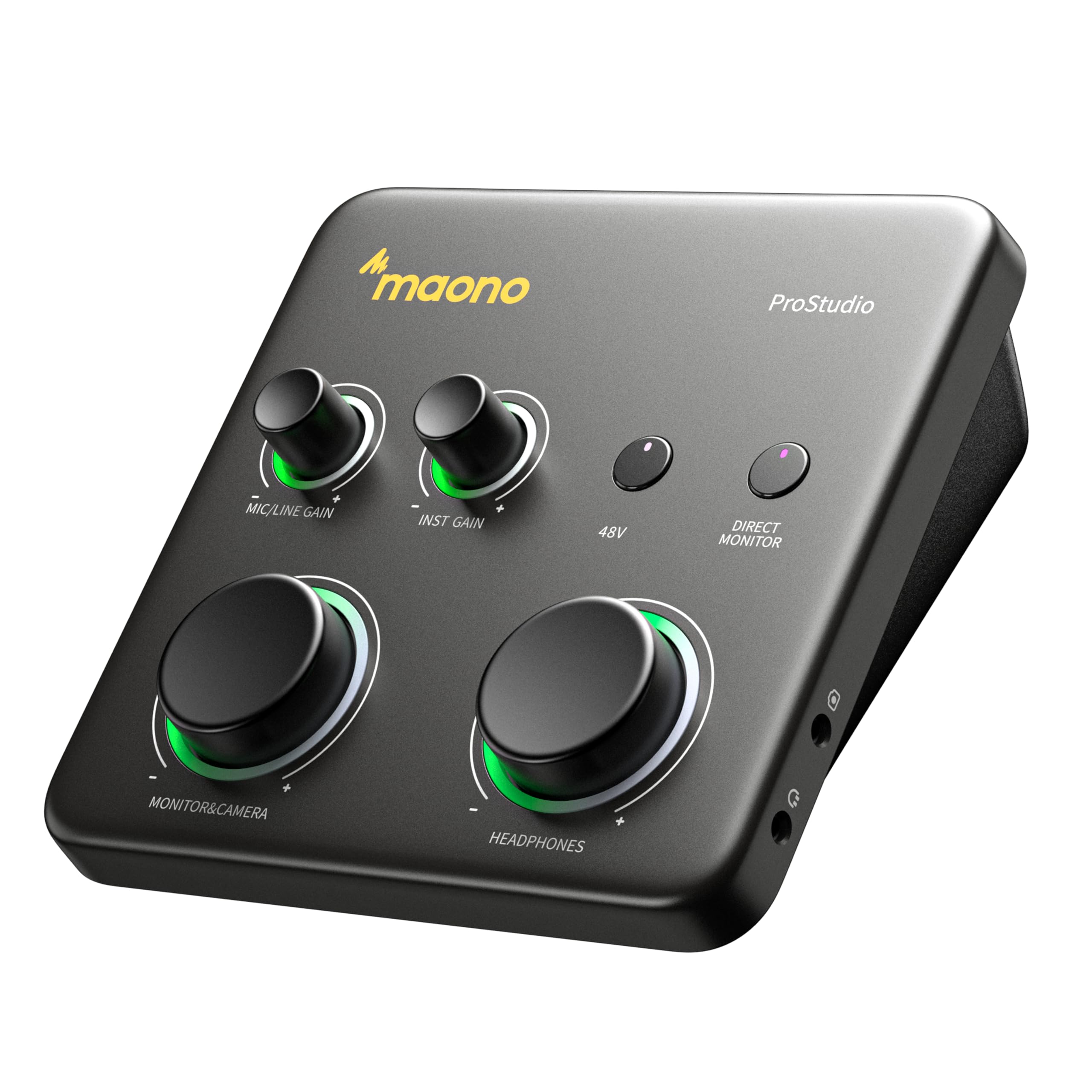
The 70dB-gain powerhouse that drives demanding dynamic mics and records straight into GarageBand on an iPad.
Gain-hungry microphones are the reason many budget recordings sound thin. The MAONO P1 solves that with up to 70dB of gain, which drives dynamic mics flawlessly with no external booster needed—a feature normally reserved for interfaces costing twice as much. Its class-leading -130dB EIN means the preamp stays dead-silent in home studios.
Its hybrid connectivity is the a neat extra: dual USB ports with MFi certification let you connect your computer and phone or iPad simultaneously. You can record in GarageBand or Logic Pro, then stream or upload guitar and vocal covers directly from your mobile device. The 15-degree tilt angle keeps controls within easy reach, and the zinc-alloy housing feels genuinely rugged.
Guitar players praise it for amp sims and direct recording, with owners noting zero noise or hiss and easy controls. The Auto-Gain feature sets your microphone level automatically for clear voice capture in OBS Studio, killing manual gain guessing. Direct monitoring delivers low-latency audio, so you hear your voice or instrument without distracting delays.
What wins people over: Quality is the top praise, with owners highlighting the clean recordings, intuitive controls, and iPad compatibility that “works flawlessly” for vocals and acoustic guitar.
Fair warning: Some owners found the bundled software unintuitive and switched to alternatives like Elgato Wave Link, and gain-hungry mics may still want an inline preamp at maximum gain.
Reach for this if: you record guitar amp sims or vocals into a laptop, iPhone, or iPad and want enough gain to skip buying a booster.
Look elsewhere if: you rely on deep, polished software control—the companion app lags behind the hardware quality.
7. Behringer U-Phoria UMC204HD
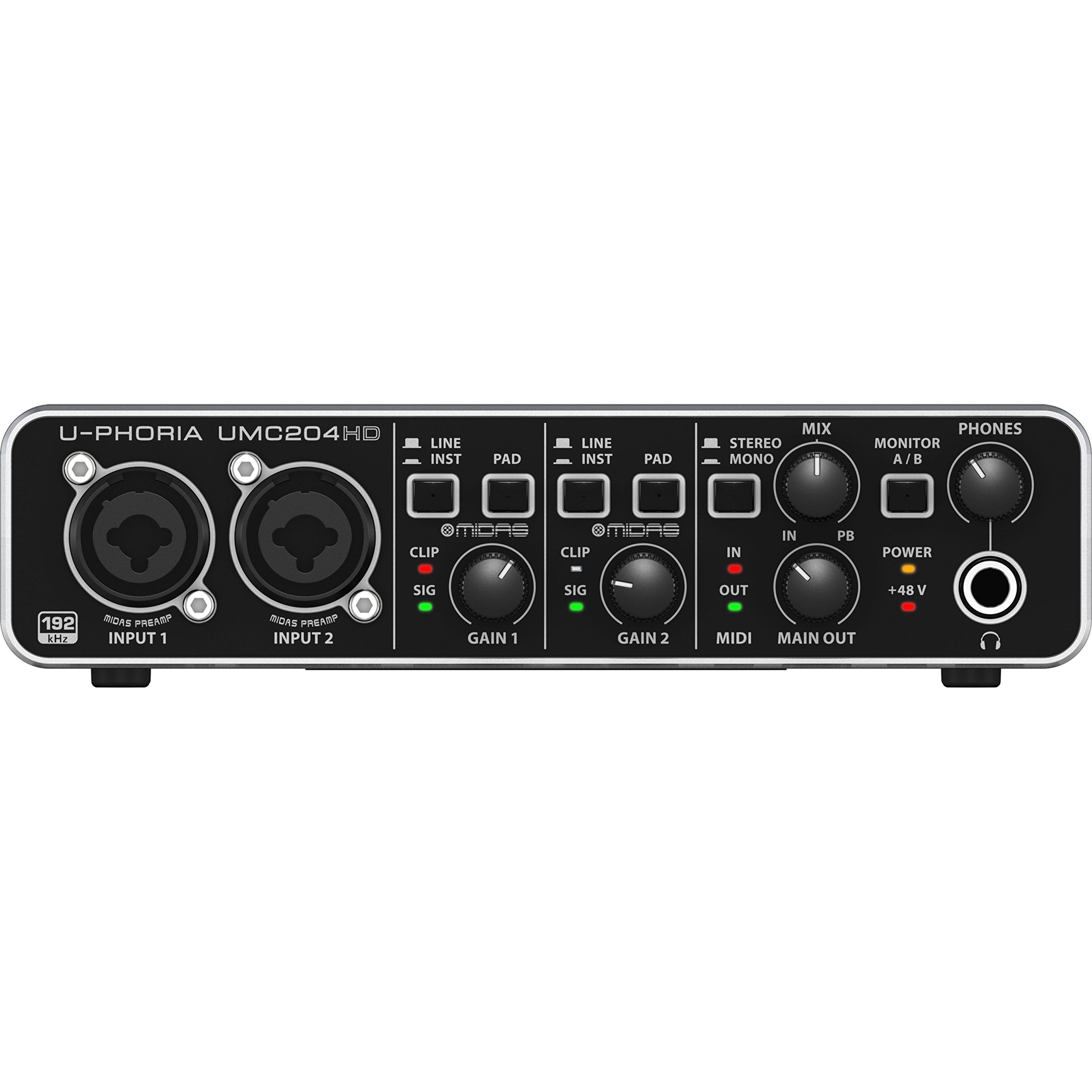
The 2-in/4-out studio workhorse with MIDAS preamps and inserts that outperforms its price class.
Behringer stuffed premium components into this compact box, and owners consistently describe it as delivering more than you pay for. The UMC204HD pairs two MIDAS-designed preamps with a 2-in/4-out configuration, giving you more routing flexibility than typical 2-in/2-out budget units. It records at 24-bit/192kHz and includes MIDI I/O and insert points on each channel for external processors.
Owners mention the solid metal chassis feels sturdy all around, with jacks and knobs that survive regular use. Linux users specifically praise it as flawless plug-and-play on distributions like Kubuntu, recognized as separate input and output devices with zero delay. One owner even found it beats a more expensive MOTU M2 for driving 250-ohm headphones and decoding 24/192 FLAC files.
The value-for-money verdict is the strongest praise, with owners calling it the “best bang for buck” among 2-input interfaces. Powerful preamps drive an SM58 without hiss—one owner found a Fethead booster unnecessary. It also runs clean on Windows 10 with a quick driver install.
The headline feature: The MIDAS preamps and insert jacks give you a genuine studio-routing advantage at an entry price, squeezing more utility from the unit than basic interfaces.
Honest note: There is no power switch, so it can send a boot-up pop to your speakers when your computer starts, and a few customers note inherent noise issues on their units.
Pick this if: you want MIDI, inserts, and premium preamps in a tank-like chassis for a two-input home studio.
The caveat: treat it as a desktop unit—the lack of a power switch means you should power your monitors separately to avoid startup pops.
8. Focusrite Vocaster Two

The podcast-focused two-mic interface with a hardware mute button and Auto Gain that sets your level in seconds.
Podcasters have very specific needs that music interfaces often ignore, and the Vocaster Two was built to answer them. It gives two presenters their own headphone output and Show Mix, and the hardware mute button cuts coughs and interruptions instantly—a feature owners call ideal for virtual meetings and live shows. Over 70dB of gain drives any mic with no booster needed.
The standout tool is Auto Gain: press the button, start talking, and it sets your recording level automatically in seconds. The Enhance feature then applies one of four podcaster-approved presets to reveal the true quality of your voice. Bluetooth phone connectivity lets you capture a whole conversation wirelessly or play music onto your show from a device.
Owners praise the simple setup and compact size, noting it works well with Shure MV7X mics and streams Bluetooth audio into the output stream. The labeled XLR jacks, 48V phantom power, and TRRS phone input make it approachable for novices. It is also portable, able to run powered by an iPhone or iPad using an adapter.
The thing everyone loves: Functionality is the top praise, with owners highlighting the auto gain, compressor, and bundled software access as a complete podcast solution that is “simple to get started.”
Fair caveat: Sound quality gets mixed marks from pickier ears, and the rubber mute button may wear over time—it also lacks built-in sound pads for dropping effects.
A natural fit for: two-host podcasters and streamers who want a push-button setup, Bluetooth phone-ins, and a dedicated mute switch without touching software.
Not the pick if: you need sound pads or deep EQ control at the hardware level—it is intentionally simple.
9. Universal Audio Volt 1

The compact unit that brings Universal Audio’s classic 610 tube-preamp character to a budget desktop box.
Universal Audio is famous for high-end studio gear, and the Volt 1 brings that heritage to a compact, affordable interface. Its signature feature is Vintage mode, which emulates the rich, full album-ready sound of UA’s classic 610 preamps—a one-button way to add analog character to your vocals or guitar. It captures every detail at up to 24-bit/192kHz.
The included software bundle is a huge part of its value. It ships with the award-winning LUNA Digital Audio Workstation, giving you the sound and workflow of a real analog studio, plus the same UAD plug-ins and instruments trusted by industry pros. For beginners, the bundled tutorials help you level up your recording and mixing skills.
Owners praise it as a “perfect audio interface for home studios,” citing its clean sound, quiet preamp, premium build, and low latency. It works right from the start and integrates well with the Apple ecosystem, including iPhones and iPads with iOS 14 or later. The direct-drive headphone output draws positive feedback for its clarity.
The convincing argument: Quality is the top praise with strong sound-quality and compatibility follow-ups—owners describe it as the best in its price range when you factor in the free software.
What to know: It requires an external power supply and an Apple Lightning adapter for iPhones, and the limited I/O plus a lack of a pad switch means you manage hot signals with gain staging.
Choose this if: you want a premium-feeling, compact interface with legendary preamp character and a full DAW bundle included in the box.
Consider the catch: the single XLR input and need for an external power adapter make it less portable than bus-powered rivals.
Understanding the Specs
Sample Rate & Bit Depth
You’ll see figures like 24-bit/192kHz on almost every interface here. The bit depth (24-bit) controls the dynamic range—how quiet and loud a sound you can capture without distortion. The sample rate (192kHz) measures how many times per second the audio is captured. For most podcasts and demos, 24-bit/48kHz is plenty, but the higher ceiling ensures your recordings keep full detail when you pitch-shift or heavily process them.
Gain (dB) & EIN
Gain is how much the preamp amplifies your microphone’s weak signal, measured in dB. Passive dynamic mics like the classic Shure SM58 need around 55dB to 60dB to sound loud without a booster. The EIN (Equivalent Input Noise) rating tells you how much hiss the preamp adds at maximum gain—lower numbers like -130dB mean a dead-silent recording, which matters for quiet home studios.
Phantom Power (48V)
Condenser microphones need a 48-volt power feed to charge their internal circuitry, and this switch on an interface delivers it through the XLR cable. Dynamic mics don’t need it and are usually unaffected. If you plan to use a condenser mic for vocals or acoustic guitar, make sure your chosen interface has a reliable phantom power switch.
Class-Compliant vs. Driver-Based
A class-compliant interface works immediately when plugged into a Mac, iPad, or Linux machine because the operating system recognizes it natively with no extra software. Driver-based interfaces often open up lower latency on Windows but can be finicky. If you record on Apple or Linux devices, prioritize class-compliant units to avoid setup headaches.
FAQ
Do cheap audio interfaces sound as good as expensive ones?
How many inputs do I need for podcasting or music recording?
Does a 192kHz sample rate really make a difference?
What is phantom power and do I need it?
Will a cheap interface work with a Shure SM7B or other gain-hungry mics?
Can I use these interfaces with my iPhone or iPad?
What does zero-latency monitoring mean?
Do these interfaces work with Linux or need special drivers on Windows?
Final Thoughts: The Verdict
For the majority of shoppers, the cheap audio interfaces winner is the Focusrite Scarlett Solo because it pairs proven ease of use with the most positive owner feedback. If you want a plug-and-play box that works on almost anything without drivers, grab the Piyone Q2. And for recording guitar with iPad or phone, the MAONO P1 is the one to reach for. The crowd favorite overall sits at 4.7 stars across over 29,000 owners, making it the safest first purchase for beginners who want to start recording today rather than troubleshoot drivers all weekend.
How We Picked
We do not accept paid placement. Every pick is matched to a real buyer and a real use-case; we do not hands-on test units.
Sources & Methodology
Specifications: manufacturer listings and product documentation. Review insights: verified customer reviews, as of August 2026. Pricing: not shown on this page (it changes often); check the current price via the retailer link.
As an Amazon Associate, Gadgets Feed earns from qualifying purchases. This does not affect which products we feature.