
Our readers keep the lights on and my morning glass full of iced black tea. As an Amazon Associate, I earn from qualifying purchases.
Specs are compiled from manufacturer listings and verified buyer reviews and can change over time — please confirm the key details on the product page before buying.
You do not need to spend a fortune to leave a 60Hz screen behind. A cheap gaming monitor with a 240Hz refresh rate is genuinely within reach, and the real trick is knowing which specs you can trim (resolution, HDR polish) and which ones you cannot (refresh rate, response time, adaptive sync). This guide sorts the herd so you can pick the one that matches the games you actually play and the GPU you actually own.
I’m Min — the founder and writer behind Gadgets Feed. This guide is built by comparing the manufacturers’ published specifications and the patterns across verified customer reviews, so you get each pick’s real strengths and trade-offs instead of marketing spin.
Buying a budget panel means accepting one or two compromises, so this guide weighs image quality, input lag, and build to crown the best cheap gaming monitor for your specific setup.
Our Picks at a Glance



How To Choose The Best Cheap Gaming Monitor
Shopping on a budget forces hard choices, but the fundamentals of a good gaming monitor stay the same. Start with the refresh rate — measured in hertz (Hz) — because that is how many times per second the screen draws a new image. A 240Hz panel updates four times as often as a standard 60Hz office monitor, which is why motion feels so much smoother.
Refresh rate vs. response time
The refresh rate (240Hz, 180Hz, 280Hz) controls how fluid motion looks. The response time (1ms, 0.5ms, 0.3ms) controls how fast a pixel changes color, which directly affects ghosting — the smearing trail behind fast-moving objects. Budget buyers want the fastest of both, and the best deals in this list deliver that combination without a premium sticker.
Adaptive sync: FreeSync vs. G-Sync
Screen tearing happens when your GPU sends frames faster than the monitor can display them. Adaptive sync fixes this by matching the monitor’s refresh rate to your GPU’s output. AMD FreeSync works best with AMD graphics cards, while Nvidia G-Sync pairs with Nvidia GPUs. Many budget panels now support both, which is exactly what you want for flexibility.
Resolution: 1080p vs. 1440p
1080p (Full HD, 1920×1080) is the budget classic — it is easier for your GPU to drive at high frame rates, which matters most in fast shooters. 1440p (Quad HD, 2560×1440) packs about 33% more pixels, so it looks sharper but demands more from your graphics card. If you own a mid-range GPU, 1080p at 240Hz often beats 1440p at 144Hz for competitive play.
Quick Comparison
| Model | Best For | Refresh Rate | Resolution | Response Time | Amazon |
|---|---|---|---|---|---|
| Samsung Odyssey G4★ Best Overall | Competitive FPS players | 240Hz | 1920 x 1080 | 1ms (GTG) | Amazon |
| ASUS TUF VG249QL3ATop Performer | All-round value with ergonomics | 180Hz | 1920 x 1080 | 1ms (GTG) | Amazon |
| Dell SE2726HGBudget Champion | Fast, simple 27-inch 1080p | 240Hz | 1920 x 1080 | 0.5ms | Amazon |
| INNOCN 25G2S | 1440p sharpness on a budget | 240Hz | 2560 x 1440 | 1ms | Amazon |
| KTC H24T7 | Compact 1440p with ergonomics | 180Hz | 2560 x 1440 | Fast IPS | Amazon |
| AOC Q27G41ZE | Blur-free 1440p esports | 240Hz (260Hz OC) | 2560 x 1440 | 0.3ms (MPRT) | Amazon |
| LG 27GS50F-B | First-time gaming monitors | 180Hz | 1920 x 1080 | 1ms (MBR) | Amazon |
| AOC C27G4ZH | Curved, ultra-fast 1080p | 280Hz | 1920 x 1080 | 0.3ms | Amazon |
| Samsung Odyssey G5 G53F | Vivid 1440p for story games | 200Hz | 2560 x 1440 | 1ms (MPRT) | Amazon |
| Acer Nitro XV272U | Flexible ergonomics and 240Hz | 240Hz | 2560 x 1440 | 1ms (G to G) | Amazon |
| Alienware AW2725DM | Premium feel without the premium price | 180Hz | 2560 x 1440 | 1ms (GTG) | Amazon |
In‑Depth Reviews
1. Samsung Odyssey G4 (LS25BG402ENXGO)
Our pick — over 4.5★ from 950+ verified ratings; the strongest balance of quality and price.
The competitive FPS pick where fluid motion meets a fully adjustable stand.
This 25-inch Samsung is built for speed, and it shows. A 240Hz refresh rate paired with a 1ms (GTG) response time keeps fast scenes free of smearing — exactly what you need when tracking enemies across a chaotic screen. Buyers report it still performs well after two years of daily use.
The IPS panel delivers vivid colors that exceed its price point. An IPS panel delivers a wide 178º viewing angle and clear, vivid hues, so the picture holds up from nearly any seat. It is also G-Sync Compatible and supports AMD FreeSync Premium, meaning it plays nice with both Nvidia and AMD graphics cards to stop choppiness and image tears.
The ergonomic stand adds comfort with swivel, tilt, and height adjustments. The ergonomic stand offers swivel, tilt, and height adjustment so you can dial in your setup, and Auto Source Switch+ hops between connected devices instantly. One caveat: the base is wide, so it will take up desk space, and it lacks built-in speakers — a 1/8″ audio out jack handles sound instead.
Why it wins: the 240Hz smoothness and crisp IPS panel are the pair buyers praise most — build quality alone earns over a hundred shout-outs, with value for money close behind.
Reach for this if: you play fast shooters and want a reliable 1080p panel with a proper adjustable stand.
Think twice if: you need built-in speakers or have a very small desk — the stand’s wide footprint demands room.
2. ASUS TUF Gaming VG249QL3A
The dependable all-rounder that wears the ASUS TUF badge and a 180Hz refresh rate.
This 23.8-inch panel (1920×1080) runs at 180Hz with a 1ms (GTG) response time, and ASUS adds its Extreme Low Motion Blur (ELMB) tech to cut ghosting even further. The result is smooth, composed motion in fast games, earning praise for reliability.
The stand stands out with height, swivel, and pivot adjustments. Unlike many budget panels that only tilt, this one offers height adjustment, swivel, and pivot, so you can position it exactly where you want it. Owners specifically call out how adjustable it is, and it comes with built-in speakers to boot — a rare perk at this level.
Shadow Boost is a nice extra. It brightens dark areas in games so you can spot enemies hiding in shadows without washing out the bright parts of the scene. Just keep expectations in check on the speakers — they are fine for casual use, but not for serious listening.
What owners love
- Vivid colors and a noticeable 180Hz boost
- Full ergonomic stand with height, swivel, and pivot
- Built-in speakers, rare for budget panels
What to weigh
- Speakers are weak — plan for headphones
- One DisplayPort only, so check your GPU’s ports
Pick this if: you want an adjustable, dependable 1080p panel for mixed gaming and desk work.
skip it if: you demand the absolute fastest 240Hz motion for esports titles.
3. Dell SE2726HG
A 27-inch 240Hz panel that outpaces its price tag on responsiveness.
Dell brings 240Hz smoothness to a 27-inch screen at an entry-level cost, and it does it with a 0.5ms response time — a 2x gap versus typical 1ms budget panels. That number translates to crisp, fluid motion in shooters and racing games, with less input lag than you would expect at this tier. Owners call the picture quality phenomenal and the value excellent.
The panel uses in-plane switching (IPS) tech for accurate colors across wide viewing angles, and it covers 99% of the sRGB color space for vivid, detailed imagery. FreeSync Premium plus HDMI VRR (variable refresh rate) keeps PC and console gameplay tear-free. It is also TÜV Rheinland 3-star certified, which means it lowers blue light while preserving color quality for long sessions.
The honest catch: this is a lean package. There is no height adjustment, and some owners note the build feels a bit light. A few have reported burn-in or discoloration appearing after roughly a month of use — treat the panel gently and it should serve you well.
The verdict: at 240Hz and 0.5ms, this is one of the fastest response-to-price ratios in the 1080p space.
Great for: console players and PC gamers who want a big 27-inch screen without paying for 1440p.
Not ideal for: anyone who needs a height-adjustable stand or prizes all-metal build quality.
4. INNOCN 25G2S
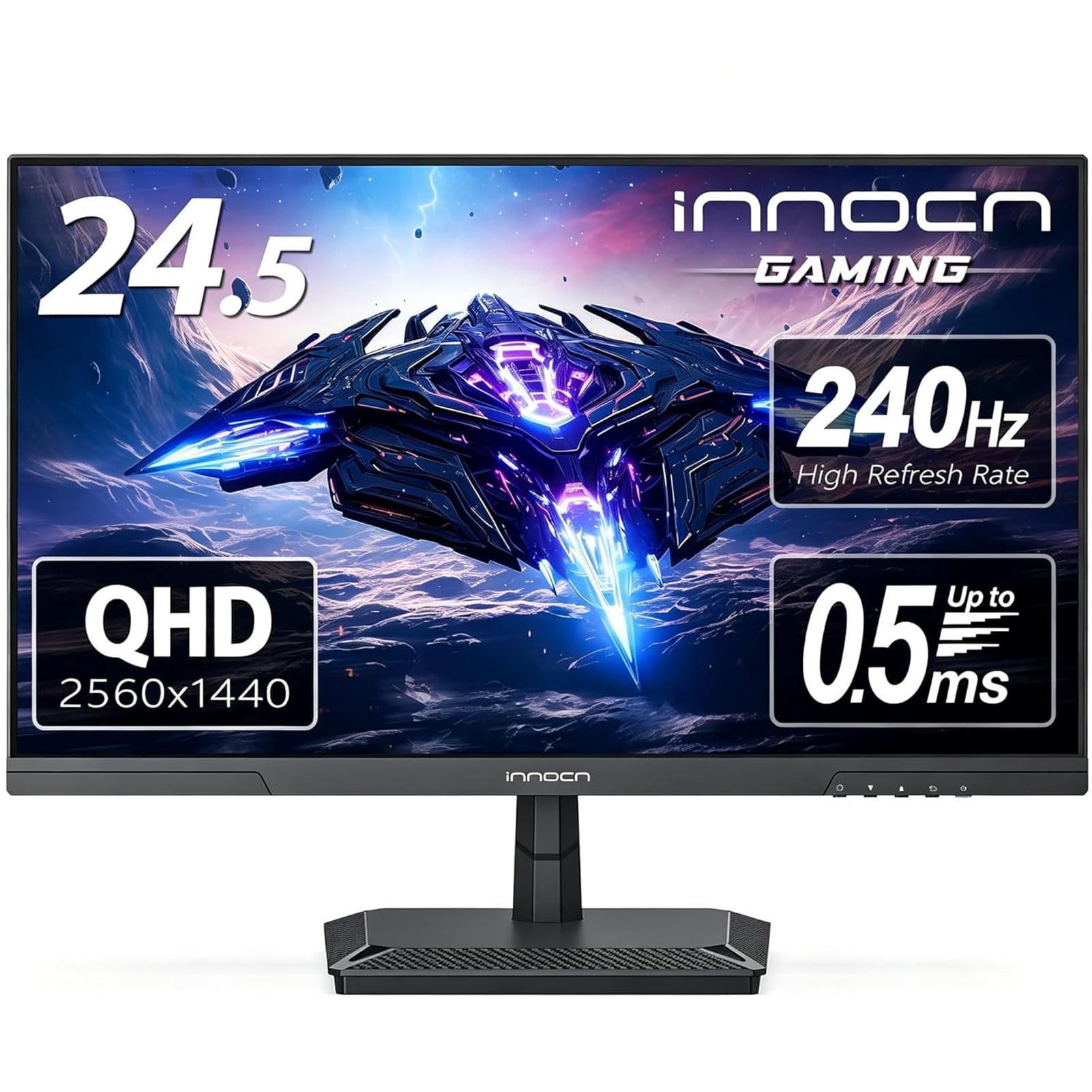
A 24.5-inch 1440p panel with a 240Hz refresh and HDMI 2.1 for next-gen consoles.
Here is the budget way into 1440p sharpness. This 24.5-inch INNOCN delivers 2560 x 1440 resolution — that’s 33% more pixels than the 1080p screens in this list — so text and game detail look noticeably crisper. It runs at up to 240Hz over DisplayPort 1.4, while HDMI 2.1 means it is ready for PS5 and Xbox Series consoles.
The Fast IPS panel covers 99% of sRGB for deep, vivid color, and G-Sync compatibility keeps motion tear-free. Owners praise the crisp 24.5-inch visuals and the almost-perfect blacks, calling the picture quality excellent. The 1200:1 contrast ratio helps dark scenes hold detail.
Comfort features include blue light reduction and flicker-free tech for longer sessions. The trade-off: some owners find the metal stand basic, and the brightness draws mixed reviews — it is good, just not exceptional. Also, this one is 7.03 lbs without the stand, so it is a solidly built unit that needs a sturdy desk.
Score to know: owners mention that 1440p resolution (2560×1440 pixels) at 100-120fps is the balance, giving you sharp motion without taxing your graphics card, and the build quality earns the most praise.
Ideal for: gamers upgrading from 1080p who want visible sharpness without jumping to a 27-inch frame.
Look elsewhere if: you want the brightest panel possible or need a premium-feeling stand.
5. KTC H24T7
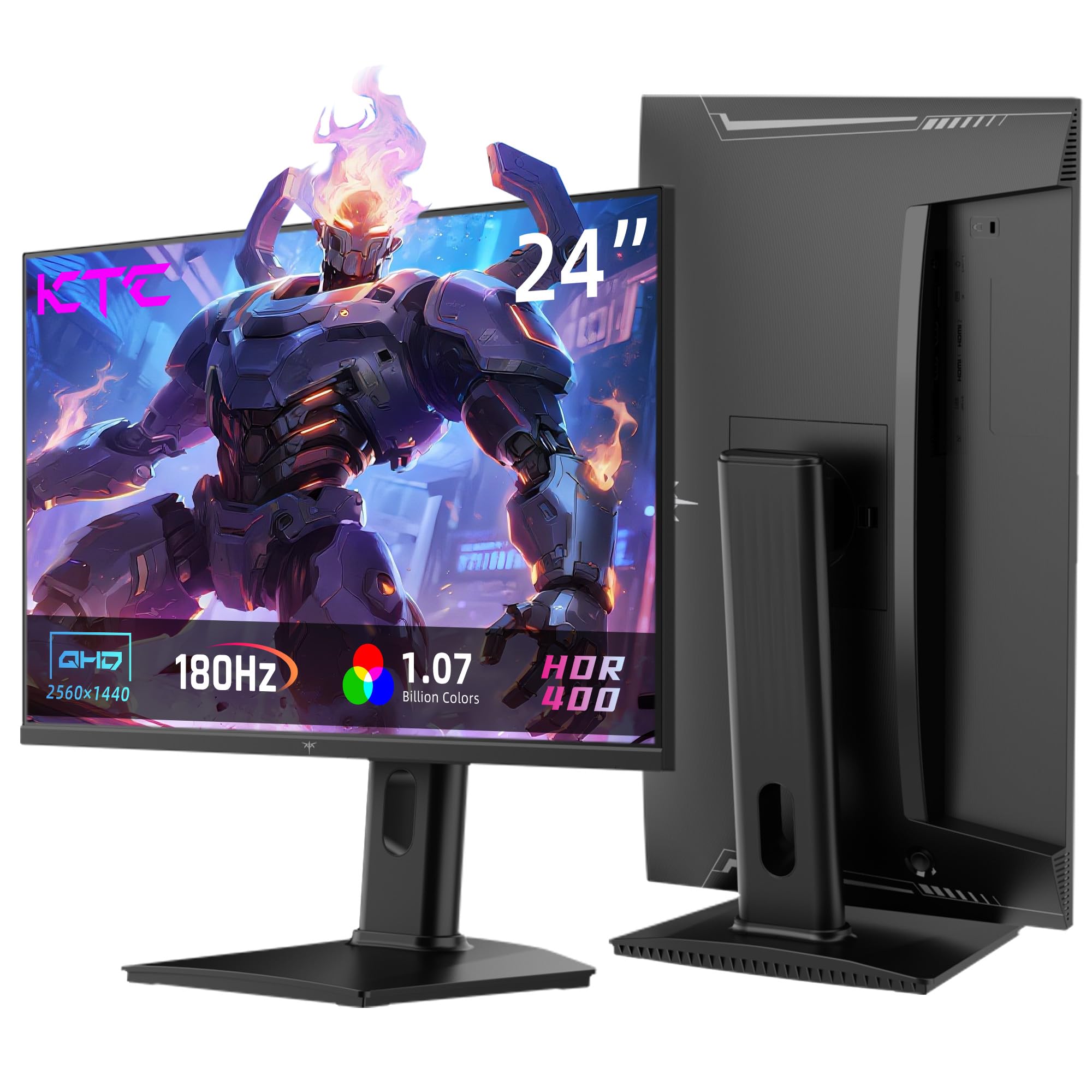
A small-screen 1440p monitor that overclocks to 185Hz and adds real ergonomics.
If 24 inches is your preferred size, this KTC packs QHD (2560×1440) resolution into that compact frame, so everything looks denser and sharper than a 1080p screen of the same size. It runs at 180Hz natively and overclocks to 185Hz, with FreeSync and G-Sync compatibility for tear-free play.
The panel covers 99% of sRGB with 1.08 billion colors and a 1000:1 contrast ratio, plus HDR400 support for richer highlights. Owners have compared it favorably to monitors costing three times as much, calling the peak brightness “insane” and the colors vivid. There is a slight light bleed in one bottom corner on some units, but it is rarely noticeable in practice.
Ergonomics are where this one stands apart. You get a 110mm height adjustment, 90-degree pivot for portrait mode, and a tilt range from -5° to 20°, plus a VESA mount (100x100mm). It covers HDMI 2.0 x2 (QHD at 144Hz) and DisplayPort 1.4 (QHD at 180Hz, up to 185Hz), so pick your cable based on how fast you want to run it.
Where it shines
- Punchy brightness and vivid colors for a 1440p panel
- Full ergonomic stand: height, pivot, and tilt
- Three-year warranty with responsive support
Where it’s thin
- Some units show slight backlight bleed in a corner
- VESA screws can run long — plan for spacers
Perfect if: you want 1440p sharpness in a compact 24-inch form with a genuinely adjustable stand.
Reconsider if: you play games that demand the full 240Hz speed instead of 180-185Hz.
6. AOC Q27G41ZE

A 27-inch 1440p monitor that overclocks to 260Hz with a 0.3ms response time.
This AOC is the blur-free specialist of the list. It runs at 240Hz natively and overclocks to 260Hz via DisplayPort, with a 0.3ms MPRT (motion picture response time) rating — a spec that targets minimum motion blur. Owners going from a 60Hz screen to this one describe the difference as “overwhelming but good,” and the 240Hz smoothness is immediately noticeable.
At 27 inches with QHD (2560×1440) resolution, it balances sharpness with speed. The IPS panel delivers wide viewing angles, a 300-nit brightness, and a 1000:1 contrast ratio, with Adaptive-Sync support for both AMD and Nvidia GPUs to stop tearing. Gaming extras include Shadow Control, Game Mode presets, and a clean on-screen display menu.
Connectivity covers 1x DisplayPort 1.4 and 2x HDMI 2.0 ports plus audio out. The honest limits: the stand only tilts (-3° to +21°), so there is no height adjustment, and there are no built-in speakers — the audio out is a headphone jack only, which caught some owners off guard.
The takeaway: build quality and picture quality lead the praise, with the controls earning specific credit for being front-mounted and easy to use.
Choose this for: high-frame-rate 1440p gaming where every millisecond of motion clarity counts.
Pass if: you need an adjustable stand or expect built-in speakers from your monitor.
7. LG UltraGear 27GS50F-B

The friendly 27-inch 1080p starter that looks great and sets up in minutes.
This LG UltraGear is the monitor beginners keep coming back to — owners literally call it “perfect for a first time gaming monitor.” It runs at 180Hz (refreshes 180 times per second) with 1ms MBR (motion blur reduction, which sharpens fast-moving images) at Full HD (1920×1080 pixels), so you get a fast, smooth experience without overwhelming complexity. The 3-side virtually borderless design keeps your desk looking clean.
Picture quality earns steady praise for being crisp and clear, with HDR10 support adding drama to colors and contrast. AMD FreeSync keeps frames fluid and tear-free, and the gamer-centric menu offers modes tuned for FPS, RTS, and general Gamer use. Black Stabilizer brightens dark scenes, and a Crosshair overlay helps with aim precision.
The 3000:1 contrast ratio is notably strong, helping blacks look deeper than typical budget IPS panels. It connects via two HDMI ports and one DisplayPort, all on a tilt-adjustable stand. Just know the brightness tops out at 250 nits, so very bright rooms may wash it out slightly — but most owners find it more than adequate.
Owners agree: the 180Hz smoothness and easy setup earn the most praise, making this the least intimidating high-refresh monitor on the list.
Great starting point if: you are new to high refresh rates and want a simple, good-looking 1080p monitor.
Skip if: you need height adjustment or a brighter panel for a sunlit room.
8. AOC C27G4ZH

The fastest refresh in this lineup — 280Hz — wrapped in an rich curved display, so you see more of the game without turning your head.
This is the speed king of the budget set. The AOC C27G4ZH pushes a 280Hz refresh rate with a 0.3ms response time, making it one of the fastest 1080p panels you can buy without stepping into premium territory. Owners say it changed their gaming experience for the better, with games running “smoothly and quickly” and no lag during intense play.
The 1500R curvature (a 1500mm radius bend) wraps the 27-inch screen around your field of view, making you feel more inside the game. HDR support (high dynamic range, for brighter highlights and deeper shadows) with a high dynamic contrast ratio keeps colors vibrant. A 3000:1 contrast ratio delivers deep blacks, which suits the VA panel (vertical alignment, known for strong contrast) well for dark scenes and cinematic games. Adaptive Sync (which matches the screen’s refresh to your graphics card) plus Flicker-Free tech (which reduces screen flicker) keeps long sessions comfortable.
Ergonomics are generous here: tilt, swivel, and height adjustment, plus VESA compatibility for mounting. It hits 1080p at 240Hz over HDMI or the full 280Hz over DisplayPort, so cable choice matters. The recurring caution is reliability — a small number of customers note issues over time, so a bit of luck is involved.
The fast bits
- 280Hz refresh with 0.3ms response — elite speed
- Generous ergonomic stand: tilt, swivel, height
- Strong 3000:1 contrast for deep blacks
The trade-offs
- 1080p resolution — not as sharp as 1440p panels
- Reliability draws some concern from long-term owners
Reach for this if: you play fast competitive titles and want the highest possible refresh rate on a budget.
Look elsewhere if: you prioritize sharp pixels over raw speed and prefer a flat panel.
9. Samsung Odyssey G5 G53F

A 27-inch QHD IPS panel where color accuracy and sharpness take center stage.
This Samsung Odyssey G5 is for the gamer who notices color. The 27-inch IPS panel delivers QHD (2560×1440) resolution with a wide 178° viewing angle, and owners specifically praise how well it handles different shades of the same color — a sign of genuinely accurate reproduction. The jump from 1080p to 1440p is described as a clear, visible upgrade.
Speed is plenty for most players at 200Hz with a 1ms (MPRT) response time, and AMD FreeSync Premium cuts choppiness and screen tearing. HDR10 adds brighter highlights and nuanced shadows, while Black Equalizer lifts visibility in dark corners of the map. Virtual Aim Point puts a crosshair on screen for extra precision.
It ships with an HDMI, a DisplayPort, and a PC cable in the box for plug-and-play setup. The limitations are the stand — tilt only, no height adjustment, and a cheap-feeling cable loop — plus occasional reports of failures after a few months. For the vivid 1440p experience at this price, though, the picture quality keeps owners satisfied.
What stands out: the color accuracy and the 1440p sharpness are what owners keep praising, with FPS and RPG color profiles suiting different games.
Best for: story-driven games and anyone who values color accuracy over maximum refresh speed.
Think twice if: you need a height-adjustable stand or plan to mount it — VESA works, but check your setup.
10. Acer Nitro XV272U W2bmiiprx

A 27-inch QHD IPS monitor with 240Hz speed and a stand that does everything.
This Acer Nitro delivers the full package: QHD (2560×1440) IPS resolution, 240Hz refresh over DisplayPort, and a response time as low as 0.5ms (G to G) at the top end. Owners upgrading from a 60Hz monitor call it a fantastic step up, with sharp picture quality and smooth performance in PC gaming.
The ergonomic stand is the headline feature. It offers height adjustment up to 4.7 inches, 360° swivel, and 90-degree pivot for portrait mode — a level of flexibility most budget monitors simply skip. A 0.233mm pixel pitch keeps text and detail crisp, and the 400-nit brightness is among the brightest here. It even packs 2-watt speakers, with DisplayPort and two HDMI 2.0 ports plus audio out.
AMD FreeSync Premium keeps frames tear-free, and VESA mounting (100x100mm) is available. The honest concerns: factory brightness runs a bit dark and needs adjustment, some units show backlight bleed, and critiques note the ports are HDMI 2.0 rather than 2.1. Reviewers point out the 240Hz capability in 2K resolution as a genuine highlight.
Why it’s a contender
- Full ergonomic stand with 4.7-inch height range
- 240Hz refresh with sub-1ms response time
- Built-in speakers included
Where it stumbles
- Brightness needs manual adjustment from the start
- Backlight bleed can appear on some units
Perfect for: gamers who want 240Hz and 1440p plus a stand flexible enough for any desk setup.
Pass if: you get irritated by backlight bleed in dark scenes or want HDMI 2.1 for the latest consoles.
11. Alienware AW2725DM

Alienware polish at a quasi-budget price, with stellar colors and a flexible stand.
This Alienware brings the premium badge without the premium price. The 27-inch QHD (2560×1440) panel runs at 180Hz with a 1ms gray-to-gray response time, and the DCI-P3 95% color coverage delivers vibrant, rich tones that owners describe as simply outstanding. It is an excellent midrange choice for both gaming and daily desktop use.
Displays with VESA DisplayHDR 400 certification punch above their class with brighter highlights, and a hardware-based low blue light solution reduces eye strain without washing out color — great for marathon sessions. G-Sync and FreeSync compatibility mean it pairs cleanly with either major GPU brand. Owners running it with a 16GB RTX 5080 rig report flawless performance in demanding titles.
The stand is fully adjustable with height, swivel, pivot, and tilt, and the included cables (DisplayPort 1.4, HDMI, and USB Type-A to Type-B) cover your setup needs. Two honest notes: there is no audio output, so plan for speakers or a headset, and a few shoppers say minor scratches around the ports on arrival — inspect yours promptly.
Why it lands here: the combination of vivid colors, crisp images, and a premium-feeling adjustable stand makes it the most complete 1440p experience under premium pricing.
Step up to this if: you want the rich colors and build quality of a premium brand without paying the usual premium markup — this gives you that feel for less.
Think twice if: you need a built-in audio jack or insist on 240Hz over 180Hz for esports.
Understanding the Specs
Refresh Rate (Hz)
This is how many times per second your monitor redraws the entire screen. A 240Hz panel updates 4 times as often as a standard 60Hz office monitor, which makes fast motion — like turning a corner in a shooter — look dramatically smoother. Higher is better for competitive play, and 144Hz is the minimum most gamers should consider.
Response Time (ms)
This measures how quickly a pixel can change from one color to another, counted in milliseconds (ms). Lower numbers mean less ghosting — the blurry trail behind fast-moving objects. Budget monitors typically advertise 1ms, while premium panels go down to 0.3ms or 0.5ms. For fast games, look for 1ms or faster.
FAQ
Is 240Hz worth it over 144Hz for gaming?
What does FreeSync vs. G-Sync actually do for me?
Do I need a 1440p monitor if I mainly play competitive shooters?
Will a 240Hz monitor work with my PlayStation 5 or Xbox Series X?
What is the difference between 1ms response time and 0.5ms?
Why does my monitor not run at 240Hz from the start?
Is a curved monitor better for gaming than a flat one?
How long do cheap gaming monitors typically last?
Final Thoughts: The Verdict
For most people, the cheap gaming monitor winner is the Samsung Odyssey G4 because it pairs a blistering 240Hz refresh with a fully adjustable stand and proven long-term reliability at a price that feels like a steal. If you want sharper 1440p pixels without giving up speed, grab the INNOCN 25G2S — it delivers 2560×1440 at 240Hz with HDMI 2.1 (the latest HDMI standard, which supports high refresh at high resolution). And for the absolute fastest refresh rate in this budget range, the AOC C27G4ZH pushes 280Hz in a curved, rich panel that competitive players will love.
How We Picked
We do not accept paid placement. Every pick is matched to a real buyer and a real use-case; we do not hands-on test units.
Sources & Methodology
Specifications: manufacturer listings and product documentation. Review insights: verified customer reviews, as of August 2026. Pricing: not shown on this page (it changes often); check the current price via the retailer link.
As an Amazon Associate, Gadgets Feed earns from qualifying purchases. This does not affect which products we feature.