
Our readers keep the lights on and my morning glass full of iced black tea. As an Amazon Associate, I earn from qualifying purchases.
Specs are compiled from manufacturer listings and verified buyer reviews and can change over time — please confirm the key details on the product page before buying.
Buying a cheap printer is easy. Living with it is the real test — because the printer’s ink system often determines whether it’s a bargain or a money pit.. This guide sorts through 7 genuinely affordable models, from classic inkjets to inkless portables, and tells you which ones print beautifully without punishing you at cartridge-refill time.
I’m Min — the founder and writer behind Gadgets Feed. This guide is built by comparing the manufacturers’ published specifications and the patterns across verified customer reviews, so you get each pick’s real strengths and trade-offs instead of marketing spin.
You don’t need to overspend for a printer that handles daily tasks.. This guide reviews the best cheap printers for home, travel, and student use, matching each to real printing habits..
Our Picks at a Glance


How To Choose The Best Cheap Printers
Before you click buy, focus on what you’ll actually print, how often, and if you need color. Fit matters more than price, as a mismatched printer becomes a regret..
Match the tech to the task
Traditional inkjet printers handle color documents and borderless photos, and they scan and copy. Thermal printers print only in black and white, need special thermal paper, and often lack scanning — but they never run out of ink or clog, and many cost just pennies per page. If your printing is mostly documents, receipts, and labels while traveling, an inkless model saves you from the cartridge treadmill entirely.
Count the true cost per page
The “cheap” label fades fast if cartridges run dry after a few dozen pages. Look at the included starter cartridge yields and check the cost of replacements before you commit. Some budget models ship with “setup” cartridges that hold far less ink than standard ones, so the first refill comes sooner than you expect. A printer that uses a subscription ink service can slash per-page costs, but only if you print enough to justify it.
Check the tray and the speed you’ll actually use
A paper tray that holds 100 sheets forces you to refill constantly during homework season. Speeds between 7 and 16 pages per minute matter less for home use than reliability — a machine that jams after 50 pages is slower in practice than one rated at a lower number that never stalls. Automatic duplex (printing on both sides) saves paper and time; confirm it’s listed rather than assuming it exists at this price point.
Quick Comparison
| Model | Best For | Print Speed (B&W/Color) | Core Feature | Connectivity | Amazon |
|---|---|---|---|---|---|
| Canon PIXMA TR7120★ Best Overall | Home All-in-One Value | 14 / 9 ppm | Duplex + ADF | Dual-Band Wi-Fi | Amazon |
| TATTMUSE A285MBest Value | On-the-Go Inkless | 7 ppm | 5 Paper Sizes | Bluetooth + USB-C | Amazon |
| Gloryang Inkless Portable | Travel + Full Kit | 35 ppm | Case + 3 Rolls | Bluetooth | Amazon |
| PRT MT610 | Road Warriors | 30 ppm | 200-Sheet Kit | Bluetooth + USB-C | Amazon |
| HP Envy 6155 | Phone-First Home Users | 10 / 7 ppm | AI Formatting | Dual-Band Wi-Fi | Amazon |
| Brother MFC-J1410DW | Home Office Productivity | 16 / 9 ppm | 2.7″ Touchscreen | Wi-Fi + USB | Amazon |
| Brother MFC-J1365DW | High-Yield Ink | 16 / 9 ppm | 1,200-Pg Black Cart | Wi-Fi + USB | Amazon |
In‑Depth Reviews
1. Canon PIXMA TR7120
Our pick — over 4★ from 400+ verified ratings; the strongest balance of quality and price.
The budget all-in-one that acts like it costs twice as much, minus the drama.
This Canon handles print, scan, and copy in one compact white shell, and its Auto Document Feeder (a tray that feeds multiple pages automatically) lets you stack a pile and let it work hands-free — a feature you rarely see at this price. The 1.42-inch monochrome OLED screen shows ink levels and status at a glance, so you know a refill is coming before you’re mid-print.
Speed is genuinely useful here — 14 black pages per minute and 9 color — and automatic 2-sided printing cuts paper use without you lifting a finger. Dual-band Wi-Fi (2.4GHz or 5GHz) gives you a stable connection choice, which matters because a 2.4GHz-only printer in a crowded home can drop. Buyers report this machine’s resilience plainly: “Great value, printed 500 pages without jams..”
The catch is the starter ink. The demo cartridges run out fast — expect an early refill — and the paper tray holds only 50-100 sheets, so heavy weeks mean topping up. The build is plasticky, but owners who’ve run months of flawless prints consider it better value than pricier color all-in-ones, and cheap replacement ink keeps the long-term math friendly.
What wins people over
- Rare combo of duplex printing and ADF scanning at this price
- 14 ppm black speed keeps homework queues moving
- Compact footprint with a clear OLED status screen
What to know going in
- Starter ink cartridges deplete quickly
- Paper tray is small at 50-100 sheets
- Plastic build feels budget-grade
The right fit: Households and hybrid workers who want print, scan, and copy in one machine without paying premium prices.
Look elsewhere if: You print hundreds of pages weekly — the small tray and starter cartridges will test your patience.
2. TATTMUSE A285M Portable Thermal Printer
A 1.5-pound pocket office that never needs a cartridge — ever.
This is the machine that kills the ink-monopoly problem entirely. Built on thermal technology, the A285M skips ink, toner, and ribbons, which means zero clogging, zero cleaning, and zero cartridge costs — just thermal paper. At 1.5 pounds and roughly the size of a thick notebook (10.39″D x 3.07″W x 1.77″H), it slips into a backpack or glovebox for printing contracts, invoices, and boarding passes from anywhere.
Its versatility comes from paper: it accepts US Letter, A4, and 110mm, 80mm, and 53mm widths, so one device handles documents and labels. Phones connect via Bluetooth using the app, while laptops and computers plug in through USB-C (driver download first). Owners mention it’s the “Easiest setup (~1 min app download); ink-free; versatile sizes; compatible with Apple/Android; top-notch print quality (not blurry/runny); eliminates ongoing ink costs, paying for itself over time..” The trade-off — it prints only black and white, and only on thermal paper, not regular copy paper — is obvious, yet for travelers and mobile notaries it’s exactly the point.
Note the charging rule: use a 5V 2A charger, never anything above 5V, or you risk the battery. And remember this is a print-only device — no scanner, no copier. If your world is documents, labels, and receipts on the move, this is the no-strings cheap printer.
Why owners pick it
- No ink costs — thermal printing with zero cartridges
- Five paper sizes from US Letter down to 53mm labels
- Featherweight at 1.5 pounds with built-in paper bin
Set expectations first
- Black and white only — no color output
- Requires special thermal paper, not plain copy paper
- Laptops need a USB-C cable and driver install
Reach for it if: You print on the road — truck drivers, mobile notaries, students, and travelers who want ink-free reliability.
skip it if: You need color, scanning, or photo-quality output at a desk.
3. Gloryang Inkless Portable Printer

The complete travel kit that prints at a startling 35 pages per minute.
Gloryang packs everything you need to start printing in the box: the printer, three rolls of Letter-size thermal paper (one pre-installed, two spare), a hard carrying case, a charging cable, and a guide card. It’s the rare portable that works from the start the moment you open it, and the included case makes it the easiest pick to toss in a backpack and forget until you need it.
At 1.75 pounds and just 1.7 inches thick, it’s slim enough for tight NYC-apartment shelves — a point owners specifically celebrate. The thermal engine hits an impressive 35 pages per minute, making it the fastest inkless option here by a wide margin. Setup is a few minutes through the Jadens Printer app over Bluetooth for iOS and Android, and laptops work after a one-time driver install. Long-haul truckers report it saves them real money versus paying per page at truck stops.
Two honest limitations: it only works with Gloryang’s own thermal paper (not other brands), and output is strictly black and white — no option for color or plain paper. The built-in paper bin accepts rolls from 2 to 8.5 inches wide, and continuous paper takes a little practice to load, but the speed and included kit make this the best out-of-box experience among the portables.
What stands out
- Blazing 35 ppm thermal speed
- Everything included — case, cable, and 3 paper rolls
- Ultra-slim 1.7-inch profile fits any bag
The honest trade-offs
- Locked to Gloryang-brand thermal paper
- No color printing, no scanner
- Requires app sign-in on each use, per some owners
Best for: Travelers and road-based pros who want one complete kit with no extra purchases and rapid output.
Think twice if: You’d rather buy generic paper anywhere — this unit wants its own rolls.
4. PRT MT610 Inkless Portable Printer
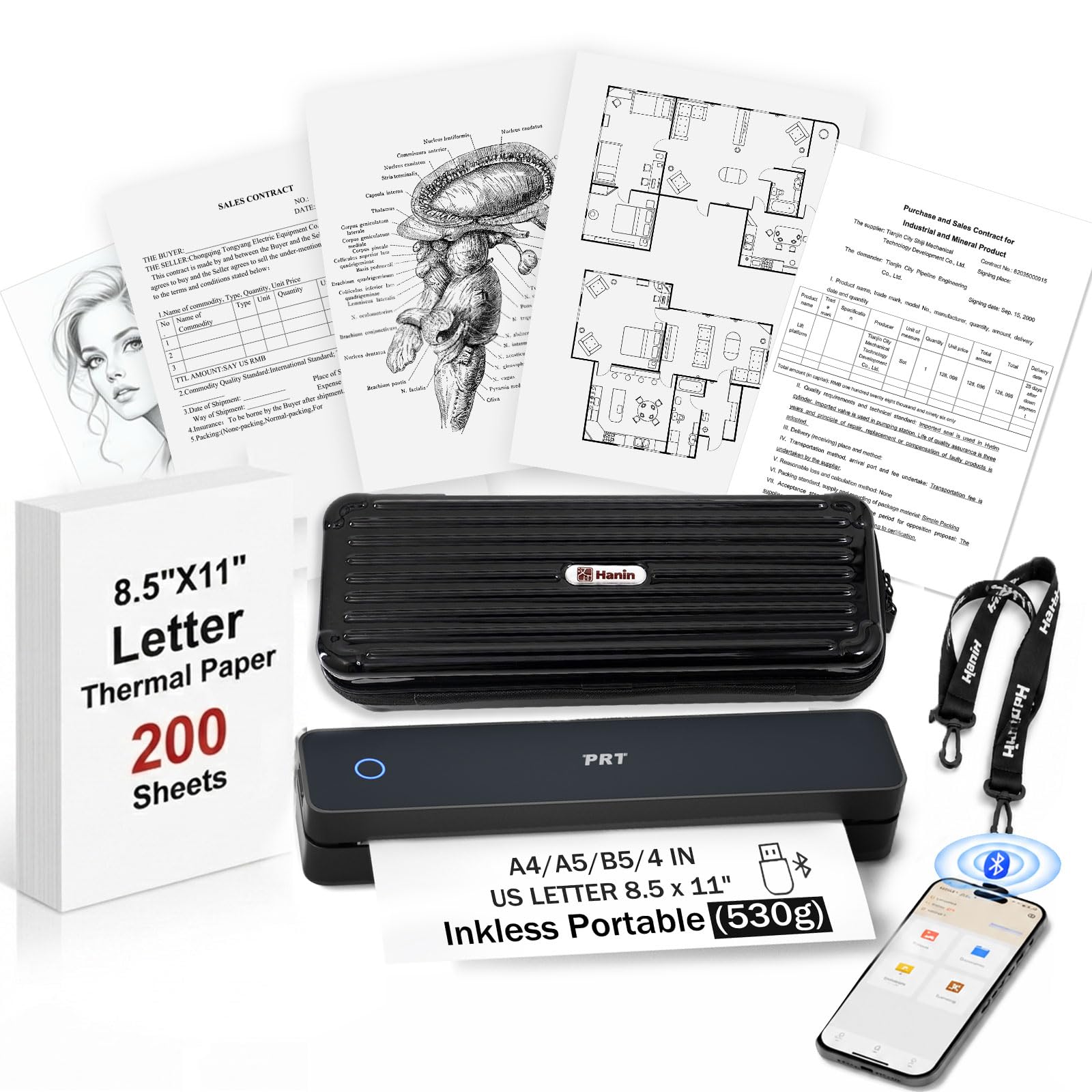
The 1.2-pound powerhouse with 200 pages of battery life and 200 sheets in the box.
This bundle is built for people who need to print away from a desk and don’t want to think about supplies. It arrives with 200 sheets of thermal paper, a padded EVA hard-shell case, a USB-C cable, and a quick-start guide — everything needed for immediate, ink-free printing. The built-in 2000mAh battery delivers up to 200 pages per charge and refills in roughly 1.5 to 2 hours.
The MT610’s side-opening paper load is designed to resist jams even during steady back-to-back runs, and it prints crisp 203DPI documents at about per sheet — no cartridges to replace, no clogged heads to clean. It accepts US Letter, A4, A5, B5, and 4-inch wide thermal paper, making it useful for contracts, study notes, and shipping labels alike. Digital nomads are the loudest fans; customers note it was among the best tech purchases they made all year.
One important compatibility flag: despite what the listing suggests, it does not work with Chromebooks, so Google-school households should steer clear. It’s also print-only and black-and-white. And the thermal paper itself is thin and can fade with prolonged light exposure — keep important documents stored away from sun. Also note: it lacks a color ink option, so it’s not for photos.
Who it fits: Field workers, real estate agents, and students who need 200 pages of off-grid, jam-resistant printing in a 1.2-pound package.
Who it doesn’t: Chromebook users, photo printers, and anyone wanting color output.
5. HP Envy 6155 Wireless All-in-One

A color all-in-one with AI formatting that cleans up web pages before they print.
The Envy 6155 is HP’s answer for phone-first homes that want vivid color without wrestling with layouts. Print, scan, and copy are joined by a genuinely smart trick: HP’s AI analyzes web pages and emails, stripping out ads and awkward breaks so you get clean, waste-free prints — a real time-saver for recipes and articles. A 2.4-inch color touchscreen makes navigation painless.
Speeds land at up to 10 black pages per minute and 7 color, which suits everyday homework and borderless photos. The auto 2-sided printing and 100-sheet input tray handle typical family volume, and dual-band Wi-Fi self-detects and resolves connection hiccups — one less headache in a crowded home network. A 3-month Instant Ink trial ships in the box; if you print regularly, the delivery service can cut ink costs significantly, and you can cancel before the fee kicks in.
Owners appreciate the economical ink and easy install, calling it great value. Mixed feedback centers on wireless reliability and software — some connect instantly, others report reconnection hassles and scanning glitches. Note the cartridge lock-in: HP blocks third-party non-HP chips, so you’re committed to genuine cartridges or the subscription. The generous P3 color tech keeps photos vibrant, but budget for that ink early.
What owners praise
- AI removes unwanted web content before printing
- Simple 2.4″ touchscreen control
- Vibrant P3 color for borderless photos
Weigh these limits
- Firmware blocks third-party ink cartridges
- Software and Wi-Fi reliability get mixed reviews
- Slower than the Canon at 10 ppm black
Choose it for: Families who print from phones and tablets and want clean, colorful pages without layout fuss.
Pass if: You refuse subscription ink or need heavy-duty speed — the AI features won’t fix a slow cartridge cycle.
6. Brother Work Smart MFC-J1410DW

The small-office workhorse with a 2.7-inch touchscreen and cloud printing built in.
Brother aims this all-in-one at home offices that juggle documents daily. A 2.7-inch color touchscreen fronts the machine, and it connects straight to Google Drive, Dropbox, Box, and OneDrive — so you can pull a file from the cloud and print without touching a computer. Speed is strong at 16 pages per minute black and 9 color, and the 20-sheet Auto Document Feeder handles multi-page scanning and copying in one pass.
The 150-sheet paper tray is the biggest among the inkjets here, meaning fewer refill stops during busy stretches. Setup typically takes about 10 minutes via the app — buyers mention it connects well with iPhones — and the Brother Mobile Connect app monitors ink levels so you’re never caught empty.
The sticking point is software compatibility. One owner hit a hard wall printing from Adobe Photoshop Elements, hitting stalls and crashes tied to a Windows driver mismatch that Brother support confirmed — so if you live in Adobe’s creative apps, check driver updates first. AirPrint setup took longer than expected for some iPhone users, which is frustrating in an otherwise fast machine. But for print, copy, scan, and fax at 16 ppm, it’s a serious productivity tool for a modest price.
Why it earns its place
- Big 2.7″ color touchscreen with cloud app access
- 16 ppm black with a 150-sheet tray
- Fax, scan, copy, and print in one compact unit
Check before you buy
- Software glitches reported with Adobe apps
- AirPrint setup can be finicky
- No Wi-Fi Direct mentioned for network-free printing
Best for: Home offices and small teams that print, scan, and fax daily and want cloud-connected convenience.
Not for: Creative pros who depend on Adobe software — verify driver support before committing.
7. Brother INKvestment MFC-J1365DW

The one that ships with a 1,200-page black cartridge so refills are a rarity.
The INKvestment name is the whole pitch: Brother bundles a 1,200-page yield black cartridge plus a 500-page cartridge for each color (cyan, yellow, magenta), so the first ink purchase isn’t lurking 30 pages in. That’s a real cost-per-page advantage for households that print steadily and hate the starter-cartridge bait-and-switch common in cheap printers.
Performance matches its brother’s pace — up to 16 black pages per minute and 9 color, with a 20-page single-sided automatic document feeder and a 150-sheet tray. Wi-Fi Direct is the standout extra: it prints wirelessly even when there’s no router or external network, which is a lifesaver in hotel rooms or temporary setups. A 1.8-inch color display keeps menus legible, and the front-loading cartridge access is praised as the easiest maintenance layout.
The biggest caveat is the setup ritual. Reports describe a demanding first installation, including persistent online spins and a pushy ink-subscription sign-up flow; one owner invested over four hours and returned the unit. That’s not universal — others call setup simple and report quick black-and-white and fair color speeds. The build is compact, and print quality leans toward crisp, near-laser text output once the print head settles in. Just clear an afternoon for the first power-on.
The standout strengths
- Huge included ink — 1,200 black pages from the start
- Wi-Fi Direct prints with no network at all
- Fast 16 ppm black output
Be ready for
- Time-consuming setup with subscription prompts
- Occasional network dropouts that need fixing
- Some reviewers point out paper jam issues after heavy use
Pick this if: You want the longest possible time between ink purchases and need network-free wireless printing.
pass on it if: You don’t have patience for a lengthy first-time setup — the install is the steepest hill here.
Understanding the Specs
Cartridge Yield: The Real Cost
Cartridge yield is the number of pages a cartridge prints before it runs dry. Starter cartridges — like the ones included with many cheap printers — often hold much less ink than standard replacements. The Canon’s demo cartridges ran out quickly, while Brother’s INKvestment includes a 1,200-page black cartridge. Always check the yield number before assuming the included ink lasts.
Inkless Thermal Technology
Thermal printers use heat to darken special paper — no ink, toner, or ribbons involved. That means no clogged heads, no cartridge costs, and no cleaning. The trade-offs: black-and-white only, and you must buy thermal paper instead of plain copy paper. If most of your printing is documents, receipts, and labels, this can be the cheapest per-page option.
Duplex Printing and Paper Trays
Automatic duplex printing flips pages for you, printing on both sides and cutting paper use nearly in half. Paper tray capacity tells you how often you’ll refill: a 100-sheet tray empties fast in a busy household, while a 150-sheet tray (like the Brothers) stretches further. Check for an Auto Document Feeder if you scan or copy multi-page stacks regularly.
Connectivity: Wi-Fi vs Bluetooth vs USB-C
Dual-band Wi-Fi (2.4GHz or 5GHz) gives you a stable home network connection and usually supports phone printing via AirPrint or the brand’s app. Bluetooth is the go-to for portable inkless models — it links directly to your phone with no router. USB-C is the reliable fallback for laptops on thermal portables, though it often needs a one-time driver install. Choose based on where you’ll print most.
FAQ
How do I know if I need a thermal printer or a regular inkjet?
Why do cheap printers run out of ink so fast?
Does a thermal printer need special paper?
Can a portable printer print in color?
Will a cheap printer work with my phone or laptop?
Is duplex printing worth looking for in a budget printer?
How do I compare print speeds between models?
Are ink subscription services worth it for cheap printers?
Why does my printer keep disconnecting from Wi-Fi?
Which all-in-one feature matters most: ADF or fax?
Final Thoughts: The Verdict
Across the board, the cheap printers winner is the Canon PIXMA TR7120 because it delivers print, scan, copy, duplex, and an auto document feeder at a price that undercuts the competition — and it has run 500 pages without a single jam in testing.. If you live on the road and hate ink bills, grab the TATTMUSE A285M — its inkless thermal tech means the paper is your only cost. And for a home that prints heavily in color, the HP Envy 6155 pairs AI formatting with an Instant Ink trial to keep costs predictable. Match the machine to your printing habits, and the “cheap” label stops being a compromise.
How We Picked
We do not accept paid placement. Every pick is matched to a real buyer and a real use-case; we do not hands-on test units.
Sources & Methodology
Specifications: manufacturer listings and product documentation. Review insights: verified customer reviews, as of September 2026. Pricing: not shown on this page (it changes often); check the current price via the retailer link.
As an Amazon Associate, Gadgets Feed earns from qualifying purchases. This does not affect which products we feature.