
Our readers keep the lights on and my morning glass full of iced black tea. As an Amazon Associate, I earn from qualifying purchases.
Specs are compiled from manufacturer listings and verified buyer reviews and can change over time — please confirm the key details on the product page before buying.
If you want to start filming yourself without dropping serious money, the good news is that the best cheap vlogging camera can now shoot 4K footage that genuinely looks professional — the trick is knowing which specs actually matter and which ones are noise. A 1-inch sensor, real stabilization, and a screen you can flip toward your face do more for your videos than any headline number. This guide breaks down five cameras that flip, film, and fit in a pocket, so you can pick the one built for how you actually shoot.
I’m Min — the founder and writer behind Gadgets Feed. This guide is built by comparing the manufacturers’ published specifications and the patterns across verified customer reviews, so you get each pick’s real strengths and trade-offs instead of marketing spin.
You will see what separates a smooth gimbal cam from a shaky budget camcorder, which bundle extras are worth having, and which model suits talking-heads, travel, or family filming. Below, you will find the standout value pick in every tier of the cheap vlogging camera market.
Our Picks at a Glance

How To Choose The Best Cheap Vlogging Camera
The biggest mistake first-time buyers make is chasing the highest megapixel or resolution number on the box. A vlogging camera lives or dies on three things: how clean the picture looks when the light drops, how steady the footage stays while you walk and talk, and how easily you can see yourself while you film.
Sensor size beats megapixel count
A 1-inch CMOS sensor is a physically larger light-catcher than the tiny chip inside a phone or a basic camcorder. That larger surface pulls in more light, so your face stays clear and colorful in a dim room or at sunset instead of turning grainy. A 64MP photo spec means little if the sensor behind it is small, because small sensors struggle at night. Look at sensor type first, resolution second.
Stabilization is what makes or breaks a walking vlog
Watch any handheld clip filmed while walking and you will see the difference instantly. A 3-axis mechanical gimbal physically counter-moves the camera to cancel out your footsteps and hand shake, which is a different technology from the electronic anti-shake built into budget camcorders. For dance, hiking, or chasing a pet, a true gimbal keeps the horizon locked and the frame buttery.
The selfie screen and how you frame yourself
Since you are both subject and camera operator, being able to see your own framing matters. Some models use a screen that rotates a full 270 degrees, others a flip screen, and some hide a retractable front-facing display. Whichever style, check that you can see yourself clearly without craning your neck, because that single feature decides whether solo filming feels natural or awkward.
Quick Comparison
| Model | Best For | Sensor / Video | Stabilization | Battery Life | Amazon |
|---|---|---|---|---|---|
| DJI Osmo Pocket 3★ Best Overall | All-round vlogging | 1-inch CMOS, 4K/120fps | 3-axis gimbal | 166 min | Amazon |
| Xtra MusePocket Gimbal Value | Pocket gimbal value | 1-inch CMOS, 4K/120fps | 3-axis gimbal | 161 min | Amazon |
| Canon PowerShot V10 | Travel and hands-free stand | 15.2MP 1-inch CMOS, 4K/30fps | 3 IS modes | 2 hours | Amazon |
| 5K Video Camera Camcorder | Beginner bundle value | 5K/20fps & 4K/60fps, 64MP | Built-in anti-shake | — | Amazon |
| G-Anica 8K Kit | Casual photo plus selfies | 8K, 64MP, dual lens | — | — | Amazon |
In-Depth Reviews
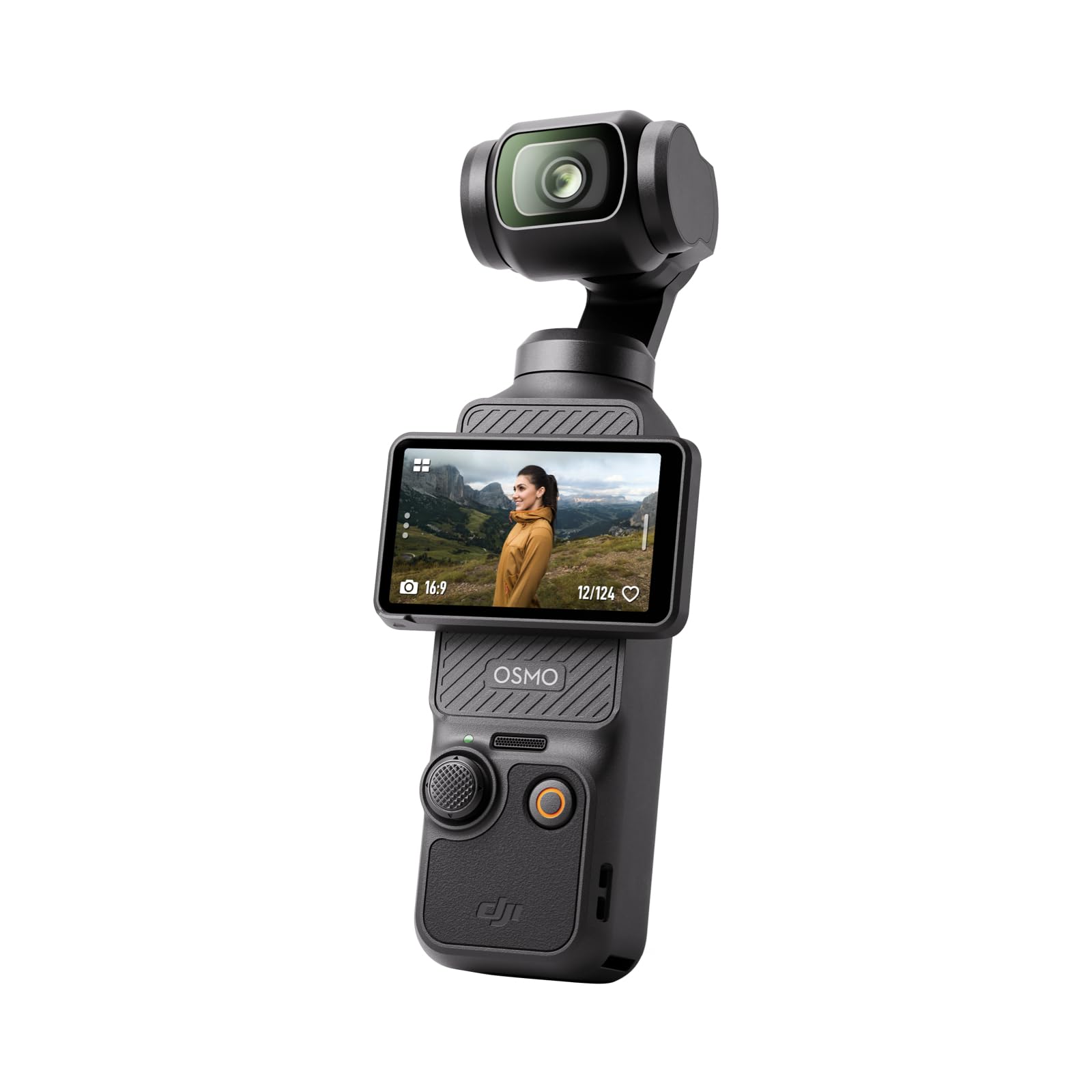
1. DJI Osmo Pocket 3 Vlogging Camera with 1” CMOS & 4K/120fps Video
Our pick — 4.5★ from 10,000+ verified ratings; the strongest balance of quality and price.
The pocket gimbal that turns a shaky walk into a smooth, cinematic vlog in one press.
For solo vlogging, this is the camera most people should buy. The 1-inch CMOS sensor (a physically large light-catcher that shapes how clean your footage looks) pairs with 4K recording at 120fps, so action shots stay crisp and night scenes keep their color. The 2-inch touchscreen rotates for both horizontal and vertical shooting — flip it to frame yourself for a YouTube clip, then spin it sideways for a Reel without changing gear.
What keeps people coming back is the steadiness. A 3-axis mechanical gimbal physically counter-moves against your footsteps, which is why dancing, chasing a dog, or hiking all come out smooth instead of jittery. ActiveTrack 6.0 keeps you centered even when you jump or spin on a tripod. The shooting experience holds up: pocketable enough to slide into a sweater pocket, quick to switch between horizontal and vertical, and it works directly with DJI Mic 2 transmitters for clean interview audio. Compared to the G-Anica kit further down, the Osmo trades a big bundle of accessories for one genuinely excellent sensor-and-gimbal core.
The catch is real but narrow. Wiring the camera into DJI’s ecosystem can be fiddly — buyers report that setup demands a mandatory registration before the fifth use and an app that needs a workaround to install, and that the icon-only manual does little to help. There is also no tripod thread on the gimbal itself, and the snap-on base adds length. None of that touches the footage, which is why owners keep filming past the setup friction.
What wins people over
- 1-inch CMOS with 4K/120fps for clean, sharp footage day and night
- 3-axis gimbal locks the frame smooth while you walk, dance, or hike
- Rotating 2-inch touchscreen flips between horizontal and vertical shooting
- Direct connection to DJI Mic 2 transmitters for better sound
Where it asks patience
- Setup includes a registration step and an app install that takes work
- No tripod thread on the gimbal; the snap-on base adds length
- Extra tripod legs and a front cover sell separately
Buy it if: you want one self-contained camera that makes solo vlogs look professionally steady without a rig.
Think twice if: you hate app setup or need a native tripod mount right on the body.
2. Xtra Muse, Vlogging Camera with 1” CMOS & 4K/120fps Videos, Pocket Camera with 3-Axis Gimbal Stabilizer
A pocket gimbal camera that borrows the Osmo formula and adds a friendlier app path.
Here is the same core recipe as the Osmo — a 1-inch CMOS sensor, 4K video at 120fps, and a 3-axis gimbal that keeps everything fluid — but packaged for buyers who want a smoother setup experience. The 2-inch touchscreen swaps between horizontal and vertical shooting without a second thought. For color graders, the 10-bit X-Log profile captures up to one billion colors, so sunrise and sunset footage holds detail you can push around in editing.
What stands out after the specs is how naturally it fits into a daily carry. It is small enough to disappear into a bag, the menus are direct rather than buried, and the companion app connects without a signup wall — a genuine contrast to the DJI setup friction mentioned above. Autofocus handles moving subjects, Master Follow keeps you centered, and native DJI mic support is on board for cleaner audio. For pocket filming with a fast, uncomplicated setup, this is the friendlier on-ramp.
The honest catch sits in the extras and edge cases. The brand’s own app is less full-featured than the DJI equivalent, and zoom range is limited — owners mention that 2x is workable while longer reaches are not there. If your vlog depends on punching in on distant subjects, factor that in before you commit.
Editorial read: This is the pocket gimbal to reach for when you value a quick, uncomplicated setup and can live without deep zoom range.
Reach for this if: you want gimbal-smooth 1-inch footage and an app that just works on the first try.
Look elsewhere if: you need long-range zoom or the most mature mobile app ecosystem.
3. Canon PowerShot V10 Compact Vlogging Camera

A shirt-pocket Canon with a built-in stand, wide lens, and three-microphone audio setup.
This is the pick for anyone who wants a real camera brand but refuses to carry a bag. Canon fits a 15.2-megapixel 1-inch back-illuminated CMOS sensor into a body small enough to slip into a fanny pack, and pairs it with a fixed 19mm wide-angle lens (35mm equivalent) that frames both you and your surroundings without feeling stretched. A retractable front-facing screen lets you check your framing while you talk.
The clever part is the stand. It folds in both the front and the back, so you can prop the camera on a table for hands-free filming in seconds — a different solution to the same problem the Osmo solves with a snap-on base. Video tops out at 8-bit 4K at 30fps and Full HD at up to 60fps, with 14 movie color filters to set the mood. Audio gets a serious nod: a pair of stereo microphones plus a third center microphone designed to pull down background noise, and there are micro-HDMI and external mic ports for later expansion. Recent firmware (version 1.2.0 or later) adds three stabilization modes while shooting video.
The trade-off every owner runs into is zoom. There is no optical zoom on this camera, so you frame with your feet rather than the lens. Buyers also note the battery drains quickly, and there is no lens cover or mic wind screen in the box. If your vlog style is talking-head and location-based, none of that will slow you down; if you need to punch in on distant action, it will.
Standout strength: the folding stand plus triple-microphone array makes this the easiest camera here to set down and film yourself talking.
Fair caveat: no optical zoom and a quick-draining battery define its limits.
Suits you if: you film yourself talking on location and want the camera to prop up anywhere.
Pass by if: your shots depend on zooming in or all-day battery.
4. 5K Video Camera Camcorder, UHD 64MP Vlogging Camera for YouTube with 3″ 270° Rotatable Touch Screen

A starter kit that hands you the camera, the mic, the card, the batteries, and the tripod together.
For first-timers who want to open one box and start filming, this camcorder is the value play. It shoots 5K/20fps video and 4K/60fps, plus 64MP photos off a high-sensitivity CMOS sensor — and its 64MP stills far outresolve the DJI Osmo above, which matters if you also want detailed photo prints. The 3.0-inch IPS touchscreen rotates a full 270 degrees, so low-angle shots and selfie framing are comfortable rather than a stretch.
What you actually get in the box is the reason this one lands for beginners: a 32GB memory card, dual 1800mAh batteries, a tripod, an external noise-reduction mic, a remote, and a lens hood — everything a hobbyist would otherwise buy piece by piece. The battery life is workable, with buyers reporting it runs about 2 hours with a spare included. It also streams through USB on OBS Studio for livestreaming, which is a feature the pocket gimbal cams here do not offer. For family events, recitals, and lawn-tutorial style filming, it covers the basics cleanly.
The fine print is worth reading before you buy. The focus is manual, so you need to keep subjects over 0.6m away for the sharpest results, and one buyer was blunt that the image quality fell short for them. Moving footage off the camera to a PC takes an external app or an SD card reader, and Mac compatibility is limited. It is not the cinematic tool the gimbal cameras are, but it is the most complete starter package on this list.
Best for: beginners who want a full rig — mic, tripod, two batteries, and a card — from day one.
Worth knowing: manual focus and a fiddly file-transfer step are the price of the low entry cost.
Grab this if: you are starting out on a budget and want every accessory included.
Steer away if: you want autofocus, easy PC transfers, or Mac-friendly file handling.
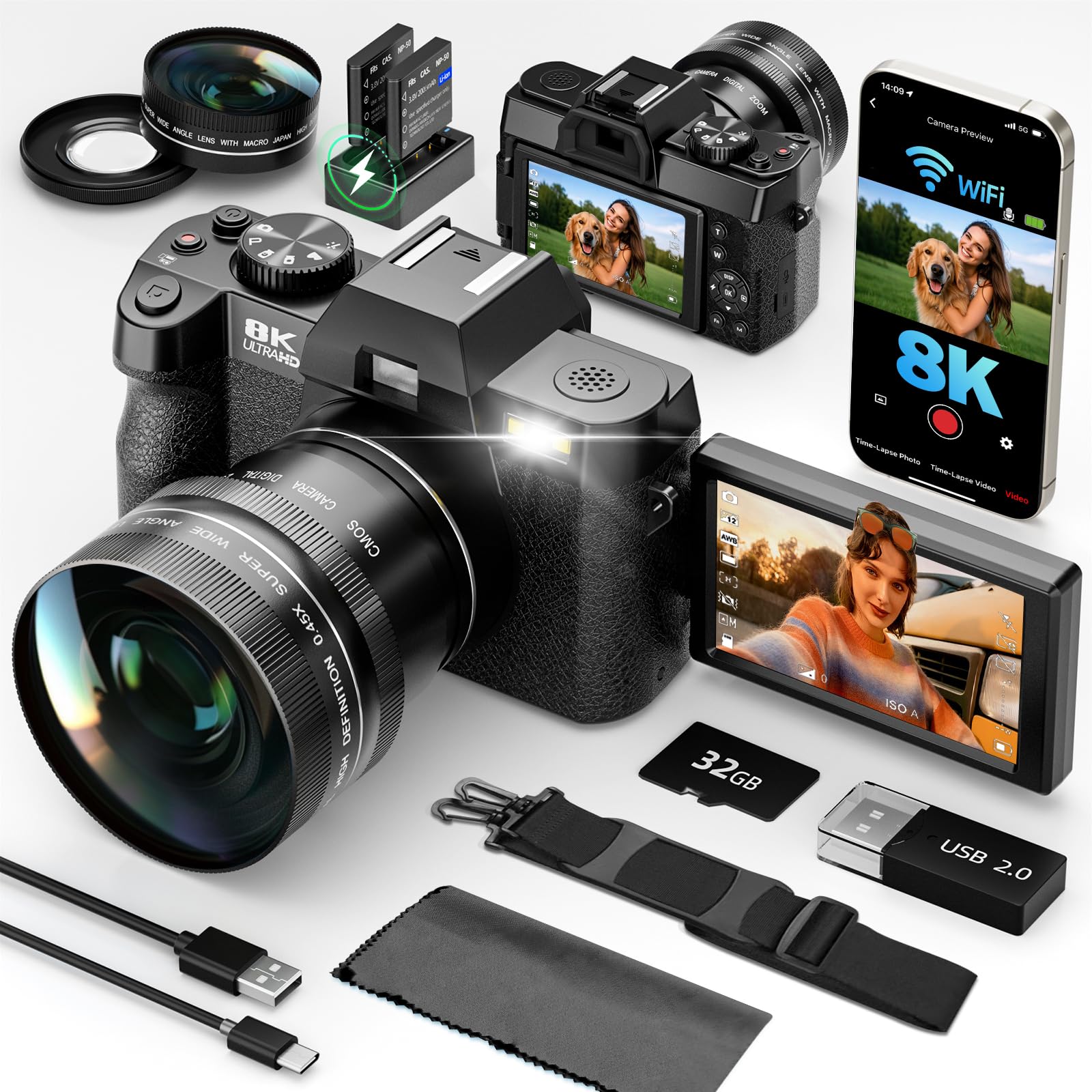
5. G-Anica 8K Digital Cameras Kit for Photography with Dual-Lens
A lightweight dual-lens kit for the creator who splits time between selfies and still photography.
If your filming is casual — quick selfie clips, family shots, and photos you can upload straight to your phone — this kit is built for that mix. It records 8K video and 64MP photos off a dual-lens system: a wide-angle lens for landscapes and a macro lens for close-ups, plus 16X digital zoom. The 180-degree flip screen flips toward you, so you can check your framing during livestreams, video calls, or self-recorded clips.
The bundle is aimed squarely at newcomers. It arrives with both lenses, a 64GB memory card, a card reader, and two rechargeable batteries, so a full afternoon of shooting is covered without a trip to the store. Built-in WiFi pushes your clips to your phone with no cables, and a rotary dial switches between Portrait Photo, Timelapse, Filter Effects, Scene Mode, Video, Burst Mode, and Auto Mode. The compact point-and-shoot body lives in a bag or pocket, and grid lines plus face tracking help beginners keep shots composed. For travel vlogging and social posting, the workflow is deliberately simple.
The honest limit is that this is a casual camera, not a pro one. It leans on good light; the macro lens shines on flowers and close-ups but the whole kit is happiest in daytime conditions. The on-screen menu takes some practice to learn. Coming from the 1-inch sensor cameras higher up this list, you will notice the difference in low light — but for phone-photo upgraders who want a dedicated device, the all-in-one approach is the appeal.
The all-in-one appeal
- Dual-lens kit with wide-angle and macro lenses included
- 180-degree flip screen for easy selfie framing
- Comes with a 64GB card, card reader, and two batteries
- Built-in WiFi for cable-free uploads to your phone
The honest limits
- Best in good light; not built for dim or low-light filming
- Menu system takes practice to navigate
- Casual-tier image quality, not a pro sensor
Ideal for: phone upgraders who want a dedicated camera for casual clips, selfies, and photos.
Not the pick if: you film mostly in low light or need the depth of a larger sensor.
Understanding the Specs
Sensor size and low-light footage
A sensor is the chip inside the camera that turns light into the picture. A 1-inch CMOS sensor is physically larger than the small chip in a phone or a basic camcorder, so it collects more light and keeps your face clear when the room goes dim. This is why the 1-inch models above hold their color at sunset while smaller-sensor cameras turn noisy. When you compare cameras, put sensor size ahead of the megapixel number on the box.
Gimbal vs electronic anti-shake
A 3-axis gimbal is a motorized mount that physically rotates to cancel your hand shake and footsteps, which is a different approach from the electronic anti-shake (software correction) some camcorders use. A true gimbal keeps the horizon level and the motion fluid during walking, dancing, or hiking. Electronic anti-shake can smooth small bumps but often crops or softens the frame to do it. For a walking vlog, a mechanical gimbal is the steadier option.
Resolution, frame rate, and bit depth
Resolution is how many pixels make up each frame, frame rate is how many frames play per second (higher rates suit fast action), and bit depth is how much color data each pixel carries. A 10-bit color profile captures up to one billion colors, giving you more room to adjust color in editing before the footage breaks apart. Higher numbers are not automatically better if the sensor behind them is small — the sensor sets the ceiling.
Bundles, batteries, and the selfie screen
Spare batteries, a memory card, and an external mic are real money saved, but the flip or rotating screen is what makes solo filming workable. A 270-degree rotating screen or a 180-degree flip screen lets you see your own framing without a monitor. Check the included battery life too — a camera that dies mid-vlog is a camera you leave at home. Bundles built for beginners usually cover all three at once.
FAQ
Do I need a 1-inch sensor for vlogging, or is a camcorder sensor enough?
Is a gimbal camera better than a camcorder with anti-shake for walking vlogs?
Can these cameras zoom in while filming?
How long does the battery last on these vlogging cameras?
Will the G-Anica kit or the 5K camcorder work for YouTube uploads?
What is the difference between 4K, 5K, and 8K on these cameras?
Do the pocket gimbal cameras need an app to work?
Can I use an external microphone with these vlogging cameras?
Which of these is best for filming indoors or at night?
How do I transfer videos off these cameras to my phone or computer?
Final Thoughts: The Verdict
For most people, the cheap vlogging camera winner is the DJI Osmo Pocket 3 because its 1-inch CMOS sensor and 3-axis gimbal deliver the steadiest, cleanest footage of anything here — rated 4.5 stars by more than 10,000 owners. If you want that same gimbal formula with an easier app setup, the Xtra Muse is the pick. And if you are starting from scratch and want every accessory in the box, reach for the 5K Video Camera Camcorder. Whichever you choose, a spare battery and practice with the flip screen will do more for your first vlogs than any single spec.
How We Picked
We do not accept paid placement. Every pick is matched to a real buyer and a real use-case; we do not hands-on test units.
Sources & Methodology
Specifications: manufacturer listings and product documentation. Review insights: verified customer reviews, as of September 2026. Pricing: not shown on this page (it changes often); check the current price via the retailer link.
As an Amazon Associate, Gadgets Feed earns from qualifying purchases. This does not affect which products we feature.