
The compact 3D printer market has matured past the point where a small build volume means you have to accept slow speeds, noisy operation, or finicky manual leveling. Today’s best machines pack CoreXY kinematics, heated chambers, and multi-color capabilities into footprints that fit on a standard desk shelf. The challenge is no longer about whether a mini printer can produce quality parts — it’s about which trade-offs in material support, speed, and ecosystem lock-in you’re willing to accept.
I’m Min — the co-founder and writer behind Gadgets Feed. After analyzing the technical specifications, real-world print speeds, and user-reported reliability data across this entire segment, I’ve mapped out exactly which compact models deliver professional-grade results without the full-size footprint.
Whether you’re furnishing a classroom makerspace, upgrading from a first-gen starter unit, or adding a secondary printer for rapid prototyping, the right machine comes down to understanding chamber temperature, acceleration rates, and multi-material routing. This guide cuts through the marketing noise to help you find the best compact 3D printer for your specific workflow.
How To Choose The Best Compact 3D Printer
Picking the right small-format printer starts with understanding that compact doesn’t mean toy-grade anymore. The same technology that drives full-size industrial machines — CoreXY motion systems, 300°C+ hotends, active chamber heating, and automated calibration — is now available in enclosures under 20 inches wide. The key is matching those specs to your actual printing habits.
Build Volume vs. Footprint Ratio
A printer that measures 15 inches square but offers 9 inches of Z-height gives you far more utility than a cube-shaped machine with 4 inches in every direction. Look for models that maximize usable height relative to their desk footprint. Entry-level units typically offer 3.9-inch cubes, while mid-range compact printers push to 8.7 inches or more — enough for functional parts, not just keychains.
Motion System and Acceleration
The biggest differentiator in print speed is the motion architecture. Bed-slinger designs with a moving Y-axis limit acceleration to around 2,000-5,000 mm/s² before print quality degrades. Compact CoreXY printers can hit 10,000-20,000 mm/s² while maintaining dimensional accuracy. If you plan to print functional prototypes or multi-part assemblies, prioritize a CoreXY frame with linear rails over a cantilevered Z design.
Material Range and Chamber Requirements
Not all small printers handle engineering-grade materials. PLA and PETG print fine on open-frame machines, but ABS, ASA, Polycarbonate, and Nylon require a controlled environment. A heated chamber (60°C target) prevents warping and improves layer adhesion for these materials. Resin-based compact printers offer a completely different material set — high detail, smooth surfaces, but with post-processing and ventilation requirements that FDM users don’t face.
Quick Comparison
On smaller screens, swipe sideways to see the full table.
| Model | Category | Best For | Key Spec | Amazon |
|---|---|---|---|---|
| QIDI Q1 Pro | FDM CoreXY | Engineering Materials | 60°C active heated chamber, 350°C hotend | Amazon |
| Bambu Lab A1 Mini Combo | FDM Bedslinger | Multi-Color Ease of Use | 10,000 mm/s² acceleration, 4-color AMS Lite | Amazon |
| Anycubic Kobra X | FDM Bedslinger | Multi-Color Value | 600mm/s max speed, 19-color expandable | Amazon |
| Phrozen Sonic Mini 8K S | Resin MSLA | High-Detail Miniatures | 22µm XY resolution, 8K mono LCD | Amazon |
| ANYCUBIC Photon Mono 4 Ultra | Resin MSLA | 10K Precision at Low Cost | 10K screen (9024×5120), 120mm/h speed | Amazon |
| Flashforge Adventurer 5M | FDM Bedslinger | Out-of-Box Speed | 600mm/s, 25-point auto leveling, 280°C hotend | Amazon |
| Geeetech Smart M1S | FDM Bedslinger | Absolute Beginner Experience | 250mm/s, 16-point auto leveling, fully assembled | Amazon |
| Entina Tina2S | FDM Bedslinger | Kids & Classroom Entry | 200mm/s, WiFi + app, 3.9″ build cube | Amazon |
| Entina Tina2C Bundle | FDM Bedslinger | Complete Starter Kit | Includes 4-color PLA, 20+ DIY modules | Amazon |
In‑Depth Reviews
1. QIDI Q1 Pro

The QIDI Q1 Pro redefines what a compact printer can handle. Its active 60°C heated chamber, combined with a 350°C bimetal nozzle and CoreXY motion system, means you can print ABS, ASA, Polycarbonate, and even carbon fiber-reinforced filaments right out of the box — no enclosure add-ons or aftermarket upgrades needed. The 20,000 mm/s² acceleration delivers functional parts at production speeds while maintaining dimensional accuracy within ±0.015mm on repeat runs.
Full-auto calibration uses dual sensors for bed leveling and Z-offset, and the intelligent filament detection system catches both runouts and tangles in real time. The 1080p camera provides remote monitoring and time-lapse capture, and the open-source Klipper firmware lets advanced users dial in custom profiles. Users report flawlessly printing ASA without any adhesive or brim, a direct result of the even chamber heat distribution.
The build volume of 9.65 inches cubed is generous for a machine this size, and the 32GB onboard storage means you can queue prints without tethering to a PC. The main compromises are the lack of a built-in carbon filter (you’ll need to print and install the optional one) and a wobbly side-mounted spool holder that benefits from a printed upgrade. For anyone printing engineering-grade materials in a compact form factor, this is the most capable option available.
Why it’s great
- True 60°C active heated chamber for ABS/PC/Nylon without warping
- 350°C bimetal nozzle handles carbon fiber and glass fiber filaments
- Consistent sub-0.02mm layer repeatability at high speeds
Good to know
- No built-in HEPA or carbon filter — recommended for ventilated areas
- Side spool mount is flimsy; a printed replacement is a common first mod
- Touchscreen responsiveness could be snappier
2. Anycubic Kobra X

Anycubic’s Kobra X is a breakthrough in affordable multi-color FDM printing. It comes with native 4-color support built into the chassis, using a redesigned filament routing path that purges 81% less material than traditional multi-material systems. At 600 mm/s max speed with vibration compensation, it completes a standard Benchy in 14 minutes. The 260mm build cube gives you substantial volume for a compact footprint, and the LeviQ 3.0 auto-leveling system uses 49 points to guarantee bed flatness right from the first layer.
The hardened steel nozzle is rated for 300°C, supporting PLA, PETG, TPU, PVA, and ASA, and the direct-drive extruder handles flexible filaments without the retraction headaches common to Bowden setups. The AI camera provides spaghetti detection and foreign object monitoring through the Anycubic app. Users report over 265 hours of printing with zero mechanical failures, citing flawless adhesion and crisp detail at full speed.
The main limitation is that the ACE 2 Pro expansion units are not backward compatible with the older ACE Pro, so early adopters of the ACE system can’t reuse old units. The phone app also feels slightly unfinished compared to Bambu’s ecosystem. But for the price — especially considering the built-in multi-color capability — the Kobra X delivers an exceptional ratio of features to cost.
Why it’s great
- Native 4-color printing with minimal purge waste — up to 81% less than competitors
- 49-point auto leveling with LeviQ 3.0 ensures perfect first layers
- Large 260mm build volume in a compact footprint
Good to know
- ACE 2 Pro expansion is not compatible with original ACE Pro units
- Mobile app could use more polish and feature parity with desktop slicer
- Early units had minor firmware stability issues — updated firmware resolves most
3. Bambu Lab A1 Mini Combo

Bambu Lab’s A1 Mini Combo sets the standard for plug-and-play multi-color printing in a compact package. The bed-slinger design accelerates at 10,000 mm/s² and uses active flow rate compensation to maintain consistent extrusion across rapid direction changes. Setup from unboxing to first print takes about 20 minutes, and the full-auto calibration handles everything from Z-offset to bed leveling without user intervention. The ≤48 dB noise level, achieved through active motor noise cancellation, makes this the quietest high-speed printer in its class.
The AMS Lite unit enables up to four-color prints with automatic filament switching, and the Bambu Handy app gives you remote access to a vast model library with one-tap printing. The 1-Clip quick-swap nozzle system lets you change between 0.2mm and 0.8mm nozzles in seconds. Users consistently report exceptional print quality out of the box, with one reviewer noting that it exceeds expectations for both beginners and experienced makers moving from older printers.
The compromises are real, though. The build volume is smaller than the Kobra X at 180 x 180 x 180 mm, and the bed-slinger design means it needs a rigid, heavy desk — at ludicrous speed settings, the machine shakes noticeably on lighter surfaces. Multi-color printing also generates significant filament waste due to the purge tower. If you prioritize a seamless, quiet, and beginner-friendly experience over maximum build volume, the A1 Mini Combo is unmatched.
Why it’s great
- Best-in-class out-of-box experience with full-auto calibration and 20-minute setup
- Active noise cancellation keeps operation at ≤48 dB — barely audible
- Seamless Bambu ecosystem with app control and huge model library
Good to know
- Bed-slinger design shakes on lightweight or carpeted surfaces
- 180mm build cube limits larger functional prints
- Multi-color printing produces significant purge tower waste
4. Phrozen Sonic Mini 8K S

The Phrozen Sonic Mini 8K S delivers extraordinary detail resolution for its footprint. The 8K monochrome LCD produces a 22µm XY pixel pitch, which means miniature faces, jewelry patterns, and dental models come out with crisp, visible texture that FDM printers at this size simply cannot match. The print volume of 6.5 x 2.8 x 6.7 inches is elongated for tall, slender models like action figures and articulated dragons. The precise Z-axis calibration ensures layers stack evenly with no visible banding.
Open-source slicer compatibility (Lychee, Chitubox, Tango) gives you full control over exposure settings and supports. Users consistently praise the reliability of this printer, with many describing it as a workhorse that delivers consistent results print after print. One dental professional noted it elevated their print quality significantly from their previous resin printer. The 22-pound weight gives the chassis substantial stability during the peel cycle, reducing ghosting on delicate overhangs.
The main trade-offs with resin printing apply here: you need isopropyl alcohol for washing, a UV curing station for post-processing, and either a well-ventilated room or an enclosure with an exhaust fan due to the strong resin odor. The printer itself also requires a USB drive to transfer files — no WiFi direct printing. For anyone who needs tabletop-quality miniatures, prototyping with high surface finish, or dental/appliance parts, the Sonic Mini 8K S is a proven, reliable choice.
Why it’s great
- 22µm XY resolution produces near-invisible layer lines on miniatures
- Compact footprint with tall build volume for action figures and models
- Open-source slicer support with no proprietary software lock-in
Good to know
- No WiFi connectivity — prints require USB drive transfer
- Resin printing requires washing, curing, and ventilation equipment
- Build plate can be damaged by bent scrapers — use plastic spatulas
5. ANYCUBIC Photon Mono 4 Ultra

The Photon Mono 4 Ultra brings 10K resolution (9024 x 5120 pixels on a 7-inch screen) to a price point that was previously reserved for 4K machines. Each pixel measures 17×17µm on the XY axes, and the COB (Chip-on-Board) light source combined with Fresnel lenses achieves ≥90% light uniformity — meaning dimensional errors across the build plate are minimized. The Intelligent Release Algorithm and ACF film allow for a print speed of 120mm/h without sacrificing accuracy, a significant improvement over previous generations.
Five intelligent detection systems cover printer self-inspection, residual resin detection, leftover resin monitoring, failed print detection, and intelligent lifespan management. This automation reduces the learning curve for new resin users. The 4.3-inch HD touchscreen with an 8-language UI makes navigation intuitive. Users report that prints at this resolution are suitable for jewelry patterns and detailed figurines right out of the box, with one reviewer specifically noting amazing detail for the price point.
The Achilles’ heel is the same as all resin printers: odor management and post-processing. The screen protector is notoriously tricky to apply without bubbles, and the FEP film at the bottom of the vat is fragile — using the plastic scraper on it will cause leaks. The build volume of 6.04 x 3.42 x 6.49 inches is adequate for small models but can’t match the Phrozen’s height advantage. For budget-conscious makers who want 10K detail without paying premium resin printer prices, this is the clear winner.
Why it’s great
- 10K resolution at an entry-level price — exceptional detail per dollar
- COB light source with Fresnel lenses ensures uniform curing across the plate
- Five intelligent detection systems reduce beginner mistakes
Good to know
- Screen protector is difficult to apply without trapping bubbles
- FEP film is fragile — avoid scraping with metal tools
- Resin odor is strong; ventilation or enclosure is necessary
6. Flashforge Adventurer 5M

The Flashforge Adventurer 5M is engineered for raw speed without sacrificing print quality. Its Klipper-based firmware drives a 20,000 mm/s² acceleration rate, and the 50W ceramic heater brings the 280°C hotend to temperature in 35 seconds. The 32mm³/s high-flow nozzle enables rapid material deposition for large bases and infill. The CoreXY frame with dual linear rails reduces resonance by 63% compared to typical bed-slinger designs, allowing 24/7 continuous printing with ±0.1mm dimensional accuracy.
Auto bed leveling uses 25-point pressure-sensor compensation to dial in the first layer to 0.01mm precision. The MagSwitch PEI build plate pops off in three seconds with a simple flex, and the Nozzle X quick-change system lets you swap nozzles in under 15 seconds — no tools required. Users report that their 13- and 14-year-olds operate this printer independently, producing action figures and accessories without intervention. The DIY enclosure kit (you print the panels yourself) is a cost-effective way to add a temperature-controlled environment.
The most consistent complaint is about the USB port, which can detach from the board if the connected device is bumped — a simple caution when plugging in. The onboard fans are noticeably loud at maximum speed, though they’re quieter than older Flashforge models. The cloud printing features are being phased out, so relying on the USB or Ethernet connection for file transfer is the more reliable path. For makers who prioritize speed and have a stable desk setup, the Adventurer 5M delivers professional-grade throughput.
Why it’s great
- True 600mm/s print speed with Klipper-based firmware and 20,000 mm/s² acceleration
- MagSwitch plate and tool-less nozzle swap for minimal downtime between prints
- DIY enclosure option for temperature-sensitive materials
Good to know
- USB port is fragile and can detach if bumped during transfer
- Cloud printing features are being deprecated — use USB or Ethernet instead
- Fans are loud at maximum speed — not ideal for noise-sensitive environments
7. Geeetech Smart M1S

The Geeetech Smart M1S is designed from the ground up for absolute beginners and young users. It arrives fully assembled with no build plate leveling or frame tightening required — unbox, load filament through the one-button feed system, and the 16-point auto leveling handles the rest. The dual-drive metal gear extruder with a 1:5 gear ratio provides enough torque to print flexible TPU as easily as PLA, a capability often missing from entry-level mini printers.
The print volume of 3.94 x 4.33 x 3.94 inches is small but adequate for toys, keychains, and STEM projects. The 2.4-inch LCD color screen and bright LED lighting make it easy for kids to operate without a laptop — everything can be managed through the Geeetech app or an SD card. Users consistently praise the ease of setup, with multiple reviewers noting their children unboxed and printed successfully on the first day. The PEI flexible build plate eliminates the struggle of removing stuck prints.
The most common issue reported is a small percentage of units arriving with faulty auto-leveling sensors that require customer service replacement — Geeetech’s support is responsive, but it’s a quality control variance to be aware of. The included filament sample is minimal, so ordering a 1kg spool at the same time is recommended. For a first-time buyer who wants the lowest possible barrier to entry and responsive customer service, the M1S is a solid starting point.
Why it’s great
- Fully assembled with true one-button filament loading — no technical skills needed
- Dual-drive extruder handles flexible TPU as easily as PLA
- Responsive customer service with reliable replacement for defective units
Good to know
- Small build volume (3.9-inch cube) limits print size
- Inconsistent QC on auto-leveling sensors in early production batches
- Comes with minimal sample filament — budget for a 1kg spool
8. Entina Tina2S

The Entina Tina2S is the most affordable fully-assembled mini printer with WiFi and app control in this roundup. It arrives pre-calibrated and ready to print within minutes — the included TF card has preloaded models, and the Poloprint Cloud app provides access to 1500+ ready-to-print designs plus a built-in Creative Hub for simple DIY modeling. The 200mm/s print speed with 0.04mm layer resolution is competitive for the price, and the dual Z-axis structure reduces vibration for smoother layers on small models.
The 3.9 x 4.7 x 3.9 inch build volume is slightly taller than the Entina Tina2C, which helps with keychains and small statuettes. Auto leveling and the flexible spring steel build plate remove the two biggest frustration points for new users. The low-noise motherboard and optimized cooling system keep operation quiet enough for a bedroom or classroom. Users overwhelmingly rate this 5 stars, with parents reporting that their kids manage everything from their phones without needing a laptop.
The main limitation is the build volume — you’re restricted to models under 4 inches in each dimension, which rules out functional parts like phone stands or收纳 boxes. The WiFi connection can occasionally be finicky to establish on first setup, though once connected, it’s stable. For the price point, the Tina2S delivers a remarkably complete starter experience that gets users printing within 10 minutes of unboxing. It’s the best entry point for families wanting to test the waters of 3D printing without a significant investment.
Why it’s great
- Fully assembled and pre-calibrated — prints within minutes of unboxing
- App-based control and model library eliminate the need for a laptop
- Dual Z-axis design for stable prints at this price point
Good to know
- Build volume is under 4 inches in all dimensions — no functional parts
- WiFi setup can be finicky on first connection
- Preloaded firmware has limited customization options for advanced users
9. Entina Tina2C Bundle
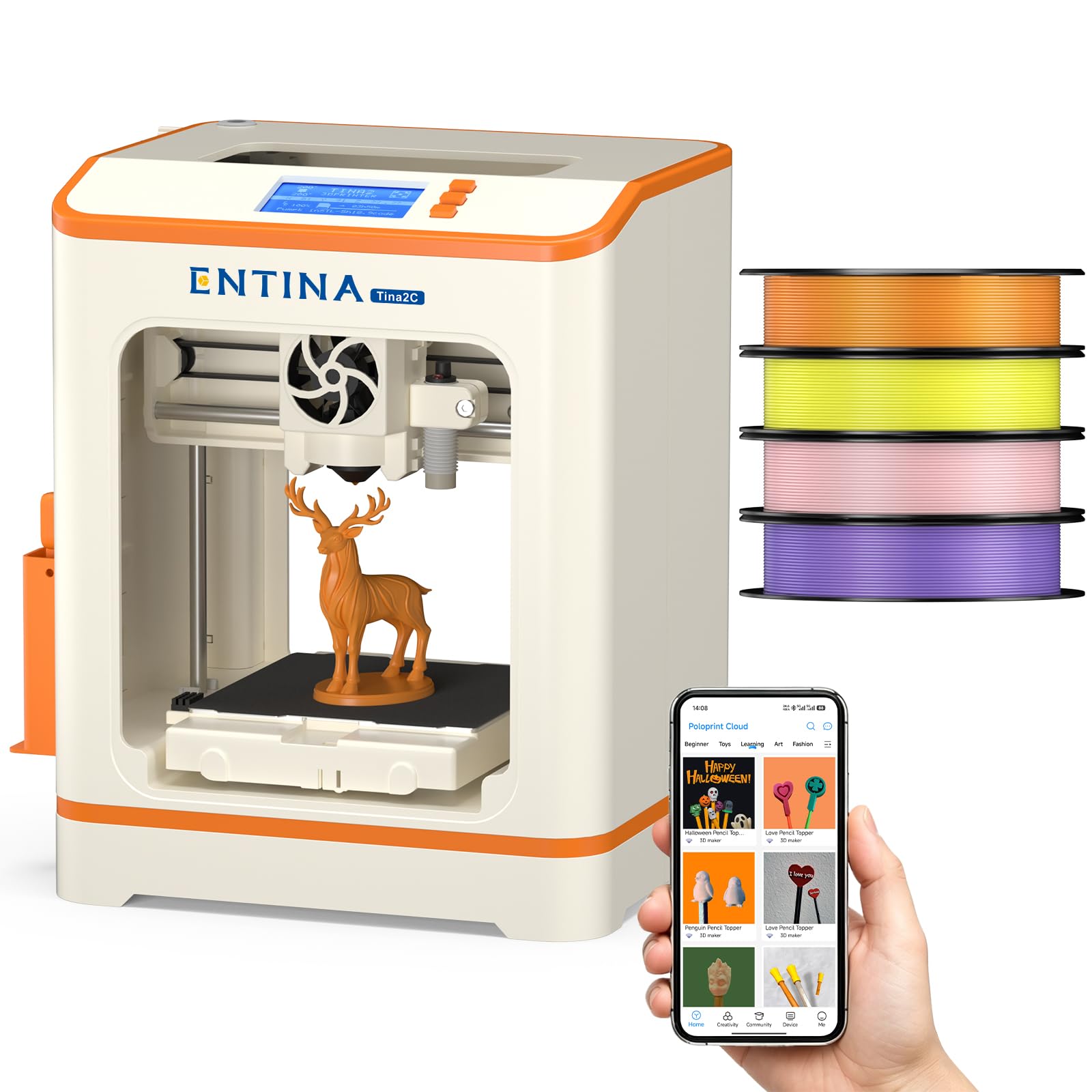
The Entina Tina2C Bundle is essentially the same core printer as the Tina2S but packaged as a complete starter kit. It includes four spools of PLA filament in different colors (approximately 1kg total) and over 20 DIY modules, making it a true out-of-box experience where you don’t need to buy anything else to start printing. The bundled approach is ideal for gift-giving, classroom adoption, or families who want everything in one package.
The printer itself features auto leveling, a flexible magnetic build plate, and a quick-swap nozzle design for easy maintenance. The 3.9-inch cubed build volume is identical to the Tina2S, and the power-loss recovery feature ensures long prints aren’t ruined by a momentary power flicker. The guided setup via the Poloprint app walks new users through the initial calibration and first print. Built-in LED lighting illuminates the build plate for easy monitoring.
The core printer’s limitations apply — small build volume, no advanced material support, and the 200mm/s speed is modest compared to mid-range options. The bundled filament is basic PLA, so users will need to purchase specialty filaments (silk, matte, glow-in-the-dark) separately. For someone who wants the simplest possible path from box to printing, and doesn’t want to shop for filament separately, the Tina2C Bundle eliminates all friction from the initial experience.
Why it’s great
- Complete starter kit with four filament colors and DIY modules included
- Power-loss recovery and auto leveling for reliable first prints
- Guided app setup eliminates any technical confusion for beginners
Good to know
- Same small build volume as Tina2S — limited to miniature models
- Bundled PLA is basic; specialty filaments not supported without tuning
- WiFi connectivity can be inconsistent on some home networks
FAQ
Can a compact 3D printer realistically print functional parts or only trinkets?
What is the real difference between a heated chamber and a heated bed for ABS printing?
Do I need ventilation for a resin compact 3D printer in a home office?
How do I choose between a compact FDM printer and a compact resin printer?
Final Thoughts: The Verdict
For most users, the best compact 3D printer winner is the QIDI Q1 Pro because it delivers a 60°C active heated chamber, 350°C hotend, and CoreXY speed in a footprint that handles engineering-grade materials without compromise. If you want seamless multi-color printing with the best out-of-box experience, grab the Bambu Lab A1 Mini Combo. And for ultra-detailed resin miniatures at an unbeatable price, nothing beats the ANYCUBIC Photon Mono 4 Ultra.