
Our readers keep the lights on and my morning glass full of iced black tea. As an Amazon Associate, I earn from qualifying purchases.
Specs are compiled from manufacturer listings and verified buyer reviews and can change over time — please confirm the key details on the product page before buying.
Buying a motherboard is the one PC purchase you cannot undo cheaply, because it decides which processor fits, how much memory you can load, and how many drives you can bolt on later. Get the socket and chipset right and everything else falls into place; get them wrong and you are rebuilding the whole machine. This guide sorts nine real boards by the questions that actually matter — AM5 or LGA1700, DDR5 or DDR4, how many M.2 slots, and whether the network chip works on day one.
I’m Min — the founder and writer behind Gadgets Feed. This guide is built by comparing the manufacturers’ published specifications and the patterns across verified customer reviews, so you get each pick’s real strengths and trade-offs instead of marketing spin.
Your motherboard must match your CPU, memory, and case before anything else. A board earns its spot by fitting those three parts, not by the logo on the box. The picks below run from a beginner-friendly AM5 board to a premium X870E build. Each one is judged on its specs and what buyers report after they take it home. Use this shortlist when you shop for the best computer motherboard.
Our Picks at a Glance


How To Choose The Best Computer Motherboard
Most first-time builders start with the case or the graphics card, then discover the board they bought cannot take the processor they wanted. Flipping that order saves you a return shipping label. Work through these four checks and you will narrow nine boards down to two in about ten minutes.
Start With The Socket, Not The Brand
Your processor physically drops into one socket only. AMD’s AM5 socket takes Ryzen 7000, 8000, and 9000 series chips, while Intel’s LGA1700 takes 12th, 13th, and 14th Gen Core processors. Buy the board first only if you have already picked a CPU family you plan to keep. Every AM5 board in this list supports the same three Ryzen generations, which is why they are interchangeable on paper — but not in the case.
Match Memory Type And Speed To Your Kit
DDR5 and DDR4 are different shapes and do not fit the same slot. If you already own a DDR4 kit, an Intel board that takes DDR4 keeps that memory useful instead of turning it into drawer clutter. Higher rated memory clock speeds matter mainly if you plan to enable EXPO or XMP — the one-click presets that push your memory past its default speed. Without that step enabled, a fast kit simply runs slower.
Count Your M.2 Slots And PCIe Generations
M.2 slots are where your NVMe solid-state drives sit — the flat sticks that load games in seconds. PCIe 5.0 is the newest and fastest lane standard, and PCIe 4.0 is the generation behind it. More slots means more drives later without swapping anything out. Watch one detail: on some boards, filling certain M.2 slots borrows lanes from the main PCIe x16 slot your graphics card uses.
Quick Comparison
| Model | Best For | Socket & Chipset | Memory | M.2 / Networking | Amazon |
|---|---|---|---|---|---|
| GIGABYTE B650 Eagle AX★ Best Overall | First AM5 build | AM5 / AMD B650 | DDR5, 4 slots, up to 128 GB | 3x M.2, WiFi 6E, GbE LAN | Amazon |
| ASRock B760M Pro RSCompact Intel Pick | Compact Intel value | LGA1700 / Intel B760 | DDR5, 4 slots, up to 192 GB | M.2 slots, HDMI/DisplayPort out | Amazon |
| MSI B760 Gaming Plus WiFiGaming Performer | Intel gaming rigs | LGA1700 / Intel B760 | DDR5, 4 slots, 6800 MHz rated | PCIe 4.0 / Gen 4 x4 M.2, 2.5G LAN + WiFi 6E | Amazon |
| MSI PRO B760-P WiFi DDR4 | Reusing DDR4 memory | LGA1700 / Intel B760 | DDR4, 4 slots, up to 128 GB | M.2 Shield Frozr, 2.5G LAN + WiFi 6E | Amazon |
| GIGABYTE B650 Gaming X AX V2 | Feature-rich AM5 on a budget | AM5 / AMD B650 | DDR5, 2 slots, up to 128 GB | 3x M.2, WiFi 6E, 2.5GbE | Amazon |
| GIGABYTE X870 AORUS Elite WIFI7 | Long-term AM5 value | AM5 / AMD X870 | DDR5, 4 slots, 8200 MHz rated | 4x M.2 PCIe 5.0, WiFi 7, 2.5GbE | Amazon |
| ASUS TUF Gaming X870-PLUS WiFi | Heavy multi-drive builds | AM5 / AMD X870 | DDR5, 4 slots | 4x M.2, WiFi 7, 2.5Gb LAN, USB4 40Gbps | Amazon |
| TUF Gaming X870E-PLUS WIFI7 | Storage-heavy workstations | AM5 / AMD X870E | DDR5, 4 slots, up to 256 GB | 2x PCIe 5.0 + 2x PCIe 4.0 M.2, WiFi 7 | Amazon |
| ASUS ROG Strix X870-A Gaming WiFi | Premium showpiece builds | AM5 / AMD X870 | DDR5, 4 slots | 4x M.2, WiFi 7, USB4 | Amazon |
In‑Depth Reviews
1. GIGABYTE B650 Eagle AX AM5 ATX Motherboard
Our pick — over 4.5★ from 950+ verified ratings; the strongest balance of quality and price.
The AM5 board that boots on the first try and keeps going eight months later.
If you are building your first AMD machine and want the board to disappear into the background, this is the one. It runs the AM5 socket, so AMD Ryzen 7000, 8000, and 9000 series processors all drop straight in. Four memory slots take DDR5, and the board carries AMD EXPO and Intel XMP presets — the one-click profiles that let your memory kit run at its rated speed instead of a slower default. That is the setup most new builders forget, and it costs nothing to enable.
You get room for three M.2 drives (stick-shaped SSDs that plug straight into the board), which is more than cheaper AM5 boards offer. One slot runs the faster PCIe 5.0 standard (a newer, quicker connection for drives), and two run PCIe 4.0. That means you can add fast storage for years without swapping the board. For networking, AMD Wi-Fi 6E (a fast wireless standard) and a Realtek GbE LAN port (a wired 1-gigabit internet jack) are built in, plus a USB 3.2 Gen2x2 Type-C port on the back for quick file transfers. The 12+2+2 phase digital VRM (the power section that feeds your processor) keeps a power-hungry chip stable, and an M.2 thermal guard covers the drive slots so they do not overheat under long loads. It weighs 1755 g, much heavier than the 980 g ASRock B760M below, and that extra mass is heatsink and board material you can feel in your hand.
Owners praise the build quality above all else, with reliability a close second. First-time builders report the install is genuinely simple. There is also a recovery feature worth knowing: Q-Flash Plus can revive a board with a corrupted BIOS from a FAT32 USB stick without a processor installed, a rare safety net at this price. Buyers running a Ryzen 7 7800X3D paired it with an RTX 3080 and reported it worked perfectly from the first boot. One practical caveat: the board runs warm with a PCIe 5.0 drive and multiple M.2 sticks installed, so give your case real airflow rather than a sealed front panel. The manual is also thinner than the printed guides premium boards ship with.
What earns it the top spot
- AM5 socket covers Ryzen 7000, 8000, and 9000 series, so the platform has room to grow
- Three M.2 slots including one PCIe 5.0 for the fastest drives
- Q-Flash Plus restores a bricked BIOS from a USB stick with no CPU installed
- 12+2+2 phase VRM with an M.2 thermal guard for stable power and cool drives
Where it asks a little of you
- Runs warm with a PCIe 5.0 drive and several M.2 sticks loaded — plan for airflow
- Wi-Fi 6E can need a driver tweak before it settles
- Printed manual is thinner than premium boards provide
Reach for this if: you are starting a fresh AM5 build and want the best all-round balance of price, storage slots, and reliability.
Think twice if: you need a compact micro-ATX footprint — this is a full ATX board.
2. ASRock B760M Pro RS Motherboard (LGA1700, DDR5)
A small Intel board that holds more memory than boards twice its weight.
This one leads with an unusual number for its class: 192 GB of maximum memory across four DDR5 slots, against 128 GB on the GIGABYTE B650 Eagle AX above. If you run virtual machines, big photo catalogs, or simulation work, that headroom is a genuine difference. The socket is Intel’s LGA1700, taking 12th and 13th Gen Core processors, and ASRock rates the DDR5 support up to 7200MHz when you overclock it. On the graphics side there is one PCIe 5.0 x16 slot for the fastest cards plus a second PCIe 3.0 x16, which buys you the option of running two graphics cards.
Its footprint is where the personality lies. That is micro-ATX territory, which fits smaller cases that a full ATX board will not. Graphics output comes straight from the board through HDMI and DisplayPort, so you can build a machine with no graphics card at all if your processor has built-in graphics. The 7+1+1 power phase design with Dr.MOS handles the VCore and GT rails for non-overclocked chips.
Quality and value carry this board’s reputation — owners rate those two above everything else. Long-term confidence runs through the feedback too, with a buyer reporting no issues after a year and a half of use. Three M.2 slots at this size surprises people, and one owner building a gaming, 3D-printing, and drone-firmware machine found it perfect for a 14600K without overclocking. The honest catch is the fit: it is smaller than the listing photos suggest, so check your case clearance and your expansion-slot needs before you commit. USB port limitations come up as the most common practical gripe, and the BIOS gets a mixed reception — fine for everyday work, less rewarding if you enjoy tuning.
Size reality check: buyers expecting a standard ATX board are sometimes surprised by how compact this runs, so measure your case first.
The memory argument: 192 GB of DDR5 capacity is the standout number here, and it is the reason a workstation builder picks this over a cheaper gaming board.
Best for: a space-limited Intel build that still needs three drives and serious memory headroom.
Look elsewhere if: you want a full-size board with generous rear USB.
3. MSI B760 Gaming Plus WiFi (DDR5, LGA1700, ATX)
A board that takes a flagship Intel chip without overclocking and does not flinch.
Speed is what owners talk about most with this board. It is rated for DDR5 memory at 6800+MHz with overclocking enabled, well above the 5200 MHz baseline on the GIGABYTE B650 Eagle AX. That matters if you want fast memory in an Intel build. The socket is LGA1700 (Intel’s current CPU socket), and MSI lists 12th, 13th, and 14th Gen Intel Core plus Pentium Gold and Celeron processors as compatible. Cooling gets real attention: an extended heatsink, MOSFET thermal pads rated 7W/mK (a measure of how well they move heat), and extra choke thermal pads. That hardware keeps the power section comfortable during long gaming sessions.
Networking is the other standout. MSI includes 2.5Gbps LAN (a wired jack that moves 2.5 gigabits per second), Wi-Fi 6E, and Bluetooth 5.3, plus USB 3.2 Gen2 ports and HDMI and DisplayPort outputs. The VRM cooling proves itself in real use: one builder ran an i9 14900KF with no overclock and called it rock solid on the latest BIOS, running 128GB across four 32GB sticks and two 4TB NVMe drives at high speed. That is flagship-chip territory on a mid-tier board.
The trade-offs are worth knowing before you order. Wi-Fi is the most contested feature — it works well for many and can need a driver step on a fresh Windows install, where you may have to bypass the setup screen to get the drivers in. Memory compatibility also takes some tuning: heavy 128GB kits often settle well below their rated speed unless you enable XMP, which is normal behavior but catches people out. Setup is not beginner-friendly in the bottom corners, where the connectors sit close to the edge and want a case with wide cable-routing holes. For a first build, budget extra time for cable management.
Where it earns its keep: serious performance headroom, 2.5Gbps networking, and VRM cooling that holds a flagship Intel chip steady.
What to plan around: expect to install Wi-Fi drivers manually and to enable XMP before your big memory kit hits rated speed.
Pick this one when: you want a fast, well-cooled Intel gaming board and you are comfortable with a little BIOS tuning.
Consider a different board if: this is your very first build and you want everything plug-and-play in the corners.
4. MSI PRO B760-P WiFi DDR4 ATX Motherboard

The board that lets your old DDR4 kit keep earning its place in a new build.
DDR4 memory is the reason to look here. If you already own a DDR4 kit, this board keeps it useful instead of forcing a fresh DDR5 purchase, and that single fact decides the build for a lot of people. It runs Intel’s LGA1700 socket with support for 12th, 13th, and 14th Gen Core processors alongside Pentium Gold and Celeron chips. Four slots take DDR4 rated up to 5333+MHz when overclocked, with 128 GB of maximum capacity. The power section is a 12+1 Duet Rail system with P-PAK and 8-pin plus 4-pin CPU connectors, which is more CPU power delivery than most DDR4 boards at this level bother with.
Build quality goes deeper than the spec sheet suggests. The PCB is six layers made with 2oz thickened copper and server-grade material, and there is an M.2 Shield Frozr heatsink to keep your drive cool. Networking pairs 2.5Gbps LAN with Wi-Fi 6E and Bluetooth 5.3. In practice, this board runs dual graphics cards happily — the layout gives you one x16 slot and one x4 slot, which suits a machine driving two GPUs rather than a single monster card.
What holds up in owner feedback is the quality and the reliability, with the price-to-performance ratio close behind. A buyer running a livestreaming and BeamNG.drive setup called the board budget-friendly and fully capable, and another arrived to a perfect-condition board with no bent pins that booted on the first try. Two things to know. Wi-Fi occasionally wants a manual driver install before Windows will connect, so keep a USB stick handy. And there is no BIOS Flashback on this model, which means you cannot update the BIOS without a compatible processor installed — worth checking your CPU is supported from the start before you buy.
The money argument: reusing DDR4 is the entire point, and the 6-layer 2oz copper PCB is a build-quality bonus most buyers never see.
The one missing tool: no BIOS Flashback means an unsupported CPU cannot be rescued with a USB stick alone, so confirm compatibility first.
Buy it if: you have DDR4 memory in hand and want a capable Intel board without rebuying RAM.
Pass if: you plan to build with DDR5 from the start or need BIOS recovery without a CPU.
5. GIGABYTE B650 Gaming X AX V2 AM5 ATX Motherboard
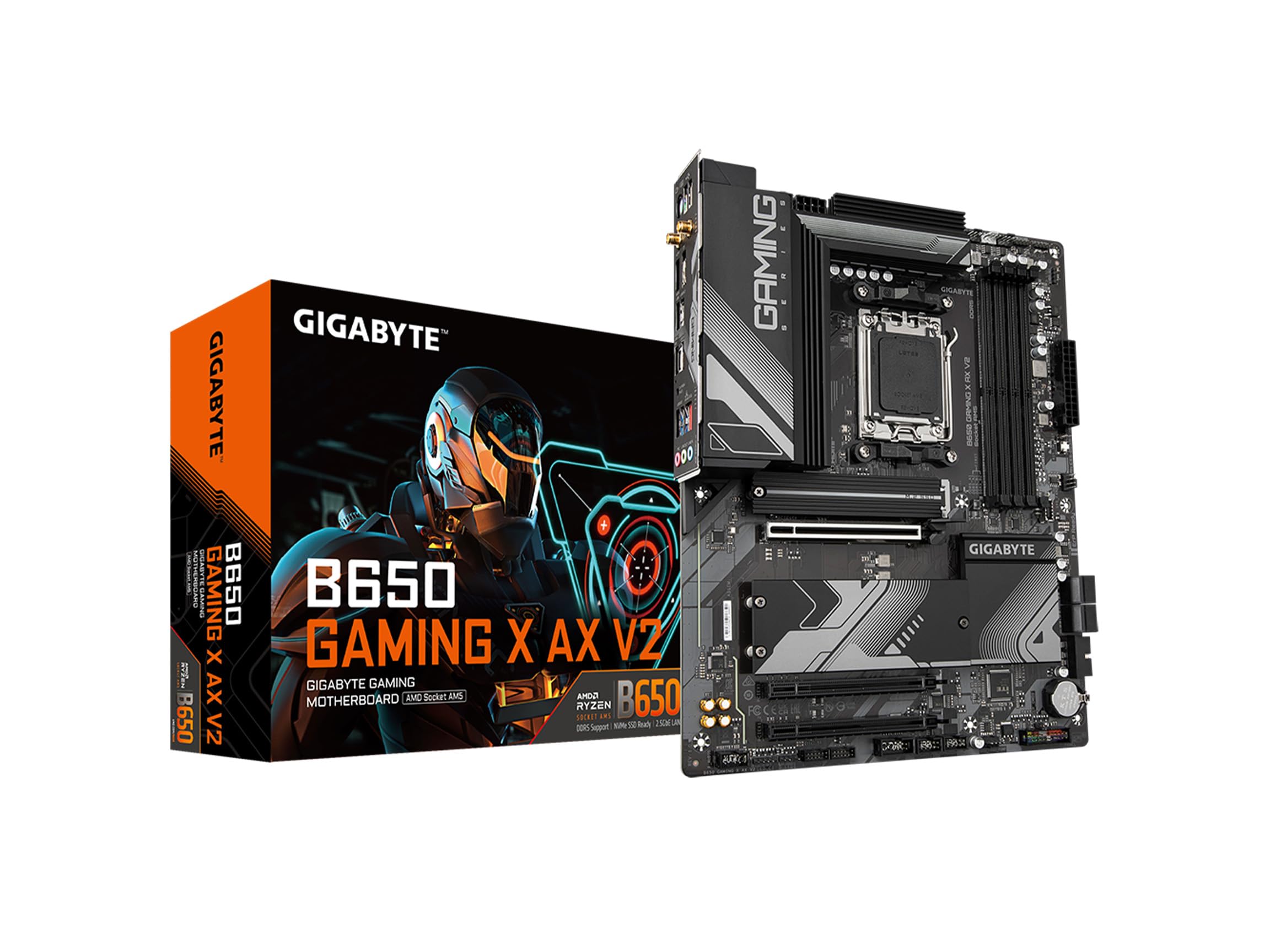
An AM5 board that trades memory slots for a faster network port and a lower ask.
Here is the trade you make with this board: two DDR5 memory slots instead of four, in exchange for 2.5GbE networking and a direct 8+2+2 phase VRM. If you only ever plan to run two memory sticks — which is most gamers — losing the extra two slots costs you nothing. A 2.5GbE port, on the other hand, is noticeably faster than the GbE LAN on the GIGABYTE B650 Eagle AX above when you are moving big files across a network or on a fast fiber line. The socket is AM5, supporting Ryzen 7000, 8000, and 9000 series, with 128 GB of maximum memory and DDR5 rated at 5200 MHz.
Storage and ports hold up well: three M.2 slots (one PCIe 5.0 x4 and two PCIe 4.0 x4) let you add fast drives, plus a USB 3.2 Gen2x2 Type-C port for quick transfers. Wi-Fi 6E is built in. The board also brings EZ-Latch, a release mechanism for the graphics card and M.2 drives that saves you poking at a latch buried under a heavy cooler, plus Q-Flash for updating the BIOS from a USB stick and RGB Fusion for lighting control. If you want a feature-dense AM5 board without paying premium prices, the checklist here is long.
This board is more polarizing than the others here. Most buyers run it happily in a gaming PC with no issues, and long-time GIGABYTE users note their previous board lasted a decade. But a small number of units have arrived with boot problems serious enough to make the board unusable, and one owner found the plastic GPU release latch snapped off in hand — annoying rather than fatal, since the card still seats. Treat this as the enthusiast pick: if you want the extra network speed and the latch design, it is a strong package. If you want the most predictable, beginner-friendly AM5 start, the Eagle AX above is the safer bet.
Worth it for: gamers who run two memory sticks and want 2.5GbE plus EZ-Latch convenience on AM5.
Be aware: a minority of units have shipped with boot faults, so buy from a seller with a clean return path.
6. GIGABYTE X870 AORUS Elite WIFI7 AM5 ATX Motherboard

A 16+2+2 power design and four M.2 slots that treat future upgrades as a given.
This is the board you buy when you want room to grow without replacing the foundation. It runs AMD’s X870 chipset — the newer generation above B650 — with four M.2 slots, PCIe 5.0 throughout, dual USB4 ports, and Wi-Fi 7. The power design is 16+2+2 phases, which is more than double the headroom the GIGABYTE B650 Eagle AX offers with its 12+2+2 phase setup, and that matters if you plan to drop in a top-tier Ryzen later. Memory support is rated to 8200 MHz across four DDR5 DIMMs with AMD EXPO profiles, so fast kits have somewhere to stretch. There is also a front and rear USB-C connection and a Sensor Panel Link for a small status display inside your case.
Owners running a 9800X3D report the 16+2+2 VRM stays cool with no throttling. Owners mention Wi-Fi 7 hitting 5-6 Gbps and Bluetooth 5.4 running without dropouts. DDR5-6000 CL30 EXPO kits boot at rated speed, and EZ-Latch releases the graphics card without a tool. It also carries a 5-year warranty, the longest coverage in this lineup.
Two things to plan for. The box arrives unsealed, which makes some buyers want a tamper sticker as proof — not a defect, just a packaging choice. And the manual skips the header pinout diagrams, so if you are wiring front-panel connectors for the first time, you will be reading the online documentation instead.
Upgrade math: four PCIe 5.0 M.2 slots and 8200 MHz memory support mean this board can absorb upgrades for years.
Support math:
Choose this if: you want the best balance of AM5 features, headroom, and warranty coverage.
Only skip it if: you are waiting for one specific premium design and this one does not match your case.
7. ASUS TUF Gaming X870-PLUS WiFi AM5 ATX Motherboard

Built like a tank, wired for four drives, and honest about its two SATA ports.
The stability and build are what you notice first. This board runs a 16+2+1 power stage setup rated at 80A per stage on an 8-layer PCB, with ProCool connectors, alloy chokes, and durable capacitors for steady power delivery. That is serious hardware for feeding a high-end Ryzen without voltage sag. Storage is generous on the M.2 side — four slots in total — while the wired side keeps just two SATA ports, which is the most common complaint from people wanting to keep spinning drives around. Ports include USB4 at 40Gbps, USB 20Gbps Type-C, HDMI out, and 2.5Gb LAN, with Wi-Fi 7 handling the wireless side.
The tuning software is genuinely useful. ASUS AI Overclocking, AI Cooling II, and AEMP help set things up for you, while Dynamic OC Switcher, Core Flex, and PBO Enhancement give a manual tuner real dials. One lane detail worth knowing: use the M.2_1 slot and your graphics card keeps its full x16 bandwidth (the full-speed connection to your GPU). Drop a drive into M.2_2 and it starts sharing lanes, so plan your drive placement rather than filling slots blindly.
Setup is where owners feel the value. The board accepts a Ryzen 7 9800X3D from the start with no BIOS update needed, EXPO memory profiles run at rated speed, and the EZ Debug LEDs plus tool-free M.2 latches make assembly quick. Compatibility takes care of itself in most builds. The honest picture on this board is more mixed than the fan-favorite status suggests: reliability and value both draw divided feedback — plenty find it superb, some have hit issues or felt the asking price was high. The most consistent practical complaint is the network drivers. Windows does not always auto-install the Wi-Fi and Bluetooth drivers, and you may need to source them manually before you can get online — download them onto a USB stick first. Bluetooth drivers from the ASUS site are the fix for the common case.
Lane logic: four M.2 slots in total, but filling M.2_2 starts sharing lanes with the main PCIe slot — plan drive placement first, not last.
First-boot prep: download the Wi-Fi and Bluetooth drivers before you build, or expect to hunt for the right version afterward.
Go for this if: you want a rock-solid X870 board with four M.2 slots and easy first-boot tuning.
Steer clear if: you need more than two SATA ports for optical or spinning drives.
8. ASUS TUF Gaming X870E-PLUS WIFI7 AM5 ATX Motherboard
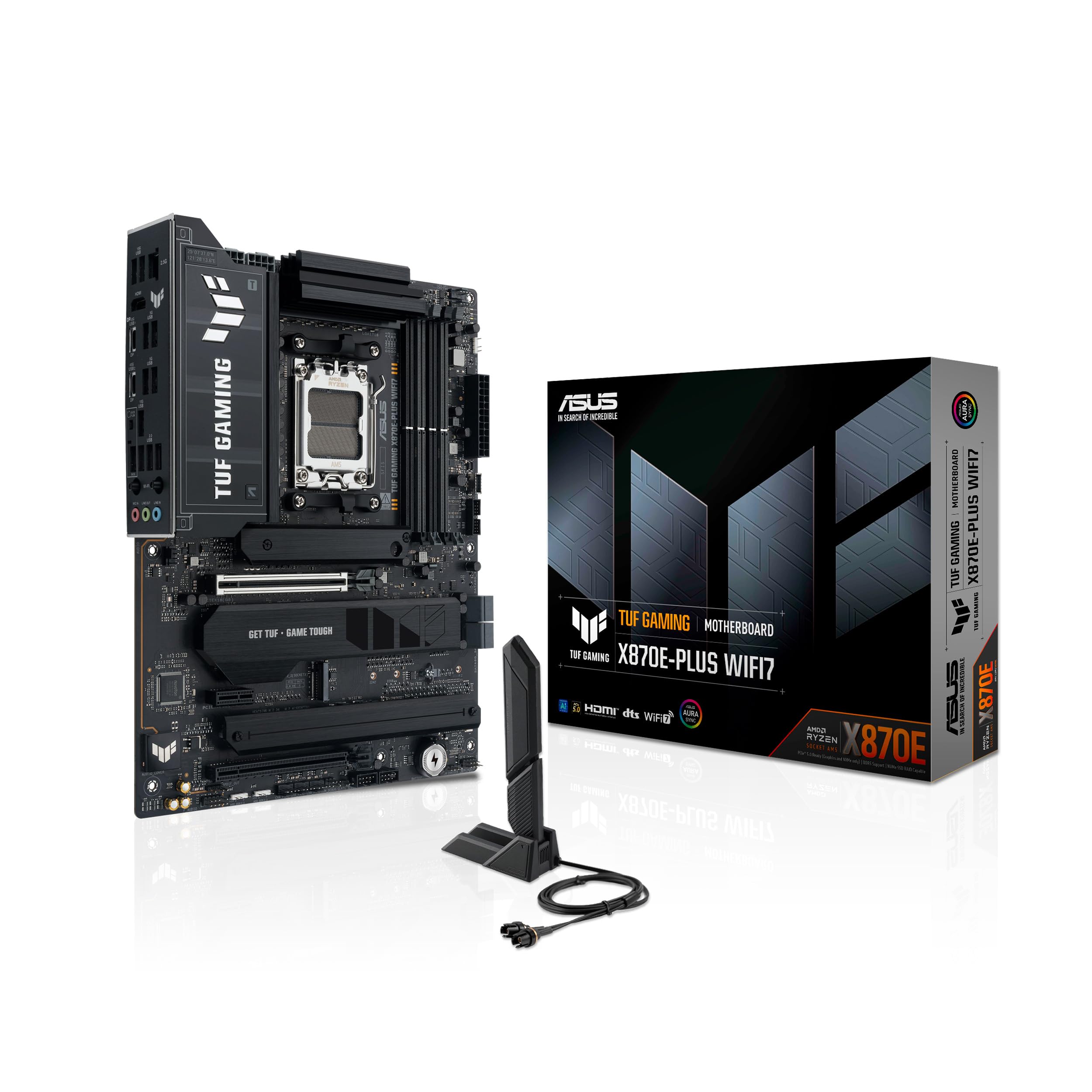
The X870E board that takes 256 GB of memory and four drives without blinking.
If storage and memory capacity are the point of your build, start here. This board uses AMD’s X870E chipset (the top tier of the X870 family) and supports up to 256 GB of DDR5 across four slots. That is double the 128 GB ceiling on the GIGABYTE B650 Eagle AX and the highest figure in this entire lineup. The M.2 situation is the real draw: two onboard PCIe 5.0 slots for the fastest drives plus two PCIe 4.0 slots, four in total. Power delivery is 16+2+1 rated at 80A per stage on an 8-layer PCB with 8+8 pin ProCool connectors, matched to the enhanced thermal design. Wi-Fi 7 is built in with the ASUS WiFi Q-Antenna.
For high-end chips, this board makes a strong case. Owners running a 9800X3D report the board delivers plenty of full-speed M.2 lanes, and unlike some designs it does not sacrifice graphics-card speed to feed those drive lanes — a detail serious builders care about. AI Overclocking, AI Cooling II, AI Networking II, and AEMP handle a lot of setup for you. The PCIe 5.0 x16 slot with Q-Release Slim makes card removal a one-hand operation.
The trade-offs land in two places. Only four SATA ports are included — standard for new boards, but a real limit if you still burn DVDs or run a drive farm, and one buyer ran short. The onboard 2.5GbE port on Linux can need the 8125 DKMS driver with the older 8169 blacklisted, a known Realtek quirk rather than a fault of this board. Board layout earns praise even from first-time builders, which is unusual for a workstation-grade part. This is overkill for casual gaming, and the people who buy it know it.
The right call for: workstation builds that need 256 GB of memory and four drives on one board.
Overkill if: you are gaming with two memory sticks and a single NVMe drive.
9. ASUS ROG Strix X870-A Gaming WiFi AM5 ATX Motherboard

A white ROG board built for a showcase PC and a top-shelf Ryzen.
This is the one that makes people stop and look at the build — but it backs the looks with hardware. The power solution is 16+2+2 rated for 90A per stage, with dual ProCool II connectors, alloy chokes, and durable capacitors feeding multi-core processors. That is the highest per-stage rating in this list, matched to the X870 chipset and four M.2 slots on PCIe 5.0. Wi-Fi 7 and USB4 handle the connectivity, and the Q-Release Slim button eases graphics-card removal in tight cases. For overclockers there is Dynamic OC Switcher, Core Flex, Asynchronous Clock, and PBO Enhancement — a full tuning arsenal most buyers will never need but a few will love.
Performance and appearance are the standout qualities owners highlight. A builder running a Ryzen 9 9950X3D with G.SKILL DDR5-6400 CL32 2x48GB reports four months of daily use with no faults. The DDR5-6400 kits need a BIOS step to reach rated speed — the board defaults to 5200 until you enable it — but once set, they run clean. Owners describe the build as rock solid under load with cool VRM temperatures. One quirk worth knowing: you can fit all four M.2 drives under one heatsink, but pushing all four at once limits the PCIe lanes available elsewhere, so plan your priorities before filling every slot.
Two caveats keep this from being the automatic pick. Connectivity takes divided feedback — the Wi-Fi 7 is superb for most, but some units have needed driver attention. And building it cleanly takes patience: several owners describe a hiccup or two during the Windows install before everything settled. If you want the most polished white build with maximum headroom, the investment is justified by the hardware. If you want the safest, most straightforward AM5 start, the GIGABYTE B650 Eagle AX delivers the essentials for less.
Pay the premium for: a white-and-silver showcase build with premium power stages and top-tier overclocking controls.
Not for you if: you want the simplest possible first-build experience without driver or install fuss.
Understanding the Specs
Socket And Chipset: The Compatibility Lock
The socket is the physical landing pad for your processor, and it is the one spec you cannot compromise on. AMD’s AM5 socket currently takes Ryzen 7000, 8000, and 9000 series chips — a wide, forward-looking ceiling. Intel’s LGA1700 takes 12th, 13th, and 14th Gen Core processors plus Pentium Gold and Celeron. The chipset (the chip that decides which features the board supports) comes in tiers: B650 and B760 are mid-range and cover most builders, while X870 and X870E are the premium AM5 options with more lanes and newer connectivity. Check the socket and chipset first. Everything else is a feature decision.
VRM And Power Delivery: The Stability Engine
The VRM (Voltage Regulator Module) is the section of the board that feeds steady, clean power to your processor, and it is described in phases — such as 12+2+2, 16+2+1, or 16+2+2. More phases and higher per-stage amperage ratings handle more demanding CPUs with less strain and less heat. Higher is not always necessary — a mainstream Ryzen or Core chip runs fine on a modest phase design — but a top-tier processor benefits from the extra capacity. Look for VRM and M.2 heatsinks if you plan to push the system or run a large graphics card.
DDR4 Versus DDR5: The Memory Decision
DDR4 and DDR5 are different physical shapes, so the board decides which memory you must buy. DDR4 boards let you reuse memory you already own, which saves money in a fresh build. DDR5 boards open up higher rated speeds — up to 8200 MHz on some of these picks — and lower power draw, but require a new kit. Enable EXPO or XMP in the BIOS to run your kit at rated speed; without it, fast memory runs at a slower default. If your build is storage-heavy, check the maximum memory capacity too — 128 GB covers most gamers, while 192 GB or 256 GB suits simulation and workstation use.
M.2 Slots And PCIe Lanes: The Upgrade Path
M.2 slots are where your flat NVMe drives live, and each slot runs at a PCIe generation — PCIe 5.0 is the newest and fastest, PCIe 4.0 the generation below. More slots means more drives later without swapping anything out. The catch is lane sharing: on some boards, populating certain M.2 slots reduces the bandwidth of the main PCIe x16 slot your graphics card uses. Check the manual before filling every slot. For most builders, two or three M.2 slots is comfortable; four is generous headroom for years of upgrades.
FAQ
Will an AM5 motherboard work with the Ryzen 9000 series?
Can I reuse my old DDR4 memory on a new motherboard?
How many M.2 slots do I actually need on a motherboard?
Does Wi-Fi 7 on a motherboard replace the need for a wired connection?
What does BIOS Flashback or Q-Flash do and why does it matter?
How much VRM headroom do I need for a high-end Ryzen processor?
Is a full ATX board better than micro ATX for a gaming build?
Will I lose graphics card performance if I use all my M.2 slots?
Do I need to enable EXPO or XMP to get full memory speed on my motherboard?
Which network port should I prioritize on a gaming motherboard?
Final Thoughts: The Verdict
For most builders, the best computer motherboard is the GIGABYTE B650 Eagle AX because it covers the AM5 platform with three M.2 slots, solid VRM cooling, and a beginner-friendly install. Owner reports read like a board most people will simply stop worrying about. If you want the features and warranty headroom that premium AM5 offers — four PCIe 5.0 M.2 slots, Wi-Fi 7, and a 5-year warranty — step up to the GIGABYTE X870 AORUS Elite WIFI7. And for a workstation build running 256 GB of memory and four drives without lane compromise, the TUF Gaming X870E-PLUS WIFI7 is the one to reach for. One practical nudge: the ASRock B760M Pro RS is the pick with the smallest footprint and the most memory headroom at its size, so if your case is compact and your workload is heavy, look there before defaulting to a full-size board. Whatever you choose, check socket, memory type, and lane layout first — those three decisions decide your next three years of upgrades.
How We Picked
We do not accept paid placement. Every pick is matched to a real buyer and a real use-case; we do not hands-on test units.
Sources & Methodology
Specifications: manufacturer listings and product documentation. Review insights: verified customer reviews, as of September 2026. Pricing: not shown on this page (it changes often); check the current price via the retailer link.
As an Amazon Associate, Gadgets Feed earns from qualifying purchases. This does not affect which products we feature.