
Our readers keep the lights on and my morning glass full of iced black tea. As an Amazon Associate, I earn from qualifying purchases.
Specs are compiled from manufacturer listings and verified buyer reviews and can change over time — please confirm the key details on the product page before buying.
Your next gaming keyboard lives or dies by one thing: how fast a keypress becomes an in-game action. That speed comes from the switches, the layout, and the connection type, and it separates a board that feels responsive from one that feels sluggish. Here are nine of the most talked-about mechanical keyboards right now, from compact 60% boards built for tournament travel to full-size workhorses with macro keys, so you can match the right one to your setup.
I’m Min — the founder and writer behind Gadgets Feed. This guide is built by comparing the manufacturers’ published specifications and the patterns across verified customer reviews, so you get each pick’s real strengths and trade-offs instead of marketing spin.
We break down switch types, form factors, and wireless features to help you find the gaming keyboard that fits your playstyle and desk space.
Our Picks at a Glance



How To Choose The Best Gaming Keyboard
Before you fall in love with a flashy RGB layout, you need to lock down three things: the switch type, the keyboard size, and how you want it to connect. These three decisions shape everything about how the board feels and performs on your desk.
Switch Type: Linear, Tactile, or Magnetic
Linear switches (like the ones in the AULA or Logitech G PRO) move straight up and down with no bump, so they excel at rapid double-taps in fast-paced shooters. Tactile switches give you a small bump at the press point, which helps you type accurately. Magnetic switches (like SteelSeries’ OmniPoint) are the wildcard — they can change how far you need to press, letting you tune it from a hair-trigger to a deep press, so you can use one board for both gaming and typing.
Form Factor: 60%, 75%, TKL, or Full-Size
Your keyboard size is a trade-off between desk space and available keys. A 60% board (like the Razer Huntsman Mini) keeps the essentials — perfect if you need maximum room for your mouse swipes. A 75% layout (like the GravaStar) adds back the function row and arrow keys, making it a better daily driver. A 96% layout (like the HUO JI) keeps the number pad, so if you do data entry or MMO gaming, it’s the most practical middle ground.
Connectivity: Wired vs. Wireless
Wired keyboards are plug-and-play with zero latency concerns, making them the safest for hardcore competitive play. Wireless has improved drastically — the Logitech LIGHTSPEED technology offers tournament-proven reliability nearly as fast as a wire, while Bluetooth is best for switching between a PC and a tablet. If playing wirelessly, check the reported battery life; the GravaStar’s 8000mAh battery is an outlier that makes charging a rare event.
Quick Comparison
| Model | Best For | Form Factor | Switch Type | Key Spec | Amazon |
|---|---|---|---|---|---|
| GravaStar Mercury K1 Pro★ Best Overall | Wireless + premium feel | 75% (79 keys) | Linear (Kailh) | 8000mAh battery | Amazon |
| AULA WIN68 HEFastest Reflexes | Esports speed on a budget | 60% (68 keys) | Hall Effect Magnetic | 8000Hz polling | Amazon |
| HUO JI E-Yooso Z-99Creamy & Quiet | Creamy, quiet typing | 96% (99 keys) | Linear (Pre-lubed) | Gasket mount | Amazon |
| RK ROYAL KLUDGE R98 Pro | Numpad + volume knob | 96% (98 keys) | Linear (Cream) | Detachable knob | Amazon |
| Razer Huntsman Mini | Travel-friendly FPS | 60% (61 keys) | Linear Optical | 1.0 mm actuation | Amazon |
| Razer BlackWidow V4 X | Macros + media controls | Full-size (104 keys) | Linear (Yellow) | 6 Macro keys | Amazon |
| CORSAIR K70 CORE | Full-size + palm rest | Full-size | Linear (MLX Red) | Rotary dial | Amazon |
| Logitech G PRO X TKL | Pro wireless reliability | TKL | Tactile (GX Brown) | LIGHTSPEED | Amazon |
| SteelSeries Apex Pro TKL Gen 3 | Adjustable actuation | TKL (84 keys) | Hall Effect Magnetic | 0.1-4.0mm range | Amazon |
In-Depth Reviews
1. GravaStar Mercury K1 Pro Wireless Mechanical Gaming Keyboard
Our pick — over 4.5★ from 700+ verified ratings; the strongest balance of quality and price.
A sci-fi weapon with a serious 8000mAh battery and buttery-smooth keys.
The K1 Pro’s skeletal aluminum alloy frame looks striking, but its 45gf Kailh Speedy Mint linear switches deliver the real performance. It’s a substantial board at 1.18 kg, giving every keystroke a solid, stable landing that steadies rapid fire in shooters. The custom Kailh Speedy Mint linear switches, needing just 45gf of force, deliver a quiet, ultra-responsive press that’s equally at home for marathon typing sessions.
Its 8000mAh battery keeps the 2.4GHz wireless connection running for days between charges. The 8000mAh rechargeable battery means buyers report it lasts for days on a single charge over the responsive 2.4GHz wireless. With a 79-key 75% layout and a programmable control knob, it reclaims desk space without sacrificing the function row or arrow keys. Dual RGB lighting with south-facing LEDs shines through Pudding PBT keycaps for a vibrant glow that stays readable at night.
The gasket-mounted FR4 plate and 5 layers of sound-dampening foam produce a ‘thocky’ sound profile that owners describe as deeply satisfying. The trade-off for that premium feel is its heft — it’s heavy, so it’s not a board you’ll want to toss in a backpack for LAN parties. The compact layout also means the compact keys take a little getting used to if you rely on dedicated Home/End keys, as some owners noted they were missing.
What owners rave about
- Serious aluminum build with a unique sci-fi look that turns heads
- Thocky sound profile thanks to gasket mount and dense foam layers
- Long-lasting 8000mAh battery outlasts daily wireless use
What to watch out for
- Linear switches offer no tactile bump, which some typists miss
- Heavy 1.18 kg weight isn’t ideal for travel
- Missing dedicated Home/End keys requires a learning curve
Reach for this if: You want a flagship wireless board that feels as premium as it looks, with a battery that keeps up with your longest sessions.
Consider another if: You prefer tactile feedback when typing or need an ultra-light board for frequent transport.
2. AULA WIN68 HE Mechanical Gaming Keyboard
Hall Effect speed that rivals top-tier boards for a fraction of the price.
The WIN68 HE packs esports-grade Hall Effect switches and an 8000Hz polling rate into a budget-friendly 60% frame., using magnetic Hall Effect switches that read your press depth instantly. With a blazing 8000Hz polling rate and 0.3ms latency, your commands hit the game server faster than most traditional mech boards can even register. It keeps up in any FPS title, giving you a real edge in reaction-based fights.
This 68-key 60% layout is built for competitive players — it saves up to 40% of desktop space, leaving plenty of room for your mouse. The pre-travel means you can even adjust how little you need to press a key to register, a feature that owners love for customizing their touch. The silky smooth typing feel and durable build make it a comfortable daily driver too, and the south-facing RGB is bright enough to see in a lit room.
The web driver is powerful, allowing for RT/SOCD/DKS/MT/TGL functions and full key mapping, but it only works on Windows — no Mac support. The plastic casing is a reminder of its budget origins, though it feels heavy and solid enough for hard play. Owners note the adjustable actuation is the standout feature, making this a serious pick for esports enthusiasts on a tight budget.
Speed king: The 8000Hz polling rate and 0.3ms latency put it on par with premium esports boards, while the magnetic switches let you fine-tune the actuation to your liking.
The trade-off: It’s a 60% board with a Windows-only driver, so Mac users and those who need a numpad should look elsewhere.
3. HUO JI E-Yooso Creamy Mechanical Keyboard
The creamy sound profile is the star, making typing feel almost therapeutic.
The Z-99’s gasket-mounted, foam-damped design produces a creamy, quiet sound that owners consistently praise. It’s hard to find a keyboard this quiet and this satisfying to type on — one owner even sold their GravaStar keyboard for this one. That signature ‘creamy’ sound comes from the gasket structure and 5 layers of sound-absorbing foam, which reduce 40% of noise and eliminate 80% of hollow sound, leaving a natural, clear tone.
At 99 keys, it’s a 96% layout with the numpad intact — you get full functionality without the bulk of a full-size board. The pre-lubed linear switches are smooth right from the start, and the hot-swappable PCB means you can replace them with any 3-pin or 5-pin switch without soldering if you want a different feel later. With 100% anti-ghosting and N-key rollover, it handles complex key combos without errors.
The RGB setup offers 15 backlight effects and 8 solid color options, all adjustable for speed and brightness. Some owners note the backlight is dimmer than expected, but the double-shot PBT keycaps make the legends durable and fade-proof. There are occasional reliability mentions about keys, but the overwhelming consensus is a premium feel for its price, with one owner calling it better quality than boards costing 2-3x more.
Why it’s a fan favorite
- Exceptional creamy sound quality that owners describe as ‘therapeutic’
- Hot-swappable PCB for easy customization without soldering
- 99-key layout retains the numpad while saving desk space
Minor notes
- Backlighting is dimmer than some premium boards
- Software for customization feels unrefined
- A few owners mention issues with occasional keys
Ideal for: Anyone who spends long sessions typing or gaming and wants a quiet, satisfying board that keeps the numpad.
Not for: Those who want ultra-bright RGB as a centerpiece of their setup.
4. RK ROYAL KLUDGE R98 Pro Wired Mechanical Keyboard

A near-perfect workhorse with a satisfying knob and buttery-smooth switches.
The R98 Pro’s 96% layout keeps the numpad and arrow keys across 98 keys for a smooth full-size transition. that keeps the numpad, arrow keys, and most functions across 98 keys, so you can jump from a full-size board without relearning anything. The standout feature is the detachable aluminum CNC volume knob — a solid, premium touch that lets you adjust audio mid-match without breaking focus, and it’s paired with four indicator lights for Num Lock, Caps Lock, Win Lock, and Mac Mode.
Typing on it is a joy, thanks to pre-lubed linear cream switches and a gasket mount with five layers of sound-absorbing foam. Owners describe the sound as ‘thocky’ and ‘creamy,’ with a smooth keystroke that’s satisfying without being loud. The MDA profile PBT keycaps offer a matte surface that fits fingers well and resists wear, and the double-shot construction means the legends won’t fade.
The RGB lighting is where opinions split — there are over 20 modes, but some owners find the lights not bright enough even at the highest setting, with the lettering on keys sometimes appearing dark. The online driver is functional but less intuitive than some competitors. At 0.8 kg it’s solid and sturdy, though the wired connection with a left-side USB port might cross your desk awkwardly.
Solid all-rounder: The hot-swappable cream switches, gasket mount, and detachable knob deliver a premium feel that’s rare at this level.
Check your lighting needs: If you want blazing bright RGB, this board’s lights lean dim, so consider that before buying.
5. Razer Huntsman Mini 60% Gaming Keyboard

Optical switches fire at light speed in a frame that takes up zero space.
The Huntsman Mini’s 60% layout frees up desk space while its 1.0mm optical switches register inputs at light speed. At just 61 keys, the 60% layout eliminates the number pad and function row entirely, giving you maximum mouse room for those wide flicks. Razer’s Linear Optical switch technology uses light beams for actuation, offering a 15-30% shorter actuation distance at just 1.0mm — your key presses register almost as fast as you can think them.
Despite its size, it doesn’t feel cheap. The matte aluminum top frame gives it structural rigidity, and the oil-resistant doubleshot PBT keycaps are textured and durable enough to resist grime buildup from marathon sessions. It’s noticeably quieter than traditional mech boards, too, with owners praising the crisp, responsive feel that stays surprisingly silent during intense play.
The Razer Chroma RGB is a big selling point, syncing with 16.8 million colors across a huge ecosystem of games and gear — even Philips Hue lights. However, the size has mixed feedback: some find it perfect, others mention the buttons are too large. Also, at 60%, you’ll rely on FN-layer shortcuts for arrow keys and function commands, which takes some adjustment if you’re not used to compact layouts.
What makes it shine
- Light-speed optical switches with a 1.0mm actuation point for instant response
- Aluminum top frame and PBT keycaps for a durable build
- Ultra-compact 60% layout frees up desk space
Keep in mind
- No arrow keys or function row — requires FN combinations
- Size and value for money receive mixed feedback from owners
Who it suits: Competitive FPS players and streamers with small desks who want Razer’s lightning-fast optical switches.
Who should pass: Typists who need dedicated arrow keys and a function row without memorizing shortcuts.
6. Razer BlackWidow V4 X Mechanical Gaming Keyboard

Six dedicated macro keys and silent linear switches for command-heavy gameplay.
The BlackWidow V4 X’s full-size frame includes six dedicated macro keys and a media roller for command-heavy MMO and strategy play. It boasts 104 keys including 6 dedicated macro keys you can program to your preferred playstyle — perfect for complex spell rotations in MMOs or building hotkeys in strategy games. A multi-function roller and secondary media keys let you pause, play, skip, and tweak brightness without alt-tabbing out of your game.
At the heart of it are Razer’s Yellow linear mechanical switches. With zero distance between actuation and reset points at 1.2mm and only 45g of force, you get instant, rapid-fire inputs that are just as quiet thanks to built-in sound dampeners. The doubleshot ABS keycaps are extra-thick to withstand intense gaming, and the Chroma RGB per-key lighting offers over 16.8 million colors with dynamic effects for hundreds of integrated games.
Some owners note the left-side macro keys can interfere with hand orientation, particularly if you’re used to hitting the Esc key — there’s a retraining period to get comfortable. There are also mixed reports on long-term durability and responsiveness, with a few owners mentioning issues after several months of use. For most, the quiet operation and smooth feel make it a great daily driver, and it has shown resilience against the occasional liquid spill.
Command center: The macro keys and media roller make this a powerful tool for MMO and strategy gamers who want total control.
Plan for a learning curve: The macro key placement can disrupt muscle memory for the Esc key, so be ready to adjust your hand position.
7. CORSAIR K70 CORE RGB Mechanical Gaming Keyboard
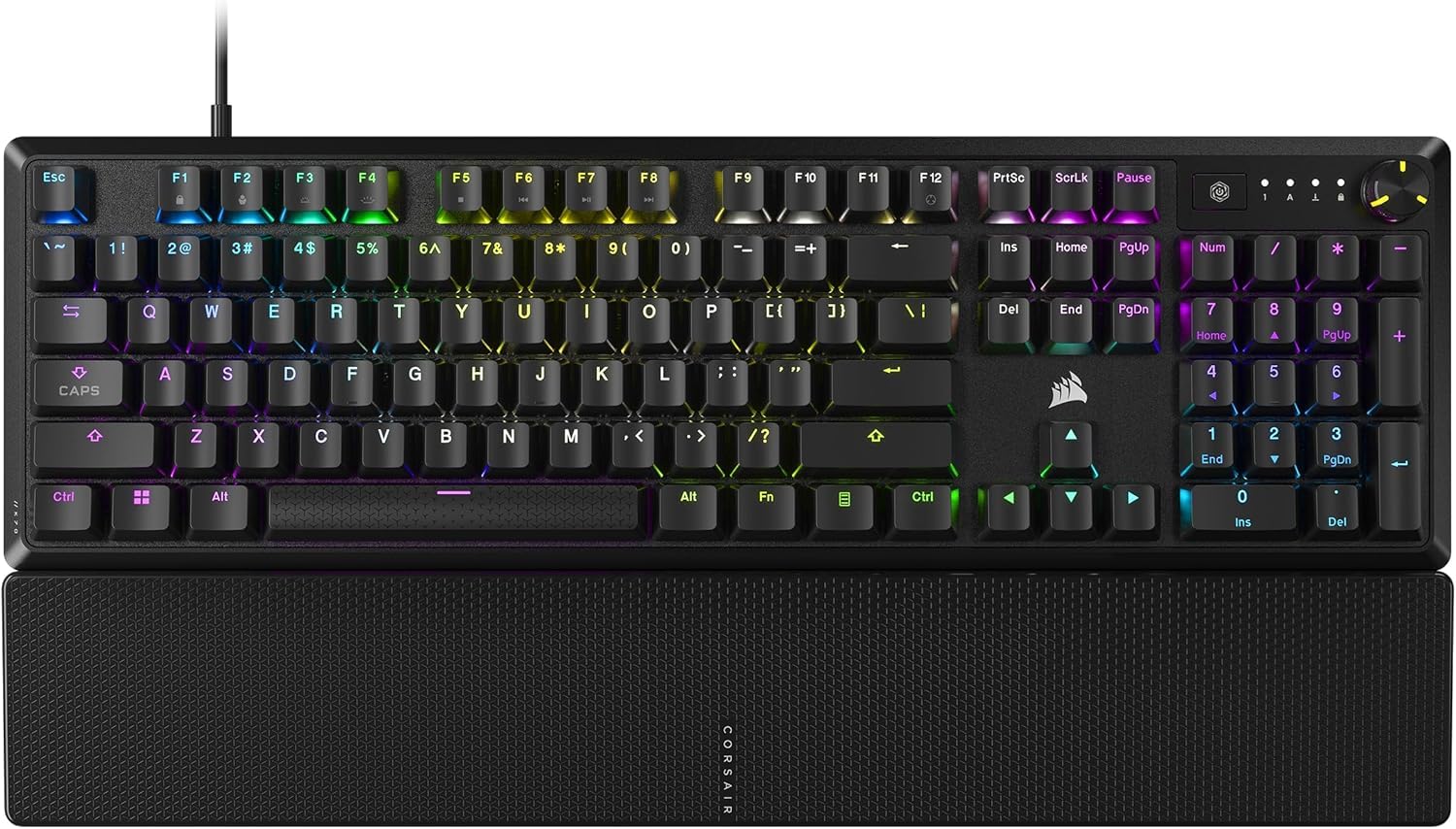
A full-size board with a magnetic palm rest that’s as comfortable as it is capable.
The K70 CORE offers a comfortable full-size layout with a magnetic palm rest and pre-lubricated Red switches for smooth, quiet typing., offering a full-size layout with a magnetic, detachable soft-touch palm rest that makes long sessions much easier on your wrists. It features pre-lubricated CORSAIR Red linear switches for smooth, responsive keystrokes, enhanced by two layers of sound dampening that keep it quiet enough for the office. Owners appreciate its ‘buttery’ feel and solid, heavy build.
It’s practical, too. The multi-function rotary dial and programmable media button make volume and track control easy, and the sturdy aluminum top plate adds stability during heated matches. The ABS double-shot keycaps resist cracking under pressure. Once you set your lighting in iCUE, it saves to the board itself, so you can plug it in anywhere and your settings follow.
However, this board has a split review history. While many love the premium typing experience, there are significant reports of reliability issues, including double or triple keystrokes and keyboards becoming completely unusable after a few months. The iCUE software also draws some complaints about disconnects and bugs. It’s a great keyboard when it works, but it’s worth being aware of these durability concerns before committing.
Standout features
- Magnetic soft-touch palm rest adds serious comfort for long sessions
- Multi-function rotary dial for quick volume control
- sturdy aluminum top plate for stability
The catch
- Recurring reports of double-typing or unresponsive keys after extended use
- iCUE software can be buggy with random disconnects
Best if: You want a comfortable, full-featured board for mixed work and gaming and are comfortable troubleshooting if issues arise.
Think twice if: Reliability is your absolute top priority — the mixed long-term reports give some reason to pause.
8. Logitech G PRO X TKL Lightspeed Wireless Gaming Keyboard

Tournament-proven wireless performance in a travel-ready tenkeyless frame.
The G PRO X TKL is the next generation of Logitech’s trusted tenkeyless PRO keyboard, refined to eliminate every barrier between you and the win. The highlight here is LIGHTSPEED wireless, a connection technology trusted by esports pros for its speed and reliability. You can even use the same LIGHTSPEED adapter to connect a compatible mouse and keyboard, reducing cable clutter. The TKL design is ultra-portable and arrives with a carrying case, so it’s ready to travel to LAN events.
It features GX Brown tactile switches, which give you a small bump at the press point that’s great for typing accuracy, and dual-shot PBT keycaps that feel textured and durable. Owners praise the excellent battery life and the standard TKL layout with legible keycaps. The volume roller is a handy addition, and the response over dongle, Bluetooth, or USB is consistently solid.
There are some trade-offs for the wireless freedom. The switches are not hot-swappable, so you’re locked into the tactile feel unless you’re willing to solder. Some owners find it a bit loud and note the Logitech G Hub software is ‘bloated’ and doesn’t support full key remapping. Also, the FN key is hardcoded, and the keyboard is not user-serviceable, so spills can be more problematic than on some other boards.
Clean signal, clean desk: LIGHTSPEED wireless and multi-device support make this a top choice for gamers who want a wire-free setup.
Know the limits: A locked-in switch type, software quirks, and a lack of hot-swap sockets mean you give up customization for that pro-level wireless.
9. SteelSeries Apex Pro TKL Gen 3 Gaming Keyboard

Adjustable magnetic switches that let you dial in the perfect press for any game.
The Apex Pro TKL Gen 3 is not just a keyboard; it’s a tunable instrument. Its OmniPoint 3.0 analog magnetic switches offer an incredible 40 levels of adjustable actuation, from an ultra-hair-trigger 0.1mm to a deep 4.0mm press. This means you can set a super-sensitive input for twitchy FPS games and switch to a deeper, more deliberate press for typing to avoid mistakes, all without changing hardware.
It’s powered by Quickset auto-presets, which are the only keyboards in the world with Rapid Trigger, Rapid Tap, and Protection Mode. Rapid Trigger resets the moment you release a key for faster stops and starts, Rapid Tap snaps to your latest key press for strafing, and Protection Mode reduces accidental keypresses on nearby keys. The OLED smart display on the keyboard lets you change these settings directly without leaving your game.
Owners note it feels quieter and more premium than previous generations, with a satisfying ‘thump’ instead of a clicky clack. The PBT keycaps are durable, and the compact TKL build with 84 keys is solid and sturdy. The adjustable actuation points are widely praised as a standout in FPS titles, and the SteelSeries software is considered better than Razer’s Synapse. It’s a heavy-hitter for competitive play, though opinions on its value are mixed given the premium price.
Cutting-edge tech
- 40 levels of actuation (0.1mm to 4.0mm) for ultimate customization
- Exclusive Rapid Trigger, Rapid Tap, and Protection Mode
- OLED display for on-the-fly adjustments without software
Consider this
- Premium price point with mixed value opinions from some owners
- Heavy, solid build is not the lightest option for transport
Who should pick this: Competitive gamers and enthusiasts who want the absolute latest in switch technology and are willing to pay for it.
Who can skip it: Casual players who are happy with a standard feel and don’t need granular control over every keypress.
Understanding the Specs
Actuation Point & Polling Rate
Actuation point is the distance you press a key before it registers a keystroke. A shorter travel (like the Razer’s 1.0mm) means less movement for faster reaction times in games. Polling rate is how often the keyboard reports its status to your PC, measured in Hz. A standard board polls at 1000Hz (once a millisecond), but high-end esports boards like the AULA can hit 8000Hz, which reduces input lag significantly.
Form Factor & Layout
The layout dictates what’s physically on your desk. Keyboard size is often measured in percentage — 60% keys without the number pad, arrow keys, or function row; 75% (or 96%) usually adds back the function row and arrows, and a tenkeyless (TKL) or full-size board keeps the navigation cluster and numpad. Choosing between them is a matter of if you need those keys or need the space.
Switch Types & Sound
Mechanical switches are the heart of your typing feel. Linear switches are smooth with no bump, making them great for gaming but can lead to typing errors. Tactile switches provide a bump for confirmation, helping with typing accuracy. Magnetic switches are a modern option that use magnets to measure pressure, opening the door to adjustable actuation and features like Rapid Trigger. The sound — often described as ‘creamy’, ‘thocky’, or ‘clacky’ — depends on the switch, the keycaps, and the board’s internal foam.
Hot-Swappable vs. Fixed
If a keyboard is hot-swappable, you can pull out the switches and replace them with different ones without any soldering. This is a huge bonus for customization, as you can change from a clicky to a linear switch, or swap in a higher-quality set, in seconds. It also makes the board more repairable and future-proof. Fixed switches (like on the Logitech G PRO X TKL) lock you into the stock feel unless you’re willing to do some serious tinkering.
FAQ
What is the difference between linear and tactile switches for gaming?
Is a 60% or a 96% keyboard better for me?
What does a high polling rate like 8000Hz actually do for me?
How important is a hot-swappable keyboard?
Will a wireless gaming keyboard have noticeable lag?
What are the benefits of PBT keycaps over ABS keycaps?
Can I use these keyboards with my Mac or console?
What is the ‘creamy’ sound everyone talks about?
What does adjustable actuation mean and why is it useful?
Are more keys always better for gaming?
Final Thoughts: The Verdict
The right gaming keyboard is a personal choice, but our top pick is the GravaStar Mercury K1 Pro because it nails the premium feel with a long-lasting 8000mAh battery and gloriously satisfying sound. If you’re a competitive player on a budget, the AULA WIN68 HE brings esports-grade speed and magnetic switches for a fraction of the price. And for those who just want a quiet, pleasant board to type on, the HUO JI E-Yooso Z-99 offers the best creamy sound experience at its price point.
How We Picked
We do not accept paid placement. Every pick is matched to a real buyer and a real use-case; we do not hands-on test units.
Sources & Methodology
Specifications: manufacturer listings and product documentation. Review insights: verified customer reviews, as of August 2026. Pricing: not shown on this page (it changes often); check the current price via the retailer link.
As an Amazon Associate, Gadgets Feed earns from qualifying purchases. This does not affect which products we feature.