
Our readers keep the lights on and my morning glass full of iced black tea. As an Amazon Associate, I earn from qualifying purchases.
Specs are compiled from manufacturer listings and verified buyer reviews and can change over time — please confirm the key details on the product page before buying.
A graphing calculator is a math major’s best friend and an engineering student’s secret weapon. But picking one gets confusing fast — you are choosing between color screens, Python code, Computer Algebra Systems (CAS, which solves equations with variables), and exam approval lists, all while your school likely has its own requirement. This guide cuts through the noise to help you find the model that actually fits your classes, your budget, and your long-term needs.
I’m Min — the founder and writer behind Gadgets Feed. This guide is built by comparing the manufacturers’ published specifications and the patterns across verified customer reviews, so you get each pick’s real strengths and trade-offs instead of marketing spin.
Whether you are a high school student taking the SAT, a college freshman in calculus, or a graduate tackling differential equations, you want the tool that handles your specific coursework without clunky menus or a wallet-crushing price tag. That is exactly what this guide to the best graphing calculator delivers.
Quick Picks
- Texas Instruments TI-Nspire CX II CAS — Best Overall
- Texas Instruments TI-84 Plus CE Python — Classroom Standard
- Casio fx-CG100 ClassWiz — 3D Powerhouse
- NumWorks Graphing Calculator — Modern & Open
- Texas Instruments TI-83 Plus Programmable — Proven Classic
- Casio fx-9750GIII — High-Value Hybrid
- Casio fx-9750GII Graphing Calculator (Renewed) — Entry-Level Steal
How To Choose The Best Graphing Calculator
A graphing calculator is a long-term investment — you might use the same device from sophomore year all the way through graduate school. Getting it right means looking past the brand name and focusing on what your actual courses require and how the specs match your day-to-day work.
Exam Approval vs. Classroom Features
The first and most restrictive filter is standardized test policy. The SAT, ACT, AP, and IB exams all approve specific models — and they explicitly ban any calculator with a Computer Algebra System (CAS, which can solve equations with variables automatically). If you are still in high school or taking pre-college exams, confirm your target model is on the approved list before you buy anything with CAS features.
Display Quality and Resolution
A graphing calculator’s screen is your primary workspace. Higher resolution and color capability let you distinguish multiple graph lines at a glance, see 3D surfaces clearly, and avoid squinting at tiny tick marks. Look for a pixel count around 320×240 and color depth of at least 16-bit if you plan to work with complex multivariable functions or statistics plots.
Programming and Python Integration
More modern calculators now include a MicroPython environment directly on the device. This feature lets you write small programs, simulate algorithmic thinking, and even complete coding assignments without a laptop. If your curriculum includes computer science or computational math modules, having onboard Python is a major bonus that extends the usefulness of the calculator beyond pure calculation.
Battery Life and Power Source
You do not want a dead calculator ten minutes into a three-hour exam. Rechargeable lithium-ion batteries offer convenience and long-term savings, but some models still rely on standard AAA or AA batteries. AAA-powered units are easy to replace with spares you keep in your bag; rechargeable models need a USB cable and wall outlet, so plan your charging habits accordingly.
Quick Comparison
On smaller screens, swipe sideways to see the full table.
| Model | Best For | Display & Resolution | Programming | Weight | Amazon |
|---|---|---|---|---|---|
| TI-Nspire CX II CAS | Advanced math & engineering | 320×240 px, 16-bit color | CAS & Student Software | 9.12 ounces | $124.99$134.99Amazon |
| TI-84 Plus CE Python (Coral) | All-around classroom standard | 140 DPI, 16-bit color | Python | 9.6 ounces | $113.99Amazon |
| Casio fx-CG100 ClassWiz | 3D graphing & color visualization | 3.7-inch, 65,000+ colors | MicroPython | 8 ounces | $122.09$139.99Amazon |
| NumWorks Graphing Calculator | Open-source, future-proof learning | 320×240 px color | Python & open-source OS | 220 Grams | $109.99$124.99Amazon |
| TI-83 Plus Programmable | Budget classic reliability | LCD, grayscale | TI-Basic | 10.4 ounces | Amazon |
| Casio fx-9750GIII | High-value with textbook display | Natural Textbook LCD | Python | 7.5 Ounces | $59.89$79.99Amazon |
| Casio fx-9750GII (Renewed) | Entry-level, lowest cost | High-resolution LCD | — | 7.52 ounces | Amazon |
In‑Depth Reviews
1. Texas Instruments TI-Nspire CX II CAS

The powerhouse that solves differential equations and 3D graphs on a single charge lasting up to two weeks.
This is the calculator for college-level engineering and math students who need a Computer Algebra System (CAS, which automatically solves equations with variables like x and y, not just numbers). The screen runs at 320 x 240 pixels with 16-bit color, and you get six different graph styles plus 15 colors to keep each curve distinct. The rechargeable battery can last up to two weeks on a single charge, so you are not hunting for AAs before a late-night study session.
Buyers report it excels for electrical engineering work, handling complex numbers for transfer functions and impedances with ease. The included TI-Nspire CX Student Software for PC or Mac adds enhanced graphing capabilities on your laptop — a feature the TI-84 Plus CE Python does not bundle. One reviewer noted the CAS solves polynomial equations with variables and graphs in 3D, calling it the best calculator they have ever used.
The main trade-off is that CAS models are not allowed on most standardized high school exams (SAT, ACT, AP) because the automatic solving can be considered cheating. You will also face a learning curve to navigate the touchpad and menus, though plenty of online tutorials help you ramp up.
Ideal for the advanced crowd: The TI-Nspire CX II CAS is your tool if you are in college engineering, physics, or higher-level math where CAS is permitted and genuinely useful.
One real catch: High school students should skip it — many standardized tests ban CAS outright, leaving you unprepared on exam day.
2. Texas Instruments TI-84 Plus CE Python
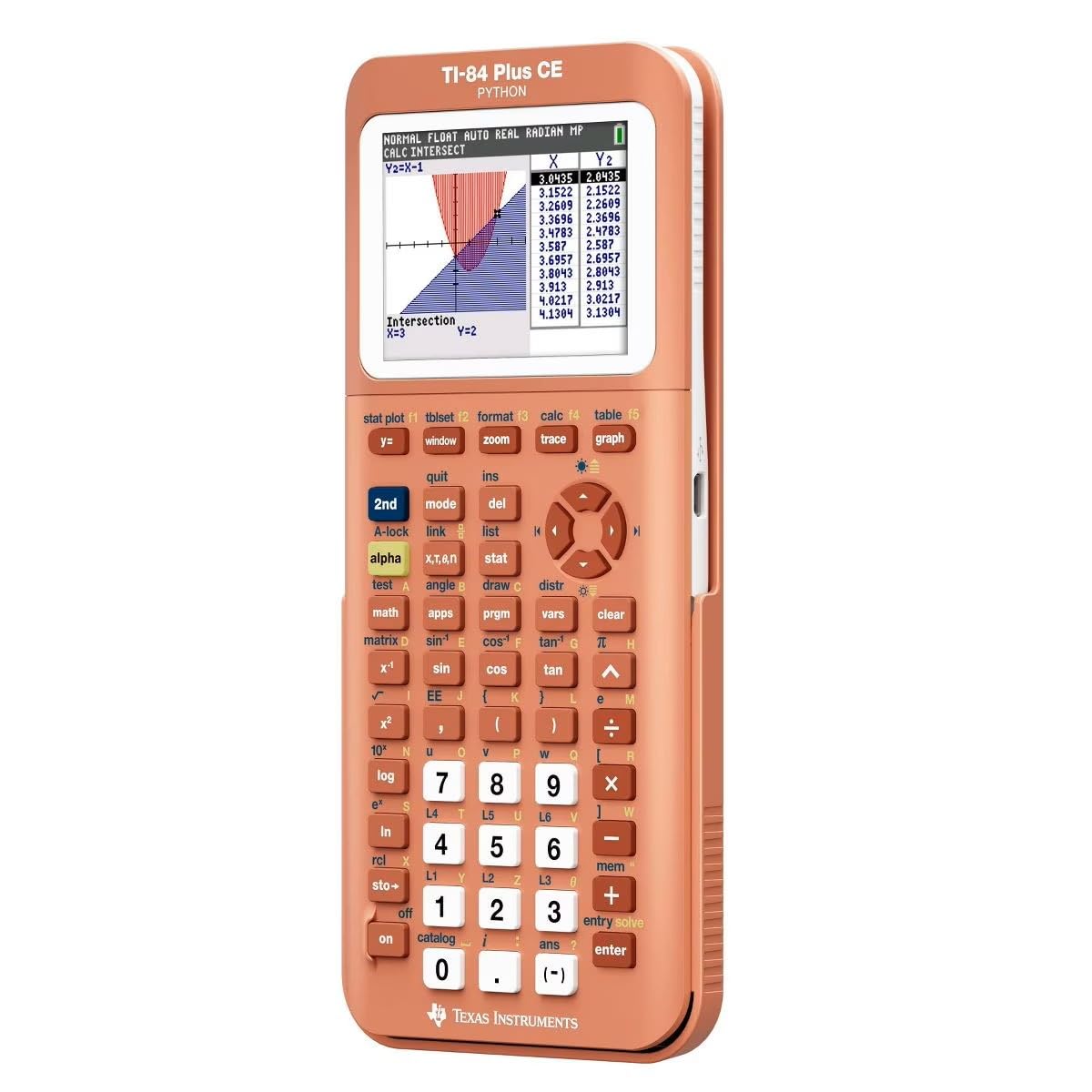
The exam-approved workhorse with a high-resolution color backlit screen and Python onboard.
This is the graphing calculator most schools actually require — it is approved for the SAT, ACT, AP, and IB exams, making it safe for high school students heading to standardized testing. The screen runs at 140 DPI with 16-bit color, so you see a vivid periodic table for chemistry and clearly separate multiple plot lines. It weighs 9.6 ounces and measures 8″L x 4.4″W, which is almost 8 inches longer than the Casio fx-9750GII (1″L x 4″W), giving you a noticeably larger display area for complex graphs.
Owners mention the TI-84 Plus CE is super reliable and easy to use, with a battery that lasts a long time and a coral metallic color that stands out in a backpack so you never lose it. One chemist reviewer was thrilled to discover the built-in color periodic table with full element data, calling it amazing for their major. Another owner mentioned the calculator did not come fully charged from the start — you will need to plug it in before your first class.
The coral model is often priced lower than the standard black version, making it a value smart pick if you are willing to carry an eye-catching color. It includes Python programming, so you can run code directly on the device without needing a separate computer.
Perfect for standard coursework: If you are in high school or early college and your syllabus is built around TI-84 compatibility, this is the safest, most reliable pick on the list.
The limitation to know: It does not have a CAS engine, so it cannot solve symbolic equations — that is actually a plus for exam compliance, but a drawback for advanced problem-solving.
3. Casio fx-CG100 ClassWiz

A vibrant 3.7-inch color screen that draws spheres, cylinders, and planes in over 65,000 colors.
If you need to visualize three-dimensional functions — think multivariable calculus or 3D geometry — this Casio is built for it. The large high-resolution backlit LCD supports 3D graphing of up to three functions, including shapes like spheres, cylinders, and planes, and it shows over 65,000 colors. The screen size is 3.7 inches, which is noticeably larger than the 3.2-inch display on the TI-84 Plus CE Python, giving you more room to inspect complex plots.
Customers note the display is bright and amazing — one parent mentioned their eighth grader was so excited after receiving this calculator that he spent the entire weekend learning its functions. The unit runs on 4 AAA batteries (included) and weighs 8 ounces. It includes MicroPython integration for coding and a Natural Textbook Display that shows fractions, integrals, and symbols exactly as they appear in your textbook.
It is approved for the AP, SAT, PSAT, and ACT exams, with a built-in Exam Mode that switches off advanced functions to stay compliant. The main gap compared to the TI-Nspire CX II CAS is that it lacks a full CAS engine, so it cannot solve symbolic equations automatically — but that keeps it legal for standardized tests.
Best for visual learners: The Casio fx-CG100 is the top choice if your course load involves heavy 3D graphing and you want a large screen that makes spatial relationships easy to grasp.
The trade-off: The AAA battery setup means you always need spares handy — unlike the rechargeable lithium batteries in the TI-84 Plus CE Python, there is no USB charging built in.
4. NumWorks Graphing Calculator

An open-source, future-proof calculator that gets frequent software updates and charges via USB-C.
The NumWorks calculator breaks the tradition of closed, proprietary firmware by offering an open-source operating system that gets frequent updates — so new features and bug fixes keep arriving long after you buy it. The high-resolution color screen is 320×240 pixels, and it is approved for AP and SAT exams. It uses a rechargeable lithium-ion battery that charges through a standard USB-C cable, which is the same cable most modern phones and laptops use, so you do not need to carry a separate charger.
Buyers consistently praise its intuitive interface — one reviewer called it “elegant and easy to use,” noting it is smaller and more elegant in appearance than equivalent models. Another highlighted the open-source hardware and OS, fast graphing, excellent equation solver, Python shell, and long battery life as major pros. The calculator supports multiple languages including English, French, Dutch, Portuguese, Italian, German, and Spanish, making it versatile for international students.
The biggest downsides reported are small Python memory (only 4KB) and scripts that can be lost if the battery dies completely. Some users also note the buttons feel mushy and the white plastic body can scratch over time. It does not have a finance app, so business majors may need to look elsewhere.
Great for tech-savvy students: If you value modern design, USB-C convenience, and the flexibility of open-source software that evolves, the NumWorks is a forward-thinking choice.
Keep in mind: The small Python memory and lack of a finance app mean it is best suited for general math and science courses rather than specialized programming or business tracks.
5. Texas Instruments TI-83 Plus Programmable

The old-school workhorse that still gets the job done if you only need basic graphing and reliability.
The TI-83 Plus is the calculator that defined a generation of math students — and it still works. It is a grayscale LCD model with no color, no Python, and no rechargeable battery, but it runs the same TI-Basic programming language that has a massive library of community programs online. It weighs 10.4 ounces, which is about 39% heavier than the Casio fx-9750GIII at 7.5 ounces, so it has a noticeably more solid, heftier feel in your hand.
Reviewers point out it works great for standard high school and college math courses. One buyer mentioned that it was “required for university exams” and called it “reliable, sturdy, simple design.” The protective case may arrive a little scuffed from previous use if you buy a used unit, but the calculator itself typically functions perfectly. A practical tip from owners: you must remove the batteries to prevent acid leakage when storing the calculator for long periods.
The price is significantly lower than the TI-84 Plus CE Python, making it a budget-friendly entry point if your school still lists the TI-83 as acceptable. However, it lacks a backlit screen, so working in dim lecture halls is tougher, and it cannot run Python or connect via USB for file sharing.
Ideal for the budget-conscious: If your exam requirements list the TI-83 family as acceptable and you just need to graph functions without any frills, this is your cheapest reliable path.
The real downside: The grayscale display and lack of backlight make it hard to use in low-light classrooms, and the old battery door design requires proactive maintenance to avoid corrosion.
6. Casio fx-9750GIII

Half the price of a TI-84 Plus, yet still packs Python and a natural textbook display.
The Casio fx-9750GIII delivers a strong set of features at a cost that leaves room in your budget for a second calculator or textbooks. The Natural Textbook Display (a screen mode that shows fractions, exponents, and integrals exactly as they appear written on paper) simplifies interpreting complex math. It includes MicroPython programming, so you can write and run code directly on the calculator. It weighs 7.5 ounces and runs on 4 AAA batteries, which shoppers say last a long time — one owner reported the calculator is durable and shows no lag even after extensive use.
Buyers report that it is “half the price of TI-84 Plus” yet still handles graph plotting, vectors, probability distributions, spreadsheets, and integrals. One owner noted the minimalistic design with a rose pattern, and said it shows both decimal and π answers, which is a useful feature for checking work. The calculator is approved for the AP, SAT, ACT, and IB exams, so it is safe for standardized testing.
The main complaints are a learning curve for the menu system and limited vector calculations that make it less ideal for physics-heavy courses. The screen resolution is also lower than pricier color models, so you do not get the sharp multi-line color plots of the TI-84 Plus CE Python or the Casio fx-CG100.
Excellent for budget-conscious STEM students: If you need Python, exam approval, and a textbook-style display without paying for a premium brand, the fx-9750GIII is the smart middle-ground pick.
The main compromise: Lower screen resolution and slower graph rendering compared to premium color models, so complex multivariable graphing takes more time to process.
7. Casio fx-9750GII Graphing Calculator (Renewed)

A sharp high-resolution LCD at the lowest entry point, but you pay for it with missing accessories.
The Casio fx-9750GII is a renewed unit that gives you a high-resolution LCD display — one buyer specifically noted it is “much sharper and clearer at angles than both my fx-9750GIII calculators” — plus USB connectivity for file sharing and a high-speed 62KB RAM CPU. It weighs 7.52 ounces and measures only 1″L x 4″W, which is a dramatically smaller footprint than the TI-84 Plus CE Python at 8″L x 4.4″W — a full 8.0x length difference — making it very pocketable for tossing in a bag.
Owners mention, “Have had this calculator for 2 years, would totally recommend,” citing easy interface, long battery life with never needing replacement, and good tutorial availability on YouTube. The intuitive software design makes it quick to pick up for basic graphing and statistics. However, a verified buyer noted that the renewed unit arrived with no accessories — no cover, no cable, just the calculator in a bag — and advised spending just a little more for a brand-new unit if you want the full package.
It lacks the Python programming of the GIII model and the color display of premium options, so it is strictly for straightforward graphing tasks. The 2 AA batteries are not included, and the white plastic body may show wear faster than black models.
Best for the absolute minimum spend: If your only requirement is a functional graphing calculator for standard high school math and the lowest possible price is your top priority, this renewed fx-9750GII works.
The catch you need to know: No cover, no cable, no Python, and no color display — you are buying a bare-bones graphing machine, and you must confirm your school accepts the model on its approved list.
Understanding the Specs
Display Resolution & Color Depth
The screen is your primary workspace, and higher resolution means each curve, axis label, and intercept point is sharper — especially when you zoom in close. Look for at least 320×240 pixels for a clear view. Color depth (measured in bits or number of colors) matters when you graph multiple functions at once. A 16-bit color display with over 65,000 colors lets you assign unique hues to each equation so you instantly tell them apart without hunting for line-style legends. Grayscale models like the TI-83 Plus work but require closer attention to distinguish overlapping plots.
Python & Programming Capabilities
Onboard Python turns your calculator into a mini coding environment — you can write, store, and run programs without needing a laptop. This is useful for automating repetitive calculations, simulating algorithms, or completing computer science assignments that require computational thinking. The available memory for Python scripts varies by model: the NumWorks caps at 4KB, while others are more generous. If your curriculum includes coding modules, prioritize a model with MicroPython integration, but be aware that more complex programs might need a PC to write and transfer.
Exam Approval Lists
Standardized tests strictly control which calculators are allowed. The College Board (SAT, AP), ACT, and IB each publish a list of approved models. The general rule is that calculators with a Computer Algebra System (CAS) — which can solve equations with variables symbolically — are banned on most high school exams because they can answer problems directly. Non-CAS models like the TI-84 Plus CE and the Casio fx-9750GIII are widely approved. Always check your local exam board’s current list before purchasing, especially if you will take the test within the next two years.
Battery Type & Charging
You have two basic options: rechargeable lithium-ion batteries (charged via USB, typically lasting 1-2 weeks on a full charge) or standard AA/AAA batteries (replaced when depleted, no charging downtime). Rechargeable models like the TI-84 Plus CE Python and the NumWorks are convenient and cost-effective over years of use, but they require access to a USB port or wall adapter. AAA-powered calculators like the Casio fx-CG100 are simpler to keep running with spares in your bag, but the ongoing cost of replacement batteries adds up. Choose based on whether you reliably remember to charge devices — a dead battery in an exam is a nightmare regardless of the type.
FAQ
What is the difference between CAS and non-CAS graphing calculators?
Can I use a graphing calculator on the SAT and ACT?
Which graphing calculator is best for high school math?
What does Python on a calculator let me do?
How long does a graphing calculator battery last?
Is a color screen worth paying extra for on a graphing calculator?
What is the Natural Textbook Display feature?
Can I use a graphing calculator for the AP Calculus exam?
What is the difference between the Casio fx-9750GII and the fx-9750GIII?
How do I transfer data between a graphing calculator and my computer?
Final Thoughts: The Verdict
If you want one dependable pick, the best graphing calculator winner is the Texas Instruments TI-84 Plus CE Python because it balances exam approval, classroom compatibility, Python programming, and clear color display without the CAS restriction that bans it from standardized tests. If you want the ultimate mathematical power for college engineering — including CAS that solves symbolic equations and two-week battery life — grab the TI-Nspire CX II CAS. And for a budget-friendly Python option that still passes exam day checks, the standout is the Casio fx-9750GIII.
How We Picked
We do not accept paid placement, and we did not hands-on test every unit. Instead, we match each pick to a real buyer and use-case by comparing the manufacturers’ published specifications against the patterns in verified customer reviews — so you get each pick’s real strengths and trade-offs instead of marketing copy.
Sources & Methodology
Specifications: manufacturer listings and product documentation. Review insights: verified customer reviews, as of July 2026. Pricing: not shown on this page (it changes often); check the current price via the retailer link.
As an Amazon Associate, Gadgets Feed earns from qualifying purchases. This does not affect which products we feature.
Product prices and availability are accurate as of the date/time indicated and are subject to change. Any price and availability information displayed on Amazon at the time of purchase will apply to the purchase of this product. As an Amazon Associate I earn from qualifying purchases.
CERTAIN CONTENT THAT APPEARS ON THIS SITE COMES FROM AMAZON. THIS CONTENT IS PROVIDED "AS IS" AND IS SUBJECT TO CHANGE OR REMOVAL AT ANY TIME.
Amazon and the Amazon logo are trademarks of Amazon.com, Inc. or its affiliates.