
Our readers keep the lights on and my morning glass full of iced black tea. As an Amazon Associate, I earn from qualifying purchases.
Specs are compiled from manufacturer listings and verified buyer reviews and can change over time — please confirm the key details on the product page before buying.
If you have a bare hard drive pulled from an old laptop, a dead PC, or a console upgrade, an HDD USB adapter turns that bare drive into a plug-and-play external drive without buying an enclosure. The best ones transfer a full movie in seconds, need no drivers, and fit in a laptop bag. This guide breaks down the specs that actually decide speed and compatibility, so you can pick the right one for your 2.5-inch SSD or your power-hungry 3.5-inch HDD.
I’m Min — the founder and writer behind Gadgets Feed. This guide is built by comparing the manufacturers’ published specifications and the patterns across verified customer reviews, so you get each pick’s real strengths and trade-offs instead of marketing spin.
You need to know one thing before buying a hdd usb adapter: whether your drive is a 2.5-inch laptop model that runs on USB bus power alone, or a 3.5-inch desktop model that needs a separate 12V adapter to spin up.
Our Picks at a Glance


How To Choose The Best HDD USB Adapter
Buying an adapter is mostly a two-question decision: what size drive are you hooking up, and how fast do you want the transfers to feel. Everything else — cable length, LED indicators, build quality — comes second. Get these two right, and you won’t end up with a useless cable in a drawer.
Match the Drive Size: 2.5-inch vs 3.5-inch
The single biggest mistake buyers make is grabbing a bus-powered cable and trying to spin a 3.5-inch desktop drive with it. A 2.5-inch laptop drive draws just enough power from the USB port itself, so a simple cable works. A 3.5-inch desktop drive needs extra juice — look for an adapter that includes a 12V power supply, or the drive simply will not spin up.
Squeeze the Speed: USB 3.0 vs 10Gbps and UASP
Transfer rate is where the numbers get real. A standard USB 3.0 adapter tops out around 5 Gbps, while a 10Gbps model doubles that ceiling — practical for fast SSDs that can actually use it. UASP (USB Attached SCSI Protocol, a more efficient way for data to flow than the older USB protocol) cuts the processing overhead and boosts read and write speeds on compatible drives and ports.
Quick Comparison
| Model | Best For | Max Speed | Drive Support | Power Supply | Amazon |
|---|---|---|---|---|---|
| StarTech USB312SAT3CB★ Best Overall | Fast 2.5-inch SSD transfers | 10 Gbps | 2.5-inch SATA | Bus-powered | Amazon |
| CLAVOOP CM41-F31Best Value | Both drive sizes on a budget | 5 Gbps | 2.5-inch / 3.5-inch | 12V/24V adapter | Amazon |
| EYOOLD T04 | PS4 and Xbox drive swaps | 5 Gbps | 2.5-inch / 3.5-inch | 12V/2A adapter | Amazon |
| WAVLINK ST345 | USB-A devices and routers | 5 Gbps | 2.5-inch / 3.5-inch up to 20TB | Power adapter | Amazon |
| FEMORO FE097-19 | USB and USB-C laptops | 5 Gbps | 2.5-inch / 3.5-inch up to 20TB | 12V supply | Amazon |
| SABRENT EC-SS31 | Cloning drives reliably | 6 Gbps (SATA III) | 2.5-inch SATA | Bus-powered | Amazon |
| Vantec CB-ST00U3 | Optical Blu-ray and DVD drives | 5 Gbps | 2.5-inch / 3.5-inch / 5.25-inch | 12VDC, 2A adapter | Amazon |
In-Depth Reviews
1. StarTech SATA to USB Adapter (USB312SAT3CB)
Our pick — over 4.5★ from 2,500+ verified ratings; the strongest balance of quality and price.
The crowd-pleasing speed king that doubles ordinary USB 3.0 transfer rates for 2.5-inch drives.
Speed is the headline here. This adapter runs at USB 10Gbps (double the 5Gbps of standard USB 3.0), and with UASP (a data flow protocol that reduces overhead) it turns fast SSDs loose. Buyers report write/read speeds of 450.9/494.5 MB/s, nearly double the 382.4/390.9 MB/s on USB 3.0. On a compatible USB 3.1 Gen 2 port, file copies start in seconds and feel almost instant.
It is a pure 2.5-inch drive cable, not a 3.5-inch solution. Because it is bus-powered (drawing all its power from the USB port), it cannot spin up a desktop 3.5-inch drive, which needs a dedicated power connection. For a laptop bag, that is a feature: there is no wall wart to carry, and the cable tucks away neatly. Its portability makes it the handiest tool in a repair kit.
The 16-inch cable length gets good marks for comfortably reaching drives sitting inside caddies, and owners mention the narrow SATA connector fits snugly into tight spots. The recurring fit-note is compatibility — most owners find it works flawlessly right away, but a few report their specific SSDs do not get detected. It also runs warm in use, and there is no activity LED, only a power light. If you need to hook up 3.5-inch desktop drives, look further down this list; if you are all-in on 2.5-inch drives and want top speed, this is the one.
What wins people over
- Roughly 60 owners single out transfer speed as the standout — files start copying in seconds.
- Ease of use gets its own wave of praise: plug in, no driver install, works on any OS.
- 16-inch cable reaches drives that stay inside their caddies.
Where it falls short
- Compatibility is the most-discussed topic — it works for most, but a few SSDs simply are not detected.
- No activity LED, so you only get a power light to confirm connection.
- Runs warm during sustained transfers.
Reach for this if: your drives are 2.5-inch SATA SSDs or HDDs and you want the fastest bus-powered transfer speeds available.
Look elsewhere if: you need to read a 3.5-inch desktop drive — this cable has no external power connection to spin one up.
2. CLAVOOP SATA to USB Adapter with Power (CM41-F31)
The do-it-all budget cable that reads both 2.5-inch and 3.5-inch drives without fuss.
Most budget adapters force a choice between drive sizes. This one sidesteps that by including an external power connection, so it supports a 2.5-inch SSD/HDD for true plug-and-play and a 3.5-inch HDD when you connect the 12V/24V supply. Add USB 3.0 protocol with UASP (a more efficient transfer mode) and the theoretical speed tops out at 5 Gbps, with tested read speeds up to 390 MB/s depending on the drive itself.
Owner feedback leans heavily on quality, with dozens of buyers calling it solid and easy to set up. People describe it working right from the start on both Mac OS and Windows, which removes the fear of fiddling with drivers. The high-hardness ABS material (a tough plastic housing) and a smart 10-minute sleep mode round out a design that feels more premium than its price suggests. The 18-inch cable gives you decent reach across a desk.
It handles large-capacity drives — the listing supports up to 20TB internal hard drives. The honest trade-off is connectivity: a recurring complaint mentions trouble holding a constant connection, though many others report zero issues. A 150-gram weight and compact size keep it travel-friendly. If you want one adapter that covers both common drive sizes, this budget option earns its place. Transfer rates are realistically drive-dependent, so a fast SSD gets more out of it than an old spinning disk.
Solid all-rounder: quality is the top praise with 40 owners calling it well-built, and compatibility follows close behind at 24 — it simply works with a wide range of drives.
Single honest gripe: a minority report intermittent connection drops, so treat the cable gently and make sure you plug in the drive before power per the included guidance.
Choose it for: a mix of 2.5-inch SSDs and 3.5-inch HDDs on a tight budget, backed by a real external power supply.
Think twice if: you want the fastest possible transfer ceiling — this one stops at 5 Gbps, not 10 Gbps.
3. EYOOLD SATA to USB Cable (T04)

A console-friendly cable with UASP speed boosts and the 12V power 3.5-inch drives demand.
You get faster file transfers because this adapter supports UASP (a transfer protocol that cuts processing overhead) at up to 5 Gbps. The maker claims UASP boosts read speeds by 70% and write speeds by 40%. It still works with USB 2.0 and USB 1.1 ports, so an older laptop connects fine, just slower. The included 12V/2A power adapter spins up a 3.5-inch desktop hard drive, while a 2.5-inch laptop drive or SSD runs without any external power.
What sets this one apart is console compatibility. The listing covers PS4 and Xbox alongside Windows 10/8.1/8/7/Vista/XP and Mac OS, making it a go-to for upgrading a console’s internal drive and reusing the old one. Functionality is the top praise — 69 owners call it out — and the matte finish looks tidy on a desk. The whole setup is portable enough to tuck into a laptop bag between uses, which fits how most people actually employ it.
The sobering part is connectivity. A handful of customers note random disconnections, and the compatibility notes flag trouble particularly with 2.5-inch SSD drives. One reviewer found a 7200 RPM 2.5-inch drive needed the power connection and still dropped out, while a 5400 RPM drive ran fine. If your main drive is a fast-spinning or high-power 2.5-inch unit, this adapter may be fussier than some rivals. For 3.5-inch drives and standard 2.5-inch SSDs, it works as advertised.
Why owners like it
- Functionality leads the praise at 69 mentions, with quality next at 27.
- Works with PS4 and Xbox drive swaps, a rarity in this category.
- 12V/2A adapter included; 2.5-inch drives need no external power.
The catch to know
- Connectivity issues pop up — 14 reviewers point out random disconnections.
- Some 2.5-inch SSD drives are not recognized reliably.
- A 7200 RPM 2.5-inch drive may demand the power connection to stay stable.
Best suited for: PS4, Xbox, and PC users who want one adapter for both drive sizes plus a 12V supply in the box.
Skip it for: critical cloning of high-RPM 2.5-inch drives, where some owners hit random drops.
4. WAVLINK SATA to USB Type-A Hard Drive Cable (ST345)

A slim, lightweight adapter built for quick drive access across laptops, tablets, HDTVs, and routers.
Most adapters assume a laptop and a desk. This WAVLINK cable widens the net: with a USB-A connection, it works with laptops, tablets, desktops, HDTVs, and even routers. That makes it a practical tool for booting up an old spare hard disk or recovering files from a broken PC — the exact scenarios owners say they bought it for. It supports 2.5-inch SATA III/II/I HDD and SSD, plus 3.5-inch HDDs up to 20TB with the included power adapter.
The design choices show care. A blue LED indicator tells you the working status at a glance, and a 3-minute auto-sleep mode conserves energy when the adapter sits idle. The PVC material (a tough, flexible plastic) adds durability, and the slim profile keeps it genuinely portable. At just 0.17 kg, it is one of the lighter options here, so it disappears into a carry-on for travel troubleshooting.
Transfer speeds comply with USB 3.0 at up to 5 Gbps, backward compatible with USB 2.0 and 1.1. Shoppers say it works perfectly for external SATA drives on Windows PCs, and one owner confirms stable connections with easy setup. The mixed feedback lands on drive detection — most connect instantly, but a few report the drive not being recognized. Given the price point and broad device support, this is a strong mid-range choice for someone who works across several machines.
Functionality first: 31 owners lead with how well it just works, and connection stability gets positive marks from most who comment.
Detection variance: a minority hit issues where the drive is not seen; for a spare-drive or recovery tool, that is worth factoring in.
Grab it for: a lightweight USB-A adapter that reaches beyond laptops to HDTVs and routers for occasional drive access.
Pass if: you demand 10 Gbps speeds — this tops out at USB 3.0’s 5 Gbps.
5. FEMORO SATA to USB Adapter with Power Supply (FE097-19)
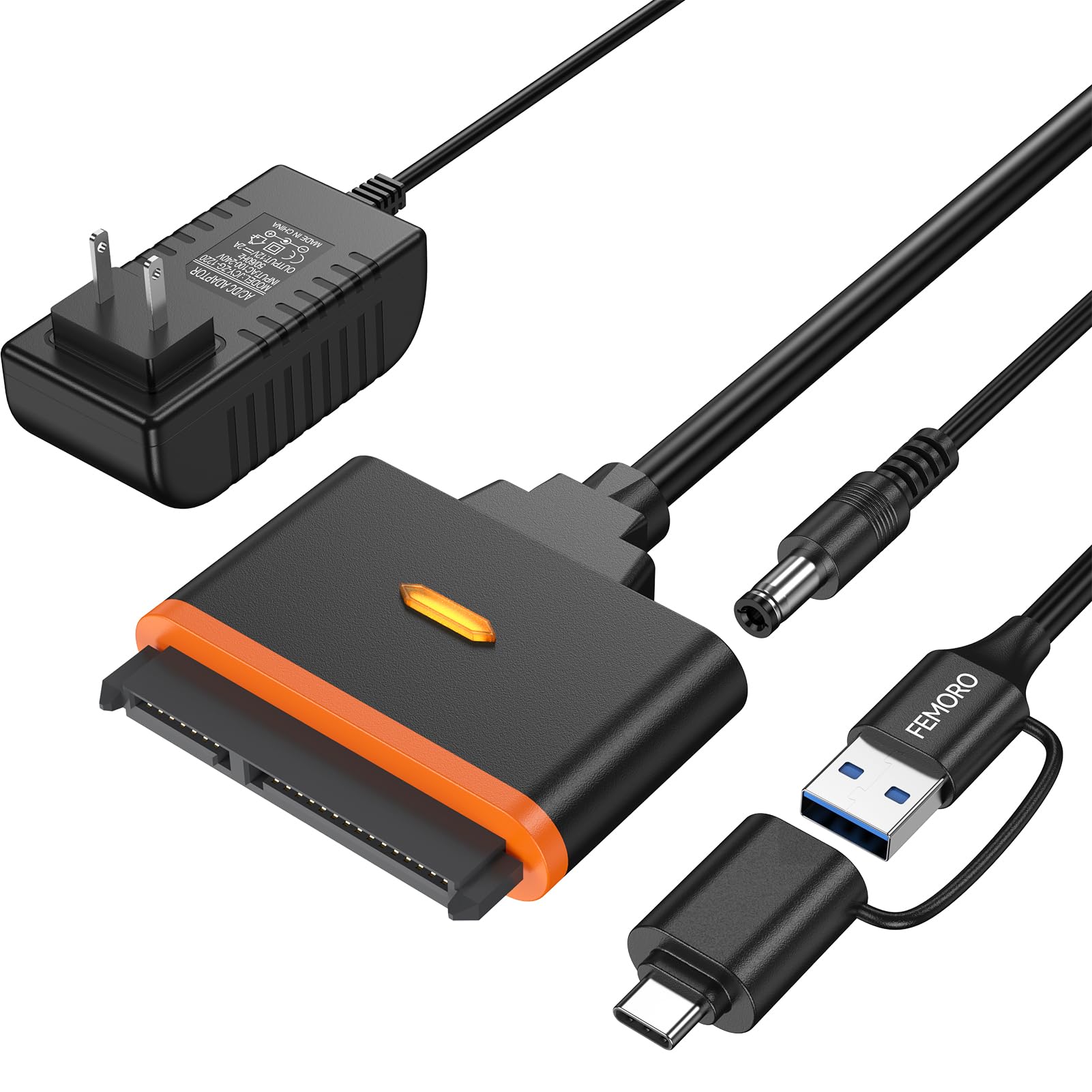
The dual-port adapter that plugs into both classic USB-A and modern USB-C laptops without extra dongles.
Newer laptops are dropping USB-A ports, and older drives still use SATA — this adapter bridges both worlds with dual ports, a standard USB and a USB-C, so it pairs with more devices than single-connector rivals. It reads standard 2.5-inch and 3.5-inch HDDs and SSDs, and the included 12V power supply (3-foot cable) feeds the bigger 3.5-inch drives. For the growing number of USB-C-only machines, skipping a dongle is a real convenience.
Performance earns strong marks, with 60 owners praising its performance and 38 more calling out quality. The UASP protocol (a more efficient data transfer method) pushes speed to 5 Gbps, and owners describe transfer speeds as legit USB 3.0 pace, with one noting it functions as effectively as a thumb drive. The flameproof PVC (a durable, fire-resistant plastic) housing and snug connectors give it a sturdy feel. Buyers successfully revived drives from Seagate, WD, Maxtor, Samsung, and HGST for data recovery after a PC crash.
The honest friction points are physical. The SATA pin connection is very tight — owners advise pushing straight in and pulling straight out rather than forcing it at an angle. The power brick is bulky, and some owners feel the included adapter may bottleneck speed, suggesting your own USB-C cable for faster transfers. Compatibility is mixed specifically with 3.5-inch drives; it works with HDDs but a few report failures there. For a data recovery or backup tool across USB-A and USB-C machines, it is dependable and well-built.
What stands out
- Dual USB and USB-C ports mean no extra dongle for modern laptops.
- Performance is the top praise at 60 owner mentions, quality next at 38.
- Sturdy flameproof PVC build with a snug, secure SATA fit.
What to watch
- SATA connector fits very tight — push straight in, pull straight out, no angling.
- Included power brick is bulky, and the stock cable may cap your speeds.
- Some buyers report 3.5-inch drives not working despite the listed support.
Reach for this if: you split time between an older USB-A desktop and a newer USB-C laptop and want one adapter for both.
Look elsewhere if: your 3.5-inch drive must work first try — a minority report it not spinning up here.
6. SABRENT USB 3.1 to 2.5in SATA Adapter Cable (EC-SS31)

A tool-free cloning champion that pairs USB 3.1 with full SATA III speed and a handy USB-C adapter.
This cable pairs a USB 3.1 Type-A interface with a SATA III bridge rated up to 6Gbps, so your drive runs at its full SATA III speed instead of being throttled by an older USB 2.0 connection. Owners mention USB-C read speeds of 463-563 MB/s and write speeds of 409-416 MB/s, with a 23-inch cable. That speed makes it a favorite for cloning — One owner cloned three Dell OptiPlex SSDs to Samsung 860 EVO 1TB drives in under 10 minutes, versus 4-5 hours expected.
The included USB-C to USB-A adapter is a standout bonus, letting it connect to both port types without buying anything extra. The design is genuinely tool-free and hot-swappable: plug in, no drivers, no rebooting, and an LED shows both power and activity. Smart data (the diagnostic info drives report) stays viewable through tools like CrystalDiskInfo, which data-recovery folks appreciate. At just 1 ounce with a chrome finish, it is featherlight in a laptop bag.
What wins people over here is sheer reliability — functionality is the overwhelming top praise with 285 owner mentions, and transfer speed follows at 82. As owners put it: “like the perfect toaster, it just works, flawlessly.” The realistic limitations: it is strictly a 2.5-inch drive tool, so a 3.5-inch desktop drive will not spin up. There is no TRIM support over USB, and random 4K write speeds slow down over USB-C. It also lacks the heavier power delivery of an external adapter, which is expected for bus-powered 2.5-inch use.
The strengths
- 285 owners make functionality the runaway top praise — it just works consistently.
- Transfer speed is the second-most praised trait at a 82 mentions.
- USB-C adapter included, plus SMART data support for diagnostics.
The limits
- 2.5-inch drives only — no external power means 3.5-inch drives are out.
- No TRIM support, and random 4K writes slow down over USB-C.
- A small number of owners note it stops working after long ownership.
The dependable choice: ideal for 2.5-inch SSD cloning and data recovery where a reliable, repeatable connection matters most.
Not for 3.5-inch: if you need to read desktop drives, step up to an adapter with a 12V power supply.
7. Vantec CB-ST00U3 NexStar USB 3.0 to SATA Adapter

The rare adapter that also breathes life into old Blu-ray, DVD, and CD drives from retired PCs.
This is the specialist of the group. Most adapters only handle hard drives; this Vantec is designed for SATA optical drives — Blu-ray, DVDRW, DVD ROM, CDRW, and CD ROM — plus 2.5-inch, 3.5-inch, and even 5.25-inch storage drives. If you have an old optical drive collecting dust, this turns it into an external burner over USB 3.0 with UASP (the efficiency-boosting transfer protocol) for added speed on an already fast connection.
The trade-offs are physical. The USB cable is short, and the connector fits loosely — it looks a bit sloppy, though it functions fine. The weight of the drive rests on the ports, so a supported setup helps. A minority report reliability concerns, and the power cord length draws complaints. You also need the included 12VDC, 2A AC adapter for anything bigger than a light 2.5-inch drive, and power-hungry optical drives may exceed even that, requiring a larger adapter. For reviving optical drives or reading full-size 5.25-inch storage, nothing else here matches it.
Why it earns its spot
- Compatibility tops the feedback at 59 — it handles optical and storage drives of all sizes.
- Value for money is second at 42, replacing far pricier enclosures.
- Anti-slip mat cuts noise and protects the drive.
Where owners feel it
- Short USB cable and a loose-fitting connector draw complaints.
- Reliability is the notable negative — a minority find it not very secure or stable.
- The SATA-to-USB bridge may limit full drive command sets.
Get this for: converting an old Blu-ray or DVD burner into a working external drive, or reading any SATA optical drive a laptop cannot fit.
Be aware: the short cable is the main friction point, and heavier optical drives may need a stronger AC adapter than the included 12VDC, 2A unit.
Understanding the Specs
Transfer Speed: 5 Gbps vs 10 Gbps
The number that defines every adapter here. Standard USB 3.0 caps at 5 Gbps, which is plenty for most spinning hard drives. A 10 Gbps adapter (USB 3.1 Gen 2) doubles that ceiling and only helps if your drive is a fast SATA SSD that can actually saturate the connection. UASP — USB Attached SCSI Protocol — makes data flow more efficiently on both speeds, boosting read and write times on compatible ports and drives.
Power: Bus-Powered vs External Adapter
The make-or-break spec for drive compatibility. Bus-powered cables draw all their electricity from the USB port, which is enough for 2.5-inch laptop drives. A 3.5-inch desktop drive needs a separate 12V power connection to spin its platters at speed. If your drive collection mixes sizes, choose an adapter with an external power supply — otherwise, the 3.5-inch drive simply will not start up.
FAQ
Can I use a bus-powered HDD USB adapter with a 3.5-inch desktop drive?
Why is my 2.5-inch SSD not detected by the adapter?
What is UASP and does it actually speed things up?
Will an HDD USB adapter work with an M.2 drive?
Which is better for cloning an SSD — a 5Gbps or 10Gbps adapter?
Do I need to install drivers for these adapters?
Can these adapters recover data from a dead computer’s hard drive?
What causes random disconnections during file transfer?
Is a 20TB hard drive supported by these adapters?
Can I connect an adapter to a PS4, Xbox, or router?
Final Thoughts: The Verdict
For the majority of shoppers, the hdd usb adapter winner is the StarTech USB312SAT3CB because its 10 Gbps speed is the fastest in this lineup and It holds a 4.7-star rating across 2,800+ owners. If you need one cable for both 2.5-inch and 3.5-inch drives without paying premium prices, grab the CLAVOOP with its included 12V power supply. And for reviving an old Blu-ray or DVD burner, the Vantec NexStar is the only one here that truly covers optical drives.
How We Picked
We do not accept paid placement. Every pick is matched to a real buyer and a real use-case; we do not hands-on test units.
Sources & Methodology
Specifications: manufacturer listings and product documentation. Review insights: verified customer reviews, as of August 2026. Pricing: not shown on this page (it changes often); check the current price via the retailer link.
As an Amazon Associate, Gadgets Feed earns from qualifying purchases. This does not affect which products we feature.