
Our readers keep the lights on and my morning glass full of iced black tea. As an Amazon Associate, I earn from qualifying purchases.
Specs are compiled from manufacturer listings and verified buyer reviews and can change over time — please confirm the key details on the product page before buying.
The real question isn’t which extractor has the most ports — it’s which one will actually lock onto your TV’s ARC or eARC handshake without a fight. This guide sorts the essential HDMI audio extractor options for you, focusing on the exact specs and real buyer experiences that decide whether your new TV talks to your old soundbar or stays stubbornly silent.
I’m Min — the founder and writer behind Gadgets Feed. This guide is built by comparing the manufacturers’ published specifications and the patterns across verified customer reviews, so you get each pick’s real strengths and trade-offs instead of marketing spin.
You’ll see which extractor handles 4K passthrough cleanly, which one preserves Dolby 5.1, and which has the most reliable reviews. The right hdmi audio extractor bridges a decade of tech gaps in minutes, making a modern TV work perfectly with older gear.
Our Picks at a Glance
How To Choose The Best HDMI Audio Extractor
An audio extractor’s job is simple: pull sound from an HDMI signal and send it to speakers that lack an HDMI input. The confusion starts with the differences in how they handle ARC, eARC, and pure HDMI passthrough.
ARC and eARC: The First Compatibility Test
ARC (Audio Return Channel) lets a TV send sound back down the same HDMI cable to a soundbar or receiver. eARC is the newer, higher-bandwidth version. If your TV’s HDMI port is labeled “ARC” or “eARC,” you can use an extractor to convert that audio to optical, RCA, or a 3.5mm jack for older gear.
Passthrough Quality: What Happens to Your Video
Some extractors simply split audio off while passing video through unchanged to your display. Others cap resolution or color depth. If you’re gaming at 4K 60Hz, you want a box that supports that exact format, like 4:2:0, without degrading the picture.
Output Formats: Matching Digital and Analog
Decide whether your sound system takes optical (Toslink), RCA red-and-white cables, or a 3.5mm headphone jack. Premium boxes offer all three. Some also handle bitstream audio like Dolby 5.1, while others only process uncompressed PCM stereo.
Quick Comparison
| Model | Best For | Video Pass-Through | Audio Outputs | Surround Support | Amazon |
|---|---|---|---|---|---|
| CAMWAY eARC/ARC★ Best Overall | New TV to legacy sound | eARC/ARC | Optical, RCA, 3.5mm | Dolby 5.1, DTS 5.1 | Amazon |
| J-Tech AE4KA4K Passthrough Pick | 4K 60Hz passthrough | 4K@60Hz (4:2:0) | RCA, Optical | 5.1Ch Optical | Amazon |
| avedio links ARC DAC | PCM stereo conversion | ARC | Optical, Coaxial, RCA, 3.5mm | PCM only | Amazon |
| LiNKFOR eARC | Simple optical hookup | eARC/ARC | Optical only | Dolby 5.1, DTS 5.1 | Amazon |
| OREI UHDS-104A | Multi-device splitting | 4K@60Hz | Optical, Analog | DTS7.1, Dolby TrueHD | Amazon |
| PROZOR eARC/ARC | Headphones & CEC volume | eARC/ARC | RCA, 3.5mm | PCM 2.0 | Amazon |
| OREI 8K Extractor | High-end 8K passthrough | 8K@60Hz | Optical (S/PDIF), 3.5mm | Dolby Atmos, DTS:X | Amazon |
In-Depth Reviews
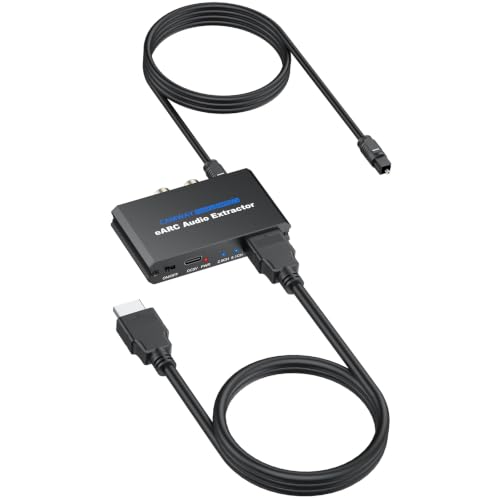
1. CAMWAY 192KHz eARC/ARC Audio Extractor
Our pick — over 4★ from 300+ verified ratings; the strongest balance of quality and price.
The most flexible bridge between a modern TV and your vintage sound gear.
If your TV only has an HDMI eARC port and your soundbar is a decade old, this is the box that makes them talk. It extracts audio from the eARC/ARC port and sends it out through optical, RCA, and 3.5mm simultaneously, so you can drive a surround receiver and wired headphones at the same time.
Buyers report it easily connected to a 10-year-old Bose soundbar paired with a new Samsung TV — a solid test of its handshake compatibility. The setup is genuinely plug-and-play with the included 3.3ft optical, HDMI, and power cables. Just connect to the TV’s “ARC” or “eARC” port and switch the audio output in your TV settings.
What wins most people over is the functionality — the box handles Dolby Digital 5.1 and DTS 5.1 through optical, while RCA and 3.5mm give clean stereo with TV remote volume control via CEC. Reviewers consistently praise the excellent sound quality and the fact it saved them from replacing an entire AV receiver.
Why It Wins
- Optical, RCA, and 3.5mm outputs all work at once
- Passes Dolby 5.1 and DTS 5.1 for home theater
- Aluminum body with 6-channel support
The Trade-Offs
- Volume control only works on RCA and 3.5mm outputs
- Setup guides are basic, so you may need your TV manual
Reach for this if: you have a modern eARC TV and any older sound system — soundbar, amplifier, or powered speakers — that you’re not ready to replace.
Look elsewhere if: you need 4K video passthrough; this unit focuses purely on audio extraction without advanced video scaling.
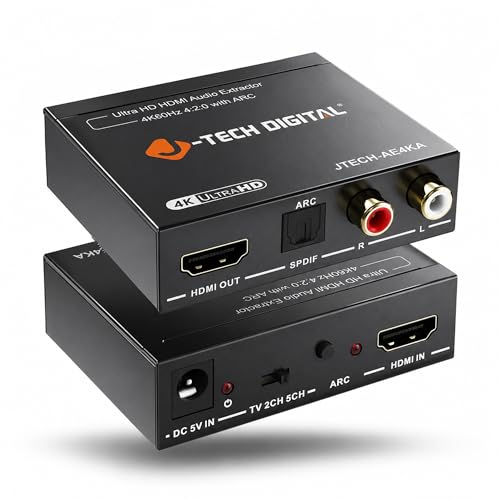
2. J-Tech Digital HDMI Audio Extractor 4K 60Hz
A gamer-friendly extractor that keeps your 4K 60Hz signal clean while splitting audio.
Gamers and projector owners will appreciate what this box does differently: it passes video through at 4K@60Hz (4:2:0) and supports 4K@30Hz (4:4:4) for sharper color. The EDID toggle switch with three modes — TV, 2CH, and 5CH — lets you fix handshake problems between your console and display without changing cables.
Owners mention using it to route audio from a PS5 through a Scarlet FocusRite interface into a PC using RCA-to-1/4 inch cables, with no lag and excellent sound quality. Others connected fiber-only soundbars via HDMI ARC to optical. It supports stereo audio via RCA and 5.1Ch via optical, but note the optical is your only ARC output path since eARC isn’t supported.
It’s compact at just 8 ounces and includes free lifetime technical support from Texas. The one caveat is that 5.1 sound doesn’t downmix to RCA — so if your receiver only takes RCA, you’ll need your source set to stereo.
Built For
- 4K@60Hz (4:2:0) video passthrough
- 3-mode EDID switch solves source signal issues
- Optical carries genuine 5.1Ch for theater setups
Keep In Mind
- No eARC support, only standard ARC
- RCA output is stereo only; no 5.1 downmix
Best suited for: console players and projector users who need full 4K 60Hz video passthrough with independent 5.1 audio to an amplifier.
Not your pick if: your soundbar relies on eARC or if you want a headphone jack — this one sticks to RCA and optical only.
3. avedio links HDMI ARC Audio Extractor DAC Converter
A do-everything converter that accepts digital audio inputs and outputs to almost anything.
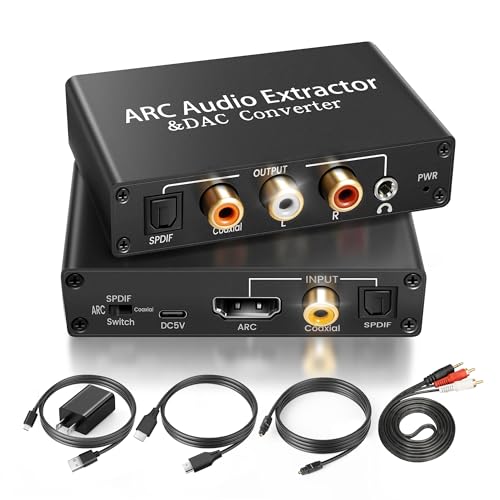
This one doubles as a digital-to-analog converter, which makes it more than just an extractor. Beyond pulling audio from a TV’s ARC port, it accepts coaxial and optical Toslink/SPDIF digital inputs directly, so you can hook up a Blu-ray player, set-top box, or even a PS3 as a source. The input selection switch on the panel flips between optical and coaxial in seconds.
Buyers pairing a new Samsung QN75Q7F with an ancient Insignia soundbar found it worked as advertised, though an expensive HDMI cable caused failures while a cheap one worked. The box outputs optical, coaxial, L/R, and 3.5mm simultaneously, and the RCA out allows TV remote volume control. It includes four cables — HDMI, optical, 3.5mm-to-L/R, and USB power — so you can start immediately.
The main restriction is compatibility: it accepts PCM and LPCM only, not Dolby or DTS surround. For pure stereo, that’s fine. The occasional report of sound dropping out highlights why quality HDMI ARC cabling matters — this box is sensitive to it.
what separates it
- Coaxial and optical digital inputs expand its uses
- All four outputs run at the same time
- Comes complete with every cable you need
Watch For
- PCM only — no Dolby or DTS decoding
- Needs a quality, ARC-capable HDMI cable to work reliably
Grab this for: a versatile stereo setup where you want one box to handle ARC extraction plus optical and coaxial digital inputs.
skip it if: your sound system needs Dolby 5.1 or DTS surround, because this box processes stereo PCM only.
4. LiNKFOR eARC/ARC Audio Extractor
A featherweight optical-only converter that locks onto eARC without any fiddly software.
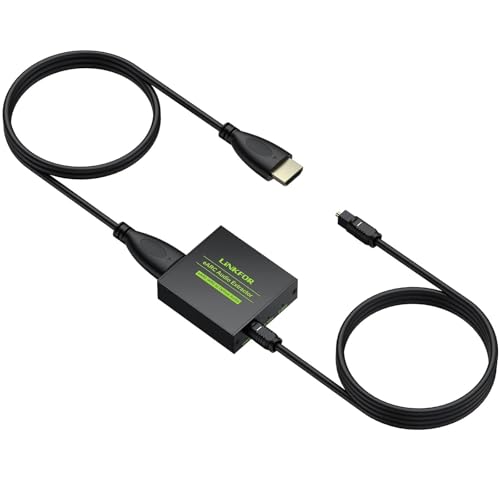
If your only goal is turning a TV’s eARC port into a clean optical signal, this is about as direct as it gets. It’s a single-purpose device: HDMI eARC in, optical out, with no drivers or software needed. At just 30 grams, it’s lighter than most TV remotes and disappears behind your console.
The 192kHz sampling rate keeps audio studio-grade, and it passes PCM 2.0, Dolby 5.1, and DTS 5.1 with clear channel indicators. Buyers with older Samsung soundbars that wouldn’t sync over Bluetooth used this as the fix to finally get surround sound working with a new TV. The plug-and-play nature earned universal praise, with hookup taking just a few minutes.
You give up two things here: there’s no CEC volume control (so you can’t adjust volume with your TV remote), and the included HDMI cable may not handle 5.1 surround sound — customers note that swapping in a quality high-speed HDMI cable switches the output from 2-channel to full 5.1. If you already own good cables, this is an easy, reliable buy.
The Appeal
- Plug-and-play with zero software setup
- 192kHz sampling for high-fidelity digital audio
- Clear indicators show which audio format is active
The Limits
- Optical output only — no RCA or headphone jack
- No CEC volume control from your TV remote
Pick this when: your soundbar or receiver takes fiber optic and you want the simplest possible eARC-to-optical bridge.
Reconsider if: you also need an analog RCA output, since this unit is optical-only by design.
5. OREI 1×4 2.0 HDMI Splitter with Scaler Audio Extractor
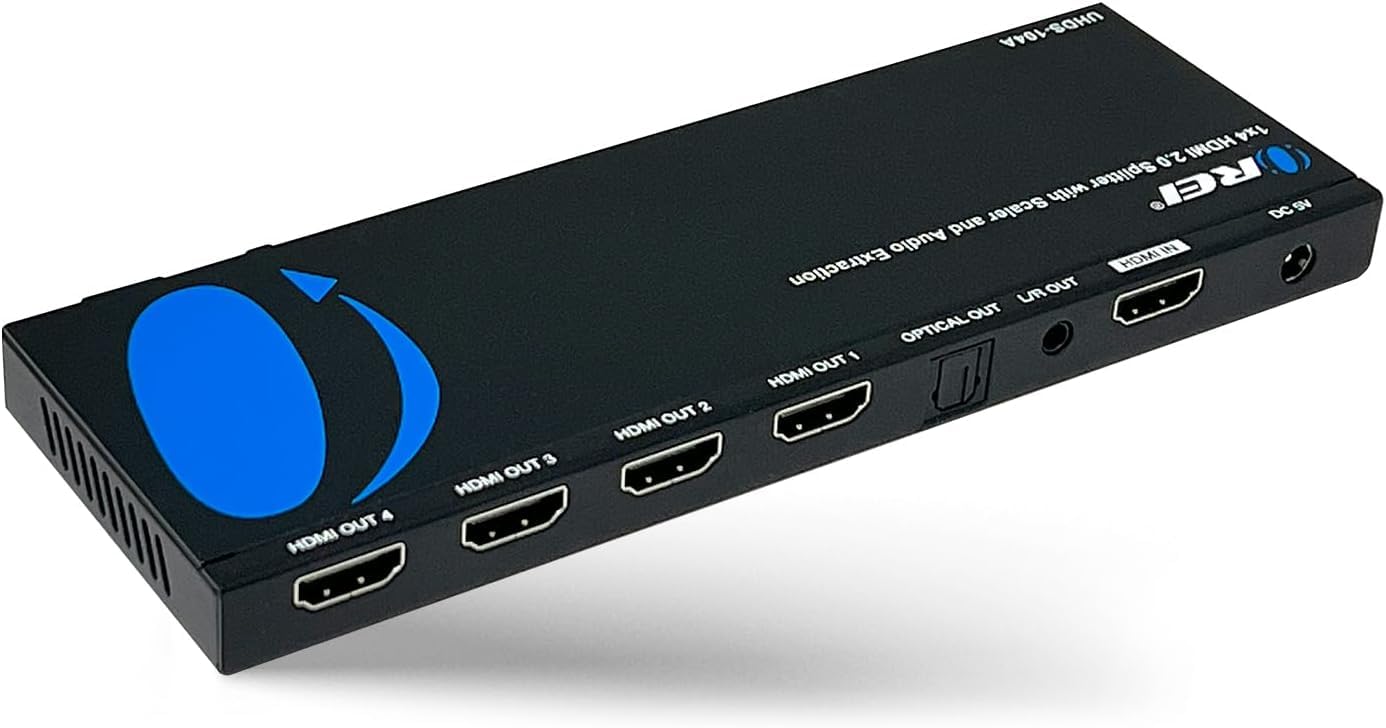
One source, four screens, and a separate audio feed for your amp — all in a single compact box.
This isn’t just an extractor; it’s a full 1×4 HDMI splitter that sends one video source to four displays while de-embedding audio to optical and analog outputs. For a karaoke room, sports bar, or gaming capture setup, that combination is a rare find. Owners ran it for a year as the core of a karaoke and Nintendo Switch rig, extracting to a 3.5mm analog mixer with one-button input switching.
It handles resolutions up to 4K x 2K at 60Hz with scaling, and supports essentially every audio format, including LPCM, Dolby AC3, DTS 7.1, DSD, Dolby TrueHD, and DTS-HD Master Audio. The 12.2-ounce metal unit is built for durability, and buyers reported no 4K picture degradation when routing video to a monitor and capture card. OREI backs it with a 1-year warranty and lifetime support.
The honest catch: it needs a full HDMI video+audio signal to extract sound. An audio-only eARC feed without video won’t trigger audio extraction, which one owner found when trying to feed a hearing aid transmitter. If your source always has video present, this is a powerhouse.
Why It’s A Powerhouse
- Splits one source to 4 displays simultaneously
- Handles high-end formats like Dolby TrueHD and DTS-HD
- 4K@60Hz output with resolution scaling
The Caveats
- Requires a video signal present to extract audio
- Use HDMI cables 30 feet or shorter for best results
Choose this if: you’re sending one source to multiple TVs or a capture card and need audio for a separate mixer or amp in the same workflow.
Not for you if: your only need is pulling audio from a TV’s eARC port, because this splitter is built around an incoming video signal.
6. PROZOR eARC/ARC Audio Extractor
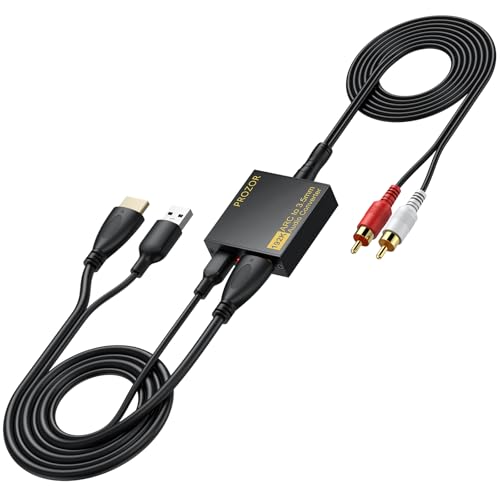
The quiet workhorse for TV-to-headphones, letting your existing remote still control the volume.
For night owls who want wired headphones with their TV, this extractor nails the specific use case. It takes audio from the TV’s eARC or ARC port and converts it to L/R analog stereo via RCA and 3.5mm outputs. Crucially, it supports CEC, which means you can often control volume with your TV or Roku remote instead of reaching for a separate amp dial.
Owners plugging it into their TV’s ARC slot plus a USB port for power found it works exactly as hoped, with both TV and Roku remotes controlling volume interchangeably into powered bookshelf speakers. It’s also ideal for active speakers, amplifiers, or any red-and-white RCA system. The complete cable kit — HDMI, USB power, and 3.5mm-to-RCA — means there’s nothing else to buy.
It’s a straightforward PCM/LPCM 2.0 stereo device, so there’s no surround processing. But for connecting modern TVs to a pair of powered speakers or a stereo receiver, that simplicity is exactly the point.
The Strengths
- CEC volume control from your TV or streaming remote
- 3.5mm and RCA outputs cover headphones and speakers
- Full cable kit included for instant setup
The Simplification
- PCM 2.0 stereo only — no surround decoding
- Requires an HDMI port labeled eARC or ARC to work
Made for: wireless-headphone holdouts and stereo speaker users who insist on controlling volume from the couch with one remote.
pass on it if: you’re chasing 5.1 surround sound, as this box focuses on clean two-channel PCM audio.
7. OREI 8K@60Hz 48Gbps HDMI Audio Extractor

The future-proof extractor that passes 8K video while delivering every modern audio format.
This is what you buy when you refuse to compromise on video quality. It passes video through at up to 8K@60Hz and 4K@120Hz (YUV 4:4:4) over a 48 Gbps FRL connection, making it the only pick here that’s truly ready for next-gen consoles and 8K displays. The heavy-duty metal enclosure at 6.27 ounces handles heat dissipation and feels genuinely premium.
On the audio side, it supports the full modern menu: LPCM 2/5.1/7.1, Dolby Digital, DTS 5.1, Dolby TrueHD, DTS-HD Master Audio, Dolby Atmos, and DTS:X. Reviewers point out it transforms Atmos from Apple TV into a “very respectable 5.1” through optical, and improves sound from Blu-ray players as well. It worked from the start with a PS4 Slim splitting optical to an old Sony amp while keeping HDR video active.
It supports HDMI 2.1 protocols including ALLM, QMS, QFT, SBTM, and CEC bypass, plus HDCP 2.3. The catch is heat — one owner found it runs very hot and unplugs it when idle — and there’s no TV remote volume control. It also skips eARC, though ARC works fine.
Top-Tier Performance
- 8K@60Hz and 4K@120Hz video passthrough
- Decodes Dolby Atmos and DTS:X for premium audio
- HDMI 2.1, HDCP 2.3, and CEC bypass support
Premium Quirks
- Runs hot during use; owners recommend unplugging when idle
- No TV remote volume control available
Worth it for: PS5 and future 8K owners who have invested in high-end displays and want every audio format preserved without touching video quality.
Think twice if: your receiver only handles basic stereo, since the premium decoding features would go unused.
Understanding the Specs
ARC vs. eARC Input
ARC (Audio Return Channel) is the older standard found on most TVs from the past decade, sending compressed 5.1 audio back down the HDMI cable. eARC is the newer version with much higher bandwidth, supporting lossless formats like Dolby TrueHD and DTS-HD Master. An extractor with eARC input will always work with a TV’s ARC port, but an ARC-only extractor won’t take full advantage of eARC’s audio quality.
Video Pass-Through Resolution
This spec tells you what picture quality survives the trip from your source to your TV. A box rated for 4K@60Hz (4:2:0) handles standard 4K gaming and streaming. For the sharpest color at high refresh rates, 4K@120Hz or 8K@60Hz passthrough matters, especially for PS5 owners. If your TV is 1080p, a lower-cost extractor handles that easily.
EDID Management
EDID is the handshake between your source device and display that tells the source what resolutions and audio formats to send. Some extractors include a toggle switch with modes like TV, 2CH, and 5CH. This lets you force a specific audio format, which solves the common problem where your TV and soundbar disagree about whether to send 5.1 surround or plain stereo.
Output Formats and Surround Support
Optical (Toslink) carries compressed 5.1 like Dolby Digital and DTS. RCA and 3.5mm are analog stereo connections. If a box says “PCM only,” it will not pass Dolby or DTS signals — meaning your receiver must do its own decoding from a stereo signal. For true surround sound, choose an extractor that explicitly lists Dolby 5.1 and DTS 5.1 passthrough.
FAQ
What is the difference between ARC and eARC on an audio extractor?
Will an HDMI audio extractor work with my TV if it only has a standard HDMI port?
Can I get 5.1 surround sound through an RCA output?
Why does my extractor need CEC to control volume?
What does the EDID switch on an audio extractor do?
Is a 4K 60Hz audio extractor enough for a PS5?
Can I use an audio extractor to connect my TV to wired headphones?
Why does my extractor only give me 2-channel audio when I expect 5.1?
Does an audio extractor degrade video quality?
What cables come with these audio extractors?
Final Thoughts: The Verdict
Across the board, the hdmi audio extractor winner is the CAMWAY because it offers the most complete set of outputs — optical, RCA, and 3.5mm — with Dolby 5.1 support that fits nearly any older sound system. If you want 4K 60Hz video passthrough for gaming, grab the J-Tech Digital. And for a future-proof 8K setup that preserves every audio format, the OREI 8K is the one to reach for.
How We Picked
We do not accept paid placement. Every pick is matched to a real buyer and a real use-case; we do not hands-on test units.
Sources & Methodology
Specifications: manufacturer listings and product documentation. Review insights: verified customer reviews, as of August 2026. Pricing: not shown on this page (it changes often); check the current price via the retailer link.
As an Amazon Associate, Gadgets Feed earns from qualifying purchases. This does not affect which products we feature.