
Our readers keep the lights on and my morning glass full of iced black tea. As an Amazon Associate, I earn from qualifying purchases.
Specs are compiled from manufacturer listings and verified buyer reviews and can change over time — please confirm the key details on the product page before buying.
You just bought a new laptop, tablet, or phone, and the first thing you notice is that there is no HDMI port. You have a monitor, a projector, or a TV that still uses one, and suddenly you are hunting for a tiny adapter that will bridge the gap. The right one gives you a crisp, lag-free picture; the wrong one leaves you fiddling with a black screen or a flickering mess.
I’m Min — the founder and writer behind Gadgets Feed. This guide is built by comparing the manufacturers’ published specifications and the patterns across verified customer reviews, so you get each pick’s real strengths and trade-offs instead of marketing spin.
No matter if you are hooking a MacBook to a big monitor for work or streaming from an iPhone to a hotel TV, the best hdmi to usb-c adapter will deliver smooth video, a solid connection, and a setup that takes seconds instead of headaches.
Quick Picks
- BENFEI 2 Pack USB C to HDMI Adapter — Best Overall
- Anker USB C to HDMI Adapter (4K@60Hz), 310 — Premium Pick
- Microwoo USB C to HDMI Adapter with 100W PD — Best Value
- Wahbite Apple USB-C to HDMI Adapter 4K@60Hz — Apple Ecosystem
- Amazon Basics USB-C to HDMI Cable Adapter — Budget Pick
- Apple USB-C Digital AV Multiport Adapter — Multiport Workhorse
How To Choose The Best HDMI To USB-C Adapter
The main thing to know is that not every USB-C port on a device can send out a video signal. Your laptop or phone needs to support something called DisplayPort Alternate Mode (DP Alt Mode) — think of it as a feature that lets the USB-C port carry a video signal. Most modern MacBooks, iPad Pros, and many Windows laptops have it, but you should quickly check your device’s specs before buying.
Resolution and Refresh Rate
This is the biggest spec that decides how your video will look. A good adapter can push out 4K resolution at 60Hz (which means 60 image refreshes per second), making mouse movements and video feel smooth and natural. Cheaper or older adapters may top out at 4K@30Hz, which works fine for watching a movie but can feel sluggish when you move windows around on a computer desktop.
Build Quality and Cable Design
The body of the adapter matters for daily use. Aluminum casings help pull heat away from the chips inside, which keeps the connection stable during long sessions. A braided or thick outer cable resists the wear of being stuffed into a bag over and over. Pay attention to the connector plug itself — a plated connector resists the corrosion that can happen over time, keeping the signal clean.
Power Delivery (PD) Passthrough
Some adapters include a separate USB-C port that lets you plug in your laptop charger alongside the HDMI output. This feature, called power delivery, tops up your battery while you run an external display. If you plan on using the adapter as a permanent desk setup or during long presentations, a model with 100W PD passthrough makes sure you never run out of battery.
Quick Comparison
| Model | Best For | Max Resolution | Ports | Power Delivery | Amazon |
|---|---|---|---|---|---|
| BENFEI 2 Pack | Multi-device households | 4K@60Hz | 1 (HDMI) | No | Amazon |
| Amazon Basics | Budget desk setup | 4K@30Hz | 1 (HDMI) | No | Amazon |
| Microwoo | On-the-go charging + video | 4K@60Hz | 2 (HDMI, USB-C PD) | 100W | Amazon |
| Anker 310 | Premium daily driver | 4K@60Hz | 1 (HDMI) | No | Amazon |
| Wahbite | Apple ecosystem + fast charging | 4K@60Hz | 2 (HDMI, USB-C PD) | 100W | Amazon |
| Apple Digital AV | Flawless Apple compatibility | 4K@60Hz | 3 (HDMI, USB-A, USB-C) | USB-C passthrough | Amazon |
In‑Depth Reviews
1. BENFEI 2 Pack USB C to HDMI Adapter

Two adapters for the price of one, both pushing a buttery-smooth 4K picture.
The central spec here is that each adapter outputs 4K resolution at 60Hz — at 60Hz versus the Amazon Basics at 30Hz. Buyers report the “4K@60Hz output sharp and smooth; no lag, flickering, or disconnects,” which backs up the promise of that built-in advanced IC chip. The package gives you two units, making it two adapters, versus one for any other single-adapter product, so you can keep one in a laptop bag and one on a desk.
You also get an 18-month warranty, which is longer than the basic 30-day return window most small adapters come with. The plated USB-C connector resists corrosion and the molded strain relief adds durability where most budget adapters snap. One thing to note: this adapter does not include a power delivery USB-C port, so if your laptop runs low on battery during a long session you will need a separate charger.
Two Is Better Than One
- Supports 4K@60Hz for smooth video and cursor movement
- Comes with two adapters at a single-unit price
- Broad compatibility with Thunderbolt 3/4/5 devices
The One Trade-Off
- No power delivery passthrough for charging while using
- Some buyers reported initial glitchiness that resolved with use
Reach for this if: you have multiple laptops or tablets and want a reliable 4K@60Hz adapter at each station without paying twice.
Look elsewhere if: you need to charge your laptop through the adapter while showing video — this one is video-only.
2. Anker USB C to HDMI Adapter (4K@60Hz), 310
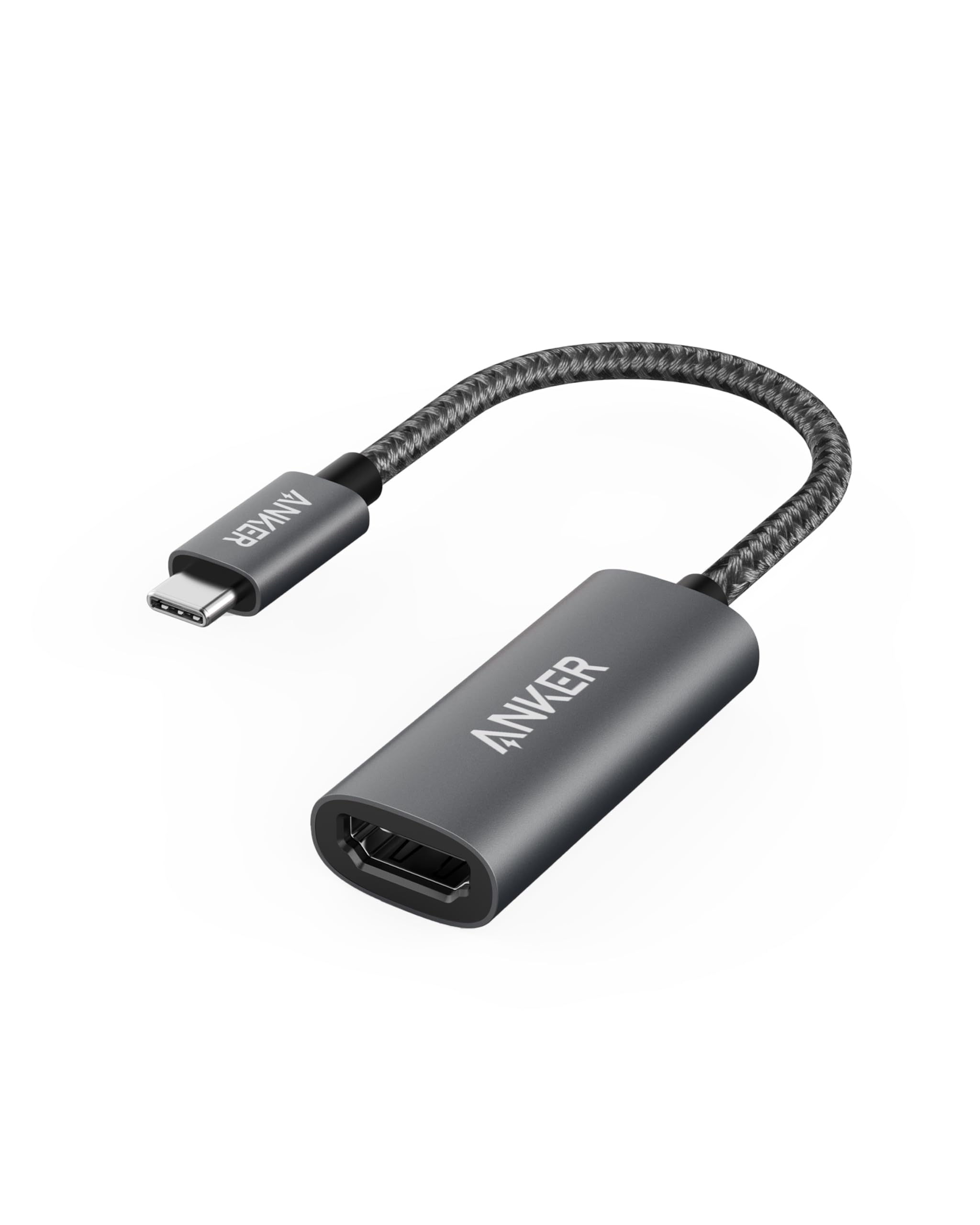
Aluminum body that sheds heat, a braided cable that survives bag life.
This Anker adapter uses a lightweight aluminum casing that acts as a heat sink, pulling warmth away from the conversion chip so it can run a 4K@60Hz signal without throttling. The reinforced braided-nylon cable is noticeably tougher than the standard rubber cable on the Amazon Basics. Buyers describe a “solid build, braided cable” and report reliable plug-and-play 4K with no lag or flicker. It supports USB-C DP Alt mode, USB4, and Thunderbolt connections, so it works with a wide range of laptops.
Unlike the Amazon Basics adapter which maxes out at 4K@30Hz (30Hz versus 60Hz), the Anker pushes a full 60Hz which makes desktop navigation feel immediate. The one downside compared to the Microwoo or Wahbite adapters is that this model does not have a power delivery port — if your battery is low, you cannot charge and display at the same time.
Why It Feels Premium
- Aluminum body for better heat dissipation during long use
- Braided-nylon cable resists wear and tangling
- Backed by an 18-month warranty and strong brand reputation
What It Lacks
- No power delivery passthrough for charging
- Bulkier plug than a short dongle adapter
Grab this for: daily use with a MacBook or Windows laptop where you want a durable, cool-running adapter that just works.
Pass if: you need a single-cable solution that charges your laptop while showing video — look at the Microwoo or Wahbite instead.
3. Microwoo USB C to HDMI Adapter with 100W PD
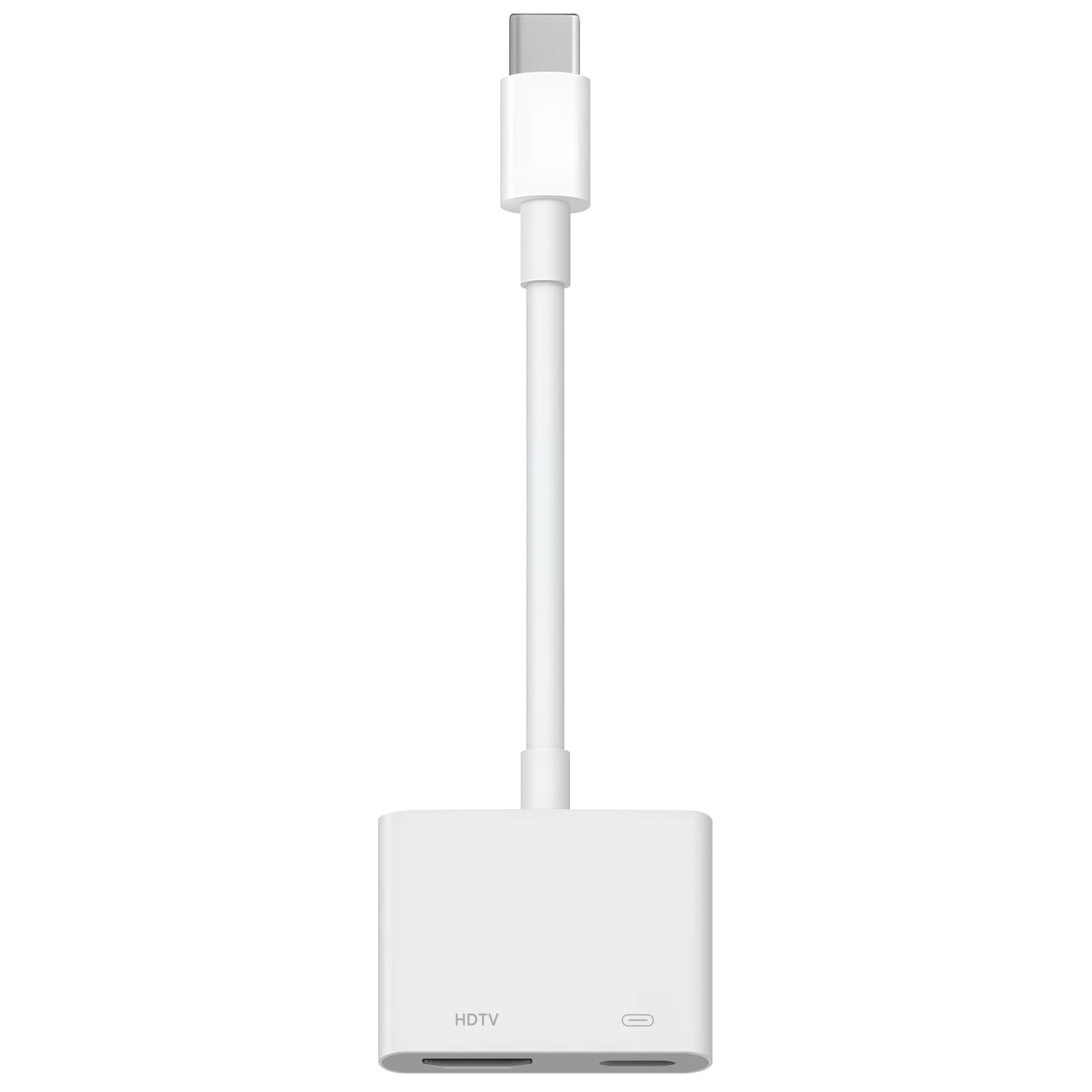
A pocket-sized adapter that charges your laptop flat-out while mirroring your screen.
This is a two-port adapter — one HDMI output for 4K@60Hz video and one USB-C port that can feed up to 100W of power to your device. That means you can keep a laptop or tablet at full battery during a movie or a work presentation. Owners mention it “worked as expected for iPhone to projector” with excellent video quality and no connectivity issues.
The body uses an eco-friendly ABS case for heat dissipation and a soft TPE cable designed to resist pulling. The nickel-plated connector adds corrosion resistance over time. On the downside, a few buyers found it did not work with some Amazon Fire tablets, so compatibility with non-standard Android tablets is not guaranteed. It has two ports, which is two ports versus one port for the BENFEI and Amazon Basics, making it a more versatile travel tool.
Why It’s a Steal
- 100W power delivery keeps laptops charged during use
- Extremely lightweight at 0.01 kilograms (0.01 kg versus the Amazon Basics at 0.06 kg)
- Plug-and-play with no drivers needed; works with iPhone 15 and newer
Room for Caution
- Not compatible with all Android tablets, like Amazon Fire devices
- Brand has less long-term track record than Anker or Apple
Best suited for: travel-heavy users who want one tiny adapter that brings both video and charging, especially with an iPhone or MacBook.
skip it if: you need guaranteed compatibility with a niche tablet or prefer a more established brand for your desk setup.
4. Wahbite Apple USB-C to HDMI Adapter 4K@60Hz

Apple MFi certification and 100W PD make this the closest third-party rival to Apple’s own adapter.
This adapter uses an Apple MFi certified chip, which means it is officially licensed to work with iOS and iPadOS devices without the “this accessory may not be supported” pop-ups that uncertified dongles sometimes trigger. Like the Microwoo, it offers a secondary USB-C port with 100W fast charging — but at 3 Amps of current rating compared to the Microwoo’s unspecified output, it has a higher stated power-handling capacity. It supports HDCP 2.2, so protected content from Netflix, HBO Max, and Disney+ streams without a black screen.
Buyers confirm it “works with my iPhone 17 Promax and my computer monitor” right from the start. One review noted it “works with the 2025 iPad 11 (A16)” and called it “much smaller than it seems in promo pics.” The 24-month warranty is longer than the 18-month coverage from Anker or BENFEI. The catch, per one critical review, is that the HDMI port was reportedly too small on one unit, suggesting a possible quality-control variance that the longer warranty should cover.
Standout Features
- Apple MFi certified chip for full iOS/iPadOS compatibility
- 100W power delivery keeps your laptop or tablet charged
- 24-month warranty is the longest on this list
Worth Noting
- One report of a too-small HDMI port suggests possible QC variation
- Brand is less recognized than Apple or Anker
Choose this for: an Apple-heavy household with iPhones, iPads, and MacBooks where you want certified compatibility plus the ability to charge.
Hesitate if: you prefer the confidence of an ultra-established brand with zero reported hardware issues — Anker or Apple may be safer bets.
5. Amazon Basics USB-C to HDMI Cable Adapter

A 6-foot integrated cable that trades top refresh rate for a simple, low-cost setup.
Unlike most adapters that are a short dongle requiring a separate HDMI cable, this Amazon Basics unit is a single 6-foot cable with a USB-C connector on one end and a full-size HDMI on the other. That extra reach makes it easier to route behind a desk or connect to a wall-mounted TV without an extra accessory. The refresh rate is 4K@30Hz — at 30Hz versus the 60Hz adapters from BENFEI, Anker, and Microwoo — which is fine for watching films but can feel unresponsive for mouse-driven work. Customers note using it “for 1+ year on MacBook Air on multiple monitors” with reliable performance.
The cable has durable shielding and tinned copper conductors, which helps maintain signal quality over the 6-foot length. The weight is 0.06 kilograms, making it six times heavier than the Microwoo adapter, but the built-in cable means nothing to lose. One reviewer noted that it did not work with their MacBook, but they attributed that to Apple’s limitations and confirmed it worked well with their iPad. If you need 4K@60Hz or power delivery, step up to the BENFEI or Microwoo.
What Works
- Integrated 6-foot cable eliminates the need for a separate HDMI cord
- Reliable 4K@30Hz video for movies and presentations
- Durable shielding and tinned copper conductors for signal integrity
Where It Falls Short
- 4K@30Hz feels less smooth than 60Hz for desktop work
- Heavier (0.06 kg) and bulkier than pocket-sized dongles
- No power delivery; cannot charge your device while using it
Great for: a fixed desk setup where you want a long, all-in-one cable for an occasional second monitor and do not need high refresh rates.
Not for: gamers or anyone who drags windows around a 4K desktop and wants the snappiness of 60Hz.
6. Apple USB-C Digital AV Multiport Adapter

Apple’s own three-port dock that never questions which Mac or iPad you own.
While most adapters on this list give you one or two ports, the Apple Digital AV Multiport Adapter gives you three: one HDMI output for video (up to 4K@60Hz), one standard USB-A port for a flash drive or a mouse, and a second USB-C port for charging. This means you can have your laptop plugged into power, connected to an external monitor, and reading files from a USB stick all through one tiny hub. It weighs 23 grams and measures 6.25 x 2.75 x 0.75 inches, so it is larger than a pure dongle but still pocketable for travel.
The compatibility list is enormous, covering everything from MacBook Neo and M5 MacBook Airs to iPad Airs, iPad minis, and Studio Displays. Buyers describe it as “a must-have for remote setup” with smooth plug-and-play and no overheating or disconnection issues over months of daily use. The catch is the price — it costs multiple times what third-party adapters cost. But reviewers consistently note that off-brand adapters failed where this one never does, making it the “buy once, cry once” choice for deep Apple investment.
Unrivaled Convenience
- Three ports: HDMI, USB-A, and USB-C charging in one device
- Flawless compatibility with virtually every modern Apple device
- Compact, premium build with no reports of long-term failures
The Big Ask
- Significantly more expensive than any third-party adapter here
- Requires a separate HDMI cable (sold separately)
Perfect for: anyone deep in the Apple ecosystem who needs one adapter for everything — power, display, and USB peripherals — and wants zero compatibility drama.
Overshoot for: a single-purpose video-only setup where a cheaper dongle like the BENFEI or Anker will do the same job for a fraction of the cost.
Understanding the Specs
Resolution and Refresh Rate
Resolution is the number of pixels on screen — 4K (3840×2160) gives you four times the detail of standard 1080p, so text looks sharp and images have more depth. The refresh rate is how many times per second the image updates, measured in Hertz (Hz). At 60Hz, motion looks smooth like real life; at 30Hz, scrolling and moving windows can feel slightly jerky or slow. For watching movies at 24 frames per second, 30Hz is fine, but for working on a computer desktop, 60Hz makes a noticeable difference in comfort.
DP Alt Mode and Compatibility
DisplayPort Alternate Mode (DP Alt Mode) is the technical name for the feature that lets a USB-C port transmit video signals. Not every USB-C port has it — some are for charging and data only. Before you buy an adapter, check your device’s specifications for “DP Alt Mode” or “Video Output” support. Thunderbolt 3, 4, and 5 ports always include DP Alt Mode, so if your laptop has a Thunderbolt logo next to the USB-C port, it will work with any of these adapters.
FAQ
Will this adapter work with my iPhone 15?
What is the difference between 4K@30Hz and 4K@60Hz?
Can I charge my laptop and use the adapter at the same time?
Does this adapter work with a Nintendo Switch?
How do I check if my laptop supports DP Alt Mode?
Why does my screen flicker or go black with some adapters?
Is a braided cable worth paying extra for?
Will a USB-C to HDMI adapter work with an iPad Pro for presentations?
How long do these adapters last?
Does the adapter need separate drivers or software?
Final Thoughts: The Verdict
If you want one dependable pick, the best hdmi to usb-c adapter winner is the BENFEI 2 Pack because it gives you two reliable 4K@60Hz adapters at a price that beats buying even one from most competitors. If you want a premium single adapter with a braided cable and aluminum body that stays cool, grab the Anker 310. And for a single-cable charging and video solution that vanishes in your pocket, the standout is the Microwoo with 100W PD.
How We Picked
We do not accept paid placement. Every pick is matched to a real buyer and a real use-case; we do not hands-on test units.
Sources & Methodology
Specifications: manufacturer listings and product documentation. Review insights: verified customer reviews, as of July 2026. Pricing: not shown on this page (it changes often); check the current price via the retailer link.
As an Amazon Associate, Gadgets Feed earns from qualifying purchases. This does not affect which products we feature.