
Our readers keep the lights on and my morning glass full of iced black tea. As an Amazon Associate, I earn from qualifying purchases.
Specs are compiled from manufacturer listings and verified buyer reviews and can change over time — please confirm the key details on the product page before buying.
If your laptop sounds like a jet engine when you open a game or a dozen browser tabs, the problem isn’t the laptop — it’s usually the airflow underneath it. A good cooling pad with fans lifts the chassis, pulls hot air away, and keeps performance steady without the fan noise or throttled frame rates. Once you feel the difference in a session that doesn’t end with a hot lap, you’ll wonder why you waited.
I’m Min — the founder and writer behind Gadgets Feed. This guide is built by comparing the manufacturers’ published specifications and the patterns across verified customer reviews, so you get each pick’s real strengths and trade-offs instead of marketing spin.
For this roundup, I sorted through active models by fan count, build quality, noise reports, and compatibility to find the most reliable laptop cooling pad with fans for gamers, remote workers, and heavy multitaskers who need their machine to breathe.
Quick Picks
- Gaming Laptop Cooler with 13 Ultra Quiet Fans, LCD Screen & Multi Color RGB — Best Overall
- havit HV-F2056 15.6″-17″ Laptop Cooler Cooling Pad — Best Value
- SHUWEI Laptop Cooling Stand with 3 Speed Fan — Ergonomic Choice
- llano V10 Gaming Laptop Cooling Pad — Premium Pick
- SOUNDANCE Laptop Cooling Pad with Low-Noise Fan and 3.0 USB Hubs — Versatile Pick
How To Choose The Best Laptop Cooling Pad With Fans
A cooling pad is a simple purchase, but picking the wrong one can mean extra desk clutter or barely any temperature drop. Here is what to look at.
Fan Layout and Airflow
More fans on paper can mean more noise and complexity, not necessarily better cooling. A single large fan — like a 4.72-inch one — can push more air through the whole chassis than several smaller fans spread around. Check the air moves under your laptop’s main heat source (usually the CPU/GPU area near the back) rather than just counting the fan blades.
Size and Laptop Fit
Your laptop needs to sit flat on the pad without overhanging the edges or covering the fan openings. A 17-inch laptop on a compact 14-inch stand will block airflow and create a tilt. Measure your laptop’s length and width, then compare them to the pad’s dimensions listed in the specs.
Power Source and USB Ports
Most pads draw power from a USB port on your laptop, which works fine for light use. If you plug in a mouse, keyboard, and an external drive at the same time, a pad with a built-in USB hub (like four USB 3.0 ports) can actually free up ports rather than consume one. Higher-power pads often come with a separate power cable to avoid draining your battery.
Noise Level in Real Use
Manufacturers often call fans “ultra-quiet,” but real noise depends on how fast they spin under load. A fan running at top speed to cool a gaming session is always audible. Check reviews for specific remarks about noise at different speed settings — a pad with adjustable fan speeds lets you balance cooling and quiet for different tasks.
Quick Comparison
On smaller screens, swipe sideways to see the full table.
| Model | Best For | Number of Fans | Max Laptop Size | Weight | Amazon |
|---|---|---|---|---|---|
| Gaming Laptop Cooler with 13 Ultra Quiet Fans | RGB Show + Phone Hold | 13 | 15 to 21 inches | 1.59 Kilograms | Amazon |
| havit HV-F2056 | Portability + Slim Build | 3 | 15.6″ to 17″ | 697.3 Grams | Amazon |
| SHUWEI Laptop Cooling Stand | Desk Ergonomics + Aluminum | 1 | 10 to 15 inches | 0.94 Kilograms | Amazon |
| llano V10 | Extreme Turbo Cooling | 1 | 13 to 17.3 inches | 1.65 Kilograms | Amazon |
| SOUNDANCE Laptop Cooling Pad | USB 3.0 Hub + Stability | 1 | Up to 17.3 inches | 1.65 Kilograms | Amazon |
In‑Depth Reviews
1. Gaming Laptop Cooler with 13 Ultra Quiet Fans, LCD Screen & Multi Color RGB
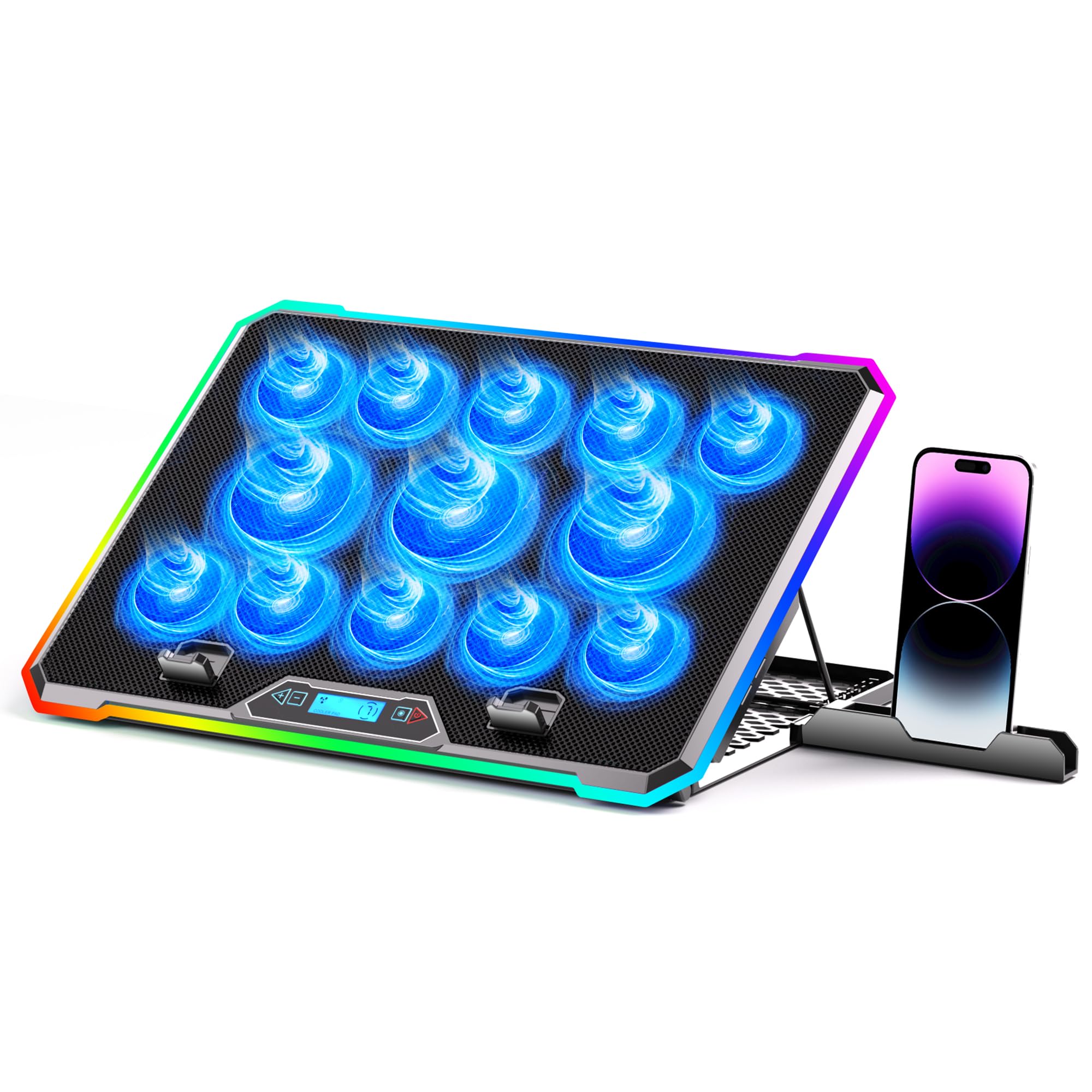
A fan-packed cooling fortress that turns your desk into a gaming cockpit while staying affordable.
This pick stands out because it packs 13 fans (3 large plus 10 small) into a single pad — that is a 13.0x gap in fan count vs the single-fan models on this list. The real story here is the smart LCD screen that shows fan speed and temperature, so you are not guessing if the cooling is working. You can set 9 height angles from 10° to 45° to fix your neck posture, and the built-in phone holder keeps your phone within reach without crowding the desk. The pad itself draws power from a standard USB port on your laptop, so there is no wall wart to carry around.
Buyers report that after nearly two years of daily use, the pad “keeps my laptop from over heating” and the color-changing border remains vibrant. The RGB lighting offers 10 modes with memory recall, saving you from reconfiguring the lights every session. The non-slip base holds a 15-21 inch laptop steady on your lap, bed, or uneven desk surface, making it a solid desk-free companion.
The phone holder feels flimsy and may block your charging port, and the button layout takes a moment to learn — the left arrow and adjacent square control fan speed while the right cycles colors. One owner noted the confusing layout but still rated the pad “functional” and praised its decent cooling for the price. For the money, you get more fans, more RGB customization, and a built-in screen that cheaper pads simply don’t offer.
Why it works
- 13 fans plus LCD temperature screen give you precise cooling feedback
- 9 height positions (10° to 45°) improve posture during long sessions
- RGB lighting with 10 modes and memory recall saves setup time
Real limits
- Phone holder is flimsy and can block the charging port
- Button layout is confusing — left/right arrows control different functions
- RGB lights are described as basic even with 10 modes
Your pick if: you want a budget-friendly cooling pad with the highest fan count, an LCD screen for real-time heat monitoring, and vibrant RGB to match your gaming setup — and you are willing to work around a finicky phone holder.
Your alternative: the phone holder’s flimsy feel and the confusing button layout may frustrate if you want a no-thought experience.
2. havit HV-F2056 15.6″-17″ Laptop Cooler Cooling Pad

A slim, travel-friendly pad that cools quietly without weighing down your bag.
At 697.3 Grams and just 1.18 inches thick, this pad is the lightest and thinnest option here — making it a natural choice if you carry your laptop between home, office, and coffee shops. It fits laptops from 15.6 to 17 inches with a metal mesh surface that doubles as a stable carrying surface. The three ultra-quiet fans push enough air to drop your system fan speed noticeably: One reviewer measured a temperature drop from 95°C to 87°C on a Lenovo P15s under load. That is a real relief for older laptops that struggle with heat.
Owners mention that the HV-F2056 fits a Lenovo P15s well and also works great on an HP Envy 17″ — the pad stays quiet, and the laptop’s internal fan barely kicks in during normal use. The pad includes an extra USB port and a power switch, so you can plug a second device and turn the fans off when you don’t need them. The ergonomic design gives you two adjustable height settings, which helps raise the screen a bit without the bulk of a full stand.
The USB-A to USB-A cable is only 21 inches long, which is a tight reach to some setups, and the slick metal mesh surface may need extra rubber bumpers to keep a laptop from sliding. One reviewer noted the pad is “not for max CPU loads” — temperatures still climbed to 87°C under heavy gaming. If you need serious cooling for a gaming laptop that runs hot, a 6-fan alternative offers more airflow. But for everyday work, video streaming, and moderate multitasking, this pad is a clean, quiet, portable solution.
What we like
- Thin and lightweight (697.3 Grams) — slips into most laptop bags
- Quiet operation with three ultra-quiet fans
- Extra USB port and power switch add convenience
What could be better
- Short USB cable (21 inches) limits placement options
- Not built for high CPU gaming loads — temps still hit 87°C
- Slick metal surface may need added rubber bumpers for grip
Reach for this if: you want a slim, quiet, and cheap cooling pad for daily office use or travel, and your laptop is 15.6 to 17 inches.
Look elsewhere if: you game heavily or run CPU-intensive tasks — this pad’s three fans aren’t enough to keep high loads cool.
3. SHUWEI Laptop Cooling Stand with 3 Speed Fan

An aluminum desk stand that clears your laptop’s hot air while lifting the screen to eye level.
This is not just a cooling pad — it is an ergonomic workstation upgrade. The SHUWEI stand is made from anodized aluminum and supports up to 22 pounds (10 kilograms), so it holds even bulky 15-inch laptops without wobbling. You can adjust the height up to 11.8 inches and the angle from 0 to 120 degrees, which is far more range than most cooling pads offer. The single enlarged fan has three wind speeds — 40CFM, 52CFM, and 85CFM — so you dial in the exact airflow for whatever you are doing.
Customers note that the stand raised their 14-inch laptop to a convenient viewing height and that the fan is quiet while keeping the laptop noticeably cooler. The stand swivels smoothly, which helps when you need to share your screen with someone beside you. At just 0.94 Kilograms, it is surprisingly light for a metal stand — a full 47% lighter by weight than the SOUNDANCE pad’s 1.65 Kilograms, making it easier to reposition on your desk. The 1-year manufacturer warranty adds a layer of reassurance for a frequently used desk accessory.
The catch is that a 17-inch laptop extends past the tray, creating a slight backward tilt, and the fan buttons on the underside can be awkward to reach once the stand is set up. The fan blows directly into the laptop’s underside vents — this works for many models, but some laptops have side vents that this single fan may not reach effectively. For 10 to 15-inch laptops in a desk setup where posture matters, this stand blends cooling with serious ergonomic adjustment that most pads skip.
Standout perks
- Anodized aluminum supports 22 pounds — sturdy base for heavy laptops
- 3-speed fan with up to 85CFM airflow for strong cooling
- Light aluminum design (0.94 Kilograms) is easy to move
Watch out for
- 17-inch laptops overhang the tray and tilt backward
- Fan buttons are hard to reach once the stand is positioned
- Single fan may not cool laptops with side exhaust vents
Desk-first pick: if you sit at a desk all day and want an adjustable aluminum stand that lifts your screen to eye level while quietly cooling a 10-15″ laptop.
Not for you: if you have a 17-inch laptop or need portability — the stand’s size and single-fan design limit its flexibility.
4. llano V10 Gaming Laptop Cooling Pad

A turbo-charged cooling pad that drops internal temps by 20°C in minutes under heavy workloads.
The llano V10’s single 4.72-inch turbo fan with a pure copper motor reaches 3500 RPM, making it the most powerful single-fan pad on this list. One owner reported idle temps dropping from 42-48°C to 29-35°C and gaming CPU temps from 80-95°C to 55-75°C at just 1200-1500 RPM. That is a dramatic difference that keeps your laptop from thermal throttling during long gaming sessions or 4K video exports. The fan speed is adjustable in 100 RPM increments, giving you fine-grained control over the balance between cooling and noise.
The pad supports laptops from 13 to 17.3 inches and comes with extra foam inserts for smaller 13-14 inch notebooks, so there is no rattling or shifting. You get 12 RGB lighting modes across 5 colors, and the lighting has memory recall — it remembers your last setting even after disconnecting the power. Physical buttons for RGB and fan control mean no accidental touch-sensitive inputs mid-game. A removable dust filter on the intake side keeps fluff out, which reviewers point out traps lint effectively and is easy to clean.
The noise is the main trade-off: above 2000 RPM, that big fan gets loud enough that you will want headphones. One buyer mentioned the fan is “noisy” at higher speeds and described it as “overkill for general use.” The RGB lights cannot be turned completely off unless you long-press the MODE button, which is a minor hassle if you prefer a dark setup. At 1.65 Kilograms, it is also one of the heaviest pads here — similar in weight to the SOUNDANCE — so it is best left on a desk rather than carried daily. But if cooling power is your top priority, this pad delivers more temperature drop than anything else.
Why it leads on cooling
- 4.72-inch turbo fan with copper motor delivers extreme airflow at 3500 RPM
- Real-world 20°C temperature drops under gaming load.
- Physical button controls are precise and avoid accidental inputs
Real drawbacks
- Noisy above 2000 RPM — needs headphones for loud use
- RGB lights cannot be turned off completely without a long-press trick
- Heavy at 1.65 Kilograms, better for desk than travel
Your pick if: you run a powerful gaming or workstation laptop that thermal throttles under load, and you want the strongest cooling performance you can bolt onto a 13-17.3 inch chassis.
Your alternative: the fan noise above 2000 RPM and heavy build make this a poor fit for quiet libraries or daily commutes — it lives on your desk.
5. SOUNDANCE Laptop Cooling Pad with Low-Noise Fan and 3.0 USB Hubs

A heavy-duty desk pad that also acts as a four-port USB 3.0 hub for all your peripherals.
The SOUNDANCE pad is built around a single 140mm diameter fan (that is about 5.5 inches) that moves enough air to keep a 17.3-inch gaming notebook from overheating. But the standout feature here is the four USB 3.0 ports built into the back — they effectively add a hub to your setup, so you can plug in a mouse, keyboard, external drive, and still have a port free. The pad also has a separate USB power port for the fan, meaning the four hub ports are all available for your devices without sharing bandwidth. Shoppers say that the pad “fits HP Envy 17″ securely with rubber pads,” so even bulky 17-inch machines stay put.
The aluminum and plastic construction includes polished smooth edges and silicone pads to protect your laptop from scratches, and the adjustable arm design uses a unique shaft mechanism that increases load stability. One owner reported the extremely sturdy hinges hold their position perfectly without sagging, which is a common complaint with cheaper adjustable stands. The fan has a blue LED that lights up when running, so you know at a glance whether cooling is active. The 1-year warranty gives a bit of extra confidence for a pad you will use daily.
The fan is louder than some competitors — one buyer called it “kind of loud” and there is no speed control, so the fan runs at full speed all the time. The blue LED also stays on constantly, which may be distracting in a dark room. The USB-A plug sticks out about 3/4 of an inch behind the pad, so you will need a 90-degree adapter if your setup is tight against a wall. At 1.65 Kilograms, it is one of the heavier options here, so count on leaving it on your desk. Still, the combination of a large fan and a full USB hub makes it a capable centerpiece for a clean workspace.
What stands out
- Four USB 3.0 ports expand your connectivity without an extra hub
- 140mm large fan moves substantial air for 17.3-inch laptops
- Adjustable arms with stable hinges hold position reliably
Watch out for
- No fan speed control — runs at full power (and noise) at all times
- Blue LED stays on constantly, no way to turn it off
- Heavy (1.65 Kilograms) and USB plug sticks out behind — not travel-friendly
Choose this if: you need a sturdy desk cooling pad that doubles as a USB 3.0 hub for all your wired peripherals, and your laptop is up to 17.3 inches.
Pass if: you work in a quiet space or at night — the constant fan noise and unswitchable blue LED may be annoying.
Understanding the Specs
Number of Fans vs Fan Size
More fans do not automatically mean more cooling. A pad with 13 small fans spreads airflow across the whole laptop base, but a single large fan (like a 4.72-inch one on the llano V10) can push air at higher speed and pressure directly under the hottest components. For a slim ultrabook that runs cool, three fans are plenty. For a gaming laptop that hits 90°C, a single large turbo fan often outperforms a dozen small ones. Match the fan layout to where your laptop actually generates heat.
CFM (Cubic Feet per Minute)
CFM measures how much air the fan moves each minute. A higher CFM number means more hot air is pushed away from your laptop. The SHUWEI stand offers three speeds reaching 85CFM, which is enough for demanding gaming loads. Pads without a CFM rating may still cool well, but an exact number lets you compare airflow directly between models. Pay attention to CFM if you run a laptop with a high-wattage CPU or dedicated GPU.
FAQ
Does a laptop cooling pad with fans actually lower my laptop’s temperature?
Will a cooling pad fit my 17.3-inch laptop?
Can I use a cooling pad on my lap?
How much noise do these cooling pads make during gaming?
What is the difference between a cooling pad and a laptop stand?
Will a USB-powered cooling pad drain my laptop battery?
Does the cooling pad need its own power source?
How long does a cooling pad usually last?
Final Thoughts: The Verdict
Across the board, the laptop cooling pad with fans winner is the Gaming Laptop Cooler with 13 Ultra Quiet Fans because it combines the highest fan count, a built-in LCD screen for real-time temperature feedback, and enough RGB customization to match any gaming rig — all without blowing the budget. If you want the strongest cooling performance for a high-end gaming machine, grab the llano V10 with its 4.72-inch turbo fan that drops temps by up to 20°C. And for a slim, travel-friendly option that stays quiet and barely adds weight to your bag, the havit HV-F2056 is the compact choice that gets the job done.
How We Picked
We do not accept paid placement, and we did not hands-on test every unit. Instead, we match each pick to a real buyer and use-case by comparing the manufacturers’ published specifications against the patterns in verified customer reviews — so you get each pick’s real strengths and trade-offs instead of marketing copy.
Sources & Methodology
Specifications: manufacturer listings and product documentation. Review insights: verified customer reviews, as of July 2026. Pricing: not shown on this page (it changes often); check the current price via the retailer link.
As an Amazon Associate, Gadgets Feed earns from qualifying purchases. This does not affect which products we feature.
Product prices and availability are accurate as of the date/time indicated and are subject to change. Any price and availability information displayed on Amazon at the time of purchase will apply to the purchase of this product. As an Amazon Associate I earn from qualifying purchases.
CERTAIN CONTENT THAT APPEARS ON THIS SITE COMES FROM AMAZON. THIS CONTENT IS PROVIDED "AS IS" AND IS SUBJECT TO CHANGE OR REMOVAL AT ANY TIME.
Amazon and the Amazon logo are trademarks of Amazon.com, Inc. or its affiliates.