
Our readers keep the lights on and my morning glass full of iced black tea. As an Amazon Associate, I earn from qualifying purchases.
Specs are compiled from manufacturer listings and verified buyer reviews and can change over time — please confirm the key details on the product page before buying.
If you are still running a 4th-gen Intel Core chip, you already know the dilemma: the CPU is fine, but the board around it is aging, and every new platform means buying new RAM. This guide ranks LGA 1150 boards by how well they revive a 4th-gen Intel CPU without a full rebuild.
I’m Min — the founder and writer behind Gadgets Feed. This guide is built by comparing the manufacturers’ published specifications and the patterns across verified customer reviews, so you get each pick’s real strengths and trade-offs instead of marketing spin.
Whether you are resurrecting a dead rig or squeezing more years out of a working one, the right lga 1150 motherboard keeps your DDR3 memory and your budget intact while supporting modern NVMe storage speeds.
Our Picks at a Glance
How To Choose The Best LGA 1150 Motherboard
Finding a new LGA 1150 board in 2025 means sorting through a mix of new old-stock and budget re-issues. Match the chipset to your CPU’s needs, as it dictates RAM capacity and overclocking support.
Match the chipset to your CPU and RAM goals
The H81 chipset is the entry point: it caps memory at 16GB and typically offers just two RAM slots. The B85 and H97 chipsets step up to four slots and 32GB of DDR3, which matters if you run a 4790K with heavy multitasking or virtual machines. If you want to overclock a “K” series chip like the i7-4790K, the H97 and B85 boards are the safer bet, since H81 boards generally lock multiplier adjustments.
Check the M.2 slot before you buy an NVMe drive
These legacy boards bolt on an M.2 slot for modern storage, but it rarely runs at full PCIe speed. On many of these boards the M.2 slot is bandwidth-limited — one owner measured about 1650 MB/s on a 970 EVO Plus, well under the drive’s 3500 MB/s ceiling. For everyday use that is still dramatically faster than any SATA SSD, but do not expect flagship NVMe performance.
Plan for a manual driver setup
Almost none of these boards ship with a printed manual, and several omit the CR2032 CMOS battery from the package — you will buy one yourself. If you plan a Windows 11 install, expect to download the Intel chipset INF driver manually; on one popular board the fix is version 10.1.1.45. Treat the product page photos as your pinout reference for front-panel headers.
Quick Comparison
| Model | Best For | Chipset | RAM Slots | Max RAM | Amazon |
|---|---|---|---|---|---|
| B85M PRO★ Best Overall | Max RAM and four slots | Intel B85 | 4 | 32 GB | Amazon |
| H81 M (DAUERHAFT)Best Value | Ultra-compact budget builds | Intel H81 | 2 | 16 GB | Amazon |
| ASUS H81M-K | Brand-name reliability | Intel H81 | 2 | 16 GB | Amazon |
| MACHINIST H81M-PRO | Budget Xeon support | Intel H81 | 2 | 16 GB | Amazon |
| ASUS H81M-E | Small form factor NAS | Intel H81 | 4 | 16 GB | Amazon |
| H97 Strong | Tiny Mini-ITX with dual LAN | Intel H97 | 2 | 16 GB | Amazon |
| H97M PRO | Quad-slot H97 upgrade | Intel H97 | 4 | 32 GB | Amazon |
In-Depth Reviews
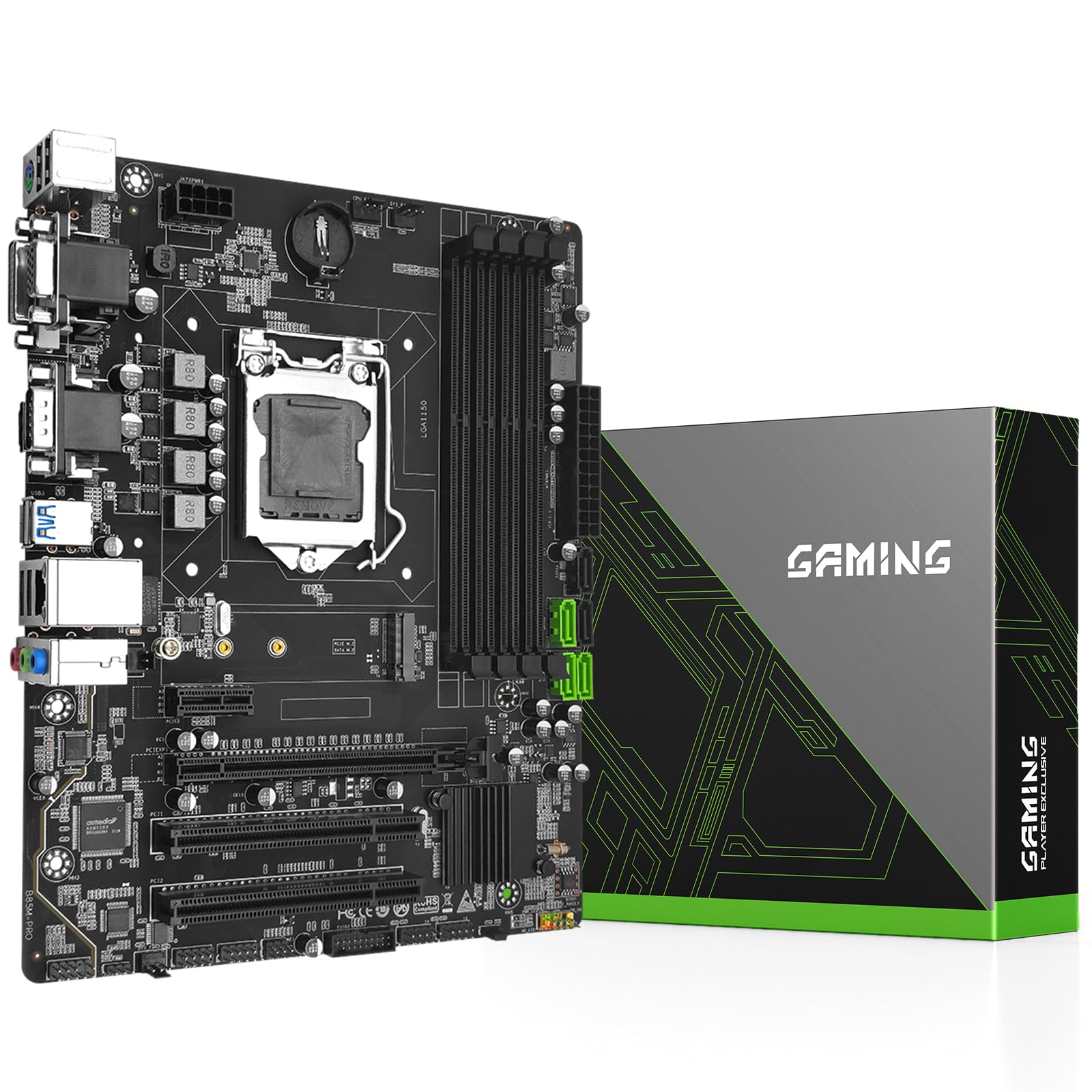
1. B85M PRO
Our pick — over 4★ from 30+ verified ratings; the strongest balance of quality and price.
The four-slot board that breathes new life into a 4790K without a RAM upgrade
The B85M PRO is the pick for anyone who wants to max out a Haswell build. It is the only board here with four DDR3 slots, letting you run a full 32GB of memory — double the 16GB ceiling that most of the H81 boards below are stuck with. That capacity matters if you run virtual machines or heavy multitasking on an older i7.
It also runs DDR3 at 1866 MHz, which is a 75% higher clock than the 1066 MHz baseline Asus entry-level board supports, so your memory runs closer to its rated speed. The M.2 slot handles NVMe and SATA drives with automatic switching, though owners measure real-world NVMe throughput around 1650 MB/s on a 970 EVO Plus — a big jump over SATA, but short of the drive’s 3500 MB/s maximum.
The board’s 24+8 pin power setup wants a quality 500W+ supply, and the package skips both a manual and a CMOS battery, so budget for those. The one nagging complaint in the reviews is a single RAM slot that failed to work on one unit, which makes a point of testing all four slots right after install.
What wins people over
- Four DDR3 slots allow 32GB max memory — 2x the capacity of the H81 boards
- Dual-channel support up to 1866MHz keeps faster RAM running at speed
- All-solid-state capacitors and an 8-layer PCB for longevity
- Two legacy PCI slots for old sound or RAID cards
Real-world catches
- M.2 NVMe runs bandwidth-limited around 1650 MB/s, not full PCIe speed
- No manual or CR2032 battery in the box
- Occasional reports of a dead RAM slot — test all four at build time
Reach for this if: you have a 4790K or 4690K and want maximum RAM capacity with four slots and faster 1866 MHz memory support.
Think twice if: you are building in a case where the board’s 2 legacy PCI slots and 3 SATA 3.0 ports are more connectivity than you will ever use.
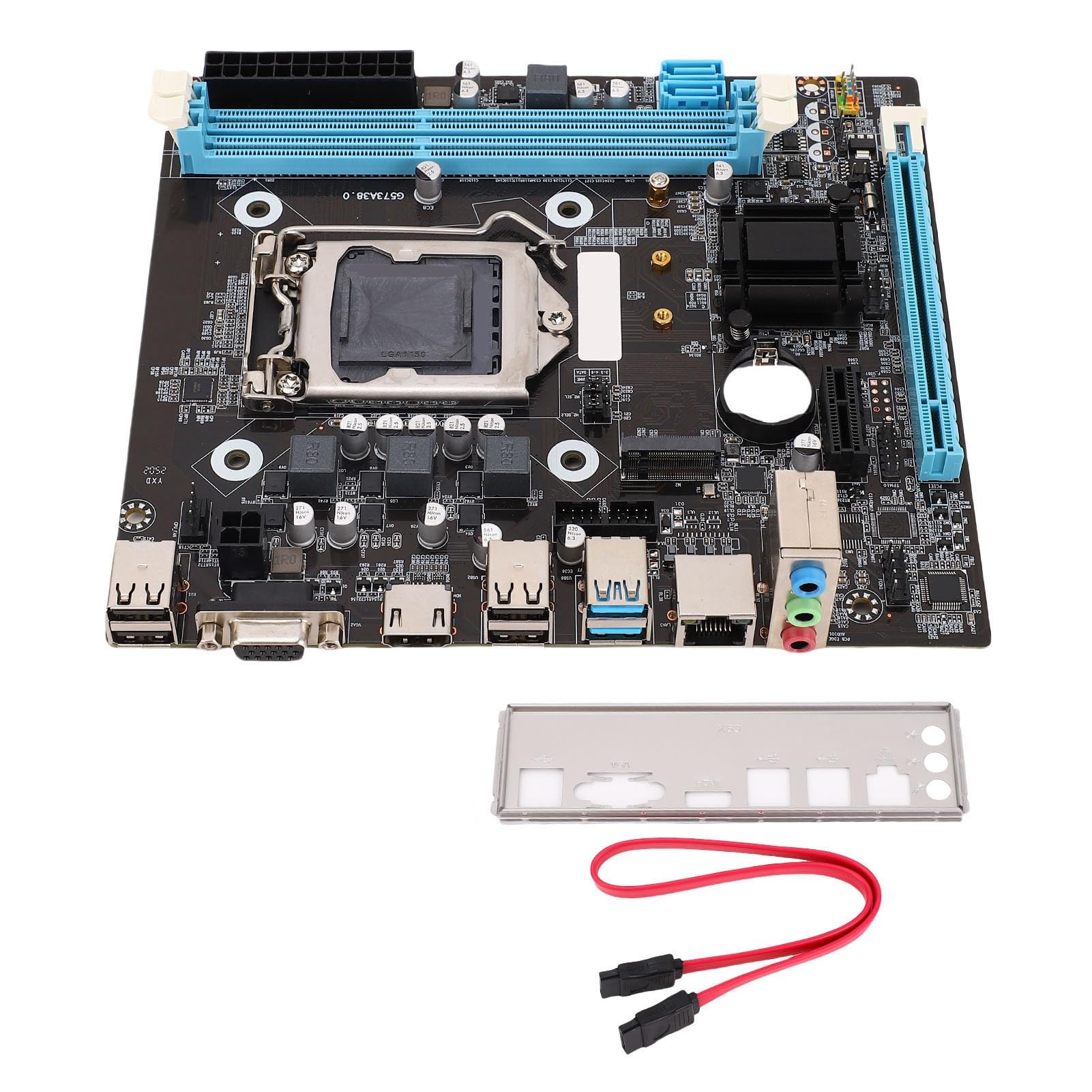
2. PC Motherboard Gaming Motherboard H81 M
A true mini-ITX surprise that squeezes an M.2 slot into the smallest Haswell footprint
This DAUERHAFT board is genuinely tiny — buyers repeatedly call it out as an ITX-sized board despite the listing saying Micro ATX. That makes it the go-to for small form factor cases where every millimeter counts, and it still manages to fit an M.2 slot alongside a PCIe x16 slot for a GPU. It runs Ubuntu smoothly, which is a strong sign for Linux builders.
The trade-off for that size is just two DDR3 slots capping you at 16GB — half the capacity of the B85M PRO above. The M.2 slot supports NVMe and NGFF interfaces with a jumper cable for high/low switching, though one owner could not get the BIOS to recognize an NVMe SSD at all, and another found SATA M.2 drives undetected until the jumper was configured. Treat the M.2 as a bonus, not a guarantee.
What wins people over here is quality for the money — the board’s build quality earns the most praise from owners. It ships with a SATA cable and I/O shield, and the BIOS is easy to navigate. One quirk: there are no case fan pins on the board, but a molex adapter from your power supply covers that gap.
Compact strengths
- Genuine mini-ITX footprint ideal for Haswell small-form-factor builds
- M.2 slot supports NVMe and NGFF for fast boot drives
- 8-layer PCB resists bending during install
- Runs Ubuntu well per owner reports
Size sacrifices
- Two RAM slots cap memory at 16GB
- M.2 NVMe recognition can require manual jumper configuration
- Missing case fan headers — plan on molex adapters
Grab it for: a compact Haswell build where the tiny footprint matters more than maximum RAM or guaranteed M.2 boot.
Look elsewhere if: you need 32GB of RAM or want a plug-and-play NVMe slot without jumper fiddling.
3. Asus Micro ATX DDR3 1066 LGA 1150 Motherboards H81M-K

The Asus name brings stability to a budget office build that just never crashes
If brand confidence matters to you, this Asus H81M-K is the safest name in the lineup. Owners consistently describe it as reliable — one office build running an i3 4150 with 4GB of RAM has been completely stable for about a year with zero crashes. This makes it a dependable budget office or home machine, with performance on par with a first-gen i7.
The Asus UEFI BIOS is smooth and rarely needs touching, and installation is genuinely simple — the board boots immediately after assembly. The honest limits: it only has two memory slots capped at 16GB, and the rear I/O is VGA-only with no HDMI, which one buyer flagged as a real disappointment for modern monitors. The PCIe x1 slots also sit close together, making it hard to fit a dual-slot graphics card alongside an expansion card.
What the data does not show is that this board runs at a 1066 MHz memory baseline — slower than the 1866 MHz of the B85M PRO — so your RAM may not reach its rated speed. It prioritizes reliability over raw performance.
Why it earns trust
- Asus H81 chipset with a smooth, stable UEFI BIOS
- Easy, immediate boot after install per multiple owners
- Great price-to-performance for entry-level builds
- Light at 0.59 kg for easy handling
Honest limitations
- No HDMI port — VGA only on the rear I/O
- Two RAM slots cap memory at 16GB
- PCIe x1 slots are too close together for a thick GPU plus expansion card
Best suited to: a straightforward office PC where crash-free stability matters more than RAM capacity or display options.
Not ideal for: anyone with a modern HDMI-only monitor or a plan to run more than 16GB of memory.
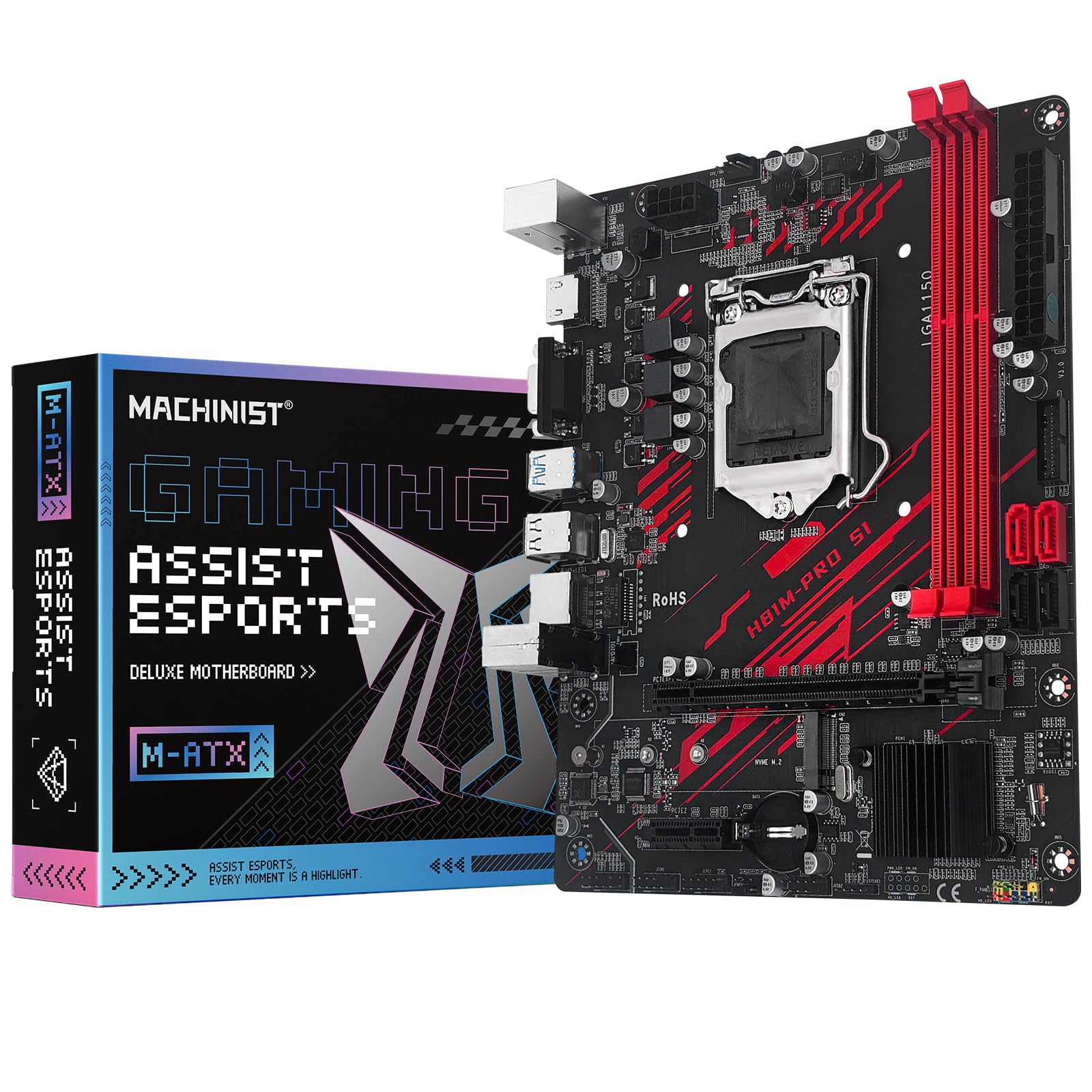
4. MACHINIST LGA 1150 Gaming Motherboard H81M-PRO S1
The budget H81 that revives a dead 2015 i7 and still leaves room for a GTX 2070
The MACHINIST board earns its place as the budget pick that actually works for a surprising range of builds. It supports 4th-gen Core i3/i5/i7 chips plus Xeon E3 V3 series processors, which makes it a cheap way to run a used Xeon in a home server or workstation. One owner revived a dead 2015 i7 PC and it booted fine, while another ran an i5 4590 with a GT 1030 on Linux with no trouble at all.
Reliability feedback is the most mixed of any board here. Some units work perfectly for months — one ran an i7 4th gen with a GTX 2070 and 32GB of DDR3 stable for six months — while a few others arrived with dead HDMI/VGA ports or non-functional SATA ports. The listing itself says the memory spec is 2 DDR3 slots at max 16GB, though the technical sheet claims 32GB, so check the product page before buying RAM.
There is no manual in the box, so the setup can be frustrating — one owner spent three hours getting it working. The PCIe x16 channel runs at 8GB/s on the 2.0 protocol, which is fine for mid-range GPUs but not a top-tier card.
Budget strengths
- Supports Xeon E3 V3 series alongside Core i3/i5/i7
- NVMe M.2 slot plus 4 SATA ports for storage flexibility
- Realtek ALC662 audio with 4-channel sound
- Proven to revive dead mid-2010s i7 builds
What to watch
- Reliability is the most-discussed issue — some units arrive with dead ports
- No manual included; setup can take hours
- Compatibility quirks: one board read 16GB RAM as 4GB until RAM was swapped
Pick it for: a cheap Xeon or i5/i7 revival build where you are comfortable troubleshooting and want a working budget board.
Skip it for: a mission-critical machine where a dead SATA port or hours of setup would be unacceptable.
5. ASUS H81M-E MicroATX DDR3 1333 LGA 1150 Motherboards

The four-slot H81 that runs cool and quiet as a small NAS workhorse
This Asus H81M-E stands out as the small form factor performer — owners note it works particularly well in compact cases, and one runs it as a cool, reliable NAS with an Intel G3220t and a 2x3TB mirror RAID. It offers four RAM slots, which is rare for an H81 board, giving you more upgrade room than the two-slot H81 competitors even if the official max is 16GB.
The big selling point is the ASUS 5X Protection suite plus USB 3.0 Boost, which the maker claims delivers 170% faster transfer speeds than traditional USB 3.0. That makes it a strong value pick for budget builds, and one owner called it “a lot of bang for your buck” — a direct quote that matches the consensus. It supports Intel Smart Response and Rapid Start for faster boot times with an SSD.
The most common complaint is the complete lack of USB 3.0 ports on the rear I/O, which feels dated if you use modern external drives. It also has a slow boot and BIOS time compared to other boards, though performance is flawless once it is up. One unit arrived dead and was returned, but the majority of buyers report solid, reliable operation.
Compact wins
- Four RAM slots — rare for an H81 board
- ASUS 5X Protection for durability
- Works great in small form factor cases per owner reports
- Runs cool and reliable in 24/7 NAS duty
Where it falls short
- No USB 3.0 ports on the rear I/O
- Memory capped at 16GB despite four slots
- Slower boot and BIOS times than competing boards
Choose it for: a compact NAS or small form factor build where four RAM slots and Asus stability give you room to grow.
Pass on it if: you regularly plug in USB 3.0 external drives and need those speeds on the rear panel.
6. H97 Strong LGA 1150 Motherboard

A true Mini-ITX H97 with dual gigabit LAN and PWM fan control in a tiny package
The H97 Strong is the premium small-format pick, and it is the only real Mini-ITX board in this lineup — the 6.7″ square footprint fits in the most compact cases. It stands apart from the H81 crowd with dual RJ45 gigabit network interfaces, which is a genuine feature for a home server or router build where you want to separate LAN traffic. The H97 chipset also supports 1866 MHz DDR3, matching the top speed of the B85M PRO.
Owners who paired it with an i7 4790 report it ran 24/7 for a year and a half with zero issues, handling an NVMe drive and a GTX 1660 Super without complaint. The board has PWM fan control, which one buyer specifically praised as the feature that made it the only board that checked all their boxes. It also offers HDMI-compatible, VGA, and DP outputs for flexible display options.
Some units arrive with defects, including one missing its CMOS battery slot. The BIOS is basic but functional, and there is no manual in the box. At 16GB max RAM across two slots, it holds less memory than the quad-slot boards above, so it is best for compact builds that do not need huge amounts of RAM.
Premium mini-ITX perks
- Dual gigabit LAN for server and networking builds
- True Mini-ITX footprint for the smallest cases
- PWM fan control for quiet, temperature-based cooling
- Proven 1.5 years of 24/7 uptime with an i7 4790
Compact compromises
- Two RAM slots cap memory at 16GB
- Quality control is inconsistent — some units arrive defective
- Basic BIOS without advanced overclocking tools
Reach for this if: you want a genuine Mini-ITX H97 with dual LAN for a home server or a premium compact gaming build.
Consider alternatives if: you need more than 16GB of RAM or prefer a board brand with a longer quality-control track record.
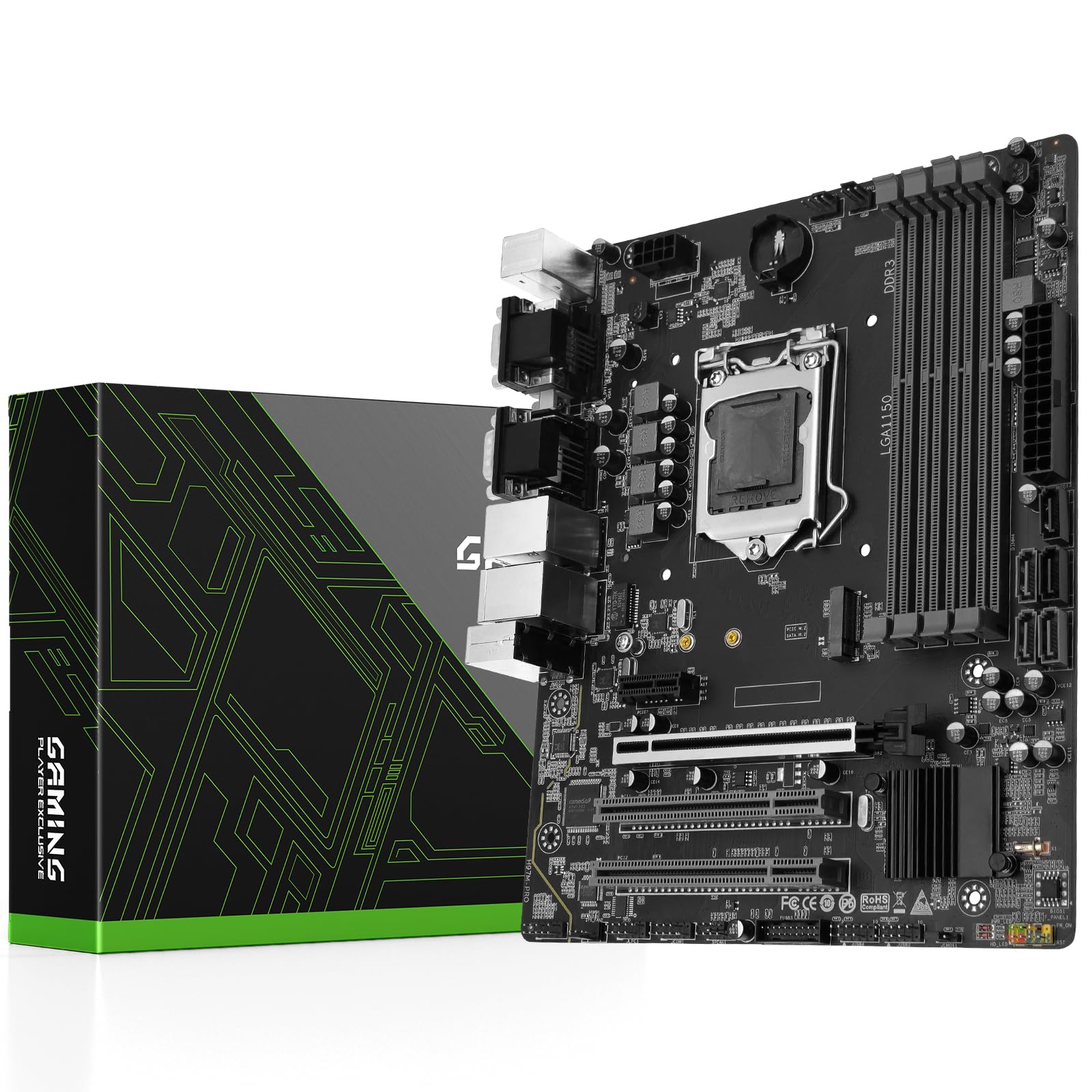
7. H97M PRO LGA 1150 Motherboard
The H97 with four DDR3 slots and dual gigabit LAN for a flex on both counts
The H97M PRO combines the best of both worlds: the premium H97 chipset with four DDR3 slots for up to 32GB of memory. It also packs two gigabit network interfaces for fast online gaming or a home server setup. It supports both 4th and 5th gen Intel Core processors, which is a nice flexibility boost over boards that only handle Haswell chips.
When it works, it works well — one owner runs it with an RTX 3060 12GB, 32GB of DDR3, and an i7 CPU to power an AI workstation, and it works flawlessly. Another bought it specifically to avoid a CPU and RAM upgrade, and it booted quickly with no conflicts. The NVMe M.2 slot and PCIe 3.0 x16 give modern storage and GPU support on a legacy platform.
Reliability is the most inconsistent aspect in reviews. One unit arrived with bent CPU socket pins, and the replacement had no ethernet, no BIOS access, and froze on a blank screen. Another owner dealt with an intermittent blank screen that persisted across two different GPUs. Quality control is a coin flip, but good units are genuinely solid.
Flex features
- Four DDR3 slots for up to 32GB of memory
- Dual gigabit LAN for gaming or server duty
- Supports 4th and 5th gen Intel Core processors
- Works with modern GPUs like the RTX 3060
Risky areas
- Aspect-counts show reliability and quality both earn mixed feedback
- Units have arrived with bent CPU pins or dead ethernet ports
- No manual or CMOS battery in the box
Consider it if: you want H97 features with 32GB RAM support for a serious build and are willing to test thoroughly on arrival.
Look elsewhere if: you need a guaranteed working board the first time — quality control is genuinely inconsistent here.
Understanding the Specs
RAM Capacity and Slots
This is the first number to check. The H81 boards mostly cap out at 16GB across two slots, while the B85 and H97 boards offer four slots and up to 32GB. If you run a 4790K with heavy multitasking, virtual machines, or content creation, the four-slot boards give you real headroom. If you are building a light office PC, 16GB across two slots is usually plenty — and you can always run 2x8GB sticks.
M.2 Slot and NVMe Bandwidth
Many of these legacy boards add an M.2 slot as a modern convenience, but it rarely runs at full PCIe speed. On the B85M PRO, owners measure about 1650 MB/s on a 970 EVO Plus versus the drive’s 3500 MB/s maximum. That is still dramatically faster than SATA, so it is worth using, but do not expect flagship NVMe numbers. Check whether the M.2 slot supports both NVMe and SATA modes — and on some boards, expect to configure a jumper to make it work.
FAQ
Will an LGA 1150 motherboard work with my 4th-gen Intel CPU?
Can I use my existing DDR3 RAM on these boards?
Will my NVMe SSD boot from the M.2 slot?
Do these boards come with a manual and CMOS battery?
Can I overclock my K-series CPU on an H81 board?
Will Windows 11 install on an LGA 1150 motherboard?
How much RAM can I install on a two-slot H81 board?
Do these boards have USB 3.0 ports?
Final Thoughts: The Verdict
Across the board, the lga 1150 motherboard winner is the B85M PRO because it is the only board here with four DDR3 slots, 32GB capacity, and 1866 MHz memory support — the full package for reviving a high-end Haswell chip. If you want a compact footprint with dual LAN for a home server, grab the H97 Strong. And for a genuinely tiny, budget Haswell build where size matters most, the H81 M is the one to reach for.
How We Picked
We do not accept paid placement. Every pick is matched to a real buyer and a real use-case; we do not hands-on test units.
Sources & Methodology
Specifications: manufacturer listings and product documentation. Review insights: verified customer reviews, as of September 2026. Pricing: not shown on this page (it changes often); check the current price via the retailer link.
As an Amazon Associate, Gadgets Feed earns from qualifying purchases. This does not affect which products we feature.