
Our readers keep the lights on and my morning glass full of iced black tea. As an Amazon Associate, I earn from qualifying purchases.
Specs are compiled from manufacturer listings and verified buyer reviews and can change over time — please confirm the key details on the product page before buying.
You bought a fast M.2 NVMe SSD to speed up your computer, and now that drive sits in a drawer because your laptop has no spare slot. An M.2 USB adapter turns that lonely SSD into a portable external drive you can plug into any USB-C or USB-A port on your PC, laptop, phone, or game console. The catch is that not every adapter runs at the same speed or fits every type of M.2 drive, so picking the wrong one costs you time and money.
I’m Min — the founder and writer behind Gadgets Feed. This guide is built by comparing the manufacturers’ published specifications and the patterns across verified customer reviews, so you get each pick’s real strengths and trade-offs instead of marketing spin.
You need an m.2 usb adapter that matches your drive’s speed and connector type — if you want USB4 speeds (up to 40 Gbps) for editing video from a portable drive or a cheaper way to reuse an old SATA M.2 SSD (a slower, older standard for solid-state drives).
Our Picks at a Glance
How To Choose The Best M.2 USB Adapter
An M.2 USB adapter is a simple device on the surface, but a few specs decide whether it makes your SSD feel fast or sluggish. Here are the three things to check before you buy.
Interface Speed: USB 3.2 Gen 2, USB4, or Thunderbolt
The adapter’s data transfer rate is the ceiling for your drive. A 10Gbps adapter works perfectly for most SATA-based SSDs and everyday file transfers. If you own a high-end NVMe PCIe 4.0 drive, a 20Gbps or 40Gbps (USB4/Thunderbolt) adapter lets that drive stretch its legs during large video or backup workloads.
NVMe vs SATA Compatibility
M.2 SSDs come in two protocols. NVMe SSDs use the PCIe bus and are usually marked with an M-Key notch. SATA M.2 SSDs use the slower SATA bus and have a B+M Key notch. Some enclosures support only NVMe drives, while others handle both. Check your drive’s key type before choosing an adapter. An adapter marked “NVMe only” will not work with a SATA M.2 drive.
Cooling and Build Quality
NVMe drives running at high speeds generate heat that can cause thermal throttling, lowering transfer rates. Look for an enclosure with an aluminum shell, a thermal pad that makes contact with the drive, and ventilation channels or fins. For sustained transfers above 10Gbps, a model with an active fan or double-sided fins handles heat better than a basic plastic case.
Quick Comparison
| Model | Best For | Max Speed | Max Capacity | Protocol Support | Amazon |
|---|---|---|---|---|---|
| SABRENT USB4★ Best Overall | Pro Creators | 3900 MB/s | 8 TB | NVMe Only | $89.99Amazon |
| UGREEN 40GbpsSilent Speed Pick | Speed + Silent Cooling | 3600 MB/s | 8 TB | NVMe Only | $66.47$105.99Limited time dealAmazon |
| UGREEN 20Gbps | High Speed + Dual Protocol | 20 Gbps | 8 TB | NVMe & SATA | $31.98$39.99Limited time dealAmazon |
| dockteck 10Gbps | Tool-Free Convenience | 10 Gbps | 4 TB | NVMe & SATA | $20.89Amazon |
| RIITOP M.2 Reader | Ultra-Light Portability | 10 Gbps | — | NVMe & SATA | $19.99Amazon |
| VCOM NVMe SATA | Budget Dual Protocol | 10 Gbps | 4 TB | NVMe & SATA | $15.19Amazon |
| ORICO M.2 Case | Entry-Level Price | 10 Gbps | 4 TB | NVMe & SATA | $15.39$21.99Limited time dealAmazon |
In‑Depth Reviews
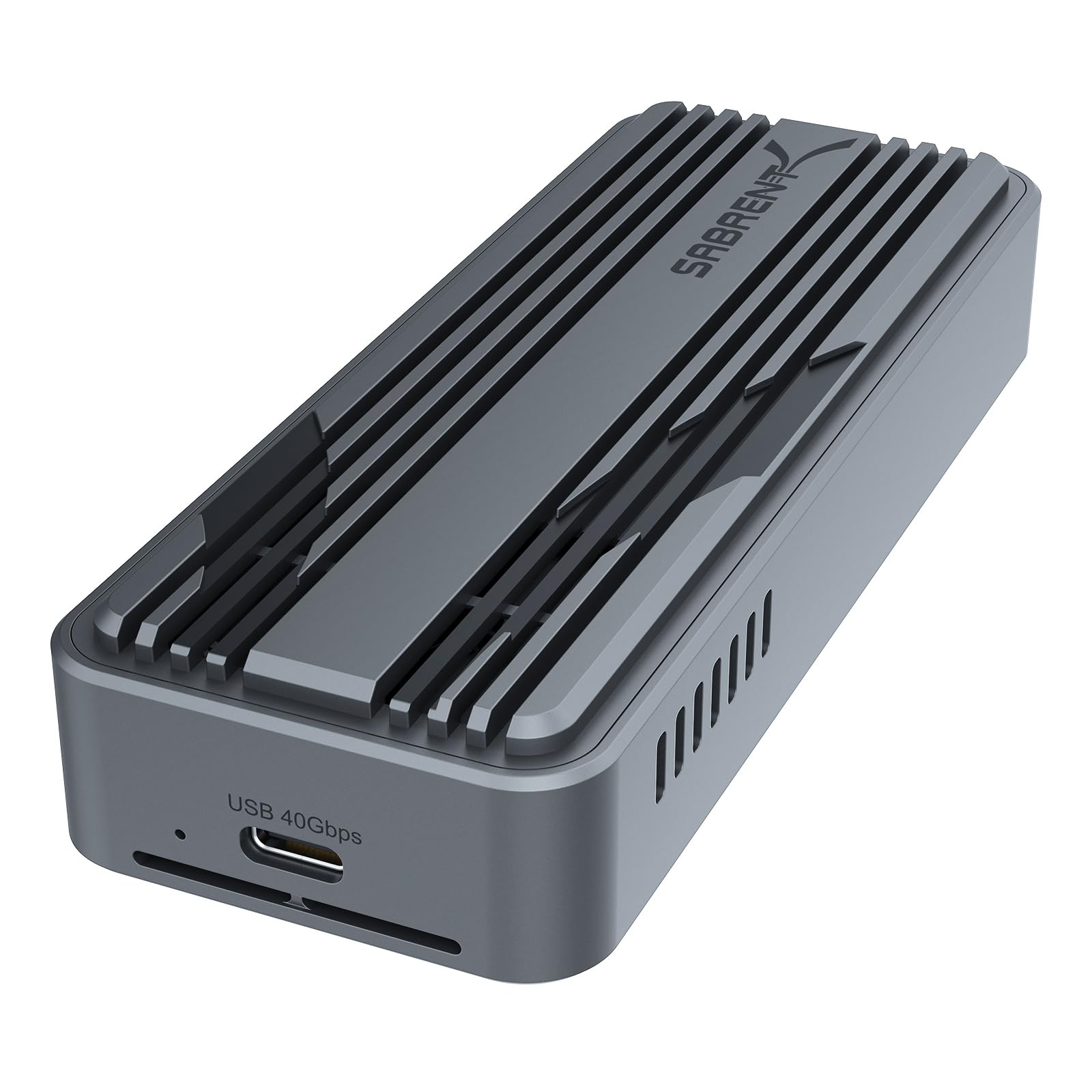
1. SABRENT USB4 NVMe SSD Enclosure (EC-U4TN)
Our pick — over 4.5★ from 16,000+ verified ratings; the strongest balance of quality and price.
The enclosure that turns your NVMe drive into an external drive as fast as an internal one.
If you edit large video files or move multi-gigabyte project folders between machines, speed is everything. The SABRENT USB4 enclosure hits up to 3,900 MB/s over USB4, or 2,700 MB/s over Thunderbolt 3 or 4 — numbers that rival internal PCIe Gen 4 drives. It holds drives up to 8 TB, which is double the 4 TB ceiling of most 10Gbps enclosures, so you can install a single high-capacity SSD for an all-in-one portable archive. The aluminum and ABS body includes an active cooling fan that keeps the drive stable during sustained writes, which is something you notice when waiting on a 50GB file to finish.
There is a trade-off. This enclosure supports only PCIe NVMe drives — your old SATA M.2 SSDs will not work here. Buyers report that the fan, while effective, makes a low hum that some people hear in a quiet room. At 8 ounces and 5.12 inches long, it is also noticeably larger than the slim 0.02-kilogram RIITOP reader below, so it takes up more space in a laptop bag.
USB4 Thunderbolt speed: This pick delivers the fastest real-world transfer rate in the guide at 3,900 MB/s with USB4, beating every other adapter here by a wide margin. The active cooling fan prevents thermal throttling during big writes, but the enclosure is heavier and noisier than fan-less designs.
bulky aluminum design: Video editors, photographers, and IT pros who offload terabytes weekly and own a USB4 or Thunderbolt port. skip it if you only need occasional file transfers or you want a silent, pocket-sized adapter.
ultra-fast transfers: you need maximum portable speed and your drive is a PCIe NVMe model.
size matters: you have SATA M.2 drives or prefer a fanless, compact enclosure.
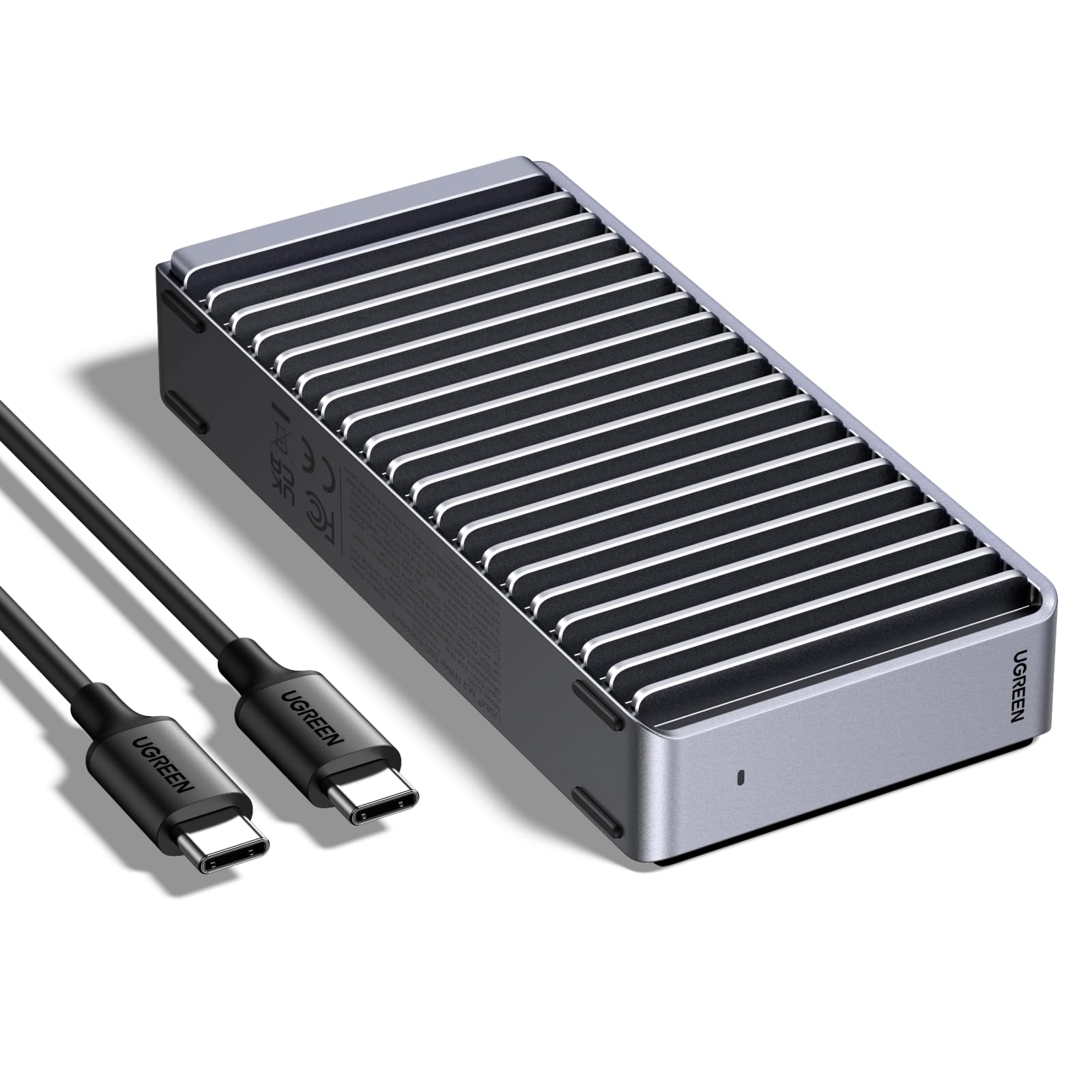
2. UGREEN 40Gbps M.2 NVMe Enclosure
Fan-less cooling that keeps a screaming-fast NVMe drive quiet and cool.
The UGREEN 40Gbps enclosure packs the ASM2464PD chip, which delivers a max transfer speed of 3,600 MB/s over USB4 or Thunderbolt 4. That is close to the SABRENT’s 3,900 MB/s, but UGREEN gets there without a fan. The secret is a double-sided fin design with a three-dimensional cooling system that dissipates heat passively. No moving parts means zero noise and no fan lifespan to worry about. It supports drives up to 8 TB and fits all common M.2 sizes from 2230 to 2280.
Like the SABRENT, this enclosure works only with NVMe drives (a fast type of M.2 SSD) — it does not support SATA M.2 SSDs (the older, slower type). Owners mention that some thicker SSDs fit tightly, and swapping the included thermal pad (a heat-conducting sticker) for a thinner one solves the problem. The 232-gram aluminum body feels solid and portable, but at 4.8 inches long it is still larger than the sub-1-inch readers in this guide.
silent fanless operation
- Passive fin cooling achieves high speed without a fan
- ASM2464PD chip delivers 3,600 MB/s peak
- Works with USB4, Thunderbolt 3/4, and older USB standards
only USB4 support
- Does not support SATA-based M.2 SSDs
- Some SSDs require a thinner thermal pad for fit
noise-free use: you want USB4-class speed but hate fan noise in your workspace.
limited compatibility: you need to use a SATA M.2 SSD in the enclosure.
3. UGREEN 20Gbps M.2 NVMe SATA SSD Enclosure

The adapter that handles both NVMe and SATA M.2 drives at 20Gbps.
Most dual-protocol enclosures top out at 10Gbps. The UGREEN 20Gbps enclosure breaks that pattern, delivering up to 20Gbps over USB 3.2 Gen 2×2 while supporting both PCIe NVMe and SATA NGFF M.2 drives. It holds up to 8 TB and fits drive sizes from 2230 up to 2280. The built-in RTL9210B chip includes UASP and Trim support for stable transfers, and the aluminum case with a silicone cover adds drop protection that the bare-metal enclosures lack.
The catch is that you need a USB 3.2 Gen 2×2 port on your host device to reach that 20Gbps ceiling. Plugging it into a standard 10Gbps port drops the speed to 10Gbps. Reviewers report that the single-screw SSD installation is simple, and the thermal pad keeps drives cool during long transfers. At 0.15 kilograms it is heavier than the RIITOP adapter, but still pocket-friendly.
Speed with versatility: This UGREEN is the only dual-protocol enclosure here that supports 20Gbps, beating the 10Gbps ceiling of the VCOM, ORICO, and dockteck. The silicone cover adds a layer of drop protection that those models lack.
affordable dual protocol: Users who own both NVMe and SATA M.2 SSDs and want one enclosure that can run either at high speed. pass on it if your laptop only has a 10Gbps USB-C port — you will not see the extra speed.
budget pick: you have a mixed collection of M.2 NVMe and SATA drives and want the fastest possible speed from each.
speed cap: your computer lacks a USB 3.2 Gen 2×2 port.
4. dockteck M.2 NVMe SATA SSD Enclosure

A tool-free slider that lets you swap drives in seconds without a screwdriver.
The dockteck enclosure uses a sliding end cap instead of screws, so you can pop in a new M.2 drive in about five seconds. It hits 10Gbps over USB 3.2 Gen 2 Type-C (6Gbps for SATA drives) with UASP and Trim support. The aluminum alloy body with a silicone thermal pad keeps temperatures under control during normal use. It supports both NVMe (M-Key) and SATA (B+M Key) drives in sizes 2230, 2242, 2260, and 2280, up to 4 TB.
One quirk buyers mention: the enclosure enters automatic sleep 15 minutes after read-write activity ends to protect the SSD. That is a good feature for longevity, but you might notice a brief delay when waking it up. The included cables are 9.8 inches long, which is short enough to keep your desk tidy but may not reach a tower PC on the floor.
tool-free installation
- Sliding end cap requires no tools to install or swap drives
- Works with both NVMe and SATA M.2 SSDs
- Includes USB-C to C and USB-C to A cables in the box
plastic build
- 15-minute auto-sleep causes a brief delay on wake
- Short 9.8-inch cables may limit placement options
quick setup: you frequently swap different M.2 drives and want the fastest physical swap time.
build quality: you need a cable longer than 10 inches to reach your computer.
5. RIITOP M.2 to USB Adapter (B08FWZXT2N)

A featherweight reader that disappears into a bag pocket.
At 0.02 kilograms, the RIITOP adapter weighs a fraction of every other enclosure here — for comparison, the VCOM enclosure is 0.09 kilograms, making this one about 4.5 times lighter. The open-frame design exposes the M.2 drive, so there is no enclosure to add bulk. It uses the Realtek 9210B master chip and runs at 10Gbps over USB 3.1 Gen 2 when plugged into a USB 3.1 Type-A port. It supports both NVMe (M-Key) and SATA B+M Key SSDs in 2280, 2260, and 2242 sizes.
The trade-off is that exposed drive gets no forced cooling and no physical protection. If you knock the adapter against a desk corner while the drive is writing, you risk data loss. Customers note that the included silicone pad helps a little with heat, but sustained transfers at 10Gbps can cause thermal throttling faster than a fully enclosed case. This is best for occasional file access, not heavy daily backup workloads.
ultra-portable adapter: The RIITOP is the lightest option and costs less than most enclosed adapters, but the open-frame design sacrifices cooling and drop resistance. Buyers who need occasional M.2 reads on the go will love its size; anyone planning to run large file transfers regularly should look at the dockteck or VCOM enclosures instead.
exposed drive risk: Travelers and techs who need a bare-minimum adapter for quick data pulls. it’s not for you if you want a rugged, daily-driver enclosure with active cooling.
travel companion: your top priority is the lightest possible adapter for your tech kit.
no protection: you need thermal management for sustained high-speed transfers.
6. VCOM M.2 NVME SATA SSD Enclosure Adapter

A dual-protocol enclosure that does not ask you to pick NVMe or SATA.
The VCOM enclosure works with both M.2 NVMe (M-Key & M+B Key) and M.2 SATA (M+B Key) drives, making it a universal second home for any spare M.2 SSD you have lying around. Data transfer runs at 10Gbps for NVMe drives and 6Gbps for SATA drives over USB 3.1 Gen 2. The aluminum alloy shell uses a striped heat-dissipation design and includes a silicone thermal pad to pull heat away from the drive. A 5-minute automatic sleep function kicks in after inactivity to extend the SSD’s lifespan.
At 0.09 kilograms it is heavier than the RIITOP adapter, but it offers full enclosure protection that the open-frame RIITOP lacks. The VCOM supports drives up to 4 TB, which matches the ORICO and dockteck but falls short of the 8 TB ceiling on the SABRENT and UGREEN models. One practical detail: the package includes a 25cm USB-A to USB-C cable and a separate 25cm USB-C to USB-C cable, so you can connect to older laptops and modern phones right from the start.
universal fit
- Supports NVMe and SATA M.2 drives in one enclosure
- Includes both USB-A and USB-C cables for broad device support
- Metal heatsink shell with thermal pad for heat management
no heat dissipation
- 4 TB max capacity is half the 8 TB on premium models
- 5-minute auto-sleep may interrupt long transfers if inactive
wide compatibility: you need a single enclosure that works with both NVMe and SATA M.2 drives at a low cost.
thermal issue: you plan to install an 8TB drive and need the full capacity.
7. ORICO M.2 NVMe SATA SSD Enclosure (M2PVM)

A solid no-frills enclosure for turning an old M.2 drive into a backup disk.
The ORICO enclosure hits 10Gbps over USB 3.1 Gen 2 Type-C and supports both NVMe PCIe (M-Key/M+B Key) and M.2 SATA NGFF (M+B Key) drives. The aluminum top and plastic bottom keep the weight down while providing decent heat dissipation. At 4.25 inches long, it is slightly longer than the VCOM’s 4.02-inch body but still fits in a palm. It supports drives up to 4 TB and sizes 2230, 2242, 2260, and 2280. The package includes a USB-C to C cable and a USB-C to A cable, and some units now ship with an all-new 2-in-1 data cable instead of two separate cables.
There is a learning curve for first-time users. The product note clearly states that a new SSD must be partitioned and formatted before the enclosure will recognize it. Reviewers occasionally miss this step and think the adapter is faulty. The ORICO enclosure also lacks a screwdriver in the box, so you need your own tool to secure the drive — unlike the tool-free dockteck or the kit-included UGREEN models.
lowest price point: The ORICO costs less than most competitors while still handling both NVMe and SATA M.2 drives. It does not match the 20Gbps speed of the UGREEN or the 8TB capacity of the SABRENT, but for a spare 1TB or 2TB drive you keep in a drawer, it is a perfectly capable companion.
mixed SATA/NVMe: A first-time buyer who has one spare M.2 SSD and wants the cheapest reliable way to use it as an external drive. look elsewhere if you want a tool-free installation or a premium aluminum build.
entry-level buy: your budget is tight and you just need a basic enclosure for an extra SSD.
speed trade-off: you want a tool-free slider, a full metal shell, or speeds above 10Gbps.
Understanding the Specs
Data Transfer Rate (Gbps vs MB/s)
The data transfer rate tells you how fast files move between the SSD and your computer. Most M.2 USB adapters use USB 3.2 Gen 2, which has a ceiling of 10 Gbps — that is roughly 1,250 MB/s in real-world conditions, enough for quick file transfers with most NVMe and SATA drives. Premium adapters like the SABRENT use USB4 or Thunderbolt, reaching up to 3,900 MB/s. You need a host device that supports the same standard to reach those speeds. Plugging a 20Gbps adapter into a 10Gbps port simply runs at 10Gbps.
NVMe vs SATA Protocol Compatibility
M.2 SSDs speak one of two languages. NVMe (Non-Volatile Memory Express) uses the PCIe bus for high-speed communication, often exceeding 3,000 MB/s. SATA (Serial ATA) M.2 SSDs use the older AHCI protocol and top out around 550 MB/s. The key physical difference is the notch position in the connector: NVMe drives use an M-Key, while SATA M.2 drives use a B+M Key. Some enclosures accept only NVMe drives, while others accept both. Check your drive’s key type and the enclosure’s specified support before buying.
FAQ
Will an M.2 USB adapter work with any M.2 SSD?
What is the difference between a 10Gbps, 20Gbps, and 40Gbps enclosure?
Does my M.2 USB adapter need a fan to stay cool?
Can I use an M.2 USB adapter with a phone or tablet?
How do I know if my M.2 SSD is NVMe or SATA?
Why does my new enclosure not recognize my SSD?
Does a longer USB cable reduce transfer speed?
Can I boot my computer from an M.2 SSD in a USB enclosure?
What is UASP and do I need it?
How do I know which USB speed my computer supports?
Final Thoughts: The Verdict
For the majority of shoppers, the m.2 usb adapter winner is the SABRENT USB4 NVMe Enclosure because it delivers the fastest possible speed at 3,900 MB/s (megabytes per second — enough to move a 4K movie in seconds), supports drives up to 8 TB, and includes an active cooling fan for sustained transfers. If you want a quieter design with nearly the same speed, grab the UGREEN 40Gbps Enclosure with its passive fin cooling (no fan noise). And for a budget-friendly dual-protocol option that works with your spare NVMe or SATA M.2 drive, the dockteck 10Gbps Enclosure is the best value pick.
How We Picked
We do not accept paid placement. Every pick is matched to a real buyer and a real use-case; we do not hands-on test units.
Sources & Methodology
Specifications: manufacturer listings and product documentation. Review insights: verified customer reviews, as of July 2026. Pricing: not shown on this page (it changes often); check the current price via the retailer link.
As an Amazon Associate, Gadgets Feed earns from qualifying purchases. This does not affect which products we feature.
Related Guides
Product prices and availability are accurate as of the date/time indicated and are subject to change. Any price and availability information displayed on Amazon at the time of purchase will apply to the purchase of this product. As an Amazon Associate I earn from qualifying purchases.
CERTAIN CONTENT THAT APPEARS ON THIS SITE COMES FROM AMAZON. THIS CONTENT IS PROVIDED "AS IS" AND IS SUBJECT TO CHANGE OR REMOVAL AT ANY TIME.
Amazon and the Amazon logo are trademarks of Amazon.com, Inc. or its affiliates.