
Finding the right enclosure for your first DIY network storage build, or upgrading from a cramped office tower, comes down to balancing drive count, cooling, and motherboard footprint. Every decision—from the backplane power delivery to the type of PCIe slot you reserve—directly impacts whether your drives last years or fail prematurely.
I’m Min — the co-founder and writer behind Gadgets Feed. I’ve spent hundreds of hours poring over chassis specifications, backplane schematics, and real-user stress reports to separate enclosures that merely hold drives from those engineered to protect them under constant read/write workloads.
Whether you need a compact 4‑bay for quiet media streaming or a full‑tower server rack alternative, this guide to the best nas case options on Amazon helps you match your storage density goals with the right thermals, power supply compatibility, and form factor for a stable home or office server.
How To Choose The Best NAS Case
Selecting a case for a network‑attached storage build involves more than counting empty slots. The enclosure must manage vibration across multiple spinning drives, route airflow past tightly packed 3.5‑inch bays, and accommodate the non‑standard power requirements of a storage backplane. Below are the three specifications that separate a reliable server chassis from a repurposed gaming case that will throttle or rattle under load.
Drive Bay Count and Backplane Type
The number of 3.5‑inch bays determines your raw storage ceiling, but the backplane that connects them matters more. A hot‑swap backplane with individual SATA connectors and power‑delivery staging lets you swap a failed drive without powering down the entire system. Cheaper enclosures use a single‑board backplane that passes through drive signals to one or two power cables — this design works for low duty cycles but creates a single point of electrical failure under 24/7 RAID operation. Prioritise models that list a separate SATA or SAS backplane rather than relying on standard power‑splitter cables.
Airflow Path and Fan Placement
Standard PC cases often blow air across the CPU first, leaving HDD stacks to soak up residual heat. A good NAS chassis positions intake fans directly in front of the drive cage, pulling cool air through the array before it reaches the motherboard compartment. Look for cases that list fan mounts alongside the drive bays — at least one 120mm or 140mm fan aimed at the HDD cage. Enclosures that rely on a single small rear exhaust fan (under 80mm) will struggle to keep four or more enterprise drives below forty degrees Celsius under sustained write loads.
Motherboard Footprint and PSU Clearance
Mini‑ITX enclosures keep the footprint small but limit expansion to a single PCIe slot — forcing you to choose between a 10GbE NIC, an HBA card, or a GPU for transcoding. Micro‑ATX and full ATX chassis let you run multiple add‑in cards simultaneously. Also check the maximum power supply length; a mid‑range ATX unit used in a drive‑heavy build runs between 160mm and 180mm. Cases that only fit SFX or short ATX units restrict your choice of quiet, high‑efficiency power supplies, especially if you plan to install twelve or more drives that each draw 1–2A during spin‑up.
Quick Comparison
On smaller screens, swipe sideways to see the full table.
| Model | Category | Best For | Key Spec | Amazon |
|---|---|---|---|---|
| JONSBO N5 | E-ATX Full Tower | High‑density enterprise builds | 12x 3.5″ hot‑swap + 4x 2.5″ | Amazon |
| UGREEN DH4300 Plus | 4‑Bay Desktop NAS | Beginner home media server | 2.5GbE + 8GB LPDDR4X | Amazon |
| JONSBO N6 | Micro‑ATX Mid Tower | Moderate expansion + aesthetics | 9‑bay hot‑swap + wood veneer | Amazon |
| JONSBO N3 | Mini‑ITX | Compact high‑density home server | 8x 3.5″ + 1x 2.5″ in Mini‑ITX | Amazon |
| CENMATE 6‑Bay | External DAS | Direct‑attach mass storage | 10Gbps USB 3.2 Gen 2 | Amazon |
| UGREEN DH2300 | 2‑Bay Desktop NAS | Entry‑level family storage | 1GbE + 4GB onboard RAM | Amazon |
| ORICO 4‑Bay RAID | External DAS | Flexible RAID without a PC | 8 RAID modes up to 88TB | Amazon |
| DARKROCK Classico | Full Tower ATX | Budget dense server build | 10x 3.5″ + 3x 2.5″ bays | Amazon |
| CENMATE 4‑Bay | External DAS | Simple plug‑and‑play backup | 80TB capacity, USB 3.0 + eSATA | Amazon |
In‑Depth Reviews
1. JONSBO N5 NAS PC Case

The JONSBO N5 is built around a professional hot‑swap backplane that handles up to twelve 3.5‑inch drives in the front cage, plus four 2.5‑inch SSDs mounted on the side. Its E‑ATX footprint accepts full‑sized motherboards up to 330mm wide, leaving enough PCIe room for a 10GbE adapter, an HBA card, and a dedicated GPU for hardware transcoding — a rarity in purpose‑built NAS chassis. The North American black walnut veneer strip on the front panel is a deliberate design choice that signals this case is meant to sit in a living room or home office, not hidden in a basement rack.
Three pre‑installed fans move air from the front intake across the drive cage and out the rear 120mm cluster, keeping twelve enterprise drives at stable temperatures under sustained writes. The power supply compartment accepts ATX units up to 240mm long, giving you full access to high‑wattage, low‑noise PSUs. Users report that the separate motherboard compartment keeps cable management clean, though the stock fans are audible — a known trade‑off for the high static pressure needed to cool a dense drive array. Owners of TrueNAS and Unraid builds appreciate the 8‑slot PCI bracket layout, which accommodates multi‑GPU setups without crowding the drive backplane.
One shortcoming worth noting: the 3.5‑inch drives use rubber straps instead of tool‑less trays, so drive swaps are slightly slower than a traditional tray system. Additionally, only 8 of the 12 front bays have individual status LEDs, which can be confusing during drive failure diagnosis in a 12‑drive pool. Despite these minor ergonomic compromises, the N5 delivers the highest drive‑density‑per‑square‑inch of any consumer‑targeted NAS case while maintaining full desktop‑grade component support.
Why it’s great
- 12 hot‑swap 3.5″ bays with separate backplane
- Fits full ATX PSU up to 240mm and E‑ATX motherboards
- Quality wood veneer finish blends into living spaces
Good to know
- Stock fans are loud; consider Noctua replacements
- Only 8 of 12 bays have individual status LEDs
- Rubber straps instead of tool‑less drive trays
2. UGREEN NAS DH4300 Plus 4‑Bay

For buyers who want a turnkey network storage appliance without assembling a bare‑bones chassis, the UGREEN DH4300 Plus delivers a purpose‑built NAS case with an integrated, beginner‑friendly OS. The plastic enclosure houses four 3.5‑inch drive bays with a secondary 2.5‑inch form factor, making it suitable for a 4‑drive RAID 5 array capped at 128TB. The 2.5GbE port is a meaningful upgrade over the 1GbE found on most entry‑level NAS units — it pushes file transfers up to 312 MB/s, enough to saturate a typical SSD cache or stream multiple 4K streams simultaneously.
The included 8GB LPDDR4X RAM and the processor handling Docker containers allow you to run Plex Media Server in a Docker environment, a feature the cheaper DH2300 lacks. The HDMI 4K output bypasses network‑transcoding bottlenecks entirely; users have reported smooth playback of 100GB 4K Blu‑ray rips by connecting directly to a TV. The UGREEN OS provides a clean, macOS‑like interface with AI photo tagging and real‑time backup across Windows, macOS, Android, and iOS devices. Setup takes under five minutes with NFC pairing, and the magnetic top dust cover keeps the drive bays clean in a living‑room environment.
On the downside, this is a locked ecosystem — you cannot swap the motherboard or upgrade the backplane. The plastic chassis cannot be reused as a standard PC case if you outgrow the UGREEN platform. Some enterprise drives may produce audible vibration without the included acoustic foam, and the system depends on a wired Ethernet connection (no built‑in Wi‑Fi or wireless adapter support). For a family seeking a quiet, subscription‑free cloud replacement that handles Docker without the complexity of a full DIY build, the DH4300 Plus hits the sweet spot between convenience and performance.
Why it’s great
- Integrated 2.5GbE port for fast wired transfers
- Docker support for running Plex and other containers
- Beginner‑friendly setup with NFC pairing
Good to know
- Plastic chassis; not reusable as a standard PC case
- No Wi‑Fi; requires wired Ethernet only
- Enterprise drives may need extra acoustic damping
3. JONSBO N6 NAS Case
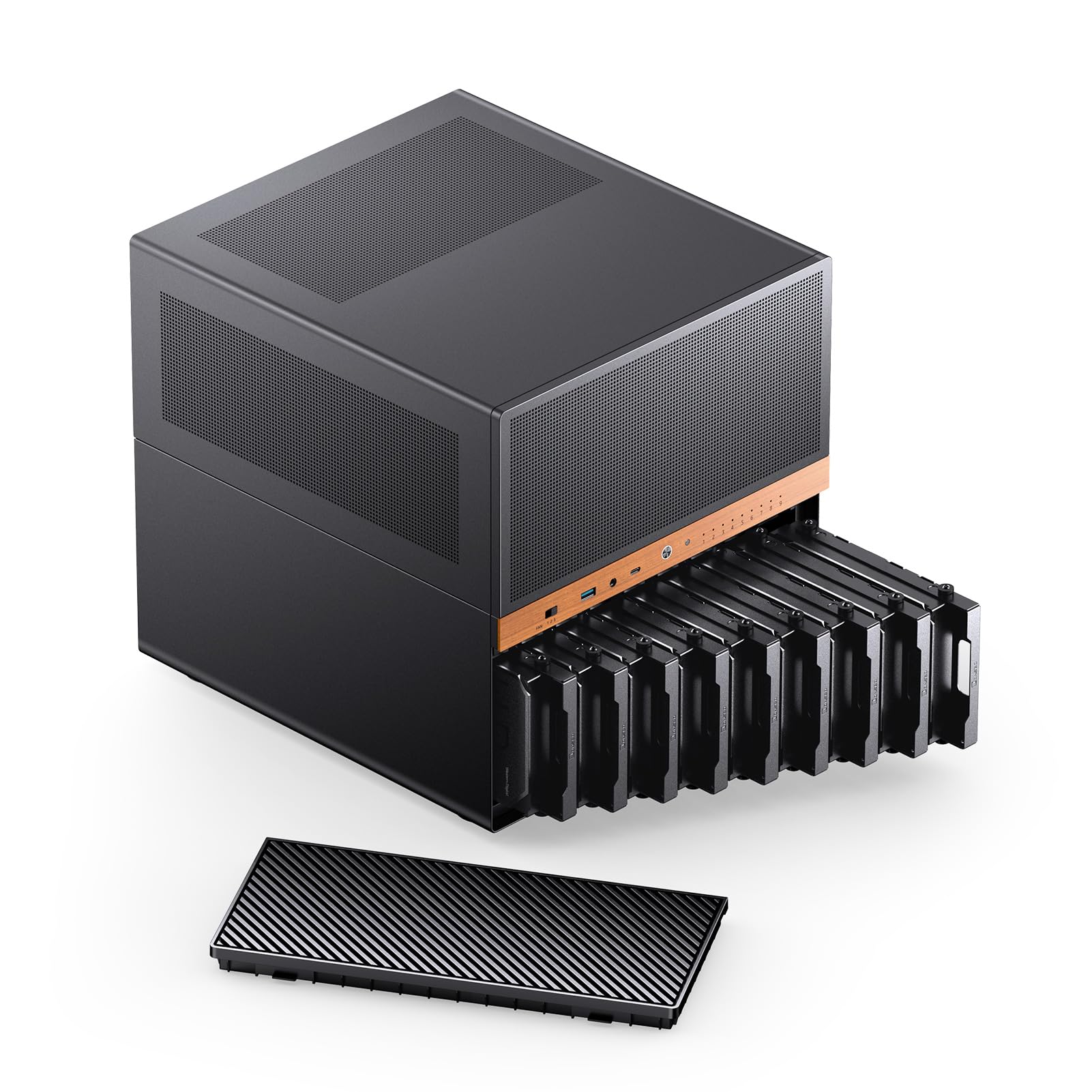
The JONSBO N6 occupies a rare middle ground: it supports Micro‑ATX boards (and standard ATX PSUs) while keeping a compact footprint that fits on a desk shelf. Nine hot‑swap drive bays (eight 3.5‑inch plus one 2.5‑inch) connect to a SATA/SAS backplane capable of handling enterprise drives with higher spin‑up currents. The black walnut veneer front panel and metal construction give it a furniture‑grade appearance that blends into a home office or entertainment centre — a deliberate departure from generic black server boxes.
Thermal performance is a strong point: the case accepts up to seven 120mm fans, including two dedicated mounts on the drive cage to pull air directly across the HDD array. The top panel removes as a single piece, making assembly of AIO coolers up to 240mm or large air towers (up to 160mm) far easier than in many Mini‑ITX NAS cases. The front I/O includes USB 3.2 Gen 2 Type‑C and a combined audio jack, a thoughtful inclusion for a machine that doubles as a workstation. Builders report that the flexible PSU mounting positions (ATX or SFX) help tame cable routing, though SFX power supplies may leave power cables short for the backplane’s four power interfaces.
The main trade‑off involves the non‑tool‑less drive trays — each 3.5‑inch unit slides in and locks with a side latch, but SSDs require screws into a dedicated mounting position. Some builders also note that the rubber HDD handles feel slightly loose, though they do not cause vibration issues in practice. For anyone who wants Micro‑ATX expandability (four PCIe slots, room for a GPU up to 305mm) without jumping to a full‑tower footprint, the N6 offers the most versatile layout in this size class.
Why it’s great
- 9 hot‑swap bays in a compact Micro‑ATX footprint
- Wood‑veneer design integrates into home décor
- Dedicated intake fans on the drive cage improve cooling
Good to know
- Drive trays are not tool‑less; SSDs require screws
- Rubber drive handles feel a bit loose
- SFX PSU cables may be short for backplane power
4. JONSBO N3 Mini‑ITX NAS PC Chassis

The JONSBO N3 packs eight 3.5‑inch hot‑swap bays and a single 2.5‑inch SSD slot into a Mini‑ITX form factor that measures roughly 9 by 10 by 12 inches. The aluminium and steel construction provides structural rigidity without excessive weight, and the divided interior separates the drive compartment from the motherboard and PSU area — a layout that prevents drive heat from soaking the chipset and memory. The included server‑grade hot‑swap backplane uses dual D‑type and SATA power plugs, a robust configuration for eight drives that spin up simultaneously.
Two pre‑installed 100mm fans sit inside the HDD compartment, pulling air directly across the drive cage before exhausting through the rear. This direct‑flow design keeps drive temperatures around 28°C under normal loads, according to builds running Unraid with eight 7200RPM drives. The case supports CPU coolers up to 130mm tall and GPUs up to 280mm, which is generous for a Mini‑ITX chassis and allows for a modest gaming card if the server doubles as an HTPC. Builders should note that the backplane uses 4‑pin molex power connectors, requiring adapters if your SFX PSU only provides SATA power leads.
The top panel fastens with hex screws rather than a thumb‑screw mechanism, which makes internal access slightly less convenient for frequent hardware swaps. The stock fans are widely reported as noisy — multiple users describe them as “mini industrial fans” — but the 92mm mounting pattern makes upgrading to Noctua or similar quiet fans straightforward. For anyone who needs eight drives in a true Mini‑ITX footprint and values separate drive‑bay zoning over the expandability of larger boards, the N3 is the densest small‑form‑factor NAS chassis available at this price point.
Why it’s great
- 8 hot‑swap 3.5″ bays in true Mini‑ITX footprint
- Divided interior keeps drive heat away from motherboard
- Supports GPU up to 280mm for HTPC dual‑use
Good to know
- Stock fans are very loud; Noctua swap recommended
- Top panel uses hex screws instead of thumb screws
- Backplane uses 4‑pin molex power connectors
5. CENMATE Aluminum 6 Bay 10Gbps HDD Enclosure
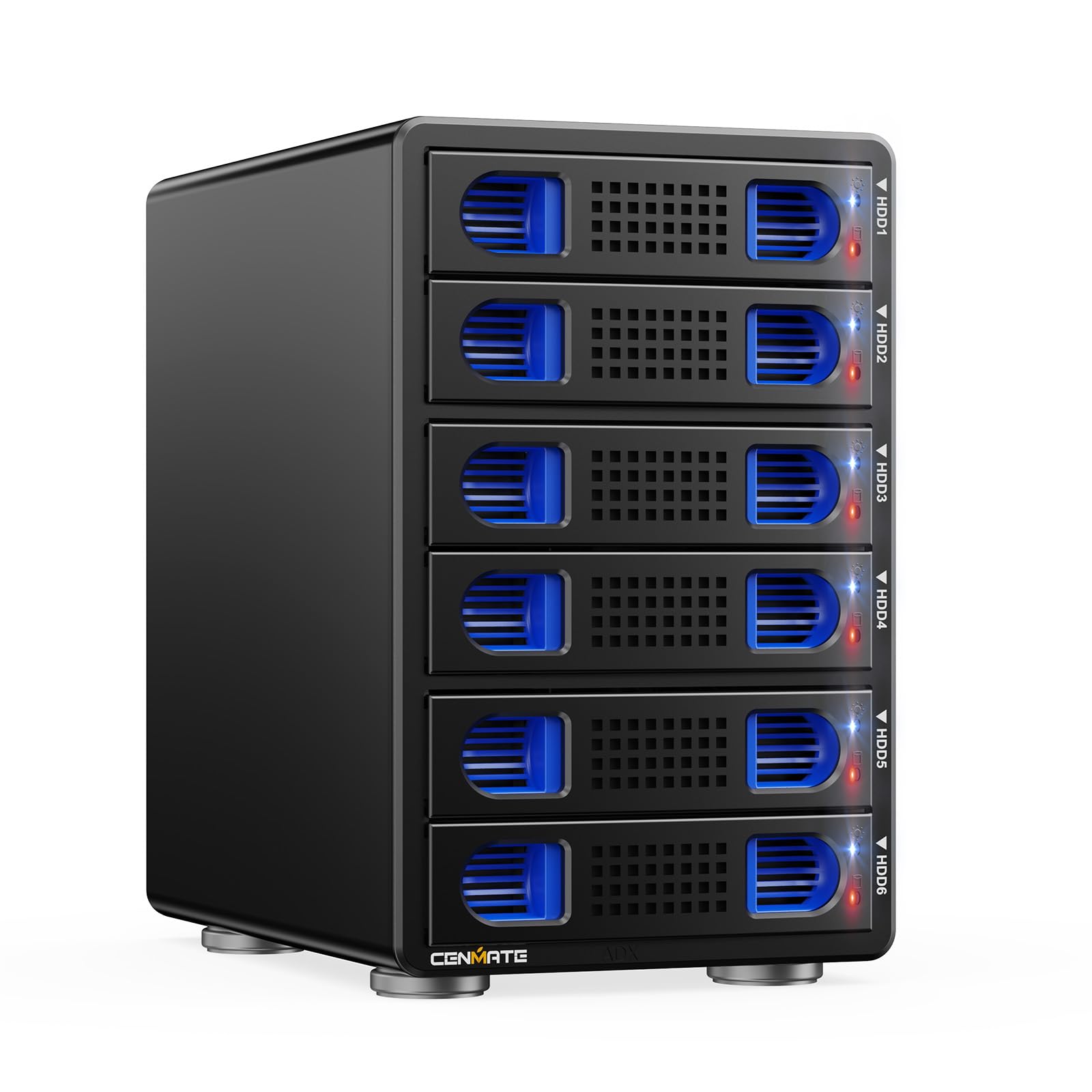
When the goal is to connect multiple drives directly to a PC without building a full server, the CENMATE 6‑Bay enclosure delivers a straightforward DAS solution with fast transfer speeds. The VL822 plus ASM235CM chipset enables USB 3.2 Gen 2 at 10Gbps, translating to real‑world reads around 510 MB/s with a single SSD and about 500 MB/s across two HDDs in RAID 0. Each of the six tool‑less bays accepts 2.5‑ or 3.5‑inch SATA drives, and the hot‑swap backplane lets you swap a drive without shutting down the Windows or Ubuntu host.
The aluminium chassis houses two 2.7‑inch fans that pull air through front and rear vents, keeping drives cool under sustained access. Users running Plex servers with four 7200RPM drives report stable 4K playback without throttling. The enclosure supports daisy‑chaining up to three units for a total of 120TB of directly attached storage, all accessible over a single USB‑C cable. The included 3.2 Gen 2 cable works with Thunderbolt 3/4 ports for maximum throughput, and the device is recognised as a block storage device on Windows, Mac, and Linux without driver installation.
Fan noise is the most common complaint — the 40–50 decibel rating places it in the “audible across a room” category, so it suits a basement or utility closet better than a quiet home office. A small number of users reported intermittent drive dropouts on Windows 11 that resolved after switching to a different USB controller card. The plastic drive clips can feel fragile when inserting enterprise drives with heavier aluminium casings. For a high‑capacity DAS that does not require an operating system, network stack, or motherboard assembly, the CENMATE 6‑Bay offers excellent value per gigabyte of attached storage.
Why it’s great
- 10Gbps USB 3.2 Gen 2 delivers fast transfers
- Tool‑less hot‑swap bays for 2.5″ and 3.5″ drives
- Daisy‑chain support allows up to 120TB total
Good to know
- Fan noise is 40–50 dB; audible across a room
- Plastic drive clips may bend with heavy drives
- Occasional dropouts reported on Windows 11
6. UGREEN NAS DH2300 2‑Bay Desktop NASync

The UGREEN DH2300 is the simplest on‑ramp to private cloud storage for families and home users migrating from Google Drive or external USB hard drives. The 2‑bay enclosure supports up to 64TB in RAID 0 or 32TB in mirrored mode, and the 1GbE port provides real‑world file transfers around 125 MB/s — enough for one 4K stream or simultaneous photo backup from multiple phones. The plastic chassis includes a 4GB soldered RAM module and a processor tuned for basic NAS tasks; it does not support Docker or virtual machines, which keeps the interface clean and the learning curve shallow.
The UGREEN OS handles automatic photo backup, AI‑powered face and object recognition, and remote access without requiring a VPN or static IP. The mobile app allows direct sharing of albums, and the HDMI output lets you view media on a TV without a separate media player. Users report that setup takes under ten minutes via browser or mobile app, and the system works silently with SSDs or standard consumer HDDs. The dual‑core processor sips power — the unit draws less than 15W at idle — making it viable for always‑on operation in a living room.
This is not a platform for expansion: the 4GB RAM is soldered and not upgradeable, the 1GbE port cannot be upgraded to 2.5GbE, and the lack of Docker support limits it to first‑party apps. Some users of enterprise‑grade drives report noticeable vibration noise, which can be mitigated with acoustic foam under the chassis. For anyone who wants a zero‑configuration, subscription‑free network drive that just works for family photo archives and basic file sharing, the DH2300 delivers exactly what it promises — no assembly required.
Why it’s great
- Simplest setup: plug, connect, and use in minutes
- AI photo tagging and remote access without VPN
- Very low idle power consumption (under 15W)
Good to know
- No Docker or VM support; limited to UGREEN apps
- RAM is soldered and not user‑upgradeable
- Loud vibration with enterprise drives without foam
7. ORICO 4 Bay Raid Hard Drive Enclosure

The ORICO 9848RU3 provides a hardware RAID controller inside a 4‑bay aluminium enclosure, offering eight RAID modes including RAID 0, 1, 3, 5, 10, JBOD, CLONE, and CLEAR. This flexibility makes it suitable for users who need either redundancy (RAID 5 for an 88‑TB array) or maximum speed (RAID 0 for 235 MB/s sequential transfers) without depending on the host operating system’s software RAID. The built‑in 150W power supply handles four 3.5‑inch drives with plenty of headroom for spin‑up surges, and the 80mm silent fan keeps the aluminium chassis cool during extended write sessions.
Physical build quality is a highlight: the tool‑less drive trays slide in smoothly and lock with an independent safety key to prevent accidental ejection. The space‑grey aluminium body matches most desktop setups, and the front‑rear ventilation path allows the fan to exhaust heat efficiently. Users running JBOD mode with ZFS on Ubuntu report stable performance for backup workloads, and the USB 3.0 interface delivers enough bandwidth for four drives spanned across a single connection. The two‑year warranty adds confidence for data‑sensitive applications.
Performance under concurrent multi‑drive access is the weak point — writes drop from around 160 MB/s to 15–22 MB/s once the onboard cache fills, which hurts performance during simultaneous large file transfers. The fan is described by some users as “bit loud” (around 40dB), though it is replaceable with a standard Noctua model if silence is critical. A few users experienced firmware power‑management issues when connecting through PC USB ports, but those resolved when plugging into a NAS USB port. For a hardware‑RAID DAS that works across any platform without drivers, the ORICO covers the widest range of RAID configurations from a single box.
Why it’s great
- Hardware RAID controller with 8 modes including RAID 5
- Tool‑less locking drive trays for quick swaps
- Built‑in 150W PSU handles 4‑drive spin‑up
Good to know
- Multi‑drive writes slow to 15–22 MB/s after cache fill
- Fan is mildly audible; replaceable with Noctua
- Firmware power management may cause PC USB issues
8. DARKROCK Classico Storage Master ATX NAS Case

The DARKROCK Classico delivers a 10‑bay 3.5‑inch drive cage plus three internal 2.5‑inch positions in a standard ATX full‑tower layout, making it one of the most drive‑dense budget enclosures available. The mesh front panel and ventilated side panel let three 120mm front fans push air directly across the hard drive stack, and the top panel supports a 360mm radiator for users who also want to water‑cool a high‑power CPU. The vertical GPU mount prevents GPU sag while keeping the PCIe slot area free for a 10GbE NIC or HBA card in the horizontal slots.
Builders praise the cable management — the case includes ample routing grommets and a PSU shroud, and the drive cage uses a side‑mount design that leaves the interior unobstructed. The pre‑installed fans (four 120mm units) are quiet at idle and maintain drive temperatures around 30°C under continuous load, according to reports from Proxmox and Unraid users. The steel and plastic construction feels durable for the price, and the case supports ATX motherboards without any clearance issues around the drive cage. For under , this is the best budget path to a high‑capacity home server that also runs a gaming GPU.
The primary drawback is build quality inconsistency — some users report sharp edges on the interior metal panels, and the top screw holes for the right‑side panel may not align perfectly. The 2.5‑inch bays require screws (no tool‑less mounting), and you must remove the PSU bracket to pop out the top drive cage section if you want to use a 360mm radiator and fill all 10 bays simultaneously. Consider this chassis as a budget‑minded foundation for a Plex or home‑lab server where modest build‑quality quirks are acceptable in exchange for the highest drive‑to‑dollar ratio.
Why it’s great
- 10‑bay 3.5″ cage offers massive drive density for the price
- Mesh front + side panels provide excellent airflow
- Supports 360mm radiator for CPU cooling
Good to know
- Sharp interior metal edges reported by some builders
- No tool‑less 2.5″ mounting
- Top drive cage removal needed for 360mm radiator + all 10 bays
9. CENMATE 4 Bay Hard Drive Enclosure

The CENMATE 4‑Bay enclosure is the most cost‑effective way to jam four 3.5‑inch drives into a single USB‑connected box. The JMS567 plus JMB575 chipset uses a USB 3.0 interface that reaches around 5Gbps, enough to feed a media server or archive that does not need simultaneous multi‑stream access. The enclosure includes both USB‑A and USB‑C cables plus an eSATA port, giving you three connectivity options for older and newer machines. The aluminium body incorporates a 50mm fan that the manufacturer rates at 40–50 decibels, which is audible but not distracting in a utility room.
Tool‑less drive trays accept both 2.5‑inch and 3.5‑inch SATA drives, and the unit operates in JBOD mode — each drive appears independently to the operating system, with no RAID logic in the hardware. This makes it suitable for software‑RAID setups like Windows Storage Spaces or Linux mdadm. Users report that the drives slide in easily, the fan is quieter than expected for a 50mm unit, and the enclosure works reliably for PLEX media servers where drives are accessed sequentially rather than in parallel. The DC 12V power adapter delivers stable power, and the device is recognised instantly on Windows, Mac, and Linux without drivers.
The lack of RAID or hardware aggregation means any redundancy must be handled at the OS level, and the fan noise may annoy users with sensitive hearing. One concerning report describes total drive corruption after a few days; while isolated, it highlights the importance of regular backups with any DAS. The USB 3.0 speed cap (5Gbps) is adequate for single‑drive reads but will bottleneck multi‑stream editing or simultaneous writes to all four drives. For a no‑frills, plug‑and‑play 4‑bay DAS that works without any configuration, the CENMATE delivers respectable capacity at the lowest entry point in this list.
Why it’s great
- Lowest‑cost 4‑bay enclosure with USB‑C and eSATA
- Tool‑less trays and plug‑and‑play across all OS
- Compact aluminium build with decent cooling
Good to know
- No hardware RAID; OS must handle redundancy
- Fan noise around 40–50 dB may bother sensitive ears
- USB 3.0 bandwidth limits multi‑drive concurrent writes
FAQ
Can I use a regular PC case for a NAS build?
What is the difference between a DAS enclosure and a NAS case?
How many drive bays should I get for a home media server?
Do I need a dedicated SATA or SAS HBA card for a NAS case?
Final Thoughts: The Verdict
For most users, the nas case winner is the JONSBO N5 because it packs 12 hot‑swap 3.5‑inch bays with an E‑ATX motherboard footprint and full ATX PSU support in a chassis that looks like furniture. If you want a turnkey appliance that runs Docker out of the box without any assembly, grab the UGREEN DH4300 Plus. And for a compact 9‑bay Micro‑ATX build with wood veneer and excellent cooling flexibility, nothing beats the JONSBO N6.