
Our readers keep the lights on and my morning glass full of iced black tea. As an Amazon Associate, I earn from qualifying purchases.
Specs are compiled from manufacturer listings and verified buyer reviews and can change over time — please confirm the key details on the product page before buying.
Your elbows dictate how your shoulders feel by the end of the day. The armrests on your office chair are the single most adjustable part of your sitting setup. A fixed armrest forces you to hunch or reach toward it. An adjustable one keeps your shoulders relaxed and your forearms parallel to the floor (the ideal typing position that stops shoulder blade ache). This guide breaks down the best office chair with adjustable arms, focusing on real specs and honest limits so you can sit without that nagging ache between your shoulder blades.
I’m Min — the founder and writer behind Gadgets Feed. This guide is built by comparing the manufacturers’ published specifications and the patterns across verified customer reviews, so you get each pick’s real strengths and trade-offs instead of marketing spin.
The chairs here cover the practical range of adjustability: from 2D (height-only) armrests on a budget to 5D (height, width, depth, pivot, and pad tilt) armrests on premium models. You will also learn how seat depth and lumbar support work with your arm position for a full-body ergonomic fit.
Our Picks at a Glance


How To Choose The Best Office Chair With Adjustable Arms
An adjustable armrest is not one feature. It is a range of capabilities. Some chairs let you change only the armrest height (the cheapest option). Others let you slide the pad forward and back, rotate it in or out, and even move the pad left or right. The more movement axes (directions of adjustment) you have, the more precisely you can align your elbow angle with your desk height and keyboard position. Start by counting how many directions your arms actually need to move: if you switch between typing and reading at a standing desk, you likely need depth adjustment too, not just height.
Armrest Dimensions: 2D, 3D, 4D, and 5D Explained
2D armrests move up and down (height) and sometimes swivel left-right. 3D (three-dimensional) adds forward-backward depth adjustment, which is the one most desk workers undervalue. 4D adds width adjustment, meaning you can slide the armrest pad horizontally toward or away from your body, useful if you have broad shoulders. 5D, like the Branch Ergonomic Chair Pro, adds pad-position swivel — the pad itself rotates on its mount, so you can tilt the pad surface to match your forearm angle when you lean back or forward.
Seat Width and Weight Capacity: The Frame Matters
A chair’s weight capacity tells you how sturdy the gas lift (the pneumatic cylinder that raises the seat) is. It also tells you how wide and sturdy the seat frame is. A 400-lb capacity chair like the Amazon Basics Big and Tall uses a wider and longer seat pan, which means more room for your thighs and hips. A 300-lb capacity chair (like the Vonesse) is standard width and works for average builds but feels snug for broader frames. If you are over 6 feet or over 220 lbs, check the seat width in inches — the SUNNOW is 19.1 inches wide, the MOLENTS is 19.7 inches — because armrest base attachment points are wider and the arms sit further apart on bigger frames.
Lumbar Support Type: Fixed vs Adjustable vs Dynamic
Fixed lumbar support is a built-in curve in the backrest that works for a narrow range of spine lengths. Adjustable lumbar support (height and depth, like the MOLENTS or Vonesse) lets you slide the support pad up or down to match the natural inward curve of your lower back. Dynamic lumbar support (like the FLEXISPOT ErgoX) uses a spring-loaded mechanism that moves with you as you lean forward or recline, giving active support instead of a static bump. For eight-hour sitting, adjustable or dynamic support is significantly more effective than a fixed curve because your spine changes position throughout the day.
Quick Comparison
| Model | Best For | Armrest Adjustability | Weight Capacity | Seat Type | Amazon |
|---|---|---|---|---|---|
| FLEXISPOT ErgoX★ Best Overall | Customizable fit for 5’1″–6’2″ | 3D (height, forward/back, swivel) | — | Mesh or foam | Amazon |
| Amazon Basics Big and TallBig & Tall Champion | Big & tall frames (400-lb capacity) | Height-adjustable | 400 lbs | Mesh back, foam seat | Amazon |
| Vonesse Ergonomic | Precision lumbar & 3D headrest | 3D (height, forward/back, angle) | 300 lbs | Mesh | Amazon |
| SUNNOW Ergonomic | Compact spaces (flip-up arms) | Height-adjustable (flip-up 90°) | — | Memory foam cushion | Amazon |
| MOLENTS Ergonomic Mesh | Adjustable lumbar height + depth | 3D (height, forward/back, swivel) | — | Mesh | Amazon |
| Branch Ergonomic Chair Pro | 14 adjustment points, premium support | 5D (height, width, depth, pivot, pad) | — | Mesh back, foam seat | Amazon |
In‑Depth Reviews
1. FLEXISPOT ErgoX Premium Ergonomic Office Chair
Our pick — over 4★ from 350+ verified ratings; the strongest balance of quality and price.
The one that adapts to your body from height to seat depth to arm angle — not the other way around.
Your armrests should move where you move. The FLEXISPOT ErgoX gives you full 3D armrests (height, forward and back, and swivel), so you can rotate the pad inward when you lean in to type and slide it outward when you push back to read. That three-axis freedom directly fixes the “elbows flared out” pain that happens when standard armrests are too wide or too narrow for your desk tray.
Beyond the arms, the seat depth adjusts from 17 inches to 20 inches. That range is critical for fitting different leg lengths — if you are under 5’6″, you can shorten the pan so the front edge does not press into the back of your knees. The dynamic lumbar support (a spring-loaded mechanism) moves with you as you shift positions, unlike static lumbar pads that only hit one spot. Buyers report the setup is straightforward, and one buyer called the “breathable mesh for cooling airflow” a standout for long shifts without sweating. This is the only chair in this list where you choose either a mesh seat or a foam seat at checkout.
Arm Precision: The 3D armrests let you dial in exact elbow alignment, which is more adjustment depth than the height-only arms on the Amazon Basics Big and Tall.
Reach for this if: You want a chair that adjusts to your body — the seat depth range from 17 to 20 inches and the dynamic lumbar make it the most accommodating pick here for varied heights (5’1″ to 6’2″).
Look elsewhere if: You are on a strict budget — it sits at the premium end of mid-range, and cheaper options with basic height-only arms exist.
2. Amazon Basics Big and Tall Mesh Office Chair
The widest frame in this lineup — built for bigger bodies that standard chairs leave out.
When you carry more weight or need extra hip room, standard chairs pinch your thighs. This chair holds up to 400 lbs, so the seat pan is genuinely wider and longer, not just a standard chair with a reinforced gas lift. The armrests move up and down to match your desk height, which is simple but effective: you get your elbows at 90 degrees without the arms digging into your sides.
Several buyers praised the lumbar support, with one calling it “the best I’ve had in a seat other than my BMW X5.” The trade-off shows in the wheels — multiple reviews note they are “flimsy, not easy to roll” on carpet, so you may want to swap them for rollerblade-style wheels. Assembly takes about 30 minutes and uses a single Allen wrench, with Loctite (a thread-locking glue) pre-applied on screws — a detail that buyers of complex chairs will appreciate. One 6’2″ reviewer noted the seat is so big they “feel like a kid sitting in a grown ups chair,” which confirms this is genuinely built for larger frames.
Room to Roam: Its 400-lb weight capacity is 100 lbs higher than the Vonesse, and the seat pan is longer and wider than standard chairs — these are real physical dimensions, not just a rating.
Choose this for: Bigger and taller users who need a wide, deep seat and a 400-lb-rated frame — no other chair here matches that capacity.
skip it if: You need multi-dimensional arm movements (this chair only adjusts armrest height) or you are on hardwood floors and cannot tolerate squeaky casters.
3. Vonesse Ergonomic Office Chair with Footrest
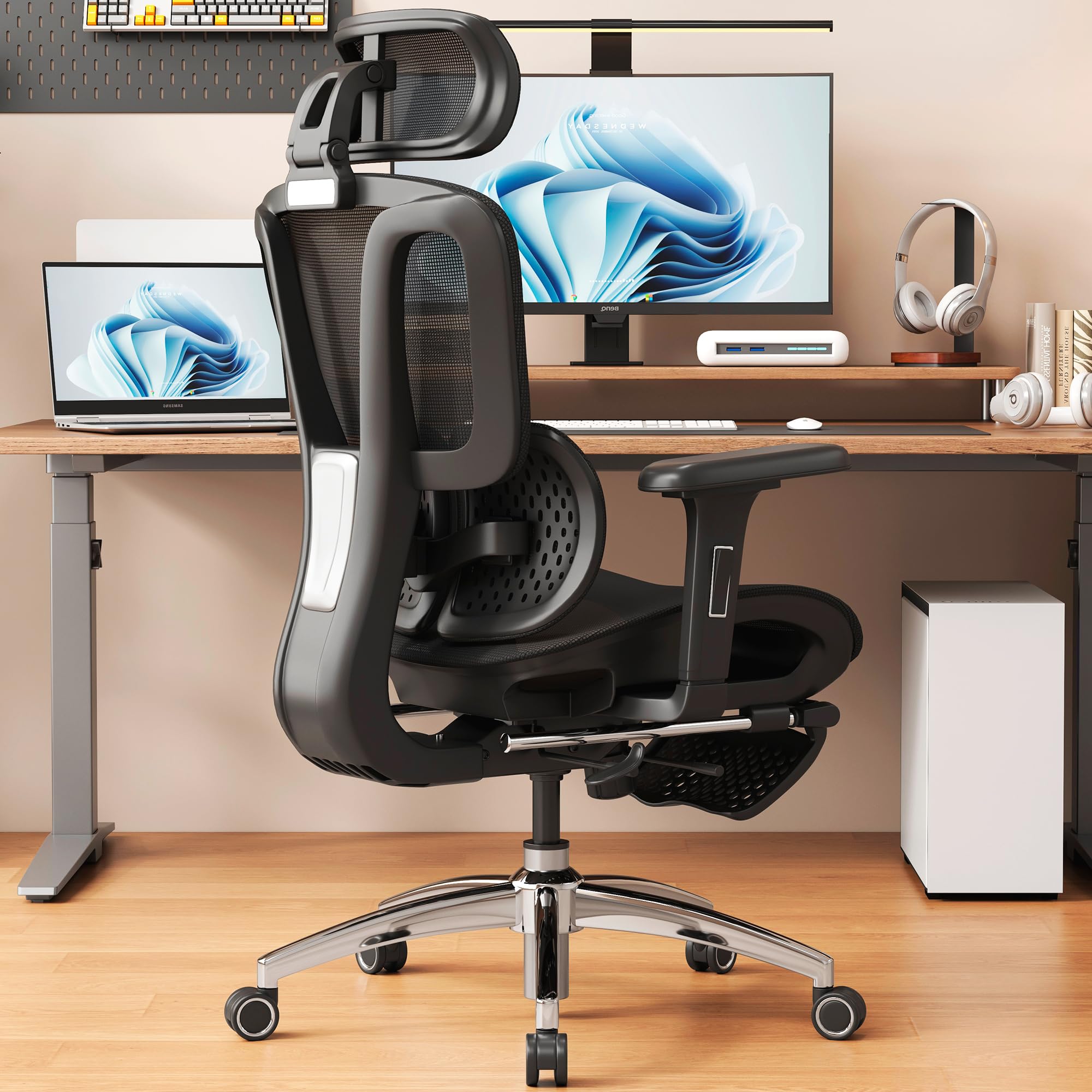
Adjustable lumbar that locks to the exact curve of your spine, plus a built-in footrest for breaks.
Most “lumbar support” chairs give you a single bump that hits one spot. The Vonesse gives you 3 levels of height adjustment and 2 levels of forward/backward depth adjustment for the lumbar pad. That means you can shift the support pad up or down and also push it closer or pull it away from your lower back. For people whose lumbar curve sits higher (common in shorter users) or lower (tall users), this is the difference between active support and a pressure point.
The 3D armrests (height, forward-backward, and angle) pair with a 60mm adjustable seat depth (about 2.4 inches), which relieves thigh pressure for different leg lengths. Owners mention the “breathable mesh keeps you cool even during extended use,” and the Grade-4 explosion-proof gas lift supports a 300-lb capacity safely. The retractable footrest slides forward for reclined breaks — but it adds weight to the base, so sliding it in and out takes a deliberate shove. Setup is claimed at 15 minutes, though the multiple adjustment knobs mean you will spend longer initially tweaking the settings.
Lumbar Tunability: Five total lumbar adjustment positions (3 heights x 2 depths) is more customization than the FLEXISPOT ErgoX’s dynamic lumbar, and it comes at a lower price than the MOLENTS.
This fits you if: You have chronic lower back tension and need to dial in the exact lumbar position — the two-axis adjustment, 3D arms, and adjustable seat depth create a fully personalized seat.
Less ideal if: You are over 240 lbs (the 300-lb limit is lower than the 400-lb Amazon Basics) or you dislike extra footrest mechanisms that add clutter under the desk.
4. SUNNOW Ergonomic Office Chair

The space-saver that stows its arms under the desk when not in use — the only chair here that does that.
The SUNNOW flips its armrests up 90 degrees, turning a standard ergonomic chair into a desk-slider. When you want to pull the chair completely under a standing desk or a shallow writing desk, those flipped-up arms clear the underside lip. Fixed-arm chairs simply will not fit. Buyers call out the “height-adjustable arms provide comfy support for your elbows,” but one reviewer noted the arms “are hard as rocks” and fixed that with aftermarket cushions. The chair is BIFMA certified (a standard for furniture durability) and SGS certified (an independent testing lab), which means the frame and gas lift are tested for durability.
The seat uses a W-shaped memory foam cushion that reduces pressure on the hips — a detail that matters during eight-hour shifts. Several reviews praise the “long seat for tall users” and the responsive customer service (one buyer mentioned a representative named Sophia provided a free lumbar pillow). At 19.1 inches wide, the backrest is narrower than the MOLENTS’s 19.7 inches, so larger-shouldered users may find the upper back support slightly snug. Assembly is listed at 15 minutes, and reviewers confirm the instructions are clear.
Space Optimization: The 90-degree flip-up arms are unique here — no other chair in this list lets you tuck the arms flat against the seat for storage or desk clearance, unlike the fixed 3D arms on the FLEXISPOT.
Grab this for: Small desks, standing desks with low clearance, or shared workspaces where you need to push the chair fully underneath when not seated.
Think twice if: You need 3D arm movement (this chair adjusts height only) or you dislike hard plastic arm pads — plan on buying padded covers.
5. MOLENTS Ergonomic Mesh Office Chair

The lumbar panel moves in two axes (up/down and forward/back), so your lower back gets precise support — not a generic bump.
Your spine’s lumbar curve changes as you recline. The MOLENTS chair lets you adjust the lumbar support up/down and also deeper into the curve (more pressure) or shallower (less pressure). That dual-axis adjustability is rare at this price tier, where most chairs only let you move the lumbar pad up and down. The 3D armrests (height, forward/backward, and swivel) mirror that precision for your elbows: you can rotate the armrest pad left or right to match the angle of your forearms while typing, which reduces strain on your ulnar nerve (the nerve running through your elbow to your pinky finger).
Customers note the chair is “comparable to higher-end chairs” in build quality, noting “real heft and doesn’t feel cheap or hollow.” The seat is 19.8 inches wide with an 18.9-inch depth — comfortable for users up to around 6 feet and 220 lbs. One shorter reviewer (5’4″, 140 lbs) found the seat feels “spacious without being overwhelmingly large” and that the mesh material “keeps me cool during long working sessions.” Assembly takes about 20 minutes, and MOLENTS includes a 2-year warranty after registration. The backrest reclines from 90° to 120° with three lockable positions, so you can switch between typing and resting without the seat sliding forward.
Lumbar Two-Way: Adjusting lumbar height and depth independently makes this a better lower-back fine-tuner than the FLEXISPOT ErgoX’s dynamic lumbar, especially for users who need more or less pressure on the spine curve.
Pick this if: You need lumbar depth adjustment (push the support closer or further from your spine) plus 3D armrests, all at a mid-range price — the build quality exceeds what you would expect at this cost.
Avoid it if: You are over 6’2″ or 240 lbs — the 19.8-inch seat width is generous but the backrest height stops early for very tall torsos.
6. Branch Ergonomic Chair Pro
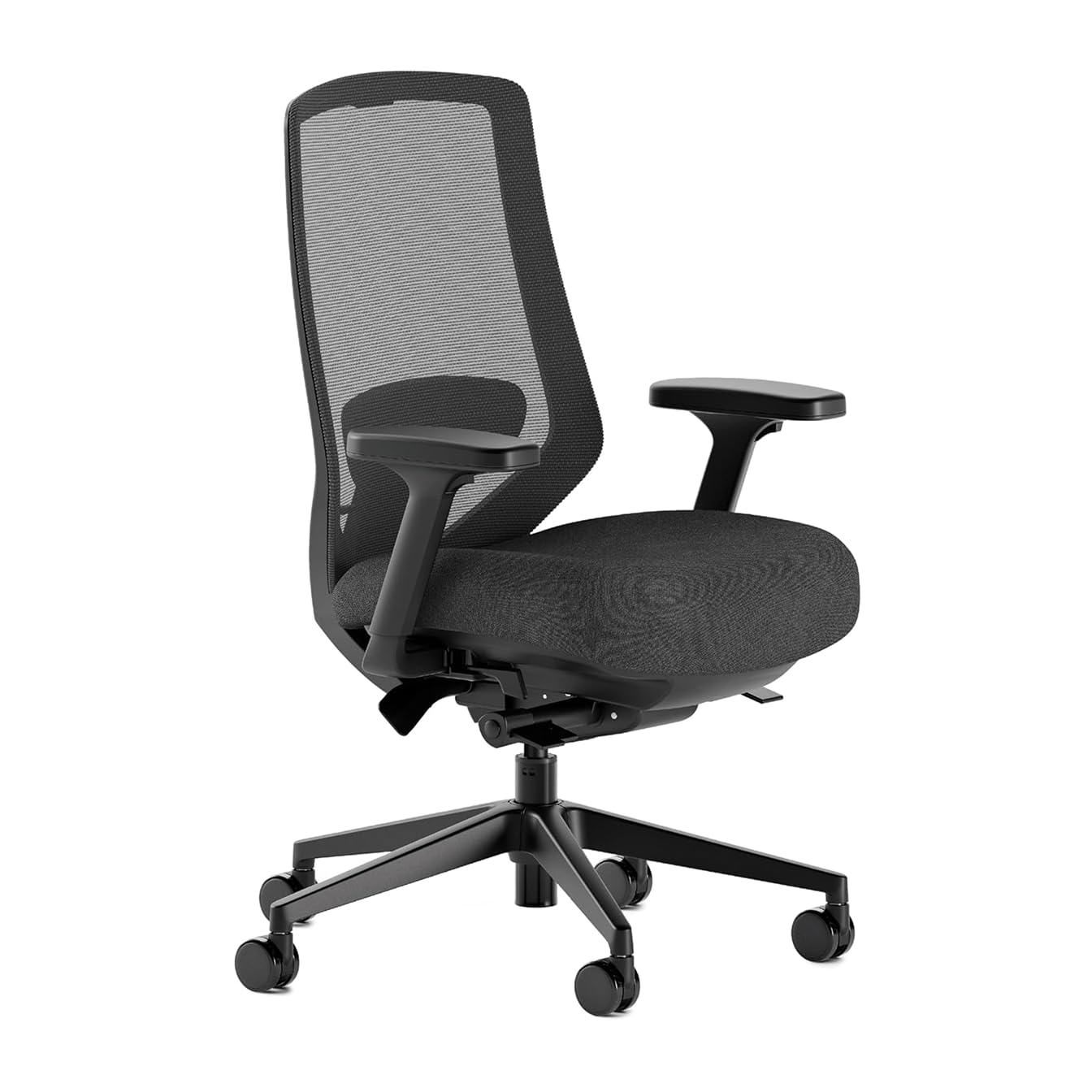
Fourteen adjustments including 5D armrests — the closest you get to a bespoke chair without a custom order.
The Branch Ergonomic Chair Pro earns its “Pro” name with 14 points of adjustment, the most of any chair here. The 5D armrests let you change height, width (slide the pad sideways), depth (forward/back), pivot (rotate the pad), and pad position (tilt the pad surface itself). If you use a vertical mouse or a split keyboard that angles your wrists inward, that extra pad tilt brings the armrest surface to your elbow rather than forcing your elbow to the pad. The chair also includes forward tilt (the seat cushion tips a few degrees forward so your hips rotate open), which reduces lower back rounding during intensive typing sessions. The FLEXISPOT ErgoX does not have this feature.
Buyers consistently compare it to high-end ergonomic chairs costing twice as much, with one writing “comparable to HM Aeron at lower price.” Another reviewer who works 8-10 hour days called it “the best desk chair I have ever sat in.” The molded high-density foam seat distributes weight evenly, and the two-way lumbar cushion adjusts vertically for targeted support. At 42 pounds, the chair is heavy — you will not slide it around casually. Assembly requires two people for the seat section, and the warranty requires shipping to the mainland for returns, which some buyers flagged as a potential hassle if something goes wrong.
Why the 5D Arms Matter
- Pad width adjustment lets you narrow or widen the arm gap without changing the arm post — perfect if your shoulders are narrower or broader than average
- Pad position tilt means the armrest surface angles with your forearm, not just the post
- Forward tilt seat cushion prevents the “c-curve” slouch common in deep seats
The Practical Tradeoffs
- Heavy 42-lb frame is inconvenient to move between rooms
- Warranty requires shipping to the mainland, not an in-place swap
- Seat cushion, while supportive, could be plusher for very thin users — some buyers noted “seat could be more cushioned”
Get this if: You want the absolute most adjustability available — the 5D armrests and forward tilt address problems most chairs ignore, and the build quality rivals chairs costing twice as much.
Hold back if: You need a light, easily movable chair for a shared desk or you are on a tighter budget — all those adjustment points come with a higher price and a heavy frame.
Understanding the Specs
Armrest Dimensions (2D, 3D, 5D)
These numbers tell you how many directions the armrest pad can move. 2D (two dimensions) = height plus one other direction, usually swivel or depth. 3D = height, depth (forward/back), and swivel or angle — the most common useful range for desk workers. 5D, as seen on the Branch Ergonomic Chair Pro, adds width (slide the pad closer to or further from your body) and pad-position tilt (rotate the pad surface itself). For most people, 3D is enough: you get your elbow at a 90-degree angle and the pad centered under your forearm. 5D is for people who want to tune the armrest surface to match an unusual desk height or keyboard angle.
Weight Capacity and Seat Width
Weight capacity is not just about the gas lift (the pneumatic cylinder that raises the seat). It also tells you how wide the seat pan and backrest are designed. A 400-lb rated chair (Amazon Basics Big and Tall) typically uses a wider seat frame with armrests spaced further apart. A 300-lb rated chair (Vonesse) uses a standard-width seat that fits average builds better. Measure your hip width at the widest point before choosing: if you are above 220 lbs, a 300-lb chair will feel tight, while a 400-lb chair will feel roomy even for average-weight users.
FAQ
Can I replace fixed armrests with adjustable armrests on my current chair?
How do I measure the correct armrest height for my desk?
Is a mesh seat or a foam seat better for long hours?
Does a 400-lb weight capacity chair feel uncomfortable for a 150-lb person?
How do I stop the armrest pads from wobbling over time?
Can I use this chair for gaming too, or only office work?
What does “forward tilt” do and do I need it?
How long do the gas lifts on these chairs last?
Can I adjust the armrest width without tools?
Final Thoughts: The Verdict
For the majority of shoppers, the office chair with adjustable arms winner is the FLEXISPOT ErgoX because its 3D armrests, dynamic lumbar support, and adjustable seat depth (17″ to 20″) cover the widest range of body types for the price. If you want the absolute maximum adjustability on a premium budget, grab the Branch Ergonomic Chair Pro. And for bigger and taller users needing a 400-lb capacity with a genuinely wide seat, the standout is the Amazon Basics Big and Tall.
How We Picked
We do not accept paid placement. Every pick is matched to a real buyer and a real use-case; we do not hands-on test units.
Sources & Methodology
Specifications: manufacturer listings and product documentation. Review insights: verified customer reviews, as of July 2026. Pricing: not shown on this page (it changes often); check the current price via the retailer link.
As an Amazon Associate, Gadgets Feed earns from qualifying purchases. This does not affect which products we feature.