
Our readers keep the lights on and my morning glass full of iced black tea. As an Amazon Associate, I earn from qualifying purchases.
Specs are compiled from manufacturer listings and verified buyer reviews and can change over time — please confirm the key details on the product page before buying.
You take hundreds of photos on your phone every month, but how many ever make it out of the cloud? A dedicated photo printer turns your best shots into tangible keepsakes you can hold, frame, or stick in a journal. The real question is which technology fits your life: a pocket-sized model for on-the-go prints, a desktop dye-sublimation machine for lab-like quality, or an all-in-one for photos and documents.
I’m Min — the founder and writer behind Gadgets Feed. This guide is built by comparing the manufacturers’ published specifications and the patterns across verified customer reviews, so you get each pick’s real strengths and trade-offs instead of marketing spin.
You want prints that capture vacation memories, scrapbook stickers, or borderless 4×6 photos with lab-like quality. This guide to the best photo printer options helps you pick the right one without the guesswork.
Our Picks at a Glance


How To Choose The Best Photo Printer
Photo printers fall into two broad camps: pocket-sized instant models that connect to your phone, and larger desktop models that deliver higher quality. Your choice depends on where you’ll print and how closely you want to match professional photo-lab quality.
Print Technology: Dye-Sub vs. Inkjet vs. ZINK
The technology inside dictates water resistance, color richness, and running costs. Dye-sublimation printers apply a protective coating over each print, making them smudge-proof and water-resistant — ideal for keepsakes. Inkjet printers, like the Epson XP-8800, use liquid ink and can produce lab-quality color with more shades, but prints need time to dry and can smudge if handled too soon. ZINK (Zero Ink) printers like the Canon Ivy 2 have no cartridges at all — color crystals are embedded in the paper itself, which makes them super portable but limits color richness and drives up the per-sheet cost.
Connectivity: Built-in Wi-Fi vs. Wi-Fi Direct vs. Hotspot
Most modern photo printers connect to your phone via an app. Some models, like the YOTON and Liene M100, create their own built-in Wi-Fi hotspot, so you pair directly even when there’s no internet nearby — useful for camping or events. Others rely on Bluetooth or your home network. For desktop models, check that your printer supports Wi-Fi Direct (router-free printing) if your home network is finicky.
Print Size and Cost Per Sheet
Decide on print size: pocket printers output 2×3 or 3.5×4.25-inch prints, while desktop models handle 4×6 postcard size and sometimes larger. Per-print cost matters over time — dye-sub bundles with included paper and ink (like the HPRT’s 108 sheets or the Liene’s 180 sheets) often beat buying refills separately.
Quick Comparison
| Model | Best For | Print Size | Speed per Photo | Connectivity | Amazon |
|---|---|---|---|---|---|
| Fujifilm Instax Mini Link 3★ Best Overall | Instant Polaroid-style fun | Credit-card sized | 1 ppm | Bluetooth | Amazon |
| YOTON 4×6AR Pioneer | AR video prints | 4×6 inch | 5 ppm color | Built-in Wi-Fi | Amazon |
| Canon Ivy 2Sticker Champ | Sticker journaling | 2×3 inch sticky-back | ~50 sec | Bluetooth 5.0 | Amazon |
| HPRT 4×6 Beige | Budget desktop home use | 4×6 inch | 300 DPI | Wi-Fi | Amazon |
| HP Envy Photo 7975 | Family workhorse plus photos | Borderless 4×6 & 8.5×11 | 15 ppm B&W | Wi-Fi & mobile | Amazon |
| HP Sprocket Studio Plus | Easy home 4×6 instant | 4×6 inch | ~61 sec | Wi-Fi | Amazon |
| Liene M100 Bundle | High-volume event printing | 4×6 inch | 300 dpi | Built-in hotspot | Amazon |
| Canon Selphy CP1500 | Portable lab-quality 4×6 | 4×6 postcard | 10 ppm color | Wi-Fi + app | Amazon |
| Epson XP-8800 | Lab-quality large prints | Up to 8.5×11 | ~10 sec 4×6 | Wi-Fi Direct | Amazon |
In‑Depth Reviews
1. Fujifilm Instax Mini Link 3
Our pick — over 4.5★ from 700+ verified ratings; the strongest balance of quality and price.
The social butterfly that turns your phone into a mini instant-photo booth.
This is the printer for party people and scrapbookers who love the classic Instax look. Its credit-card-sized prints come straight out with that retro white-frame aesthetic, and the app adds confetti, spotlights, sprinkles, and a photobooth mode that makes group events genuinely more fun. One thing to know upfront: the film — the actual Instax mini cartridges — is sold separately, and the included accessories drew the most negative feedback for that reason.
Print quality is the thing everyone raves about here, and pairing is painless with Bluetooth and USB-C charging. It’s compact enough to fit in a bag, and owners describe taking it to a retirement party and printing 80 photos straight from a phone to hand out to guests. The one quirk several buyers report: the battery can arrive fully drained — “Had to charge for about 25 minutes before using it” — so plan a quick top-up before your first session.
At 1 page per minute, you are not smashing through a hundred prints quickly, but that’s not what this is for. It’s for savoring a handful of perfect memories, and at about three times the thickness of a phone, it travels easily. If you want fast, high-volume 4×6 output, the YOTON below blasts through prints 15 times faster on black and white and 5 times faster in color — but it lacks the nostalgic, peel-and-stick charm this one delivers.
Best in its lane: For instant, fun, shareable prints at parties, the classic Instax look wins people over every time — no other pick here matches that vibe.
The heads-up: Budget for film packs from day one; the printer ships without any, and the battery needs an initial charge before first use.
Reach for this if: You want a portable, social printer for events, gifts, and journaling with that iconic instant-photo frame.
Look elsewhere if: You need true 4×6 prints or plan to print in bulk — this is a single-print-at-a-time experience.
2. YOTON 4×6 Photo Printer
The only printer here that makes a still photo play a 15-second video.
The YOTON’s a neat extra is its exclusive AR Video Printing feature: you can print a photo of a moving moment up to 15 seconds long, then scan that print with the app and watch the image animate on your phone. It’s a genuinely surprising way to bring baby milestones or travel memories to life. This is also the fastest printer in this lineup — 15 pages per minute in black and white and 5 pages per minute in color, a 15x and 5x speed gap over the Fujifilm above.
Build quality is mixed — some owners describe the body as flimsy — but the prints themselves earn strong praise. One owner reports printing 28 pictures and says they look amazing, matching the quality of a full-size printer. The paper feels thick, and each photo gets a protective layer that resists water, scratches, and fingerprints, making it ideal for framed keepsakes you want to hang onto. It ships with 54 sheets and one ink ribbon, plus a print cassette and AC charger, so you can start immediately.
The recurring pain point is connectivity: the app demands constant location tracking, and setup relies on a 2.4GHz Wi-Fi network. Some iPhone users found it wouldn’t connect at all, while Android users mostly got it working. It also runs through the built-in Wi-Fi hotspot, so you connect directly to the printer itself — even with no internet around — which is more stable than Bluetooth once the initial pairing is done.
The wow factor: AR video prints are the single most unique feature in this whole guide — a still photo that moves is a guaranteed conversation starter.
The catch: Expect a fiddly first-time setup with app permissions and 2.4GHz requirements; patience is part of the deal.
Best for: Tech-curious families who want 4×6 prints with a twist and don’t mind troubleshooting an app to get there.
Think twice if: You’re on an iPhone and want zero-hassle pairing — this one has a documented Android bias.
3. Canon Ivy 2 Mini Photo Printer
A featherweight 145-gram sticker maker for journaling and travel — no cartridges to buy, ever.
The Canon Ivy 2 weighs just 145 grams, so it disappears into a purse or backpack, and its peel-and-stick backing makes every print a ready-made sticker. Journalers and scrapbookers live for this: print a photo, peel off the back, and stick it straight into a diary or onto a laptop. The ZINK technology means there’s no ink to replace — color crystals are embedded in the paper itself, so your only ongoing cost is the paper packs.
Connectivity uses Bluetooth 5.0, which owners find instant and reliable from phones and tablets via the Canon Mini Print App. Unlike the YOTON, there’s no app permission headache or 2.4GHz dance — you just pair and print. An initial print takes up to 50 seconds, which is fine for single keepsakes but slow for bulk work. Canon also tuned the Ivy 2 for better skin tones and improved contrast in the print engine.
Print quality is genuinely polarizing here: the size and portability get universal praise, but color accuracy lands as the most-discussed fit note. Some owners find blues overemphasized, and the small 2×3 output is not a full-size replacement — it’s an instant-memory, sticky-back machine. That’s the trade-off for a printer this small, and for journaling it’s exactly the point.
Why it wins: Zero-ink stickers at 145 grams make this the most portable and low-maintenance pick in the lineup — ideal for scrapbooking on the go.
The honest limit: Color shifts toward blue on some prints, and the tiny 2×3 size won’t satisfy anyone wanting frame-worthy 4×6 output.
Grab it for: Daily journaling, travel memory keeping, and anyone who wants a tiny sticker printer that just works.
skip it if: You want true photo-lab color accuracy or standard 4×6 prints — this is a cute sidekick, not a serious photo machine.
4. HPRT 4×6 Photo Printer
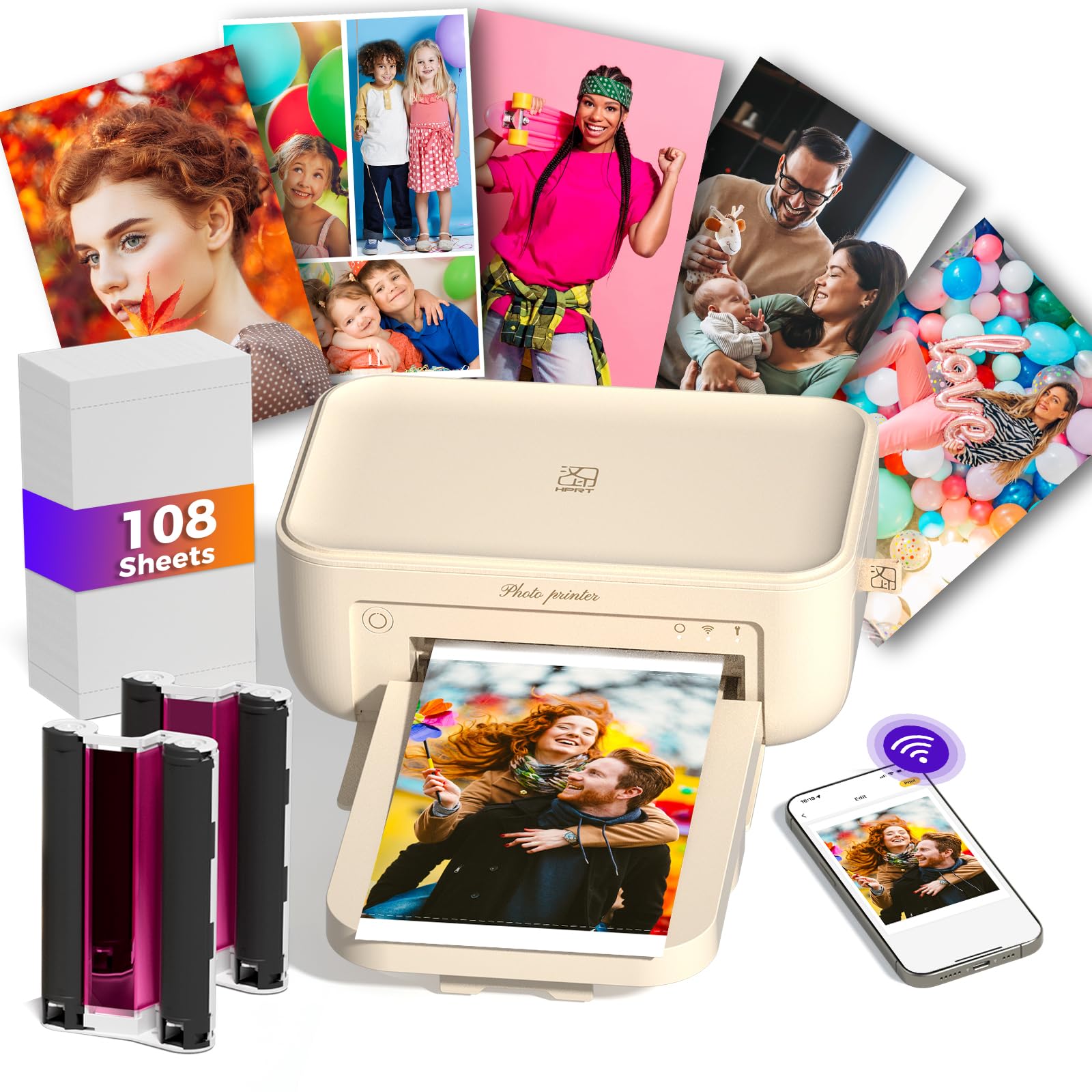
The desktop dye-sub starter that includes 108 sheets and two ribbons right in the box.
If you want true 4×6 prints without paying a premium, the HPRT is the smart entry point. from the start you get 108 sheets of photo paper and two ink ribbons — that’s a lot of keepsakes before you ever buy a refill. It’s a dye-sublimation printer, so each photo gets an automatic lamination layer that seals out dust, fingerprints, and water. Owners consistently call the picture quality amazing for the price.
Setup takes a few steps: plug in the power, download the Heyphoto app, confirm your phone is on the same Wi-Fi as the printer, then load the ink cassette and paper. It’s a lightweight desktop unit, not a pocket model, so it lives happily on a shelf or desk. At 300 DPI and roughly 2.4 kg, it’s a solid home-use machine for daily prints and wallet-sized photos without the expense of a bulky office printer.
The reliability feedback is genuinely split — many owners say it works perfectly, but some report it stopping after the first picture. The app also gets dinged for shutting down unexpectedly and having thin instructions. For the money, though, the sheer volume of included supplies makes it a low-risk way to test whether you’ll actually use a 4×6 printer regularly.
The value angle: 108 sheets and two ribbons in the box mean a very low cost-per-print right out of the gate — unbeatable for a budget 4×6 starter.
Know this: Quality control varies; occasional units stop after the first print, and the companion app is the weakest link in the experience.
Ideal for: Budget-conscious homes wanting their first real 4×6 dye-sub printer with enough paper to learn on.
Not for: Anyone who can’t tolerate app hiccups or wants a printer they never have to troubleshoot.
5. HP Envy Photo 7975

The home office workhorse that also happens to print borderless photos beautifully.
This is the pick for households that can’t justify two separate machines. The Envy Photo 7975 prints, scans, and copies, with an automatic document feeder, a separate photo tray, and automatic two-sided printing. It hits up to 15 pages per minute in black and 10 pages per minute in color for documents, and it prints high-quality true-to-screen borderless photos when you switch to photo mode. The 22-second initial page time and a dedicated photo tray make casual photo printing painless.
HP’s AI-enablement is the standout differentiator: it cleans up web pages and emails before printing, removing unwanted content so you don’t waste paper on awkward layouts. Owners describe it as quiet, easy to set up, and note that the ink doesn’t dry out quickly between uses — a common inkjet annoyance that this one handles well. It’s also a large desktop unit at 15.08″D x 18.11″W x 9.17″H, so it’s a permanent fixture rather than a stow-away.
The honest trade-off is that wireless connectivity draws mixed feedback — most owners get it running smoothly, but a minority report persistent reinstalls and driver struggles on Windows. The included 3-month Instant Ink trial is a nice start, but long-term ink costs are the real consideration with any inkjet. If you’re a Mac or phone user who wants one reliable machine for both docs and occasional photos, this balance is tough to top.
What it nails
- Full print, scan, copy, and fax workflow in one machine
- Dedicated photo tray means no swapping paper mid-job
- AI-assisted web printing cuts wasted pages and ink
Where it stumbles
- Wi-Fi setup is love-it-or-hate-it; some need constant reinstalls
- Inkjet prints need handling care and ongoing ink budgets
Choose this for: Families wanting one machine that does homework, office docs, and borderless photos without a second device.
Pass if: You’re photo-only — a dedicated dye-sub printer will serve you better and cheaper long-term.
6. HP Sprocket Studio Plus

A shoebox-sized dye-sub printer that produces dry, tear-resistant 4×6 photos from your phone.
The Sprocket Studio Plus delivers full 4×6 prints on tear-resistant, smudge-proof, waterproof paper — a real upgrade from pocket-sized stickers. It’s a compact home unit, often described as shoebox-sized, that connects over Wi-Fi to the HP Sprocket app. The app lets you decorate photos with stickers, frames, and filters before printing, and it offers collage, photobooth, and photo ID modes that give it genuine utility beyond plain prints.
Owners praise how easy it is to use, particularly for older family members who found the setup intuitive — you hold the power button, load the paper, and print. It ships with 118 sheets and 3 ink cartridges, so you can build a substantial photo album before restocking. Each photo comes out dry to the touch immediately, which is the defining dye-sub advantage over inkjet.
The reality check: connectivity is this model’s most-discussed weakness, with far more negative feedback than on other picks here, and it needs a 2.4GHz network specifically. Some owners mention the printer failing after roughly 10 prints, and print speed runs about 61 seconds per photo (or longer) with a color quality that owners call merely good, not great. The paper and ink quantities match exactly with no margin for errors, so a botched print costs you a sheet.
The appeal: Genuinely easy for seniors and non-techies, with 118 sheets included and waterproof output that’s dry instantly.
The risk: Connectivity complaints dominate, and reliability issues surface often enough that you need a tolerance for troubleshooting.
Best for: Someone who wants a simple 4×6 dye-sub printer and is on a reliable 2.4GHz network — especially as a gift.
Avoid if: You need dependable daily printing; the mixed reliability record makes this a risky primary machine.
7. Liene M100 4×6 Bundle

The event printer’s bundle — 180 sheets and five cartridges mean you’re ready to print for months.
The Liene M100 is the volume play. The bundle includes a printer plus 180 sheets of 4×6 photo paper and 5 ink cartridges, which is an enormous amount of printing before you ever buy a refill. It uses thermal dye sublimation with a 30 bpp color depth, and each photo gets a protective lamination layer that guards against water, scratches, and fading. A professional photographer who tested it was impressed, noting the dye-sub tech means no ink clogs even after a year of sitting idle — a real advantage over inkjets.
Connection is handled by a built-in Wi-Fi hotspot, so you pair directly to the printer with no home network involved, and it supports up to 5 devices connecting simultaneously — handy for events where multiple guests want prints. The app walks you through any errors step by step and even shows which printing stage you’re on. Customers note crisp, accurate color when using the app, though skipping the app produces grainy results, so it’s mandatory rather than optional.
The biggest practical note: budget roughly one minute per photo. It’s not fast, so it’s not ideal for high-volume events despite the large bundle — owners advise keeping to batches under 20 prints to avoid overheating. But for steady home use, selling event photos, or printing from an RV with just a power source, the included volume makes the math work in your favor from day one.
The math that matters: 180 sheets and five cartridges included means your per-print cost is as low as this category gets without a subscription.
The pace: One photo per minute limits you to methodical printing; batch over 20 prints at once and you risk overheating.
Reach for this if: You print often and want the lowest sustained cost with dependable dye-sub quality and off-grid hotspot connectivity.
Not for: Speed demons or anyone printing at events with a queue — this is a patient printer.
8. Canon Selphy CP1500 Bundle

The portable dye-sub that matches drugstore print quality in a 7 x 5 x 2-inch package.
The Selphy CP1500 is the reference point for portable 4×6 quality. It produces vibrant 300 x 300 DPI prints with 16.7 million colors, and owners say the output is “what you would get at Walmart or Walgreens” — meaning proper photo-lab quality in a device smaller than a loaf of bread. This bundle sweetens the deal with a KP-108IN set (108 sheets of 4×6 paper plus 3 ink cartridges), a 6-slot memory card holder, and a screen cloth.
Versatility is its superpower. It prints on four different paper sizes, including 2.1 x 3.4-inch adhesive stickers, and lets you pick glossy, semi-gloss, or satin finishes right in the app. It connects over built-in Wi-Fi to the SELPHY Layout app, or you can print directly from a memory card or USB flash drive — no phone required. An optional battery makes it genuinely portable for on-the-go use. Setup involves a small tray that some owners had to wiggle into place, but everyone agrees it’s quick to master.
The biggest negative feedback loop is around color — some owners find the colors less punchy than their phone screen, while others love them, so it’s a fit-note rather than a flaw. Paper and ink are pricey, but for occasional keepsake prints, owners say it’s worth it. The 24 bpp color depth and automatic lamination give you prints that last, and at 10 pages per minute color, it’s the fastest dye-sub here.
Why it’s the standard: Lab-quality prints in four sizes with three finish options and memory-card direct printing — class-leading flexibility in a portable body.
The honest note: Color intensity varies from screen to print depending on the photo, and refill paper/ink costs add up for heavy users.
Best for: Hobbyists and families who want genuine photo-lab output, sticker prints, and the ability to print cards, all from a compact unit.
Pass if: You’re on a tight budget — the upfront plus refill costs make it a premium proposition.
9. Epson Expression Photo XP-8800

The 6-color inkjet that produces lab-quality prints up to 8.5 x 11 inches in as fast as 10 seconds.
This is the printer for people who take photography seriously. The XP-8800 uses six separate Claria Photo HD inks — adding light cyan and light magenta to the standard four — which is what gives it that extra smoothness in skin tones and sky gradients. A 4×6 borderless photo prints in as fast as 10 seconds, and you can go all the way up to 8.5 x 11 inches, making it the only pick here that handles true letter-size photo paper. Owners describe the color as “excellent” and the output as nearly lab-quality on glossy paper.
It’s also a full all-in-one: scanner, copier, and wireless printer with a flush 4.3-inch color touchscreen. Separate trays for plain and photo paper mean you don’t have to swap paper between jobs, and a rear feed handles specialty stock like card stock. Wi-Fi Direct lets you print without a router, and the Epson Smart Panel and Creative Print apps cover everything from setup to building custom cards and stationery. Black and white documents run at 9.5 pages per minute.
The honest catch is the classic inkjet trade-off: prints need a moment to dry, and the six small ink cartridges won’t last forever — ink life is a mixed feedback point. Connectivity complaints also surface, with some buyers reporting the unit won’t print from certain devices. But for anyone wanting the flexibility of large, vibrant prints plus scanning and copying in one machine, the six-color engine delivers a quality level no compact dye-sub here can match.
The quality ceiling: Six inks and borderless up to 8.5×11 put this a clear step above every other pick for serious color work.
The trade-off: Ink costs and occasional connectivity quirks are the price of inkjet versatility; prints need drying time.
Choose this for: Photographers and crafters wanting lab-quality large prints, scanning, and copying in one serious desktop machine.
pass on it if: You print photos only occasionally — the ongoing ink commitment favors a dye-sub unit instead.
Understanding the Specs
Dye-Sublimation vs. Inkjet Output
Dye-sub printers (like the Selphy CP1500 or HPRT) melt dye into the paper and then apply a protective laminate, making prints water-resistant, smudge-proof, and ready to handle immediately. Inkjets (like the Epson XP-8800) spray liquid ink in microscopic droplets, which allows more subtle color blends and larger sizes but leaves prints vulnerable to smudging until dry and vulnerable to running over time.
Pages Per Minute vs. Real-World Speed
A spec like “15 pages per minute” refers to rapid document printing in black and white. Photo printing is slower because each 4×6 image requires multiple passes through the dye-sub process or dense ink coverage. The Selphy’s 10 ppm color spec translates to roughly a photo every few seconds, while a pocket printer at 1 ppm takes about a minute per print. Always read photo-speed specs rather than document-speed specs.
FAQ
Which photo printer has the lowest running cost per sheet?
Will a photo printer work without an internet connection?
How long do photo prints last before fading?
Can I print stickers with these photo printers?
What is the difference between ZINK and dye-sublimation printing?
Can I print photos larger than 4×6 inches?
Do I need a smartphone to use these printers?
How fast is photo printing in real time?
Final Thoughts: The Verdict
For most people, the photo printer winner is the Canon Selphy CP1500 because it pairs true photo-lab output with compact portability, four paper sizes, and memory-card printing — the most flexible balance in the lineup. If you want instant sticky-back prints for journaling, grab the Canon Ivy 2. And for serious hobbyists who print large-scale and scan, the Epson XP-8800 is the one to reach for.
How We Picked
We do not accept paid placement. Every pick is matched to a real buyer and a real use-case; we do not hands-on test units.
Sources & Methodology
Specifications: manufacturer listings and product documentation. Review insights: verified customer reviews, as of August 2026. Pricing: not shown on this page (it changes often); check the current price via the retailer link.
As an Amazon Associate, Gadgets Feed earns from qualifying purchases. This does not affect which products we feature.