
Our readers keep the lights on and my morning glass full of iced black tea. As an Amazon Associate, I earn from qualifying purchases.
Specs are compiled from manufacturer listings and verified buyer reviews and can change over time — please confirm the key details on the product page before buying.
If your streaming box, soundbar, and TV each came with their own clicker, you already know the drill: three remotes on the coffee table, one of them dead, none of them where you left it. The good news is that a single well-chosen replacement can run your whole setup — power, volume, inputs, voice search. The trick is matching the remote to the hardware you actually own, because the wrong one simply refuses to pair no matter how many times you press Return and Pause.
I’m Min — the founder and writer behind Gadgets Feed. This guide is built by comparing the manufacturers’ published specifications and the patterns across verified customer reviews, so you get each pick’s real strengths and trade-offs instead of marketing spin.
Most buyers just want one remote that turns everything on in one press. Whether you are replacing a drowned Samsung clicker, adding voice search to an older Roku, or hunting down a remote that vanishes into sofa cushions, this guide breaks down the best Remote Control options by the TV brand and streaming player they genuinely pair with.
Our Picks at a Glance


How To Choose The Best Remote Control
The remote you need is decided by two things most buyers never check before ordering: what your TV or streaming player uses to receive commands, and how many devices you want one clicker to run. Get those two wrong and a perfectly good remote sits in a drawer.
Match the connection type to your box
Infrared remotes (the kind that need a clear line of sight to the TV) are the workhorses here — they pair instantly, but you have to point them. Wi-Fi and Bluetooth remotes, like the Roku Voice Remote, talk to the device without aiming, which is why voice search works on them. If your streaming stick is hidden behind the TV, an infrared universal remote like the GE model simply cannot reach it.
Decide how many devices one remote should run
A single-device replacement keeps things simple and cheap. A multi-device universal remote, like the RCA 4-device model or the GE 4-device unit, lets one clicker run your TV, soundbar, and disc player. The trade-off is programming: multi-device remotes ask you to enter codes or run an automatic code search, while single-device replacements often just work the second you pop in batteries.
Check the small stuff that ruins a purchase
Batteries are rarely included, so factor in whether the remote takes AAAs or recharges over USB-C. Backlighting matters more than people expect if you watch in a dark room. And button layout — where volume and play/pause sit — decides whether you reach for it comfortably or fight it every night.
Quick Comparison
| Model | Best For | Connectivity | Buttons | Battery Type | Amazon |
|---|---|---|---|---|---|
| Roku Voice Remote, Replacement TV Remote Control★ Best Overall | Roku TVs and players with voice search | Wi-Fi | 18 | Alkaline | Amazon |
| Remote Control for Samsung Smart TV & Frame TV Universal ReplacementBest Coverage | Samsung 2019-2026 TVs needing voice and shortcuts | Infrared | 22 | Alkaline | Amazon |
| Amazon Fire TV Alexa Voice Remote ProNever Lose It | Fire TV owners who lose remotes in the dark | — | — | — | Amazon |
| GE Rechargeable TV Remote Control, Universal Remote Control, Backlit | Running four devices with one backlit clicker | Infrared | 25 | Rechargeable | Amazon |
| Replacement for Samsung TV Remote Control, Universal for Samsung Smart TVs | Samsung owners who want the original feel restored | Infrared | 2 | AAA | Amazon |
| RMF-TX500U for Sony TV Remote Replacement, for All Sony Bravia TV Voice | Sony Bravia owners replacing a lost or chewed remote | Bluetooth | 2 | AAA | Amazon |
| RCA Universal 4-Device Big Button Universal Remote with Streaming (RCR413BHE) | Seniors and anyone wanting big visible buttons | Infrared | 4 | AA | Amazon |
| 2-Pack Replacement Remote for Samsung Smart TV – No Setup, Instant Response | Samsung households wanting a spare in the drawer | Infrared | 17 | Alkaline | Amazon |
In‑Depth Reviews
1. Roku Voice Remote, Replacement TV Remote Control
Our pick — over 4.5★ from 24,500+ verified ratings; the strongest balance of quality and price.
The clicker that turns couch shouting into an actual search bar.
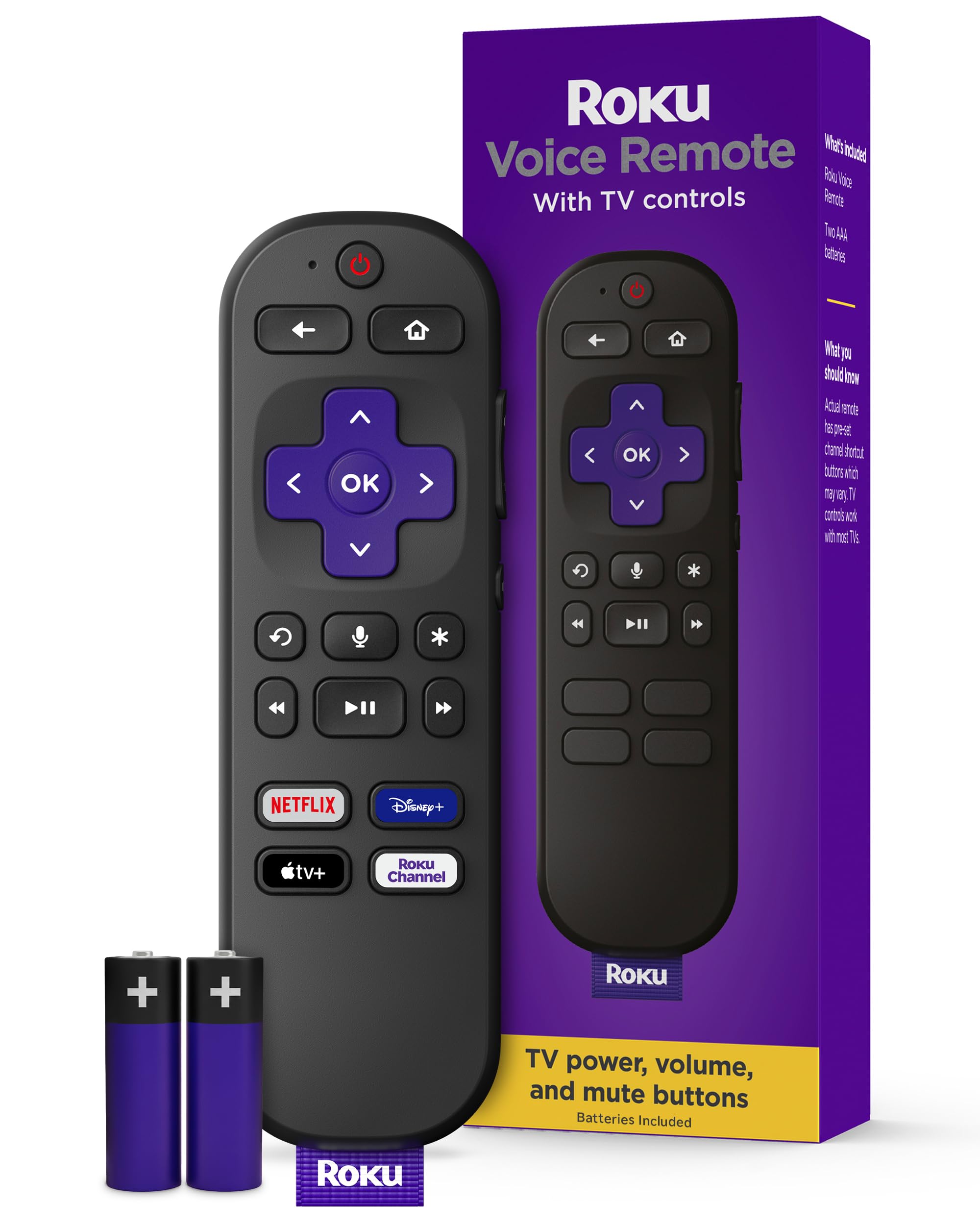
If you live inside a Roku TV or Roku player, this is the one replacement that gives you everything the factory remote does — and it talks back. You press the voice button, say a show name, and it opens instead of making you type letters one at a time across a grid. It ships with two AAA batteries already in the box, so the remote is working the moment you pull the little tab on the back. Pull that tab, turn on the Roku, and it pairs itself.
What buyers keep coming back to is how completely it just works — the pairing is instant, the voice mic picks up cleanly, and the preset Netflix, Disney+, Apple, and News buttons skip the scrolling entirely. Owners with older Roku version 3 receivers report it set up beautifully right from the start. Roku 4800X buyers report the same, with voice and mic both functioning. Eighteen buttons cover power, volume, input switching, and playback without filling the face with clutter.
The catches are worth knowing up front. This remote runs on Wi-Fi, not infrared, so it needs to pair — which is instant in practice but not something you can skip. It is not programmable, so you cannot remap the shortcut keys to your own apps. And the button legend is printed rather than backlit, which means dark-room use takes a little muscle memory.
What earns it first place
- Voice search opens shows by name instead of making you type on a grid.
- Pairs instantly — no code entry, no programming menus.
- Batteries included, so it is ready the second it arrives.
- Preset Netflix, Disney+, Apple, and News buttons in one tap.
Where it asks patience
- Not programmable, so shortcut buttons stay fixed.
- No backlight and no earphone-audio support.
- Wi-Fi pairing means it only works inside the Roku ecosystem.
Made for: anyone whose whole setup is Roku — this is the crowd favorite at 4.6 stars across 24,000+ owners, and the voice button is the reason.
Look elsewhere if: your TV is a Samsung and you need an infrared remote that reaches a hidden cable box.
2. Remote Control for Samsung Smart TV & Frame TV Universal Replacement
Twenty-two buttons, a voice chip, and a Samsung model list longer than your warranty card.
This is the pick for a Samsung household that wants the full-button experience back — not a stripped replacement. It carries 22 buttons against the 18 on the Roku up top, and that extra row is where the dedicated playback and menu keys live. The remote is built for Samsung TVs from 2019 through 2026, covering QLED, LCD, LED, and the Frame series, and it drops into the same hand position as the original.
Voice search here runs through an advanced chip that the maker lists as precise up to 40 inches, and four shortcut keys jump straight to your apps without menu diving. The shell is premium ABS (a hard, drop-resistant plastic), and the buttons are rated for 150,000+ presses — a figure that speaks to years of nightly channel surfing rather than months. At 45 g it sits light in the hand, roughly the weight of a small candy bar.
The honest caveat is the one the listing states plainly: voice and shortcut functions only work if your TV’s original hardware supports them. If your old Samsung remote never had voice, this one cannot add it. Compatibility across the wider Roku and streaming-player world is also uneven — Samsung sets are the target, and that is where it behaves.
What the owner pages say: owners say it feels better in the hand than the original Samsung remote — it is repeatedly described as better than the original, with easy setup and a build that outlasts the clicker it replaced.
The one thing to check: confirm your specific Samsung model appears on the compatibility list before ordering, since voice support is inherited from your TV, not created by the remote.
Reach for this if: you own a 2019-or-newer Samsung and want every button back, including the ones stripped off cheap replacements.
skip it if: your Samsung predates 2019 — the pairing instructions assume the newer hardware.
3. Amazon Fire TV Alexa Voice Remote Pro
A Fire TV remote that rings when you ask Alexa to find it.
For anyone who has ever pulled apart a sofa cushion, this is the feature that sells itself. Ask any Alexa device or the Fire TV app to find your remote, and the clicker emits a ring — no cushion archaeology required. For Fire TV owners who misplace the remote weekly, that finder is the reason to buy this one.
The backlight is the other headline act. A motion-activated light wakes the buttons when you pick it up in a dark room, so you are not fumbling for the volume key during a quiet scene. Two customizable buttons let you build shortcuts to favorite channels, apps, or any Alexa command, and there is a dedicated headphone button that jumps to the on-screen Bluetooth menu so you can pair wireless headphones fast. Integrated TV controls handle power, volume, and channel surfing from the same slab.
The trade-off to plan around is battery appetite. The finder and the auto-backlight are genuinely useful, but owners consistently note the backlight drains batteries quickly, and there is no obvious way to switch it off. Pairing can also be fussy on a first attempt — one unit refused to pair until support walked the owner through resets, though the replacement worked in under 15 seconds. Check the compatibility list first: first and second-generation Fire TV, first-gen Fire TV Stick, and a handful of Fire TV Edition sets are not supported.
The best fit: Fire TV households in dark rooms, especially anyone who misplaces remotes weekly — the finder and the glow-in-the-dark buttons earn their keep.
Think twice if: you hate swapping batteries, since the motion backlight quietly chews through them.
4. GE Rechargeable TV Remote Control, Universal Remote Control, Backlit

One rechargeable clicker for four devices — and it lights up when you pick it up.
If your living room runs a TV, a soundbar, a disc player, and a cable box, this is the remote that retires the pile. It controls up to four devices and includes preprogrammed app hotkeys for Netflix, Disney+, Prime Video, and YouTube. The keypad is fully backlit, and the light kicks on with any button press — roughly two seconds of glow, which is plenty to find the mute key mid-argument. A blue indicator glows while charging and turns green when full.
The rechargeable battery is the real cost story. A single charge keeps it running for months, and an 18-inch USB-C to USB-A cable is in the box — the same cable you probably already use for your phone. Owners describe programming as quick: an LG TV paired on the first four-digit code tried, an A/V receiver on the fifth. The master volume feature keeps audio control on whichever device is active, so you are not hunting for the right mode.
Be honest about one thing before buying: this is an infrared remote, and the listing states it will not work with radio-frequency devices like Roku Streaming Sticks or Amazon Fire TV Sticks. If your streaming hardware hides behind the panel, this remote cannot reach it. A few owners also find the number buttons sit high and the play/pause cluster is awkward to reach one-handed.
Why it earns its spot: the slim white shell feels sturdier than its price suggests, with a slim profile, a crisp white finish, and a backplate that looks at home next to modern gear.
One owner note worth repeating: a unit that arrived appearing dead revived with a pinhole reset button beside the charging port — worth knowing before you return it.
Built for: the four-device living room, and anyone tired of buying batteries — the USB-C recharge means no more AAA runs to the store.
Pass on it if: your streaming stick is RF-only, because infrared cannot talk to a hidden Fire Stick.
5. Replacement for Samsung TV Remote Control, Universal for Samsung Smart TVs
A dead-ringer replacement for the Samsung remote that fell in the drink.
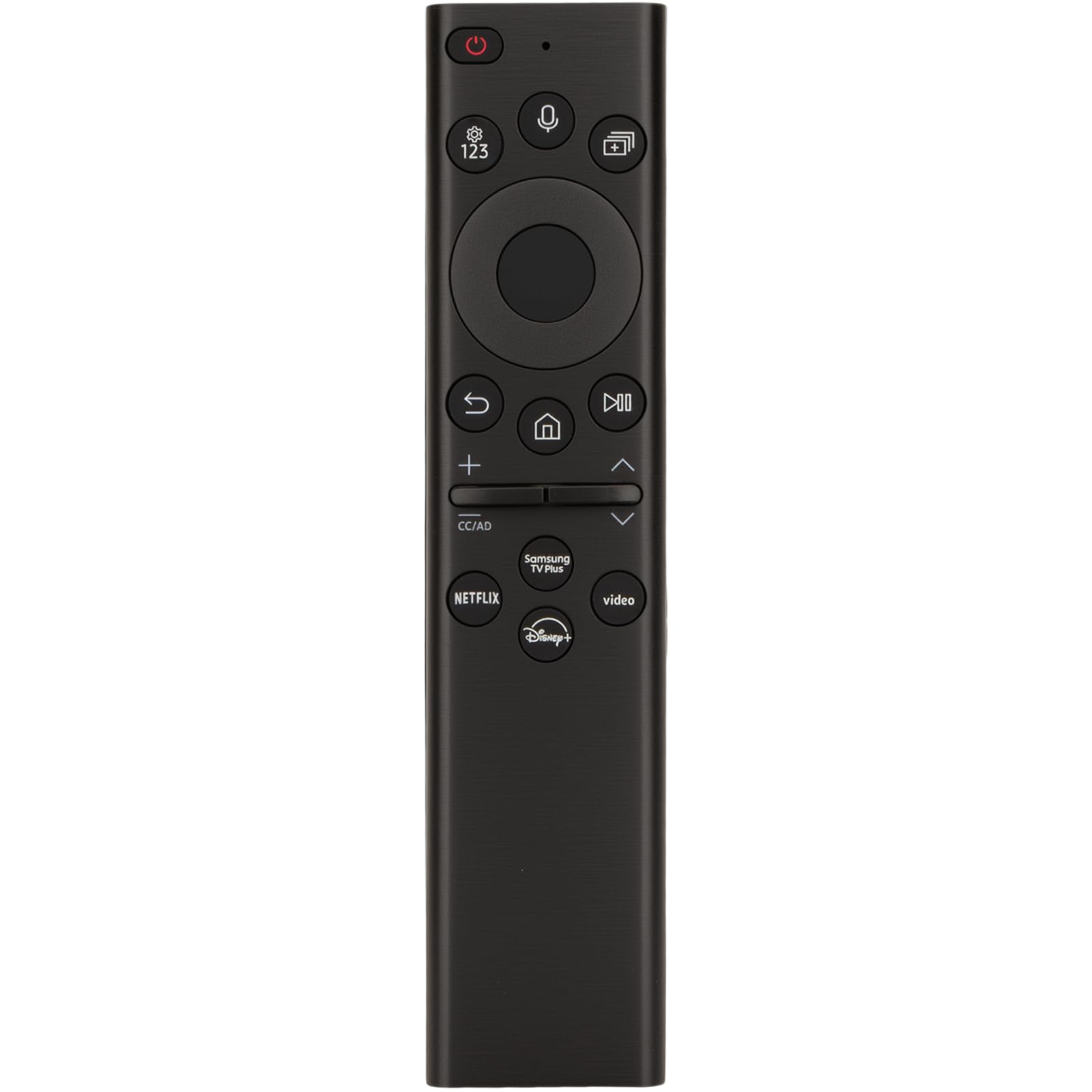
Some remotes are bought in a panic — the original went swimming, the dog made a meal of it, or it simply vanished. This is the one you order when you want the closest thing to the factory Samsung clicker without paying factory money. It replaces a long list of model numbers including BN59-01357A, BN59-01357F, BN59-01363A, BN59-01385A, and more, covering Samsung smart TVs released after 2019. Range runs to 50 feet, which covers any normal living room and then some.
Setup is a two-button trick: switch the TV on, then hold Return and Pause together for 5 to 8 seconds until the screen confirms pairing is complete. Owners describe the result as feeling original — smaller and lighter than the remote it replaces, quick to pair, and easy on batteries. It runs on two AAA batteries, which are not included. The voice button lets you speak a title instead of typing it, a step up from the no-voice originals many buyers are upgrading from.
The recurring note is that the buttons occasionally need a firmer press than the original, and the voice function is inconsistent — some buyers find it does not activate at all, while everything else works perfectly. Treat voice as a bonus rather than the reason to buy.
What owners highlight: the fit and feel in the hand — this one is repeatedly called better than the OEM remote it replaces, with a pairing process that takes seconds.
Pick this when: you need an affordable Samsung replacement fast and want it to feel like the original in your hand.
Know before you buy: voice is hit-or-miss, so do not pay up expecting it to work every time.
6. RMF-TX500U for Sony TV Remote Replacement, for All Sony Bravia TV Voice

For the Bravia owner whose remote met a dog, a drain, or the void.
Sony Bravia remotes are not cheap to replace, and they are not universal — which is exactly why this one exists. It stands in for a long run of model numbers including RMF-TX500U, RMF-TX520U, RMF-TX800U, RMF-TX900U, and RMF-TX300U, and it works across Bravia sets like the XBR-55X950H and KD-65X9000H. Response time is listed at 0.2 seconds, and the transmission distance is 15 meters — both figures that keep the cursor moving the instant your thumb lands.
This is a Bluetooth remote, not infrared, which means you do not have to aim it at the TV. Pairing takes a deliberate two-second hold on the volume-down and Google Assistant buttons, and after that it behaves like the original. Two large hotkeys put Google Play and Netflix one press away, and the voice function lets you search by speaking, check the weather, or ask for music.
Where it stumbles is consistency. Owners mention the buttons are firm and may need a firm press to register, and the voice function draws the most complaints — it is the feature buyers flag as not working. Everything else tends to be praised: it feels solid, pairs quickly, and functions just fine.
Suits you if: you own a Sony Bravia and want a plug-and-play replacement that works the moment batteries go in.
Skip the upgrade hope: if voice search is your priority, this one is the weakest performer on that front across the whole list.
7. RCA Universal 4-Device Big Button Universal Remote with Streaming (RCR413BHE)

Big, legible numbers for anyone who is done squinting at tiny keys.
This remote is built for a specific buyer: someone who wants to see the buttons without glasses and does not want a programming project. The big-button layout puts large, readable numbers on the face, and setup uses automatic brand search or direct code entry rather than a manual. It controls up to four devices, works with Roku and Apple among others, and runs on two AA batteries.
Owners describe it as staying connected to the TV and working across older Sansui and newer TCL Roku sets without fuss. The labeling is clear enough that you can see exactly what you are pressing, which matters more than any spec when the room lights are low. And the big-button design is exactly what makes it approachable for older users who find modern remotes too dense.
The honest limits: the plastic shell feels hollow and light in the hand, and switching volume requires pressing the device button first, then adjusting — a two-step habit that takes getting used to if your old remote did it in one. It also failed entirely on a new Toshiba Fire TV in one owner’s report, though that buyer attributed the failure to the TV rather than the remote.
The case for it: simplicity done right — no voice, no backlight, just big buttons that do what they say and a setup that does not require a manual.
Right for: a second TV, a guest room, or a parent who wants a remote they can read across the room.
Not for: anyone who wants voice search or a single-press volume control.
8. 2-Pack Replacement Remote for Samsung Smart TV – No Setup, Instant Response

Two clickers, one instant pairing, and a spare that lives in the drawer.
Buying a two-pack solves the oldest problem in television: the day the remote dies, you are not stuck. This package includes two universal remotes that work with Samsung Frame, Crystal UHD, Neo QLED, OLED, 4K, 8K, and Smart TVs. The pair carries 17 buttons, uses infrared to talk to the TV, and includes one-tap streaming keys for NFLX, Video, and Hulu — a step up from fumbling through menus for the app you use nightly. It is a compact remote at 5 inches long, 1 inch wide, and 0.2 inches thick, light enough to disappear into a pocket.
Setup is the whole pitch, and owners say it delivers: the remote started working the second good batteries went in, with no setup and no programming. Buttons respond well and the labeling is clear enough that you always know what you are pressing. Unlike the voice-equipped Samsung replacements above, this one trades voice for simplicity — there is nothing to configure.
Two things to know before ordering. It is an infrared remote with no voice control, so if you want to speak search terms, this is not the one. And because the pair covers a wide range of Samsung models, a small number of buyers find their particular set does not respond at all — the compatibility list is long, so it is worth a quick check against your model number.
Why the pair makes sense: two remotes for less than the price of two singles — one remote stays on the coffee table, the other waits in a drawer for the day the first one fails.
Go here if: you want a no-hassle Samsung replacement with a backup built into the box.
Opt out if: voice search matters to you, because this model is button-only.
Understanding the Specs
Connectivity: Infrared vs Wi-Fi vs Bluetooth
Infrared (IR) remotes send a beam of light to the TV and need a clear line of sight — point and press. They pair instantly and work without setup, which is why the RCA and the two Samsung infrared replacements here are so simple. Wi-Fi remotes, like the Roku Voice Remote, talk to your network instead, so no aiming is needed and voice search works. Bluetooth remotes, like the Sony Bravia replacement, behave the same way and hide behind a pairing step. The rule is simple: if your streaming stick is hidden behind the TV, buy Wi-Fi or Bluetooth, never infrared.
Button Count and Backlighting
Button count tells you how much control lives on the face. A 25-button remote like the GE model puts playback, menu, and number keys in reach; a 17-button Samsung replacement keeps it minimal. Backlighting — a gentle glow behind the keys — matters in dark rooms, and both the GE and Fire TV remotes offer it, though the Fire TV version drains batteries faster because it wakes on movement. Voice search, where present, saves the tedious on-screen keyboard entry but relies on the TV’s own hardware supporting it.
FAQ
Will a universal remote work with my Samsung TV?
Do I need infrared or Bluetooth for a hidden streaming stick?
How long do the batteries actually last?
Will voice search work if my old remote never had it?
How do I pair a replacement remote without a code list?
Is a two-pack worth it over a single remote?
Can one remote really control my TV soundbar and disc player?
Why do my buttons stop responding after a few months?
Do replacement remotes come with batteries included?
What is the real difference between a cheap and a premium replacement?
Final Thoughts: The Verdict
For most people hunting for a solid replacement, the best remote control winner is the Roku Voice Remote — it pairs instantly, includes batteries, and the voice button genuinely saves time every night. If you have a newer Samsung and want every button back, grab the Acoyer Samsung Replacement with its 22 buttons and 40-inch voice chip. And if you can never find the remote in a dark room, the Fire TV Alexa Voice Remote Pro is the one to reach for — it rings when you ask, and the buttons glow when you move.
How We Picked
We do not accept paid placement. Every pick is matched to a real buyer and a real use-case; we do not hands-on test units.
Sources & Methodology
Specifications: manufacturer listings and product documentation. Review insights: verified customer reviews, as of September 2026. Pricing: not shown on this page (it changes often); check the current price via the retailer link.
As an Amazon Associate, Gadgets Feed earns from qualifying purchases. This does not affect which products we feature.