
That grinding pause when you drag a 4K video file to a thumb drive isn’t just annoying — it’s a sign you’re working with a relic. Modern thumb drives have vaulted past the old USB 2.0 bottleneck, with some hitting sequential read speeds over 400MB/s and write speeds that turn a 10-minute wait into a 30-second blink. But picking the right one means looking past the cheap price sticker and zeroing in on real-world throughput, build materials, and whether the connector fits your current laptop (USB-C, anyone?).
I’m Min — the co-founder and writer behind Gadgets Feed. I’ve spent hundreds of hours combing through Amazon listings, cross-referencing advertised speeds against customer benchmarks, and comparing NAND flash quality across dozens of thumb drive models to find the ones that actually deliver on their promises.
This guide breaks down the top contenders so you can confidently pick the best thumb drive for your workflow, whether you need rugged portability or max-capacity media transfers.
How To Choose The Best Thumb Drive
Not all thumb drives are created equal, even if they look identical on the shelf. The internal NAND flash controller, the bus interface (USB 3.0 vs. 3.1 vs. 3.2 Gen 1), and whether the casing dissipates heat all affect real-world performance. Focus on these three areas first.
Speed Ratings: Read vs. Write
Manufacturers almost always advertise read speed because it’s the higher number. Write speed, which determines how fast you can actually offload files onto the drive, is often half or less of the read figure. For video editors or anyone moving large RAW photo libraries, a drive with a sustained write speed above 100MB/s is a game-changer. Cheap drives may hit 30MB/s write — fine for documents, painful for media.
Build Quality and Durability
A plastic housing with a sliding cap is the cheapest to produce, but it’s the first thing to crack in a bag or pocket. Premium thumb drives use a single-piece metal casing that acts as a heat sink (keeping speeds consistent during long transfers) and resists drops. Some, like the Samsung BAR Plus, are also waterproof, shockproof, magnet-proof, and x-ray proof — useful if the drive lives on a keychain.
Interface and Connector Type
USB 3.0 (now called USB 3.2 Gen 1) tops out at 5Gbps theoretical, but real-world max for a thumb drive is far lower. USB 3.1 Gen 1 is the same spec. USB 3.2 Gen 2 doubles the bandwidth to 10Gbps, though few thumb drives can saturate it. Also consider USB-C versions if your laptop or tablet only has USB-C ports — a dual-connector drive (Type-A + Type-C) saves you from carrying an adapter.
Quick Comparison
On smaller screens, swipe sideways to see the full table.
| Model | Category | Best For | Key Spec | Amazon |
|---|---|---|---|---|
| Samsung BAR Plus 256GB | Premium | Max speed & durability | 400MB/s read speed | Amazon |
| SanDisk 256GB Ultra Flair | Premium | Password-protected metal drive | 150MB/s read / 128-bit AES | Amazon |
| Amazon Basics 256GB USB 3.1 | Mid-Range | High capacity on a budget | 130MB/s read / 256GB | Amazon |
| Lexar D40E 128GB Dual USB-C | Mid-Range | USB-A & USB-C versatility | 100MB/s read / Dual connector | Amazon |
| Amazon Basics 128GB USB 3.1 | Mid-Range | Everyday affordable storage | 130MB/s read / 128GB | Amazon |
| SanDisk 128GB Ultra Flair | Entry-Level | Entry-level metal build | 150MB/s read / metal casing | Amazon |
| PNY 256GB Turbo Attache 3 | Budget | Maximum storage at lowest cost | 256GB / sliding collar | Amazon |
In‑Depth Reviews
1. Samsung BAR Plus 256GB

The Samsung BAR Plus is the only thumb drive in this roundup that pushes read speeds past 400MB/s, fully leveraging its USB 3.1 interface. That translates to moving a 4GB movie file in roughly 10 seconds — a pace that makes every other drive here feel pedestrian. The 256GB capacity is plenty for media archives, bootable OS installers, or a portable application library.
Samsung built this drive like a tank: a unibody metal casing that’s waterproof, shockproof, magnet-proof, and temperature-proof. It handles being tossed in a bag or dangling from a keychain without skipping a beat. The integrated key ring loop is a small but critical detail for anyone who tends to misplace small gadgets.
Multiple customer reviews confirm that write speeds remain consistent even after sustained use, thanks to the metal housing acting as a heat sink. The BAR Plus runs noticeably cooler than plastic-bodied drives during large file transfers, which protects the NAND flash and extends the drive’s usable lifespan.
Why it’s great
- Class-leading 400MB/s read speed
- Rugged metal casing with five-way protection
- Excellent thermal management during long writes
Good to know
- Premium price tier compared to budget options
- Available only in USB Type-A, no USB-C version
2. SanDisk 256GB Ultra Flair

The SanDisk Ultra Flair in its 256GB iteration brings the same sleek metal design and 150MB/s read speed as the smaller variant, but doubles the storage ceiling. It’s the sweet spot for users who need more than 128GB but don’t want to shell out for the Samsung BAR Plus — and still want a premium metal shell rather than cheap plastic.
One standout feature here is SanDisk’s SecureAccess software, which provides 128-bit AES encryption for password-protecting sensitive folders. That’s a practical layer of security for carrying work documents, tax records, or personal media. The encryption works on both Windows and Mac (with a software download), and it doesn’t slow down everyday uncrypted transfers.
Customer feedback consistently praises the Ultra Flair’s longevity — several reviewers report years of daily use with no data corruption or connector looseness. The drive can get warm during extended sequential writes (a sign the metal casing is doing its job as a passive cooler), but that’s normal for a USB 3.0 drive pushing near its rated limits.
Why it’s great
- Durable brushed metal construction
- Built-in 128-bit AES encryption software
- Strong reputation for long-term reliability
Good to know
- Write speed (~50MB/s) slower than BAR Plus
- Can get warm during sustained transfers
3. Amazon Basics 256GB USB 3.1

The Amazon Basics 256GB USB 3.1 drive delivers high capacity at a mid-range price point with no-frills practicality. Its retractable, telescopic design eliminates the need for a cap — just slide the connector out when you need it and push it back in for pocket protection. The 130MB/s read speed and roughly 30MB/s write speed are adequate for backing up documents, photos, and standard 1080p video files.
This drive ships formatted in FAT32 from the factory, which means single files larger than 4GB will need a reformat to exFAT or NTFS. That’s a quick one-time step, but worth noting if you plan to transfer ISO files or long 4K clips straight out of the box. The plastic body is sturdy enough for desk-to-bag travel, though it lacks the drop resistance of a metal drive.
Several buyers mention real-world transfer rates between 180-200MB/s on modern USB 3.1 ports — exceeding the advertised spec — which suggests the controller and NAND are capable of punching above their weight. The keyring hole at the tail is a thoughtful addition for attaching to a lanyard or keychain.
Why it’s great
- High 256GB capacity without the premium price
- Retractable USB connector — no cap to lose
- Actual speeds often exceed advertised 130MB/s read
Good to know
- Plastic housing, less impact-resistant than metal
- FAT32 default format requires reformatting for files over 4GB
4. Lexar D40E 128GB Dual USB-C
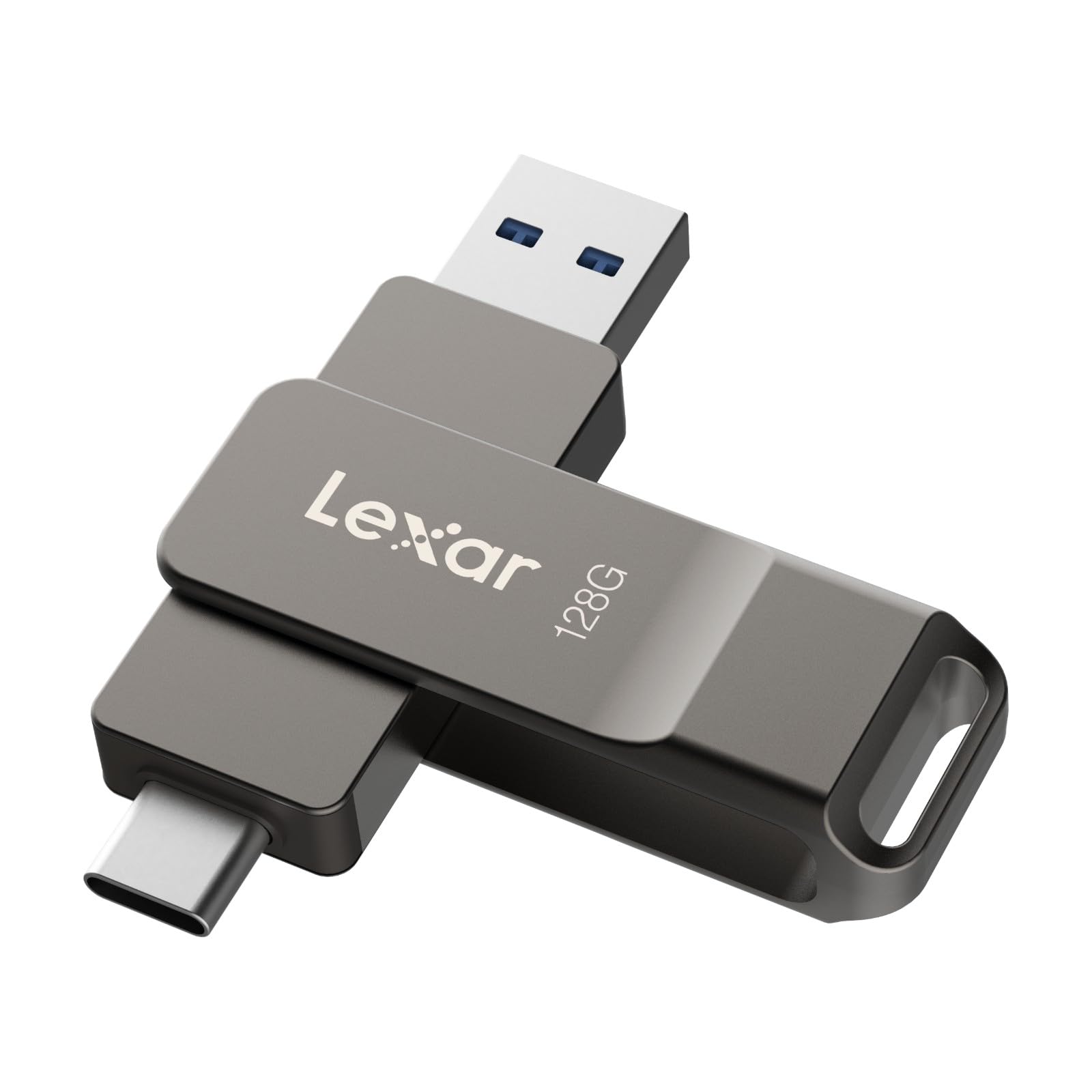
The Lexar D40E solves the biggest compatibility headache of the modern era: connecting to both old USB-A laptops and new USB-C tablets/phones without a dongle. Its 360-degree swivel design houses both connectors in a single metal body, so you flip the housing to expose whichever port you need. That’s a massive convenience for anyone juggling a MacBook and a legacy Windows desktop.
Despite its USB 3.2 Gen 1 badge, real-world read speeds hover around 100MB/s — adequate for daily file shuffling but not breaking any records. The trade-off pays off in utility: you can plug this directly into a Pixel, Galaxy, or iPad Pro for on-the-go photo offloading, then flip it around to connect to a desktop for editing. No adapters, no cables, no frustration.
The titanium-grey metal housing feels premium in hand and includes a keyring loop at the base. Lexar backs this drive with a 3-year limited warranty and includes 256-bit AES encryption software for securing sensitive files. Customer reviews consistently note that this dual-connector approach eliminates the need for separate drives for different devices.
Why it’s great
- Dual USB-A and USB-C connectors in one swivel body
- Metal casing with keyring loop
- 256-bit AES encryption software included
Good to know
- Read speed capped at ~100MB/s, slower than single-connector rivals
- 128GB capacity limits large media libraries
5. Amazon Basics 128GB USB 3.1

This 128GB variant of the Amazon Basics USB 3.1 drive shares the same retractable design and read speed specification as its 256GB sibling, but at a lower entry point. It’s ideal for users who don’t need massive capacity — think school assignments, presentation files, or a portable collection of favorite music — and want the same reliable performance for a smaller investment.
Customer reports peg sustained write speeds in the 30MB/s range, which is perfectly fine for document-heavy workflows and photo transfers under 1GB batches. The telescopic mechanism feels snappy and stays retracted when not in use, preventing damage to the USB connector in a pocket. At under half an ounce, you’ll forget it’s even there.
One practical quirk: like its bigger brother, this drive ships formatted as FAT32. If you plan to transfer Blu-ray ISOs or 4K video files over 4GB, you’ll need to reformat to exFAT or NTFS first. That’s a minor setup step that gives you access to a reliable daily driver for years.
Why it’s great
- Reliable 130MB/s read for everyday tasks
- Retractable design removes cap-loss risk
- Very lightweight and pocket-friendly
Good to know
- Write speed (30MB/s) is entry-level tier
- FAT32 default format requires reformatting for 4GB+ files
6. SanDisk 128GB Ultra Flair
The 128GB SanDisk Ultra Flair is the entry point into metal-construction thumb drives without sacrificing speed. Its 150MB/s read speed matches the larger 256GB version, and the single-piece aluminum housing feels far more substantial than similarly priced plastic alternatives. For under thirty dollars, you get a drive that looks and handles like a premium accessory.
SanDisk’s SecureAccess encryption (128-bit AES) is also available here, giving you password-protected private folders on the same drive. The write speed sits around 50MB/s based on customer benchmarks, which is competitive for this price bracket — enough to transfer a 2GB video in about 40 seconds. The drive is compact enough to stay plugged into a laptop without blocking adjacent ports.
Multiple long-term reviews highlight durability as the standout trait: the Ultra Flair survives drops, bag jostling, and years of daily plugging without data loss or connector fatigue. For users who only need 128GB of storage and want the reassurance of a metal shell, this is the benchmark pick in its capacity class.
Why it’s great
- Metal casing at an accessible price point
- 150MB/s read with AES encryption built-in
- Compact profile fits tight laptop ports
Good to know
- 128GB fills up quickly for media archivists
- Can run warm during frequent large transfers
7. PNY 256GB Turbo Attache 3

The PNY Turbo Attache 3 is pure capacity play: 256GB in a capless sliding-collar design at a price that undercuts most premium 128GB drives. It’s USB 3.0 rated for roughly 10x the speed of USB 2.0, and customer tests show sequential read speeds in the 100-160MB/s range — adequate for moving large photo libraries and game install files.
The plastic housing with an integrated loop attaches easily to keychains or backpacks, making it a convenient bulk-storage companion. PNY claims it holds about 47,000 songs, which gives a sense of the raw capacity available here. The sliding collar protects the connector when retracted, though some users note the collar can feel a bit loose over time compared to a fixed-cap design.
Where this drive really shines is cost per gigabyte. If you need to shuttle large amounts of data — family video archives, school project backups, or a portable media collection — and speed is secondary to sheer space, the Turbo Attache 3 delivers the best bang for the buck. The 1-year warranty is shorter than SanDisk’s 5-year, but for the price difference, that’s a fair trade-off.
Why it’s great
- Massive 256GB capacity at a budget-friendly price
- Capless sliding collar design prevents cap loss
- Keychain loop for easy carrying
Good to know
- Plastic body less durable than metal drives
- 1-year warranty is shorter than competitors
FAQ
Why does my thumb drive show less capacity than advertised?
Can I use a USB 3.2 Gen 1 thumb drive on an older USB 2.0 port?
What does FAT32, exFAT, and NTFS mean for my thumb drive?
How important is encryption on a thumb drive?
Final Thoughts: The Verdict
For most users, the best thumb drive winner is the Samsung BAR Plus 256GB because it crushes every other contender in raw speed while being the most rugged drive in the lineup. If you want a balance of metal build quality, encryption, and value, grab the SanDisk 256GB Ultra Flair. And for a versatile dual-connector solution that works with modern USB-C devices without an adapter, nothing beats the Lexar D40E 128GB.