
Waiting on a sluggish scanner kills your workflow. A slow or inaccurate USB barcode scanner creates bottlenecks at checkout, introduces errors into inventory counts, and frustrates staff who just need to move on to the next item. The right pick reads damaged labels, catches codes off phone screens, and works the moment you plug it in without driver headaches.
I’m Min — the co-founder and writer behind Gadgets Feed. I track the engineering specs, real-world scan rates, and build quality of dozens of barcode readers to separate the reliable workhorses from the flimsy ones that fail after a few hundred scans.
Whether you run a busy retail counter, manage a warehouse, or track assets in an office, choosing the right tool cuts scanning time in half and prevents costly data errors. This guide breaks down the top contenders to help you find the best usb barcode scanner that fits your exact workflow and environment.
How To Choose The Best USB Barcode Scanner
A USB barcode scanner seems simple — plug it in and scan. But the internal sensor type, build quality, and supported symbologies determine whether it lasts a month or a decade. Here are the critical factors that separate a smart buy from a regret.
Sensor Technology: CCD, Laser, or 2D CMOS
If you scan only pristine, paper-based barcodes, a traditional laser scanner works fine. However, modern CCD and 2D CMOS sensors read codes from smartphone screens, damaged labels, and reflective surfaces far more reliably. A 2D CMOS scanner also handles QR codes and PDF417 (like driver’s licenses), making it the future-proof choice for most businesses.
Scan Speed and Reading Angle
Scan rate, measured in scans per second (or the equivalent), determines how fast you can move through a line of items. A rate of 200 scans per second handles moderate retail use. Higher-end models push past 600 scans per second for high-volume logistics. The reading angle also matters — a wider angle and omnidirectional capability mean fewer attempts to align the code.
Durability and Environmental Resistance
A scanner dropped from a counter might survive once. Check for drop-test specs — 2m to concrete is a good baseline. IP ratings (like IP54 or IP65) tell you whether the unit resists dust and water splashes. In dusty warehouses or busy retail floors, a solid protective boot and sealed internals prevent early failure.
Quick Comparison
On smaller screens, swipe sideways to see the full table.
| Model | Category | Best For | Key Spec | Amazon |
|---|---|---|---|---|
| Tera HW0009 | Wireless + Screen | High-volume inventory with data storage | 2500mAh battery, 3-in-1 connection | Amazon |
| Symbol Zebra LS2208 | Enterprise Laser | Square POS and high-reliability retail | 5.3 oz, USB corded with stand | Amazon |
| NetumScan Omnidirectional A5 | Hands-Free Desktop | Fast checkout without lifting the scanner | 180° reading angle, auto-sensing | Amazon |
| Tera D5100Y | 2D Rugged | 2D/QR and PDF417 scanning in tough conditions | IP65 rated, ergonomic handle | Amazon |
| NetumScan L3S-USB | Starter CCD | Budget-friendly retail and library tasks | CCD sensor, 2m drop resistant | Amazon |
| Esup ES 3300 | Budget Laser | Light-duty inventory with auto-scan mode | 240 scans/s, 0-60cm depth | Amazon |
| WoneNice WN2806G | Value 1D | Small business POS with data editing | 200 scans/s, custom prefix/suffix support | Amazon |
In‑Depth Reviews
1. Tera HW0009 Wireless Barcode Scanner with Screen
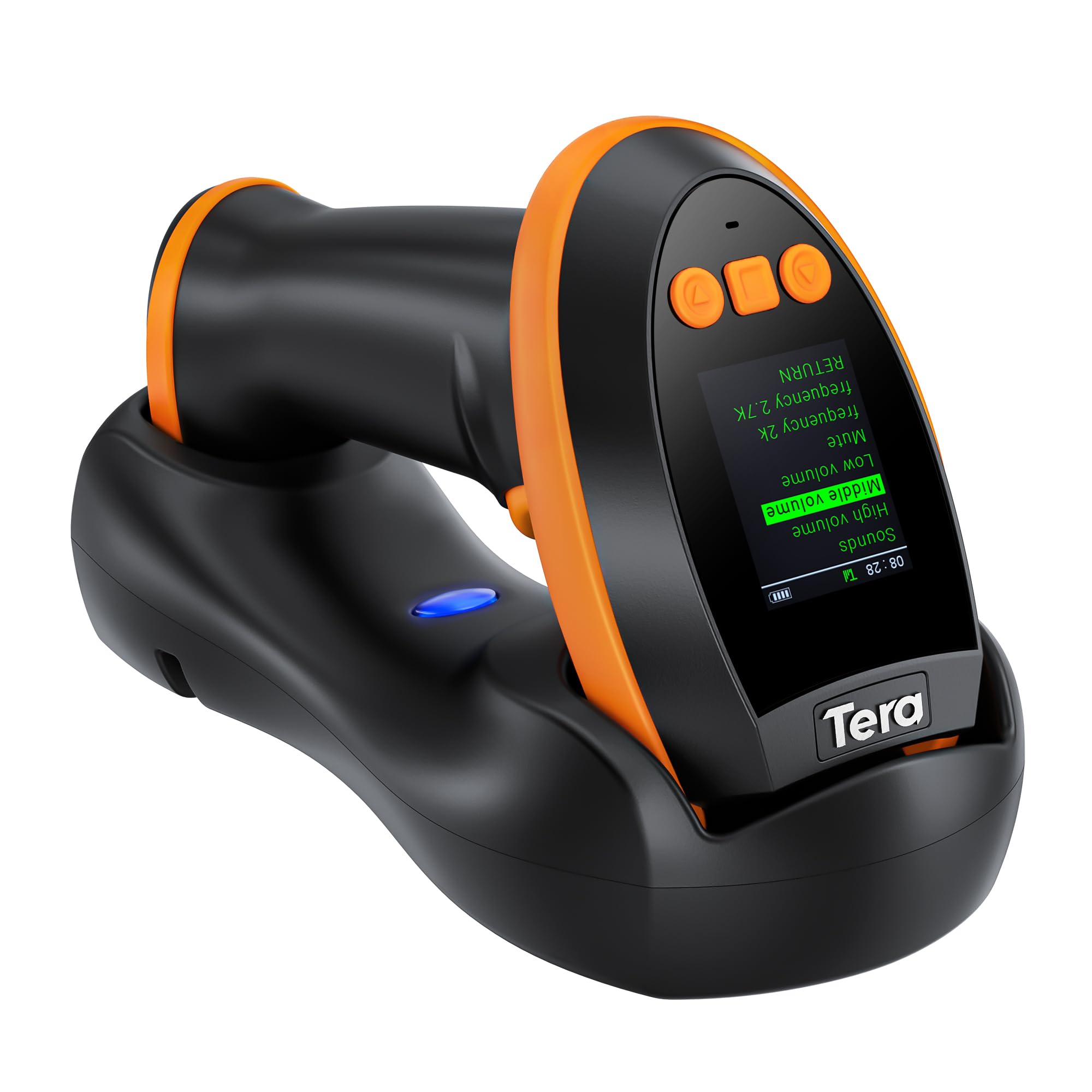
The Tera HW0009 is the most versatile USB barcode scanner in this lineup because it eliminates the biggest pain point — tethering. Its 3-in-1 connectivity (Bluetooth, 2.4G wireless up to 328 feet, and wired USB) means you can roam a warehouse floor or plug directly into a fixed POS station. The built-in screen and keypad let you change language, adjust volume, and review stored barcodes without needing a separate configuration barcode sheet.
Under the hood, the global CMOS imaging sensor reads 1D, 2D, QR, and PDF417 codes (including the dense data on driver’s licenses) reliably even on reflective or silver-paper labels. The 2500mAh battery inside the charging cradle keeps the scanner operational through a full shift. Users report it works with Windows, Mac, iOS, Android, and Linux with minimal setup fuss.
Businesses running high-volume inventory cycles will appreciate the built-in data storage mode that lets you scan offline and upload later. The unit feels slightly heavier than budget options, but that weight comes from the larger battery and durable shell. For a shop that needs wireless freedom without sacrificing wired reliability, this is the clear frontrunner.
Why it’s great
- Reads 1D, 2D, QR, and PDF417 codes including driver’s licenses
- Screen and keypad enable on-device settings without a manual
- Three connection modes plus 2500mAh battery for full-shift wireless operation
Good to know
- Slightly heavier than corded-only models due to the large battery
- Screen interface can take some practice to navigate all functions
2. Symbol Zebra LS2208 Corded Handheld Scanner Kit

The Symbol Zebra LS2208 is the industry-standard laser scanner you see at checkout counters everywhere, and for good reason. Its 30-degree reading angle and laser precision make it exceptionally fast at scanning standard 1D barcodes on paper and cardboard. The kit includes a gooseneck stand, so you can use it hands-free at a counter or pick it up for larger items.
At only 5.3 ounces, it is the lightest unit in this roundup, which reduces wrist fatigue during eight-hour shifts. It is officially listed as compatible with Square POS and Mac systems (using a USB adapter), making it the top choice for small retailers who need guaranteed plug-and-play performance. Users consistently report zero configuration headaches — plug it in, scan, done.
The downside is clear: this is a 1D laser scanner, so it cannot read 2D QR codes or PDF417 data from driver’s licenses. If your business deals exclusively with UPC and Code 128 barcodes, this durability king will outlast cheaper units by years. The three-year warranty adds serious peace of mind for a daily-driver scanner.
Why it’s great
- Verified compatibility with Square POS and Mac systems
- Ultra-light 5.3 oz body reduces hand fatigue over long shifts
- Three-year warranty reflects enterprise-grade durability
Good to know
- Laser sensor cannot read 2D QR codes or PDF417
- Higher price point than comparable CCD-based scanners
3. NetumScan Omnidirectional Desktop Barcode Scanner A5

The NetumScan A5 reimagines the barcode scanner as a fixed-position device that does the work for you. Its omnidirectional sensor reads 1D, 2D, and QR codes from any angle without requiring you to align the barcode perfectly. The auto-sensing trigger activates the scan the moment an object enters its window, which is a massive time-saver for cashiers scanning items or customers presenting phone screens.
The non-slip base and built-in anti-vibration system keep it stable on a countertop, and the IP54 dust protection means it survives the debris of a busy retail floor. It reads damaged, distorted, and reflective barcodes accurately — a common headache with older laser-based fixed scanners. Users at high-traffic events report lightning-fast performance and no overheating during continuous operation.
The catch is that this scanner is not compatible with Square, Clover, or Shopify POS systems, so check your POS compatibility before buying. It works seamlessly with Windows, Mac, and Linux over a standard USB cable. If your business runs a compatible system and you want to eliminate handheld scanning entirely, this desktop unit is the most efficient upgrade.
Why it’s great
- 180-degree omnidirectional reading eliminates barcode alignment delays
- Auto-sensing trigger starts scanning without pressing any button
- Reads damaged and reflective barcodes that trip up laser scanners
Good to know
- Not compatible with Square, Clover, or Shopify POS systems
- Fixed-position design limits use to desktop-only workflows
4. Tera D5100Y Wired 2D Barcode Scanner

The Tera D5100Y packs 2D CMOS scanning capability into a rugged, entry-level price bracket. It reads 1D, 2D, QR, and PDF417 codes — including the barcodes on driver’s licenses — making it a versatile tool for retail, ID verification, or library systems. The orange anti-shock silicone cover protects it from drops up to 6.56 feet, and the IP65 rating means it is sealed against dust ingress and low-pressure water jets.
The ergonomic handle is extended and thickened for larger hands, and the trigger is designed for comfortable repetitive use. It supports multiple keyboard languages (English, Spanish, German, French, etc.), which is rare at this price point. Users who deployed over 50 units in a warehouse environment reported zero defects or failures, suggesting consistent manufacturing quality.
Some users experienced units that stopped transmitting after a few scans, and tech support is reportedly hard to reach. The scan rate is listed at 200 seconds, which is an odd spec — in practical use, it decodes standard and high-density barcodes quickly. For a business that needs 2D capability on a tight budget and can accept occasional unit variance, the D5100Y delivers impressive breadth.
Why it’s great
- IP65 dust and water resistance for harsh environments
- 2D sensor reads QR codes, PDF417, and all common 1D symbologies
- Anti-shock silicone cover protects from 6.56-foot drops
Good to know
- Inconsistent quality control — some units arrive defective
- Tech support is difficult to reach for troubleshooting
5. NetumScan L3S-USB Handheld 1D Barcode Scanner

The NetumScan L3S-USB proves that a budget-priced CCD scanner can outperform many laser-based competitors in real-world conditions. Its CCD sensor reads even smudged, damaged, fuzzy, and reflective barcodes that leave a laser scanner confused. It supports a full range of 1D symbologies including UPC/EAN, Code 128, and Codabar, making it suitable for retail, library, and warehouse tasks.
The included stand allows hands-free continuous scanning mode — you scan a programming barcode from the manual to enable auto-scanning, then pass items under the window. The ABS housing withstands repeated 2-meter drops to concrete, so it survives the inevitable countertop tumble. Users report it works great for scanning books, DVDs, and for use in state inspection centers.
The main limitation is 1D-only support — no QR code or PDF417 reading. The cable is shorter than some users prefer, and the continuous mode can trigger false positives with a stationary beam. For straightforward 1D barcode scanning on a tight budget, this is the most reliable entry-level choice.
Why it’s great
- CCD sensor reads damaged, smudged, and reflective barcodes better than laser
- Safe from 2-meter drops to concrete — tough plastic housing
- Included stand enables hands-free continuous scanning mode
Good to know
- 1D only — cannot read QR codes or 2D symbologies
- Continuous mode may scan erroneously without a barcode present
6. Esup Barcode Scanner with Stand ES 3300

The Esup ES 3300 is a laser-based 1D barcode scanner that punches above its weight class. With a scan rate of 240 lines per second and a reading depth of up to 60 centimeters, it handles typical retail and inventory tasks with ease. The most praised feature is the auto-scan mode — press and hold the trigger for ten seconds, and the scanner stays on continuously, eliminating the need to press a button for every scan.
The adjustable stand flips between handheld and hands-free use, and the ABS plastic build feels solid enough for years of daily use. Users who compared it directly against premium wireless units found the Esup outperformed them at a fraction of the cost. The 2-year warranty is a welcome bonus at this price point, signaling manufacturer confidence.
The laser sensor cannot read QR codes, and the included paper manual is missing — you have to access the programming barcodes online as a PDF. The auto-on feature, while convenient, drains the unit if left in continuous mode. For basic 1D scanning on a shoestring budget, the Esup is the undisputed value king.
Why it’s great
- Auto-scan mode saves time during high-volume scanning sessions
- 240 scans/s at 0-60cm depth handles most retail and inventory needs
- 2-year warranty is exceptional for the entry-level price
Good to know
- Laser sensor cannot scan QR codes or 2D barcodes
- No physical manual included — must download programming PDF online
7. WoneNice WN2806G Wired 1D Barcode Scanner

The WoneNice WN2806G stands out in the budget tier because it includes data editing capabilities usually reserved for more expensive models. You can change case (upper/lower), add custom prefixes or suffixes, delete characters, and toggle the beep volume — all through programming barcodes included in the box. This is a massive advantage for small businesses that need scanned data to auto-format into spreadsheets without post-processing.
It scans all standard 1D symbologies at 200 scans per second, reads barcodes from phone screens, and works with Windows, macOS, Linux, and most POS systems out of the box. The 1.8-meter USB cable offers decent reach, and the included stand lets you switch to hands-free mode. Users report it outperforms scanners costing several times more, especially for reading tiny or faint barcodes from iPhone screens.
Continuous mode can trigger double scans if not configured correctly, and some units stop working after extended use due to a loose internal cable connection (resolvable by holding the trigger for 7 seconds to reset). It also uses a very bright green LED that may need tape to diffuse. For a small business owner who needs programmable output and reliable 1D scanning at the lowest possible cost, this is the smartest pick.
Why it’s great
- Built-in data editing lets you add prefixes, suffixes, and change text case
- Reads tiny or faint barcodes from smartphone screens reliably
- Plug-and-play setup works across Windows, Mac, and Linux
Good to know
- Continuous scan mode may produce double scans without careful configuration
- Cable connection can loosen over time, requiring a trigger-hold reset
FAQ
Can a USB barcode scanner read barcodes from a smartphone screen?
What does 2D barcode scanning add that 1D cannot do?
How do I set up continuous hands-free scanning mode?
Final Thoughts: The Verdict
For most users, the best usb barcode scanner winner is the Tera HW0009 because it offers wireless freedom, 2D/QR/PDF417 scanning, an onboard screen for settings, and a 2500mAh battery that lasts all day. If you want unmatched enterprise-grade durability and Square POS compatibility, grab the Symbol Zebra LS2208. And for hands-free countertop efficiency, nothing beats the NetumScan A5.