
Our readers keep the lights on and my morning glass full of iced black tea. As an Amazon Associate, I earn from qualifying purchases.
Specs are compiled from manufacturer listings and verified buyer reviews and can change over time — please confirm the key details on the product page before buying.
If your Wi-Fi drops during video calls or your MacBook loses its connection every time it wakes from sleep, a USB-C Ethernet Adapter is the fix. It turns your laptop’s USB-C port into a physical network jack, giving you a stable, fast wired link that Wi-Fi simply cannot match for reliability. This guide sorts through the adapters that actually deliver the speeds they promise and hold up to daily plugging and unplugging.
I’m Min — the founder and writer behind Gadgets Feed. This guide is built by comparing the manufacturers’ published specifications and the patterns across verified customer reviews, so you get each pick’s real strengths and trade-offs instead of marketing spin.
The right pick depends on your internet plan and gear, so here is the practical breakdown of the best usb-c ethernet adapter options to keep your connection steady.
Our Picks at a Glance


How To Choose The Best USB-C Ethernet Adapter
Buying a network adapter is about matching the chip inside it to your actual internet connection. A 2.5Gbps adapter sounds impressive, but it only helps if your router and internet plan can actually push data faster than a standard Gigabit (1000Mbps) connection.
Match Speed to Your Internet Plan
Check the speed you pay for. Most home internet plans cap out at 1 Gigabit, so a standard 1000Mbps adapter is plenty. If you have a multi-gig fiber plan or you move big files between computers on your local network, a 2.5Gbps adapter is worth the extra money for the headroom.
Decide: Adapter or Combination Cable
A traditional adapter is a small dongle with a short attached cable, and you bring your own Ethernet cord. A USB-C to Ethernet cable is one single cord that plugs straight from your laptop into the wall. The one-piece cable is cleaner for travel, but an adapter is easier to swap when a cable gets damaged.
Check for Power Delivery if Your Laptop Needs It
Some adapters add a USB-C port for charging your laptop while you use the wired network. That is a huge win for a MacBook with only two ports. If you go this route, check the wattage rating to make sure it can keep up with your laptop’s power needs, not just a phone.
Quick Comparison
| Model | Best For | Speed | Charging | Design | Amazon |
|---|---|---|---|---|---|
| Belkin USB-C to 2.5Gb★ Best Overall | MacBooks with sleep/wake drops | 2500Mbps | No | Tethered dongle | Amazon |
| UGREEN USB-C EthernetBest Value | Budget-friendly reliability | 1000Mbps | No | Aluminum dongle | Amazon |
| uni USB-C Ethernet | Charging while connected | 1000Mbps | 100W PD | Braided cable dongle | Amazon |
| Dutevolns USB-C Cable | Simple one-cable travel setup | 1000Mbps | No | 3.3ft cable | Amazon |
| Thzzhnno USB-C Cable | Extra-long reach from the modem | 1000Mbps | No | 6.6ft cable | Amazon |
| Cable Matters 1Gb + PD | High-watt charging with network | 1000Mbps | 140W PD | Aluminum dongle | Amazon |
| TP-Link UE302C | Future-proof 2.5G networks | 2.5Gbps | No | Foldable dongle | Amazon |
In‑Depth Reviews
1. Belkin USB-C to 2.5Gb Ethernet Adapter
Our pick — over 4.5★ from 800+ verified ratings; the strongest balance of quality and price.
The cure for MacBook sleep/wake connection drops, with speed to spare.
If your Mac drops the network every time it sleeps, this Belkin is the adapter people turn to. Buyers report it “Fixes M1 Mac sleep/wake ethernet disconnects; no drops since plug-in.” The 2.5x speed gap over a standard 1000Mbps adapter means it runs up to 2500Mbps — a clear edge for multi-gig file transfers.
It is USB-IF certified for safety and WWCB certified for Chromebooks, so it is tested across MacBook Pro/Air, iPad Pro, XPS, Surface, and Chromebooks. The built-in LED indicator confirms your connection is live at a glance. The 90mm tethered cable keeps the dongle close to your laptop without dangling.
You can plug this in and get online right away—no drivers to install, which buyers repeatedly praise. The plastic body weighs just 60g, so it is easy to carry, and owners mention it stays cool during long transfers.
What wins people over
- Functionality is the top rave — buyers consistently report rock-solid, stable connections
- Plug-and-play on MacBook Pro M4 via Thunderbolt 4 with zero driver installs
- Runs cool and doesn’t shut down under sustained transfers
Keep in mind
- No built-in charging passthrough, so you still need your laptop power brick
- The 2.5G speed needs a 2.5G-capable router or switch to fully use it
The pick for stability: If your Mac’s Wi-Fi drops on wake, this is the adapter owners credit with ending it.
Think twice if: You are on a 1G internet plan and just want the cheapest reliable link — the speed headroom goes unused.
2. UGREEN USB-C to Ethernet Adapter
A crowd-pleasing aluminum dongle that beats built-in laptop network ports.
UGREEN’s adapter is the budget champion that refuses to feel cheap. Customers note it “Outperforms native Realtek ports on ASROCK X670E; low heat, stable, plug-and-play on Win11.” That is high praise for a compact dongle that fits in a pocket and weighs just 0.06kg.
The aluminum alloy case pulls heat away faster than plastic, keeping it cool during long transfers. It is driver-free on Windows 11/10/8.1/8, macOS, Chrome OS, and Android — though Windows XP/7/Vista and Linux need a manual driver. That broad compatibility covers MacBook Pro/Air, iPhone 15/16 Pro/Pro Max, Nintendo Switch, and Steam Deck.
Owners highlight the stable Gigabit speeds and note the “lower-cost model sufficient for 1G internet,” so it nails the value proposition for most home connections. The reinforced cable tail and wear-resistant port signal a build designed for frequent travel.
Why it earns the spot: At 1000Mbps with a durable metal case, it covers the vast majority of Gigabit internet plans without fuss.
The honest trade-off: Connectivity gets mixed feedback in the long run — a few units have failed within the first year, so it is not the one for mission-critical rigs.
Reach for this if: You want a dependable, affordable wired link for a 1G plan with wide device support.
Look elsewhere if: You need 2.5G speeds or simultaneous laptop charging — this dongle does neither.
3. uni USB-C to Ethernet Adapter with 100W PD

One port that charges your laptop while the other locks in your network.
The uni adapter answers the biggest laptop complaint — not enough ports. It adds a 100W Power Delivery charging port (a USB-C port that feeds power to your laptop) alongside the Gigabit Ethernet jack, so you can work wired and stay topped up with a single connection. That is a lifeline for a MacBook Pro/Air with only two USB-C ports.
It open up up to 1000Mbps speeds, backward compatible with 100Mbps/10Mbps networks, and the note is clear: you need Cat6 or higher Ethernet cables to actually hit 1Gbps. The braided nylon cable and aluminum casing (a metal shell) give it a tougher feel than flimsy plastic dongles.
Owners praise the plug-and-play ease on Windows 11 and note it works with Android phones like the Samsung Fold 5 for huge file transfers. The honest caveat is the charging — it receives mixed feedback, with some reporting it does not always charge properly depending on the device’s protocol support.
The standout trick: Simultaneous charging and networking from one compact unit, backed by an 18-month warranty.
Who should skip: Anyone relying on it purely as a phone charger — uni itself recommends not charging phones with this product.
The pick for travelers: If you carry a modern thin laptop, this dongle replaces a dock for wired internet plus power.
Not for: Multi-gig setups or users who want a simple no-frills cable without the charging feature.
4. Dutevolns USB-C to Ethernet Cable 3.3FT

A single 3.3-foot cord that skips the dongle-and-cable dance entirely.
This is not an adapter you attach a separate Ethernet cable to — it is the whole link in one piece. The Dutevolns cable runs 3.3ft from your USB-C port straight to a router, modem, or network switch, and it is rated Cat 6 (a cable grade built for Gigabit speeds) pushing up to 1000Mbps.
The pure copper wire inside gives faster, more stable transmission, and the USB-C end wears a quality aluminum shell with a nylon braided exterior for durability. It is driver-free across Windows, Mac OS, iPad OS, Chrome OS, and Android, covering MacBook Pro, iPhone 15 series, and most USB-C and Thunderbolt 3 devices.
Buyers call it “exactly as described” for direct modem connections and essential for IT professionals testing devices. The one gap: it ships with no setup instructions, so phone users may need to figure out the connection steps themselves.
Reach for this if: You want one tidy cord for a hotel room or a laptop bag, with nothing extra to lose.
Not ideal for: Fixed desk setups where a longer reach or replaceable Ethernet cable gives more flexibility.
5. Thzzhnno USB-C to Ethernet Cable 6.6FT

Double the cable length of a typical dongle, built for durability and steady gaming.
At 6.6ft, this one-piece USB-C to RJ45 cord gives you the freedom to reach a modem or wall port that sits further from your desk. Like the shorter Dutevolns, it is a direct male-to-male cable with a built-in chip that pushes up to 1Gbps, backward compatible with 100Mbps/10Mbps networks.
The build gets serious attention: 24K gold-plated connectors (a corrosion-resistant coating) and an aluminum casing for heat dissipation. It has survived 3000+ bending tests, a durability claim owners say outlasts flimsier options. Functionality is the top praise, with buyers crediting it for fixing internet glitching during online gaming.
Compatibility spans MacBook Pro/Air, iPad Pro, iPhone 15 series, Galaxy Tablet, and most USB-C and Thunderbolt 3 devices. The trade-off is heat — a couple of owners note the connector gets warm during use, though they call it “nothing too serious.”
The pick for gamers: When Wi-Fi lag ruins a match, this cord delivers a stable wired link your laptop will thank you for.
Consider the catch: The warm connector is worth knowing about if you leave it plugged in for hours at a stretch.
6. Cable Matters USB-C Ethernet Adapter with 140W PD
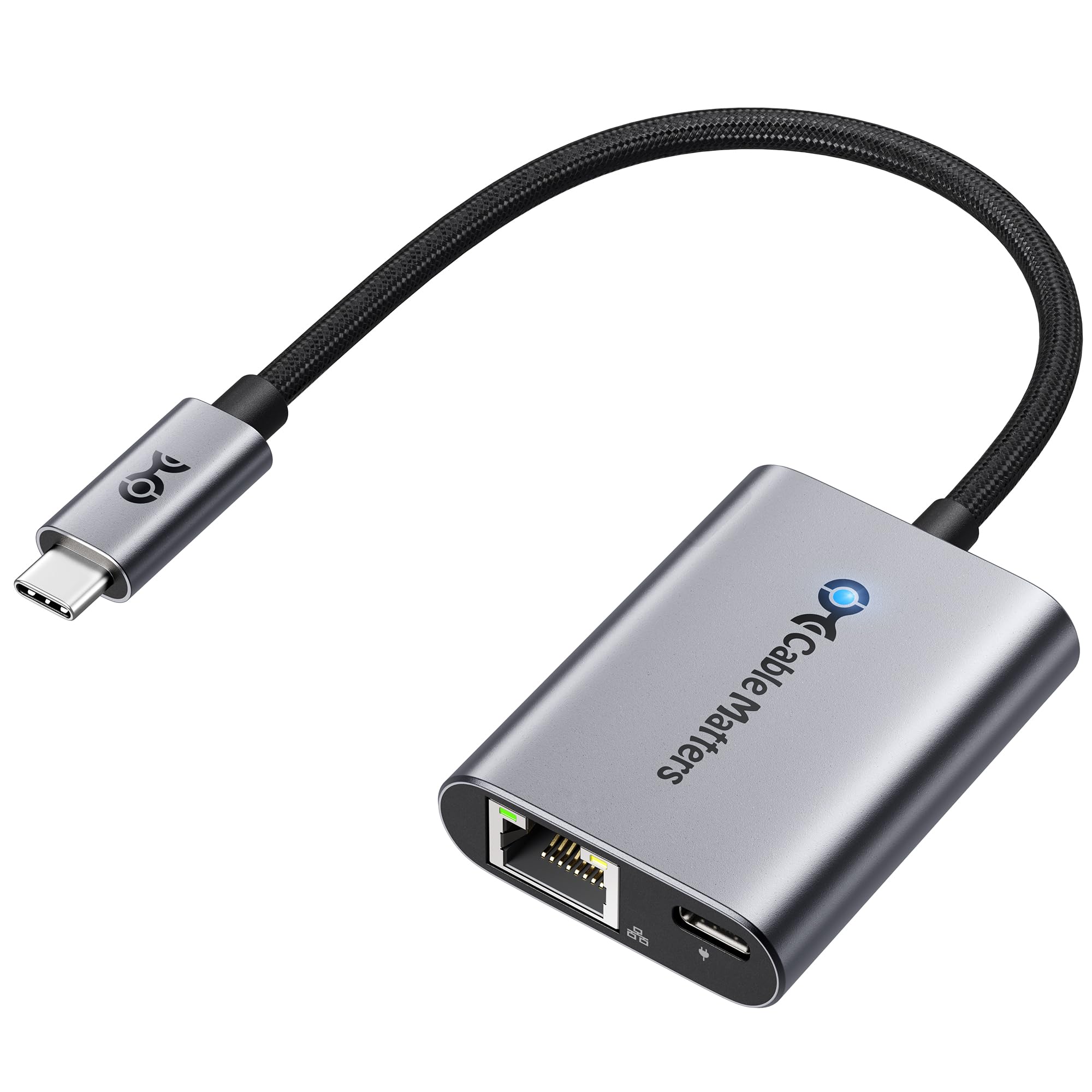
The heaviest charging passthrough in this lineup keeps power-hungry laptops fed.
Where the uni tops out at 100W, the Cable Matters adapter pushes Power Delivery to 140W (28V/5A). That is enough to fast-charge high-performance laptops like the MacBook Pro or Dell XPS while you stay wired to Gigabit Ethernet at up to 1000Mbps — ideal for 4K streaming and large downloads.
It goes further than typical laptop adapters by working with Chromecast with Google TV (2020 and later), adding a wired connection up to 480Mbps to a streaming stick that normally relies on Wi-Fi. The lightweight aluminum housing (a metal shell) and flexible braided pigtail handle daily travel and desk use without strain.
Reviewers point out it “doubles laptop connection speed” and delivers near-full Gigabit in local speed tests while charging a phone at its max rate. The weak spot is charging consistency — it draws mixed feedback, with one unit failing to charge from multiple 20+ watt chargers even though Ethernet worked fine.
The big number: 140W PD is the top charging spec here, beating the 100W model for serious laptop users.
Who should be cautious: Android phone users — one unit stopped working for Android after an update, though it still worked for PCs.
Reach for this if: You run a powerful laptop and want one port to handle both network and high-watt charging.
Look elsewhere if: You only need a network link — the charging port adds cost you will not use.
7. TP-Link UE302C 2.5G USB-C Ethernet Adapter
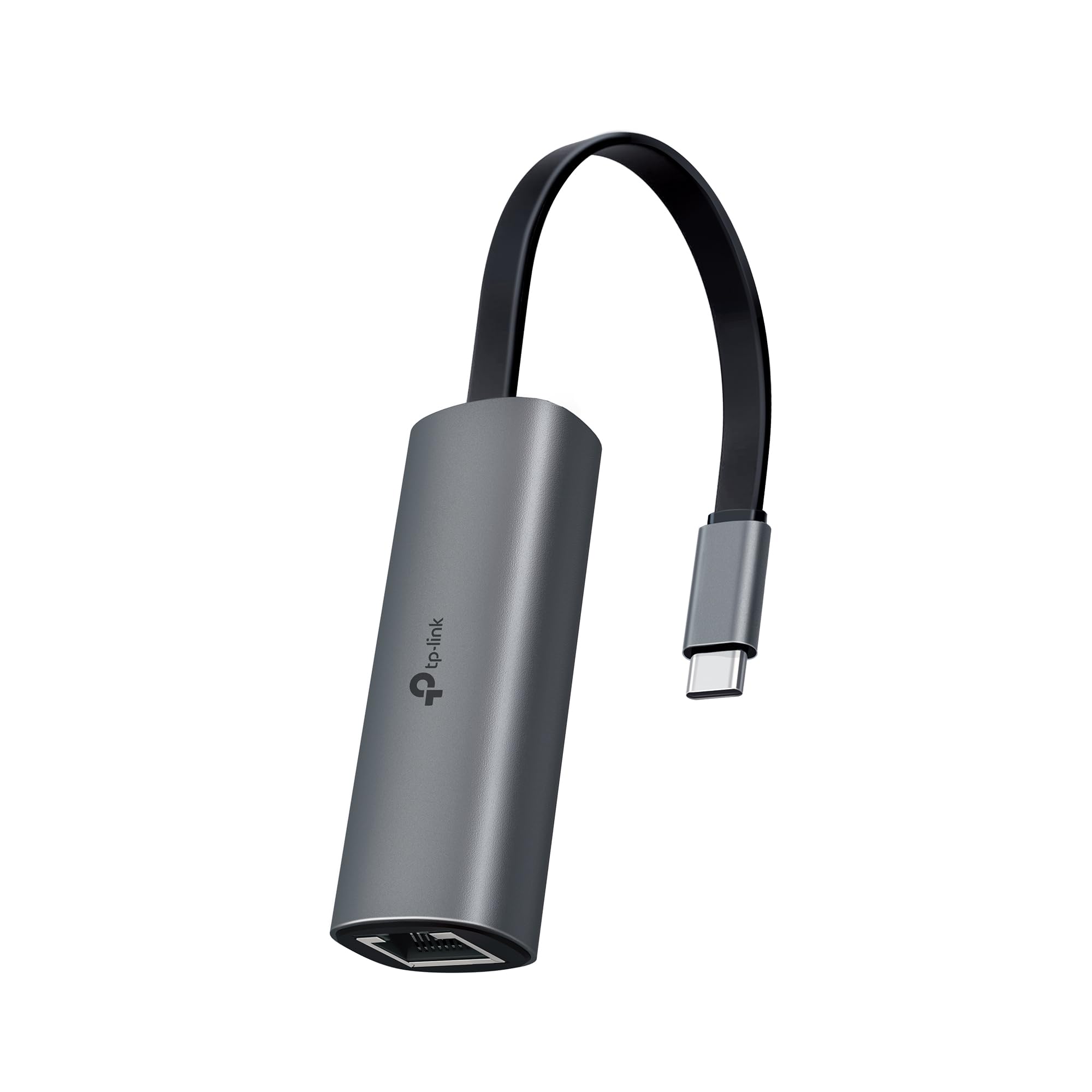
A foldable 2.5G dongle that future-proofs your old laptop for faster networks.
TP-Link brings the speed race to a pocketable foldable design. At 2.5 Gbps, it matches the Belkin for top-end throughput and instantly upgrades a standard 1G device when paired with a 2.5Gb-capable router or switch — no need to replace your whole setup. It covers MacBook Pro/Air, iPad Pro, Dell XPS, Surface, Chromebook, Lenovo ThinkPad, and smartphones.
Plug-and-play is genuinely driver-free on Windows 11/10/8.1/8/7, macOS, iPadOS, Chrome OS, Linux OS, and iOS. The reinforced connector and aluminum case (a metal shell) are built for repeated plugging, and it weighs just 27.22g with a 2.68″ length, so it disappears into a pocket or laptop sleeve.
Owners praise it for fixing laptop Wi-Fi recognition issues and maxing out multi-gig ISP speeds with minimal drop during peak times, with one calling it the best of three adapters tested. Speed feedback is mixed — some see full 2.5 Gb, others report lower real-world numbers depending on the network. Durability also splits reviewers, with a few noting loose connections at times.
Why it wins for upgraders
- Compatibility is the top praise — it works across Mac, Windows, Linux, and iOS devices
- 2.5Gbps speed headroom for multi-gig fiber plans
- Foldable, ultra-light at 27.22g, and never gets hot in testing
The trade-offs
- No charging passthrough, so laptops still need their own power
- Real-world speeds vary by network, and the connector can feel loose at times
The pick for upgraders: If you are moving to multi-gig internet, this is the affordable way to bring an older laptop along.
skip it if: You just need a basic 1G link today — the extra speed premium is wasted on a standard plan.
Understanding the Specs
Data Transfer Rate
This is the maximum speed the adapter’s chip can handle, shown in megabits per second (Mbps) or gigabits per second (Gbps). A 1000Mbps adapter matches standard Gigabit internet, while a 2.5Gbps adapter (2500Mbps) handles faster multi-gig plans. Your router and internet plan must support the higher speed to benefit from it.
Power Delivery (PD)
PD is the standard that lets a USB-C port charge your laptop while it also carries data. It is rated in watts — 100W and 140W are common figures. A higher wattage means faster charging for power-hungry laptops, but the adapter only charges as fast as your device’s protocol allows. Not all adapters include charging, so check if your laptop has spare ports.
FAQ
Will a USB-C Ethernet adapter fix my MacBook sleep and wake connection drops?
How do I know if I need a 2.5Gbps adapter instead of a 1000Mbps one?
Do these adapters require driver installation?
Can I charge my laptop while using the Ethernet connection?
What is the difference between an adapter and a USB-C to Ethernet cable?
Will a USB-C Ethernet adapter work with my phone or tablet?
Do I need a special Ethernet cable to get Gigabit speeds?
Can I use a USB-C Ethernet adapter with a Chromecast or streaming stick?
Why does my Ethernet adapter get warm during use?
How durable are these adapters for daily travel?
Final Thoughts: The Verdict
For the majority of shoppers, the usb-c ethernet adapter winner is the Belkin because it pairs the fastest 2.5Gbps speed with a proven track record of fixing MacBook connection drops. If you want the best budget pick that handles 1G internet flawlessly, grab the UGREEN. And for a one-cord travel setup that needs charging, the uni with 100W Power Delivery is the one to reach for.
How We Picked
We do not accept paid placement. Every pick is matched to a real buyer and a real use-case; we do not hands-on test units.
Sources & Methodology
Specifications: manufacturer listings and product documentation. Review insights: verified customer reviews, as of September 2026. Pricing: not shown on this page (it changes often); check the current price via the retailer link.
As an Amazon Associate, Gadgets Feed earns from qualifying purchases. This does not affect which products we feature.