
Our readers keep the lights on and my morning glass full of iced black tea. As an Amazon Associate, I earn from qualifying purchases.
Specs are compiled from manufacturer listings and verified buyer reviews and can change over time — please confirm the key details on the product page before buying.
When your laptop’s USB-C port must drive an old projector, a tiny adapter decides if your meeting goes smoothly or falls apart. You want a connection that appears instantly, keeps text readable, and stays reliable through your whole presentation. The key is picking an adapter with specs you can verify before buying.
I’m Min — the founder and writer behind Gadgets Feed. This guide is built by comparing the manufacturers’ published specifications and the patterns across verified customer reviews, so you get each pick’s real strengths and trade-offs instead of marketing spin.
Here is the shortlist of the best usb-c to vga adapter picks, judged on reliability, resolution support, and how they hold up in real desks and conference rooms.
Our Picks at a Glance


How To Choose The Best USB-C To VGA Adapter
The single most common mistake is buying an adapter before checking whether your laptop can output video over USB-C at all. VGA adapters are purely passive converters — they cannot create a signal that your port never sends.
Check for DisplayPort Alt Mode first
Your USB-C port has to carry a video signal alongside power and data, a feature called DisplayPort Alt Mode. If your laptop lacks it, no adapter on this list will show a picture. Look for a laptop with a USB-C or Thunderbolt 3/4 port on a modern MacBook, Dell XPS, or HP Spectre — those almost always support it.
Match the resolution to your display
VGA maxes out at 1920×1200, which is 1080p resolution (1920×1080 pixels). If you need sharper images, choose an adapter with an HDMI port—several here offer both, so you can get 4K (3840×2160) on a modern monitor and still use VGA for legacy projectors.
Decide: single adapter or a full hub
If you only ever connect one projector, a slim single-purpose adapter is the lightest, simplest option. If you also need to charge your laptop, plug in a USB drive, or run two screens, step up to a multi-port hub — it replaces a whole bag of cables.
Quick Comparison
| Model | Best For | Max VGA Resolution | Ports | Item Weight | Amazon |
|---|---|---|---|---|---|
| BENFEI USB-C to VGA (2-Pack)★ Best Overall | Best Overall | 1920*1200@60Hz | 1x VGA | 0.06 kg | Amazon |
| BENFEI USB-C Hub 4-in-1Most Versatile Hub | Most Versatile Hub | 1920×1080@60Hz | 4 (HDMI, VGA, USB-A, USB-C PD) | — | Amazon |
| Belkin USB-C to VGA + Charge | Best with Charging | 1920×1200@60Hz | 2 (VGA, USB-C PD) | 0.04 kg | Amazon |
| CableCreation USB-C to HDMI/VGA | Best for Dual Displays | 1920X1200@60Hz | 3 (HDMI, VGA, USB-C) | 0.03 kg | Amazon |
| intpw USB-C Hub 4-in-1 | Best Budget Hub | 1080P@60Hz | 4 (HDMI, VGA, USB-A, USB-C PD) | 0.01 kg | Amazon |
| StarTech USB-C to VGA | Best for Interference-Free Output | 1920×1200 | 1x VGA | 0.02 kg | Amazon |
| Acer 11-in-1 USB-C Hub | Best Full Docking Station | 1080P | 11 (HDMI, VGA, USB-C, USB-A, Ethernet, SD/TF) | 160 g | Amazon |
In‑Depth Reviews
1. BENFEI USB C to VGA Adapter, 2 Pack
Our pick — over 4.5★ from 5,500+ verified ratings; the strongest balance of quality and price.
The two-pack that feeds fresh life into aging monitors without breaking a sweat.
This is the adapter that turns a brand-new PC into a two-monitor setup in seconds — one screen over HDMI, the other over VGA to an older display. Buyers report the picture “looks great” and it works “right away,” which is exactly what you want when you are mid-setup and the cable is already in your hand. The crowd favorite pulls a strong 4.6 stars out of thousands of owners, making it the safest bet on this list.
The defining spec here is the 1920*1200@60Hz ceiling, which covers 1080P, 720p, and even 1600×1200 and 1280×1024 for older monitors or projectors. The built-in advanced IC chip (a small processor that converts the digital signal) handles the translation from USB-C to VGA, and the plated connector resists corrosion to keep that signal clean. A molded strain relief at the cable joint means it survives being yanked out of a bag daily.
Over 200 owners praise this adapter for simply working every time. The 18-month warranty from BENFEI outlasts the typical 12-month coverage on budget adapters. The trade-off: a few owners mention the unit lasted only about a year, so handle it with care to extend its life.
Why it wins
- Plug-and-play — no drivers, works with Windows 10 and MacBook Air
- Two in the pack means a spare for home and office
- Solid aluminium shell with strain relief at the cable joint
Who should think twice
- One owner could not connect to an old projector
- Durability is mixed — some report it lasting about a year
- No HDMI or charging pass-through here
Reach for this if: you need a reliable, no-drama VGA connection for a home office or a spare adapter for travel.
Look elsewhere if: you must charge your laptop while connected or need 4K output — this is strictly a video cable.
2. BENFEI USB C HUB 4in1
A pocket-sized dock that adds HDMI, USB-A, and charging to your laptop through one port.
This is the adapter for the person who looks at their sleek laptop and mourns the missing ports. It adds an HDMI port, a VGA port, a USB-A port, and a USB-C charging port all from a single USB-C connection. The HDMI port outputs 4K at 30Hz, while VGA handles 1080p at 60Hz, and both can mirror the same image simultaneously.
The standout spec is the 60W power delivery, which means your laptop charges while you present, a lifesaver for machines with a single USB-C port. File transfers run up to 5Gbps over the USB 3.0 port, so moving a large presentation off a flash drive is instant. The premium aluminium alloy casing helps with heat insulation, keeping things cool during long meetings.
Functionality is what owners rave about — the ports perform well and transfer speeds are fast, with the compact design making it easy to carry. Unlike the single-purpose BENFEI above, this one replaces a bag of cables. The catch is that the two screens show identical images; you cannot extend your desktop across them separately, and it is not compatible with iPad Pro 2021 M1 models.
The payoffs
- HDMI plus VGA working together on one hub
- 60W pass-through charging keeps your laptop alive
- 5Gbps USB 3.0 port for quick file moves
The limits
- Screens mirror — no separate desktop extension
- Not for iPad Pro 2021 M1 11″ or 12.9″
Grab it if: you need ports back on a thin laptop and want both HDMI and VGA options in one tidy hub.
skip it if: you run a multi-tasking setup that needs two independent screens — this mirrors, it does not extend.
3. Belkin USB-C to VGA Adapter with Charging

The featherweight that charges your laptop while it conquers the conference room projector.
For anyone with a modern laptop that has a single USB-C port, this Belkin is the answer to the eternal dilemma: present on the projector or keep the battery alive? It solves it with pass-through charging up to 60 watts, so your device tops up while your slides are on the big screen. At just 0.04 kg, it is noticeably lighter than the 2-pack BENFEI above — a 50% weight gap that you feel when it rides in a shirt pocket.
Setup is genuinely easy: it is plug and play with both Mac and Windows laptops, no drivers, no fuss. Owners have connected an iMac Mini to an HP monitor and a 2021 MacBook Pro to a projector, and every time it “works great” right from the start. The video quality holds up to 1920×1200 (1080p) at 60Hz, which is plenty for a boardroom display.
What wins people over is the sheer simplicity — reviewers describe it as “no fuss. no muss.” and “hooked up instantly.” It is the cleanest single-purpose option on this list. The trade-off is that you get exactly two ports: VGA and charging. If you also need a USB-A port or an HDMI output, this is not the one.
Perfect for one-port laptops: this is the pick for the MacBook owner who refuses to carry a hub, wants the laptop charged, and needs a reliable VGA hookup for meetings.
The honest catch: it is strictly VGA plus power — no extra USB ports, no HDMI, so it suits the minimalist, not the multi-device power user.
4. CableCreation USB C to HDMI VGA Adapter

The dual-output adapter that runs a 4K screen and an older VGA monitor at the same time.
The CableCreation is for the productivity crowd who refuse to work on a single screen. The HDMI port pushes up to 4k*2k@30HZ — the maker claims 4 times clearer than 1080P — while the VGA port handles 1920X1200@60Hz. Both can run simultaneously, so you can keep a 4K monitor for your main work and a VGA projector for the shared display. The 9Gbps bandwidth ensures smooth video streaming and lag-free online gaming.
It buys trust through wear-and-tear engineering: the VGA screw holes physically lock the cable in place, a detail owners swear by after cheaper adapters overheated and disconnected. The plug-and-play design needs no external drivers or power adapter, saving desk space and setup time. Reliability is the most-praised trait here, with hundreds of owners confirming it simply does its job day after day.
The digital native in this setup will love that it works with Apple’s Intel and M1 Macs, MacBook, iMac, and Mac Mini, as well as an HP ENVY 13. The caveat is the same mirror-versus-extend confusion: under extend mode you get two screen images, not three, and it is not compatible with iPad Pro 2021 11″ or 12.9″.
Best for desk warriors: if you want a 4K-capable HDMI plus a VGA output in one slim package with screw-tight security, this is the workhorse.
Worth knowing: one owner needed a Lenovo firmware update to get it working on a Yoga 920 — most machines are plug and play, but a rare laptop may need a patch.
5. intpw USB C Hub, 4 in 1

A budget-friendly hub that charges at 100W and still keeps the old VGA projector in the loop.
This is the budget pick that does not feel budget. It packs a 4K@30Hz HDMI port, a 1080P@60Hz VGA port, a USB 3.0 port at 5Gbps, and a PD 100W charging port into a compact aluminium body. The 100W pass-through charging keeps a MacBook or Windows laptop powered through heavy multitasking, preventing mid-presentation shutdowns.
Owners consistently praise the functionality and build quality, noting it works great for an older monitor paired with a new laptop. It is a “poor man’s docking station” — the VGA and HDMI outputs can feed two screens, with VGA extending and HDMI duplicating. The lightweight design at 0.01 kg makes it a natural travel companion.
The 18-month warranty and responsive seller support stand out — one owner’s defective unit was replaced with a fully working one. The trade-off is that on Mac OS the display only duplicates, not extends, and there are no VGA screw holes to lock the connection.
What shines
- 100W PD charging is a rare find at this level
- 4K@30Hz HDMI plus 1080P VGA in one hub
- Featherlight at 0.01 kg — vanishes in a bag
What to expect
- Mac OS duplicates screens — no true extension
- No screw holes to secure the VGA cable
Pick this if: you need 100W laptop charging plus VGA and HDMI on a tight budget.
Pass it over if: you are a Mac user who needs two independent extended displays, not duplicate ones.
6. StarTech USB-C to VGA Adapter

The premium pick for crisp, interference-free output when cheap adapters fail you.
There is a specific frustration that StarTech answers: the cheap adapter from the big box store that fills your projector with static and noise. This one is built to deliver a “crisp picture” with “no interference at all,” as owners put it after switching. It connects a USB-C laptop to a legacy VGA system with support for resolutions up to 1920×1200 — full HD on an older display — and it does it the first time, every time.
The build quality is the story here. It is a compact dongle with a small footprint that fits perfectly in a laptop bag for hot-desking and travel. The 10-watt power draw keeps the signal stable, and CE, FCC, and REACH certifications are rare at this price point. It works with both Windows and Mac, including Thunderbolt 3 devices.
Customers note it perfectly extends a laptop display onto a second 1920×1080 monitor when paired with an HDMI adapter, making it a strong choice for the two-monitor desk. The honest catch is the USB-C connector can feel loose on some hosts — one owner notes any movement of the cable can drop the signal, and it does not work with an LG G6 smartphone. This is video-only, with no charging or extra ports.
The clean-signal specialist: if you have been burned by static and ghosting, this is the adapter that finally delivers a stable, crisp picture on a projector or monitor.
Who it is not for: smartphone users and anyone wanting charging or extra USB ports — this is a pure, high-quality VGA video cable.
7. Acer 11 in 1 USB C HUB
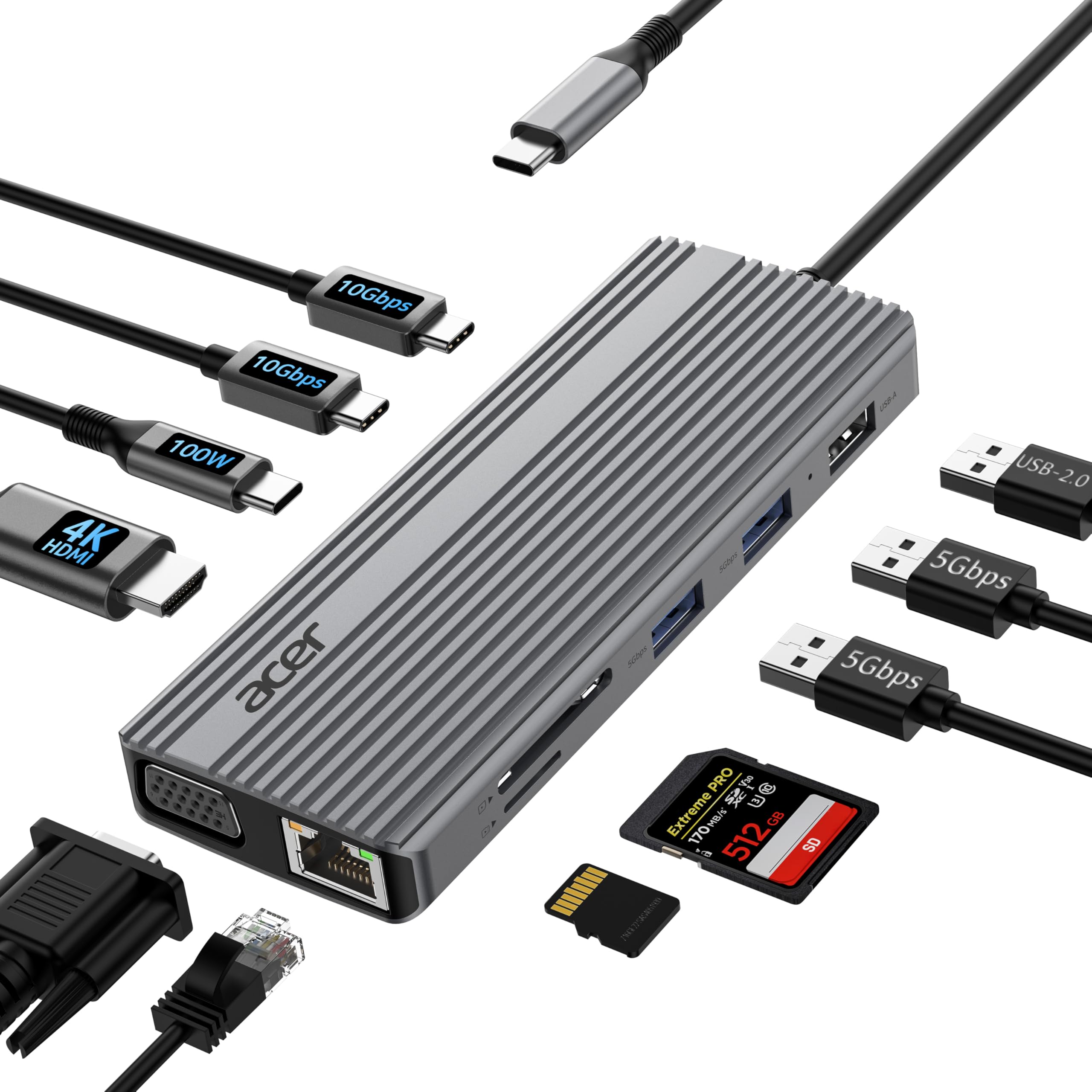
The desktop-dock giant that turns any USB-C laptop into a full workstation in one plug.
If you want your laptop to act like a desktop tower, the Acer 11-in-1 hub delivers. It packs 11 ports into an aluminium shell: a 4K@60Hz HDMI port (for ultra-sharp 4K at 60 frames per second), a 1080P VGA port, two USB-C 3.2 ports at 10Gbps (for fast data transfer), two USB-A 3.0 ports at 5Gbps, a USB 2.0 port, a 100W PD charging port (to power your laptop), a 1Gbps ethernet port (for wired internet), and SD/Micro SD card slots. It’s a full docking station that fits in your bag.
The 10Gbps USB-C ports and 1Gbps ethernet speed up large file transfers and HD video uploads for photographers and pros. The 100W PD port delivers 90W output, fast-charging a MacBook Pro or Air. When used with VGA, the hub achieves dual-screen display up to 1080P@60Hz, supporting both mirror and extended modes — a real extension, unlike some budget hubs.
Portability is what owners praise most, finding it well-made and compact with plenty of ports for various needs. It is a great buy for the price when you consider it replaces a monitor cable, a keyboard receiver, a mouse dongle, a card reader, and an ethernet cable. The recurring note is reliability is mixed — one owner’s port stopped working after three months, though the seller replaced it promptly. Also, the hub can get hot under load, and the USB ports do not support charging or video/audio.
Why it is the ultimate desk upgrade
- 11 ports including ethernet, SD card slots, and dual USB-C 10Gbps
- 4K@60Hz HDMI plus true extended dual-screen with VGA
- 100W PD with 90W output for fast laptop charging
The reality check
- Runs hot during heavy use
- USB ports are data-only — no charging or video
Choose this if: you want one cable to rule them all — monitor, network, card reader, and charging in a single hub.
Consider the simpler route if: you only need VGA output and hate carrying a 160-gram device that demands a powered USB-C host port.
Understanding the Specs
DisplayPort Alt Mode
This is the feature your USB-C port needs to carry video at all. Modern MacBooks, Dell XPS, and HP Spectre laptops almost always support it. If your laptop lacks it, no adapter will produce a picture — the adapter can only convert a signal that already exists.
Pass-Through Charging
Adapters with pass-through charging let you plug your laptop’s charger into a USB-C port on the adapter, so the laptop charges while you use the VGA output. Look for a wattage number (like 60W or 100W) — the higher it is, the faster your laptop tops up under load.
Mirror vs Extend Mode
Mirror mode shows the same image on both screens — ideal for presentations. Extend mode gives you two separate desktops so you can drag windows between them. Not every adapter or operating system supports both, so check the listing if you need true multi-tasking across two monitors.
Resolution: 1080p vs 4K
VGA is an older standard, so it tops out around 1920×1200. If you need sharper output, you need an adapter with an HDMI port — those can hit 4K at 30Hz or 60Hz. Match the adapter to your display: a 4K HDMI adapter is overkill if you only ever plug into a VGA projector.
FAQ
Why does my USB-C to VGA adapter show no picture at all?
Can I use a USB-C to VGA adapter to extend my desktop to a second monitor?
What is the highest resolution I can get from VGA output?
Will a USB-C to VGA adapter work with my MacBook?
What does pass-through charging mean on a VGA adapter?
Is a 4-in-1 hub better than a single VGA adapter?
How do I know if my adapter supports dual monitors?
Why does my cheap VGA adapter show static or interference on the screen?
Can I use a USB-C to VGA adapter with my Android phone?
How long do these adapters typically last?
Final Thoughts: The Verdict
For most people, the usb-c to vga adapter winner is the BENFEI 2-Pack because it pairs a rock-solid 4.6-star reputation with a spare in the box, and its 1920*1200 output handles any projector you will meet. If you want to charge your laptop while you present, grab the Belkin for its 60W pass-through.
How We Picked
We do not accept paid placement. Every pick is matched to a real buyer and a real use-case; we do not hands-on test units.
Sources & Methodology
Specifications: manufacturer listings and product documentation. Review insights: verified customer reviews, as of August 2026. Pricing: not shown on this page (it changes often); check the current price via the retailer link.
As an Amazon Associate, Gadgets Feed earns from qualifying purchases. This does not affect which products we feature.