
Our readers keep the lights on and my morning glass full of iced black tea. As an Amazon Associate, I earn from qualifying purchases.
Specs are compiled from manufacturer listings and verified buyer reviews and can change over time — please confirm the key details on the product page before buying.
A slow or flaky Wi-Fi connection on a desktop PC is a special kind of frustration — video calls freeze, downloads crawl, and gaming lag makes you want to throw the whole tower out the window. The fix is usually a small USB dongle that plugs into a port and adds or upgrades your wireless internet, but not all of them are created equal. This guide breaks down the best USB wireless adapters by real-world performance, compatibility, and ease of setup, so you can pick the one that actually ends your signal struggles.
I’m Min — the founder and writer behind Gadgets Feed. This guide is built by comparing the manufacturers’ published specifications and the patterns across verified customer reviews, so you get each pick’s real strengths and trade-offs instead of marketing spin.
If your desktop or laptop keeps dropping Wi-Fi or crawls during streaming, the right usb wireless adapter can fix it fast—but you need to match speed, range, and system support to your own setup.
Our Picks at a Glance

How To Choose The Best USB Wireless Adapter
Before you click buy, you need to know that Wi-Fi adapters are not universal. A dongle that works flawlessly on one person’s Windows 11 rig might be a total dud on your older macOS setup. The three things that decide everything are the speed rating, the USB port type, and — most overlooked — the operating system support.
Match the Wi-Fi standard to your router
Your adapter can only be as fast as the router it talks to. If you have a modern Wi-Fi 6 router, an older AC1200 adapter will work, but you are leaving speed on the table. Look for the same generation on both ends — AX1800 adapters pair with Wi-Fi 6 routers, while Wi-Fi 7 adapters need a Wi-Fi 7 router to open up their top speeds. Buying a faster adapter than your router supports is fine for future-proofing, but it won’t make your current connection any quicker.
Check the USB port version
Plenty of adapters claim high speeds but connect through an older USB 2.0 port, which caps the real-world throughput. A USB 3.0 adapter is the standard for anything above basic browsing, as it offers faster data transfer between the dongle and your PC. If your computer only has USB 2.0 ports, even the best adapter will be limited by that slower connection.
Verify operating system compatibility before ordering
This is where buyers get burned most often. Many adapters are strictly Windows-only, while others support macOS but only up to a specific version like Catalina. Check the fine print: if an adapter says it needs Windows 10/11 only, don’t expect it to work on Linux or an older Mac. A driver download is common, so make sure the maker still hosts the software for your system.
Quick Comparison
| Model | Best For | Max Speed Rating | Wi-Fi Standard | System Support | Amazon |
|---|---|---|---|---|---|
| NETGEAR AC1200 (A6150)★ Best Overall | Plug-and-play with Linux & Macs | 1200 Mbps | Wi-Fi 5 (AC) | Win 7-10, macOS up to 10.15.7 | Amazon |
| UGREEN AX1800Best Value | Budget Wi-Fi 6 for Windows 10/11 | 1775 Mbps | Wi-Fi 6 (AX) | Windows 10/11 only | Amazon |
| TP-Link Archer TX20U Nano | Invisible nano upgrade for older PCs | 1201 Mbps | Wi-Fi 6 (AX) | Windows 10/11 | Amazon |
| Nineplus AC1300 | Long-range with external antennas | 1300 Mbps | Wi-Fi 5 (AC) | Win 7/10/11, Linux | Amazon |
| StarTech.com AC600 | True plug-and-play simplicity | 433 Mbps | Wi-Fi 5 (AC) | macOS (driver-free) | Amazon |
| NETGEAR Nighthawk A7500 | High-speed gaming & streaming | 1.8 Gbps | Wi-Fi 6 (AX) | Windows 10/11 | Amazon |
| BrosTrend BE6500 | Future-proof Wi-Fi 7 tri-band | 6500 Mbps | Wi-Fi 7 (BE) | Windows 10/11 (6GHz needs Win11) | Amazon |
In‑Depth Reviews
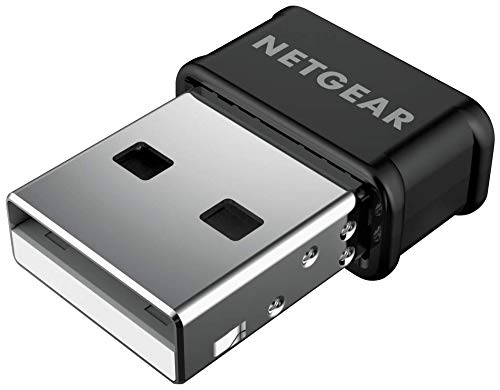
1. NETGEAR AC1200 Wi-Fi USB 2.0 Mini Adapter (A6150)
Our pick — over 4★ from 750+ verified ratings; the strongest balance of quality and price.
The tiny dongle that just works, no matter which operating system your PC runs.
Most adapters in this category lock you into Windows, so the standout feature here is the sheer flexibility. This NETGEAR dongle supports Windows 7, 8, and 10 plus macOS 10.8.3 through 10.15.7 (Catalina), and it has a fan base among Linux users who report it works flawlessly without downloading any drivers at all. For Windows and Mac you will need to grab a driver first — it is not truly plug-and-play on those systems — but owners consistently call the setup easy once you disable your old network adapter.
Performance lands at AC1200 dual-band speeds, which means up to 300 Mbps on 2.4 GHz and 867 Mbps on 5 GHz for streaming, gaming, and video calls. Buyers report real-world numbers that back this up, with several hitting download speeds around 250 Mbps on their connections. The nano design plugs into a USB 2.0 port without blocking the one next to it, and Beamforming+ and MU-MIMO help push range and reliability toward your router.
The honest limitation is that this is a Wi-Fi 5 (AC) adapter, so it is not built for the fastest Wi-Fi 6 networks, and it is not compatible with Windows 11 or newer macOS versions like Big Sur. It also weighs 3.2 ounces and is physically larger than the ultra-light nano sticks below — a 3.8x size difference compared to TP-Link’s tiny offering. If you run an older system or value broad compatibility over bleeding-edge speed, this is the crowd favorite that keeps selling itself, holding 4.4 stars across 700+ ratings.
Why it wins people over
- Rare multi-OS support spanning Windows 7-10, macOS up to Catalina, and Linux without drivers
- Strong real-world throughput — owners mention download speeds of 250 Mbps
- Compact nano build that leaves adjacent USB ports free
Where it shows its age
- Not compatible with Windows 11 or macOS Big Sur and newer
- Wi-Fi 5 (AC) speed tier, so it won’t max out a Wi-Fi 6 router
The verdict: The best all-round pick for anyone on an older PC or Mac who wants reliable dual-band speed without worrying about OS compatibility.
Think twice if: You are on Windows 11 and want to squeeze every drop from a Wi-Fi 6 router — you’ll want a newer AX adapter instead.
2. UGREEN AX1800 WiFi Adapter for Desktop PC
Budget-friendly Wi-Fi 6 speed that breathes new life into an older Windows desktop.
If you are on Windows 10 or 11 and want the efficiency of Wi-Fi 6 without spending premium money, this UGREEN dongle is the value play. It delivers AX1800 speeds — up to 1201 Mbps on 5 GHz and 574 Mbps on 2.4 GHz — through a USB 3.0 connection, which supports rapid data transfers so your PC isn’t the bottleneck. The back ventilation holes help with heat dissipation, keeping performance steady during long gaming or streaming sessions.
The speed difference versus an older Wi-Fi 5 adapter is real: at 1775 Mbps rated, this outpaces the NETGEAR AC1200’s 1200 Mbps rating by a noticeable margin, making it the faster option for a modern Wi-Fi 6 router. Owners on aging laptops report fast 5G connections once the driver is installed, and the built-in driver means no CD or internet download is needed for setup. WPA3-SAE encryption keeps your connection protected with the latest security standard.
Setup is where opinions split — it is only compatible with Windows 10/11 (X86/X64), so Mac, Linux, and older Windows versions are out entirely. Some buyers hit a snag during installation where the adapter initially showed up as USB Mass Storage before a Device Manager “Update Drivers” fix resolved it as a Realtek device. At just 50 g, it is featherlight, though that is an 11.0x weight gap compared to TP-Link’s nano 4.54 g stick — you will feel the difference in your pocket if you travel with it.
The affordable upgrade path
- True Wi-Fi 6 AX1800 speeds up to 1775 Mbps with USB 3.0 transfer support
- Built-in driver means no CD or external download needed for Windows 10/11
- Ventilation holes prevent overheating during long sessions
Who should pass
- Strictly Windows 10/11 — no macOS, Linux, or Windows 7/8 support
- Installation can be tricky if the device isn’t auto-detected on first plug-in
Reach for this if: You run Windows 10/11 and want affordable Wi-Fi 6 speeds for streaming and gaming while staying affordable.
Look elsewhere if: You need macOS or Linux support, or you want a truly invisible nano-sized stick.
3. TP-Link Archer TX20U Nano (AX1800)

A 4.54-gram stick so small you will forget it is plugged in, delivering Wi-Fi 6 speeds.
Revive an old laptop or desktop with a failing internal Wi-Fi card using the TP-Link Archer TX20U Nano. It is genuinely pocket-sized at just 1.06″L x 0.62″W x 0.3″H and weighs a mere 4.54 g — a 3.8x smaller footprint than NETGEAR’s AC1200 mini adapter — so it sits flush in a USB 3.0 port without blocking neighbors or snapping off in a bag. The defining spec is AX1800 Wi-Fi 6 (the latest wireless standard), pushing up to 1201 Mbps on 5 GHz and 574 Mbps on 2.4 GHz, so you can stream 4K and game without stutter.
The real-world payoff shows up on older machines. Customers note download speeds jumping from 30-40 Mbps to 110-120 Mbps on a 2014 all-in-one, and that improvement eliminated buffering on 1080p60 streams. MU-MIMO and OFDMA technology help your PC handle data at the same time as other devices on the network, which translates to limited lag for videos and online gaming when the whole household is online. WPA3 encryption keeps your password protected with the latest security protocol.
The catch is that setup preferences vary by router. The pre-loaded driver makes for easy installation, but some owners found connection drops every 15-20 seconds until they switched their router from Auto mode to N/AC/AX mixed — a quick change in router settings rather than a fault in the adapter. It supports Windows 10/11 only, so Mac users are out of luck here.
The invisible powerhouse
- Ultra-compact nano design that barely protrudes from the USB port
- Wi-Fi 6 AX1800 with MU-MIMO and OFDMA for lag-free streaming and gaming
- Measured speed jumps from 30-40 Mbps to 110-120 Mbps on aging PCs
Setup notes to know
- May require changing your router to N/AC/AX mixed mode to prevent drops
- Windows 10/11 only — no macOS or Linux support
Best for: Extending the useful life of an old laptop or desktop where a nano form factor and Wi-Fi 6 speeds matter more than raw top-end throughput.
Who it doesn’t suit: Mac owners, or anyone unwilling to tweak a router setting if intermittent drops appear.
4. Nineplus AC1300 USB WiFi Adapter with Dual Antennas

Dual high-gain antennas reach across the house to rescue weak bedroom signals.
If your bedroom is a dead zone, this adapter’s two external 5dBi antennas (the units that send and receive Wi-Fi) capture the signal more reliably at distance, making it a practical fix for rooms far from the router. Speed ratings hit AC1300 — up to 867 Mbps on the 5.8 GHz band and 400 Mbps on 2.4 GHz — and it runs on USB 3.0, which the maker claims offers up to 10 times faster connections compared to USB 2.0 for the data moving between the dongle and your PC.
There is genuine plug-and-play appeal here: on Windows 10/11, the system auto-detects and installs the driver when you plug it into a USB 3.0 port, with no manual setup required. It is broadly compatible with Windows 11/10/7 and Linux, which is broader than many rivals. Reviewers point out extremely high speeds in real use, including 100 MB download and 40 MB upload figures, and the WPA3 encryption protects your network from intrusion with the latest security standard.
The strongest endorsement might be the customer support story that threads through the reviews — when owners hit compatibility issues, the tech team worked to send a compatible replacement model at no charge. That said, a few buyers experienced connection drops or recognition failures on Windows 11, and the chunky antenna design is the opposite of the nano sticks above. If your PC sits near the router, a smaller adapter would be neater; if range is your problem, this is the answer.
The distance solution
- Dual 5dBi high-gain antennas deliver stable connections at greater distances
- Plug-and-play on Windows 10/11 with auto driver detection — no CD needed
- Broad OS support including Windows 7, 10, 11, and Linux
Honest trade-offs
- Bulky antenna design isn’t travel-friendly compared to nano adapters
- Occasional connection drops or compatibility issues reported on Windows 11
The verdict: Reach for this if you need to overcome weak signal in a far room — the dual antennas give it a range advantage most USB dongles can’t match.
skip it if: You want a discreet stick for travel or your PC already sits close to the router.
5. StarTech.com AC600 Dual Band USB WiFi Adapter

The rare adapter that genuinely works the moment you plug it in — no driver hunt required.
If downloading drivers and digging through Device Manager makes your eyes glaze over, this StarTech stick is the low-friction choice. It is driver-free for many systems, and owners repeatedly describe it working as soon as it’s plugged in, with several reporting it reached speeds around 161 Mbps down and 22 Mbps up — much faster than their old internal cards. The compact USB nano form factor (about the size of a fingernail) keeps obstruction minimal, ideal for when you’re on the go.
Speed is AC600 tier, which means top data rates of up to 433 Mbps on the 5 GHz band and up to 150 Mbps on 2.4 GHz. That’s decidedly entry-level compared to the Wi-Fi 6 and Wi-Fi 7 adapters on this list, so it suits typical browsing, email, and HD streaming rather than competitive gaming or massive downloads. It is IEEE 802.11a/b/g/n/ac compliant and supports WEP, WPA, and WPA2 wireless security, and it runs over USB 2.0.
The mixed note in the feedback is that “driver-free” isn’t universal — some owners found it worked from the start while others needed to install Windows drivers and disable USB power-saving in Device Manager to stop frequent disconnects. At just 0.7″L x 0.9″W x 0.3″H, it’s a true nano stick, though the modest speed ceiling means it won’t be the last adapter you ever buy if your internet plan is fast.
Simplicity first
- Plug-and-play operation for many users — no driver download needed
- Tiny nano form factor that won’t block adjacent ports
- Real-world speeds around 161 Mbps down reported by owners
Know the limits
- AC600 speed tier with USB 2.0 caps throughput for heavy gaming or 4K streaming
- Some units need manual driver install and USB power-saving disabled to avoid drops
Reach for this if: You want the simplest possible upgrade for basic web use on a laptop or desktop, and you prize instant setup over raw speed.
Look elsewhere if: You pay for fast internet and want to actually use it — step up to a Wi-Fi 6 adapter.
6. NETGEAR Nighthawk WiFi 6 USB 3.0 Adapter (A7500)

A flexible antenna and AX1800 speeds that turn a weak Wi-Fi PC into a streaming powerhouse.
Where nano adapters save space, this Nighthawk sacrifices neatness for sheer signal muscle. The flexible antenna lets you angle the adapter to find the strongest Wi-Fi signal and best coverage, which pays off in real-world tests — one owner saw speed jump from 32 Mbps on powerline to roughly 600 Mbps, and another reported their 5-10 Mbps connection leap past 100 Mbps at the same spot. That kind of improvement transforms video conferences, gaming, and online learning from a struggle into a non-event.
It’s an AX1800 Wi-Fi 6 adapter rated up to 1.8 Gbps, works with any Wi-Fi 6 or Wi-Fi 5 router or mesh system, and connects over USB 3.0. Setup is straightforward via the included thumb drive with software — shoppers say being up and running in under 5 minutes. WPA3 support is a bonus for the latest security protocol, and it requires Windows 10 or 11 (32/64-bit).
The fair critique is durability and bulk. The adapter is significantly larger than a nano stick and crowds adjacent USB ports, and a single owner reported the unit failing to reconnect after Windows updates and barely lasting a month before considering a return. Those are the exceptions, though — the broader feedback is that this adapter outperforms older stubby ones and is considered good value for the speed it open up on aging PCs.
The speed open up
- Flexible antenna provides best coverage — buyers report jumps from 5-10 Mbps to over 100 Mbps
- Wi-Fi 6 AX1800 rated up to 1.8 Gbps with USB 3.0 for fast transfers
- Setup in under 5 minutes via included USB thumb drive with software
Consider the size
- Bulky design crowds adjacent USB ports on a desktop or laptop
- Rare reports of failure to reconnect after Windows updates
Best for: Windows users with a weak built-in Wi-Fi card who want maximum speed and range from a single USB dongle with an adjustable antenna.
Who should skip: Anyone needing a discreet travel stick, or Mac and Linux users — this is Windows-only.
7. BrosTrend BE6500 USB WiFi 7 Adapter

The first wave of Wi-Fi 7 in a USB stick, pushing up to 6.5 Gbps across three bands.
This is the adapter for the early adopter who already owns a Wi-Fi 7 router or plans to buy one soon. The BrosTrend BE6500 is a true tri-band Wi-Fi 7 dongle with rated speeds of 2882 Mbps on 6 GHz, 2882 Mbps on 5 GHz, and 688 Mbps on 2.4 GHz — a total data rate of 6500 Mbps. It uses 4K-QAM, 160 MHz channels, Multi-RU, and Preamble Puncturing to cut through congestion, while dual external antennas with beamforming lock onto your router for a stable connection even through walls.
In practice, owners mention it delivers close to full internet speed, with one laptop test matching 1 Gbps ethernet speeds at a full 6 GHz signal from 75 feet away. It picked up 7 more networks than a built-in receiver in another test, and the build survived a bent USB connector. Setup uses a pre-loaded driver with no CD needed, though it isn’t quite plug-and-play — you’ll likely disable your built-in Wi-Fi chip in Device Manager first, then reboot.
There are real caveats to weigh. Windows 11 is required to access the 6 GHz band; Windows 10 only supports the 5 GHz and 2.4 GHz bands, so you won’t open up the headline speeds on an older OS. It’s not compatible with macOS, Linux, or Bluetooth, and MLO (Multi-Link Operation) is currently not supported. Owners also warn against using a long extension cord with the adapter, which causes constant dropouts — the included cable works best. Durability got mixed feedback, with a few units reportedly not lasting long.
The next-gen leap
- True Wi-Fi 7 tri-band speeds up to 6.5 Gbps for gaming and 4K/8K streaming
- Dual antennas with beamforming — matched 1 Gbps ethernet speeds at 75 feet in owner tests
- Pre-loaded driver, no CD or downloads required for setup
The fine print
- Needs Windows 11 to access the 6 GHz band — Windows 10 tops out at 5 GHz
- Not for macOS, Linux, or Bluetooth; MLO technology unsupported
- Avoid long extension cords — they cause connection dropouts
The verdict: The premium future-proof pick for Windows 11 gamers and streamers who want Wi-Fi 7 readiness today on a Wi-Fi 7 router.
Think twice if: You’re on Windows 10, a Mac, or a Wi-Fi 6 router — you’ll pay for speed you can’t currently use.
Understanding the Specs
Wi-Fi Standards (AC, AX, BE)
The letter code tells you the generation of Wi-Fi technology the adapter supports. AC means Wi-Fi 5, AX means Wi-Fi 6, and BE means Wi-Fi 7 — each newer generation brings faster potential speeds and better performance in crowded homes with many devices. Your router must support the same standard to open up the adapter’s full speed.
Mbps vs Gbps Speed Ratings
Adapters advertise a theoretical maximum speed in megabits per second (Mbps) or gigabits per second (Gbps, where 1 Gbps equals 1000 Mbps). Real-world speeds are almost always lower because of distance, walls, and other devices on your network. Use the rating to compare adapters against each other, but expect actual throughput to be a fraction of the headline number.
USB 2.0 vs USB 3.0
The USB port version controls how fast data moves between the adapter and your computer. USB 3.0 offers significantly faster transfer rates than USB 2.0, so it’s the right choice for high-speed Wi-Fi plans. If your PC only has USB 2.0 ports, that older connection will cap the adapter’s real-world speed regardless of its Wi-Fi rating.
MU-MIMO and OFDMA
These are technologies that help your adapter handle multiple devices at once without slowing down. MU-MIMO lets your adapter talk to several devices simultaneously, while OFDMA allows your PC to receive data at the same time as other devices on the same stream. Together they reduce lag for video calls, gaming, and streaming when your whole household is online.
FAQ
Will a USB wireless adapter work with any desktop or laptop?
Is a USB Wi-Fi adapter as fast as a built-in network card?
Do I need to install drivers before the adapter works?
What is the difference between Wi-Fi 5, Wi-Fi 6, and Wi-Fi 7 adapters?
Why is my adapter’s real-world speed lower than the advertised rating?
Can I use a USB wireless adapter with a Mac?
What does dual-band and tri-band mean for a Wi-Fi adapter?
How do I fix frequent disconnects with my USB Wi-Fi adapter?
Is a nano USB adapter as reliable as one with a big antenna?
Final Thoughts: The Verdict
For most people, the usb wireless adapter winner is the NETGEAR AC1200 (A6150) because it offers the broadest compatibility across Windows, macOS, and Linux in a compact design that just works. If you want the speed of Wi-Fi 6 on a modern Windows 10/11 machine, grab the UGREEN AX1800 for the best value. And for anyone fighting a weak signal in a far room, the Nineplus AC1300 with its dual antennas is the one to reach for.
How We Picked
We do not accept paid placement. Every pick is matched to a real buyer and a real use-case; we do not hands-on test units.
Sources & Methodology
Specifications: manufacturer listings and product documentation. Review insights: verified customer reviews, as of September 2026. Pricing: not shown on this page (it changes often); check the current price via the retailer link.
As an Amazon Associate, Gadgets Feed earns from qualifying purchases. This does not affect which products we feature.