
You have a legacy desktop, an old laptop, or a piece of industrial equipment with a 15-pin VGA output, and you need to feed that analog signal into a modern HDMI monitor, TV, or projector. The problem isn’t just the physical connector—it’s the active conversion required to turn an analog RGB signal into a digital HDMI stream. Not every cable on the shelf can do it, and the wrong pick will leave you staring at a blank screen or scrambled artifacts.
I’m Min — the co-founder and writer behind Gadgets Feed. I’ve dug deep into this niche, analyzing hundreds of active chipset designs, USB power requirements, audio passthrough methods, and resolution support across the VGA-to-HDMI market to separate the adapters that genuinely work from those that frustrate.
No matter if you’re hooking up a vintage workstation for a dual-monitor setup or connecting a DVR to a modern flat panel, this guide pinpoints the most reliable vga to hdmi adapter for your exact scenario and budget.
How To Choose The Best VGA To HDMI Adapter
Choosing a VGA to HDMI adapter is not as simple as matching pin counts. Every adapter in this category is an active device—meaning it contains a chip that digitizes analog VGA signals. Understanding the differences in power delivery, audio handling, form factor, and resolution support will make or break your connection.
Active Chipset & USB Power Requirement
Every VGA to HDMI adapter relies on an internal analog-to-digital converter chip. This chip draws power—most commonly from a USB-A port (5V/1A or 2A). If your source device cannot spare a USB port for power, the adapter will produce a weak or nonexistent signal. Premium adapters from brands like StarTech prove that optional external power adds reliability, budget models require constant USB juice or they fail intermittently.
Audio Integration Paths
VGA cables carry no digital audio. To get sound through an HDMI display, the adapter must include a 3.5mm auxiliary audio input jack that merges the analog audio into the HDMI stream. Some adapters bundle a 3.5mm cable, others omit it entirely. If your VGA source has a separate headphone jack, an adapter with audio input is essential; otherwise, you will get video only and will need to run a separate speaker setup.
Resolution Ceiling and Refresh Rate
Almost all VGA to HDMI converters cap at 1920×1080 (1080p) at 60 Hz. A handful of dual-output models (like the AKWOR) push HDMI to 2560×1440 at 60 Hz, but the VGA output remains at 1080p. If you need higher refresh rates for gaming or higher pixel counts for detailed design work, you are limited by the VGA analog standard’s inherent bandwidth. Adapters that claim higher resolutions from a VGA source should be treated with skepticism.
Form Factor & Cable Length
Dongle-style adapters (male VGA to female HDMI) sit directly on the computer’s VGA port, creating a compact, low-profile connection. Cable-style adapters (male VGA to male HDMI) offer more reach—typically 1.5 to 1.8 meters—but add extra bulk. The best choice depends on whether you need to bridge a physical gap between devices or want a clean, minimal setup.
Quick Comparison
On smaller screens, swipe sideways to see the full table.
| Model | Category | Best For | Key Spec | Amazon |
|---|---|---|---|---|
| StarTech.com HDMI to VGA Adapter | Premium | No-power-required reliability | 1920×1200 support, no external power | Amazon |
| JideTech VGA to HDMI Converter | Premium | Commercial and industrial AV | Active chip, DC 5V powered, 3.5mm audio | Amazon |
| Dell HDMI to VGA Adapter | Mid-Range | Brand-matched Dell setups | 0.1 pounds, plug-and-play | Amazon |
| FOINNEX VGA to HDMI Adapter (B0B1Q2DLR9) | Mid-Range | Old laptop to modern monitor | 1080p, 3.5mm audio, micro USB power | Amazon |
| AKWOR VGA to HDMI+VGA Adapter | Mid-Range | Dual monitor mirroring | 2-in-1 VGA/HDMI output, 2560×1440 HDMI | Amazon |
| FOINNEX VGA to HDMI Adapter (B07121Y1Z3) | Mid-Range | KVM switch and compact setups | Dongle style, 1080p, USB powered | Amazon |
| Duttek VGA to HDMI Adapter Cable | Budget | Long-reach VGA source to HDMI display | 1.5m cable, 1080p, frosted aluminum | Amazon |
In‑Depth Reviews
1. StarTech.com HDMI to VGA Adapter
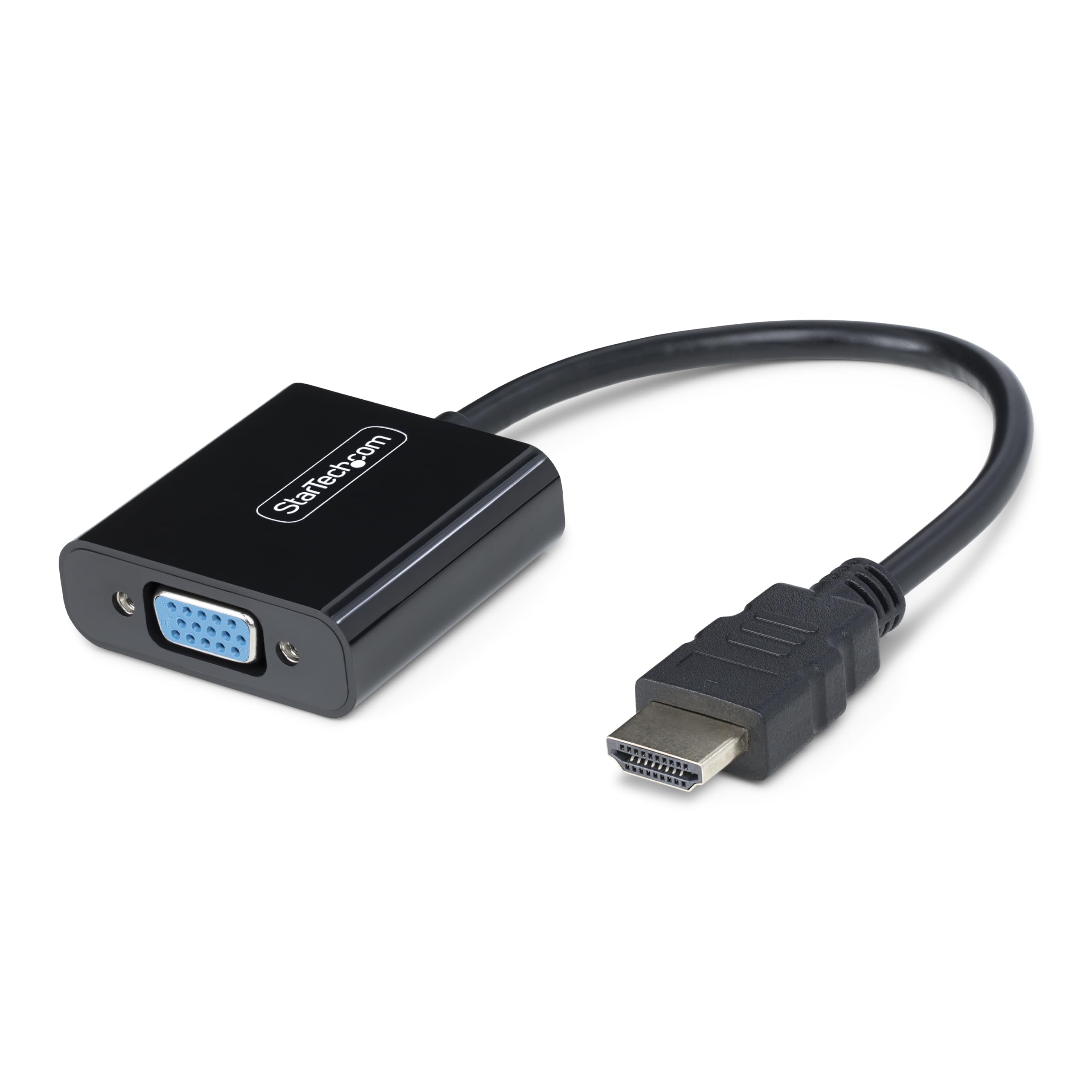
The StarTech.com HD2VGAE3 stands apart because it draws all the power it needs from the HDMI source itself, eliminating the USB tether that trips up most active adapters. This means zero power bricks, zero micro-USB cables to forget at home, and zero dropped signals when the USB port is already occupied. It supports resolutions up to 1920×1200 at 60Hz, covering both standard 1080p and wider workstation displays.
StarTech designed this adapter for universal OS compatibility—Windows, macOS, ChromeOS, and Linux all work out of the box without driver installation. The 14.7cm cable is short enough to avoid clutter but long enough to reach a recessed HDMI port. The housing is compact, and the VGA end includes screw-lock nuts that grip older projector cables securely.
This is a pure HDMI-to-VGA converter (the reverse of the keyword direction), but its no-power architecture and rock-solid signal integrity make it the reference point for the category. If you need VGA output from an HDMI source, this is the one. For VGA-to-HDMI, the same lessons about power efficiency apply when evaluating dongles that do require USB.
Why it’s great
- Zero external power needed—uses HDMI bus power
- Supports 1920×1200, beyond typical 1080p ceiling
- Screw-lock VGA connector prevents accidental disconnects
Good to know
- Unidirectional—only HDMI source to VGA display
- No audio passthrough; relies on separate audio path
2. JideTech VGA to HDMI Converter with Audio
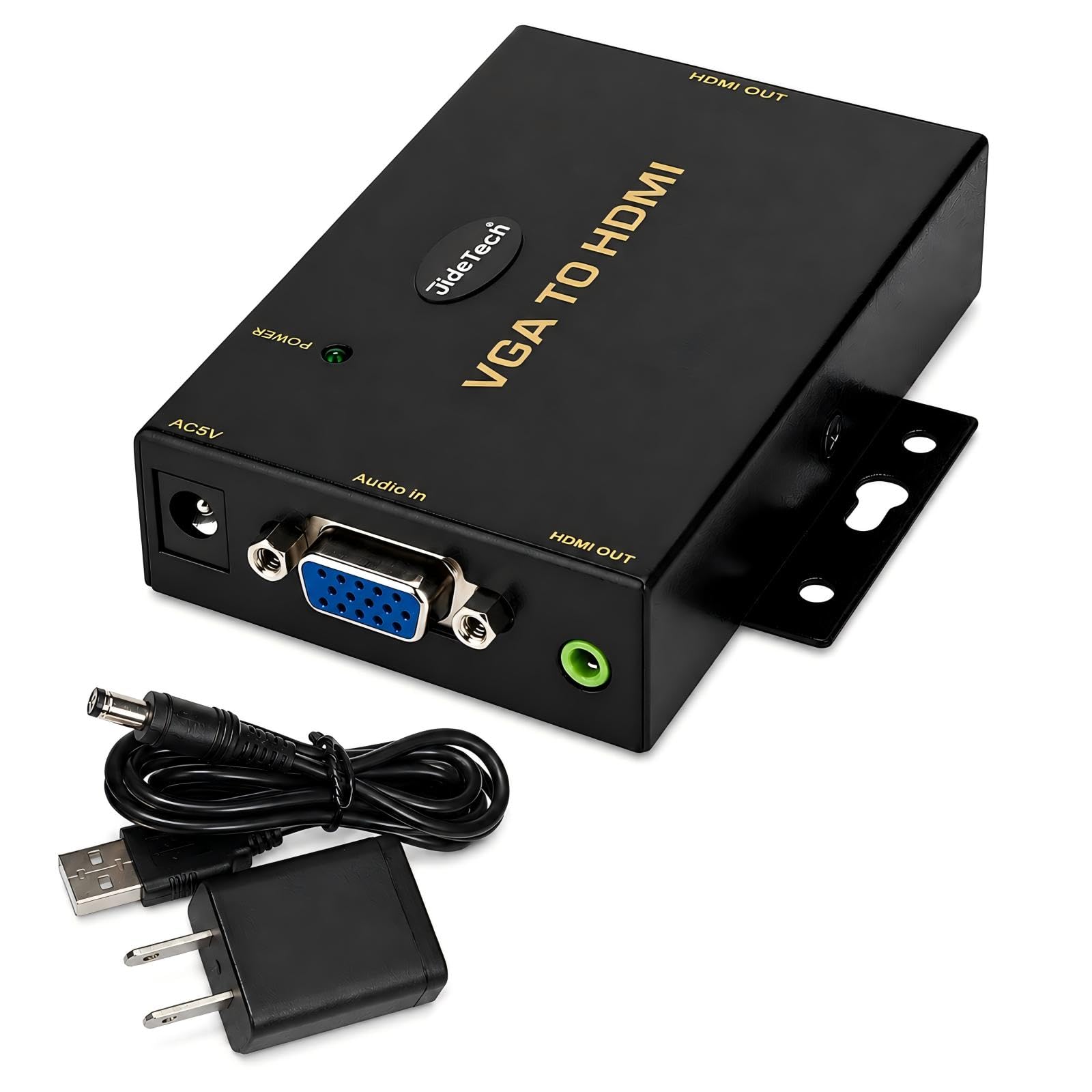
The JideTech JD-VGAH is built for environments where signal stability is non-negotiable: conference rooms, classrooms, industrial control panels, and POS systems. Its active conversion chipset is powered by a dedicated DC 5V adapter (included), meaning it never depends on the host device’s USB current for stable operation. This independence avoids the flickering or blackout issues that budget models suffer when the USB port delivers inconsistent voltage.
Audio integration is a standout feature here. A 3.5mm auxiliary input on the converter merges analog stereo audio from the VGA source into the HDMI output, so a single HDMI cable carries both picture and sound to the display. Resolutions scale cleanly to 1920×1080 at 60Hz, and multiple user reports confirm it works flawlessly with retro gaming setups like the Sega Dreamcast VGA box at 480p.
The housing is robust, and the converter includes a separate power cable with a North American Type-A plug. It is unidirectional—VGA source to HDMI display only—and the added depth of the unit means it may block adjacent ports on a tightly packed PC back panel.
Why it’s great
- Dedicated DC 5V power for interference-free conversion
- 3.5mm audio input merges sound into HDMI stream
- Proven reliability with retro consoles and industrial PCs
Good to know
- Higher price point than dongle-style adapters
- Requires AC outlet near the VGA source
3. Dell HDMI to VGA Adapter

The Dell 470-AALJ adapter is exactly what you expect from an OEM part: it works without drama, fits the aesthetic of a Dell workstation, and requires zero configuration. This is an HDMI-to-VGA converter, meaning it takes a digital HDMI signal from a modern laptop or desktop and outputs analog VGA for an older monitor or projector. Its simple black dongle design weighs only 0.1 pounds and measures 6.9 x 0.5 x 1.3 inches—small enough to live permanently in a laptop bag.
Users consistently report perfect compatibility with Dell displays and PCs, but it works across brands too. It supports a maximum resolution of 1920×1080 at 60Hz. Like the StarTech, it draws power from the HDMI port, so there are no extra cables to manage. The build quality is standard Dell—plastic housing, gold-plated pins, and a short pigtail that reduces strain on the laptop’s HDMI port.
If you already own Dell hardware and value seamless compatibility over extra features (like audio passthrough or dual-output), this adapter is a safe bet. Note that it is strictly HDMI-to-VGA, not the reverse direction.
Why it’s great
- Truly plug-and-play with Dell systems
- Ultra-light and pocket-friendly design
- No external power or driver required
Good to know
- Only HDMI to VGA, not bidirectional
- No audio input jack—video only
4. FOINNEX VGA to HDMI Adapter (B0B1Q2DLR9)

FOINNEX markets this adapter specifically as a solution for hooking older computers to modern HDMI displays, and it delivers exactly that with a clean, compact form factor. The unit is a dongle: male VGA on one side, female HDMI on the other, with a short attached micro-USB cable for power. It requires a 5V/2A USB port (or a 5V/1A adapter) to energize the active chipset. Without that USB connection, nothing happens—this is the most common point of confusion, so plan your USB port allocation before buying.
Resolution support hits the standard 1080p at 60Hz ceiling, and the gold-plated VGA pins resist corrosion while maintaining signal integrity. A bundled 3.5mm audio cable lets you route sound from the computer’s audio jack into the adapter, which then embeds it into the HDMI feed. Users praise the short extension cable attached to the thumbscrews, which gives fingers enough room to tighten them even on crowded I/O panels.
The adapter is unidirectional (VGA source to HDMI display only) and does not support HDMI to VGA. It works with Windows 7/8/10 and Linux but is not tested with macOS in the official specs.
Why it’s great
- Includes both micro-USB power and 3.5mm audio cables
- Thumbscrew extension makes installation on tight panels easy
- Solid 1080p/60Hz performance with gold-plated connectors
Good to know
- USB power is mandatory—no signal without it
- No macOS compatibility listed
5. AKWOR VGA to HDMI+VGA Adapter for Dual Monitors

The AKWOR NXA210-L2 is a 2-in-1 adapter that splits a single VGA source into simultaneous VGA and HDMI outputs. This makes it a niche but valuable tool for scenarios where you need to mirror a single display to two screens—for example, a presentation displayed on both a projector (VGA) and a nearby TV (HDMI). It is not an extended desktop adapter; both outputs show the same content.
On the HDMI side, the adapter supports 2560×1440 at 60Hz—a notable jump above the 1080p ceiling of typical VGA converters. The VGA output remains at 1920×1080. The aluminum frosted shell resists scratches and feels premium in hand. A micro-USB power cable and a 3.5mm audio cable are included in the box, both of which are necessary for reliable signal transmission and audio integration.
Compatibility extends across Windows, macOS, and Linux. However, users noted that the male VGA connector sits close to the HDMI output ports, so a slim HDMI extender may be needed if your equipment has tightly spaced ports. This adapter is best for dedicated mirroring workflows, not for users who want independent extended displays.
Why it’s great
- Drives both VGA and HDMI displays from one VGA source
- HDMI supports up to 2560×1440 resolution
- Durable aluminum housing resists wear
Good to know
- Mirroring only—no independent extended displays
- Tight port spacing may require a short HDMI extender
6. FOINNEX VGA to HDMI Adapter (B07121Y1Z3)

This earlier FOINNEX model (VH-UA02) offers the same core conversion capability—VGA source to HDMI display at 1080p/60Hz—but in a slightly different physical format. It sits as a compact dongle directly on the VGA port, with a short micro-USB pigtail for power and a separate 3.5mm audio jack. The matte black finish and gold-plated VGA connector give it a basic, functional look that suits less visible installs like behind a monitor or inside a KVM cabinet.
User experiences highlight its plug-and-play simplicity: no drivers, no configuration, and reliable 1080p output as long as the USB is plugged into a 5V/1A or 2A port. The unit is unidirectional and does not support HDMI-to-VGA. A separate HDMI cable (not included) is required to connect the adapter’s female HDMI port to the display.
The main drawback is the lack of user instructions—multiple buyers had to figure out the USB power requirement by trial and error. Also, the side-mounted USB port can block adjacent I/O ports on a desktop PC. Once powered correctly, it delivers stable, flicker-free performance.
Why it’s great
- Ultra-compact dongle fits directly on VGA port
- Stable 1080p output with no driver installation
- Includes 3.5mm audio cable for sound integration
Good to know
- No instructions included—USB power requirement not obvious
- Side USB port may block adjacent ports on a PC
7. Duttek VGA to HDMI Adapter Cable 5FT

The Duttek VGA-to-HDMI adapter is a cable-style solution rather than a dongle, giving you 1.5 meters (5 feet) of length to span the distance between an older computer and a modern display without needing a separate HDMI extension. It terminates in a male VGA connector on one end and a male HDMI connector on the other, with an attached USB-A plug for power and a 3.5mm audio jack. The aluminum frosted housing on the connector ends resists scratches and looks clean.
Resolution support is standard at 1920×1080 at 60Hz. The gold-plated VGA pins resist corrosion, and the metal woven shielding layer provides strong interference rejection—useful in environments with electromagnetic noise from nearby power cables or machinery. Users report that the adapter works with older Dell desktop PCs, Xbox 360s, PS3s, Chromebooks, and Roku boxes that carry VGA output.
The critical caveat: you must plug in the USB power cable simultaneously for the adapter to function. Without it, the active chipset receives no power and no signal passes through. Also, the adapter is unidirectional (VGA to HDMI only) and cannot be used in reverse. Build quality is decent for the price point, but the cable jacket feels slightly stiff out of the box.
Why it’s great
- 1.5-meter integrated cable reduces extra adapters
- Frosted aluminum housing is durable and scratch-resistant
- Metal woven shielding blocks electromagnetic interference
Good to know
- USB power is mandatory—no signal without it
- Unidirectional, not for HDMI to VGA use
FAQ
Can I use a VGA to HDMI adapter in reverse to connect HDMI to VGA?
Why does my VGA to HDMI adapter show “No Signal” even when everything is plugged in?
Will a VGA to HDMI adapter support audio without a 3.5mm cable?
What is the maximum resolution I can expect from a VGA to HDMI adapter?
Final Thoughts: The Verdict
For most users, the vga to hdmi adapter winner is the JideTech VGA to HDMI Converter because its dedicated DC power supply eliminates the USB-dependent flickering that plagues cheaper dongles, while its integrated 3.5mm audio input ensures both picture and sound travel through a single HDMI cable. If you want a compact, USB-powered solution for occasional connections, grab the FOINNEX VGA to HDMI Adapter (B0B1Q2DLR9). And for a dual-monitor mirroring setup in a presentation environment, nothing beats the AKWOR VGA to HDMI+VGA Adapter.