
That spinning wheel of death on your laptop isn’t your ISP’s fault — it’s likely the tiny, underpowered wireless card buried inside your machine struggling to punch through a wall or two. A dedicated external antenna cuts through that interference, turning a spotty signal into a stable, high-speed connection for streaming, gaming, or video calls.
I’m Min — the co-founder and writer behind Gadgets Feed. I’ve spent hundreds of hours analyzing the silicon, antenna gain figures, and driver compatibility across dozens of USB wireless adapters to separate genuine performance from marketing fluff.
This guide breaks down the top contenders to help you pick the right best wifi antenna for laptop for your specific setup, whether you need raw speed, long-range stability, or a budget-friendly fix for a dead zone.
How To Choose The Best WiFi Antenna For Laptop
Not every laptop needs the same antenna. A compact travel dongle for coffee shop use is a different beast from a high-gain desktop replacement meant to bridge a signal across a multi-story home. Focus on three core factors before you buy.
Wireless Standard and Speed Rating
The standard (Wi-Fi 5, 6, 6E, or 7) determines the maximum theoretical throughput and which frequency bands the adapter can use. Wi-Fi 6 (802.11ax) is the current sweet spot for most users, offering OFDMA and MU-MIMO for efficient multi-device handling. Wi-Fi 6E unlocks the 6 GHz band for less congested channels, but requires Windows 11. Wi-Fi 7 adapters exist but are future-proofing investments that demand a matching router for full benefit.
Antenna Gain and Form Factor
Antenna gain, measured in dBi, directly dictates how well the adapter can receive weak signals. A 2 dBi internal antenna is fine for a laptop sitting next to a router; a 5 dBi external antenna is the minimum for penetrating walls or floors. Larger, adjustable antennas offer better positioning but are less portable. Nano dongles sacrifice range for convenience — know your trade-off.
Driver Support and OS Compatibility
Windows 10 and 11 are universally supported. Linux users must check for native kernel module support or manually compile drivers — the Realtek and MediaTek chipsets dominate here. macOS compatibility is rare for USB adapters. Always verify your specific operating system version is listed before purchasing, especially for Wi-Fi 6E and 7 models that require Windows 11 for 6 GHz access.
Quick Comparison
On smaller screens, swipe sideways to see the full table.
| Model | Category | Best For | Key Spec | Amazon |
|---|---|---|---|---|
| Panda Wireless PAU0F | Wi-Fi 6E | Linux users and 6 GHz access | Tri-band (2.4/5/6 GHz), dual adjustable antennas | Amazon |
| NETGEAR Nighthawk A7500 | Wi-Fi 6 | Premium brand reliability | AX1800, up to 1.8 Gbps, flexible antenna | Amazon |
| Nineplus AX1800 | Wi-Fi 6 | Value-driven performance | 1800 Mbps, 2x5dBi antennas, USB 3.0 | Amazon |
| Nineplus 1300Mbps | Wi-Fi 5 | Budget entry-level upgrade | 1300 Mbps, 2x5dBi antennas, WPA3 | Amazon |
| BrosTrend BE6500 | Wi-Fi 7 | Future-proof gaming performance | Tri-band 6.5 Gbps, 4K-QAM, dual antennas | Amazon |
| WAVLINK BE6500 | Wi-Fi 7 | Maximum range with 4 antennas | Tri-band 6.5 Gbps, MLO, 4x5dBi antennas | Amazon |
| TP-Link Archer TX20U Nano | Wi-Fi 6 | Ultra-portable travel adapter | AX1800, nano-sized, USB 2.0 | Amazon |
In‑Depth Reviews
1. Panda Wireless PAU0F AXE3000

The Panda PAU0F is the rare adapter that delivers genuine Wi-Fi 6E tri-band performance (2.4, 5, and 6 GHz) without locking you into Windows-only territory. Its dual adjustable antennas provide focused signal directionality, and the USB 3.0 interface ensures the 1200 Mbps theoretical ceiling isn’t choked by a bottleneck. Users with a compatible Wi-Fi 6E router will see the real benefit: the 6 GHz band is a clean highway compared to the congested 5 GHz spectrum most adapters fight over.
What separates the PAU0F from the pack is its broad Linux support. Out-of-the-box compatibility with Ubuntu 24.04, Fedora, and even Kali VMs means no kernel module wrestling for the open-source crowd. On Windows 11, it’s truly plug-and-play — the system auto-detects the Realtek chipset and connects. The swivel antennas also rotate 90 degrees, letting you angle them for optimal polarization relative to your router’s signal.
The included USB extension cable is a thoughtful addition that lets you position the adapter away from the laptop’s internal RF noise. While the adapter isn’t as nano-sized as some competitors, the trade-off in portability is directly returned in signal stability. Just note that Windows 10 does not support the 6 GHz band, so older OS versions will be limited to 5 and 2.4 GHz operation.
Why it’s great
- Authentic tri-band 6E performance with low latency on clean 6 GHz spectrum
- Strong Linux compatibility across multiple distros without manual driver builds
- Adjustable antennas plus extension cable for optimal signal positioning
Good to know
- Requires Windows 11 for 6 GHz band access — Windows 10 users stuck on 5/2.4 GHz
- Larger form factor than nano dongles, less ideal for ultra-portable travel
2. NETGEAR Nighthawk A7500

The Nighthawk A7500 carries NETGEAR’s established pedigree into the USB adapter space, offering a polished AX1800 experience for Windows users. Its single flexible antenna folds down for transport but extends to a full 180-degree pivot range when deployed, letting you find the signal sweet spot without guesswork. Real-world throughput jumps — measured from 190 Mbps to over 500 Mbps on the same mini PC — translate the 1.8 Gbps theoretical ceiling into tangible downloads and reduced buffer times.
Build quality here surpasses every plastic-bodied competitor. The A7500’s casing feels dense, and the included thumb drive with pre-loaded drivers eliminates the CD-ROM hassle that plagues older peripherals. WPA3 encryption is on board for security-conscious users, and the adapter works with any Wi-Fi 6 or Wi-Fi 5 router — no ecosystem lock-in required. The bright front LED provides clear connection status, though some users note it’s quite luminous in a dark room.
The primary drawback is physical footprint. The wide-body design extends noticeably from a laptop’s USB port and will block an adjacent port on closely spaced laptops. It’s better suited for desktop use or laptops with side-mounted ports that have generous spacing. The adapter is also Windows-only, ruling out macOS or Linux use entirely.
Why it’s great
- Premium build quality with durable casing and reliable NETGEAR engineering
- Real-world speed uplift of 2-3x over older internal Wi-Fi 5 adapters
- Flexible antenna pivots for precise signal alignment
Good to know
- Bulky design blocks adjacent USB ports on tightly spaced laptops
- Limited to Windows 10/11 — no macOS or Linux driver support
3. Nineplus AX1800 Wi-Fi 6 Adapter

Nineplus cuts straight to the point: a real Wi-Fi 6 chipset (802.11ax) paired with two external 5 dBi antennas, USB 3.0, and WPA3 — all at a price that undercuts most competitors by a significant margin. The 1800 Mbps rating breaks down to 1201 Mbps on 5 GHz and 567 Mbps on 2.4 GHz, giving you genuine dual-band headroom for both low-latency gaming and high-range browsing. The included driver USB flash drive handles installation on Windows 10/11 without internet access.
What makes this adapter punch above its weight is the beamforming technology working in tandem with those 5 dBi antennas. Beamforming focuses the Wi-Fi signal directionally toward your router rather than broadcasting omnidirectionally, which translates to fewer dropped packets at range. Customer reports confirm stable 2.4 and 5 GHz connections to routers located one floor away, with no stability issues during streaming sessions. Linux users on Fedora 42 report the MediaTek MT7921U chipset is supported by the built-in kernel module with a minor udev configuration tweak.
The catch is longevity consistency. While many units perform flawlessly out of the box, a subset of long-term reviews describe intermittent disconnection issues developing after roughly a year of use. The 2-year replacement warranty mitigates this risk, but it’s worth noting that the build quality doesn’t match the NETGEAR or Panda offerings. If you need a stopgap upgrade or a test bed for Wi-Fi 6, this is the clear value champion.
Why it’s great
- Excellent price-to-performance ratio with genuine AX1800 Wi-Fi 6 speeds
- 2x5dBi antennas with beamforming for strong signal penetration through floors
- USB 3.0 interface prevents bottlenecking on high-throughput connections
Good to know
- Some units develop connection instability after prolonged use
- No included stand — antennas must rest on desk surface
4. TP-Link Archer TX20U Nano

The Archer TX20U Nano is the adapter you forget is plugged in. At just 1.06 x 0.62 x 0.3 inches and weighing under 3 grams, it protrudes barely a centimeter from your laptop’s USB port — no snagging, no breaking, no blocking adjacent ports. Despite the minuscule footprint, TP-Link packs in Wi-Fi 6 with AX1800 speeds (1201 Mbps on 5 GHz, 574 Mbps on 2.4 GHz), MU-MIMO, OFDMA, and WPA3. It’s designed for the laptop user who prioritizes portability above all else.
The trade-off for the nano form factor is antenna gain. Without external antennas, the internal antenna array relies on close proximity to the router for peak throughput. In a coffee shop or hotel room where the router is within 20 feet, the TX20U delivers full speeds. In a multi-story home with the router two floors down, the performance will degrade faster than an adapter with 5 dBi external antennas. Ping improvements are real though — reviewers note a drop from 12-15 ms to 5-8 ms in online gaming.
Installation is straightforward on Windows 10/11 thanks to the pre-loaded driver that auto-mounts as a virtual CD drive. Linux users on Fedora report out-of-the-box recognition with no additional configuration needed. One caveat: the USB 2.0 interface limits the adapter’s peak throughput to roughly 480 Mbps in practice, below the theoretical Wi-Fi 6 ceiling. For most laptop use cases this is irrelevant, but power users with gigabit internet will want a USB 3.0 adapter.
Why it’s great
- Extremely compact — zero protrusion, safe for always-plugged travel
- Excellent ping reduction for online gaming despite small size
- Broad OS compatibility including Windows and Linux
Good to know
- USB 2.0 interface limits real-world throughput to ~480 Mbps maximum
- No external antennas means weaker performance at long range through walls
5. BrosTrend BE6500 WiFi 7 Adapter

The BrosTrend BE6500 jumps straight to the bleeding edge of USB Wi-Fi adapters with a tri-band Wi-Fi 7 design that pushes up to 6.5 Gbps across 2.4 GHz (688 Mbps), 5 GHz (2882 Mbps), and 6 GHz (2882 Mbps) bands. The 4K-QAM modulation packs more data per signal wave than the 1024-QAM used in Wi-Fi 6, translating to higher throughput in congested environments. Dual external antennas with beamforming lock onto your router’s signal with dynamic directional focus.
Real-world testing from a Dell 7730 laptop shows the BE6500 pulling a full 1 Gbps ethernet-equivalent connection from a TP-Link Archer BE550 Pro AP 75 feet away on the 6 GHz band. That’s the promise of Wi-Fi 7’s wider 320 MHz channels in action — but only if you have a Wi-Fi 7 router. Used with a Wi-Fi 6 router, the adapter operates as a standard AX adapter. The pre-loaded driver installation requires a specific sequence: disable the internal Wi-Fi adapter, plug in the USB, run the setup.exe from the virtual CD drive, and reboot.
The form factor is not tiny — the boxy antenna housing measures 3.62 x 2.28 x 3.66 inches — so ensure your laptop setup has the physical room. The adapter draws enough power that a USB 3.0 port is mandatory for stability. A notable current limitation: Multi-Link Operation (MLO), a headline Wi-Fi 7 feature, is not supported on this generation. If pure future-proofing without today’s full spec is acceptable, this is the fastest USB adapter you can buy right now.
Why it’s great
- Wi-Fi 7 tri-band delivers real-world throughput matching gigabit wired connections
- 4K-QAM modulation provides tangible speed gains in congested signal environments
- Dual beamforming antennas lock onto distant router signals with precision
Good to know
- Requires specific driver installation sequence — not true plug-and-play
- MLO (Multi-Link Operation) is not supported despite Wi-Fi 7 branding
6. WAVLINK BE6500 Wi-Fi 7 Adapter
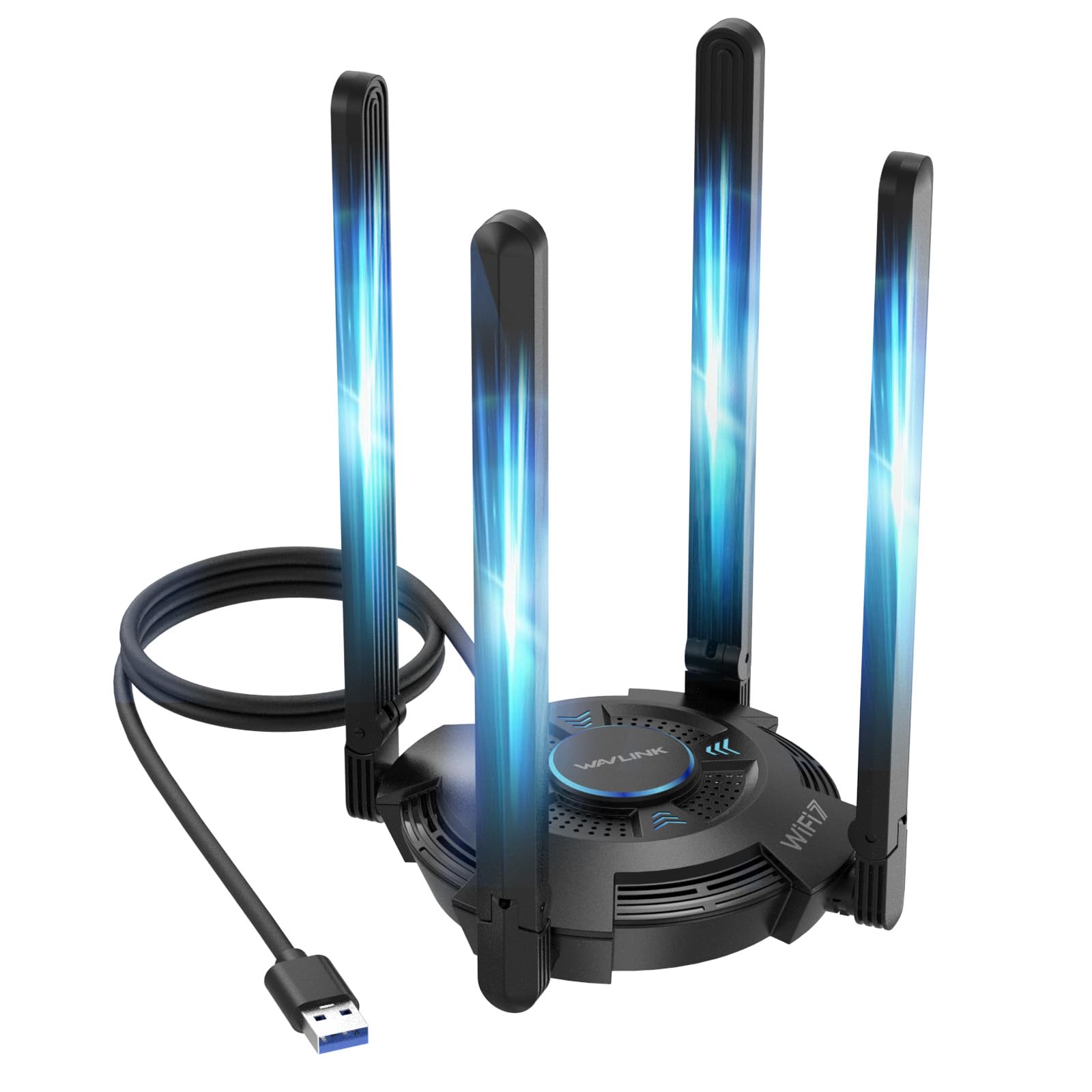
The WAVLINK BE6500 takes the brute-force approach to Wi-Fi coverage: four adjustable 5 dBi antennas mounted on a ventilated base that doubles as a heat sink. This is the adapter you deploy when your laptop is two floors away from the router and the internal card sees no signal. The tri-band 6.5 Gbps speed rating is matched with genuine Wi-Fi 7 features including MLO (Multi-Link Operation) — which the BrosTrend lacks — letting the adapter simultaneously use 5 GHz and 6 GHz bands for combined throughput and failover.
Installation is handled by a built-in driver that auto-launches on Windows 10/11. A multicolor LED (blue, pink, red) gives instant visual feedback on connection quality, and the touch-sensitive switch lets you cycle the lighting mode or turn it off entirely — a rare touch of user experience design in the budget-to-midrange USB adapter space. The adapter also supports Hotspot Mode, turning your PC into a Wi-Fi hotspot for other devices, and ships with a USB 3.0 extension cable for optimal desktop placement away from chassis interference.
Range performance is exceptional. Customer reports describe going from zero signal bars to a full connection two floors away, with latency low enough to stop the lag complaints during Fortnite sessions. The four-antenna layout provides significant spatial diversity better at capturing signals reflected off walls compared to two-antenna designs. The weight (550 grams) and footprint are substantial — this is a desktop peripheral, not a laptop travel companion. Ensure your desk has the real estate before purchasing.
Why it’s great
- Four adjustable 5 dBi antennas deliver best-in-class long-range signal capture
- Full MLO support enables simultaneous multi-band operation for maximum throughput
- Hotspot Mode and multicolor signal LED add real utility and usability
Good to know
- Very large and heavy — designed for stationary desktop use, not portable laptop bags
- Requires Wi-Fi 7 router for full feature unlock; Wi-Fi 6 routers limit performance
7. Nineplus 1300Mbps USB WiFi Adapter

The entry-level Nineplus 1300Mbps adapter proves you don’t need Wi-Fi 6 to fix a broken laptop antenna. Built on the 802.11ac (Wi-Fi 5) standard, it delivers a dual-band 5 GHz (867 Mbps) and 2.4 GHz (400 Mbps) connection via USB 3.0 — and importantly, it comes with two high-gain 5 dBi antennas that immediately outspecs any integrated laptop antenna. For under , this is the cheapest way to breathe life into an older laptop whose internal Wi-Fi card has failed or is stuck on 2.4 GHz only.
The adapter is plug-and-play on Windows 10/11 with driver-free installation, and includes support for Windows 7 and Linux with manual drivers. WPA3 encryption is a surprising inclusion at this price point, securing the connection against contemporary threats. Real-world feedback from users confirms the adapter eliminates buffering during streaming and provides stable connections for older Dell Optiplex and hand-me-down gaming PCs. The lightweight 4.5 gram body with foldable antennas makes it easy to toss in a laptop sleeve.
Performance ceilings exist. The 1300 Mbps theoretical maximum is shared across both bands, not dedicated, so peak simultaneous throughput is lower than any Wi-Fi 6 or 7 adapter on this list. A small number of users report brief signal cutouts every day or two during gaming sessions — likely a driver power-saving behavior rather than a hardware fault. If you’re on a modern fiber connection over 500 Mbps, the Wi-Fi 5 limitation will be visible. For everyone else fixing a broken port or extending a weak signal, this is the best value fix.
Why it’s great
- Lowest cost Wi-Fi 5 adapter with genuine 5 dBi antennas for range extension
- Plug-and-play on Windows 10/11 with driver-free auto-install
- WPA3 security at entry-level pricing is uncommon and appreciated
Good to know
- Wi-Fi 5 (802.11ac) caps throughput below modern fiber internet speeds
- Occasional brief signal dropouts reported during extended gaming sessions
FAQ
Can I use a USB Wi-Fi antenna with a laptop that already has built-in Wi-Fi?
Does a Wi-Fi 7 adapter work with my older Wi-Fi 5 or Wi-Fi 6 router?
Will an external antenna improve signal if my laptop is far from the router?
Final Thoughts: The Verdict
For most users, the best wifi antenna for laptop winner is the Panda Wireless PAU0F because it delivers genuine tri-band 6E performance with broad OS compatibility and adjustable antennas at a fair mid-range price. If you want the most portable travel-friendly adapter, grab the TP-Link Archer TX20U Nano. And for extreme long-range scenarios where your laptop sits two floors from the router, nothing beats the four-antenna brute force of the WAVLINK BE6500.