
Walking into the SAT room with the wrong calculator is a strategic mistake. The College Board allows specific graphing models, and choosing a device that lags, runs out of battery mid-section, or lacks the functions to solve systems of equations or graph complex parabolas can cost you precious minutes and points. The right tool turns time pressure into strategic advantage.
I’m Min — the co-founder and writer behind Gadgets Feed. I’ve spent hundreds of hours analyzing the technical specifications and real-world performance of graphing calculators, cross-referencing processor speeds, screen resolutions, battery chemistries, and exam approval lists so you don’t have to.
This guide breaks down the seven top candidates to help you pick the absolute best calculator for sat success based on display quality, power, and real test-day reliability.
How To Choose The Best Calculator For SAT
Picking a calculator for the SAT isn’t just about brand loyalty. You need a device that’s on the College Board’s approved list, has a clear high-contrast display for fast graph reading, and offers enough processing power to handle polynomial regressions and matrix operations without freezing. Three factors dominate this decision.
Display Quality and Resolution
A 140 DPI color screen like the one on the TI-84 Plus CE lets you differentiate between multiple function graphs at a glance. Monochrome LCDs can work, but lower pixel density makes it harder to read intersections and table values under the fluorescent lighting of a testing center. Higher resolution reduces eye fatigue over the three-hour exam.
Battery Type and Longevity
Rechargeable lithium-ion batteries, found in premium models like the TI-84 Plus CE and HP Prime G2, eliminate the risk of dying mid-test from old alkaline cells. AAA-powered models, while cheaper, require fresh batteries before every exam. Check the battery chemistry — NiMH rechargeable AAAs are an option, but not all calculators charge them internally.
CAS vs. Non-CAS
The SAT explicitly bans calculators with Computer Algebra System (CAS) functionality. This rules out models like the TI-Nspire CAS and the HP Prime G2 (unless you toggle CAS off in the exam mode). Stick with non-CAS models like the TI-84 series or the Casio fx-9750GIII for guaranteed zero-risk compliance.
Quick Comparison
On smaller screens, swipe sideways to see the full table.
| Model | Category | Best For | Key Spec | Amazon |
|---|---|---|---|---|
| TI-84 Plus CE | Premium | Best Overall SAT Pick | 140 DPI, 16-Bit Color Display | Amazon |
| HP Prime G2 | Premium | Fastest Processor & Touchscreen | Multi-Touch Color Display | Amazon |
| Casio fx-CG100 | Premium | Best 3D Visualization & Python | 3.7″ High-Res Backlit LCD | Amazon |
| TI-84 Plus Silver Edition | Mid-Range | Budget-Friendly TI Workhorse | USB On-The-Go, 21 Apps | Amazon |
| TI-83 Plus | Mid-Range | Backup or Legacy Use | Standard School Requirement | Amazon |
| Casio fx-9750GIII | Mid-Range | Best Value with Python | Natural Textbook Display, MicroPython | Amazon |
| TI-Nspire CAS | Premium | Advanced Features (Not SAT Legal) | Touchpad, CAS, 3D Graphing | Amazon |
In‑Depth Reviews
1. Texas Instruments TI-84 Plus CE Color Graphing Calculator, Coral

The TI-84 Plus CE is the gold standard for SAT preparation. Its 320×240 pixel, 16-bit color display running at 140 DPI makes it easy to distinguish between multiple function plots, trace intersection points, and read table values without squinting. The backlight is a lifesaver in dim testing environments.
Power comes from a rechargeable lithium-ion battery that lasts weeks on a single charge under normal use. The slim metal enclosure is lighter than the older TI-84 models, making it more comfortable to carry in a backpack alongside study materials. It packs 21 preloaded apps covering everything from polynomial root finders to geometry tools.
For SAT-specific use, the TI-84 Plus CE is fully approved by the College Board. The included exam mode disables any insecure functions. The coral color variant helps it stand out in a sea of black calculators, reducing the chance of mix-ups during the test.
Why it’s great
- High-resolution color backlit display improves graph legibility
- Rechargeable battery eliminates AAA swapping anxiety
- Lightweight metal construction feels premium and durable
Good to know
- Does not ship fully charged — plan for initial charging time
- No built-in CAS, but that’s a feature for SAT compliance
2. HP Prime G2 Graphing Calculator with WYNGS Case
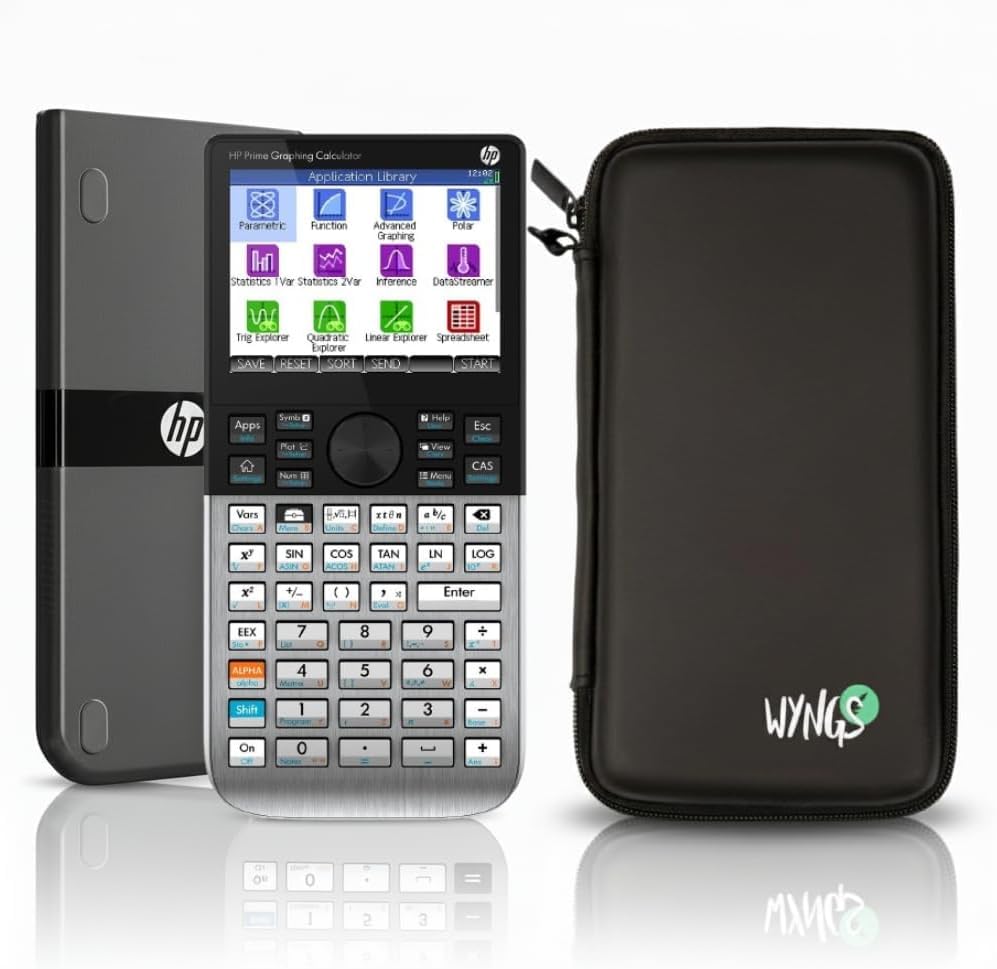
The HP Prime G2 is the speed king of the graphing calculator world. Its ARM-based processor delivers near-instant rendering of complex functions, solving systems of equations faster than any TI or Casio in this list. The 3.5-inch multi-touch color display supports pinch-to-zoom and swipe gestures reminiscent of a smartphone.
This model includes a full Computer Algebra System (CAS) for symbolic math, but crucially, the CAS can be toggled off via the exam mode to meet SAT requirements. The included WYNGS custom-fit protective case adds grip and protection, though the calculator itself has a metal enclosure that feels solid in hand.
Battery life is powered by a rechargeable lithium-ion cell. The Prime G2 supports connectivity options for data transfer and firmware updates. Its learning curve is steeper than a TI-84, but for students willing to invest time, it offers the most raw horsepower for SAT-level math.
Why it’s great
- Fastest processor for instant graphing and calculations
- Intuitive touch interface similar to a modern smartphone
- CAS toggle makes it SAT-legal when in exam mode
Good to know
- Steeper learning curve than TI-84 series
- May be overkill for students who only need basic graphing
3. Casio fx-CG100 ClassWiz Color Graphing Calculator

The Casio fx-CG100 offers the largest display in this roundup at 3.7 inches with a high-resolution backlit LCD supporting over 65,000 colors. This makes 3D graphing of spheres, cylinders, and planes visually stunning, though for SAT purposes, its 2D function graphing and table views are exceptionally crisp.
It runs on four AAA batteries, but its power management is efficient. The Natural Textbook Display renders expressions exactly as they appear in books, which reduces input errors. Built-in MicroPython programming support is a bonus for students interested in coding, though irrelevant on test day.
The fx-CG100 is SAT, PSAT, and ACT approved, with a dedicated exam mode accessible from the home screen. The tab-based menu layout and glyph-labeled keys make navigation faster than older Casio models. It bridges the gap between a basic scientific and a full graphing calculator seamlessly.
Why it’s great
- Largest high-resolution color display for easy graph reading
- Natural Textbook Display reduces input errors
- MicroPython integration for coding learners
Good to know
- Uses AAA batteries instead of rechargeable
- 3D graphing is overkill for SAT but fun for STEM
4. Texas Instruments TI-84 Plus Silver Edition

The TI-84 Plus Silver Edition is the budget-friendly entry into the TI-84 ecosystem. It runs on four AAA batteries and lacks the rechargeable battery and color display of the CE, but it still delivers the same core functionality: split-screen graphing, table tracing, and 21 preloaded apps covering calculus, engineering, and trigonometry.
USB on-the-go technology allows file sharing between calculators and direct connection to a PC. The silver metallic finish is more resistant to scratches than the standard black casing. It’s backed by a one-year warranty, which adds peace of mind for a long-term school investment.
For SAT readiness, this calculator is fully approved. Its monochrome LCD is perfectly readable under typical lighting, and the split-screen feature allows you to trace a graph while scrolling through table values simultaneously. It’s a reliable workhorse that won’t break the bank.
Why it’s great
- Core TI-84 functionality at a lower price point
- USB on-the-go for file sharing
- Backed by a one-year warranty
Good to know
- Monochrome display — no color differentiation for graphs
- Runs on AAA batteries, not rechargeable
5. Texas Instruments TI-83 Plus Programmable Graphing Calculator

The TI-83 Plus is the classic calculator that defined a generation of standardized testing. It runs on a single CR123A battery, which is less common than AAA but offers very long life. The 96×64 pixel monochrome display is basic by modern standards, but it gets the job done for function graphing and statistics.
This model is often found as refurbished or used units, making it the most budget-friendly option. It’s still approved for the SAT and is commonly required for university exams. However, the discontinued parts mean you should remove the battery when not in use to prevent acid damage.
Given its age, the TI-83 Plus lacks modern amenities like a USB port, backlit screen, or high-speed processor. It’s best suited as a backup calculator or for students on a very tight budget who only need essential graphing and table functions.
Why it’s great
- Extremely affordable — great budget entry point
- Simple, reliable operation with long battery life
- Widely supported with free online tutorials and programs
Good to know
- No USB connectivity or backlight
- Uses CR123A battery, not standard AA/AAA
6. Casio fx-9750GIII Graphing Calculator with Python

The Casio fx-9750GIII punches far above its price class. It features a Natural Textbook Display that shows expressions exactly as they appear in textbooks, which is a massive help for students transitioning from paper to calculator. It runs on four AAA batteries and has excellent battery life — reviewers report months of daily use without replacement.
This calculator includes MicroPython programming, making it a fantastic tool for STEM students who want to learn coding on-device. It handles graph plotting, vectors, probability distributions, spreadsheets, and integrals. The USB connectivity allows easy file transfer to a PC.
It is approved for the SAT, ACT, AP, and IB exams. The interface is intuitive enough for grades 6 through 12, and the compact form factor (7.5 ounces) makes it easy to carry. If you want the most features per dollar, this is the calculator to beat.
Why it’s great
- Natural Textbook Display reduces confusion with complex expressions
- MicroPython integration for learning code
- Excellent battery life and durable build
Good to know
- Limited vector calculations — not ideal for physics
- Monochrome only — no color display
7. TI-Nspire CAS with Touchpad

The TI-Nspire CAS is a powerhouse for advanced mathematics, featuring a full Computer Algebra System that performs symbolic differentiation, integration, and equation solving. The touchpad operates like a laptop trackpad, making navigation of menus and graph points fluid. It can display up to four representations of a problem on the same screen.
This model runs on four AAA batteries with excellent longevity — reviewers report up to two months of daily use including gaming. The greyscale display is large and clear, though not backlit. It’s significantly faster than the TI-83 and TI-84 series and supports 3D graphing.
Critical warning for SAT buyers: the CAS functionality is banned on the SAT and ACT. While it’s legal for AP exams, you cannot use this model on test day unless you are certain the proctor allows it (most don’t). Consider this only if your primary need is high-level coursework and you have a separate SAT-approved calculator.
Why it’s great
- Powerful CAS for symbolic math and engineering
- Touchpad navigation is intuitive and fast
- Excellent battery life and large display
Good to know
- CAS is banned on SAT and ACT exams
- Steep learning curve for new users
FAQ
Can I use a CAS calculator on the SAT?
Is a color display necessary for the SAT math section?
How long does a graphing calculator battery last during a test?
Final Thoughts: The Verdict
For most users, the calculator for sat winner is the TI-84 Plus CE because its high-resolution color display, rechargeable battery, and full SAT compliance strike the perfect balance of performance and price. If you want the fastest processor and a touchscreen interface, grab the HP Prime G2 (remember to toggle CAS off). And for a budget-friendly option with excellent value and Python programming, nothing beats the Casio fx-9750GIII.