
Algebra is the language of higher mathematics, and your calculator is your translator. Picking the wrong one turns solving for X into a frustrating hunt for hidden menus and unresponsive keys, while the right model becomes an extension of your own reasoning, letting you focus on the logic rather than the button-pushing.
I’m Min — the co-founder and writer behind Gadgets Feed. I’ve spent countless hours cross-referencing the spec sheets, user manuals, and real-world feedback to determine exactly which models handle algebraic functions like variable solving, function analysis, and graphing without bogging you down.
Whether you’re preparing for the SAT or tackling college calculus, this guide cuts through the noise to help you find the best calculator for algebra that matches your specific coursework and budget.
How To Choose The Best Calculator For Algebra
Finding the right tool for algebra means knowing where your coursework ends and where the calculator’s capabilities begin. Beginners often overspend on features they’ll never use, while serious students underbuy and struggle with manual processes. The following criteria will help you land on the right model for your specific stage of study.
Function Library: What Algebra Actually Needs
For Algebra I and II, you need a calculator that handles polynomial roots, system-of-equation solvers, quadratics, and absolute value operations. A scientific model with 300–400 functions covers this thoroughly. Once you reach Pre-Calculus or Calculus, a graphing model with function visualization becomes necessary to understand asymptotes, intercepts, and transformations visually rather than just numerically.
Display and Input: Natural Textbook vs. Linear
A Natural Textbook Display renders fractions, exponents, and radicals exactly as they appear in your textbook. This reduces syntax errors dramatically — especially when entering complex rational expressions common in algebra. Models that only show linear input force you to count parentheses carefully, which is a significant source of mistakes on timed exams.
Exam Approval and Restrictions
Most standardized tests including the SAT, ACT, AP, and IB exams have strict rules about which calculators are allowed. Devices with computer algebra systems (CAS) are often banned. Always check the latest College Board or IB calculator policy before purchasing. Models like the Casio fx-9750GIII are widely approved and still offer robust function plotting for algebra.
Quick Comparison
On smaller screens, swipe sideways to see the full table.
| Model | Category | Best For | Key Spec | Amazon |
|---|---|---|---|---|
| NEWYES 991ES MAX | Scientific | High school algebra & on-the-go note-taking | 417 functions, 4-line display, built-in writing pad | Amazon |
| Nadex Scientific Pink | Scientific | Middle & high school, AP exam prep | 360+ functions, solar powered, LR44 battery included | Amazon |
| Nadex Scientific Black | Scientific | Advanced math & standardized tests | 360+ functions, includes protective case | Amazon |
| Casio fx-9750GIII | Graphing | Graphing-intensive algebra & Python programming | Natural Textbook Display, USB connectivity | Amazon |
| Calculated Industries 4080 | Construction | Algebra in trade & construction contexts | Full trig functions, feet-inch-fraction conversions | Amazon |
| TI-84 Plus CE Coral | Graphing | College algebra, Pre-Calculus & Calculus | Full-color backlit display, 140 DPI resolution | Amazon |
| TI-Nspire CX II CAS | Graphing | University-level algebra & engineering | CAS engine, animated path plotting, deSolve wizard | Amazon |
In‑Depth Reviews
1. NEWYES 991ES MAX
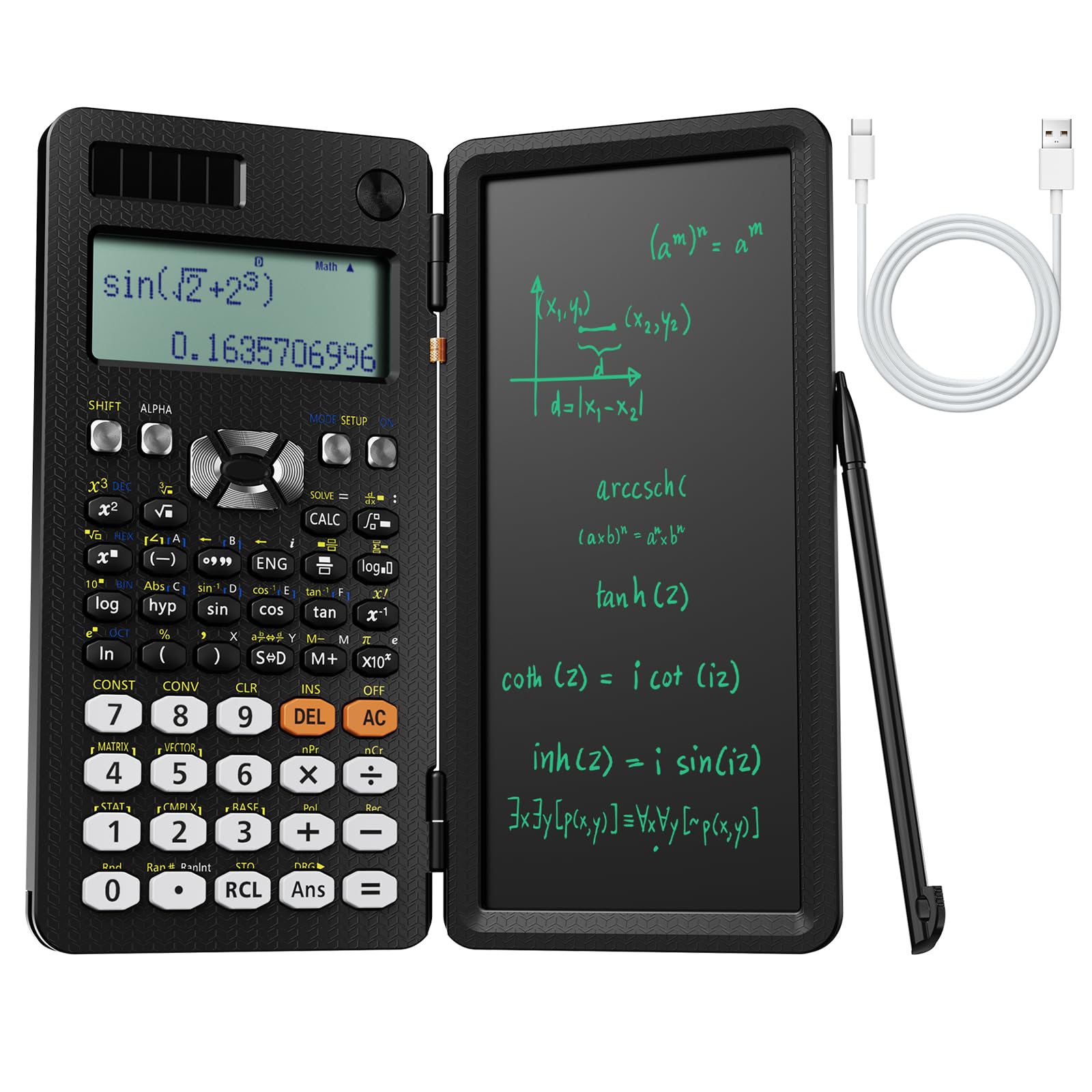
The NEWYES 991ES MAX hits the sweet spot between a powerful function library and practical design. Its 417 calculation functions cover every algebraic operation from polynomial roots to complex number calculations. The four-line LCD display shows your full expression and result simultaneously, which is a major time-saver when working through multi-step equations.
The standout feature is the integrated LCD writing pad on the case lid. You can jot down intermediate steps, factor polynomials, or solve for X without reaching for a separate notebook. The foldable design protects the screen in a backpack, and the dual power system — Type-C rechargeable plus solar — means you will never be caught with a dead calculator before an exam.
Some users noted that the writing lid makes two-handed thumb-typing awkward, but for traditional one-handed operation it works fine. For high school algebra students who want a versatile, modern tool with no recurring battery costs, this is the most practical choice available.
Why it’s great
- 417 functions cover Algebra I through college prep
- Writing pad eliminates need for scratch paper
- Dual power ensures reliability during exams
Good to know
- Foldable lid restricts two-handed key access
- Not a graphing calculator — visual function plotting limited
2. Nadex Scientific Calculator Pink

The Nadex Scientific Calculator delivers strong value for students who need a reliable, feature-dense tool without spending on a graphing model. Its 360-plus function set includes variable solving, linear regression, standard deviation, and permutations — all directly applicable to Algebra I, Algebra II, and Geometry coursework. The solar-powered design with a backup LR44 battery ensures longevity.
The large LCD screen shows equations and graphical formula visualizations simultaneously. While this is not a full graphing calculator, the ability to plot formula shapes helps students grasp transformations and intercepts conceptually. The included protective sliding case keeps the unit safe in a backpack, and the pink color is a nice departure from standard black.
Several verified buyers report that it feels very similar to the TI-84 in function layout but at a much lower price point, with one user saying their son uses it as a primary calculator in high school. It is approved for PSAT, SAT, ACT, and AP exams, making it a safe choice for test-takers.
Why it’s great
- Approved for major standardized tests
- Solar backup extends battery life considerably
- Intuitive layout similar to TI-84
Good to know
- Graph functions can only visualize formulas, not full plots
- Screen size is smaller than graphing models at 2.5 inches
3. Casio fx-9750GIII

The Casio fx-9750GIII is a graphing calculator that does not compromise on readability. Its Natural Textbook Display shows expressions, fractions, integrals, and matrices exactly as they appear in your textbook, which eliminates syntax confusion during complex algebra. The 7.5-ounce weight and AAA battery power make it highly portable, with real-world battery life exceeding five months of daily use according to verified owners.
Algebra students benefit from the built-in spreadsheet, eActivities, and probability distributions. For those advancing into STEM, the MicroPython programming capability allows you to write and run custom programs directly on the calculator or transfer them via the included USB cable. The unit is exam-approved for AP, SAT, ACT, and IB, giving it broad academic utility.
The graphing resolution is not as sharp as premium TI models, and the unit lacks a computer algebra system (CAS). However, its strong matrix capabilities and affordable price make it a favorite among engineering students who need linear algebra support. For high school algebra through college calculus, this is a reliable workhorse.
Why it’s great
- Natural Textbook Display reduces input errors
- Python integration for programming practice
- Excellent battery life for daily school use
Good to know
- Graphing is slower and lower resolution than TI models
- No CAS for symbolic algebra manipulation
4. Texas Instruments TI-84 Plus CE Coral

The Texas Instruments TI-84 Plus CE remains the gold standard for algebra and higher mathematics in American high schools and colleges. Its high-resolution 140 DPI backlit color display makes it easy to differentiate between multiple graph functions, track points, and read equations clearly even in dim classrooms. The rechargeable lithium-ion battery is a major upgrade from older models that chewed through AAA batteries.
Algebra students will appreciate the built-in function library covering polynomial root finding, systems of equations, matrix operations, and statistical analysis. The metallic coral color is eye-catching and helps prevent mix-ups in shared classrooms. The 3.2-inch screen is generous for a graphing calculator, and the 0.6-pound weight feels substantial without being heavy.
Users consistently praise the durability — one owner reported dropping it twice with no damage. The price is higher than entry-level models, but the TI-84 ecosystem includes vast online resources, tutorials, and exam policies that make it the default choice for many school districts. If your curriculum specifically requires or recommends this model, the investment is justified.
Why it’s great
- Full-color backlit display with excellent resolution
- Rechargeable battery eliminates disposable costs
- Widest exam approval and school compatibility
Good to know
- Premium price compared to scientific models
- No CAS function for symbolic algebra
5. Texas Instruments TI-Nspire CX II CAS

The TI-Nspire CX II CAS is the most powerful tool on this list, designed for university-level algebra and engineering coursework. Its computer algebra system (CAS) performs symbolic manipulation — factoring polynomials, solving equations symbolically, and simplifying expressions without requiring numeric input. This is a massive advantage for advanced algebra where understanding the structure of an expression is as important as the numeric result.
The device includes an animated path plotting feature that shows function, parametric, and polar graphs as they are drawn, which builds intuition for transformations and limits. The deSolve wizard reduces syntax errors when working with differential equations. Integrated Python programming and a PC emulator expand its utility beyond pure mathematics into computer science contexts.
Note that the CAS function is disallowed on many standardized tests including the SAT, ACT, and AP exams. You can disable it through the Press-to-Test dialog, but this is an extra step. For college algebra, calculus, and engineering students who need symbolic solving, this is the definitive choice. The plastic enclosure still feels durable, and the lithium-ion battery lasts through long study sessions.
Why it’s great
- CAS enables symbolic algebra manipulation
- Animated path plotting aids conceptual learning
- Python and PC emulator for programming
Good to know
- CAS must be disabled for standardized exams
- Higher price reflects university-level capabilities
6. Calculated Industries 4080 Construction Master Pro Trig

The Calculated Industries 4080 is purpose-built for trade professionals, but its strong algebra and trigonometry capabilities make it relevant for students in construction math, carpentry, and engineering technology programs. It handles dimensional math in feet, inches, and fractions, and includes full trig functions with sine, cosine, tangent, arcsine, arccosine, and arctangent — exactly what you need for rafter layouts, stair calculations, and angle solutions.
Built-in functions solve for square-ups, rafters, rake-walls, slopes, arches, and circles. The calculator also converts between all common building dimension formats, including yards and metric. The rugged Armadillo Gear case protects against dust and moisture, making it suitable for field use alongside academic work.
Algebraically, the ability to work with feet-inch-fraction arithmetic and trig functions simultaneously is unique. However, this is not a general-purpose graphing calculator. For students whose algebra coursework intersects with trade math, surveying, or construction estimating, it is an invaluable specialist tool. The three memory slots may feel limiting for multi-step formula storage.
Why it’s great
- Exceptional dimensional math with feet-inch-fraction
- Full trig functions for construction applications
- Rugged Armadillo Gear case for field durability
Good to know
- Not a graphing calculator — limited algebraic function set
- Only three memory slots for formula storage
7. Nadex Scientific Calculator Black

The Nadex Scientific Calculator in black is the same capable 360+ function device as the pink variant, offered in a more universally acceptable color. It covers the full range of algebra functions — complex number calculations, fractions, linear regression, standard deviation, permutations, and variable solving. The LCD screen shows equations and graphic formula visualizations simultaneously, which helps during function transformation exercises.
The included carrying case is a practical addition that the pink model does not explicitly include, providing protection for daily school commutes. The solar-powered design with an AA battery backup means you can rely on it through years of algebra and geometry coursework without thinking about recharging. The black color fits into professional and academic settings without standing out.
The only functional limitation is the same as the pink model — it is a scientific calculator, not a graphing calculator. It can visualize formulas but cannot plot full graphs. For students in Algebra I through Geometry who do not yet need graphing, this represents excellent entry-level value. Several reviewers specifically noted using it for the PSAT and finding it fully sufficient.
Why it’s great
- Full algebra function set at a budget-friendly cost
- Solar power plus AA backup
- Includes protective carrying case
Good to know
- No true graphing functionality
- Screen is smaller than graphing models
FAQ
Can a scientific calculator handle Algebra II problems?
What does CAS mean and do I need it for algebra?
Why is the TI-84 Plus CE so popular for algebra classes?
Final Thoughts: The Verdict
For most users, the best calculator for algebra winner is the NEWYES 991ES MAX because it blends 417 functions with a built-in writing pad and dual power supply — eliminating both scratch paper and battery anxiety. If you want full graphing capabilities for higher-level courses, grab the Casio fx-9750GIII for its Natural Textbook Display and Python integration. And for university symbolic algebra, nothing beats the TI-Nspire CX II CAS.