
Choosing the right B550 ATX motherboard means balancing VRM thermal performance, PCIe 4.0 lane allocation, and rear I/O connectivity without overspending on features you won’t use. The B550 chipset sits in a sweet spot — it unlocks PCIe 4.0 for your primary GPU and a single M.2 slot while keeping board costs well below X570 territory, making it the pragmatic choice for Ryzen 5000 and 5000G-series processors.
I’m Min — the co-founder and writer behind Gadgets Feed. I’ve spent dozens of hours cross-referencing VRM phase counts, real-world customer thermal reports, and BIOS compatibility data across every major B550 ATX model to build this guide.
The result is a precise, feature-focused breakdown of the best B550 ATX motherboard options currently available, ranked by real-world reliability and measurable performance traits like memory overclocking ceilings and power delivery stability.
How To Choose The Best B550 ATX Motherboard
B550 ATX motherboards share the same chipset but vary wildly in VRM capability, PCIe slot configuration, and BIOS maturity. The wrong choice can mean thermal throttling with a Ryzen 9 or buying a board that needs a separate older CPU just to boot. Here’s what to check before adding to cart.
VRM Phase Count and Heatsink Quality
The B550 chipset itself doesn’t determine how well your CPU runs — the voltage regulator modules (VRMs) do. An 8-phase VRM with a proper aluminum heatsink handles a Ryzen 7 5800X under sustained all-core loads. For a Ryzen 9 5900X or 5950X, look for at least a 10-phase design with a chunky heatsink and thermal pads. Boards with bare MOSFETs or tiny aluminum strips will force your CPU to throttle or run fans at high RPM.
PCIe 4.0 Lane Awareness
B550 dedicates PCIe 4.0 to one GPU slot and one M.2 slot. The second M.2 slot and all secondary PCIe x16 slots run at PCIe 3.0. If you plan to run dual Gen4 NVMe drives, you will need a board with a second native PCIe 4.0 M.2 slot — some models like the ASRock B550 Phantom Gaming 4 offer this via the chipset. Check the block diagram in the manual before assuming all slots run at the same speed.
BIOS Compatibility With Ryzen 5000
Many B550 boards shipped before Ryzen 5000 support was finalized. Some still carry BIOS versions that only support Ryzen 3000-series processors. If the listing does not explicitly confirm Ryzen 5000 readiness, choose a board with BIOS Flashback or USB Flashback functionality. This lets you update the BIOS with a USB stick and a power supply only — no CPU required. Boards without this feature may leave you staring at a black screen.
Rear I/O and Internal Headers
The B550 ATX segment is where connectivity varies most. Confirm the number of USB 3.2 Gen 2 (10Gbps) ports on the rear panel — two is the minimum for modern peripherals. Check for a USB 3.2 Type-C internal header if your case has a front-panel USB-C port. Integrated Wi-Fi 6 or a M.2 Key E slot for an add-in card saves you a PCIe slot. Boards with only USB 3.2 Gen 1 (5Gbps) ports feel dated immediately.
Quick Comparison
On smaller screens, swipe sideways to see the full table.
| Model | Category | Best For | Key Spec | Amazon |
|---|---|---|---|---|
| ASUS ROG Strix B850-F | Premium | High-end AM5 builds | 16+2+2 power stages | Amazon |
| GIGABYTE B850 AORUS Elite WIFI7 | Premium | White-themed PC builds | 14+2+2 VRM phases | Amazon |
| Asus TUF Gaming B550-PLUS | Premium | Reliable AM4 Ryzen 5000 | 4 DDR4 slots, 128GB | Amazon |
| GIGABYTE B650 Eagle AX | Premium | AM5 DDR5 value entry | 12+2+2 VRM, DDR5 | Amazon |
| MSI B550-A PRO V1 | Mid-Range | No-frills Ryzen 9 build | 4400MHz DDR4 OC | Amazon |
| MSI MPG B550 GAMING PLUS | Mid-Range | Gaming ATX, Ryzen 9 | 4400MHz DDR4 support | Amazon |
| ASRock B550 Phantom Gaming 4 | Entry-Level | Budget Ryzen 5000 build | 8 power phases, DDR4 4733+ | Amazon |
| ASUS Prime B550M-A WiFi II | Entry-Level | Compact mATX with Wi-Fi 6 | Wi-Fi 6, 4 DDR4 slots | Amazon |
In‑Depth Reviews
1. ASUS ROG Strix B850-F Gaming WiFi

The ROG Strix B850-F Gaming WiFi delivers a 16+2+2 power stage design rated at 80A per stage, making it one of the most robust power delivery solutions available for AM5. Users pairing it with a Ryzen 9 9800X3D and RTX 4090 report flawless stability, even with DDR5 memory running at 6400MHz CL30 across four sticks. The board features tool-free M.2 installation on all four slots, including one Gen5 slot, which is a genuine quality-of-life improvement during assembly.
Connectivity is comprehensive: 19 total USB ports on the rear I/O, a 20Gbps USB Type-C port, and integrated Wi-Fi 7 with the new EZ-Plug antenna design. The UEFI BIOS is the highlight of the ROG experience — deeply customizable for overclockers yet easy to navigate for first-time builders. The Q-Release button on the primary PCIe slot is a welcome convenience.
Be aware that the board requires a BIOS update out of the box to support Ryzen 9000-series processors, and the first DDR5 memory training take several minutes. The 2.5G Ethernet controller is solid but not the 5Gbe some premium buyers expect at this tier. Windows 11 is mandatory for Wi-Fi driver support.
Why it’s great
- Extremely high 16+2+2 power stage count handles any AM5 CPU
- Wi-Fi 7 and 20Gbps USB-C provide future-proof connectivity
- Tool-free M.2 latches and Q-Release PCIe slot simplify building
Good to know
- Requires BIOS update for Ryzen 9000 compatibility
- First boot DDR5 training can take several minutes
- No Windows 10 Wi-Fi drivers available
2. GIGABYTE B850 AORUS Elite WIFI7 Ice
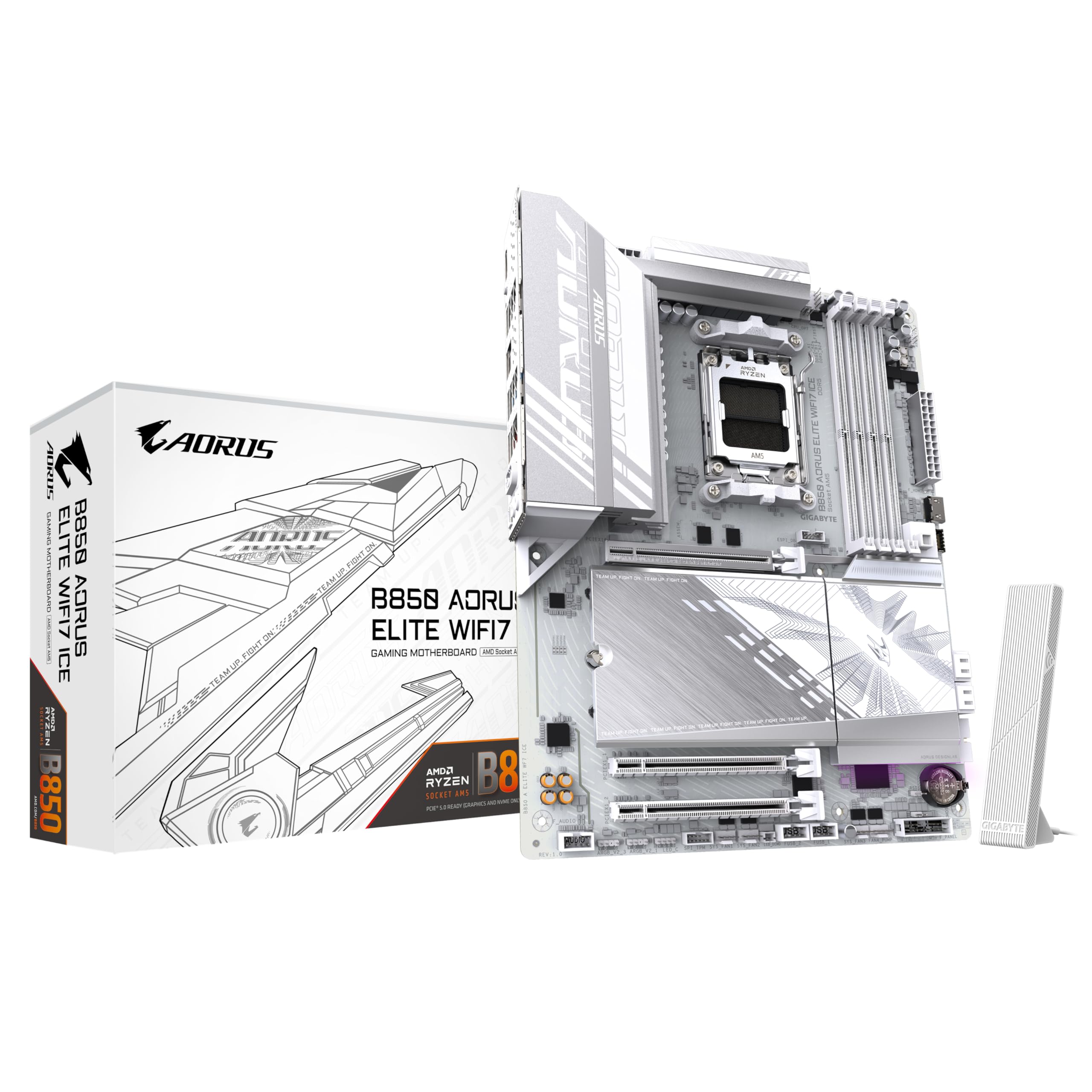
The B850 AORUS Elite WIFI7 Ice stands out for its white PCB design, which is rare in the B850 segment and highly sought after for all-white PC builds. The 14+2+2 digital VRM with DrMOS is more than capable of driving a Ryzen 9 9950X under sustained workloads, as confirmed by user reports of running twelve case fans plus a CPU cooler without power delivery issues. The fully covered MOSFET heatsinks keep VRM temperatures in check even during extended gaming sessions.
Memory support reaches 8200MHz DDR5 in overclocking mode, and the board includes four DIMM slots for dual-channel operation. The Wi-Fi 7 implementation with the directional antenna and EZ-Plug design simplifies setup compared to the usual screw-in antenna connectors. Q-Flash Plus allows BIOS updates without a CPU installed, which is a critical safety net for early AM5 adopters.
Some users note that the manual could be clearer about specific header placements, particularly for the front-panel audio and ARGB connections. The chipset runs slightly warm under heavy load, but this is within normal operating range for B850 boards and rarely affects real-world performance.
Why it’s great
- Unique white PCB design for themed builds
- 14+2+2 DrMOS VRM handles Ryzen 9 CPUs with ease
- Q-Flash Plus enables CPU-less BIOS updates
Good to know
- Manual lacks clarity on some header locations
- Chipset runs warm under sustained full-system load
- PCIe slot layout may block lower headers with large GPUs
3. Asus TUF Gaming B550-PLUS

The TUF Gaming B550-PLUS is the most trusted AM4 ATX motherboard among builders who prioritize long-term reliability over flashy extras. Its military-grade TUF components and reinforced PCIe slots have held up across years of daily use, with many users reporting zero issues after 12-plus months of continuous operation. The board supports Ryzen 5000 processors out of the box — buyers report it works with Ryzen 7 5700G and Ryzen 5 3600XT with no BIOS update required.
The GUI BIOS with mouse support is highly configurable for overclocking, allowing fine-grained control over voltage, memory timings, and fan curves. Aura Sync RGB is built in for lighting control across compatible components. The rear I/O includes six USB 3.2 Gen 2 ports, HDMI 2.1, DisplayPort, and a PS/2 combo port for legacy peripherals.
The board lacks USB 3.2 Gen 2×2 Type-C and integrated Wi-Fi, so you will need a PCIe card for faster external storage and wireless connectivity. The second PCIe x16 slot runs at PCIe 3.0 x4, not the full x16 speed some users expect for dual-GPU configurations.
Why it’s great
- Rock-solid reliability with proven long-term stability
- Ryzen 5000 support out of the box for most units
- Highly configurable UEFI BIOS with mouse support
Good to know
- No USB-C header for front-panel connection
- No integrated Wi-Fi or Bluetooth
- Second PCIe slot limited to x4 electrical
4. GIGABYTE B650 Eagle AX

The B650 Eagle AX delivers the cheapest entry point into the AM5 platform without sacrificing essential features. Its 12+2+2 phase digital VRM design is sufficient for Ryzen 7000 and 9000-series CPUs up to a Ryzen 9, and users report stable performance under heavy gaming loads with a Ryzen 7500F. The board supports DDR5 memory with AMD EXPO and Intel XMP profiles, and 6000MHz CL30 kits work with EXPO 1 enabled on first boot.
Storage is well-covered with three M.2 slots — one PCIe 5.0 and two PCIe 4.0 — plus four SATA ports. The integrated Wi-Fi 6E includes Bluetooth and works reliably after a quick antenna setup. Q-Flash Plus is present for CPU-less BIOS updates, which saved at least one user after a failed BIOS flash during a first build.
The board runs hotter under sustained load compared to premium B650 options, so pairing it with a case that has good airflow is important. The manual could be more detailed about which M.2 slots share bandwidth with SATA ports, and some users find the Wi-Fi antenna connector placement awkward near the rear I/O stack.
Why it’s great
- Cheapest reliable AM5 motherboard with strong VRM
- PCIe 5.0 M.2 slot and 12+2+2 phase power delivery
- Q-Flash Plus enables CPU-less BIOS recovery
Good to know
- Runs hot under heavy load — needs good case airflow
- Manual lacks clarity on M.2/SATA lane sharing
- Wi-Fi antenna connector placement is awkward
5. MSI B550-A PRO V1
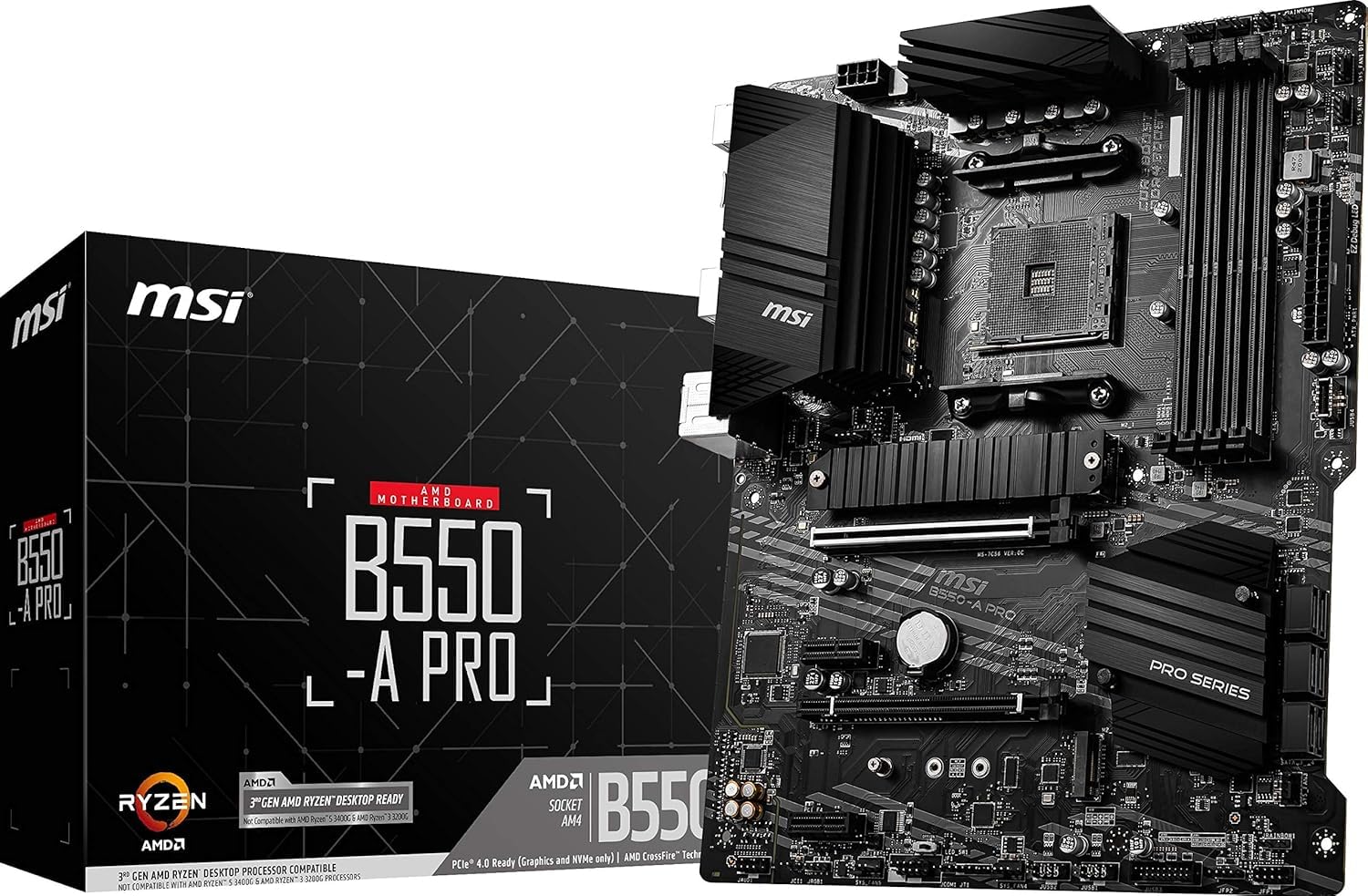
The MSI B550-A PRO V1 is a no-frills ATX board that focuses on clean power delivery and straightforward BIOS features. It supports dual-channel DDR4 memory up to 128GB at 4400MHz, and the Core Boost technology uses digital power regulation for precise voltage delivery to the CPU. Users report it runs a Ryzen 9 5900XT with basic PBO enabled without VRM thermal issues, thanks to the thick heatsinks on the VRM and chipset.
BIOS Flashback is included, which means you can update the firmware with only a power supply connected — no CPU or RAM needed. This is a critical feature for B550 boards that may ship with older BIOS versions. The board has plenty of fan headers and a clean layout that makes cable management straightforward in any ATX case.
The board lacks 2.5G Ethernet, sticking with a 1GbE Realtek controller. The Realtek ALC892 audio codec is a generation old and may sound slightly muted compared to newer codecs. Some users experienced boot issues with four RAM sticks installed, though this is often resolved by reseating the modules or updating the BIOS.
Why it’s great
- Thick VRM and chipset heatsinks keep thermals in check
- BIOS Flashback enables easy firmware updates without CPU
- Clean layout with ample fan headers for cable management
Good to know
- Only 1GbE LAN, no 2.5G Ethernet
- Older Realtek ALC892 audio codec
- Some users report DDR4 instability with four sticks installed
6. MSI MPG B550 GAMING PLUS

The MPG B550 GAMING PLUS is a straightforward ATX gaming board with PCIe 4.0 support, dual M.2 slots, and a clean aesthetic with minimal RGB lighting that is often hidden by the GPU. Users report it works well with Ryzen 9 5900XT processors under Ubuntu, Linux, and Windows 11, and the BIOS interface is well-regarded for its clarity and ease of navigation. Both NVMe slots deliver over 2500MB/s sequential read speeds.
The fan and RGB headers are well-positioned around the board, and a physical RGB switch allows you to disable the lighting entirely. The USB-C port on the rear I/O powers a secondary monitor in some configurations, which is a useful bonus. The board supports three operating systems in one build — Mac OS, Windows 11, and Ubuntu — without compatibility issues.
Some refurbished units ship with limited warranty coverage, and a small number of users received boards with BIOS versions that did not support Ryzen 5000 out of the box. The board lacks built-in Wi-Fi, so you will need to use the M.2 Key E slot or a USB adapter for wireless connectivity.
Why it’s great
- Clean black aesthetic with minimal RGB
- Robust BIOS with good fan control options
- Well-positioned connectors for easy cable routing
Good to know
- No integrated Wi-Fi or Bluetooth
- Some units may ship with older BIOS requiring update
- Refurbished units may have limited warranty
7. ASRock B550 Phantom Gaming 4

The ASRock B550 Phantom Gaming 4 is the strongest entry-level B550 ATX board, offering an 8-phase digital power design and support for DDR4 memory overclocked past 4733MHz. Users running a Ryzen 3700X with a be quiet Dark Rock 4 cooler report that VRM temperatures stay comfortable even during extended gaming sessions. The board includes six SATA ports, two M.2 slots (one Gen4, one Gen3), and a dedicated M.2 Key E slot for a Wi-Fi card.
The build quality is better than expected at this tier — users comment on the board’s weight and the absence of sharp solder points or creaking sounds when components are installed. The rear I/O includes six USB 3.2 Gen 1 ports, HDMI, a PS/2 combo port, and audio jacks. The board has two 12V ATX power connectors, though only one is necessary for most builds.
The board lacks a USB 3.2 Type-C internal header for front-panel USB-C cases. Some units shipped with BIOS version 1.0, which is incompatible with Ryzen 5000G-series processors out of the box. Users with a Ryzen 7 5700G received a board that produced no POST and required a legacy CPU to flash the BIOS. The board also has only one physical PCIe x16 slot, limiting multi-GPU configurations.
Why it’s great
- Great build quality for the price point
- DDR4 overclocking support beyond 4733MHz
- 6 SATA ports for extensive storage configurations
Good to know
- No front-panel USB-C header
- Some units ship with BIOS incompatible with Ryzen 5000G
- Single PCIe x16 slot limits expansion options
8. ASUS Prime B550M-A WiFi II

The Prime B550M-A WiFi II is an mATX board that fits in smaller cases while retaining the B550 chipset’s PCIe 4.0 support and Wi-Fi 6 connectivity. Users report the integrated Wi-Fi and Bluetooth module is rock-solid, delivering 500-800Mbps wirelessly and over 900Mbps through the 1GbE Ethernet port. The board supports up to 128GB of RAM at 4866MHz in overclocking mode, with four DIMM slots for dual-channel configurations.
The ASUS OptiMem memory trace layout allows higher memory frequencies at lower voltages, which benefits stability with faster RAM kits. The 5X Protection III suite includes LANGuard, DRAM overcurrent protection, and SafeSlot Core reinforcement for the PCIe slot. The board includes a VRM heatsink and a PCH heatsink for thermal management.
A notable defect was reported where one USB port had an internal short that caused an instant power-off when used, though this appears to be an isolated manufacturing issue rather than a design flaw. The board only has a single USB 3.0 bus and no USB-C internal header, requiring a PCIe card for front-panel USB-C support. The graphics card may physically cover the PCIe x1 slot in some cases, limiting expansion.
Why it’s great
- Integrated Wi-Fi 6 is fast and reliable out of the box
- Compact mATX size fits in smaller chassis
- OptiMem design enables stable high-frequency DDR4
Good to know
- No internal USB-C header for front-panel connection
- GPU may block the PCIe x1 slot
- Isolated USB port short defect reported
FAQ
Does B550 support PCIe 4.0 on both M.2 slots?
What is BIOS Flashback and do I need it for B550?
Final Thoughts: The Verdict
For most users, the b550 atx motherboard winner is the ASUS ROG Strix B850-F Gaming WiFi because its 16+2+2 power stage design and comprehensive connectivity set a new standard for AM5 builds. If you want the best balance of price and proven reliability on AM4, grab the Asus TUF Gaming B550-PLUS. And for a budget-friendly entry into AM5 with DDR5 support, nothing beats the GIGABYTE B650 Eagle AX.