
Stripping away the numpad and the function row clutter leaves you with the most efficient desktop real estate strategy in mechanical keyboards: a compact layout that keeps arrow keys, navigation cluster, and essential typing zones intact while giving your mouse arm room to breathe. The 70% form factor sits in the sweet spot between portability and productivity, offering a typing experience that feels full-sized without the footprint.
I’m Min — the co-founder and writer behind Gadgets Feed. I spend hundreds of hours dissecting technical specifications, comparing gasket mounting structures, switch types, and wireless protocols to separate genuinely well-engineered boards from marketing fluff in the compact mechanical keyboard space.
Whether you are a competitive gamer who needs mouse space or a desk minimalist who values clean wire management, finding the right 70% keyboard depends on weighing hot-swap flexibility, connection modes, and typing acoustics against your daily workflow.
How To Choose The Best 70% Keyboard
The 70% keyboard category demands careful attention to three interdependent variables: the internal mounting structure that governs feel and sound, the connectivity suite that determines desk integration, and the switch platform that defines daily typing character. Novice buyers often fixate on brand names while ignoring the gasket design and foam layering that actually separate a board from a board in terms of acoustic satisfaction.
Gasket Mounting and Sound Dampening Layers
A gasket-mounted keyboard suspends the PCB and plate between silicone or poron strips, creating a flexible, cushioned typing feel that reduces metallic ping and hollow echo. The number of foam layers — typically PO, IXPE, PET, and bottom silicone — directly correlates with how “creamy” or “thocky” the typing sound becomes. Five-layer dampening is now the gold standard for eliminating cavity noise without muting key character.
Connection Protocol and Battery Capacity
Tri-mode connectivity (USB-C wired, Bluetooth, and 2.4 GHz dongle) offers the most flexible workflow, with 2.4 GHz delivering gaming-grade sub-10ms latency and Bluetooth conserving power for office use. Battery capacity in the 4000mAh to 8000mAh range determines whether you recharge weekly or monthly — larger cells add weight but reduce charging anxiety significantly.
Hot-Swap PCB and Switch Compatibility
A hot-swappable PCB accepting both 3-pin and 5-pin switches lets you experiment with linear, tactile, and clicky variants without desoldering. South-facing LED sockets prevent interference with Cherry-profile keycap legends, ensuring consistent RGB brightness across the entire board. If you plan to customize later, verify the PCB uses a standard pin layout rather than proprietary connections.
Quick Comparison
On smaller screens, swipe sideways to see the full table.
| Model | Category | Best For | Key Spec | Amazon |
|---|---|---|---|---|
| Corsair K70 PRO TKL | Premium | Competitive Gaming | Hall Effect MGX switches, 0.4mm–3.6mm actuation | Amazon |
| Logitech G PRO X TKL | Premium | Esports Portability | LIGHTSPEED wireless, GX Brown tactile | Amazon |
| AULA F99 Pro | Mid-Range | All-Day Battery Life | 8000mAh battery, tri-mode, gasket structure | Amazon |
| RK ROYAL KLUDGE R75 | Mid-Range | Wireless Creamy Typing | 4000mAh, 75% layout, hot-swap Cream switches | Amazon |
| Corsair K60 RGB TKL | Mid-Range | Optical Speed Wired | OPX optical-mechanical, 1.0mm actuation | Amazon |
| RK ROYAL KLUDGE R87 Pro | Budget | Knob Control Customization | QMK/VIA support, 88-key 75% design | Amazon |
| Redragon K707 PRO | Budget | Best Entry-Level Gasket | 5-layer noise dampening, 3-mode connectivity | Amazon |
In‑Depth Reviews
1. Corsair K70 PRO TKL RGB

The K70 PRO TKL redefines what a tenkeyless keyboard can do by replacing traditional mechanical contacts with Hall Effect MGX magnetic switches. Per-key actuation ranges from an ultra-sensitive 0.4mm for lightning-fast gaming inputs to a forgiving 3.6mm for typing, adjustable in 0.1mm steps through the Corsair iCUE ecosystem. The Rapid Trigger feature dynamically resets actuation points without waiting for full key travel, giving competitive fps players an edge in counter-strafing and movement juke scenarios.
The chassis is built around a brushed aluminum frame that adds noticeable heft at 2.1 pounds, eliminating flex even during aggressive key presses. The tenkeyless layout preserves dedicated function keys and a programmable volume roller, though the roller sits close to the PgUp and Home keys, which can cause accidental presses during blind operation. All non-primary keys utilize Corsair MLX mechanical switches, maintaining consistent feel across the board.
Typing acoustics are pleasantly muted thanks to pre-lubricated stabilizers and the magnetic switch design, producing a low, satisfying clack rather than a high-pitched click. The included detachable USB-C cable and slim bezels make this board easy to pack for LAN events, but buyers should note that iCUE software can be buggy during initial setup and requires patience for full macro customization. For gamers who demand per-key actuation profiles and rapid trigger responsiveness, this is the most future-proof option available.
Why it’s great
- Adjustable magnetic actuation from 0.4mm to 3.6mm per key
- Rapid Trigger and SOCD support for competitive advantage
- Aluminum frame with extremely rigid build quality
Good to know
- iCUE software can be cumbersome during initial configuration
- Volume knob position may interfere with adjacent keys
2. AULA F99 Pro

The AULA F99 Pro delivers an 8000mAh battery that users report only needing two charges in three months of mixed use, making it the endurance king among wireless 70% keyboards. Its 96% layout squeezes 99 keys into a compact footprint that retains the number pad and arrow cluster, but for pure 70% enthusiasts, the slightly wider right-side column still offers significant space savings over full-size boards. The gasket structure incorporates multiple foam layers — PO, IXPE, PET, and bottom silicone — producing that creamy, velvety typing sound the enthusiast community covets.
Hot-swap PCB support for both 3-pin and 5-pin switches allows easy customization beyond the factory pre-lubed linear switches, which already feel smooth and consistent out of the box. The multi-function knob switches between backlit mode and multimedia mode via a 5-second long press, rotating to adjust brightness or volume and clicking to toggle effects or play/pause. Connection options include BT 5.0, 2.4GHz dongle, and USB-C wired, handling up to five paired devices simultaneously.
Double-shot PBT keycaps resist shine over long-term use, and south-facing LEDs ensure no interference with Cherry-profile keycap replacements. At this price point, the 8000mAh battery alone justifies consideration — few competitors offer half the capacity. The plastic enclosure feels dense rather than hollow, though it lacks the aluminum rigidity of premium options. Buyers seeking near-endless wireless runtime without sacrificing creamy typing acoustics will find the F99 Pro exceptionally difficult to beat.
Why it’s great
- Massive 8000mAh battery lasts months between charges
- Multi-layer gasket design produces creamy typing sound
- Hot-swappable PCB accepts 3/5-pin switches
Good to know
- Plastic chassis lacks premium metal feel
- Battery indicator visibility requires shortcut check
3. Logitech G PRO X TKL Lightspeed

Logitech’s tournament-proven LIGHTSPEED technology makes the G PRO X TKL a staple among competitive players who trust the 1ms wireless response during high-stakes matches. The tenkeyless design sheds the numpad completely, pairing with Logitech’s mice ecosystem through a single LIGHTSPEED adapter for a unified RF connection. GX Brown tactile switches provide a subtle bump at actuation without the audible click of blue switches, offering a balanced middle ground for gamers who also type documentation between matches.
Dual-shot PBT keycaps resist wear and maintain legend readability, and the included carrying case protects the board during travel to LAN events. The media controls and volume roller are conveniently positioned on the top edge, accessible without lifting hands from home row. Users praise the robust battery life — approximately 50 hours with RGB on, extending significantly when lighting is dimmed or disabled, though max RGB brightness drains the cell faster than expected.
The non-hot-swappable switch design means you are locked into GX Brown unless you desolder and replace each switch, a limitation for customization enthusiasts. Logitech G Hub software is required for lighting configuration and has no Linux support, leaving Linux users with a static blue backlight. The larger stabilized keys produce a slightly higher-pitched noise than the rest of the board, a minor inconsistency in an otherwise refined package. This keyboard excels for players who value reliable wireless performance and comfortable tactile feedback over aftermarket modding.
Why it’s great
- LIGHTSPEED wireless with true 1ms latency
- Durable PBT keycaps with excellent text legibility
- Compact and portable design with included travel case
Good to know
- Switches are soldered and not hot-swappable
- G Hub software required for lighting, no Linux support
4. RK ROYAL KLUDGE R75
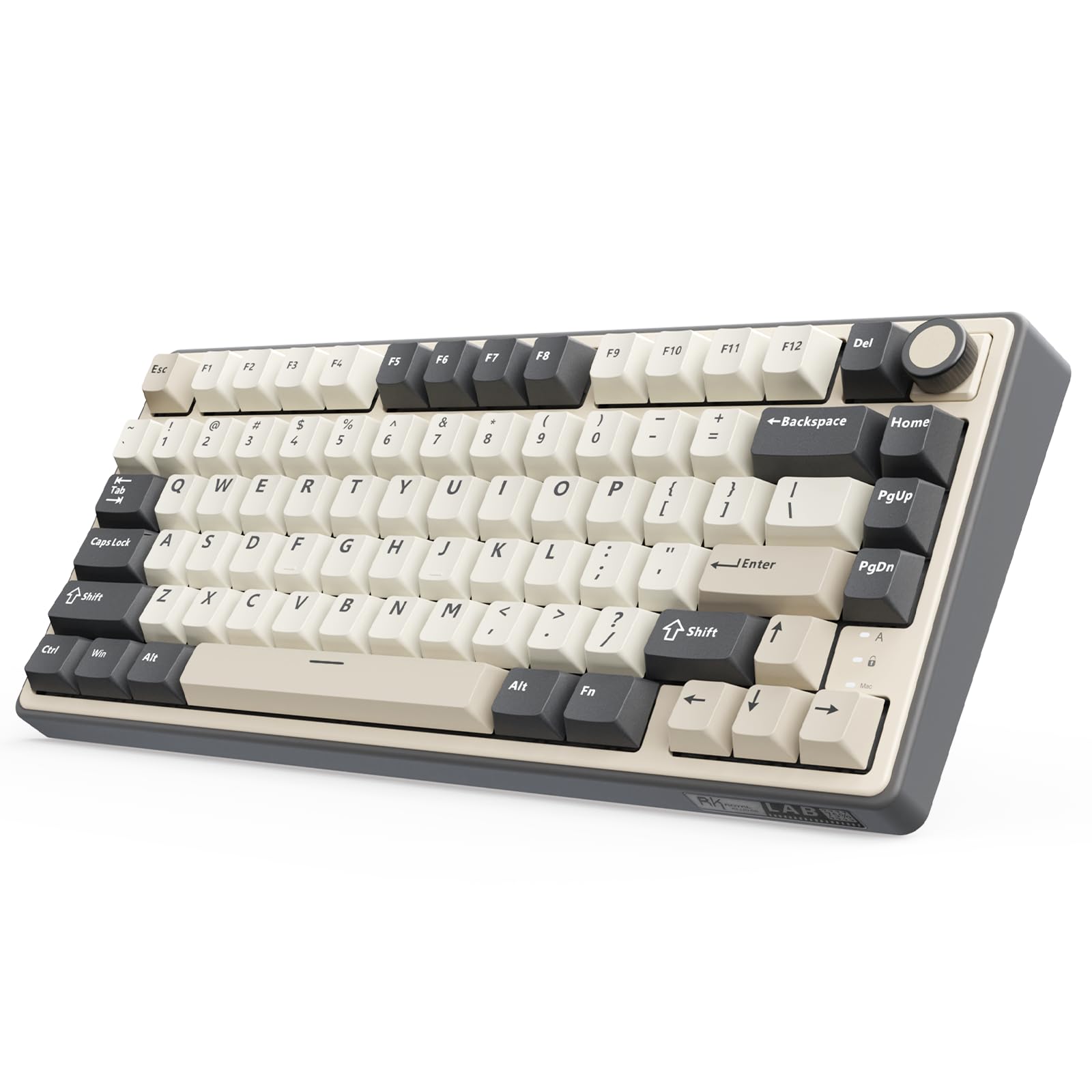
The RK R75 delivers one of the most satisfying creamy typing experiences in the mid-range wireless segment thanks to its pre-lubed linear Cream switches and five-layer gasket design that includes poron cotton cushioning. The 75% layout maintains function row keys and arrows while shaving off the numpad, making it an ideal fit for compact desks and HTPC setups. With Bluetooth 5.1, 2.4GHz dongle, and USB-C connectivity, it pairs with up to three devices simultaneously and switches via a physical toggle on the side.
The 4000mAh internal battery provides roughly seven days of continuous use with RGB enabled, extending considerably when the backlight is turned off. Over 20 RGB lighting modes are adjustable through onboard key combinations, and the south-facing LED orientation prevents keycap shading issues when swapping to aftermarket sets. The hot-swappable PCB supports both 3-pin and 5-pin switches, letting you customize tactile behavior without soldering.
Build quality is solid for the price tier, with minimal chassis flex thanks to the gasket mounting points. The CNC metal volume knob is programmable, though the default behavior for rotating adjusts volume and pressing mutes — functionality that covers most multimedia needs. A few users note that the legends on the keycaps could be more legible under bright ambient light, but the PBT material ensures they will not develop shiny spots over time. For a first wireless mechanical keyboard, the R75 offers a compelling balance of features without breaking the bank.
Why it’s great
- Five-layer gasket design with creamy pre-lubed switches
- Tri-mode wireless with 4000mAh battery
- CNC programmable volume knob included
Good to know
- Keycap legends could be more visible
- Chassis is plastic without metal plate options
5. Corsair K60 RGB TKL

Corsair’s K60 RGB TKL brings optical-mechanical technology to the mid-range with OPX switches that register at a 1.0mm actuation distance — 40% less travel than standard Cherry MX Red switches. This faster actuation translates to quicker in-game response for tapping, strafing, and rapid double-taps, while the linear travel curve keeps the feel smooth and wobble-free. The 8000Hz hyper-polling rate transmits inputs eight times faster than standard 1000Hz boards, reducing the delay between key press and screen action to measurable nanoseconds.
The brushed aluminum frame with black anodization gives the K60 a premium appearance that rivals boards costing twice as much, while the polycarbonate keycaps offer a slightly different texture than standard ABS — glossy but not slippery. The tenkeyless size reduces desk clutter significantly, and the detachable USB-C cable simplifies storage and transport for gamers who shuttle between home and LAN environments. The iCUE software ecosystem enables per-key RGB customization and program-specific lighting profiles that switch automatically when you tab between applications.
The OPX optical switches are rated for 150 million keystrokes, making this a board that will outlast most users’ upgrade cycles. However, the 1.0mm actuation is extremely sensitive — some users report accidentally triggering adjacent keys until they adjust their typing technique. The stabilizers are well-dampened and produce minimal rattle, contributing to a clean, quiet typing sound that is more muted than traditional clicky switches. If you prefer wired reliability and optical speed over wireless flexibility, the K60 delivers exceptional value.
Why it’s great
- Optical OPX switches with 1.0mm actuation for instant response
- 8000Hz hyper-polling minimizes input latency
- Brushed aluminum frame offers premium build
Good to know
- Very sensitive actuation may cause accidental key presses
- Wired-only, no wireless connectivity options
6. RK ROYAL KLUDGE R87 Pro

The R87 Pro brings QMK and VIA firmware support to the budget tier, giving you the same deep customization capabilities found on enthusiast boards costing three times as much. You can remap every key, create complex macros, and program per-layer RGB lighting through VIA’s intuitive web-based interface without installing bloated software. The CNC metal knob is fully programmable — assign it to zoom, scroll, or application switching beyond the default volume control.
The 75% layout packs 88 keys in a tenkeyless form factor while keeping the function row intact, a feature that 70% purists appreciate for dedicated shortcuts. Hot-swap support for 3-pin and 5-pin switches means you can experiment with different tactile scopes without soldering, and the five-layer gasket structure reduces pinging and hollow acoustic noise. The Creamy linear switches come pre-lubed from the factory, delivering a smooth keystroke that rivals more expensive boards.
PBT keycaps provide long-term durability against shining, and the south-facing RGB LEDs ensure compatibility with virtually any Cherry-profile keycap set you might upgrade to later. The plastic chassis is functional but lacks the rigidity of metal-framed alternatives — some flex is noticeable when pressing the center of the board. For anyone looking to enter the QMK/VIA ecosystem at an accessible price point while enjoying a solid gasket-mounted typing experience, the R87 Pro is the smartest entry-level choice.
Why it’s great
- Full QMK/VIA support for unlimited customization
- Programmable CNC knob for versatile control
- Five-layer gasket structure and pre-lubed switches
Good to know
- Plastic chassis shows some flex under pressure
- Wired-only connectivity limits desk placement
7. Redragon K707 PRO

The custom Mint Mambo linear switches are thickly lubricated from the factory, producing a creamy, cozy typing feel that rivals boards more than double its price. The 87-key tenkeyless layout gives mouse-heavy gamers ample arm space without sacrificing essential keyboard real estate.
Tri-mode connectivity includes USB-C wired, Bluetooth 3.0/5.0, and 2.4GHz wireless, giving you the flexibility to pair with gaming consoles, laptops, PCs, and tablets. The 2.4GHz dongle offers reliable low-latency performance for gaming sessions, while Bluetooth conserves battery for typing-focused tasks. PBT gradient keycaps with side-printed legends pair with south-facing LEDs to deliver unique RGB aesthetics — the glow looks particularly striking in low-light desk setups.
Redragon’s pro software enables macro recording, key remapping, and custom lighting effects, though the interface is less polished than QMK/VIA alternatives. Build quality is commendable for the price — users describe the keyboard as heavy due to its large battery, contributing to stability on the desk. The adjustable RGB brightness at its dimmest setting may still be too bright for some users in completely dark rooms. For anyone wanting to dip into gasket-mounted mechanical keyboards without financial risk, the K707 PRO is an astonishingly capable starting point.
Why it’s great
- Gasket mount with five-layer noise dampening at budget pricing
- Tri-mode wireless with good battery life
- Thick-lubed Mint Mambo switches feel creamy out of box
Good to know
- Software lacks QMK/VIA advanced customization depth
- RGB brightness minimum may still be too bright
FAQ
What is the difference between a 70% and a 75% keyboard?
Can I use any mechanical keycap set on a 70% keyboard?
How important is the gasket mount for wireless keyboards?
Final Thoughts: The Verdict
For most users, the 70% keyboard winner is the Corsair K70 PRO TKL because its Hall Effect magnetic switches, adjustable per-key actuation, and Rapid Trigger technology deliver unmatched gaming performance and typing versatility. If you want massive wireless battery life and creamy pre-lubed switches at a mid-range price, grab the AULA F99 Pro. And for esports portability with tournament-proven low-latency connections, nothing beats the Logitech G PRO X TKL Lightspeed.