
A 360 conference camera promises to eliminate the single biggest hybrid meeting headache: remote participants feeling like they’re watching a security feed rather than sitting at the table. The right unit stitches a full-room view, tracks the active speaker with AI, and captures clear audio from every chair. The wrong one leaves half your team muted and out of frame.
I’m Min — the co-founder and writer behind Gadgets Feed. I’ve spent hundreds of hours digging through spec sheets, analyzing microphone array configurations, AI tracking latency, and video stitching quality across every major 360 conference camera platform to build this guide.
Whether you’re equipping a huddle room or a boardroom, the investment depends on room size, participant count, and required resolution. This guide breaks down the options to help you find the best 360 conference camera for your specific setup.
How To Choose The Best 360 Conference Camera
A 360 conference camera isn’t a simple webcam. It’s an integrated system of lenses, microphones, speakers, and AI logic. The wrong choice means remote attendees hear echo, miss speakers, or stare at a static fisheye. Here are the critical decision points.
Microphone Array and Pickup Range
More microphones usually mean better spatial awareness and noise rejection. A 3-mic array can cover a small huddle table up to 10 feet. An 8-mic array with beamforming stretches that to 18 feet and can isolate a voice from keyboard clatter. If your room seats more than six, prioritize an 8-mic configuration.
AI Tracking vs. Manual Control
AI speaker tracking uses visual and audio cues to automatically frame the current speaker. This is essential for organic discussion flows. Some systems also offer auto-framing that zooms to include everyone in the shot. For larger rooms with predictable seating, manual modes like 180° widescreen or custom view presets can be more stable.
Resolution and Stitching Quality
360 cameras capture multiple wide-angle lenses that must be stitched into a seamless panorama. A 4K capture sensor usually outputs a sharper 1080p stitched stream than a native 1080p sensor. Real-time stitching quality varies — poor stitching creates visible distortion where the lenses overlap. Look for dedicated vision processors that handle this on-device.
Quick Comparison
On smaller screens, swipe sideways to see the full table.
| Model | Category | Best For | Key Spec | Amazon |
|---|---|---|---|---|
| Panocore360 | Mid-Range | Small huddle rooms | 4K capture, 1080p output, 3-mic array | Amazon |
| j5create JVU368 | Mid-Range | Portable use & travel | 1080p, remote control, travel case | Amazon |
| TOUCAN SC360 | Premium | Round-table meetings | 1080p, 4-mic array, Bluetooth speaker | Amazon |
| COOLPO Panax5ft | Premium | Medium rooms, AI accuracy | 4K resolution, 8-mic array, local AI | Amazon |
| KanDao Meeting Pro | Premium | Flexible modes & standalone use | 1080p Wi-Fi/HDMI/USB, 8-mic, 18ft range | Amazon |
| NexiGo Meeting 360 Ultra | Premium | Multi-camera setups & large rooms | 8K capture, 1080p output, 8-mic, built-in OS | Amazon |
| Jabra PanaCast 50 | High-End | Boardrooms & wide-table layouts | 4K 180° Panoramic, 3x13MP cameras, 8-mic | Amazon |
| Meeting Owl 3 | High-End | Plug-and-play durability | 1080p 360°, 18ft audio, dual-Owl pairing | Amazon |
| Meeting Owl 4+ | Enterprise | Enterprise, 4K & IT management | 4K 360°, 18ft audio, PoE, Kensington lock | Amazon |
In‑Depth Reviews
1. COOLPO Camera 360, 4K Smart Video Conference Camera

The COOLPO Panax5ft delivers the sweet spot of resolution, microphone density, and AI performance for medium conference rooms. Its 8-microphone array captures voices clearly up to 15 feet, while the 4K sensor outputs a crisp, stitch-free 360° view. The AI-driven voice tracking intelligently zooms and frames the active speaker without the distracting snap-pan seen on lesser units.
Setup is genuinely plug-and-play with USB-A connectivity — no drivers, no cloud sign-ups. All AI processing happens on-device through edge computing, which means zero data leaves your local network. This is critical for organizations with strict privacy policies. It works seamlessly with Zoom, Teams, and Google Meet out of the box.
Be aware the fisheye lens can introduce some visual distortion on rectangular tables, and the speaker quality drops noticeably above 70% volume. It also uses microUSB, which feels dated. But for a room of 6 to 12 people, it matches the performance of systems costing significantly more.
Why it’s great
- True 4K capture with no stitching artifacts
- On-device AI processing for privacy
- Plug-and-play with all major platforms
Good to know
- Fisheye distortion on rectangular tables
- Speaker degrades above 70% volume
- Uses microUSB connection
2. PANOCORE360 All-in-One Meeting Camera
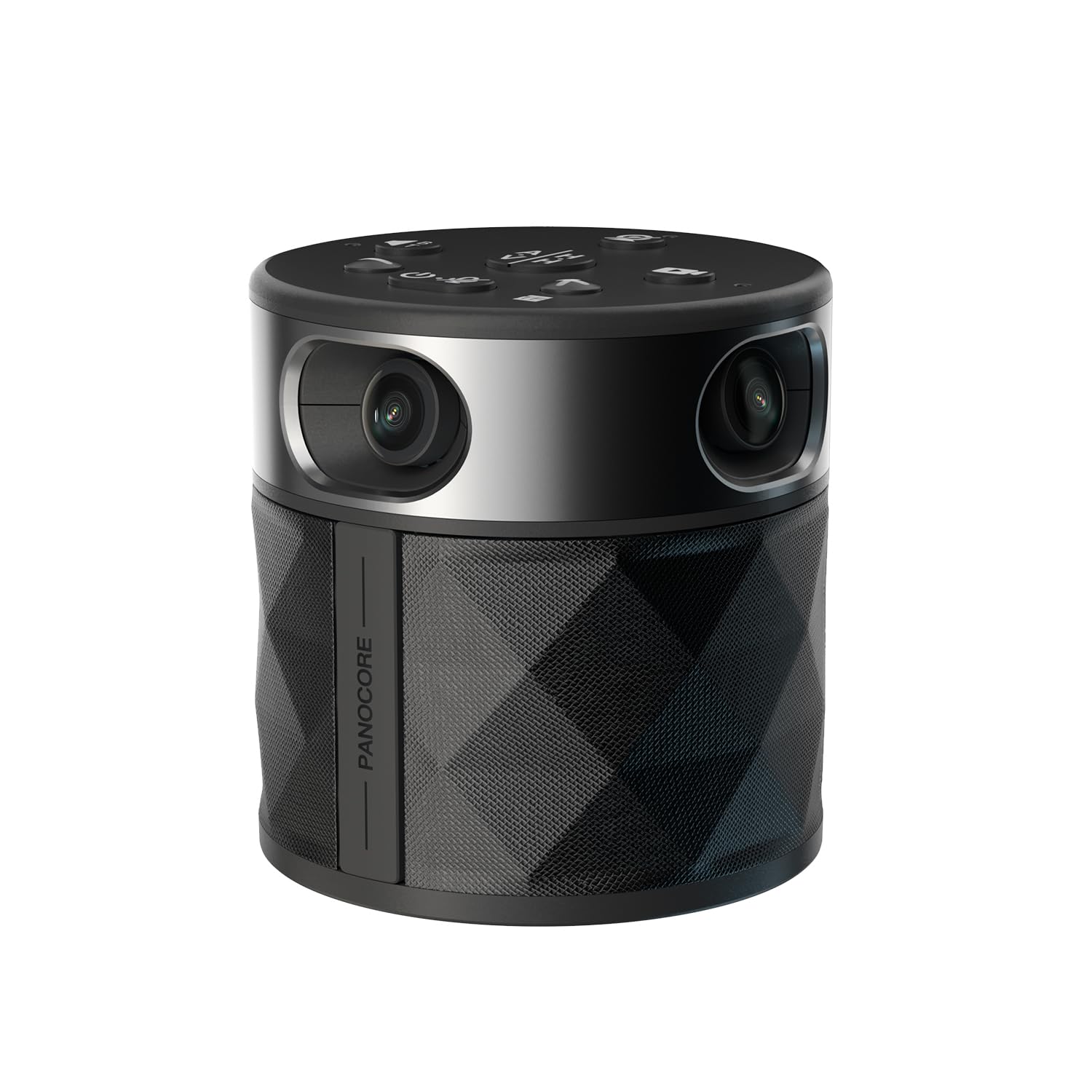
The Panocore360 is a CES Innovation Award winner that punches well above its price tier. Its chip-level integration stiches four cameras into a smooth 1080p output stream from a true 4K sensor. The 3-mic omnidirectional array handles up to 10 feet, making it a strong fit for huddle rooms with 6 to 12 participants.
It offers dual vision modes: auto-focus on the active speaker or a full-room 180° split view. The custom PANOCORE vision chip handles all stitching and AI processing on-device, keeping latency low. It also supports local recording to a MicroSD card via a long-press button — a rare feature at this level.
The AI tracking can be inconsistent with fast-moving presenters, and the built-in speaker sounds hollow compared to dedicated conferencing speakers. The USB-powered operation means some older laptops will require the included splitter and power adapter to run it at full performance.
Why it’s great
- Low-power USB operation with great image quality
- Onboard MicroSD recording for meeting archives
- Dual vision modes for flexibility
Good to know
- AI tracking stutters with fast movement
- Speaker quality is budget-level
- Requires power adapter with older laptops
3. KanDao Meeting Pro 360-degree Video Conference Camera

The KanDao Meeting Pro stands out for its connectivity flexibility and 5 smart operating modes. It uses dual 195-degree lenses for a true 360° view with no blind spots. The 8-mic array and 5W hi-fi speaker deliver crystal-clear audio with an 18-foot pickup range, making it suitable for medium to large rooms.
It runs a built-in Android OS, which allows it to function as a standalone conferencing device without a PC — just connect it to a monitor via HDMI and connect to Wi-Fi. The smart modes (Discussion, Global, Presentation, Patrol, Custom) let you tailor the camera behavior to the meeting style. It supports local recording to an SD card.
The main drawback is the Android implementation: it lacks Google Play Protect certification, so standalone mode requires some technical workarounds. The remote control setup process feels clunky. As a pure USB camera for PC/Mac, it performs excellently, but the standalone promise has rough edges.
Why it’s great
- Versatile connectivity: Wi-Fi, HDMI, and USB
- Five intelligent meeting modes for any format
- Excellent 8-mic audio and speaker quality
Good to know
- Android standalone mode lacks Google certification
- Setup process is more involved than pure USB cameras
- No travel case included
4. j5create 360 All Around AI-Powered Conference Room Camera (JVU368)

The j5create JVU368 is designed for professionals who need conference camera quality on the go. It comes with a detachable travel case and an included remote control for digital pan, tilt, and zoom — letting you adjust framing without touching the device. The AI auto-framing and participant detection work well for 2-4 people.
Video quality is clear 1080p with no blind spot in 360° mode, and the omnidirectional microphone with noise cancellation handles small to medium rooms effectively. Users report the AI cropping is excellent for tabletop streaming and podcast setups, not just traditional meetings.
Build quality has been a concern for some units — reports of the base glue failing and the lens cap magnet breaking. The included microphone is good for conversation but may not match dedicated audio solutions for larger groups. The remote control uses basic IR, so line-of-sight is required.
Why it’s great
- Travel case and remote control included
- AI cropping excellent for small groups and podcasts
- No blind spots in 360° conference mode
Good to know
- Physical build quality has inconsistency reports
- Remote is IR-based, needs line-of-sight
- Microphone is adequate but not class-leading
5. TOUCAN 360-Degree Video Conference Camera

The TOUCAN SC360 is a straightforward, no-fuss 360 camera that excels in round-table meeting scenarios. Its 4-microphone array and Bluetooth speaker deliver good voice clarity for 6 to 10 participants. Setup is truly plug-and-play — users report going from box to meeting in about two minutes with no software installation required.
The AI tracking is effective up to 12 feet, and the camera includes a physical lens cover for privacy. It works with Zoom, Teams, Google Meet, and other major platforms without compatibility issues. The included Bluetooth speaker offers flexibility in placement.
Maximum speaker volume is a common complaint — it’s not loud enough for noisy rooms. The 360° view can capture the TV projection or laptop screens, which may cause distractions. It requires an updated computer with enough USB power to function properly, and the Bluetooth pairing can be finicky on first setup.
Why it’s great
- Extremely fast plug-and-play setup
- Physical lens cover for privacy
- Good AI tracking at range
Good to know
- Max speaker volume is low for noisy rooms
- 360 view can capture distracting screens
- Bluetooth pairing process can be finicky
6. NexiGo Meeting 360 Ultra (Gen 3)

The NexiGo Meeting 360 Ultra Gen 3 is a powerhouse designed for large, complex meeting spaces. Its headline feature is support for up to four connected cameras, enabling full coverage of long tables, U-shaped layouts, or lecture halls. The dual 195-degree lenses capture 8K resolution, though it outputs at 1080p for platform compatibility.
It has a built-in operating system with an app store, meaning you can install Zoom, Teams, or Google Meet directly on the camera and connect it to a TV without a PC. The 8-microphone array with hi-fi speakers provides crystal-clear audio up to 18 feet. AI-powered framing and auto-tracking work across the multi-camera setup.
At this level, buyers should be aware of its physical size — it’s larger than most all-in-one units. The built-in microphone, while functional, isn’t as refined as the audio from dedicated conferencing systems. Some users report occasional autofocus loss requiring a manual reset. It’s best for buyers who need the multi-camera ecosystem.
Why it’s great
- Multi-camera support for complex room layouts
- Built-in OS with app store for standalone use
- 8K capture sensor for sharp 1080p output
Good to know
- Larger physical footprint than most
- Built-in mic quality is secondary to camera
- Occasional autofocus loss on fast movement
7. Jabra PanaCast 50 – Intelligent 180° Panoramic-4K Meeting Room Video Camera

The Jabra PanaCast 50 is a high-end video bar rather than a traditional 360 camera, but it earns its place here for its intelligent panoramic approach. It uses three 13MP cameras with real-time video stitching to offer flexible fields of view — 90°, 120°, 140°, or 180° — adapting to the room dynamically. The 8 beamforming microphones and four speakers deliver exceptional audio for up to 20 people.
Jabra’s intelligent zoom technology automatically adjusts framing based on participant location, and the low-light performance is outstanding compared to most conference cameras. It’s certified for Microsoft Teams and works with Zoom and Google Meet. The unit has no moving parts, which improves long-term reliability.
The PanaCast 50 is a 180° camera, not a full 360° — it’s designed for the front of a conference table or mounted on a wall, not placed in the center of a round table. The remote control is sold separately, which is a notable omission at this price point. It’s best for rectangular boardrooms where everyone faces the same direction.
Why it’s great
- Three 13MP cameras for excellent image quality
- Outstanding audio with 8 mics and 4 speakers
- No moving parts for reliability
Good to know
- 180° coverage, not full 360°
- Remote control sold separately
- Best suited for wall-mount or front-of-room placement
8. Owl Labs Meeting Owl 3 – 360° 1080p HD Conference Room Camera

The Meeting Owl 3 is the most recognized name in 360 conference cameras for good reason. Its Owl Intelligence System uses both visual and audio cues to track the active speaker with remarkable accuracy. The 360° video in 1080p HD and 360° audio with 18-foot pickup range cover small to large rooms effectively, and it supports pairing with a second Owl or Expansion Mic for larger spaces.
Setup is genuinely fast — most users are in a meeting within 6 minutes of unboxing. IT admins can manage fleets via The Nest management tool, making it ideal for enterprise deployment. It is certified for Microsoft Teams and compatible with Zoom, Google Meet, Webex, and more. Users report surviving multiple drops over years of heavy use.
The main limitation is the 1080p video resolution at this price point — some competitors offer 4K for less. The camera can struggle with backlit participants. The + price tag places it firmly in the premium tier, and the ecosystem encourages additional purchases for full large-room coverage.
Why it’s great
- Proven reliability and durability over years
- Excellent AI speaker tracking accuracy
- Comprehensive enterprise IT management tools
Good to know
- 1080p resolution only at this price
- Struggles with backlit participants
- Ecosystem encourages accessory purchases for large rooms
9. Meeting Owl 4+ 360-Degree, 4K Smart Video Conference Camera

The Meeting Owl 4+ is the answer to the biggest critique of the Owl 3: 4K resolution. It captures 360° video in UHD while maintaining the acclaimed Owl Intelligence System for speaker tracking. The 360° audio pickup remains at 18 feet, and the device now supports enterprise features like Power over Ethernet (PoE) via adapter and a built-in Kensington lock for physical security.
It runs on a Qualcomm Snapdragon 8250 processor, enabling faster AI processing and smoother video stitching. The setup remains the same 6-minute plug-and-play experience. IT management through The Nest is enhanced with bulk registration and default settings management. It supports dual-Owl pairing for larger spaces and works with the Whiteboard Owl accessory.
The price is the most significant barrier — it is the most expensive option in this guide. For rooms with up to 12 participants in a doughnut layout, it performs excellently, but there is a slight lag when switching between speakers. For most organizations, the Owl 3 at its lower price point offers 90% of the functionality for much less investment.
Why it’s great
- 4K resolution finally addresses the video quality gap
- Enterprise features: PoE, Kensington lock, Wi-Fi
- Powerful Snapdragon processor for fast AI
Good to know
- Highest price point in the category
- Slight lag on speaker switching
- Best value proposition for the Owl 3 remains strong
FAQ
Can a 360 conference camera replace a dedicated microphone and speaker system for a large room?
Do I need a 4K 360 conference camera if my video platform only supports 1080p?
Is a 180° panoramic camera or a 360° camera better for my meeting room?
Final Thoughts: The Verdict
For most users, the best 360 conference camera winner is the COOLPO Camera 360 because it delivers true 4K capture with an 8-mic array and on-device AI at a price that undercuts the incumbents while outperforming budget options. If you need maximum flexibility with standalone Wi-Fi and HDMI connectivity, grab the KanDao Meeting Pro. And for enterprise-grade durability and centralized IT management, nothing beats the Meeting Owl 3.