
Asset label printers serve a specific purpose: they produce durable, scannable identification tags for equipment, tools, inventory, and infrastructure. Unlike general-purpose label makers, these machines prioritize adhesion strength, material resilience, and print permanence for environments where a peeled or faded label means a lost asset.
I’m Min — the co-founder and writer behind Gadgets Feed. My analysis of asset label printers focuses on real-world durability metrics (adhesive shear strength, substrate resistance to solvents and UV, and IP-rated drop survival) and connectivity practicality (USB-C, Bluetooth pairing stability, and batch printing workflows) drawn from hundreds of hours of market research and spec comparison.
Whether you are an IT manager tagging server racks or a field technician labeling cable bundles, the best asset label printer must reliably produce labels that outlast the equipment they identify.
How To Choose The Best Asset Label Printer
Asset label printers are not one-size-fits-all. Choosing the wrong platform results in labels that peel, smudge, or waste media. Focus on these four criteria to match the printer to your environment.
Media Type and Adhesive Strength
The label material must match the surface: metalized polyester for industrial equipment, vinyl for curved surfaces, and heat-shrink for wire marking. Adhesive shear strength determines whether a label stays bonded to a textured plastic case or a painted metal beam. Look for industrial-rated adhesives (3M™ or equivalent) if your assets face temperature swings or solvent exposure.
Connectivity and Workflow Integration
Decide whether you need Bluetooth tethering for on-the-go printing from a phone, a USB connection for PC-based batch label creation, or a standalone keyboard for rapid single-label jobs. Printers that support both a physical QWERTY keyboard and a mobile app offer the widest field utility — you can type a tag quickly on site or design a barcode spreadsheet from your desk.
Print Method and Durability
Direct thermal printers require no toner but produce labels that can fade under UV or heat. Thermal transfer and thermal ribbon printers yield darker, more permanent markings. For assets that live indoors (server rooms, warehouses), direct thermal is sufficient. For outdoor equipment or chemical environments, choose printers that accept polyester or polyimide tape with a thermal transfer option.
Portability vs. Volume
Handheld label makers (Brady, DYMO Rhino, Epson LW) serve field technicians and small-scale asset tagging with up to 1.5-inch media widths. Desktop thermal printers (Rollo, Brother QL, Westinghouse) handle high-volume batch printing of 4×6 shipping labels and larger asset tags. Match the output width and media capacity to your typical batch size.
Quick Comparison
On smaller screens, swipe sideways to see the full table.
| Model | Category | Best For | Key Spec | Amazon |
|---|---|---|---|---|
| LABELWORKS Epson LW-PX900PCD | Premium Kit | Industrial & field service | Up to 36mm tape; mil-spec drop rated | Amazon |
| Rollo USB Thermal | Premium Desktop | High-volume batch shipping | 1 label/sec; 203 DPI | Amazon |
| Brother QL-1100 | Mid-Range | Wide-format batch asset labels | Up to 4″ wide; 300 DPI | Amazon |
| DYMO Rhino 5200 | Mid-Range | Wire & patch panel labeling | Prints heat-shrink tubes; hot keys | Amazon |
| Brother PT-D610BTVP | Mid-Range | Office & warehouse organization | Up to 24mm TZe tapes; Bluetooth + USB | Amazon |
| Brady M210 Kit | Mid-Range | Mobile field labeling | Drop-tested; ~16h battery | Amazon |
| Brady M211 Bluetooth | Mid-Range | Portable Bluetooth labeling | App-driven; USB-C | Amazon |
| Westinghouse Thermal USB | Mid-Range | Small biz shipping & asset tags | 6 ips; supports ZPL | Amazon |
| McAuley Custom Asset Tags | Budget | Pre-printed polyester tags | Metalized polyester; 100-count | Amazon |
In‑Depth Reviews
1. LABELWORKS Epson LW-PX900PCD Industrial Label Maker Kit

The Epson LW-PX900PCD is a complete industrial solution with a rechargeable lithium-ion battery, magnetic attachments for rack mounting, and a hard case. It supports a wide variety of Epson PX tapes including polyester, heat-shrink, vinyl, and self-laminating wraps for wire marking — all up to 36mm wide.
This kit includes the Label Editor Professional software for Windows, enabling advanced barcode and batch label creation. The onboard keyboard and large preview LCD allow standalone operation without a phone. The printer’s body meets MilSpec drop standards, and the auto-rewind feature reduces tape waste by minimizing margins.
The main drawback is the software: it is Windows-only, lacks macOS/Linux drivers, and the image-upload utility is limited to two graphic elements per label. Despite this, the hardware build quality, cheap media cost, and lifetime warranty make it the top choice for network engineers and facility managers who label in bulk.
Why it’s great
- Supports 36mm tape — the widest handheld in this class.
- Drop-tested body and strong magnetic attachments for field use.
- Cheaper media than DYMO or Brady, with lifetime warranty.
Good to know
- Software is Windows-only with limited image importing.
- No Bluetooth or WiFi — USB-only connectivity.
- Onboard screen is low resolution compared to modern apps.
2. Rollo USB Shipping Label Printer

The Rollo USB is a desktop direct-thermal printer designed for high-volume shipping and warehouse asset tags. It prints a 4×6 label in under a second at 203 DPI — sharp enough for scannable barcodes and text. Its compact footprint and simple USB connection make it a drop-in replacement for failed DYMO or Zebra units.
Setup is fast on both Windows and Mac: install drivers, connect USB, and print from any shipping platform (Shopify, PirateShip, ShipStation). The Rollo also functions as a custom label maker for barcodes, thank-you stickers, and QR codes in widths from 1.57 to 4.1 inches. The direct-thermal method eliminates ink and toner costs.
The printer has no onboard display and requires a computer — there is no Bluetooth or standalone mode. It is best suited for static workstation environments where the printer stays tethered to a PC or laptop. For mobile asset tagging, a handheld unit is a better fit.
Why it’s great
- Extremely fast: prints a 4×6 label in ~1 second.
- Works with all major shipping and ecommerce platforms out of the box.
- No ink or toner — labels are inexpensive consumables.
Good to know
- No wireless connectivity — USB only to a computer.
- Cannot operate standalone — requires a host device.
- Media width maxes out at 4.1 inches, not suited for handheld labels.
3. Brother QL-1100 Wide Format Thermal Label Printer

The Brother QL-1100 prints on wide-format labels up to 4 inches across, making it ideal for shipping labels, large asset tags, and name badges. With 300 DPI resolution, text and barcodes print crisp and dark. The automatic cutter handles batch printing efficiently, and the included starter rolls help you get started immediately.
This printer features a USB host interface for direct scanning and label printing without a PC, plus a “Plug & Label” mode for Windows users who want to bypass software installation. Free SDKs for Windows and Android allow developers to integrate into proprietary asset tracking systems. It is compatible with Windows, macOS, and Linux.
The primary limitation is the label cost: Brother’s genuine DK rolls are expensive, and the cutter mechanism may fail after several thousand labels. Generic brands like BETCKEY work well for cost savings. The printer is also relatively large — it occupies permanent desk space.
Why it’s great
- 300 DPI produces sharp, highly scannable barcodes.
- USB host lets you crop and print barcodes without a PC.
- Supports batch printing with reliable automatic cutting.
Good to know
- Proprietary Brother labels are pricier than generic alternatives.
- Cutter durability concerns after heavy use (10,000+ labels).
- Not portable — desk-bound form factor.
4. DYMO Industrial Label Maker Rhino 5200

The DYMO Rhino 5200 is purpose-built for electricians and network technicians. It prints Code 39 and Code 128 barcodes on 3/4-inch wide labels, and crucially supports heat-shrink tubing for permanent wire identification. The one-touch hot keys automatically format labels for patch panels, terminal blocks, and cable flags, saving significant time on repetitive jobs.
Independent testing claims it labels up to 77% faster than competing Brady or Brother units for patch panel labeling. The LCD display shows previews, and the onboard keyboard is large enough for gloved hands. The printer meets ANSI and TIA/EIA-606-A standards for commercial labeling compliance.
The bare-bones package (M5200) does not include a battery or charger — you must buy the kit for out-of-box readiness. Users report that the display backlight can fail after years of use, although the underlying print mechanism remains functional. The cartridge costs are higher than Epson PX media.
Why it’s great
- Supports heat-shrink tubing for permanent wire labeling.
- One-touch hot keys automate formatting for electrical work.
- Meets ANSI and TIA/EIA-606-A industry standards.
Good to know
- Base model comes without battery or charger.
- Display backlight longevity concerns reported.
- Proprietary DYMO cartridges are expensive per label.
5. Brother P-Touch PT-D610BTVP Business Label Maker

The Brother P-Touch PT-D610BTVP is a full-featured desktop label maker with a QWERTY keyboard, color LCD, and Bluetooth connectivity for mobile printing. It uses Brother TZe tapes up to 24mm wide in a wide variety of colors and finishes including security and flexible ID tapes. It prints up to 8 lines of text with 17 fonts and 900 symbols.
This model can operate on 6 AA batteries for portability or the included AC adapter for desk use. The Bluetooth connection pairs seamlessly with iOS and Android devices via the iPrint&Label app, which provides templates, spreadsheet import, and voice-to-text. The VP variant includes a carry case for transport.
The print quality is excellent for a consumer/light-commercial device, though some users note slight jaggedness on certain fonts at small sizes. The keyboard has minor side-to-side play, and the Windows setup process requires installing the iPrint app before the driver. It is best suited for retail, warehouse organization, and office labeling — not heavy industrial field use.
Why it’s great
- Full QWERTY keyboard and color LCD for standalone operation.
- Bluetooth + USB dual connectivity for computer or phone.
- Supports a huge range of TZe tape sizes and colors.
Good to know
- Battery life on 6 AAs is decent but not all-day heavy use.
- Font rendering at small sizes can appear slightly jagged.
- Windows driver installation requires app-first workflow.
6. Brady M210 Portable Label Printer Kit

The Brady M210 is a standalone portable label printer designed for industrial environments. It features a full alphanumeric keypad, a backlit LCD graphics display, and prints in six text sizes from 6 to 40 point. It uses M21 series cartridges covering continuous tape, pre-sized labels, nylon cloth patch panel labels, and wire/cable markers across 12 material types.
The kit includes a Li-ion rechargeable battery, AC adapter, hard case, and a starter roll of nylon cloth labels. The printer is drop-tested and reinforced with molded rubber impact bumpers. Users report roughly 16 hours of moderate use per charge, and the auto-off setting preserves power during idle periods.
The print speed is slow (roughly 0.4 inches per second) compared to desktop thermal printers, and the rubber keypad layout requires acclimation. The hard case holds two spare cartridges but could be more compact. This printer excels for field technicians who need durable, professional labels without a phone or PC.
Why it’s great
- Standalone operation with a full keyboard — no phone required.
- Drop-tested with rubber bumpers for job site durability.
- Excellent battery life for full-shift labeling.
Good to know
- Print speed is slow at roughly 0.4 ips.
- Cartridges are proprietary and relatively costly.
- Keypad has a learning curve compared to touchscreen apps.
7. Brady M211 Portable Bluetooth Monochrome Label Printer

The Brady M211 is a compact, phone-powered label printer that prioritizes portability and app functionality. It connects via Bluetooth to the Brady WorkHub app, which offers label preview, spreadsheet import for batch barcodes, and voice-to-text. The body is drop-rated to 6 feet and crush-resistant to 250 pounds.
Charging is done through USB-C, and the battery lasts a full workday. The autofeed and auto-cut features save time on repetitive labels. Print quality is sharp and professional-grade, suitable for cable wraps, terminal labels, and panel identifiers. The app interface is intuitive and reduces misprints compared to older Brady models.
The downside is total dependence on a smartphone — there is no onboard keyboard or screen. Print speed is only 0.6 ips, and maximum label width is just 0.75 inches. The M211 cartridges are expensive, and the magnetic mount is sold separately. This is an excellent choice for IT and AV professionals who already work with a mobile device.
Why it’s great
- Extremely rugged: 6-ft drop rated, 250 lb crush resistance.
- USB-C charging and all-day battery life.
- Powerful app with spreadsheet import and voice-to-text.
Good to know
- No onboard controls — requires a smartphone to operate.
- Print speed is slow (0.6 ips); max width is 0.75 inches.
- Cartridges are expensive; magnetic mount sold separately.
8. Westinghouse Thermal Shipping Label Printer

The Westinghouse Thermal Label Printer is a direct-thermal desktop unit optimized for 4×6 shipping labels. It prints at speeds up to 6 inches per second at 203 DPI, making it a strong contender for small businesses that need fast, reliable label output. It supports fanfold and roll labels with a straight paper path that minimizes jams.
Compatibility extends to Windows, macOS, and Linux, plus ZPL software for advanced barcode label design. The Ethernet port allows hardwired network connections, while USB is standard. The package includes starter labels, a label holder, a USB flash drive with drivers, and all necessary cables. The unit is compact and fits on a standard desk.
The printer is not Bluetooth capable — it requires a USB or Ethernet connection. Some users note that the driver setup for ZPL mode can be finicky on macOS. It uses direct thermal technology, so labels may fade if exposed to direct sunlight or heat. It is a cost-effective choice for warehouse and ecommerce shipping stations.
Why it’s great
- Fast 6 ips print speed for high-volume label runs.
- Supports ZPL, making it compatible with legacy enterprise systems.
- Straight paper path reduces label jams during operation.
Good to know
- No Bluetooth — only USB and Ethernet connectivity.
- Direct thermal labels can fade under prolonged UV exposure.
- ZPL driver setup on macOS can be tricky for novice users.
9. McAuley Labels Custom Asset Tags for Equipment
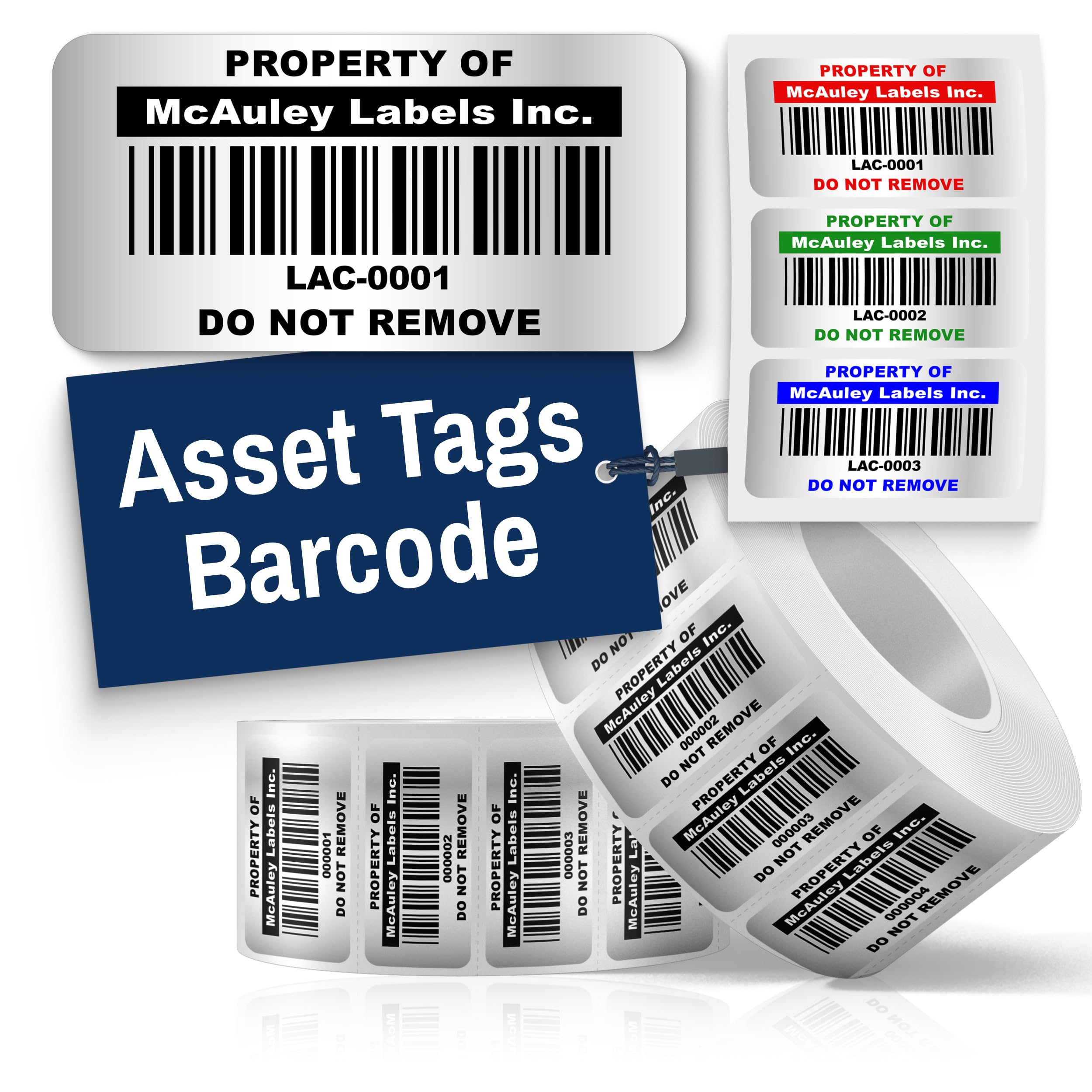
McAuley Labels offers pre-printed asset tags made from heavy-duty metalized polyester with industrial-strength adhesive. These are not a printer — they are a pre-order service where you specify 11 text inputs for sequential numbering and barcode generation. Each tag measures 1.5×0.75 inches and comes in a roll of 100.
The material resists water, scratches, and fading, and the adhesive bonds to metal, plastic, and textured surfaces. The high-contrast barcodes are designed to scan in any lighting condition. McAuley is a family-owned US manufacturer offering 1-year warranty and customization options for size, color, and adhesive type.
The obvious limitation is inflexibility: once printed, the tags cannot be changed. If you add a new asset that disrupts your numbering schema, you must order a new batch. This product is best for permanent asset identification where the tag list is finalized, and you prefer an economical, no-hardware solution.
Why it’s great
- No printer or software required — tags arrive ready to apply.
- Metalized polyester resists water, chemicals, and UV.
- Made in the USA with a 1-year warranty.
Good to know
- Cannot edit numbering after ordering — static sequence.
- 100-count packs may run thin for large inventory.
- No instant reprinting if you need to add assets to the list.
FAQ
Can I use any generic label roll in a direct thermal asset printer?
Does a thermal label printer need ink or toner?
Final Thoughts: The Verdict
For most users, the best asset label printer winner is the LABELWORKS Epson LW-PX900PCD because it combines mil-spec durability, the widest media compatibility (up to 36mm), and a lifetime warranty at a reasonable media cost. If you want ultra-fast batch printing for warehouse shipping labels, grab the Rollo USB. And for portable wire and patch panel labeling in the field, nothing beats the DYMO Rhino 5200 with its heat-shrink tube support and one-touch hot keys.