
A cheap mouse can make your cursor jitter, your wrist ache, and your coworkers cringe at every click. But a well-chosen budget computer mouse delivers smooth optical tracking, a comfortable grip, and near-silent operation without draining your wallet. The trick is knowing which silent switch matters, what DPI range actually helps, and whether wireless interference ruins your workflow.
I’m Min — the co-founder and writer behind Gadgets Feed. After comparing sensor accuracy, battery life claims, ergonomic angles, and wireless stability across dozens of models, I’ve separated the real performers from the flashy listings that disappoint within weeks.
This guide breaks down the seven most compelling options for anyone searching for the best budget computer mouse, focusing on the specs that actually affect daily use rather than marketing fluff.
How To Choose The Best Budget Computer Mouse
Choosing a budget-friendly mouse means prioritizing the features that prevent frustration. A poorly designed mouse can cause hand fatigue, missed clicks, or disconnections at the worst moment. Focus on connectivity, sensor resolution, ergonomic shape, and battery or power management.
Connectivity: Wired, 2.4 GHz, or Bluetooth
A wired USB mouse offers zero latency and no pairing, ideal for desktop setups where cable management isn’t a concern. A 2.4 GHz wireless mouse with a USB receiver delivers a stable, lag-free connection up to 33 feet, perfect for laptops. Bluetooth eliminates the dongle but can introduce slight latency — Bluetooth 5.0 or 5.2 significantly reduces this. Choose wired for reliability, 2.4 GHz for range, and Bluetooth for multi-device flexibility.
DPI and Sensor Precision
DPI (dots per inch) measures how many pixels the cursor moves per inch of physical mouse movement. 800 DPI is slow and precise for detailed work; 1600 DPI is standard for office tasks; 2400 to 4800 DPI suits high-resolution monitors or casual gaming. Budget mice with adjustable DPI — ideally four to six levels — let you switch between tasks without software. A basic optical sensor works on most surfaces, but skip mice that only offer one fixed DPI setting if you work across different screen sizes.
Ergonomic Shape and Noise Level
Standard flat mice force your wrist into a pronated position that strains tendons over hours. A vertical mouse keeps your hand in a neutral handshake position, reducing carpal tunnel risk. Budget options now include contoured grips and thumb rests that mimic premium designs. Silent switches reduce click noise by over 90 percent — essential for shared offices, libraries, or late-night work. Check reviews for actual click sound; some budget mice claim silence but produce a loud “thock” on the main buttons.
Quick Comparison
On smaller screens, swipe sideways to see the full table.
| Model | Category | Best For | Key Spec | Amazon |
|---|---|---|---|---|
| TECKNET Bluetooth Wireless Mouse | Wireless Rechargeable | Multi-device Users | 4800 DPI, 6-Level Adjustable | Amazon |
| Logitech M330 Silent Wireless | Wireless 2.4GHz | Office Quiet | 18-Month Battery Life (AA) | Amazon |
| Uineer Ergonomic Wireless Vertical | Tri-Mode Vertical | Wrist Comfort | 500mAh Rechargeable, 4 DPI Levels | Amazon |
| TECKNET Ergonomic Vertical Wireless | Vertical Wireless | Long Battery Life | 4800 DPI, 6 Adjustable Levels | Amazon |
| Logitech MK270 Combo | Keyboard + Mouse | Full Desktop Setup | 2-Year Keyboard Battery Life | Amazon |
| ELECOM Left Hand Wired | Wired Ergonomic | Left-Handed Users | 2000 DPI, Silent Click | Amazon |
| HXMJ Ergonomic Vertical Wired | Wired Vertical | Entry-Level Vertical | 1000/1600 DPI, Silent | Amazon |
In‑Depth Reviews
1. TECKNET Bluetooth Wireless Mouse
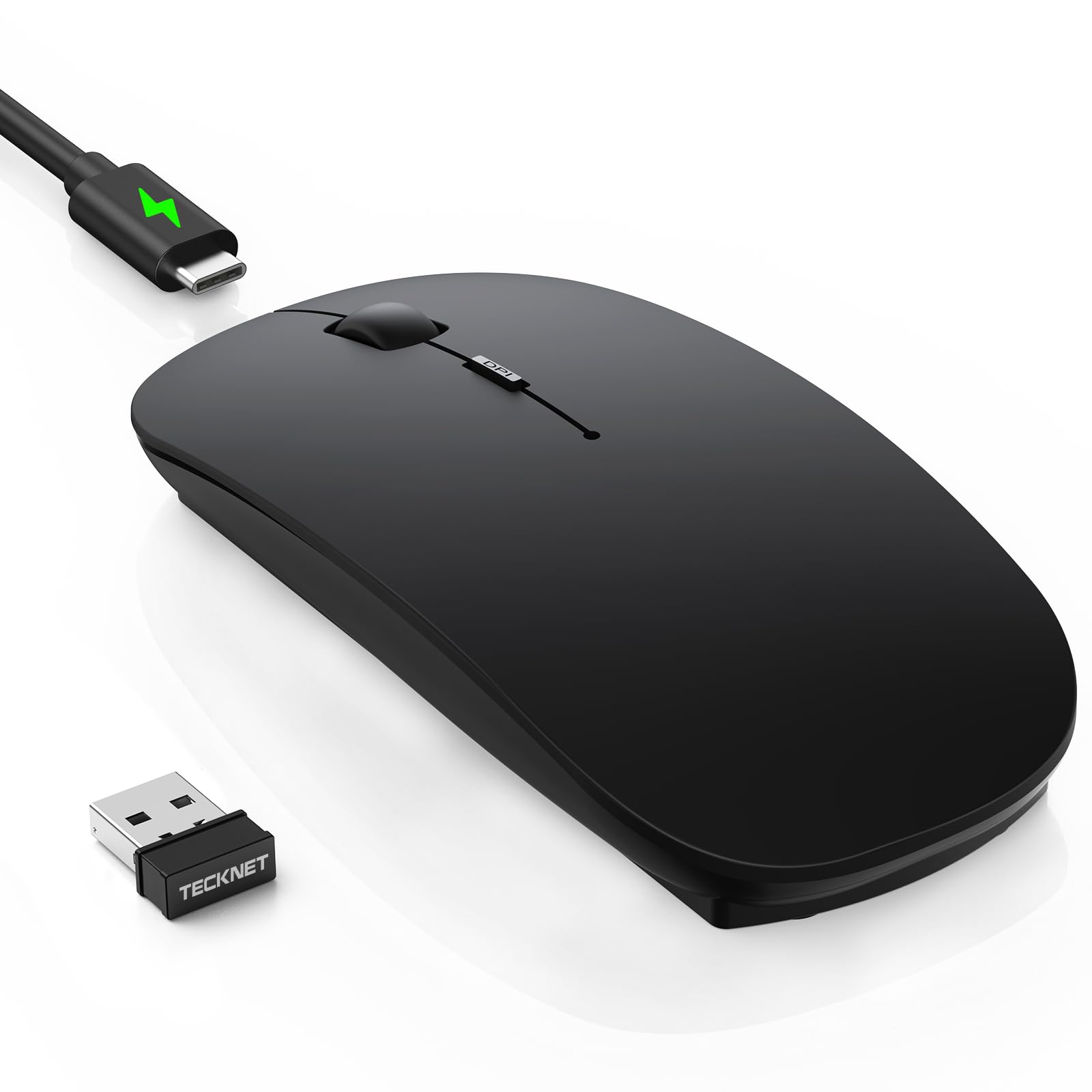
This TECKNET mouse packs Bluetooth 5.2, Bluetooth 3.0, and 2.4 GHz connectivity into an ultra-slim 0.93-inch profile, letting you switch between three devices with a single button press. The 4800 DPI sensor with six adjustable levels — 800, 1200, 1600, 2400, 3200, and 4800 — covers everything from pixel-precise photo editing to fast cursor sweeps across a 4K monitor. The rechargeable battery lasts 60 days on a 2.5-hour USB-C charge, and a 30-minute auto-sleep preserves power during breaks.
Silent clicks reduce noise by around 90 percent, though the button feel is more tactile than mushy — a rare combination at this price tier. The ambidextrous body measures 4.48 inches long and weighs 0.2 pounds, making it genuinely portable for travel or shared desks. The hidden USB receiver stores inside the magnetic bottom cover, so you won’t lose the dongle during transit.
Some users reported initial tracking jitter for the first day or two, which resolved as the sensor settled. The black version has a matte finish that resists fingerprints but can show dirt from oily hands. Overall, this is the most feature-dense budget mouse for multitaskers who need seamless device hopping.
Why it’s great
- Triple connectivity (BT 5.2, BT 3.0, 2.4 GHz) with one-button switching
- USB-C rechargeable with 60-day real-world battery life
- Six adjustable DPI levels up to 4800 for versatile use
Good to know
- Initial tracking jitter reported during first 24-48 hours
- Matte finish on black variant shows hand oils over time
- Cable is charging-only, not usable as a wired mouse
2. Logitech M330 Silent Wireless Mouse

Logitech’s M330 uses SilentTouch technology to reduce clicking sounds by over 90 percent, producing a soft cushion-like thud rather than a sharp plastic snap. The 2.4 GHz wireless range reaches 33 feet, and the included USB-A receiver offers plug-and-play simplicity on Windows, macOS, ChromeOS, and Linux. A single AA battery delivers 18 months of use with auto-sleep engaged — no recharge cycles to track, no cable to find.
The contoured right-handed shape with plastic side grips provides stable palm support for all-day spreadsheets, though users with large hands may find it slightly undersized. The scroll wheel is notched and silent, a rare feature among budget mice. Optical tracking works on wood, cloth, and laminated desks without a mouse pad, and cursor precision remains consistent across 1000 DPI.
After two years of daily use, the plastic shell may show wear, but the internals hold up reliably. The battery compartment has a power off switch to prevent drain during travel. The lack of Bluetooth means you need a free USB-A port, and the right-hand-only design excludes lefties. For pure silent productivity, this is the benchmark.
Why it’s great
- Industry-leading SilentTouch with 90%+ noise reduction
- 18-month battery life from one AA battery
- Flawless 2.4 GHz connection with zero driver installation
Good to know
- Right-handed only, not ambidextrous
- No Bluetooth connectivity
- Plastic side grips can feel slippery without textured coating
3. Uineer Ergonomic Wireless Vertical Mouse
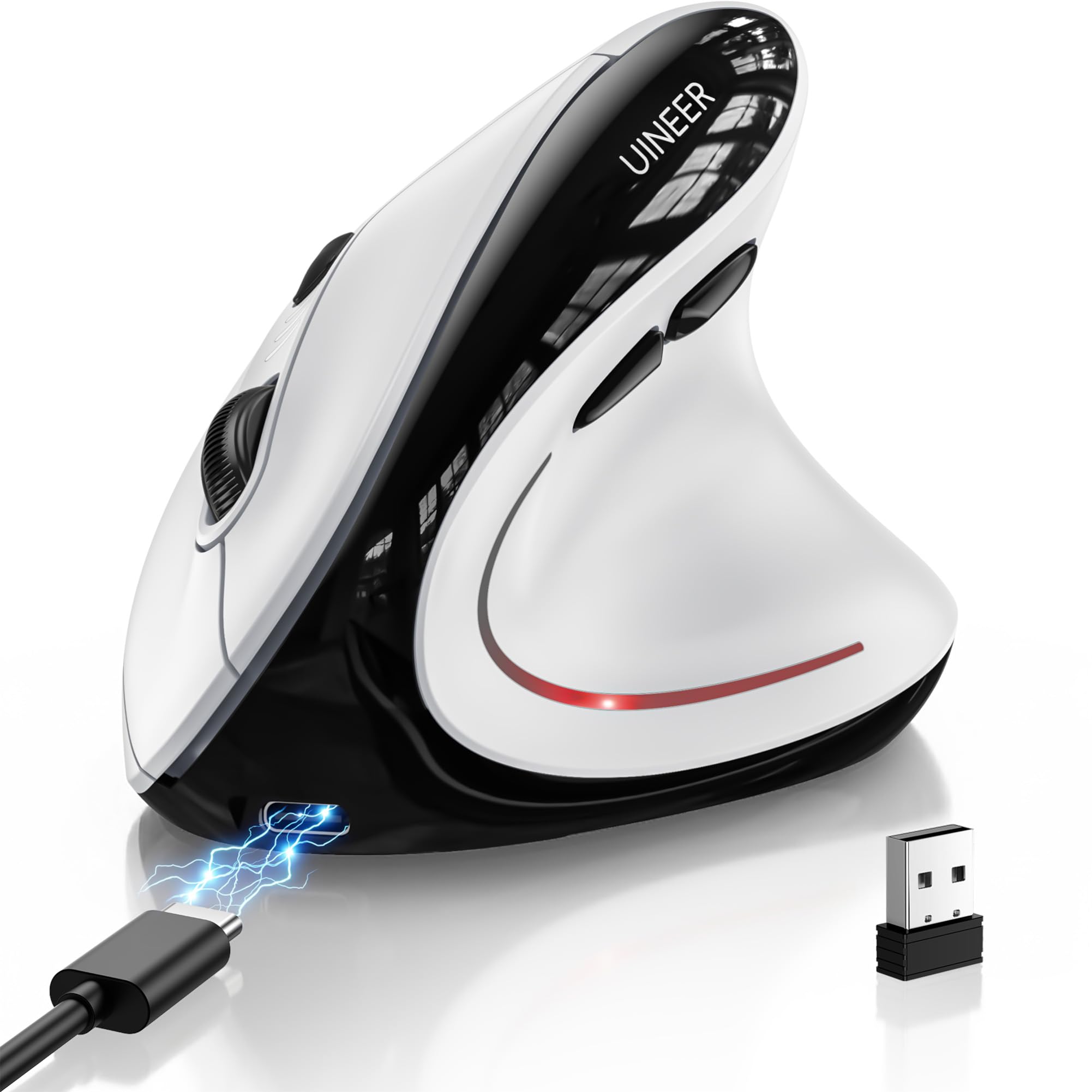
The Uineer vertical mouse supports Bluetooth 5.0, Bluetooth 4.0, and 2.4 GHz connectivity with three-device switching, letting you jump from a MacBook to a Windows desktop to an iPad without unplugging a receiver. Its 57-degree natural grip angle keeps the wrist in a neutral handshake position, reducing forearm strain during 10-hour shifts. Four DPI levels — 800, 1200, 1600, and 2400 — cover most office and creative tasks.
A built-in 500mAh rechargeable battery lasts roughly two weeks under 8-hour daily use, and the USB-C port allows charging while working — no downtime. The side scroll wheel is a genuine productivity booster for horizontal timeline navigation in video editors or spreadsheet rows. Seven-color LED ambient lighting adds desk flair, though you can disable it to conserve battery.
Some users reported battery life closer to 10 days rather than weeks, especially with LED lighting active. The silent main clicks are genuinely quiet, but the forward/back thumb buttons produce a louder tactile snap. First-timers to vertical mice should expect a 1-2 week adaptation period. For wrist pain relief at this price point, it’s a strong contender.
Why it’s great
- Tri-mode wireless with three-device switching
- 500mAh rechargeable battery with USB-C charging
- Side scroll wheel for horizontal navigation
Good to know
- Battery lasts ~10-14 days, not weeks as advertised with LED on
- Thumb buttons are louder than main silent clicks
- Requires adaptation period for vertical grip comfort
4. TECKNET Ergonomic Vertical Wireless Mouse

TECKNET’s vertical mouse combines Bluetooth 5.0/3.0 with a 2.4 GHz USB receiver, supporting two Bluetooth devices and one 2.4 GHz connection simultaneously. The 4800 DPI optical sensor with six adjustment levels (800 to 4800) provides hairline precision for CAD work or fast cursor flicks for casual gaming. The vertical design angles the palm at roughly 60 degrees, reducing wrist pronation compared to flat mice over long work sessions.
Two AAA batteries power the mouse for up to 24 months, though no batteries are included in the box. The silent left and right clicks are confirmed quiet, while the DPI button, scroll wheel, and side buttons produce more audible feedback. The USB receiver stores in a magnetic slot on the bottom, preventing loss during travel. The ABS plastic shell with matte coating resists fingerprints better than glossy alternatives.
A known durability concern involves the scroll wheel: some units develop continuous scrolling after roughly six months of heavy use. The mouse also lacks onboard memory, so DPI settings revert after the mouse enters deep sleep. For users who prioritize battery longevity and adjustable sensitivity over battery-included convenience, this is a solid mid-range vertical pick.
Why it’s great
- Six adjustable DPI levels up to 4800 for precise tracking
- Up to 24-month battery life on two AAA batteries
- Dual Bluetooth + 2.4 GHz with three-device support
Good to know
- AAA batteries not included
- Scroll wheel may develop scrolling issues after months of use
- Side buttons and scroll wheel are not silent
5. Logitech MK270 Wireless Keyboard and Mouse Combo

The MK270 combo bundles a full-size spill-resistant keyboard with a compact ambidextrous mouse, sharing a single 2.4 GHz USB receiver for a clutter-free desk. The keyboard features eight multimedia hotkeys for volume, play/pause, internet, and email — ideal for users who want quick media control without software. The keyboard’s 36-month battery life and the mouse’s 12-month battery life come from included AA and AAA batteries, respectively.
The included mouse is basic but functional: ambidextrous shape, standard optical tracking, and smooth cursor navigation on most surfaces. It lacks DPI adjustment or silent switches, but for office productivity, email, and web browsing, it tracks reliably up to 33 feet. The keyboard’s low-profile keys with standard spacing reduce typing fatigue for long documents, and the adjustable tilt legs provide two typing angles.
Logitech’s software shift from Unifying Receiver to Logi Hub means older unifying receivers won’t work with newer software features, but the core plug-and-play functionality remains unchanged. The mouse right-click may feel spongy compared to standalone budget mice, and the keyboard lacks backlighting. For anyone starting from scratch with a limited budget, this combo delivers both input devices at a combined cost below most single premium mice.
Why it’s great
- Single receiver runs both keyboard and mouse
- Keyboard has 36-month battery life and spill-resistant design
- Eight multimedia hotkeys for instant access
Good to know
- Mouse has no DPI adjustment or silent switches
- Keyboard lacks backlighting
- Unifying receiver not compatible with newer Logi Hub
6. ELECOM Left Hand Wired USB Ergonomic Mouse

ELECOM’s EX-G series delivers a literal mirror-image vertical design for left-handed users, with the left click positioned on the right side so the index finger handles primary input. The 58-degree angle bridges the gap between flat mice and aggressive vertical grips, reducing wrist bone pressure without an extreme learning curve. The optical sensor reaches 2000 DPI with customizable button assignments via ELECOM’s Mouse Assistant software, letting you remap all five buttons.
Silent click switches eliminate the sharp plastic tick, making this viable for library or late-night use. The wired USB connection guarantees zero latency and no battery anxiety — ideal for stationary desktops where cable management is manageable. The large size (4.7 x 3.1 x 2.3 inches) accommodates medium-to-large hands, with a palm rest that supports full-hand contact rather than claw gripping.
The included 4.9-foot USB cable is fixed and non-detachable, which limits placement flexibility for tower setups. The white color option is actually a light grey, which may mismatch other peripherals. Some left-handed users transitioning from ambidextrous mice reported initial thumb strain as the thumb adjusts to operating side buttons. For southpaws who cannot tolerate mirrored ambidextrous designs, this is the most targeted budget option available.
Why it’s great
- Dedicated left-handed ergonomic shape with 58-degree angle
- 2000 DPI optical sensor with customizable button remapping
- Silent click switches for noise-sensitive environments
Good to know
- Wired connection only, cable is non-detachable
- White model is actually a light grey color
- Large size may strain smaller hands initially
7. HXMJ Ergonomic Vertical Mouse Wired

This HXMJ wired vertical mouse offers the cheapest entry point into ergonomic handshake positioning, with a 45-degree angle that reduces wrist pronation compared to standard flat mice. The optical sensor operates at 1000 and 1600 DPI — no software or button cycling required, just a simple toggle. Six buttons include forward/back navigation for browsing, and all main clicks use a dampened switch that produces a quiet tactile bump rather than a sharp snap.
At 5.43 x 2.95 inches and a lightweight plastic build, this mouse feels notably smaller than premium vertical options, making it better suited for small-to-medium hands. The 4.9-foot USB cable offers enough reach for most desktop layouts. The thumb rest and palm support provide decent stability, though the rear-positioned sensor changes the wrist rotation arc, which takes some adjustment.
Some users note the glide pads feel rough on cloth mouse pads, creating slight drag. The scroll wheel click requires noticeably more force than the main buttons — roughly 30 to 40 percent more pressure. For users with carpal tunnel concerns who want to test a vertical form factor without significant investment, this wired mouse lets you evaluate ergonomic benefits for a minimal commitment.
Why it’s great
- Lowest-priced vertical ergonomic shape for testing wrist relief
- Quiet dampened clicks suitable for shared workspaces
- Forward/back navigation buttons for efficient browsing
Good to know
- Limited to 1000/1600 DPI, no higher sensitivity for large monitors
- Glide pads create noticeable drag on cloth surfaces
- Scroll wheel click requires significantly more force than main buttons
FAQ
Is 4800 DPI really necessary for a budget office mouse?
How long do rechargeable budget mice actually last between charges?
Can a vertical mouse really help with wrist pain on a tight budget?
Final Thoughts: The Verdict
For most users, the budget computer mouse winner is the TECKNET Bluetooth Wireless Mouse because it combines triple connectivity, a rechargeable 60-day battery, and six-level 4800 DPI adjustment in an ultra-slim silent body — features that rival mice costing three times as much. If you want true whisper-quiet operation without recharge anxiety, grab the Logitech M330 Silent for its proven 18-month battery life and industry-leading SilentTouch clicks. And for wrist comfort with wireless flexibility, the Uineer vertical mouse delivers tri-mode connectivity and a 500mAh rechargeable battery that keeps you going through long workdays without straining your forearm.