
Whether you are building a new gaming rig on a strict budget or upgrading an older system to handle modern ray-traced titles, the 60-class graphics card market is the most competitive and confusing tier to navigate. These cards walk a tight line between affordability, memory capacity, and raw rasterization power, making a single wrong choice painful for the next several years of gameplay.
I’m Min — the co-founder and writer behind Gadgets Feed. I have spent hundreds of hours dissecting GPU specifications, benchmarking memory bandwidth differences, and analyzing the real-world thermal performance of every major cooler design in this crowded price bracket to separate actual value from marketing noise.
This guide ranks the most compelling contenders based on core count, VRAM configuration, cooling efficiency, and feature set so you can confidently pick the best 60 series gpu for your specific resolution target and gaming priorities.
How To Choose The Best 60 Series GPU
The 60 series segment spans multiple architectures from Ampere to the latest Blackwell, each with different memory types, bus widths, and feature generations. Understanding where performance bottlenecks actually occur is the only way to avoid overspending or underbuying.
VRAM Size and Memory Bus Width
8 GB cards on a 128-bit bus (like the newest RTX 5060) rely heavily on faster GDDR7 to compensate for the narrow interface. 12 GB models on a 192-bit bus provide more headroom for texture-heavy titles and ray tracing workloads but use slower GDDR6. Budget 8 GB cards can struggle at 1440p with maxed textures, while 12 GB variants offer more consistent minimum frame rates.
Cooler Design and Noise Profile
60-class GPUs have modest power draws, but cooler quality still varies dramatically. Triple-fan designs with larger heatsinks run quieter under sustained loads than dual-fan compact models. Metal backplates aid structural rigidity and passive heat dissipation, while plastic shrouds can trap heat in poorly ventilated cases.
Architecture Features Beyond Raw Speed
DLSS 4 on Blackwell-based cards offers significant frame rate gains through multi-frame generation, which older Ampere cards cannot match. Ray tracing performance also jumps between generations — second-gen RT cores on the 30-series lag behind the fourth-gen implementation on the 50-series, making the newer cards far more capable in path-traced titles.
Quick Comparison
On smaller screens, swipe sideways to see the full table.
| Model | Category | Best For | Key Spec | Amazon |
|---|---|---|---|---|
| GIGABYTE RTX 5060 Gaming OC | Best Overall | 1080p ultra ray tracing | 8GB GDDR7 128-bit | Amazon |
| ASUS ROG Strix RTX 3060 V2 OC | Premium Build | Silent premium 1080p | 12GB GDDR6 192-bit | Amazon |
| GIGABYTE AORUS RTX 3060 Ti Elite | Top Performer | 1440p high refresh | 8GB GDDR6 256-bit | Amazon |
| ASUS TUF RTX 3060 Ti V2 OC | Best Cooling | Thermally demanding builds | 8GB GDDR6 256-bit | Amazon |
| EVGA RTX 3060 Ti XC Gaming | Compact Pick | Small form factor builds | 8GB GDDR6 256-bit | Amazon |
| MSI RTX 3060 Ti Ventus 2X OC | Best Value | Budget 1440p entry | 8GB GDDR6 256-bit | Amazon |
| GeForce RTX 3060 Ti FE | Founders Pick | Reference reliability | 8GB GDDR6 256-bit | Amazon |
| GIGABYTE RTX 3060 Gaming OC 12G | Most VRAM | Texture-heavy 1080p | 12GB GDDR6 192-bit | Amazon |
| GIGABYTE RTX 3060 Windforce OC 2.0 | Budget Champion | Entry-level 1080p build | 12GB GDDR6 192-bit | Amazon |
In‑Depth Reviews
1. GIGABYTE GeForce RTX 5060 Gaming OC 8G
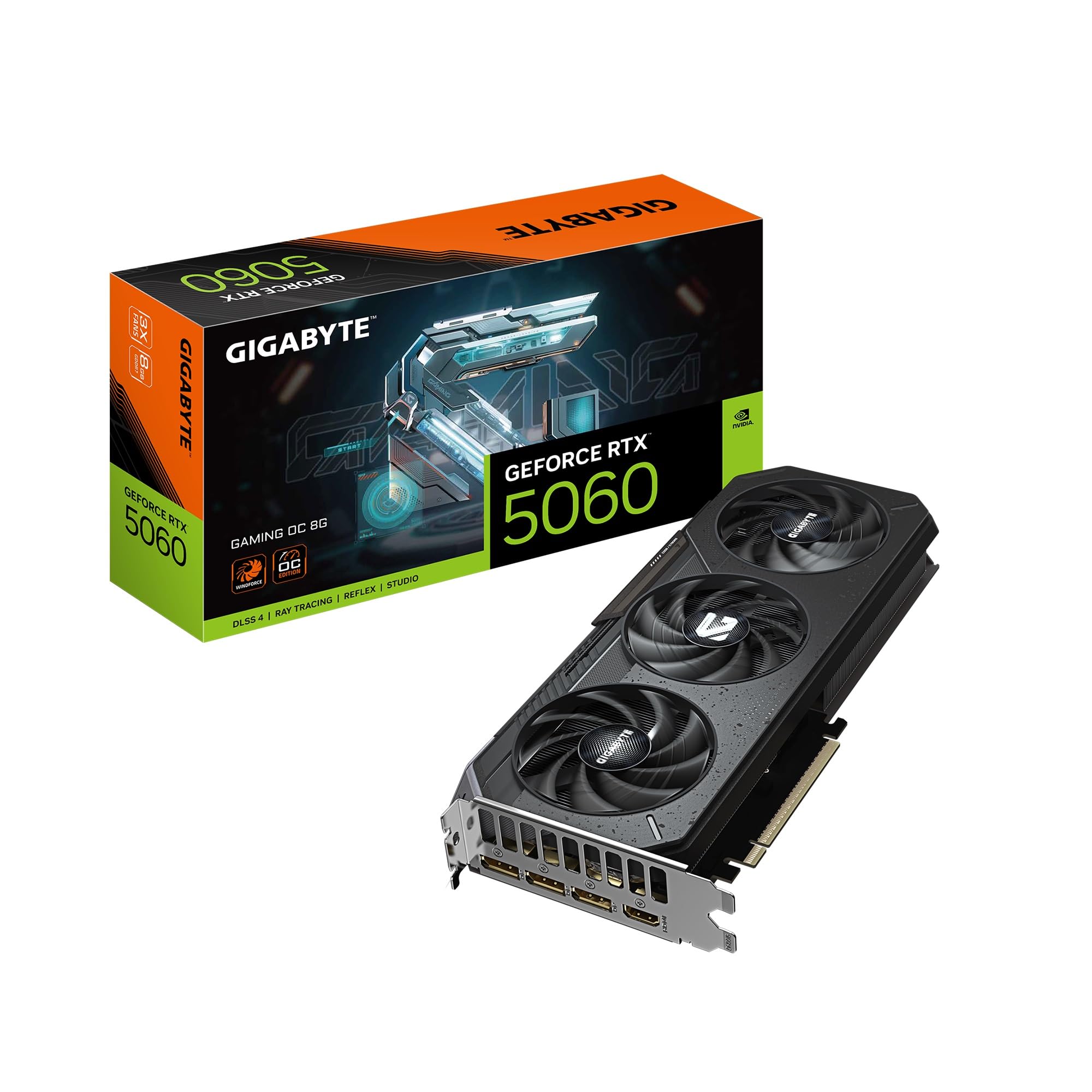
The GIGABYTE RTX 5060 Gaming OC leverages the new Blackwell architecture and GDDR7 memory running across a 128-bit bus, delivering roughly 30 percent more raster performance than the previous-generation RTX 2070. The WINDFORCE triple-fan cooling system keeps core temperatures comfortably under 60°C even during extended Cyberpunk 2077 sessions with ray tracing and path tracing enabled, a feat that was simply not possible on older 60-class cards.
DLSS 4 is the headline feature here — the multi-frame generation algorithm can nearly double perceived frame rates in supported titles, making 1080p ultra settings with full ray tracing feel buttery smooth. The compact three-fan design fits most mid-tower cases without clearance issues, and the PCIe 5.0 interface provides future-proofing for next-generation motherboards.
Where this card falls short is the 8 GB VRAM ceiling. Several customer reviews note that texture-heavy titles at 1440p begin to stutter when VRAM runs out, and ray tracing performance suffers when memory is saturated. This is unambiguously a 1080p GPU — stretching it beyond that resolution requires compromising on texture quality or disabling ray tracing.
Why it’s great
- DLSS 4 provides massive frame rate boosts in supported games
- WINDFORCE cooler is exceptionally quiet and cool under load
- PCIe 5.0 support for upcoming motherboard platforms
Good to know
- 8 GB VRAM is tight for 1440p gaming with max textures
- 128-bit memory bus limits bandwidth despite GDDR7 speed
- Not recommended for streaming or video editing workloads
2. ASUS ROG Strix RTX 3060 V2 OC 12GB

The ASUS ROG Strix RTX 3060 V2 OC is the premium-tier interpretation of the Ampere 3060, featuring a factory overclock that pushes the boost clock to 1912 MHz — the highest among all 3060 variants on this list. The axial-tech fan design with reversed center fan rotation reduces turbulence noise, and the all-metal shroud provides exceptional structural rigidity for a card that is physically large at 11.81 inches.
The 12 GB GDDR6 frame buffer operating on a 192-bit bus is this card’s defining advantage over its 8 GB competition. Texture-heavy titles like Microsoft Flight Simulator and modded Skyrim can fully utilize the extra VRAM without stuttering, and the memory bandwidth is sufficient to maintain smooth 1080p gameplay with high-resolution texture packs installed.
Customer feedback consistently praises the thermals — one reviewer noted that even after overclocking, the card remained “extremely cool and quiet” with no fan noise complaints. The major drawback is the physical footprint: many mid-tower cases struggle to accommodate the 2.7-slot thickness, and the card is power-hungry relative to other 3060 models, requiring a robust power supply.
Why it’s great
- 12 GB VRAM is ideal for texture-heavy 1080p gaming
- Highest boost clock among all 3060 variants reviewed
- Premium all-metal build with excellent thermal performance
Good to know
- Very large 2.7-slot design limits case compatibility
- Higher power draw compared to other 3060 models
- Some units shipped in minimal packaging with damaged boxes
3. GIGABYTE AORUS RTX 3060 Ti Elite 8G REV2.0

The GIGABYTE AORUS RTX 3060 Ti Elite represents the absolute ceiling of 60-class performance, pairing the full-fledged Ti silicon with a generous 256-bit memory bus and a triple-WINDFORCE cooler. This combination delivers measurable advantages at 1440p resolutions — memory bandwidth peaks at 448 GB/s, which is nearly double that of the RTX 5060’s narrow 128-bit interface despite the older GDDR6 standard.
The AORUS branding brings premium touches including RGB Fusion lighting, a metal backplate, and reinforced PCIe mounting for heavy cards. Customer reviews highlight stable driver performance in home theater PC setups and consistent frame rates in demanding engine titles running on Unreal and CryEngine. The card does not require an overly powerful PSU, making it accessible for upgrades from older systems.
The most frequently cited downside is fan noise under heavy loads — several owners reported that the fans become noticeably audible when gaming at higher settings. The 8 GB VRAM also stands out as a limitation for a card in this premium pricing tier, especially when compared to cheaper 12 GB 3060 options.
Why it’s great
- 256-bit memory bus provides exceptional bandwidth for 1440p
- Triple-fan cooler handles sustained gaming loads well
- Stable GeForce drivers with good HTPC compatibility
Good to know
- Fan noise is noticeable during high-demand gaming sessions
- 8 GB VRAM feels limited for the price tier
- No RGB-free version available for minimalist builds
4. ASUS TUF Gaming RTX 3060 Ti V2 OC

The ASUS TUF Gaming RTX 3060 Ti V2 OC distinguishes itself through a military-grade build that uses an aluminum and steel shroud rather than plastic, providing superior heat dissipation and structural durability. The dual ball bearing fan design maintains operational temperatures below 58°C during overclocked gaming sessions, as confirmed by multiple customer reviews, while the fans themselves remain nearly inaudible even at maximum RPM.
The OC edition pushes the boost clock to 1785 MHz in OC mode, and the inclusion of HDMI 2.1 enables 8K display output for users with high-resolution monitors. The V2 revision incorporates LHR design, which is irrelevant for gaming performance but does not degrade gaming experience in any way. Owners upgrading from older GTX 1060 cards report massive FPS improvements in Cyberpunk, Forza, and Call of Duty titles.
The main caveat is the 8 GB VRAM limit, which can become a bottleneck in VR workloads or when running multiple high-resolution displays simultaneously. The card is also physically large at 11.85 inches, requiring careful case selection for smaller form factor builds. Some users felt the price premium over non-OC models was difficult to justify purely on clock speed gains.
Why it’s great
- All-metal construction with exceptional thermal performance under 58°C
- Very quiet fan operation even at full speed
- HDMI 2.1 supports 8K resolution output
Good to know
- 8 GB VRAM may bottleneck in VR and multi-monitor setups
- Large physical size limits case compatibility
- Premium pricing for the ASUS brand and OC features
5. EVGA GeForce RTX 3060 Ti XC Gaming

The EVGA RTX 3060 Ti XC Gaming is the most compact 3060 Ti on this list at just 7.94 inches long, making it the go-to option for small form factor builds and ITX cases where every millimeter counts. Despite its reduced footprint, the card maintains a real boost clock of 1710 MHz and features a full metal backplate that adds rigidity and helps with passive heat dissipation in tight enclosures.
Performance at 1440p is impressive for the size — customer reviews consistently report 70-120 FPS at high to ultra settings on 3440×1440 ultrawide monitors, with Cyberpunk 2077 delivering playable frame rates at medium settings. The card also handles VR workloads flawlessly, and users upgrading from GTX 1660 Super-class cards report more than doubling their frame rates across almost every title.
The compact cooler design has a downside: thermals run noticeably hotter than larger triple-fan alternatives, especially during extended gaming sessions. Many owners note that the card’s surface temperature climbs higher than they expected, and the single-fan design can become audible under sustained load. The 8 GB VRAM is also a limiting factor for users who want to max out texture settings at 1440p.
Why it’s great
- Short 7.94-inch length fits ITX and SFF cases easily
- Solid 1440p performance at high-ultra settings
- Metal backplate improves structural integrity
Good to know
- Runs hotter than larger triple-fan 3060 Ti cards
- Compact fan design can be audible under load
- 8 GB VRAM limits ultra texture settings at 1440p
6. MSI Gaming RTX 3060 Ti Ventus 2X OC LHR

The MSI Gaming RTX 3060 Ti Ventus 2X OC strikes the best price-to-performance ratio in the 3060 Ti category, combining a 1695 MHz boost clock with the full 256-bit memory bus in a dual-fan form factor that fits most builds. The Torx Fan 3.0 design delivers adequate cooling for the 200W TDP without excessive noise, and the card benchmarks within 1 percent of the average for its chip class.
At 1440p, the card handles most modern titles at high settings with playable frame rates, though demanding games require reducing settings from ultra. The 8 GB GDDR6 memory is adequate for current AAA titles, but users should plan for texture resolution compromises within the next two years as game memory requirements increase. A nice touch is the inclusion of three DisplayPort 1.4a outputs alongside a single HDMI 2.1, supporting multi-monitor productivity setups.
Several customer reviews noted that the LHR designation does not impact gaming performance whatsoever, though one user experienced a bricked BIOS that required manual recovery via MSI’s M-Flash utility. The card is larger than expected based on product photos, measuring 9.1 inches, so pre-measuring your case is advisable.
Why it’s great
- Excellent price-to-performance ratio in the 3060 Ti class
- 256-bit bus provides strong memory bandwidth
- Three DisplayPort 1.4a outputs for multi-monitor setups
Good to know
- BIOS issues reported requiring manual recovery
- Larger than expected at 9.1 inches
- No RGB lighting for those wanting aesthetic features
7. NVIDIA GeForce RTX 3060 Ti Founders Edition

The NVIDIA GeForce RTX 3060 Ti Founders Edition is the baseline reference card that defines the spec floor for all third-party variants. Built on the Ampere architecture with second-generation RT cores and third-generation Tensor cores, the FE delivers consistent performance with DLSS support that significantly boosts frame rates in supported games without compromising image quality.
The reference cooler is surprisingly capable for a dual-slot design, maintaining low noise levels during most gaming loads. Customer reviews note that the card is an excellent upgrade from the RTX 2060 Super generation, providing smooth 1080p performance with ray tracing enabled. The card supports NVIDIA Reflex for latency reduction in competitive titles, which competitive gamers will appreciate for improved responsiveness.
The primary issue with the Founders Edition is availability — this card is often sold through third-party resellers at significantly marked-up prices, and used units may have visible wear including dust accumulation inside the heatsink. Some owners report that the fan noise becomes noticeable under heavier loads, though this is consistent with the reference cooler’s thermal design limits.
Why it’s great
- Reference design with stable, proven driver support
- DLSS delivers noticeable frame rate improvements
- NVIDIA Reflex reduces input latency for competitive gaming
Good to know
- Frequently sold at inflated prices by third-party sellers
- Reference cooler can become audible under sustained load
- Used units often require cleaning before installation
8. GIGABYTE RTX 3060 Gaming OC 12G

The GIGABYTE RTX 3060 Gaming OC 12G is the most memory-rich option in the 60 series lineup, featuring a full 12 GB of GDDR6 memory on a 192-bit bus. This extra VRAM directly benefits games with high-resolution texture packs and modded environments — users report smooth gameplay in titles that would otherwise stutter on 8 GB cards when texture quality is maxed out at 1080p.
The triple WINDFORCE fan cooler is shared with GIGABYTE’s higher-tier cards, providing generous thermal headroom for the 3060’s relatively modest power draw. The 15000 MHz memory clock speed ensures that the 192-bit bus is utilized efficiently, and the card supports 8K display output via DisplayPort for users with high-resolution panels. Builders upgrading from GTX 1060 cards consistently report massive generational improvements.
The 3060 non-Ti silicon has fewer CUDA cores than the Ti variants, which means raw rasterization performance is lower despite the larger frame buffer. This creates an unusual situation where the card has more VRAM than the faster 3060 Ti but lower overall rendering throughput. Some units have also been reported with cosmetic damage like scratches on the heatsink plate from factory handling.
Why it’s great
- 12 GB VRAM handles high-resolution texture packs without stuttering
- Triple WINDFORCE cooler provides excellent thermal performance
- 8K display output support for high-resolution monitors
Good to know
- Fewer CUDA cores than 3060 Ti despite more VRAM
- Rasterization performance lags behind the Ti variant
- Some units arrive with cosmetic blemishes
9. GIGABYTE RTX 3060 Windforce OC 2.0 12GB
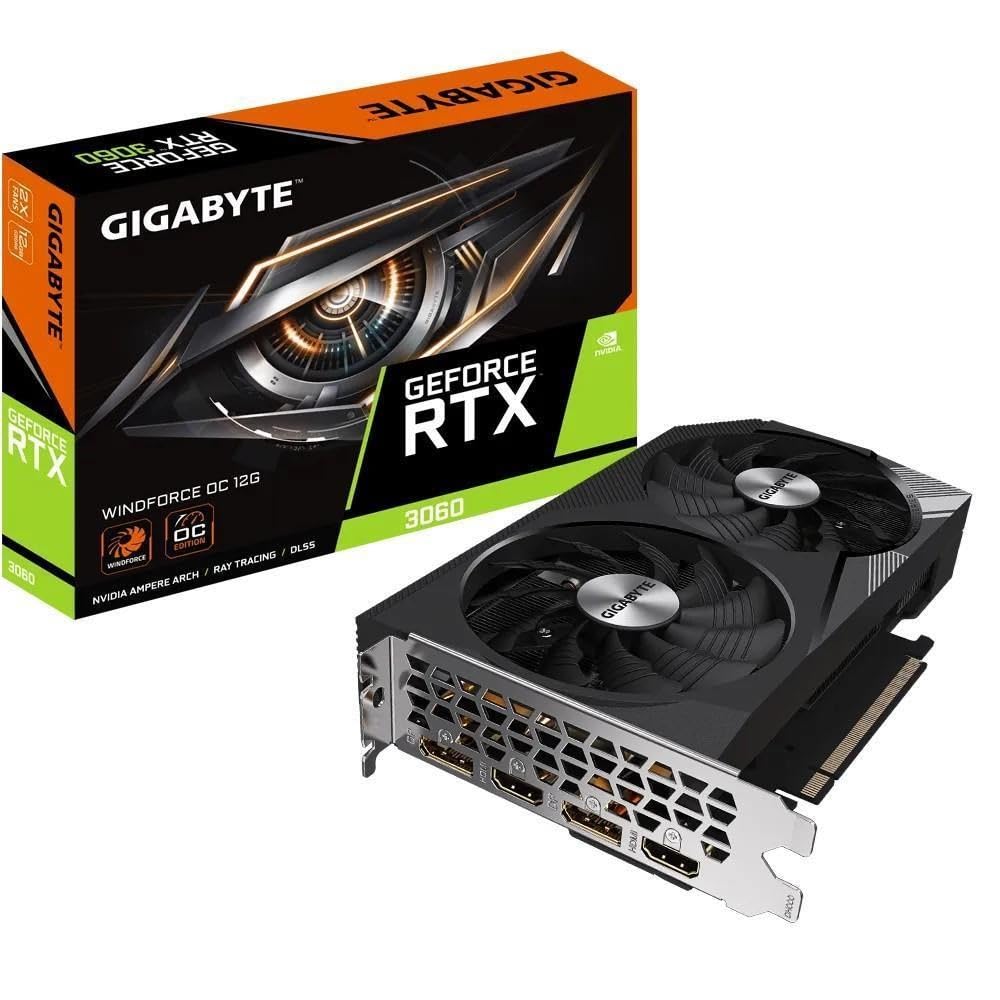
The GIGABYTE RTX 3060 Windforce OC 2.0 is the most accessible entry point into the 60 series ecosystem, offering 12 GB of VRAM at the lowest price in this guide. The dual-fan WINDFORCE 2X cooling system with alternate spinning fans reduces turbulence noise while maintaining adequate temperatures for the 3060’s power envelope, and the 1777 MHz boost clock is competitive with larger triple-fan models.
Customer reviews highlight the card’s ability to run modern games at high settings with smooth frame rates, and the 12 GB GDDR6 memory provides a measure of future-proofing that its 8 GB competitors cannot match. The card is remarkably compact for a 12 GB GPU, making it suitable for builds where space is at a premium but VRAM requirements are high.
The dual-fan cooler is the primary limitation — sustained gaming in warmer environments can push temperatures higher than the triple-fan alternatives, and the card lacks the premium features like RGB lighting or metal backplates found on more expensive models. Some units have been reported arriving with the anti-static bag already opened and security seal cut, which may concern buyers expecting factory-sealed packaging.
Why it’s great
- Most affordable entry point with 12 GB VRAM
- Compact dual-fan design fits smaller cases easily
- Good 1080p high-settings gaming performance
Good to know
- Dual-fan cooling runs warmer than triple-fan models
- No RGB lighting or premium metal shroud
- Packaging seals may be opened on some units
FAQ
Can a 60 series GPU handle 1440p 144Hz gaming?
Is GDDR7 worth the upgrade over GDDR6 in this class?
Does PCIe 5.0 matter for 60 series GPUs?
Why do some 3060 cards have 12 GB while the faster 3060 Ti only has 8 GB?
Final Thoughts: The Verdict
For most users, the best 60 series gpu winner is the GIGABYTE RTX 5060 Gaming OC because its Blackwell architecture and DLSS 4 deliver the highest frame rates in modern ray-traced titles at 1080p with the quietest cooling solution available in this class. If you want maximum VRAM headroom for texture-heavy games, grab the GIGABYTE RTX 3060 Gaming OC 12G. And for 1440p gaming where memory bandwidth matters most, nothing beats the GIGABYTE AORUS RTX 3060 Ti Elite.