
Building a high-performance PC is an exercise in thermal management, and nothing sabotages a top-tier CPU or GPU faster than a chassis that traps heat. The market is flooded with glass boxes prioritizing looks over laminar flow, making the hunt for a well-ventilated enclosure a genuinely critical decision—one that directly dictates component longevity and sustained clock speeds under load.
I’m Min — the co-founder and writer behind Gadgets Feed. I’ve spent hundreds of hours analyzing airflow-optimized PC cases, poring over fan curve data, mesh density specs, and real-user thermal reports to separate designs that simply look the part from those that actively evacuate hot air.
After comparing mesh density, pre-installed fan configurations, radiator support, and positive-pressure layouts, I’ve narrowed the field to the most thermally competent enclosures available today. This guide covers the definitive best case for airflow across several build priorities and budgets.
How To Choose The Best Case For Airflow
Selecting an airflow-focused case goes far beyond counting fan mounting points. You must evaluate mesh porosity, fan size and static pressure ratings, the chassis’ internal layout for unobstructed paths, and how easily the case maintains positive pressure to minimize dust ingress. Understanding these four pillars ensures your components run cooler and quieter.
Mesh Panel Density and Ventilation Ratio
A fine mesh front panel with a high ventilation ratio—ideally over 40% open area—allows fans to draw air freely without significant impedance. Coarse grills or panels with small slotted vents drastically reduce effective airflow, forcing fans to spin faster and louder to compensate. Look for cases specifying their mesh airflow percentage or those with proven thermal reviews.
Fan Configuration: Size, Quantity, and Pressure
Two 140mm or 160mm intake fans can move more air at lower noise levels than three 120mm fans. However, the latter configuration often provides higher static pressure, which is critical for pushing air through dense radiator fins or dust filters. A balanced setup with slightly more intake than exhaust fans creates positive pressure, reducing dust buildup through unfiltered gaps.
Dual-Chamber vs. Traditional Layout
A dual-chamber case physically separates the PSU and drives behind the motherboard tray, opening up the front and bottom of the main chamber for unobstructed airflow. This layout dramatically improves air intake paths to the GPU and CPU cooler. Traditional layouts with a bottom PSU shroud are still effective, but the front intake is often partially blocked by the drive cage.
Radiator Compatibility and Clearance
If you plan on using an AIO or custom loop, ensure the case supports your radiator size (360mm, 420mm) at the top or front without interfering with RAM or the GPU. Cases that allow bottom radiator mounting or have a removable top bracket for easier installation offer greater building flexibility and thermal headroom for high-TDP components.
Quick Comparison
On smaller screens, swipe sideways to see the full table.
| Model | Category | Best For | Key Spec | Amazon |
|---|---|---|---|---|
| Montech AIR 903 MAX | Mid-Range | Best Overall Airflow | 51% mesh ventilation rate | Amazon |
| Lian Li LANCOOL 216 | Premium | Large 160mm Front Fans | 2x160mm + 1x140mm fans | Amazon |
| NZXT H9 Flow (2025) | Premium | Dual-Chamber Layout | 10-fan capacity | Amazon |
| Antec Performance 1 FT | Premium | Full Tower & Temp Display | 420mm radiator support | Amazon |
| FOIFKIN F600 | Mid-Range | 7 Pre-Installed Fans | 270° panoramic glass | Amazon |
| MUSETEX Y6 | Mid-Range | Pre-Installed 120mm Fans | 6 PWM ARGB fans included | Amazon |
| FOIFKIN F1 | Budget | Budget Pick | 6 pre-installed fans (5 reverse) | Amazon |
In‑Depth Reviews
1. Montech AIR 903 MAX

The Montech AIR 903 MAX earns top honors by combining a highly perforated metal front panel with a 51% ventilation rate, ensuring that its four pre-installed 140mm PWM fans (three ARGB, one standard) receive an almost unimpeded feed of cool air. This design creates an exceptionally low-restriction intake path that directly benefits GPU and CPU cooler performance even at moderate fan speeds.
Internally, the case accommodates E-ATX motherboards and graphics cards up to 400mm long, including the chunky RTX 4090 series. The mesh front panel doubles as a dust filter and is tool-less to remove for cleaning. Support for a 360mm AIO at the front or top, combined with 180mm of CPU cooler clearance, provides ample headroom for high-TDP air or liquid cooling solutions.
Build quality is solid with thumbscrews throughout, a removable HDD cage for extra PSU or radiator space, and a clean, professional aesthetic without excessive RGB. The stock fans do spin up noticeably at default PWM curves, but tuning them down in BIOS yields an excellent balance of noise and thermal performance that few cases at this tier can match.
Why it’s great
- Industry-leading 51% mesh front ventilation
- Four 140mm PWM fans included
- Excellent 400mm GPU and 180mm CPU cooler clearance
Good to know
- Stock fans can be loud at default curve without BIOS tuning
- I/O panel is placed on a less accessible side for some desk setups
2. Lian Li LANCOOL 216

The Lian Li LANCOOL 216 stands apart with its two massive 160mm ARGB front intake fans, which move a high volume of air at noticeably lower noise levels than 120mm-based competitors. This fan selection is ideal for builders who prioritize near-silent operation under light loads while still having immense cooling capacity for peak gaming sessions.
An innovative rear PCIe fan bracket allows mounting an extra 120mm fan vertically to directly exhaust heat from the GPU backplate, a niche feature that helps maintain lower VRAM and core temperatures in tightly packed multi-GPU or high-end single-GPU builds. The modular motherboard I/O tray can be repositioned to optimize airflow for air or water cooling layouts.
Cable management is excellent thanks to a pre-installed Velcro strap bar and grooved routing channels. The case supports E-ATX boards (under 280mm width), GPUs up to 392mm, and CPU coolers up to 180mm. The all-around mesh panels—front, top, and PSU shroud—create a highly ventilated chassis that responds well to any fan speed curve.
Why it’s great
- Massive 160mm front fans for quiet, high-volume airflow
- Innovative PCIe fan bracket for targeted GPU exhaust
- Modular I/O tray adapts to cooling preferences
Good to know
- SSD access requires removing the rear side panel
- Front I/O relocation routing is time-consuming initially
3. NZXT H9 Flow (2025)

The NZXT H9 Flow leverages a dual-chamber layout to completely isolate the PSU and drives from the main compartment, allowing unobstructed front, bottom, and side intake paths. It comes with three F140Q fans (Case Version, 3-pin DC) on the front-right and one F120Q fan at the rear, providing solid out-of-the-box airflow for an ATX build.
Its ten-fan capacity—supporting up to nine 140mm fans plus a rear 120mm—makes it a premier choice for custom water cooling loops that demand high static pressure across multiple radiators. The top and front-right both support up to a 420mm radiator, giving loop builders exceptional flexibility. The seamless tempered glass panels offer a panoramic view without obstructing any ventilation.
Back-connect motherboard compatibility (ASUS BTF, MSI Project Zero) provides a clean, cable-free aesthetic in the main chamber. Cable management is simplified by extra-wide channels and built-in Velcro straps. The 2025 revision maintains excellent build quality, though the stock DC fans may be slightly louder than premium PWM alternatives at full speed.
Why it’s great
- Dual-chamber layout for unimpeded airflow paths
- Massive 420mm radiator support at top and front-right
- Back-connect motherboard ready for a clean look
Good to know
- Bottom-mounted front I/O can be awkward to reach
- Stock fans are DC (3-pin) and may benefit from PWM replacement
4. Antec Performance 1 FT

The Antec Performance 1 FT is a full-tower powerhouse with a built-in temperature display on the front panel, giving you a live readout of your coolant or ambient internal temps without needing software. It ships with four Storm T3 PWM fans that move a serious volume of air through a high-density mesh front panel, ensuring positive pressure right out of the box.
As a full tower, it supports E-ATX motherboards and accommodates GPUs up to 370mm in length and CPU coolers up to 165mm. The top bracket is removable for easier radiator installation and can house up to a 420mm radiator, making it a natural fit for custom loops. Dual 4mm tempered glass side panels showcase the build while maintaining structural rigidity.
The Antec iUnity software provides detailed system stats, and the included cable covers help route wiring cleanly behind the motherboard tray. Storage options include four 2.5-inch SSD mounts and two tool-less 3.5-inch HDD bays. The non-RGB stock fans are a boon for users who prefer a clean, professional look without excessive lighting.
Why it’s great
- Integrated temperature display for at-a-glance monitoring
- Full tower with massive 420mm radiator support
- Four included Storm T3 PWM fans for positive pressure
Good to know
- Magnetic front grille can feel loose until clipped in
- No removable motherboard tray for easier CPU cooler backplate access
5. FOIFKIN F600

The FOIFKIN F600 packs seven pre-installed 120mm ARGB PWM fans (six reverse-blade, one standard) into a dual-chamber mid-tower at a price point that undercuts most competitors with fewer fans. This aggressive fan count ensures substantial out-of-the-box airflow, especially with the six reverse fans acting as intakes for a flood of cool air.
The 270° panoramic tempered glass panels provide a near-unobstructed view of the interior, making it a favorite for builders who prioritize aesthetics alongside thermals. The dual-chamber design separates PSU and drives, allowing the front and side fans to feed the GPU and CPU directly without any obstructions in the path.
Radiator support extends to triple 360mm installations (top, side, front), giving substantial headroom for custom cooling loops. The case accommodates ATX motherboards, GPUs up to 400mm, and includes a USB-C 3.0 port. Build quality is impressive for the price, with sturdy metal construction and clean wiring channels behind the motherboard tray.
Why it’s great
- Seven pre-installed ARGB PWM fans for immediate airflow
- 270° panoramic tempered glass for full component visibility
- Supports triple 360mm radiators for custom loops
Good to know
- Stock fans are basic and may be outlasted by premium alternatives
- Storage options are limited (one 3.5-inch HDD, two 2.5-inch SSDs)
6. MUSETEX Y6

The MUSETEX Y6 in Pure White offers a striking 270° fully transparent dual tempered glass panel design that displays every component. It ships with six pre-installed PWM ARGB fans, including two reverse-blade side fans optimized for intake, creating a visually appealing and thermally effective positive pressure setup.
Internally, the Y6 supports ATX, M-ATX, and ITX motherboards, with GPU clearance up to 400mm and CPU cooler height up to 176mm. The top panel supports up to a 360mm radiator, and the innovative side-panel venting works with the two side intake fans to direct fresh air directly onto the GPU and CPU socket area.
Magnetic dust filters on the top and bottom simplify cleaning. The pre-installed fans are ribbon-cabled in a 2-pin configuration, which prevents individual color control but simplifies setup for users who want a unified ARGB effect without complex wiring. The Y6 provides a good balance of looks, airflow, and value for a white-themed build.
Why it’s great
- Includes six pre-installed PWM ARGB fans (two reverse blade)
- 270° dual tempered glass panels for full component showcase
- Magnetic dust filters for easy maintenance
Good to know
- Fan wiring is ribbon-style (2-pin), limiting per-fan RGB control
- Best suited for Micro-ATX builds; ATX can be a tight fit
7. FOIFKIN F1
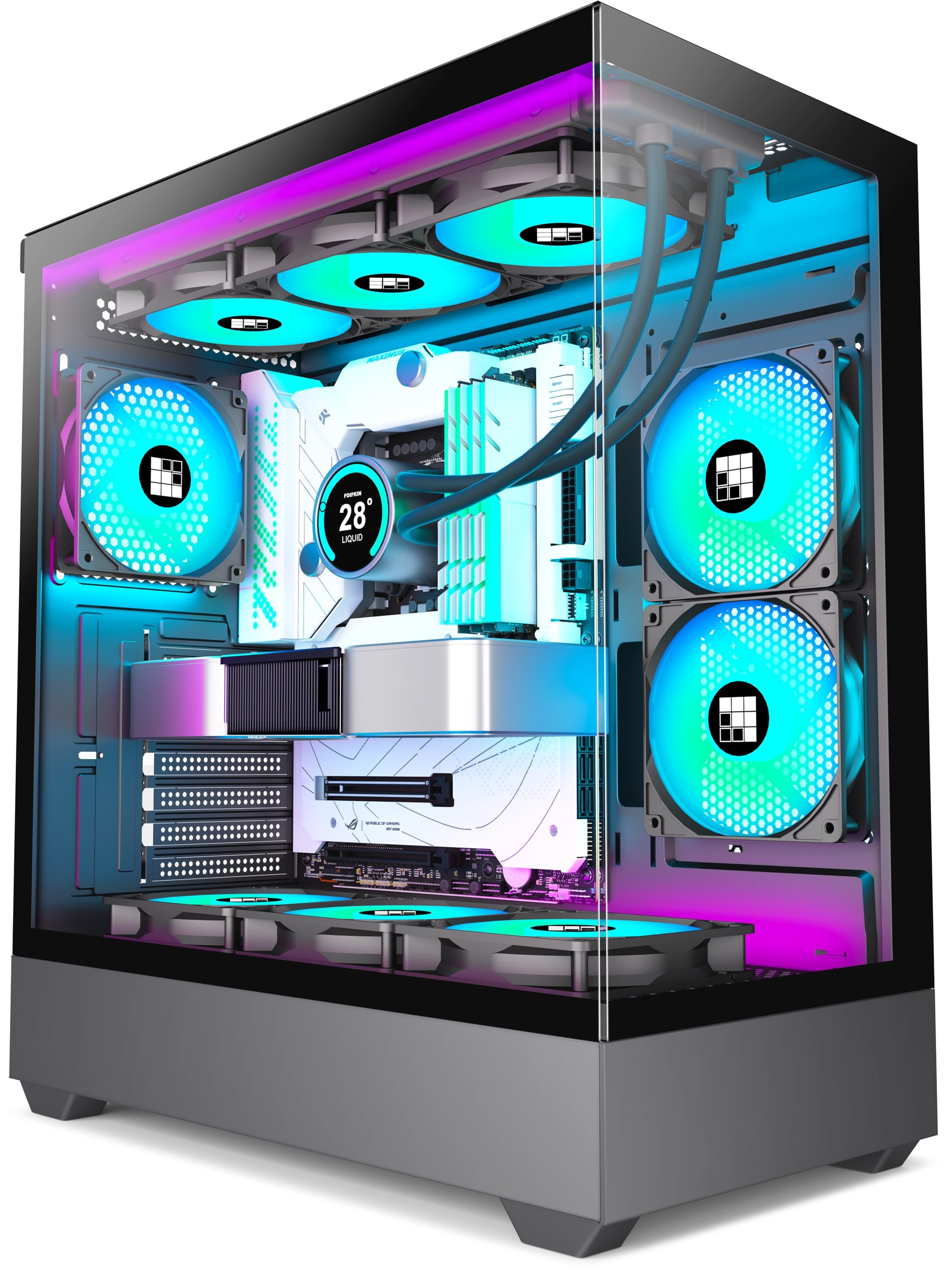
The FOIFKIN F1 proves that high airflow doesn’t require a premium budget. It arrives with six pre-installed 120mm ARGB PWM fans—five reverse-blade for intake and one forward for exhaust—providing immediate positive pressure cooling for a wide range of builds. The dual-chamber design separates the PSU and drives to prevent obstruction of front intake paths.
The case supports up to a 360mm radiator at the top, GPUs up to 400mm, and PSUs up to 200mm, offering flexibility for mid-range and high-end components. The tempered glass side panel is fully transparent, and the I/O includes a USB-C 3.0 port alongside two USB 2.0 and one USB 3.0. Build quality is solid for the price, with a combination of steel, plastic, and glass.
Cable management is improved by the dual-chamber layout, though some users report the included fan connectors require a 5V ARGB adapter for older motherboards. The case runs quiet in operation, with users noting only a faint pleasant hum from the fans. For budget-conscious builders seeking maximum fan count and airflow, the F1 is an outstanding value.
Why it’s great
- Six pre-installed ARGB fans (five reverse) for positive pressure
- Dual-chamber design enhances thermal performance and cable management
- Supports 360mm radiators and 400mm GPUs
Good to know
- Fan wiring uses non-standard connectors; may need a 5V adapter for older boards
- Bottom fan mounting can have clearance issues with some ATX motherboards
FAQ
What is the ideal number of fans for an airflow-optimized case?
Does a dual-chamber case really improve airflow?
Are pre-installed case fans worth keeping or should I replace them?
How do I know if my build needs a high-airflow case versus a standard one?
Final Thoughts: The Verdict
For most users, the best case for airflow winner is the Montech AIR 903 MAX because its 51% mesh ventilation rate and four 140mm fans provide best-in-class thermal performance at a mid-range price. If you want massive 160mm intake fans and a unique GPU exhaust bracket, grab the Lian Li LANCOOL 216. And for a dual-chamber layout with ten-fan capacity and premium build quality, nothing beats the NZXT H9 Flow (2025).