
The biggest mistake buyers make when shopping for a 140mm RGB fan is prioritizing lighting effects over airflow performance.
I’m Min — the co-founder and writer behind Gadgets Feed. My buying guides are built on weeks of cross-referencing CFM, static pressure, RPM ranges, bearing types, and LED counts across dozens of models to find the units that deliver real cooling without the marketing fluff.
Whether you are building a clean showpiece or upgrading an existing rig for better thermals and cleaner aesthetics, this guide breaks down the top performers so you can confidently pick the best 140mm rgb fan for your exact build.
How To Choose The Best 140mm RGB Fan
A 140mm RGB fan is more than just a lighting accessory — it is a critical component that moves air through your case, across your radiator, or over your heatsink. Picking the wrong one means noisy operation, underwhelming cooling, or frustrating cable spaghetti. Focus on these three factors to get it right.
Static Pressure vs. Airflow (CFM)
For fans mounted on radiators or behind dust filters, static pressure — measured in mmH₂O — is the metric that matters. A high-static-pressure fan pushes air through resistance without stalling. For open-case intake or exhaust with minimal obstruction, raw CFM (cubic feet per minute) is your priority. Hybrid designs that balance both are ideal for versatile placements.
Bearing Type and Noise Profile
Rifle bearings are cost-effective and decently quiet but top out around 60,000 hours. Fluid dynamic bearings (FDB) offer smoother, quieter operation and often exceed 100,000 hours. Magnetic dome bearings reduce friction further for near-silent spinning. Avoid sleeve bearings entirely — they wear out fast and can hum audibly over time.
ARGB Ecosystem and Daisy-Chain Connectivity
Standard 3-pin 5V ARGB headers let you sync lighting with your motherboard software. Proprietary ecosystems (like Corsair iCUE Link or NZXT CAM) require a dedicated hub but offer deeper customization. Daisy-chainable fans drastically reduce cable clutter — look for models with integrated pass-through connectors to link multiple fans with a single cable run.
Quick Comparison
On smaller screens, swipe sideways to see the full table.
| Model | Category | Best For | Key Spec | Amazon |
|---|---|---|---|---|
| be quiet! Light Wings LX 140mm PWM | Mid-Range | Silent case builds | 20.6 dB noise / rifle bearing | Amazon |
| ARCTIC P14 PWM PST A-RGB | Mid-Range | Radiator pressure | 2.00 mmH₂O static pressure | Amazon |
| Lian Li UNI Fan SL-Infinity 140 | Mid-Range | Premium aesthetics | 40 LEDs / infinity mirror | Amazon |
| Cooler Master MF140 Halo² | Mid-Range | Dual-loop RGB | 2.53 mmH₂O / 160K hrs MTTF | Amazon |
| Geometric Future Squama 2503 RGB | Premium | High CFM & quiet | 91.15 CFM / 2.63 mmH₂O | Amazon |
| Corsair iCUE Link LX140 RGB | Premium | Ecosystem lovers | 84.6 CFM / 4.82 mmH₂O | Amazon |
| NZXT F140 RGB Twin Pack | Premium | Ecosystem (CAM) | 84.75 CFM / FDB bearing | Amazon |
In‑Depth Reviews
1. be quiet! Light Wings LX 140mm PWM
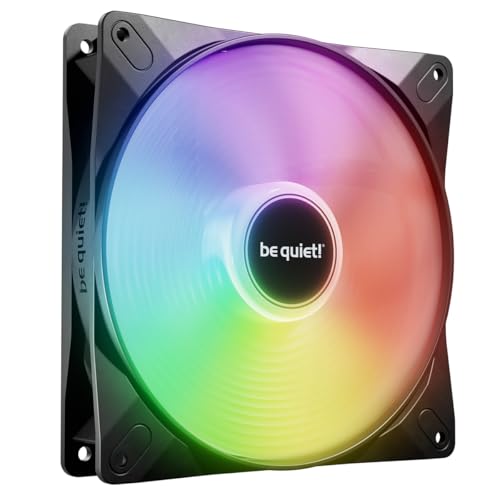
The Light Wings LX from be quiet! proves that German engineering in the 140mm RGB fan space isn’t just a marketing tag. Its 16 hub-mounted LEDs shine outward onto frosted blades, creating a diffused glow that looks premium without being gaudy. At just 20.6 dB, this is one of the quietest ARGB 140mm fans you can buy at this tier — you won’t hear it until you push past 40% PWM.
Airflow performance is solid thanks to optimized blade geometry and a frame outlet that reduces leakage. The rifle bearing is rated for 60,000 hours, which is respectable for the price. Daisy-chain capability via the ARGB input/output connector lets you link multiple fans without needing a separate hub, keeping your build clean.
Buyers consistently praise the low noise floor and strong cooling. One reviewer noted it keeps their gaming rig cool without audible distraction, and another called the RGB “better looking than most” even compared to older flagship models. The only watchpoint is that you get a single fan — budget accordingly if you need a full set.
Why it’s great
- Exceptionally quiet at low RPM (20.6 dB)
- Frosted blade diffuses 16 LEDs for premium look
- Daisy-chainable ARGB and 4-pin PWM
Good to know
- Single pack only — need multiple for full build
- Rifle bearing caps at 60,000 hours vs FDB rivals
2. ARCTIC P14 PWM PST A-RGB (White)
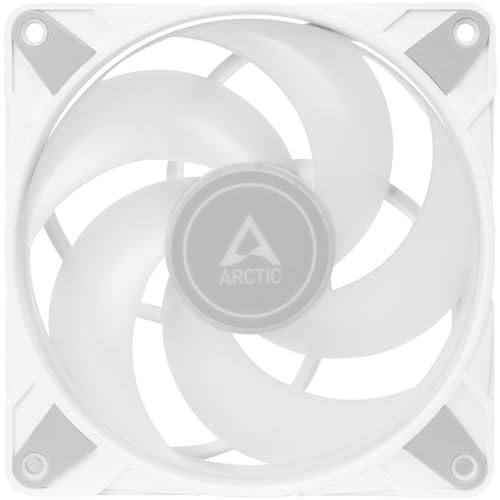
ARCTIC has long been the value king in case fans, and the P14 PWM PST A-RGB continues that tradition. With 12 A-RGB LEDs inside a transparent closed rotor, the lighting is even and rich — though some users note slight color drift on certain motherboards. The standout feature here is the static pressure rating of 2.00 mmH₂O, making it an excellent choice for radiator or heatsink duty.
The semi-passive PWM control means the fan can stop completely (0 RPM) below 5% load, which is great for near-silent idle systems. Noise is rated at 0.3 Sones — roughly equivalent to 20-25 dB — and real-world owners confirm it’s whisper-quiet under 700 RPM. The integrated Y-splitter on both fan and ARGB cables simplifies daisy-chaining without extra adapters.
Where the ARCTIC falls short is RGB consistency. A verified buyer reported that 4 out of 6 fans showed color drift (blue shift) on a Gigabyte X670E board, requiring a power cycle to reset. For pure lighting reliability, you may want to step up to a premium option. But for raw cooling value, this fan is hard to beat.
Why it’s great
- High static pressure for radiator use
- Semi-passive 0 RPM mode below 5% load
- Integrated Y-splitter for easy daisy-chaining
Good to know
- RGB color drift reported on some boards
- 12 LEDs feel less vibrant than 16-20 LED rivals
3. Lian Li UNI Fan SL-Infinity 140

Lian Li’s UNI Fan SL-Infinity 140 is the undisputed visual showstopper in this roundup. Each fan packs 40 LEDs arranged in an infinity mirror design that creates a mesmerizing multi-layer effect visible from every angle. The daisy-chain pin-to-pad contact system means you can connect up to four fans with a single cable — cable management perfection for showcase builds.
Performance is equally impressive: 72.7 CFM airflow and an expanded RPM range up to 2100 RPM, with a 10% optimization over the previous generation. The aluminum construction and fluid dynamic bearing keep noise at a respectable 28 dB. Start/stop mode lets the fan halt entirely when system temperatures are low, further reducing noise at idle.
Owners love the build quality and L-Connect 3 software, but note two quirks: the white RGB setting leans slightly bluish, and daisy-chaining three fans can misalign screw holes in cases without adjustable mounting brackets. This fan also requires a separate controller (sold separately) for full functionality, so factor that into your total cost.
Why it’s great
- 40-LED infinity mirror is visually unmatched
- Single-cable daisy-chain for up to 4 fans
- Aluminum build and FDB for durability
Good to know
- Requires separate controller (not included)
- White LED color shows blue tint
4. Cooler Master MF140 Halo²
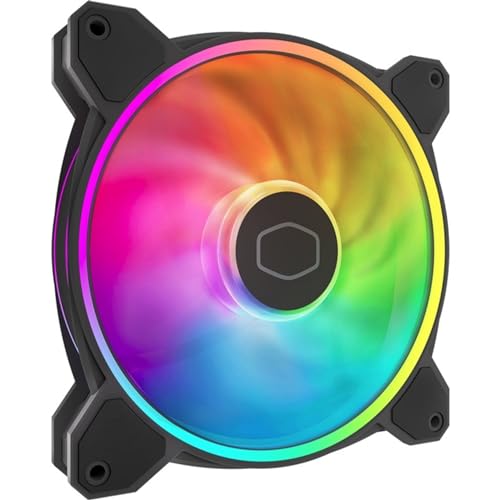
Cooler Master’s MF140 Halo² brings a dual-loop ARGB design with 24 individually addressable Gen 2 LEDs that wrap both the outer frame and an inner ring. The frosted blades diffuse the light beautifully, creating a soft halo effect that looks premium from any angle. Rated at 59.51 CFM and 2.53 mmH₂O of static pressure, this fan balances airflow and pressure well for mixed-use scenarios.
The rifle bearing is rated for an exceptional 160,000 hours MTTF — nearly triple the be quiet! Light Wings LX. Noise sits at 27 dBA, which is audibly present at full 2050 RPM but still within comfortable range for most builds. The included proprietary hub supports up to 5 fans, though some users report loose connectors on the hub cable.
Real buyers are overwhelmingly positive, calling it “quiet, stylish, and powerful.” One reviewer noted it was a perfect match for the Wraith Prism cooler. The only recurring frustration is the hub limitation — you cannot easily exceed 5 fans without buying a second hub. If you are building a large case with more than 5 fans, factor in that extra cost.
Why it’s great
- Dual-loop ARGB with 24 Gen 2 LEDs
- 160,000-hour MTTF rating
- Solid balance of airflow and static pressure
Good to know
- Hub limits to 5 fans without extra purchase
- 27 dBA at full speed is audible
5. Geometric Future Squama 2503 RGB PWM (3-Pack)
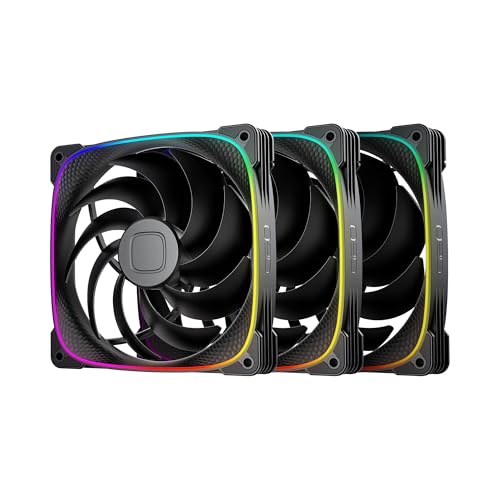
The Geometric Future Squama 2503 is a relatively new contender that punches hard in the high-airflow category. With 91.15 CFM and 2.63 mmH₂O of static pressure, it outperforms nearly every 140mm RGB fan in this list on raw air-moving capability. The patented Squama particle texture on the frame reduces turbulent flow noise, allowing it to push massive air at a max of 34 dB(A).
The dual light ring design uses addressable RGB LEDs that sync with your motherboard’s 5V 3-pin header, and the 4-pin PWM control spans 800 to 2400 RPM. Anti-vibration rubber pads on the corners prevent scratches and further dampen noise at higher speeds. The 3-pack gives you strong value compared to single-pack premium options — though early units had packaging issues causing crushed frames.
Buyers call these “excellent quality fans” that are “super quiet and move a ton of air.” The standout praise goes to the reverse blade variant for intake builds, maintaining a consistent aesthetic on both sides. The company’s customer service was responsive in replacing damaged units, which builds confidence. Short cables are the main annoyance — you will likely need extensions for widely spaced mounts.
Why it’s great
- Highest CFM in this roundup (91.15)
- Excellent static pressure for radiator use
- 3-pack provides strong value
Good to know
- Early units had packaging damage reports
- Short cables may require extensions
6. Corsair iCUE Link LX140 RGB

The Corsair iCUE Link LX140 RGB is the premium champion in this category, delivering a staggering 84.6 CFM and 4.82 mmH₂O of static pressure — the highest pressure rating of any fan here by a wide margin. This makes it the undisputed best choice for dense radiator configurations where resistance is high. The dual light loops pack 18 LEDs per fan, and the iCUE Link bridge connectors let you daisy-chain fans together with just one cable to the hub.
Corsair’s AirGuide anti-vortex vanes direct airflow straight at your hottest components, and the magnetic dome bearing reduces friction for near-silent operation at low RPM. At 36 dB at full 2000 RPM, it is louder than some competitors, but owners consistently report that the cooling performance justifies the decibel count. The iCUE Link ecosystem requires a separate System Hub (sold separately), but the cable reduction is transformative — one builder reported going from 26 cables down to 2-4.
Verified purchasers call it the “king of RGB CFM/static pressure” and note dramatic temperature drops — one RTX 5070 dropped 10°C. The only drawback is the cost: at nearly per single fan, this is an investment. But if you are already in the Corsair ecosystem and want best-in-class radiator cooling with stunning dual-loop ARGB, this is the one.
Why it’s great
- Best static pressure (4.82 mmH₂O) for rads
- Massive cable reduction via iCUE Link
- Magnetic dome bearing for longevity
Good to know
- Requires iCUE Link System Hub (sold separately)
- 36 dB at full speed is noticeable
7. NZXT F140 RGB Twin Pack

The NZXT F140 RGB Twin Pack bundles two 140mm fans plus an RGB controller, making it a convenient drop-in solution for builds that want synchronized lighting without motherboard ARGB dependency. Each fan features 20 LEDs across inner and outer rings — 2 more than Corsair’s LX140 for a slightly richer light spread. Rated at 84.75 CFM and 1800 RPM, airflow is competitive, though static pressure is not officially listed (it is designed for balanced intake/exhaust use).
The fluid dynamic bearing ensures whisper-quiet operation at low loads, and PWM control lets the fans ramp up only when needed. NZXT CAM software gives you deep customization of lighting effects and fan curves, and syncs beautifully with other NZXT components. The included controller handles the RGB without tying up your motherboard’s ARGB header — but note that this also means the fans are not compatible with standard 3-pin ARGB headers.
Owners love the build quality and aesthetics, calling them “premium” and “rock solid.” One buyer noted they never need to run above idle speed for cooling in their H6 Flow case. The trade-off is ecosystem lock-in — if you want to sync with non-NZXT parts, you will need to bypass the included controller, which is not straightforward. Also, at this price, you are paying a premium for the twin-pack convenience.
Why it’s great
- Twin-pack with RGB controller included
- 20 LEDs per fan for vibrant lighting
- Fluid dynamic bearing for quiet operation
Good to know
- Not compatible with standard 3-pin ARGB
- Ecosystem lock-in with NZXT CAM
FAQ
Can I use a 140mm RGB fan on a radiator meant for 120mm fans?
What does the “PWM” in 140mm RGB fan specs mean?
Do I need a separate RGB hub for a 140mm RGB fan?
Final Thoughts: The Verdict
For most users, the best 140mm rgb fan winner is the be quiet! Light Wings LX 140mm PWM because it delivers near-silent operation at just 20.6 dB, vibrant diffused ARGB, and daisy-chain simplicity at a reasonable per-fan cost. If you want the absolute highest static pressure for a thick radiator, grab the Corsair iCUE Link LX140 RGB. And for unbeatable raw CFM airflow in an open case, nothing beats the Geometric Future Squama 2503 RGB 3-pack.