
Commanding an expansive 34-inch viewport at 4K resolution with a refresh rate that eliminates motion blur is the ultimate upgrade for the discerning gamer and power user. The challenge lies in balancing pixel density, panel technology, and sheer speed without compromise.
I’m Min — the co-founder and writer behind Gadgets Feed. For this guide, I’ve analyzed the critical trade-offs between QD-OLED, Fast IPS, and VA panel types, scrutinized adaptive sync implementations, and verified real-world performance data to separate genuine breakthroughs from marketing noise.
After comparing the most competitive models on the market, I’ve curated the definitive list to help you find the best 34 inch 4k high refresh rate monitor for your specific setup and budget.
How To Choose The Best 34 Inch 4K High Refresh Rate Monitor
Selecting the right monitor in this category forces several key decisions. Your choice of panel technology will define the viewing experience, while connectivity must match your hardware capabilities. The resolution and aspect ratio will directly impact both your gaming immersion and productivity workflow.
Panel Technology: OLED vs. Fast IPS vs. VA
The panel type is the single most important decision. QD-OLED and WOLED panels offer infinite contrast ratio, true blacks, and stunning color vibrancy, making every game and movie pop. They also achieve near-instantaneous 0.03ms response times, completely eliminating ghosting. However, they have a theoretical risk of burn-in with static elements and often have lower peak brightness in bright rooms. Fast IPS panels deliver excellent color accuracy and brightness and have no burn-in risk, but they cannot match the contrast and black levels of OLED. VA panels offer good contrast for their price but often suffer from slower response times and more pronounced black smearing, making them less ideal for the high-refresh-rate use case.
Resolution, Aspect Ratio, and Adaptive Sync
A true 34-inch 4K UHD monitor (3840 x 2160) provides incredibly sharp detail but demands significant graphics horsepower to drive at high frame rates in modern games. Many “34-inch high-refresh” monitors are actually ultrawide 21:9 WQHD (3440 x 1440), which is less demanding and offers a wider field of view but has a lower pixel density than 4K. For a smooth, tear-free experience, look for official Adaptive Sync support: AMD FreeSync Premium Pro or NVIDIA G-SYNC Compatible certification ensures the monitor’s refresh rate dynamically matches your GPU’s frame output, eliminating stutter and screen tearing without the latency penalty of traditional V-Sync.
Quick Comparison
On smaller screens, swipe sideways to see the full table.
| Model | Category | Best For | Key Spec | Amazon |
|---|---|---|---|---|
| ASUS ROG Swift PG32UCDMR | Premium OLED | Enthusiast Gaming | 240Hz / QD-OLED / 0.03ms | Amazon |
| MSI MAG 321UPX | Value OLED | High-FPS 4K | 240Hz / QD-OLED / 0.03ms | Amazon |
| Alienware AW3425DW | Ultrawide OLED | Immersive Gaming | 240Hz / WQHD QD-OLED / 0.03ms | Amazon |
| LG 34GS95QE | Curved WOLED | Competitive FPS | 240Hz / 800R Curve / 0.03ms | Amazon |
| Alienware AW3423DWF | Classic Ultrawide | Creator & Gamer | 165Hz / WQHD QD-OLED / 0.1ms | Amazon |
| ASUS ROG Strix XG32UCG | Dual Mode IPS | Versatile Gaming | 160Hz 4K / 320Hz FHD / 0.3ms | Amazon |
| Samsung 37″ Odyssey G7 | Curved VA | Productivity & Console | 165Hz / 4K VA / 1ms GtG | Amazon |
| Dell S3225QC | Entry OLED | Media & Console | 120Hz / QD-OLED / 0.03ms | Amazon |
| INNOCN GA27W1Q | Budget OLED | Budget 4K Gaming | 240Hz / QD-OLED / 0.03ms | Amazon |
| Samsung Odyssey G9 OLED | Super Ultrawide | Multitasking & Flight Sim | 144Hz / Dual QHD QD-OLED / 0.03ms | Amazon |
| Dell UltraSharp U4025QW | Professional IPS | Professional Workflow | 120Hz / 5K2K IPS / 5ms | Amazon |
In‑Depth Reviews
1. ASUS ROG Swift PG32UCDMR

The ASUS ROG Swift PG32UCDMR is the definitive enthusiast monitor, packing a 32-inch 4K QD-OLED panel that delivers a blistering 240Hz refresh rate with a 0.03ms GtG response time. This monitor is built for uncompromising performance, featuring a full-bandwidth DisplayPort 2.1 connection that ensures no compression is needed to hit its peak refresh rate at 4K resolution, a critical advantage for future-proofing your setup. The VESA DisplayHDR 400 True Black compliance and 99% DCI-P3 coverage produce jaw-dropping contrast and color volume that makes standard IPS panels look flat in comparison.
Beyond raw specs, ASUS has integrated its “OLED Care Pro” suite, including a Neo Proximity Sensor that automatically detects when you step away and dims the screen to mitigate burn-in. This is the highest level of proactive burn-in protection available in a current monitor, lending peace of mind to a long-term purchase. The build quality is premium, with a sturdy stand that offers full ergonomic adjustment, and the back boasts a customizable ROG lighting array for your battlestation aesthetic.
The primary consideration is its high premium tier cost, placing it firmly above mid-range options. While the panel is excellent for HDR gaming and media consumption, the glossy QD-OLED coating can raise black levels in rooms with significant ambient light, a characteristic common to this panel type. If you have a controlled lighting environment and want the absolute best 4K high-refresh experience, this is the monitor to beat.
Why it’s great
- Best-in-class 240Hz QD-OLED panel with stunning HDR performance.
- Full-bandwidth DisplayPort 2.1 for uncompressed 4K 240Hz.
- Advanced OLED Care Pro with proximity sensor for burn-in protection.
Good to know
- Premium pricing reflects its top-tier position.
- Glossy screen may show reflections in very bright rooms.
2. MSI MAG 321UPX

The MSI MAG 321UPX delivers a near-identical 4K QD-OLED experience to models costing significantly more, making it the clear value champion in this list. It features a 32-inch 3840 x 2160 panel with a 240Hz refresh rate and a 0.03ms response time, the same core performance metrics as the premium ASUS model. The QD Premium Color ensures a Delta E≤2 out of the box, making it suitable for color-critical creative work in addition to gaming. For console gamers, the HDMI 2.1 ports support full 48Gbps bandwidth, enabling 4K at 240Hz from compatible sources.
The MSI OLED Care 2.0 suite provides multiple layers of protection against burn-in, including pixel shift and taskbar detection. The stand is fully adjustable, and the design is sleek and understated without aggressive gamer aesthetics. Its primary trade-off is a slightly lower peak brightness compared to the most premium panels, though this is largely academic in a dark room where OLED contrast truly shines. It also lacks the DisplayPort 2.1 of the ASUS, using DisplayPort 1.4 with DSC, which is functionally identical for 4K 240Hz.
User feedback confirms the stunning visual quality and smooth motion handling, though some users note the mandatory OLED care pop-ups can interrupt workflow. For the price, this monitor offers an incredible gateway into 4K high-refresh OLED without the premium tier price tag, representing the best balance of performance and cost.
Why it’s great
- Exceptionally strong value for a 4K 240Hz QD-OLED monitor.
- Full-bandwidth HDMI 2.1 for console and next-gen GPUs.
- Delta E≤2 color accuracy ready for creative work.
Good to know
- Peak HDR brightness is slightly lower than top-tier models.
- Uses DisplayPort 1.4 with DSC instead of DP 2.1.
3. Alienware AW3425DW

The Alienware AW3425DW takes a slightly different approach, targeting ultimate immersion with a 34-inch 21:9 WQHD (3440 x 1440) QD-OLED panel wrapped in a 1800R curve. While its pixel density is lower than a true 4K 16:9 monitor, the ultrawide aspect ratio provides a wider field of view that dramatically enhances single-player games and flight/racing simulators. It boasts a 240Hz refresh rate and a 0.03ms response time, paired with VESA DisplayHDR TrueBlack 400 for exceptional contrast. The DCI-P3 99.3% color coverage and Delta E<2 accuracy mean colors are incredibly rich and lifelike.
Alienware backs this monitor with a comprehensive 3-year premium warranty that includes coverage for OLED burn-in, giving you tangible peace of mind. The build quality is excellent, featuring the Legend 2.0 design with a sturdy, height-adjustable stand and customizable AlienFX RGB lighting. It supports AMD FreeSync Premium Pro and is NVIDIA G-SYNC Compatible, ensuring a smooth experience with both major GPU ecosystems. The 1800R curve is more subtle than the LG 34GS95QE’s aggressive 800R, making it a more versatile choice for combined gaming and productivity use.
The compromise is the WQHD resolution; while it delivers a phenomenal and sharp image, it’s not the ultra-sharp 4K that a 16:9 32-inch panel provides. This makes it less ideal for pure productivity users who crave every pixel of desk space for text, but for gaming immersion, it is unrivaled at this price point.
Why it’s great
- Highly immersive 34-inch ultrawide QD-OLED with a gentle curve.
- 240Hz refresh rate with true 0.03ms response time.
- Premium 3-year warranty with burn-in coverage included.
Good to know
- WQHD resolution has a lower pixel density than 4K 16:9 panels.
- Text clarity can appear slightly fuzzy out of the box without ClearType adjustments.
4. LG 34GS95QE

The LG 34GS95QE is a specialist tool for the competitive gamer who craves maximum immersion. This 34-inch monitor uses a WOLED panel at a WQHD resolution (3440 x 1440) with the most aggressive 800R curvature in this comparison. This steep curve wraps around your peripheral vision, pulling you into the game and making it excellent for fast-paced FPS titles where spatial awareness is key. Its 240Hz refresh rate and 0.03ms response time are matched with both NVIDIA G-SYNC Compatible and AMD FreeSync Premium Pro, ensuring zero screen tear at the highest frame rates.
The WOLED technology provides the hallmark infinite contrast ratio and true blacks, with DisplayHDR True Black 400 certification. The matte anti-glare coating on the LG is considerably more effective at reducing reflections than the glossy coatings on many QD-OLED competitors, making it a better choice for rooms with uncontrolled light. The stand is fully ergonomic, and the overall design is sleek with a nearly borderless, ultra-thin profile that looks clean on any desk.
The 800R curve is a love-it-or-hate-it feature; it is fantastic for gaming and media consumption but less ideal for productivity tasks like photo editing or spreadsheet work, where straight lines may appear distorted. Additionally, the WOLED panel’s text rendering is not as sharp as that of a QD-OLED or high-density IPS, a known compromise of this panel type. For the pure gaming enthusiast, however, this level of wrap-around immersion is unmatched.
Why it’s great
- Intense 800R curve creates the most immersive ultrawide experience.
- Excellent anti-glare matte coating for brighter rooms.
- 240Hz and 0.03ms response with dual-sync compatibility.
Good to know
- Aggressive 800R curve is not suitable for professional productivity tasks.
- WOLED text clarity is mediocre compared to QD-OLED panels.
5. Alienware AW3423DWF

The Alienware AW3423DWF remains a favorite for its balanced blend of QD-OLED excellence and creator-friendly features. It offers a 34-inch 21:9 WQHD panel with a 165Hz refresh rate and a 0.1ms response time. While its refresh rate is lower than the 240Hz models, it is still exceptionally smooth, and for most users the difference is negligible. The “Creator Mode” feature in the OSD is a standout, allowing you to switch between DCI-P3 and sRGB color spaces and adjust gamma settings, making it a versatile tool for game developers and content creators who need color-critical accuracy without a dedicated professional monitor.
The image quality is what you’d expect from a premium QD-OLED: infinite contrast, vibrant colors with 99.3% DCI-P3 coverage, and VESA DisplayHDR True Black 400 support. The build is robust, featuring the Legend 2.0 design, a 5-axis joystick for OSD navigation, and comprehensive cable management. It also includes a 3-year warranty that covers OLED burn-in, matching the updated AW3425DW’s peace of mind. The 1800R curve provides a comfortable immersive viewing experience without the distortion of steeper curves.
Potential buyers should be aware of the lower 165Hz refresh rate ceiling compared to the 240Hz competition and its relatively lower peak brightness. Some users have reported minor cosmetic defects like micro-scratches from the factory packaging, which are often only visible when the screen is off. For a user who wants an exceptional gaming monitor that also holds its own in color-accurate creative work, this is a fantastic and proven choice.
Why it’s great
- Creator Mode with DCI-P3/sRGB switching for color-accurate work.
- Proven QD-OLED panel with excellent motion clarity.
- Includes 3-year burn-in warranty for peace of mind.
Good to know
- 165Hz refresh rate is lower than 240Hz competitors.
- Peak brightness is modest, and text clarity requires fine-tuning.
6. ASUS ROG Strix XG32UCG

The ASUS ROG Strix XG32UCG is a cleverly designed monitor that solves a common dilemma: choosing between high resolution and high frame rates. It features a 32-inch Fast IPS panel that can operate in two distinct modes: 4K at 160Hz or FHD (1920 x 1080) at a blazing 320Hz. This “Dual Mode” feature makes it an incredible versatile option for a user who plays both visually rich single-player titles at 4K and wants a competitive edge in games like Valorant or CS2 by turning up the refresh rate. The 0.3ms response time (minimum) and ASUS Extreme Low Motion Blur Sync (ELMB SYNC) ensure sharp, ghost-free motion.
As a Fast IPS panel, it has zero burn-in risk, making it an easy recommendation for users who keep their monitor on for long hours with static UI elements. Its color performance is strong with 95% DCI-P3 coverage, and the built-in DisplayWidget Center allows for easy mouse-based OSD adjustments. The connection suite is generous, including a USB-C with DP Alt mode. It’s also a great choice for console gamers, offering native support for 4K 120Hz on the latest consoles.
The main trade-off is that no IPS monitor can match the infinite contrast and deep blacks of an OLED panel. The static contrast ratio is a standard 1000:1, so blacks will appear as a dark gray in a dark room. For users who prioritize a diverse gaming library and multi-purpose use over the perfect black levels of an OLED, the XG32UCG’s unique dual-mode functionality and burn-in-free peace of mind make it a very strong contender.
Why it’s great
- Unique Dual Mode switches between 4K 160Hz and FHD 320Hz on-the-fly.
- No burn-in risk, ideal for mixed gaming and productivity use.
- Fast IPS panel with 0.3ms response and ELMB SYNC for clear motion.
Good to know
- Contrast ratio is standard IPS-level, blacks are not as deep as OLED.
- FHD mode resolution (1920×1080) can look softer on 32-inch screen.
7. Dell UltraSharp U4025QW

The Dell UltraSharp U4025QW redefines the “high refresh rate” concept for the professional market. It’s a 40-inch 5K2K (5120 x 2160) ultrawide IPS Black panel with a 120Hz refresh rate. For professionals dealing with long timelines, spreadsheets, or code, the sheer pixel real estate at a high refresh rate is a massive productivity boost, eliminating the need for multiple monitors. The IPS Black technology delivers a 2000:1 contrast ratio, which is double that of standard IPS, resulting in noticeably deeper blacks and better visual depth for content creation.
The connectivity is a hub for the modern desk: Thunderbolt 4 with up to 140W Power Delivery, HDMI, DisplayPort, a built-in Ethernet port, and a fully functional KVM that allows you to control two PCs with one set of peripherals seamlessly. The 600 nits of peak brightness and VESA DisplayHDR 600 make it excellent for HDR content consumption and review. The 120Hz refresh rate makes the desktop feel incredibly fluid, moving from sluggish 60Hz to a level of smoothness that feels transformative for window management and scrolling.
The trade-offs are clear: it is not a gaming monitor. The 5ms GtG response time is slow by gaming standards, and while it has FreeSync, it lacks the real-time responsiveness of gaming monitors. The price is also at a premium tier level, justified by its professional-grade hub and panel. This is the ultimate monitor for the workflow-focused user who also wants buttery-smooth desktop performance, not for the competitive gamer.
Why it’s great
- Massive 5K2K resolution provides unparalleled screen real estate.
- Built-in Thunderbolt 4 hub with 140W PD, KVM, and Ethernet.
- 120Hz refresh rate makes productivity tasks feel incredibly smooth.
Good to know
- Designed for productivity, not for competitive gaming (5ms response).
- Premium-tier price reflects its professional-grade features.
8. Samsung 37″ Odyssey G7 G75F

The Samsung 37″ Odyssey G7 (G75F) offers a unique mid-range option with its large 37-inch VA panel at a true 4K UHD (3840 x 2160) resolution with a 165Hz refresh rate. The 1000R curve is Samsung’s signature, designed to match the natural curvature of the human eye for a deeply enveloping feel that is excellent for both immersive gaming and console use. With VESA DisplayHDR 600 and AMD FreeSync Premium Pro, it provides solid HDR performance with meaningful contrast from the VA panel and tear-free gaming.
The 37-inch size is a sweet spot for those who find 32 inches too small and 42 inches too large for a desk. The VA panel offers a significant contrast ratio advantage over IPS, with 3000:1 static contrast delivering much deeper blacks. The 1ms MPRT response time is good, and the high native resolution ensures crisp text for productivity. It’s a fantastic companion for a PS5 or Xbox Series X, natively supporting 4K at 120Hz VRR without any issues.
The main downside is that it is not an OLED panel, so true blacks and the instantaneous pixel response of OLED are absent. The 1ms MPRT response is a marketing figure, and the GtG response can be slower in dark transitions, leading to some VA-specific black smearing. It is priced in the mid-range, offering a large, high-refresh 4K experience that is a great step up from standard monitors without the cost and concerns of OLED technology.
Why it’s great
- Unique 37-inch 4K screen size with a tight 1000R curve.
- Excellent for console gaming with native 4K 120Hz support.
- VA panel offers better contrast and deeper blacks than IPS.
Good to know
- VA panel may exhibit black smearing in dark transitions.
- Cannot match the true blacks and response times of OLED.
9. Dell S3225QC
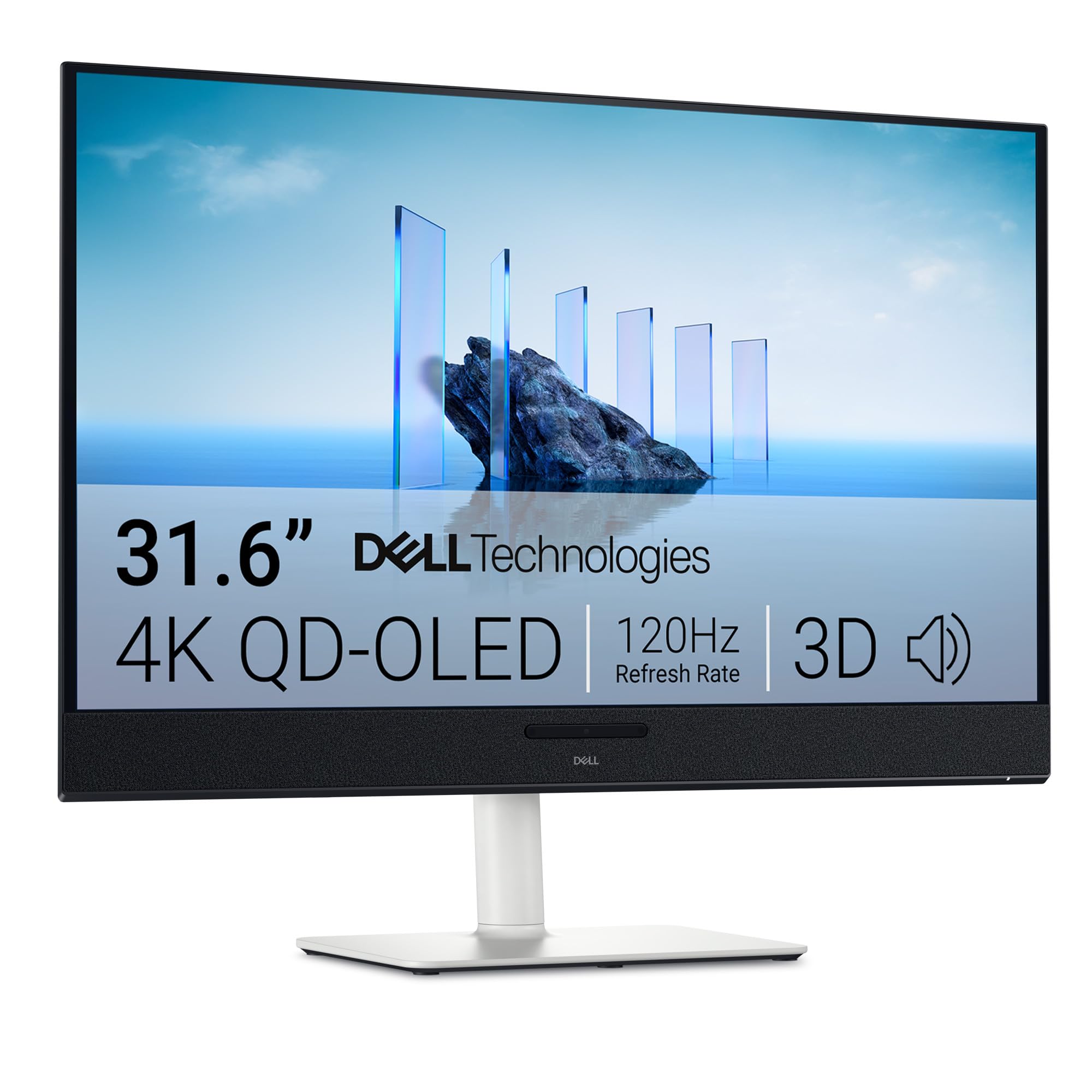
The Dell S3225QC is an excellent entry point into the world of 4K QD-OLED, sacrificing peak refresh rate for affordability and a fantastic all-rounder feature set. This 32-inch monitor sports a 4K QD-OLED panel with a 120Hz refresh rate and a 0.03ms response time. While 120Hz is lower than the 240Hz flagships, it is still a massive upgrade from 60Hz and is perfectly matched for console gaming at 4K 120fps. The Dell’s integrated five 5W speakers with AI-driven 3D spatial audio are genuinely impressive for a monitor, offering a rich and immersive soundstage that eliminates the need for separate desktop speakers for many users.
The connectivity is a highlight, with a single USB-C cable that can deliver 90W of power to a laptop while carrying a video signal, creating an incredibly clean, single-cable desk setup for workstation use. The built-in pop-out quick-access USB-C port with 15W charging is a thoughtful touch for charging peripherals. The design is clean and modern in Ash White, with a fully adjustable stand (height, tilt, swivel, slant) that is typically robust for a Dell monitor.
The 120Hz ceiling may be a deal-breaker for PC gamers who demand the highest frame rates, and it has only one HDMI port, which is limiting for users with multiple consoles. Some user reports mention buggy firmware related to sleep mode and screen timeout. For the console gamer or the PC user wanting a visual upgrade without needing the absolute fastest refresh rate, the Dell S3225QC offers tremendous value and a premium visual experience.
Why it’s great
- Fantastic value for a 4K QD-OLED monitor with good speakers.
- USB-C with 90W PD for a clean single-cable laptop setup.
- 120Hz and 0.03ms response is perfect for high-end console gaming.
Good to know
- 120Hz refresh rate is the ceiling; no support for 160Hz or higher.
- Only includes one HDMI port, limiting multi-device setups.
10. INNOCN GA27W1Q

The INNOCN GA27W1Q emerges as a budget-friendly yet powerful 4K OLED contender. Despite being a 27-inch monitor—smaller than the 32-inch+ focus—it delivers the full 4K experience with a 240Hz refresh rate and a 0.03ms response time, hitting the exact formula for high-refresh 4K gaming at a low price. It uses a QD-OLED panel, enabling a 1,500,000:1 contrast ratio and 99% DCI-P3 color gamut, providing the same vibrant colors and true blacks found in monitors costing hundreds more. It supports both FreeSync and G-SYNC Compatible for a tear-free experience.
The monitor includes a dedicated MAC-View Mode in the OSD, which is a rare and useful feature for optimizing color matching when connected to a Mac device. It has a stylish, ultra-thin design with a three-sided narrow bezel and LED atmosphere lights on the back. The stand offers full ergonomic adjustment, including pivot rotation. The connectivity is solid with dual DisplayPort and HDMI ports, along with a USB-C data port.
The main trade-off is in build quality and firmware. User reports indicate that the build feels cheaper than premium-tier competitors, and the OSD menu can be confusing with poorly explained HDR settings. The included speakers are also considered poor. For the price, however, you are getting flagship-level core specs in a package that can’t be beaten on value, making it an excellent choice for a gamer who wants to maximize performance on a tighter budget.
Why it’s great
- Unbeatable budget-friendly price for 4K 240Hz QD-OLED core specs.
- Excellent HDR performance with infinite contrast ratio.
- Includes niche features like MAC-View Mode and full ergonomic stand.
Good to know
- Build quality and OSD menu feel cheap compared to major brands.
- 27-inch screen size may be smaller than desired for 4K.
11. Samsung Odyssey G9 OLED G91SD

The Samsung Odyssey G9 OLED (G91SD) is a monument to display technology, offering a 49-inch 32:9 aspect ratio screen at a Dual QHD (5120 x 1440) resolution. This effectively replaces two 27-inch QHD monitors without a bezel, creating an incredible panoramic workspace or a hyper-immersive gaming environment. It uses a QD-OLED panel, providing the superb color, contrast, and true black levels we expect, paired with a 144Hz refresh rate and a 0.03ms response time. It includes robust adaptive sync support with both G-Sync Compatibility and FreeSync Premium Pro.
For productivity, the Picture-in-Picture and Picture-by-Picture modes are well-implemented, allowing you to connect two separate PCs and use them on the same screen. For gaming, the 32:9 aspect ratio provides an unparalleled field of view for racing and flight sims, and it is transformative for strategy games. The Samsung Thermal Modulation System intelligently manages heat to prevent burn-in, and the burn-in warranty provides long-term confidence. The design is sleek with a metal stand and a subtle aluminum finish.
The immense size is both a strength and a weakness. It requires a very deep desk to use comfortably, and the 32:9 aspect ratio is not universally supported in many games, which will require black bars on the sides. The price is also quite high. This is a specialized product for the user who wants the absolute maximum screen real estate and immersion, not a general recommendation for all users.
Why it’s great
- Unmatched 49-inch 32:9 screen real estate for productivity and immersion.
- QD-OLED panel provides stunning colors and infinite contrast.
- Effective burn-in prevention with Thermal Modulation System and warranty.
Good to know
- Requires a large, deep desk and a powerful GPU to drive the resolution.
- Not all games support the native 32:9 aspect ratio.
FAQ
Is a 34-inch ultrawide monitor the same as a 4K monitor?
How important is G-SYNC or FreeSync for a high-refresh monitor?
What is the difference between QD-OLED and WOLED panel technology?
Does a high refresh rate monitor affect productivity work?
Is OLED burn-in a real concern for gaming monitors?
Final Thoughts: The Verdict
For most users, the best 34 inch 4k high refresh rate monitor winner is the MSI MAG 321UPX because it delivers the core enthusiast experience of a 4K 240Hz QD-OLED panel at a price that undercuts the premium tier competition by hundreds of dollars. If you want ultimate immersion and a 21:9 ultrawide format, grab the Alienware AW3425DW. And for uncompromised absolute performance with DisplayPort 2.1 and the best burn-in protection, nothing beats the ASUS ROG Swift PG32UCDMR.