
Finding a router that delivers reliable, fast Wi-Fi without breaking the bank is the central challenge for anyone living in an apartment, small home, or dorm. The market is flooded with options that promise high speeds but deliver buffering and dead zones the moment multiple devices connect. A true budget router must balance raw throughput, coverage, and stability without requiring a second mortgage.
I’m Min — the co-founder and writer behind Gadgets Feed. I’ve spent countless hours combing through real user feedback, benchmark data, and hardware specifications to separate the actual contenders from the overpromising duds in the crowded entry-level router space.
Whether you are equipping a home office, setting up a guest network, or just tired of your ISP’s rental fee, finding the right budget wifi router is a matter of knowing which specs genuinely matter and which marketing claims you can safely ignore.
How To Choose The Best Budget WiFi Router
Selecting a budget router means prioritizing the specs that directly impact your daily browsing, streaming, and gaming. Ignore the maximum theoretical speed on the box—focus on port hardware, antenna technology, and the wireless standard that matches your device fleet.
Wi-Fi Standard: AC vs AX
A Wi-Fi 5 (AC1200) router like the Cudy WR1300 or TP-Link Archer A6 is perfectly adequate for internet plans up to 500 Mbps. A Wi-Fi 6 (AX1800 or AX3000) unit offers better efficiency when multiple devices are active simultaneously, thanks to technologies like OFDMA. If your household has more than five Wi-Fi devices, spending a few extra dollars for AX is a smart future-proofing move.
Port Selection: Why Gigabit is Non-Negotiable
Every router on this list includes Gigabit Ethernet ports. A router with 100 Mbps ports will bottleneck any internet plan faster than 100 Mbps. For wired connections to a gaming console, PC, or streaming box, four Gigabit LAN ports allow you to offload high-bandwidth traffic from your Wi-Fi network, preserving airtime for mobile devices.
Coverage and Antenna Configuration
Routers with external antennas and beamforming technology concentrate the signal toward connected devices rather than broadcasting it in a random sphere. For a single-story home under 1,500 square feet, a well-placed unit with four external antennas usually suffices. Larger or multi-story homes benefit from a mesh system like Google Wifi, which sacrifices top-end speed for blanket coverage.
Quick Comparison
On smaller screens, swipe sideways to see the full table.
| Model | Category | Best For | Key Spec | Amazon |
|---|---|---|---|---|
| Google Wifi – AC1200 | Mesh System | Whole-Home Coverage | 1500 sq ft per node | Amazon |
| NETGEAR Nighthawk RAX30 (Renewed) | Gaming Focus | AX2400 Throughput | AX2400, 2000 sq ft | Amazon |
| Tenda RX12Pro AX3000 | Value AX | VPN & High-Speed AX | 2402 Mbps on 5 GHz | Amazon |
| NETGEAR Nighthawk RAX36 (Certified Refurbished) | Security Focus | Built-in Armor Security | AX3000, 3 Gbps speed | Amazon |
| TP-Link Archer AX20 (Renewed) | Wi-Fi 6 Entry | Affordable Wi-Fi 6 | AX1800, Gigabit ports | Amazon |
| Cudy AC1200 WR1300 | Budget AC | OpenWrt Customization | AC1200, Gigabit LAN | Amazon |
| TP-Link Archer A6 AC1200 | Reliable AC | VR Streaming & Stability | AC1200, WPA3, OneMesh | Amazon |
In‑Depth Reviews
1. Google Wifi – AC1200 – Mesh WiFi System

Google Wifi stands out because it solves the core problem of budget routers: dead spots. Its mesh architecture uses a single puck to cover 1,500 square feet, and you can add more pucks to extend coverage up to 4,500 square feet. The AC1200 spec (1200 Mbps theoretical) is modest, but the system prioritizes stability and seamless roaming over raw top speed, which matters more for video calls and streaming across multiple rooms.
Setup through the Google Home app takes roughly fifteen minutes, and the app provides clear visibility into connected devices, network speeds, and guest access. Real-world reports from users with challenging floor plans—thick concrete walls, detached garages, and three-story homes—consistently praise the elimination of buffering and connection drops. The mesh handoff between nodes is transparent to the user.
The trade-off is that each puck uses internal antennas and lacks the raw throughput of a single high-end router. For gigabit internet plans, a wired-across-the-home mesh setup will not saturate the full connection. But for the vast majority of budget-conscious buyers on plans under 500 Mbps, the consistent coverage and zero-hassle setup make this the most effective choice.
Why it’s great
- Mesh coverage eliminates dead zones without manual configuration
- Simple, fast setup via the Google Home app
- Scalable by adding more pucks later
Good to know
- AC1200 speeds may not fully saturate gigabit internet connections
- Requires a Google account and app for setup
- No external antennas for signal focusing
2. NETGEAR Nighthawk WiFi 6 Router (RAX30) Renewed

The NETGEAR RAX30 delivers AX2400 speeds (up to 2.4 Gbps aggregate) with a coverage rating of 2,000 square feet. This renewed unit offers Wi-Fi 6 features like OFDMA and improved efficiency for up to 20 devices. For a budget-conscious gamer or a household running multiple 4K streams, the RAX30 provides a noticeable jump over AC1200 routers in multi-device throughput.
Setup is handled via the Nighthawk app, and the four Gigabit Ethernet ports let you hard-wire a gaming console or PC. Users upgrading from much older AC routers report dramatic improvements in range and stability. The compact design is a plus for cramped entertainment centers, and the renewed condition typically includes all necessary accessories with cosmetic blemishes that do not affect performance.
The main drawback is that this is a single-unit router, not a mesh system. Large homes with multiple floors or difficult floor plans may still have weak zones. Additionally, renewed products come with a shorter warranty than new units. However, for the price, the RAX30 is the strongest AX2400 performer in the budget space.
Why it’s great
- Wi-Fi 6 with OFDMA reduces latency for gaming
- Strong coverage for a 2,000 sq ft single-story home
- Four Gigabit Ethernet ports for wired connections
Good to know
- Single-unit router lacks mesh expandability
- Renewed units have limited warranty coverage
- No USB port for external drive sharing
3. Tenda WiFi 6 Router, AX3000 Dual Band Gigabit (RX12Pro)
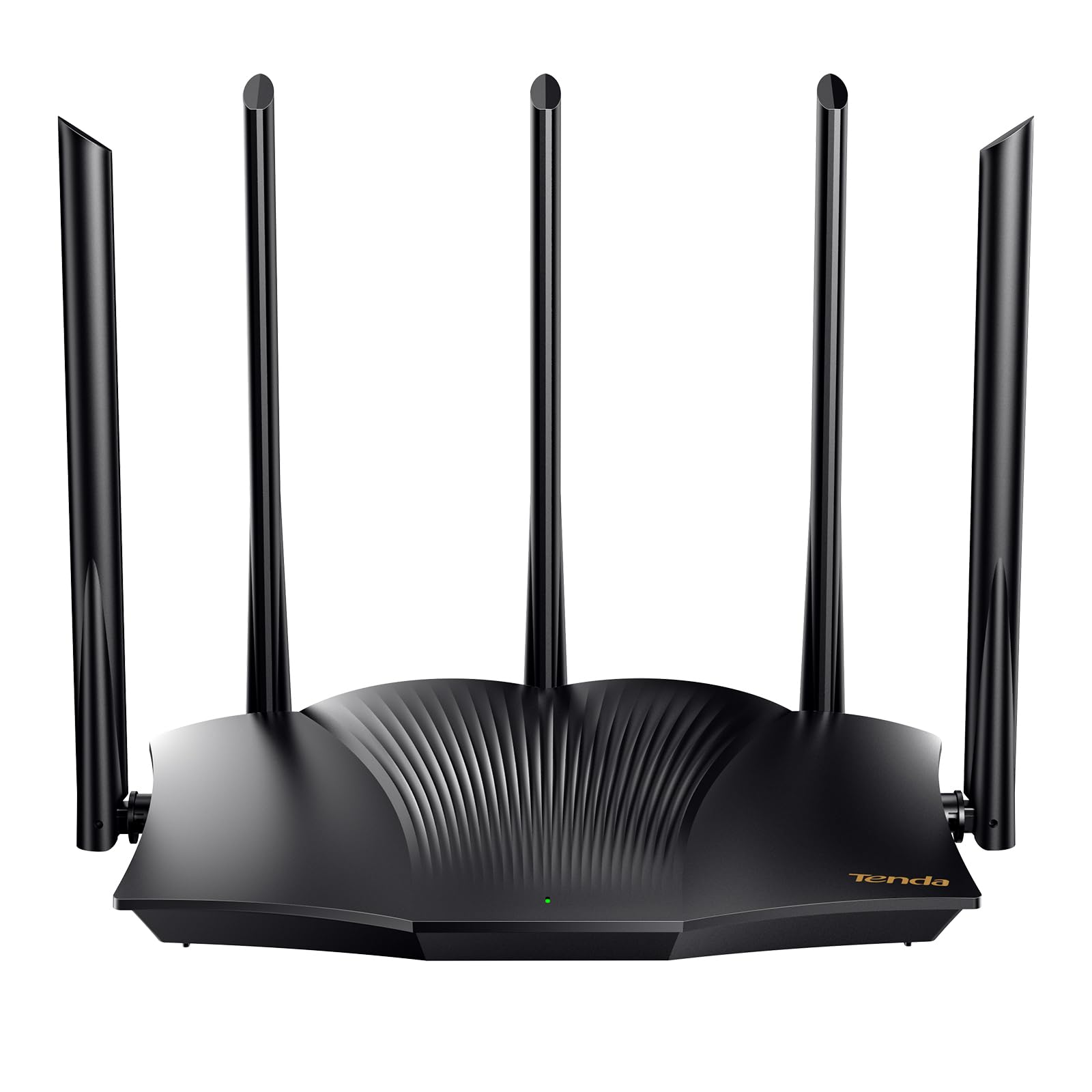
The Tenda RX12Pro punches well above its price tier with an AX3000 configuration that allocates 2402 Mbps on the 5 GHz band and 574 Mbps on 2.4 GHz. Its five external 6dBi antennas with beamforming deliver exceptional signal penetration for a budget unit. The inclusion of OpenVPN and WireGuard support is rare at this price point, making it a strong choice for users who need secure remote access to their home network.
Setup is straightforward via the web interface or the Tenda app, and the router offers a self-diagnosis feature that can automatically resolve common connectivity issues. User feedback highlights its effectiveness as an access point in larger homes, and the MU-MIMO plus OFDMA combo ensures stable performance even with a dozen connected devices. The RX12Pro consistently holds its signal strength at distances that cause older routers to drop connections.
The WiFi+ function allows multiple RX12Pro units to mesh without complex configuration, giving a path to whole-home coverage later. The main caveat is that Tenda’s customer support and firmware update cadence are not as established as TP-Link or NETGEAR. Still, for raw hardware specs and VPN features, this is the best pure-value AX3000 router in the budget segment.
Why it’s great
- AX3000 speeds with 2402 Mbps on 5 GHz band
- Five high-gain antennas for strong coverage
- Supports OpenVPN and WireGuard natively
Good to know
- VPN setup requires firmware update via app
- Customer support less responsive than major brands
4. NETGEAR RAX36-100PAR Nighthawk AX3000 (Certified Refurbished)

The RAX36 is a certified refurbished unit from NETGEAR’s popular Nighthawk line, offering AX3000 speeds and a two-year subscription to NETGEAR Armor security. This gives the router real-time threat detection, anti-malware, and VPN protection for all connected devices—a feature set usually found on routers costing significantly more. Coverage is rated for up to 2,000 square feet and 25 devices.
Setup through the Nighthawk app is quick, and the four Gigabit Ethernet ports provide wired connectivity for high-bandwidth equipment. Users consistently describe the unit as appearing like-new and performing at the same level as a full-price retail version. The built-in security is particularly valuable for families with smart home devices and children’s tablets, as it blocks malicious sites automatically.
There is no USB port on the RAX36, which eliminates the option for network-attached storage. As a refurbished model, it may not include a printed manual, though the quick-start guide and QR-code-based setup compensate. For anyone who prioritizes network security without paying extra for a subscription, the RAX36 is the standout option.
Why it’s great
- Includes NETGEAR Armor security suite at no added cost
- AX3000 speeds handle heavy multi-device use
- Certified refurbished units are near-perfect condition
Good to know
- No USB port for external storage
- Renewed product with shorter warranty
5. TP-Link Archer AX20 AX1800 (Renewed)

The TP-Link Archer AX20 brings Wi-Fi 6 into the budget conversation with an AX1800 configuration. It supports OFDMA and MU-MIMO, which means better handling of simultaneous device connections compared to any AC1200 router. For a household with five to ten devices—phones, laptops, smart TVs, and IoT gadgets—the AX20 delivers a noticeable reduction in buffering during peak usage.
The web-based interface is thorough and offers quality-of-service (QoS) controls that let you prioritize traffic for specific devices. Users report achieving real-world speeds of 500-600 Mbps on a gigabit fiber connection at close range, and the refurbished units generally arrive in like-new condition. The four Gigabit LAN ports are standard, and the setup process does not require account creation or a mandatory app.
The AX20 lacks the external high-gain antennas found on the Tenda RX12Pro, so coverage in homes over 1,800 square feet may be less consistent. It is also not a mesh system, so adding coverage later requires a separate extender. Nonetheless, as the most affordable Wi-Fi 6 router from a major brand, the AX20 is a solid entry point into the next-gen standard.
Why it’s great
- Affordable Wi-Fi 6 with OFDMA for multi-device efficiency
- Advanced QoS settings for traffic prioritization
- No forced app or account required for setup
Good to know
- Coverage may drop off in larger homes
- Refurbished unit may have minor cosmetic scuffs
6. Cudy AC1200 Gigabit WiFi Router (WR1300)

The Cudy WR1300 is a budget AC1200 router with a secret weapon: an officially supported OpenWrt-based firmware. This gives advanced users complete control over routing, VLANs, firewall rules, and even ad blocking. For anyone who wants to customize their network beyond the limitations of stock firmware, the WR1300 is a dream at this price point. It includes four Gigabit LAN ports and beamforming with four external antennas.
Performance is solid for an AC1200 unit: users report stable connections on both 2.4 GHz and 5 GHz bands, with range extending approximately 200 feet on 2.4 GHz even through cinder block walls. The adjustable transmission power is a rare feature that lets you fine-tune coverage. Setup is straightforward for those comfortable with a browser-based interface, though the quick-start guide leaves some details to online resources.
The router runs notably warm under load, and some users report that the Gigabit ports may not achieve full line rate when routing through heavy VPN or QoS rules. Additionally, Cudy is a smaller brand, so firmware updates may be less frequent than with TP-Link or NETGEAR. For the OpenWrt enthusiast, however, this is hands-down the best budget customizable router on the list.
Why it’s great
- Officially supported OpenWrt firmware for full customization
- Adjustable transmission power for range tuning
- Four external antennas with beamforming
Good to know
- Runs hot; may benefit from additional ventilation
- Gigabit port throughput may drop with heavy QoS
7. TP-Link AC1200 Gigabit WiFi Router (Archer A6)

The TP-Link Archer A6 is a well-rounded AC1200 router that consistently earns praise for its stability and ease of use. It features four external antennas with beamforming, MU-MIMO on the 5 GHz band, and WPA3 security. The OneMesh compatibility allows you to add a compatible extender later to create a unified mesh network, which is a valuable upgrade path for growing homes.
Setup via the TP-Link Tether app takes minutes, and the router’s performance is remarkably solid for VR streaming. Users specifically mention using the Archer A6 as a dedicated 5 GHz-only router for the Quest 2 and Quest 3, achieving 800-900 Mbps wireless speeds with a wired PC. The 5 GHz range extends well outside the home, and the unit runs cool even under sustained load.
The Archer A6 is limited by its AC1200 spec, so it won’t match Wi-Fi 6 routers in multi-device efficiency or raw throughput. It also lacks USB ports and advanced QoS features. Nonetheless, for a straightforward, reliable AC1200 router with a path to mesh expansion, the Archer A6 is the gold standard of its tier.
Why it’s great
- Excellent stability and real-world 800+ Mbps throughput on 5 GHz
- OneMesh compatibility for future mesh expansion
- Runs cool and reliable for VR streaming
Good to know
- AC1200 spec may struggle with heavy multi-device Wi-Fi 6 traffic
- No USB port for external storage
FAQ
Can I use a budget Wi-Fi 6 router with my existing modem?
How many devices can a budget AC1200 router handle?
What is the real difference between a and a budget router?
Final Thoughts: The Verdict
For most users, the budget wifi router winner is the Google Wifi because its mesh architecture eliminates dead spots with zero configuration, providing reliable whole-home coverage that AC routers cannot match. If you want Wi-Fi 6 speeds for gaming and heavy streaming, grab the NETGEAR Nighthawk RAX30. And for the best pure value with advanced features like VPN support, nothing beats the Tenda RX12Pro.