
Buying your first desktop is a rite of passage, but the sheer number of options — refurbished office towers, budget gaming rigs, and everything in between — makes it easy to pick a machine that looks good on paper but stumbles in real-world use. The wrong choice chokes on multitasking, struggles with the games you actually want to play, or relies on ancient components that were outdated five years ago.
I’m Min — the co-founder and writer behind Gadgets Feed. After absorbing hundreds of customer reviews and cross-referencing CPU generations, GPU models, RAM speeds, and storage types across the entire price spectrum, I built this guide to separate the true beginner-friendly machines from the traps hiding behind flashy RGB lights.
Whether you need a machine for school, home office work, or dipping your toes into PC gaming, this guide to the best beginner pc covers eleven desktops that actually deliver a solid out-of-box experience for users taking their first steps into desktop computing.
How To Choose The Best Beginner PC
The first desktop purchase often hinges on budget, but the real decision tree involves matching the hardware to your actual workload. A machine built for spreadsheets will struggle with modern gaming in ways that no amount of RAM can fix, and a gaming rig with a weak power supply may leave you unable to upgrade later.
CPU Generation Is Everything
A Core i7 label from a decade-old generation (anything 4th-gen or older) will be slower than a modern Core i3 in single-threaded tasks. Always look up the specific model number — an i7-4770 (2013) cannot keep up with a Ryzen 5 5600 (2021). Newer architectures also support faster RAM and PCIe 4.0 drives.
Storage: SSD Is Non-Negotiable
Any beginner PC sold with a traditional hard drive as the primary boot drive will feel sluggish from day one. A 512GB NVMe SSD is the baseline for a responsive system. The difference between a SATA SSD and an NVMe drive is noticeable when loading large game files or booting in under ten seconds.
Graphics: Dedicated vs. Integrated
If you plan to play modern 3D games — even casually — you need a dedicated GPU. Integrated graphics like Intel UHD 630 or AMD Radeon Vega can handle esports titles and older games, but anything from Fortnite to Call of Duty requires at least an RX 550 or RTX 3050. Know your target games before you buy.
Quick Comparison
On smaller screens, swipe sideways to see the full table.
| Model | Category | Best For | Key Spec | Amazon |
|---|---|---|---|---|
| CyberPowerPC Gamer Master | Mid-Range | Future-proof gaming on AM5 platform | AMD Ryzen 7 8700F, RTX 5060 Ti 8GB | Amazon |
| Skytech Gaming Crystal | Mid-Range | High-FPS 1080p out of the box | AMD Ryzen 7 5700, RTX 5060 8GB | Amazon |
| YAWYORE Gaming PC | Mid-Range | Upgrade-friendly integrated graphics starter | AMD Ryzen 5 5600GT, 1TB NVMe SSD | Amazon |
| STGAubron Gaming PC (RTX 3050) | Mid-Range | Budget-friendly dedicated GPU gaming | Intel i7 (4th gen), RTX 3050 6GB | Amazon |
| suevery Pre Built Gaming PC | Mid-Range | White tower with upgrade path | AMD Ryzen 5, RX 550 4GB | Amazon |
| Dell OptiPlex 7070 SFF | Mid-Range | Productivity powerhouse with 32GB RAM | Intel i7-9700, 32GB DDR4, 1TB NVMe | Amazon |
| ZER-LON Gaming PC | Value | Entry-level gaming with complete bundle | Intel i7 (4th gen), RX 550 4GB | Amazon |
| abytespark Tower Gaming PC | Value | Sea-view case with dedicated RX 550 | Intel i5 (4th gen), RX 550 4GB | Amazon |
| STGAubron Prebuilt Gaming PC (RX 550) | Value | Low-cost starter with WiFi 6 included | Intel i5 (4th gen), RX 550 4GB | Amazon |
| Dell OptiPlex Desktop RGB | Budget | Complete family office setup with monitor | Intel i7 (4th gen), 16GB DDR3 RAM | Amazon |
| HP Windows 11 Desktop Computer | Budget | Complete monitor, keyboard, speaker bundle | Intel i5 (8th gen), 500GB SSD, 24″ LCD | Amazon |
In‑Depth Reviews
1. CyberPowerPC Gamer Master Gaming PC

The CyberPowerPC Gamer Master is the definitive choice for a first-time buyer who wants a system that will not require an upgrade in six months. The AMD Ryzen 7 8700F paired with a dedicated GeForce RTX 5060 Ti 8GB card running on GDDR7 memory delivers 60+ FPS at 1080p Ultra settings in nearly every current title, including BeamNG.drive and Call of Duty. With 16GB of DDR5-4800 RAM and a 1TB PCIe 4.0 NVMe SSD, boot times and level loads are essentially instant.
The AM5 socket motherboard provides a genuine future-proof upgrade path — you can drop in a newer Ryzen chip later without replacing the board. Connectivity is robust with dual USB-C 3.2 ports, Wi-Fi 6, and Bluetooth 5.3, so peripherals and high-speed networking work out of the box. The tempered glass side panel and custom RGB lighting add a polished aesthetic that feels premium.
Some users reported early random restarts resolved by a BIOS update, and CyberPowerPC’s email support has been inconsistent in responsiveness. However, the 1-year warranty and free lifetime tech support offer real peace of mind for a first-time PC owner. This is the machine to buy if you want to skip the starter tier entirely.
Why it’s great
- Fastest CPU/GPU combo in this lineup with DDR5 memory
- AM5 motherboard allows easy CPU upgrades later
- Included Wi-Fi 6 and Bluetooth 5.3
Good to know
- Email support response can be slow
- BIOS update may be needed for stability
2. Skytech Gaming Crystal Gaming PC

The Skytech Gaming Crystal hits the sweet spot for a first gaming PC by pairing an AMD Ryzen 7 5700 with an NVIDIA GeForce RTX 5060 featuring 8GB of GDDR7 memory. This combination runs Fortnite, Warzone, and Apex Legends at well over 100 FPS on competitive settings, and it handles Ultra settings on newer titles at 60 FPS without breaking a sweat. The 32GB of DDR4-3200 RAM is overkill for pure gaming but future-proofs the system for heavy multitasking and streaming.
The 1TB NVMe SSD provides ample storage for a large game library, and the 650W Gold PSU leaves enough headroom for future component swaps. Skytech assembles these in the USA and backs them with a 1-year warranty. The triple tempered-glass Crystal case with ARGB fans looks spectacular on a desk and keeps thermals reasonable under load.
Buyers should note that the built-in Wi-Fi adapter has been reported as finicky by some users — a wired Ethernet connection or a cheap USB Wi-Fi adapter is a reliable workaround. The included keyboard and mouse are basic, so plan to upgrade those separately. For a beginner who wants high frame rates day one, this is an exceptional value.
Why it’s great
- High-performance RTX 5060 delivers outstanding 1080p FPS
- 32GB RAM exceeds all multitasking needs
- 650W Gold PSU supports future upgrades
Good to know
- Wi-Fi adapter can be inconsistent
- Included peripherals are entry-level quality
3. YAWYORE Gaming PC Desktop Computer

The YAWYORE Gaming PC is designed for the beginner who wants modern platform features without paying for a dedicated GPU they might not need yet. The AMD Ryzen 5 5600GT includes Radeon Vega integrated graphics — capable of running Fortnite at playable frame rates and esports titles like CS2 and Valorant at medium settings. The real story is the upgrade-friendly foundation: an MSI A520M-A PRO motherboard, a 550W 80PLUS Bronze PSU, and five ARGB fans in a well-ventilated case.
Storage is a 1TB M.2 NVMe PCIe drive, which is double the capacity of most competitors at this tier. The 16GB of DDR4-3200 RAM is standard but adequate.
The integrated Vega graphics limit you to less demanding games at launch, and the power supply, while 80PLUS Bronze, does not have modular cables — cable management inside the case is tight. For a beginner who wants to learn about PC upgrades without replacing the entire system, this is the smartest starting point.
Why it’s great
- 550W PSU and standard motherboard accept most GPU upgrades
- 1TB NVMe drive is massive for this price tier
- Quiet, stable operation out of the box
Good to know
- Integrated graphics limits modern 3D gaming
- Non-modular PSU complicates cable routing
4. STGAubron Gaming PC Desktop, Intel Core i7, RTX 3050

The STGAubron Gaming PC delivers the most affordable entry point to an RTX 3050 6GB GPU, which supports ray tracing and DLSS at the entry level. The Intel Core i7 (4th-gen, i7-4790) is an older chip, but the 16GB of DDR3 RAM and 512GB SSD keep the system feeling responsive for daily use. This machine runs Valorant, Fortnite, and Call of Duty Warzone at 60+ FPS on medium settings, and the RTX 3050 handles creative software like DaVinci Resolve much better than any integrated solution.
The build includes six RGB fans, a gaming keyboard and mouse, and a 1-year warranty with free lifetime tech support. Connectivity features Wi-Fi 6 and Bluetooth 5.0, so wireless peripherals and high-speed networking are ready from the start. The case supports up to three monitors through the GPU’s HDMI, DisplayPort, and DVI outputs.
The 4th-gen i7 is a bottleneck — the CPU will max out before the GPU in CPU-bound games. Several users also reported a faulty built-in Wi-Fi adapter that required a simple USB Wi-Fi dongle replacement. The RGB fans can also run loud under full load. For the price, the RTX 3050 alone makes this a solid first gaming PC if you go in knowing the CPU is dated.
Why it’s great
- RTX 3050 delivers ray tracing at a low price point
- Wi-Fi 6 and Bluetooth 5.0 included
- Six RGB fans provide abundant cooling
Good to know
- 4th-gen i7 CPU bottlenecks the RTX 3050
- Wi-Fi adapter may need replacement
5. suevery Pre Built Gaming PC
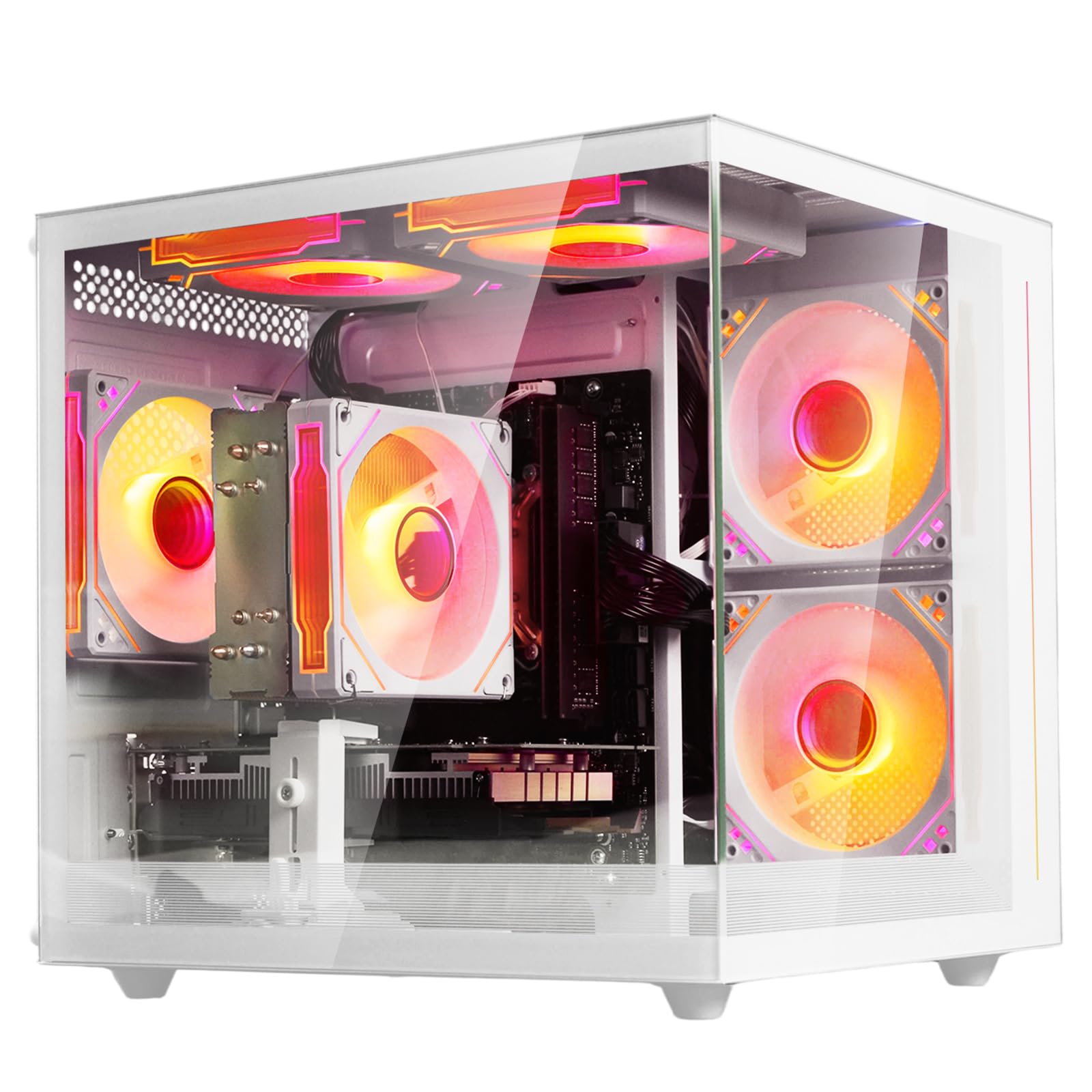
The suevery Pre Built Gaming PC stands out with its white tower design and customizable RGB lighting system that you can adjust via a remote control. Under the hood, an AMD Ryzen 5 6-core processor (boosting up to 4.1GHz) paired with an AMD Radeon RX 550 4GB GPU handles indie games, esports titles, and solo games like Stray or Assetto Corsa smoothly. The 16GB of DDR4-3200 RAM and 512GB M.2 NVMe SSD provide snappy multitasking and fast load times.
Wi-Fi 6 is built in, giving you low-latency wireless performance for online gaming and streaming. The case includes multiple RGB fans that maintain cool temperatures even during extended sessions, and several reviewers noted the system stays remarkably quiet. The single RAM stick leaves an open slot for a future upgrade to 32GB, and the case has room for a GPU upgrade when you outgrow the RX 550.
Some units shipped with the GPU not detected by the system, requiring a manual re-seat or replacement. The RX 550 is also at the very bottom of dedicated GPU performance — do not expect to run modern AAA titles at high settings. For a first desktop that looks fantastic and handles lighter gaming loads with room to grow, this is a strong contender.
Why it’s great
- Stunning white case with customizable RGB lighting
- Wi-Fi 6 for low-latency gaming connectivity
- Upgradeable RAM and GPU for future growth
Good to know
- RX 550 is a low-end GPU suitable for lighter games only
- GPU may arrive undetected and need reseating
6. Dell OptiPlex 7070 SFF Desktop Computer

The Dell OptiPlex 7070 SFF is a refurbished business-class machine that outperforms many budget gaming PCs in raw CPU power. The 9th-gen Intel Core i7-9700 with eight cores and 32GB of DDR4 RAM is overkill for web browsing and office work, which means it handles heavy multitasking — dozens of browser tabs, virtual machines, video editing — without any slowdown. The 1TB M.2 NVMe SSD is among the fastest storage options in this entire guide.
The small form factor (SFF) case takes up minimal desk space, and the robust port selection — nine USB ports plus dual DisplayPort outputs — supports dual 4K monitors natively. Windows 11 Pro is pre-installed, and a wireless keyboard and mouse are included. The refurbished unit looks and performs like new, with many users praising the cosmetic condition.
Gaming is limited by the integrated Intel UHD 630 graphics, which cannot run modern 3D games at acceptable frame rates. A few customers reported intermittent power issues or missing accessories like a power cord. The sound card is also average compared to dedicated audio solutions. This is the best choice for a beginner focused on school, work, or creative productivity rather than gaming.
Why it’s great
- 32GB DDR4 RAM handles heavy multitasking effortlessly
- 1TB NVMe SSD provides lightning-fast storage
- Compact SFF case fits easily into any workspace
Good to know
- Integrated graphics unsuitable for gaming
- Refurbished unit may have minor accessory issues
7. ZER-LON Gaming PC Desktop Computer
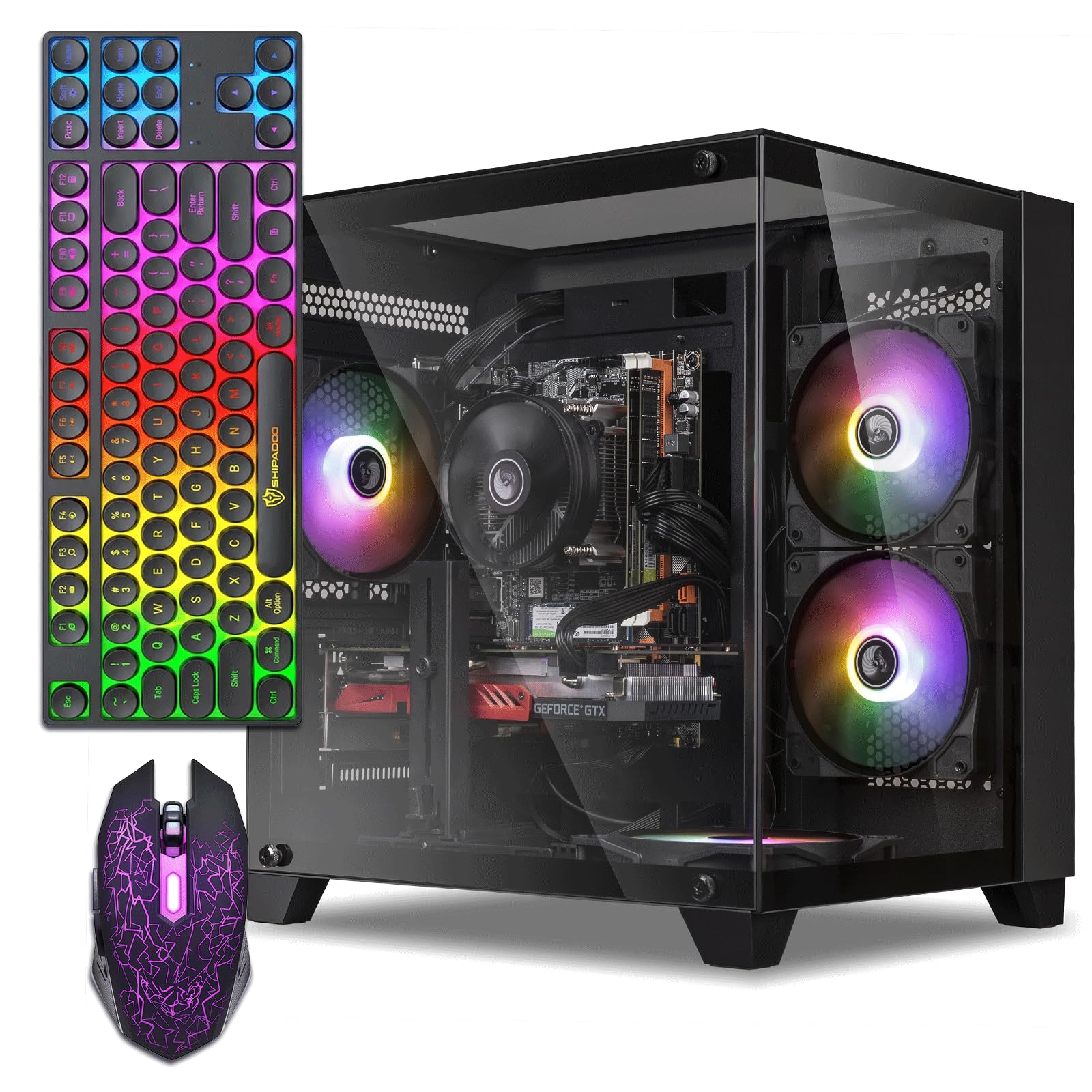
The ZER-LON Gaming PC bundles everything a beginner needs: a dedicated AMD Radeon RX 550 4GB GPU, 16GB of DDR4 RAM, a 512GB SSD, five RGB fans, and a full set of peripherals including a gaming keyboard, mouse, and mouse pad. The Intel Core i7 (4th-gen, i7-4770) is an older processor, but it still handles everyday computing, light photo editing, and older games without issue. The RX 550 runs Steam games like CSGO and Rocket League smoothly at 1080p medium settings.
The white and black design is visually appealing, and the five RGB fans provide ample airflow to keep temperatures in check during extended use. The system supports dual monitors via its HDMI and DVI ports, which is a great feature for productivity. Users who are computer technicians or experienced with hardware noted that the platform is fully upgradeable — you can swap in a better GPU or more storage down the line.
Several units shipped with no video output, which required a complete return. The integrated Wi-Fi relies on an older standard, and Bluetooth is not included — plan to use Ethernet or a USB Wi-Fi dongle. The i7-4770 is now over a decade old and will bottleneck any future GPU upgrade beyond an RX 580. This is a functional starter PC for the absolute beginner who wants a full kit out of the box.
Why it’s great
- Complete bundle includes keyboard, mouse, and mouse pad
- Five RGB fans keep the system cool
- Upgradeable platform for future component swaps
Good to know
- Some units arrive with no video output
- CPU is a decade old and limits future GPU upgrades
8. abytespark Tower Gaming PC Desktop Computer

The abytespark Tower Gaming PC makes a strong first impression with its white “sea view” case featuring five RGB fans and interior lighting that shows off the components through a glass side panel. Under the hood, an Intel Core i5 processor (running at 3.2-3.6GHz) paired with an AMD Radeon RX 550 4GB dedicated GPU provides enough power for Fortnite, Valorant, and Roblox at 50+ FPS on medium settings. It also ships with 16GB of RAM and a 512GB NVMe SSD, meeting the baseline for a responsive system.
The bundle includes a gaming mouse, keyboard, and mouse pad, so you have a complete setup out of the box. Connectivity covers Ethernet and Wi-Fi, though Bluetooth is not included. The pre-installed Windows 11 Home 64-bit runs cleanly, and the system is ready to use within an hour of unboxing. Enthusiasts noted that the fans keep the CPU cool during prolonged gaming sessions.
The actual hardware may differ from the listing — one detailed review uncovered that the “i5” was actually a 4th-gen i7-4770 on a circa-2013 motherboard, and the Windows 11 installation used unsupported registry bypasses. This raises concerns about long-term OS compatibility and driver support. The RX 550 is also the lowest-performance dedicated GPU currently available. For the pure aesthetic and immediate functionality, it works, but verify the components on arrival.
Why it’s great
- Eye-catching sea view case with five RGB fans
- Complete with keyboard, mouse, and mouse pad
- Dedicated GPU handles esports titles at 50+ FPS
Good to know
- Hardware may not match the advertised specs exactly
- RX 550 is the slowest dedicated GPU available
9. STGAubron Prebuilt Gaming PC Desktop

The STGAubron Prebuilt Gaming PC is the cheapest entry point in this guide that still includes a dedicated GPU. The AMD Radeon RX 550 4GB paired with an Intel Core i5 (4th-gen) delivers playable performance in Fortnite, Roblox, Minecraft, and even Call of Duty at low settings. With 16GB of DDR4 RAM and a 512GB SSD, the system feels snappy for everyday tasks, and Wi-Fi 6 and Bluetooth 5.0 are both built in — a rare find at this price tier.
The package includes an RGB gaming keyboard and mouse, and STGAubron backs the system with a 1-year warranty and free lifetime tech support. Several buyers reported that the system runs cool thanks to the two front RGB fans, and boot times are fast enough that Windows 11 is ready in under 15 seconds. The included customer service has been praised for quickly replacing faulty units when issues arise.
Reliability is a mixed bag — some units have failed within months due to cheap power supplies or failing graphics cards. The 4th-gen i5 and RX 550 are both obsolete, meaning you cannot run modern AAA titles or future games. The RGB stickers on the front panel also restrict airflow, leading to overheating in some cases. This machine works as a starter for light gaming, but do not expect it to last years without component failures.
Why it’s great
- Lowest-priced dedicated GPU setup in the guide
- Built-in Wi-Fi 6 and Bluetooth 5.0
- Includes gaming peripherals and warranty support
Good to know
- Component quality varies; failures reported after a few months
- 4th-gen i5 and RX 550 are outdated and non-competitive for modern gaming
10. Dell OptiPlex Desktop RGB Computer PC

The Dell OptiPlex Desktop RGB is a refurbished business PC repackaged as a beginner-friendly bundle that includes a 24-inch Full HD monitor, gaming keyboard and mouse, and a gaming headset. Inside, an Intel Core i7 (4th-gen, i7-4770) with 16GB of DDR3 RAM and a 512GB SSD handles web browsing, streaming video, and office applications without complaint. The 24-inch 1080p monitor is a genuine inclusion that saves a separate purchase.
The RGB front panel adds a bit of flair to an otherwise utilitarian business case, and the remote control lets you cycle through lighting patterns. The 512GB SSD ensures fast boot times and application launches. For a family buying a first computer for homework and light entertainment, this all-in-one bundle is a practical option that includes almost everything except speakers.
DDR3 RAM is two generations behind current standards, and the 4th-gen i7 is bottlenecked for anything beyond basic productivity. Gaming performance is limited to 2D titles or very old 3D games — even Fortnite will struggle. The included keyboard and headset quality are poor, and several users reported receiving the wrong accessories or missing items. This system is for productivity-first beginners, not gamers.
Why it’s great
- Comes with a 24-inch 1080p monitor, keyboard, mouse, headset
- 512GB SSD provides fast boot and app loading
- RGB front panel adds visual appeal
Good to know
- DDR3 RAM and 4th-gen i7 limit performance
- Not suitable for any modern gaming
11. HP Windows 11 Desktop Computer

The HP Windows 11 Desktop Computer is a refurbished business SFF tower that is bundled with a 24-inch LCD monitor, an RGB gaming keyboard and mouse, speakers, and a 2K webcam — everything needed for school, video calls, and media consumption. The Intel Core i5 8th-gen processor and 16GB of DDR4 RAM provide solid performance for browsing, streaming, and Microsoft Office tasks. The 500GB SSD is on the smaller side but adequate for documents and basic software.
The bundle is genuinely comprehensive — you do not need to buy a single accessory. The 2K webcam is a nice touch for students attending online classes or families hopping on video calls. The RGB keyboard and mouse add a modern look without extra cost. The small form factor case takes up minimal desk space, making it ideal for a child’s desk or a cramped home office corner.
Some units have arrived non-functional due to the refurbishment process, and the 500GB SSD fills up quickly with modern apps and games. The integrated Intel graphics cannot handle any real gaming beyond solitaire or Minecraft at the lowest settings. The Wi-Fi setup may also require a separate USB adapter if the internal module fails. This is strictly for a budget-conscious family building a non-gaming workstation.
Why it’s great
- Complete bundle with monitor, webcam, speakers, keyboard, mouse
- 8th-gen i5 is decent for school and office use
- Compact SFF case saves desk space
Good to know
- Refurbished quality varies; some units arrive DOA
- 500GB SSD is small and integrated graphics limit gaming
FAQ
Can a 4th-gen Intel Core i7 run Windows 11 properly?
How much RAM do I actually need for a first PC?
Should I buy a refurbished business PC or a budget gaming tower?
The listing says “WiFi ready” but my PC has no WiFi — why?
Final Thoughts: The Verdict
For most users, the best beginner pc winner is the CyberPowerPC Gamer Master Gaming PC because the AMD Ryzen 7 8700F, RTX 5060 Ti, 16GB of DDR5 RAM, 1TB PCIe 4.0 SSD, and AM5 upgrade path provide a platform that will stay relevant for years, not months. If you want the best value that still delivers high frame rates in every major game, grab the Skytech Gaming Crystal Gaming PC. And for a beginner focused on productivity who wants tons of RAM and storage without the gaming tax, nothing beats the Dell OptiPlex 7070 SFF Desktop Computer.