
Dust, faded colors, and scratched negatives aren’t just imperfections — they’re the slow erosion of visual memories locked inside plastic sleeves. A dedicated 35mm film scanner pulls those details back from the brink, translating silver-halide grains into pixel-perfect digital files that you can archive, share, and print without degradation.
I’m Min — the co-founder and writer behind Gadgets Feed. I’ve spent months studying the optical sensors, interpolation algorithms, and software ecosystems that separate a true film scanner from a glorified webcam on a slide tray, cross-referencing specs like CCD vs. CMOS architecture, true optical resolution, and infrared dust-removal effectiveness to give you a practical, non-romanticized guide.
Whether you are clearing out a lifetime of family slides or digitizing your own medium-format darkroom output, selecting the right tool means navigating sensor size, DPI claims, and software quality that dictate whether your scans look archival or amateur. This guide to the best 35mm film scanner breaks down every meaningful metric so you can digitize with confidence and clarity.
How To Choose The Best 35mm Film Scanner
With DPI claims ranging from 3600 to 7200 and sensor types that fundamentally change how color and grain are captured, making the right choice requires understanding a few core principles rather than comparing marketing numbers. These three factors will determine whether your scans look like a darkroom contact sheet or a cheap webcam grab.
True Optical Resolution vs. Interpolated Megapixels
Many standalone film scanners advertise interpolated resolutions like 22MP or 24MP, but the real benchmark is the optical sensor’s native grain-grabbing ability. A scanner with a 14MP CMOS sensor that interpolates to 22MP will never resolve as much fine detail as a 7200 DPI CCD scanner delivering a true 69-megapixel-equivalent capture. If you intend to print larger than 8×10, prioritize optical DPI over the interpolated megapixel figure.
Sensor Architecture: CCD vs. CMOS
CCD (charge-coupled device) sensors are the traditional choice for film because they offer higher dynamic range and better color fidelity per pixel — crucial for pulling detail out of dense negatives or overexposed slides. CMOS sensors, common in budget-friendly portable scanners, have improved significantly but still tend to produce more noise in shadow areas and can exhibit a slightly processed look. For archival-grade work, CCD remains the gold standard.
Infrared Dust and Scratch Removal
Dust specs and emulsion scratches are the bane of film scanning. High-end dedicated scanners incorporate an infrared channel that detects surface defects and invisibly patches them without softening the actual image grain. This feature, often branded as iSRD or Digital ICE, can turn a ten-minute manual cleanup job into a one-click operation. If you are scanning large batches of unwashed negatives, it is non-negotiable.
Quick Comparison
On smaller screens, swipe sideways to see the full table.
| Model | Category | Best For | Key Spec | Amazon |
|---|---|---|---|---|
| Plustek OpticFilm 8200i SE | Premium | Archival-quality scans with dust removal | 7200 DPI optical / 48-bit / iSRD | Amazon |
| HP Touch Screen Film & Slide Scanner | Premium | Touchscreen ease & multi-format support | 5″ LCD / 13MP CMOS / Touch | Amazon |
| ClearClick QuickConvert 2.0 | Premium | Album-scanning without removing photos | 22MP interp. / 5″ LCD / Battery | Amazon |
| KODAK Slide N SCAN | Mid-Range | Speed & simplicity for bulk slides | 22MP CMOS / 5″ LCD / USB-C | Amazon |
| KODAK SCANZA | Mid-Range | Kodak color science & multiple adapters | 14/22MP CCD / 3.5″ LCD / HDMI | Amazon |
| PORTTA Film Scanner | Mid-Range | HDMI output for group viewing | 22MP CMOS / 5″ LCD / 2yr warranty | Amazon |
| KEDOK 4-in-1 Scanner | Mid-Range | Including 8GB card & name-card scanning | 22MP CMOS / 5″ LCD / 8GB SD inc. | Amazon |
| BEONEGLOBAL ClearScan S5 | Budget | Ultra-compact with 5″ screen at low cost | 24MP CMOS / 5″ LCD / Ergonomic | Amazon |
| QPIX DIGITAL M122A | Budget | 4-in-1 budget entry point for photos & film | 3600 DPI / 2.4″ LCD / No PC needed | Amazon |
In‑Depth Reviews
1. Plustek OpticFilm 8200i SE

The Plustek OpticFilm 8200i SE is the class of the field for any serious film archivist. Its true 7200 x 7200 DPI optical resolution — backed by a 48-bit color depth and 3.6 Dmax dynamic range — extracts grain-level detail from even dense Kodachrome slides, producing 69-megapixel-equivalent captures that hold up to large fine-art prints. The integrated infrared channel (iSRD) automatically detects and removes dust and scratches across the surface, saving hours of manual clone-stamping in post-production.
It ships with SilverFast SE Plus 9, a professional-tier scanning application that offers multi-exposure mode and advanced color profiling, though the learning curve is steep — expect to spend an afternoon calibrating presets. The unit supports both Windows (7–11) and macOS (10.7–14.x), and the included carrying case makes it easy to store when not in use. Scan speed is deliberate: a single 7200 DPI frame with iSRD enabled takes roughly three minutes.
For batch scanning large collections, many users pair this scanner with VueScan software for a more streamlined workflow. The physical film carrier feels slightly stiff out of the box but loosens with use, and the manual feed mechanism (each frame is advanced by a click-stop wheel) keeps alignment consistent. If your goal is archival retention and print-grade output, this is the only scanner on this list that genuinely rivals a lab drum scan.
Why it’s great
- True 7200 DPI optical resolution captures every grain with zero interpolation.
- Infrared dust removal (iSRD) eliminates surface defects without softening the image.
- Bundled SilverFast SE Plus 9 provides professional color management and multi-exposure.
Good to know
- Scan speed is slow — about three minutes per frame at maximum resolution with iSRD.
- SilverFast has a steep learning curve; beginners may prefer VueScan as an alternative.
- USB-A connection — requires an adapter for modern USB-C laptops.
2. HP Touch Screen Film & Slide Scanner

The HP FilmScan 5 integrates a responsive 5-inch touchscreen that genuinely enhances the scanning workflow — you can pinch-to-zoom on previews, adjust brightness with a slider, and rotate scans directly on the display without diving into a clunky menu system. Under the hood, a 13MP CMOS sensor captures image data at native resolution, with 22MP interpolation for output files that balance detail and file size for social sharing and 8×10 prints.
Format support covers 135, 126, and 110 film strips as well as mounted slides, and the quick-load tray keeps the scanning pace brisk — roughly two to three seconds per frame. It draws power through a USB-C connection, making it easy to run from a laptop port or a standard 5V adapter. The gallery mode doubles as a digital picture frame, letting you cycle through scanned images on the display without a computer.
Color accuracy is generally good after a quick white-balance tweak, though the CMOS sensor can push red saturation slightly high on underexposed negatives — correctable in a few seconds on any photo editor. The unit weighs just 13.4 ounces and measures 3.5 inches tall, so it stows easily in a drawer between scanning sessions. For a family historian who values simplicity and a modern interface, this HP delivers a fuss-free digitization experience.
Why it’s great
- Full-color 5-inch touchscreen makes previewing and editing intuitive and fast.
- USB-C powered — works seamlessly with modern laptops and portable battery packs.
- Compact and lightweight design fits in a drawer when not in use.
Good to know
- CMOS sensor may introduce red cast on underexposed negatives.
- Requires a separately purchased SD card — none included in the box.
- Interpolated 22MP output is softer than a true optical 7200 DPI scan.
3. ClearClick QuickConvert 2.0

ClearClick’s QuickConvert 2.0 solves a specific pain point that other scanners ignore: scanning photos and documents without removing them from archival albums. Its removable base plate lets you slide the scanner directly over a photo still held in a plastic sleeve, avoiding the risk of tearing fragile prints. The 5-inch preview screen and 22MP interpolated output (14MP native) deliver images that look excellent on a 4K monitor and print cleanly at 4×6.
The built-in rechargeable battery unlocks cord-free operation — charge it overnight and scan through an afternoon of family albums at the kitchen table without hunting for an outlet. Adapters are included for 35mm, 110, and 126 slide and negative strips, though the primary strength here is photo-scanning. The unit scans a single frame in roughly two seconds, making it one of the fastest options for high-volume album digitization.
Color balance can drift slightly toward blue when the brightness boost is engaged, but the included PhotoPad editing software handles quick corrections. SD card support goes to 32GB, and the 2-year warranty and US-based tech support from ClearClick add peace of mind. If most of your backlog is photo albums rather than loose film strips, the QuickConvert 2.0 is the most pragmatic tool in this list.
Why it’s great
- Scan photos directly in archival albums without removing them — zero risk of tearing.
- Rechargeable battery enables completely cordless scanning anywhere in the home.
- Very fast per-frame capture (two seconds) suited to high-volume projects.
Good to know
- Does not support 5×7 photos — maximum size is 4×6.
- Color balance can shift bluish when brightness boost is active.
- 22MP output is interpolated; fine detail is not true optical resolution.
4. KODAK Slide N SCAN

Kodak’s Slide N SCAN combines a generously sized 5-inch LCD with a quick-feeding tray system that keeps slides and film strips moving fast — users report scanning over 500 slides in a single afternoon without significant fatigue. The 22MP CMOS capture (interpolated from a native 14MP sensor) produces JPEGs that look vibrant on-screen and hold up well for 8×10 prints, especially after a one-click white balance adjustment.
Format coverage includes 135, 126, and 110 film as well as 50mm slides, and the USB-C connectivity makes file transfer effortless. The gallery mode turns the 5-inch display into a digital picture frame when the scanner is idle, a nice bonus for family gatherings. The color balance is pleasing straight out of the box, leaning toward Kodak’s signature warm tone that many users prefer for nostalgic imagery.
Build quality is serviceable — the plastic body feels light but not flimsy — and the scanner requires an SD/SDHC card (up to 32GB, not included). A known quirk: the unit can freeze after transferring files to a computer via USB, requiring a power cycle to resume. If you need to digitize a large slide collection quickly and prefer a non-intimidating interface, the Slide N SCAN offers the best speed-to-quality ratio at its price tier.
Why it’s great
- Fast quick-feed tray system enables scanning hundreds of slides per session.
- Large 5-inch LCD provides clear preview and doubles as a digital picture frame.
- USB-C connectivity for simple file transfers to modern computers.
Good to know
- Build feels light; the plastic chassis may not withstand heavy daily use.
- Unit can freeze after USB file transfer — requires a manual power cycle to resume.
- 22MP output is interpolated from a native 14MP CMOS sensor.
5. KODAK SCANZA

The original KODAK SCANZA remains a respected entry in the dedicated-film-scanner space, largely because it uses a genuine CCD sensor rather than a CMOS chip. This gives it superior dynamic range and color separation on difficult subjects — particularly black-and-white negatives where tonal gradation matters most. The 3.5-inch TFT LCD is smaller than newer rivals, but it tilts for comfortable viewing and offers adjustable brightness to match your ambient lighting.
HDMI and composite video output let you preview scans directly on a TV, which is surprisingly useful when demonstrating the scanner for older relatives or during classroom instruction — reviews from photography teachers confirm this is a standout feature for group settings. It ships with adapters for 35mm, 126, 110, Super 8, and 8mm film, covering almost every consumer-film format from the last 60 years. Scan time averages under 20 seconds per slide at the full 14MP native setting.
The big caveat: the 22MP mode is interpolated and visibly softer than the native 14MP capture, and the on-screen preview does not perfectly match the final JPEG — you will need to tweak exposure and color in post-production for critical images. Packaging from some third-party sellers has been criticized as inadequate, so inspect the box on arrival. For budget-conscious users who want a CCD sensor for better tonal quality, the SCANZA is still a solid pick.
Why it’s great
- CCD sensor provides superior dynamic range and tonal separation on B&W film.
- HDMI and composite video output for instant preview on a television screen.
- Includes adapters for virtually all consumer film formats (35mm, 126, 110, Super 8, 8mm).
Good to know
- 22MP mode is interpolated from 14MP native — does not resolve additional detail.
- Screen preview does not accurately represent final JPEG exposure.
- Some third-party seller packaging has been insufficient, risking damage in transit.
6. PORTTA Film Scanner

Portta’s NS10 film scanner punches well above its weight by including HDMI output and a bright 5-inch LCD at a price point where most competitors offer smaller screens and no external display support. The ability to preview scans on a monitor or TV in real time is a genuine workflow booster for anyone organizing batch scanning sessions. The scanner offers both 16MP standard and 22MP enhanced output modes, giving you the option of faster capture when resolution isn’t critical.
Format support covers 135 (35mm), 126, and 110 film as well as slides, and the built-in editing tools let you adjust brightness, color, and orientation directly on the device before saving to an SD card (up to 128GB). The image sensor is CMOS-based, so expect color accuracy typical of this sensor class — good enough for social sharing and small prints, but not competitive with a CCD scanner for archival-grade tonality. A 2-year warranty adds confidence beyond the average 12-month coverage.
Hobbyist reviewers have noted that colors on Kodak Gold 200 negatives come through with pleasant fidelity after a quick white-balance correction. The physical build feels solid for its weight (407 grams), and the squat form factor takes up minimal desk space. If you want a capable mid-range scanner that fills a monitor with your slides in real time without breaking the bank, this Portta model is a strong contender.
Why it’s great
- HDMI output lets you preview scans on a large monitor or TV during the session.
- Large 5-inch LCD provides clear on-device preview with editing controls.
- 2-year warranty offers better long-term protection than most competitors.
Good to know
- CMOS sensor cannot match CCD for dynamic range and shadow detail.
- 22MP output is interpolated from a smaller native sensor resolution.
- File naming scheme can create duplicate filenames when scanning multiple batches.
7. KEDOK 4-in-1 Scanner

Kedok’s 4-in-1 scanner differentiates itself by including an 8GB SD card in the package and extending the warranty to a full three years — a coverage period that signals confidence in build quality. The 5-inch LCD screen provides a wide viewing angle for previewing scans, and the 22MP CMOS imaging pipeline handles 135 and 110 negatives, slides, photos (up to 5R), and even name cards with a single button press.
The physical package is generous: you get dedicated holders for 135 and 110 film, a slide holder, a business-card adapter, cleaning tools, and the power adapter. Setup is genuinely plug-and-play with no driver installation, which is appreciated for less tech-inclined family members tackling their own archive. Image quality is serviceable for web sharing and 4×6 prints, though the same CMOS interpolation limitation applies — fine grain detail will not match a 7200 DPI CCD scanner.
One consistent observation from users is that the scanner-bed glass scratches easily, so treat the surface gently and use the included cleaning cloth. A small subset of units arrived with loose micro-USB-C connections, though Kedok’s customer service replaced the affected units under the three-year warranty. If you want a stress-free all-in-one box with long warranty coverage and the convenience of an included memory card, this Kedok model is the most turnkey option.
Why it’s great
- Includes an 8GB SD card and a 3-year warranty for true out-of-box peace of mind.
- Scans photos up to 5R (5×7 inches), slides, negatives, and name cards in one device.
- Wide 5-inch LCD with easy single-button operation for non-technical users.
Good to know
- Scanner-bed glass is prone to scratching — requires careful handling and cleaning.
- Some units have experienced loose micro-USB-C power connections.
- 22MP output is interpolated; not suitable for critical archival printing.
8. BEONEGLOBAL ClearScan S5
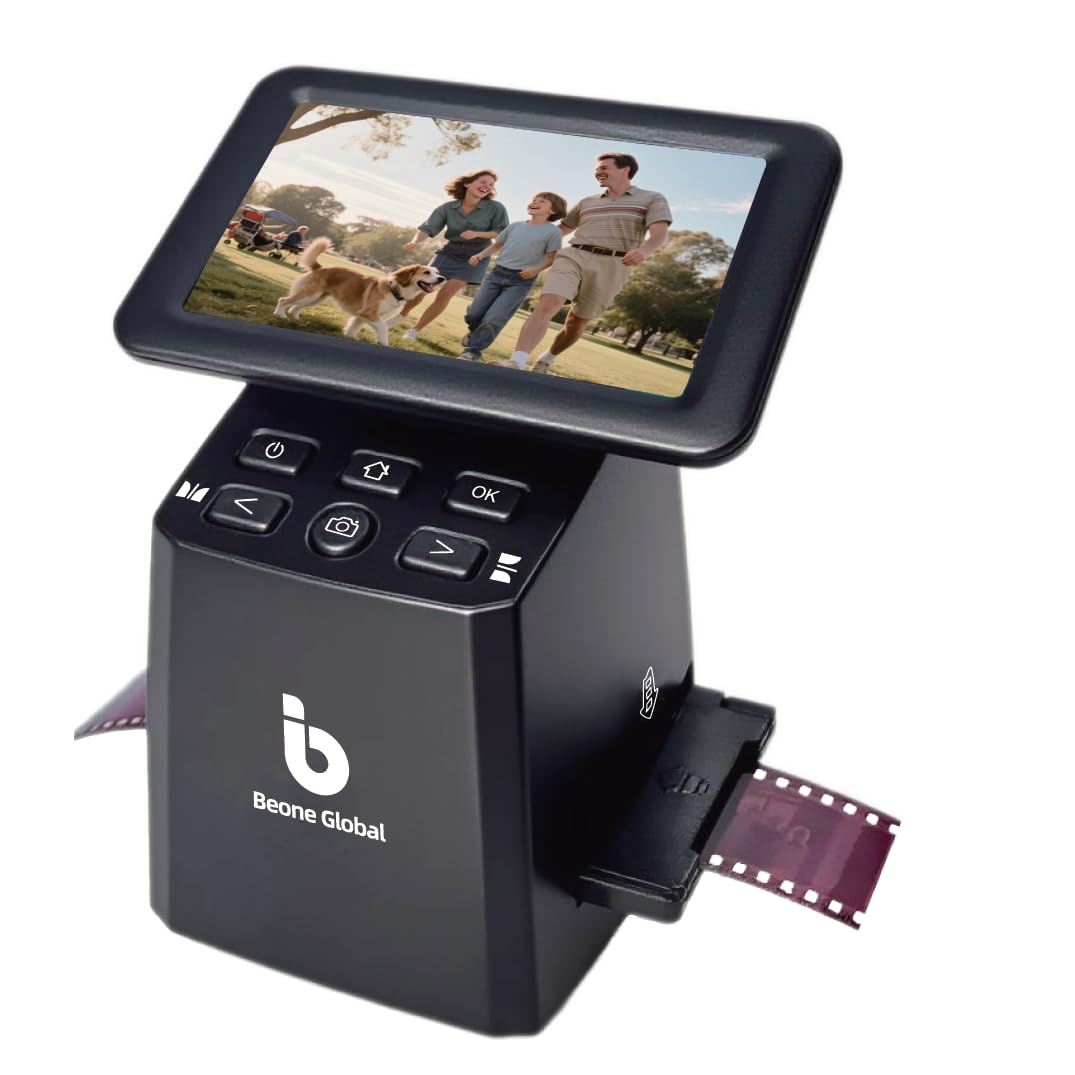
BeOneGlobal’s ClearScan S5 pushes the boundary of what a budget-tier film scanner can include by fitting a 5-inch LCD and a 24MP CMOS sensor with a 1/2.3-inch physical sensor size — slightly larger than the typical sensor found in this price bracket. The extra sensor surface helps capture moderately better shadow detail than the sub-1/3-inch sensors used in ultra-budget models. The ergonomic front-panel buttons sit below the screen, preventing awkward hand positions during extended scanning sessions.
Format support covers 135, 126, 110, and Super 8 film, plus mounted slides, and the loading mechanism is designed to minimize film jams. The 128MB internal memory holds a handful of scans for quick transfer, while the SD card slot supports cards up to 32GB. Color reproduction is decent for the price, though the CMOS sensor exhibits visible noise in dark slide areas — expect to run a denoise filter in your photo editor for the best results.
Build quality feels adequate for light-duty use, but the plastic construction and compact footprint (about 4.3 x 5.7 inches) mean it won’t survive a drop onto a hard floor. The most common failure reported involves defective SD card slots on early units, so test this function immediately upon arrival. For someone dipping their toes into film digitization on a tight budget, the ClearScan S5 offers a large screen and competitive pixel count that punches above its price class.
Why it’s great
- Large 5-inch LCD screen normally found on much more expensive models.
- 1/2.3-inch CMOS sensor provides better light capture than smaller budget sensors.
- Ergonomic front-panel button layout reduces wrist strain during long scanning sessions.
Good to know
- CMOS sensor noise is visible in dark slide areas, requiring post-processing cleanup.
- Plastic build is not rugged — a drop could break the unit.
- SD card slot failures have been reported by some early buyers.
9. QPIX DIGITAL M122A

The QPIX DIGITAL M122A is the cheapest dedicated film scanner in this roundup, and it is best understood as an entry-level tool for someone who wants to test the digitization waters without committing serious cash. It supports 35mm film negatives, slides, prints (up to 5×7 inches), and name cards, making it a true 4-in-1 device. The 2.4-inch LCD is small but functional for framing and quick preview, and the 16MP output (based on a 8.1MP CMOS sensor with interpolation) is adequate for 4×6 prints and social media sharing.
No computer is required — insert your film, select the mode, and scan directly to the 128MB internal memory or an SD card. The included adapters and cleaning gloves show attention to first-use experience, and the unit powers via USB or the included AC adapter. Scanning speed is rapid, with each frame captured in roughly one to two seconds.
Image quality is the main compromise: colors often require heavy correction in post to remove color casts, and the small sensor struggles with shadow detail, producing flat-looking scans. Several reviewers noted that the output from 30-year-old negatives looked acceptable after brightness and contrast edits, but that buying the Kodak Scanza () was a significant quality upgrade. If your budget is ultra-tight and your expectations are modest, this QPIX will get the job done, but be ready to spend time in Lightroom.
Why it’s great
- Lowest-cost entry point for digitizing 35mm film, slides, photos, and name cards.
- Fast scan speed (1–2 seconds per frame) suitable for quick browsing.
- Includes cleaning gloves, adapters, and both USB and AC power options.
Good to know
- Image quality is poor — requires heavy color, contrast, and brightness correction in post.
- 2.4-inch LCD is too small for accurate preview or focus assessment.
- 8.1MP native sensor (interpolated to 16MP) lacks the resolution for prints larger than 4×6.
FAQ
Is a CCD sensor always better than a CMOS sensor for 35mm film scanning?
What is the difference between 3600 DPI and 7200 DPI on a 35mm film scanner?
Can I use a 35mm film scanner to digitize slides that are already mounted in plastic brackets?
Final Thoughts: The Verdict
For most users, the best 35mm film scanner winner is the Plustek OpticFilm 8200i SE because its true 7200 DPI optical resolution and infrared dust removal produce lab-grade scans from a compact desktop footprint. If you want a large touchscreen and USB-C convenience for casual family scanning, grab the HP Touch Screen Film Scanner. And for scanning photos directly from archival albums without removal, nothing beats the ClearClick QuickConvert 2.0.